hermes-routines


Community plugin. This is an independent, community-maintained plugin. It is not an official Nous Research product and is not endorsed by them. It installs through the Hermes Desktop plugin surface; review the source and the security notes before installing.
A standalone Hermes Desktop plugin that adds a Routines page at /routines — with a matching sidebar entry — for managing scheduled routines through the host's per-profile cron.manage API. Routine data stays in the Hermes host; this package ships no separate service, database, or update mechanism.
Cover image — hermes-routines for Hermes Desktop.
Quick navigation
- What it does
- Screenshots
- Quick install
- Usage
- Requirements
- Installation
- Upgrade
- Uninstall
- Security and privacy
- Troubleshooting
- Development
- Project layout
- License
What it does
Manage scheduled routines for the active Hermes profile from inside Hermes Desktop — no separate service or dashboard.
Supported:
- View routines for the active Hermes profile.
- Search and filter the routine list.
- Inspect the schedule and stored run instruction for each routine.
- Create a routine from a name, schedule, and prompt.
- Pause and resume existing routines.
- Use fail-closed profile routing: calls without a resolved profile route are rejected instead of being sent to an unintended gateway.
- Build a deterministic, auditable
desktop/plugin.jsartifact with no bundled runtime dependencies.
Limits:
- The current page intentionally provides no delete, edit-mutation, or run-now actions — the row Edit control only opens the read-only inspector.
- The routine backend exposes exactly five
cron.manageactions — list, add, remove, pause, and resume — with no update and no run action. - The inspector panel is a disabled, read-only mirror of the composer: it reflects the selected routine but offers no editable controls.
Screenshots
The images below are captures of the plugin running inside Hermes Desktop. Routine names, schedules, and prompts shown are examples.
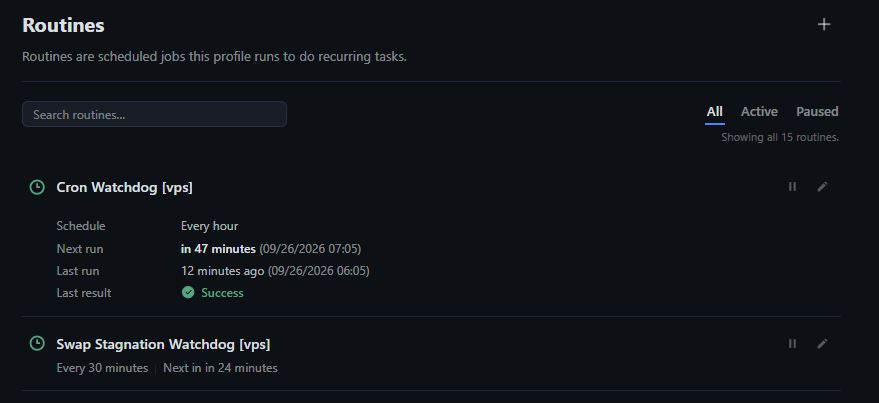
Routines list — browse, search, and filter routines for the active profile.
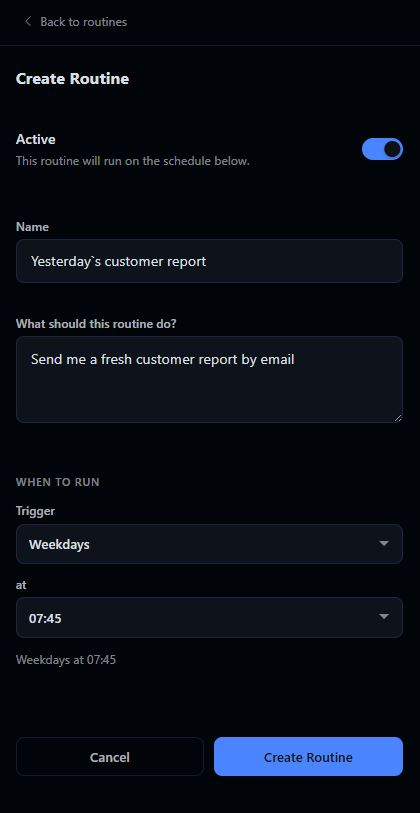
Composer — create a routine from a name, schedule, and prompt.
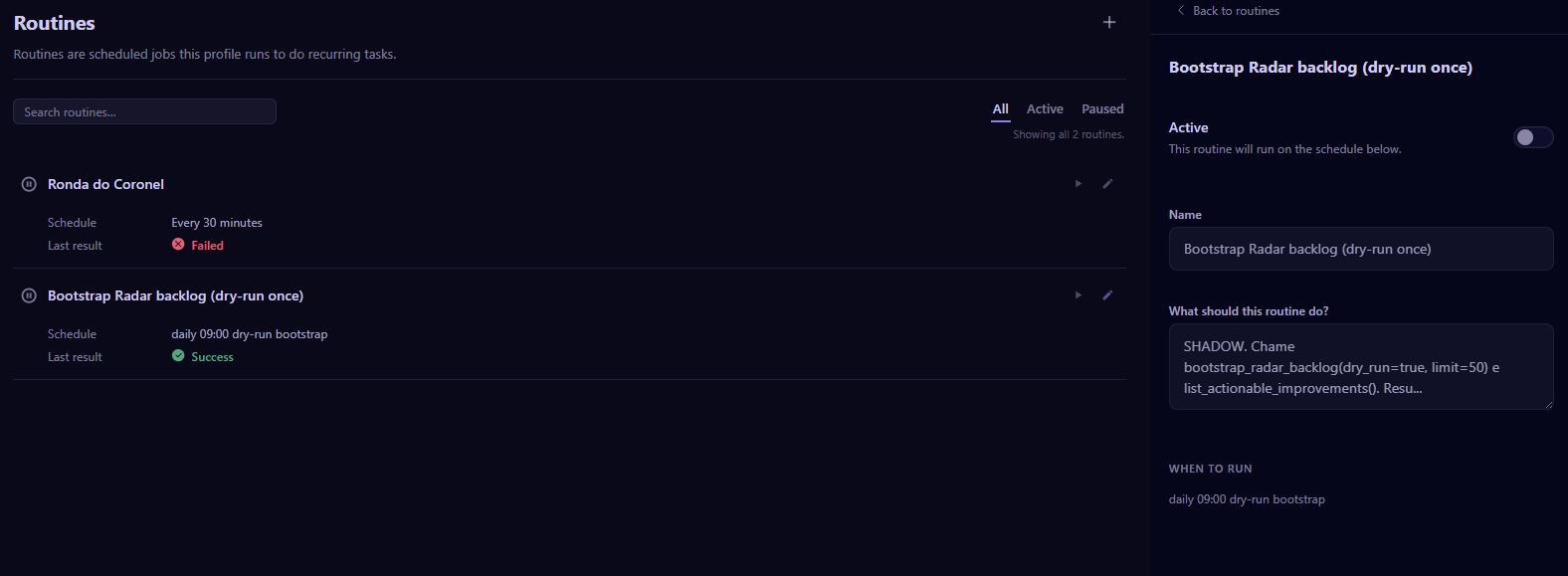
Inspector — the selected routine's schedule and stored instruction, shown read-only beside the list.
Quick install
Install it with the Hermes plugin manager:
hermes plugins install crdesign8/hermes-routines
That resolves this repository directly. It is marked as a custom,
unreviewed source until it is listed in the official catalog, so the
security scan runs and the install may ask you to confirm. To pin an
exact commit, add --ref followed by a full 40-character commit SHA.
Prefer to build it yourself? The manual path:
git clone https://github.com/crdesign8/hermes-routines.git
cd hermes-routines
npm ci
npm run build
node scripts/install.mjs install
The installer copies the generated artifact to the single install location —
<HERMES_HOME>/desktop-plugins/hermes-routines/plugin.js (default home
~/.hermes) — and verifies its SHA-256 before and after publishing:
sha256sum desktop/plugin.js \
  "$HOME/.hermes/desktop-plugins/hermes-routines/plugin.js"
The two hashes must match. The plugin is opt-in (defaultEnabled: false):
after installing, reload the Desktop app, go to Capabilities → Plugins, and
enable hermes-routines. The Routines page is then available at /routines,
whichever profile is active. See docs/INSTALL.md for the
full installation reference.
Usage
- Install the plugin, reload the profile, then go to Capabilities → Plugins and enable hermes-routines (opt-in; it does not self-enable).
- Open Routines from the sidebar, or navigate to
/routines. - The page follows the active Desktop profile. It requires the host to expose a complete route for that profile; there is no profile picker in this view.
- Use the list to inspect routines, then use the New routine control to submit a name, schedule, and prompt. The prompt is the instruction that the host will execute when the routine runs.
- Use the pause/resume controls to change a routine's active state.
All list and mutation requests are scoped to the active profile. The plugin requires a resolved route with a backend profile and fails closed when that route is unavailable. It does not fall back to the active gateway.
Requirements
Supported platforms: Linux is the only verified supported platform for building, testing, and installing. Other operating systems are not yet verified and are unsupported.
- Hermes Desktop with a profile that exposes the plugin host and
cron.manage. - Node.js
>=22.18for building and testing the repository. The floor is 22.18 because the test suite imports TypeScript source files using native type stripping, which is only available from Node.js 22.18 — older releases cannot runnpm test. - Node.js
24is recommended and is the version used by CI. - npm (included with supported Node.js distributions).
The repository does not declare a separate minimum Hermes Desktop release.
Verify that the Desktop host implements the plugin descriptor and
@hermes/plugin-sdk surface used by the local type shim before installing.
Installation
The supported installation path is from a checkout. The installer copies the generated artifact into the app-level desktop-plugins root and verifies its SHA-256 before and after publishing it.
git clone https://github.com/crdesign8/hermes-routines.git
cd hermes-routines
npm ci
npm run build
node scripts/install.mjs install --hermes-home="$HOME/.hermes"
For a non-standard app home, pass an explicit home (or set HERMES_HOME).
The default is ~/.hermes:
node scripts/install.mjs install \
  --hermes-home="$HOME/.hermes"
There is exactly one install location —
<HERMES_HOME>/desktop-plugins/hermes-routines/plugin.js — shared by all
profiles. The --hermes-home / HERMES_HOME precedence is documented in
docs/INSTALL.md.
After installation, reload the Desktop app (or trigger a runtime plugin
reload), then go to Capabilities → Plugins and enable hermes-routines.
The plugin is opt-in (defaultEnabled: false) and does not self-enable.
Once enabled, the Routines page is available at /routines, whichever
profile is active.
Verify the installed artifact
sha256sum desktop/plugin.js \
  "$HOME/.hermes/desktop-plugins/hermes-routines/plugin.js"
The two hashes must match.
Upgrade
git fetch origin
git checkout main
git pull --ff-only origin main
npm ci
npm run build
node scripts/install.mjs update --hermes-home="$HOME/.hermes"
Then reload the Desktop app. The plugin has no local migration step;
routine state remains in the host's cron.manage backend. A differing
update keeps the replaced bytes as plugin.js.prev — restore them with
node scripts/install.mjs rollback --hermes-home="$HOME/.hermes".
Uninstall
The installer creates or updates exactly:
<HERMES_HOME>/desktop-plugins/hermes-routines/plugin.js
Remove it (and its backup, if any), then reload the app:
node scripts/install.mjs uninstall --hermes-home="$HOME/.hermes"
or manually, remove the installed files and then the plugin directory.
Inside ~/.hermes/desktop-plugins/hermes-routines/, delete plugin.js
and, if present, plugin.js.prev; then remove the
hermes-routines directory itself if it is now empty. A plain directory
removal only succeeds on an empty directory, so it cannot delete
anything beyond this plugin.
Do not remove the shared desktop-plugins directory. Uninstalling this plugin does
not delete routines stored by the Hermes host; manage those through the host's
own cron interface if you need to remove them.
Migrating from a pre-#14 release? Delete the old per-profile file too
(rm "$HOME/.hermes/profiles/default/plugins/routines/plugin.js") —
see docs/INSTALL.md (Migration).
Security and privacy
- The shipped artifact imports only the host-provided
@hermes/plugin-sdkand React externals. Build and test tooling is kept indevDependencies. - The plugin has no standalone network client, telemetry, analytics, updater, or credential storage of its own.
- It reads and sends routine operations through the Desktop host's
cron.manageAPI. The host remains responsible for authentication, authorization, and the data-retention policy for those routines. - Routed requests fail closed when a profile route is missing or incomplete; the view never opts into the active-gateway fallback.
- Prompt and schedule values are sent to the host as part of the routine operation. Review them before creating a routine, especially when the host is connected to a shared or remote profile.
- The repository is MIT-licensed. See
LICENSEandSECURITY.mdfor reporting instructions.
For installation details, profile-path resolution, hash verification, and
edge cases, see docs/INSTALL.md.
Troubleshooting
npm cior the build reports a Node version error: use Node.js24, or another version satisfying bothengines.nodeand the test runner's native TypeScript requirements.desktop/plugin.js is stale: runnpm run build; never edit the generated file by hand.sha256 mismatch: re-run the installer and compare the two hashes again. The installer removes its temporary file on failure and uses an exclusive temporary name for concurrent installs.invalid hermes-home: pass a non-empty--hermes-homepath or setHERMES_HOME. The pre-#14--profile/--profile-homeflags are rejected — seedocs/INSTALL.md(Migration).- The page is unavailable after install: reload the Desktop app and
confirm that the target profile has a usable route and the required
cron.managetool. - The route is present but operations fail closed: the host did not provide a complete profile route. Check the host's profile configuration; do not bypass the route guard.
Development
The editable source is src/**/*.ts(x). desktop/plugin.js is generated and
must not be edited directly.
npm ci
npm run typecheck
npm test
npm run check
npm run build
npm run check runs the typecheck, import/allowlist and dynamic-evaluation
checks, version synchronization check, and generated-artifact freshness
check. Before opening a pull request, run all commands above and review the
staged diff. See CONTRIBUTING.md for the contribution
workflow and docs/INSTALL.md for the deeper install
reference.
Project layout
src/— TypeScript source of truth.desktop/plugin.js— deterministic generated Desktop artifact.scripts/— build, checks, and atomic installer.tests/— Node test suite and SDK/host stubs.docs/INSTALL.md— installation, upgrade, uninstall, and troubleshooting reference.
License
Copyright (c) 2026 crdesign8. Released under the MIT License.