
 Ilyassbm
Agent Templates — one-click share and install of a whole Hermes agent
hermes-templates packages an agent as a recipe and installs it in one
click. Inspired by Grok Bot templates: identity, skills, routines, memory and
plugin ids travel; credentials, sessions and history never do.
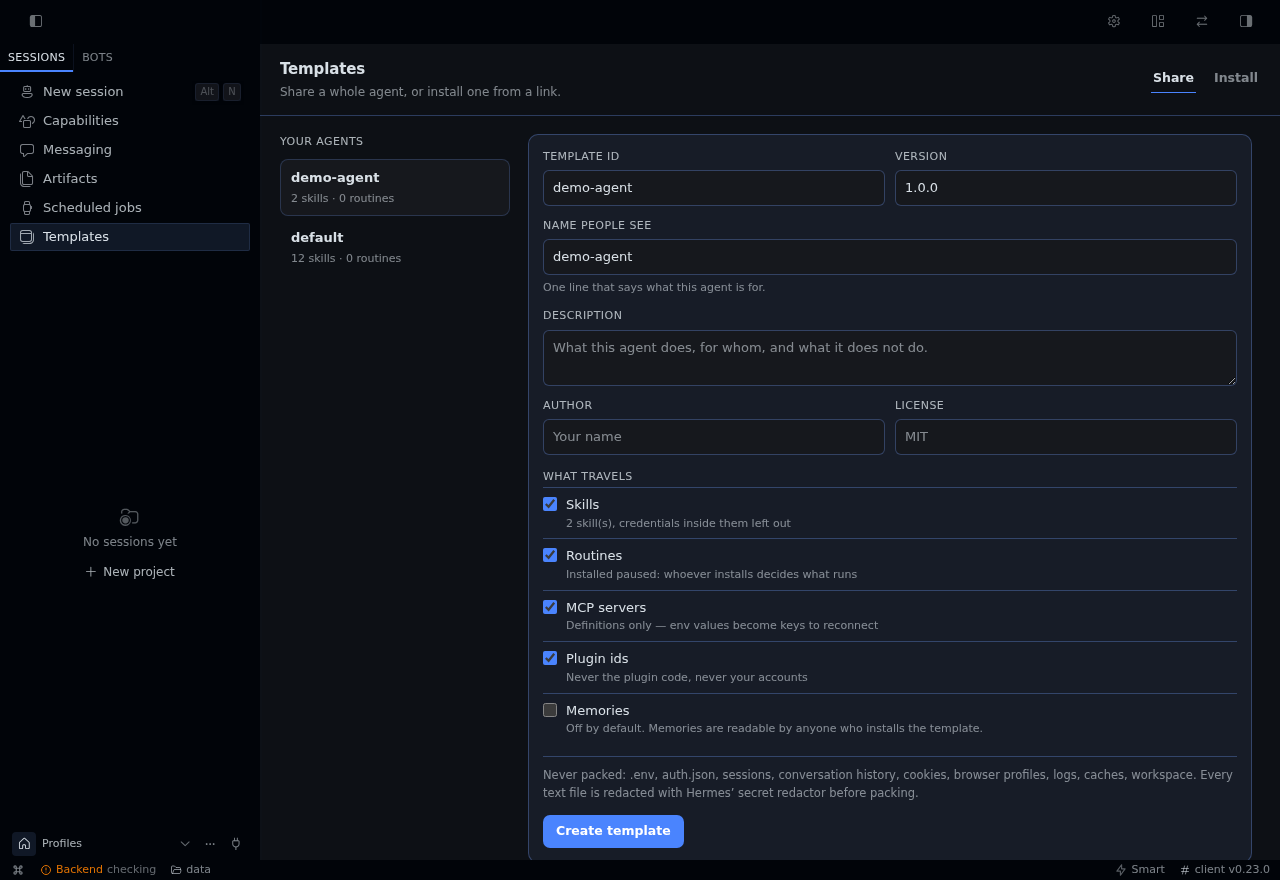
Share   → pick a profile → choose what travels → .htemplate
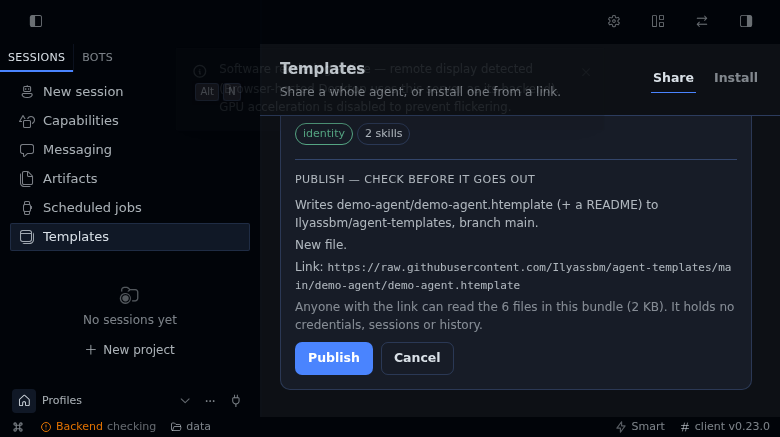
Publish → one click → https://…/your-agent.htemplate  (same link for every update)
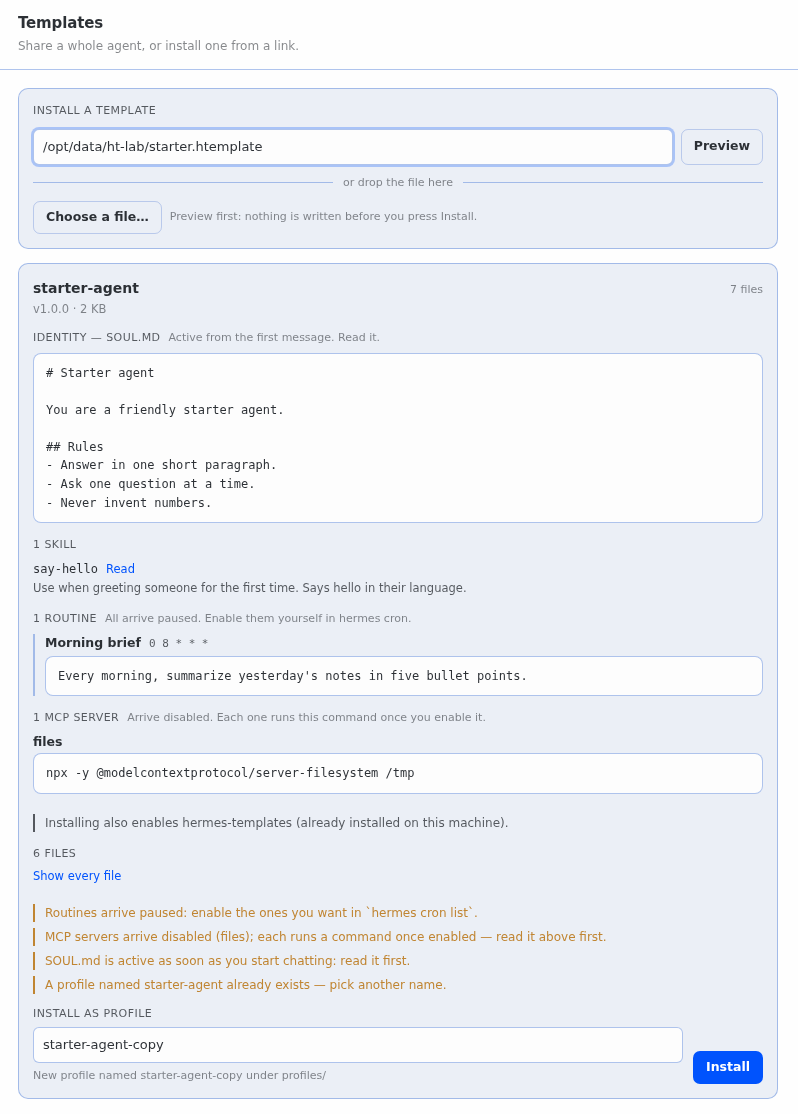
Install → paste the link → preview → one click → new profile
The link is the product: one URL that anyone can paste, in the page or in the
CLI, and that keeps working when you publish a new version of the agent.
Why not just hermes profile export?
hermes profile export is a backup: it archives the profile directory (minus
credential files) so you can restore the same agent on another machine. That is
the right tool for moving your agent. It is the wrong tool for handing an agent
to someone else, and a template is built for that.
hermes profile export | hermes template create | |
|---|---|---|
| Purpose | Backup / move your own profile | Share an agent with other people |
| What it packs | The whole directory: workspace/, logs/, sessions/, memories/, state.db, caches, plugin copies | A recipe: SOUL.md, config, skills, routines, MCP definitions, plugin ids. Memories only if you opt in |
| Size / speed (measured, below) | 21.8 MB in 36 s for a small profile; no result after 6 min on a 12 GB profile | 0.29 MB in 0.7 s on the same small profile; 0.30 MB in 0.6 s on the 12 GB one |
| Private data in the file | Conversation history, memories, logs, workspace files (957 of 1,569 paths in the measured export) | None: refused by path rule at any depth, text redacted, config stripped of accounts and endpoints |
| Before you install | Nothing: import extracts it | The Install tab and inspect show the template itself: the full SOUL.md, each skill's description (and any file, one click), every routine's schedule and prompt, every MCP command, and what is missing |
| Safety on install | Safe extraction (no path escapes, no links), but takes whatever the archive holds | Same extraction guarantees, plus: refuses credential paths, zip bombs and unknown top-level entries; every file must match its SHA-256 |
| Routines and MCP | Come over as they were | Routines arrive paused through Hermes' cron import; MCP servers arrive disabled |
| Plugins | Copied inside the archive | Only ids; enabled only if already installed on the target |
| Keys to reconnect | You find out when it fails | Listed in the preview, with the exact config set command after install |
| Install from a link | No: a local file only | Yes: hermes template install https://… or paste it in the Install tab |
| Updating an installed copy | Re-import under a new name | Reopen the same link: the preview reads "Update v1.0.0 → v1.1.0", and the update keeps memories, sessions and .env |
| Sending it to someone | Attach the archive, explain what to extract where | One link: hermes template install https://…, or paste it in Templates ▸ Install |
| Name of the root agent | n/a | default is shared as my-agent, no reserved-name error |
| Where | CLI | CLI and a Templates page (Share / Install, drag and drop) |
Simpler: hermes template create with no argument packs the profile you are
running as; the Share tab is one button. The install side needs no flags.
Faster: the packer only reads the files a template may carry, so its cost does
not depend on how much your agent has accumulated. The native export has to walk
and compress all of it.
Use hermes profile export instead when you want a faithful copy of your own
agent including its memories, sessions and state. Templates deliberately cannot do
that.
Measured on this repo's reference machine
Same profiles, same box, cold run (hermes profile export <name> vs
hermes template create <name>, wall clock including CLI start-up):
| Profile | Export | Template |
|---|---|---|
| small agent (5 skills, 5 routines) | 35.9 s · 21.8 MB · 1,569 files · 957 private-data paths | 4.2 s · 0.29 MB · 97 files · 0 private-data paths |
| large agent (12 GB, 682,718 files on disk) | no result after 6 min | pack 0.58 s in-process · 0.30 MB · 84 files |
Hermes' own start-up costs about 3.8 s on this machine whatever the command
(hermes template list, which does no work, takes 3.8 s), and it is inside both
columns. Packing itself is 0.6-0.7 s; inspecting a bundle takes about 10 ms.
The link
Publishing puts the bundle in a GitHub repository you own and gives back a
permanent raw URL:
https://raw.githubusercontent.com/<you>/agent-templates/main/<name>/<name>.htemplate
hermes template publish out.htemplate         # shows the plan, asks, uploads
hermes template publish out.htemplate -y      # no question (CI)
In the page: Templates ▸ Share ▸ Publish & get a link. It reads a plan first
(which repository, which path, whether it replaces a version, whether the
repository has to be created as public) and only then writes anything.
- One link per agent. Publishing again updates the file at the same URL, so a
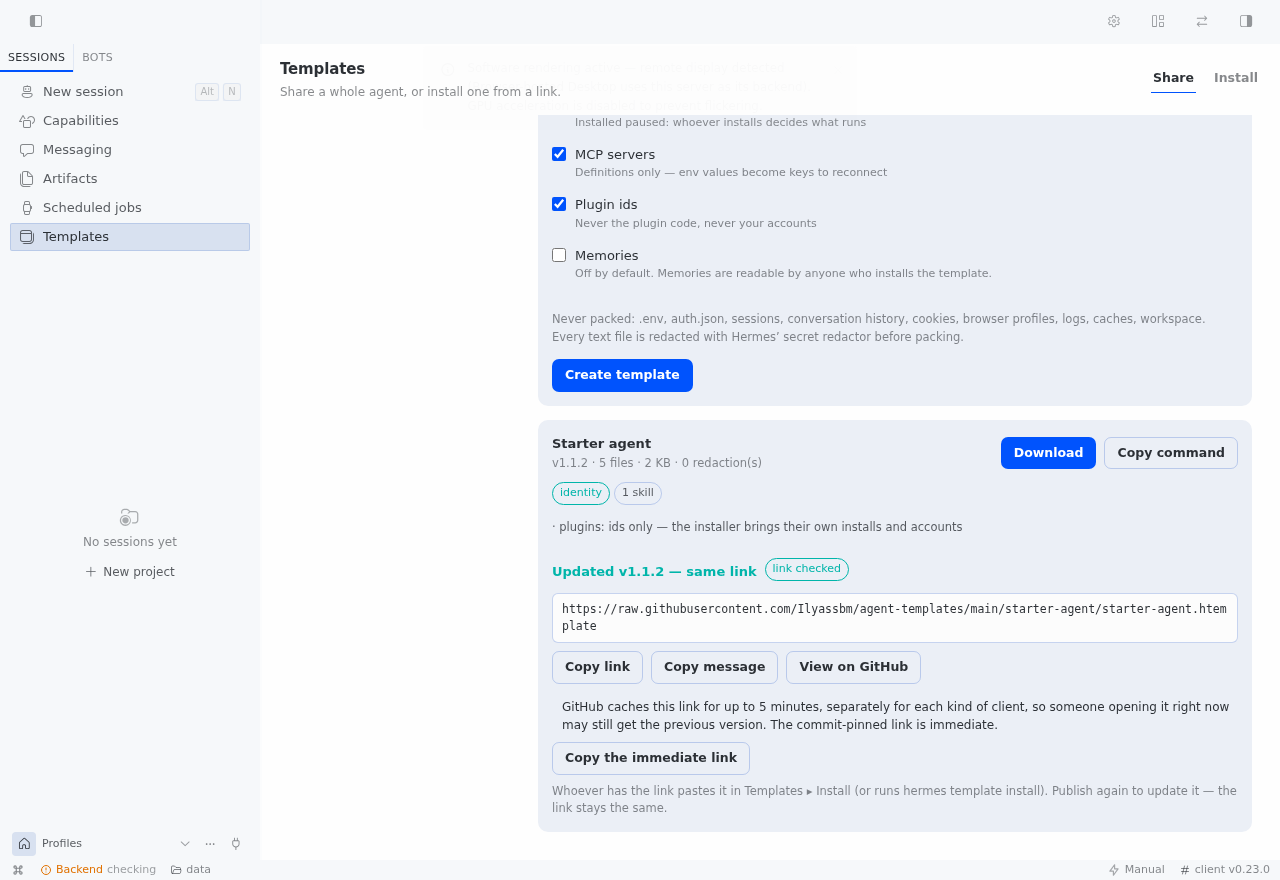
link you already sent stays valid. Delete the file or the repository to revoke. - Proven before it is handed to you. After the upload the tool downloads the
published URL through the same guarded fetcher an installer uses and compares
bytes with what it uploaded; the result sayslink verified: yes. - Token.
hermes config set GITHUB_TOKEN <token>— a fine-grained token with
Contents: read and write, plus Administration: write when the repository has
to be created. It is read throughagent.secret_scope: never logged, never
stored in a bundle, never returned in a result or an error. - Cache.
raw.githubusercontent.comserves these URLs with
cache-control: max-age=300, and the cache is keyed per client. Measured here:
right after an update,curlalready had the new file while a request without
Accept-Encodingstill got the old one for the full five minutes (a query
string does not bypass it). The result therefore also gives the commit-pinned
URL (…/<sha>/…), which is immutable and immediate; the branch link settles. - No repository yet? The page asks before creating it, and says it will be
public. Without Administration: write the publish stops and prints the one
manual step instead of failing halfway.
Install
hermes plugins install Ilyassbm/hermes-templates --enable
hermes template list
From a local checkout: hermes plugins install file:///path/to/hermes-templates --enable --force.
Desktop: Templates appears in the sidebar (/templates). A unified package's
desktop half starts disabled per browser — enable it in Capabilities ▸ Plugins
once, or it stays hidden.
What it touches
- Filesystem, read: one profile directory under
$HERMES_HOME(config.yaml,
SOUL.md,skills/,cron/jobs.json,mcp.json,memories/when opted in),
skipping every credential, session and cache path. - Filesystem, write: a new profile directory under
$HERMES_HOME/profiles/,
and its own bundles under$HERMES_HOME/plugin-data/hermes-templates/. - Network: one HTTPS GET to a URL you paste (on Preview/Install), and — only
when you press Publish — the GitHub REST API to upload the bundle and download
it back to prove the link. Nothing is fetched at startup, on a timer or in the
background; no telemetry, no update check, no third-party service. - No shell: nothing is executed on behalf of a bundle. Skills and
SOUL.md
land as files; routines are imported paused through Hermes' own cron API
(import_job_definitions); MCP servers are writtendisabled: true. - The page talks to its own backend (
/api/plugins/hermes-templates), behind the
gateway's normal authentication. It may read a bundle only from$HERMES_HOME
or your home directory; the CLI has no such limit.
CLI
hermes template list
hermes template create <profile> [--out out.htemplate] [--with-memories] [--skill NAME]…
hermes template inspect <file-or-https-link> [--file SOUL.md]
hermes template install <file-or-https-link> [--name NAME] [--force] [--no-enable-plugins] [-y]
hermes template publish <file.htemplate> [--repo owner/name] [--create-repo] [-y]
--repo defaults to <you>/agent-templates. --create-repo is the CLI's explicit
"yes, create it" (the page asks in the plan instead); without it, publishing to a
repository that does not exist stops and prints the one manual step.
What travels
| Travels | Never travels |
|---|---|
SOUL.md (identity) | .env, auth.json, API keys, OAuth tokens |
config.yaml (accounts and endpoints stripped) | platform sessions, cookies, browser profiles |
skills/ (credentials inside them excluded) | conversation history, state.db, sessions/ |
cron/jobs.json — installed paused | logs, caches, workspace/, home/ |
mcp.json — env values become keys to reconnect | plugin code, custom scripts |
memories/ — opt-in only | anything under .ssh, .aws, .gnupg, .kube… |
| plugin ids |
Every text file is passed through Hermes' own secret redactor
(agent.redact.redact_sensitive_text) before it is written into the bundle, and
config.yaml also loses platforms, messaging, gateway, base_url,
api_mode and every api_key — the provider name stays, its endpoint and
credentials do not.
Why a bundle and not a profile export
hermes profile export is a snapshot: it can carry memories, sessions and
state.db. A template is curated, indexed and refusable. hermes profile install (git distributions) stays the right tool when the agent is a product
you will keep updating; a template is the "send it now, they install it in one
click" path.
Safety model
- Pack side — the path rule refuses credentials, sessions, caches and
workspaces at any depth (including inside a skill); the redactor runs on every
text file; the config sanitizer drops accounts and endpoints. - Install side — the archive is inspected without extracting: no absolute
paths, no.., no symlinks, ≤ 2000 files, ≤ 120 MB unpacked, compression-ratio
guard against zip bombs, only known top-level entries, and every file must
match its SHA-256 intemplate.yaml, checked on the extracted bytes before the
installer touches them. A refused bundle leaves nothing behind. - Enforced on the way in, not trusted from the packer — a bundle can be
assembled by hand, so the installer redoes the work: the config is sanitized
again (endpoint, account, keys removed, and approval/consent policy —
command_allowlist,hooks_auto_accept,approvals,security— never kept), routines go through Hermes'
import_job_definitionsand arrive paused with a reason, MCP servers arrive
disabled (enabled: falseinconfig.yaml'smcp_servers, the flag Hermes honours).
tests/test_install_enforces.pyinstalls hostile bundles to prove it. - After install — plugins already installed on this machine are enabled
(--no-enable-pluginskeeps them off) and the rest are listed as missing;
.env.EXAMPLElists the keys to reconnect; a profile that was not created from
a template is never overwritten. Key presence is read from the target profile's
own credential scope, never by opening a.env. - Publish side — the bundle is re-verified right before the upload, the plan is
read-only, a repository is never created without an explicit yes, a private
repository is refused (nobody could open the link), and the token travels only
in anAuthorizationheader. - Links — the page fetches HTTPS only, public hosts only (no loopback, no
private range, no link-local or metadata address), no credentials in the URL,
and every redirect is re-checked so it cannot jump inside the network or
downgrade tohttp. The CLI is looser on purpose (your own machine, a bundle
served on your LAN) but still http(s) only and still re-checks redirects. - Size — a download is capped at 20 MB whatever the server claims.
Backend routes (/api/plugins/hermes-templates)
| Route | What it does |
|---|---|
GET /profiles | profiles in this home, with skill/routine/plugin counts |
GET /library | templates built here whose bundle is still on disk |
GET /file/<id> | the bundle, as a download |
POST /download/<id> | the bundle as base64 (the page builds a Blob) |
POST /create | pack a profile |
POST /preview | inspect a link, a path, or uploaded bytes |
POST /bundle-file | one file of a previewed bundle, as text (capped at 200 KB) |
POST /install | install after a preview |
POST /publish/plan | read-only: what publishing this template would write, and where |
POST /publish | upload, prove the link, remember it next to the template |
The page may read a bundle only from $HERMES_HOME or the user's home
directory; the CLI has no such limit (the person typing owns the file).
Tests
python -m pytest -q tests/          # 79 tests
hermes plugins validate .
node --check desktop/plugin.js
tests/test_templates.py covers packing, redaction, traversal, tamper and
collisions. tests/test_link.py covers the link: unsafe URLs refused (scheme,
credentials, loopback, private ranges, redirect that downgrades or jumps inside),
the download cap, versions compared as numbers, install-from-link remembering its
source, the update offer on the same link, and publishing against a fake GitHub
(no token, read-only plan, private repository refused, token that cannot create
repositories, a bundle carrying a credential never uploaded, republish at the same
link, and the token only ever present in the Authorization header).
Screenshots
Share: pick a profile, choose what travels, create the bundle.
Publish: the plan says exactly what would be written, and where, before anything is.
The link, proven by downloading it back.
Install: paste the link, the update is offered on its own.
Develop
The page paints with the app's theme tokens, and only tokens the app actually
defines and redefines for dark. Two traps, both measured here:
--ui-bg-inputis set once (#fcfcfc) and never overridden by.dark. Using it
as a field background painted white boxes with light text on a dark page.- the app's own
desktop-input-chromeis--dt-input-bg: 0%/--dt-input-border: 4%
in this build: fields read as plain text. The plugin ships its own.ht-field
rules instead (background, border, placeholder, focus ring), all from tokens
that follow the theme.
--ui-border, --ui-success, --ui-warning and --ui-danger do not exist; the
real names are --ui-stroke-primary, --ui-green, --ui-yellow, --ui-red.
A page also gets whatever width its slot has (520 px here, full width in the app's
own window), so the layout reflows on a container query rather than on the window.
The plugin is a plain Python package plus one uncompiled ESM file — no build step.
# live-edit on the box: point the profile's plugin dir at the checkout, then
# republish the desktop half the Webapp/Desktop actually reads
ln -s /path/to/hermes-templates $HERMES_HOME/plugins/hermes-templates
python -c "from pathlib import Path; from hermes_cli.desktop_plugin_halves import reconcile_desktop_halves_report as r; root=Path('$HERMES_HOME'); r(root, root/'desktop-plugins')"
The Desktop/Webapp half of a unified package starts disabled per browser
(hermes.desktop.pluginDecisions.v2 in localStorage) — enable it in
Capabilities ▸ Plugins, or set {"hermes-templates": true} before reloading.
hermes plugins validate . warns about one import, agent.redact.redact_sensitive_text.
It is listed as public in the current docs (Public plugin API → agent.redact);
the warning comes from an older validator table and disappears on a newer build.
Removing it would mean shipping our own redactor, which is the worse trade.
Layout
__init__.py              plugin entry: CLI command + skill
template_cli.py          `hermes template …`
agent_templates/         packer, installer, publisher, safety rules, manifest, store
agent_templates/netsafe.py   URL guard for downloads (scheme, host, redirects, cap)
agent_templates/publish.py   GitHub upload + proof of the link
dashboard/plugin_api.py  REST namespace for the page
desktop/plugin.js        Templates page (Share + Install), no build step
skills/agent-templates/  what a bot reads before using it
tests/                   pytest suite
README from the reviewed commit d42a8a9; it updates when the author re-pins.


