
 Ilyassbm
Hermes UI
A bespoke chat workspace for Hermes Desktop and the Webapp: it replaces the native home with a three-column page —
the bots rail, the conversation, the right panel — and leaves the rest of the app alone.
Screenshots
Every screenshot is a real conversation in the Webapp, answered live by Claude Haiku 5.5 through the gateway —
nothing is mocked. Four demo bots, a throwaway profile, no account or usage data on screen.
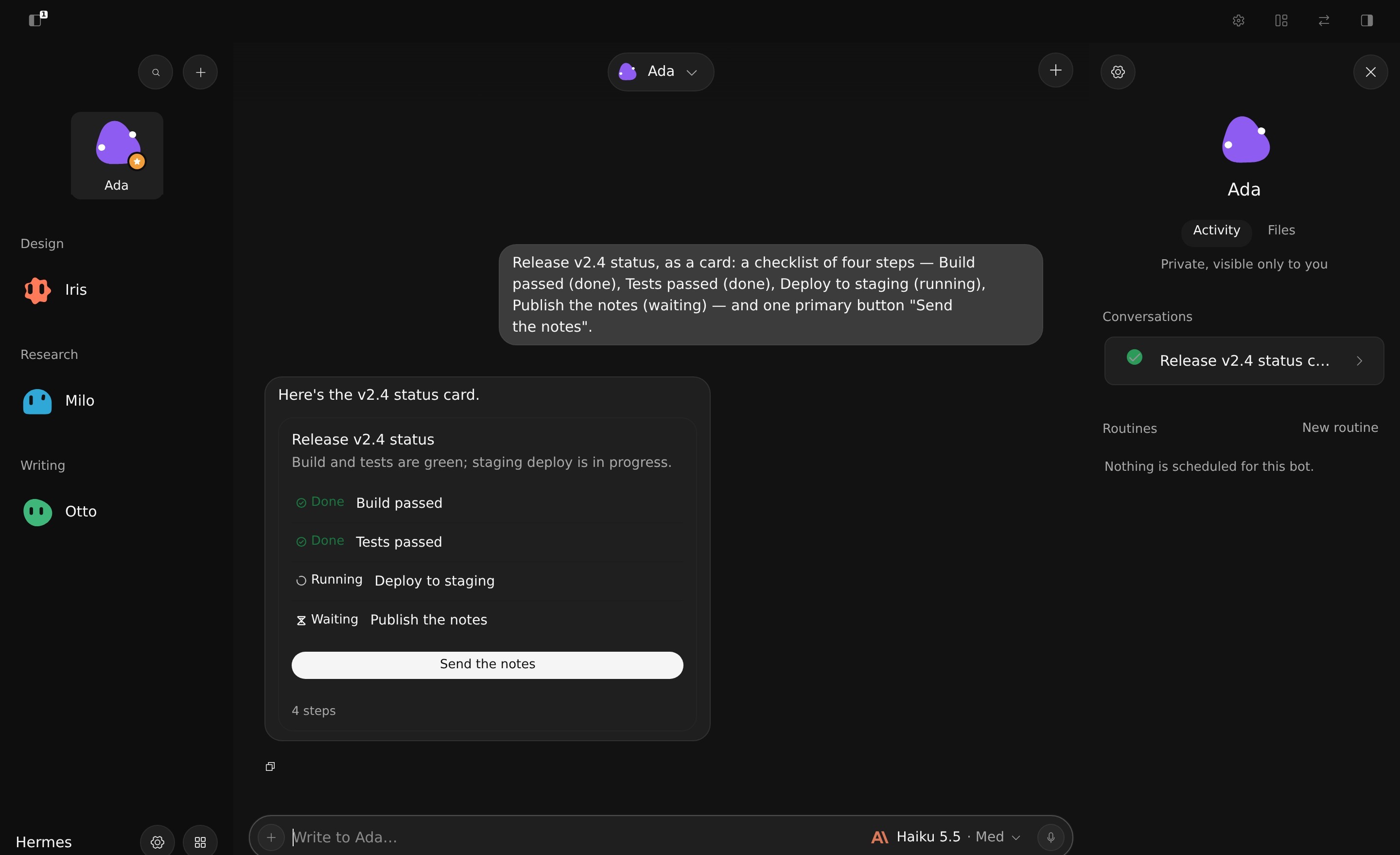
Intelligent UI. The bot answers with a <hui-ui> block and the thread draws it as Glaze components — here a status
card with a checklist and a button that sends its own follow-up. The bot's name above the thread opens all of its
conversations.
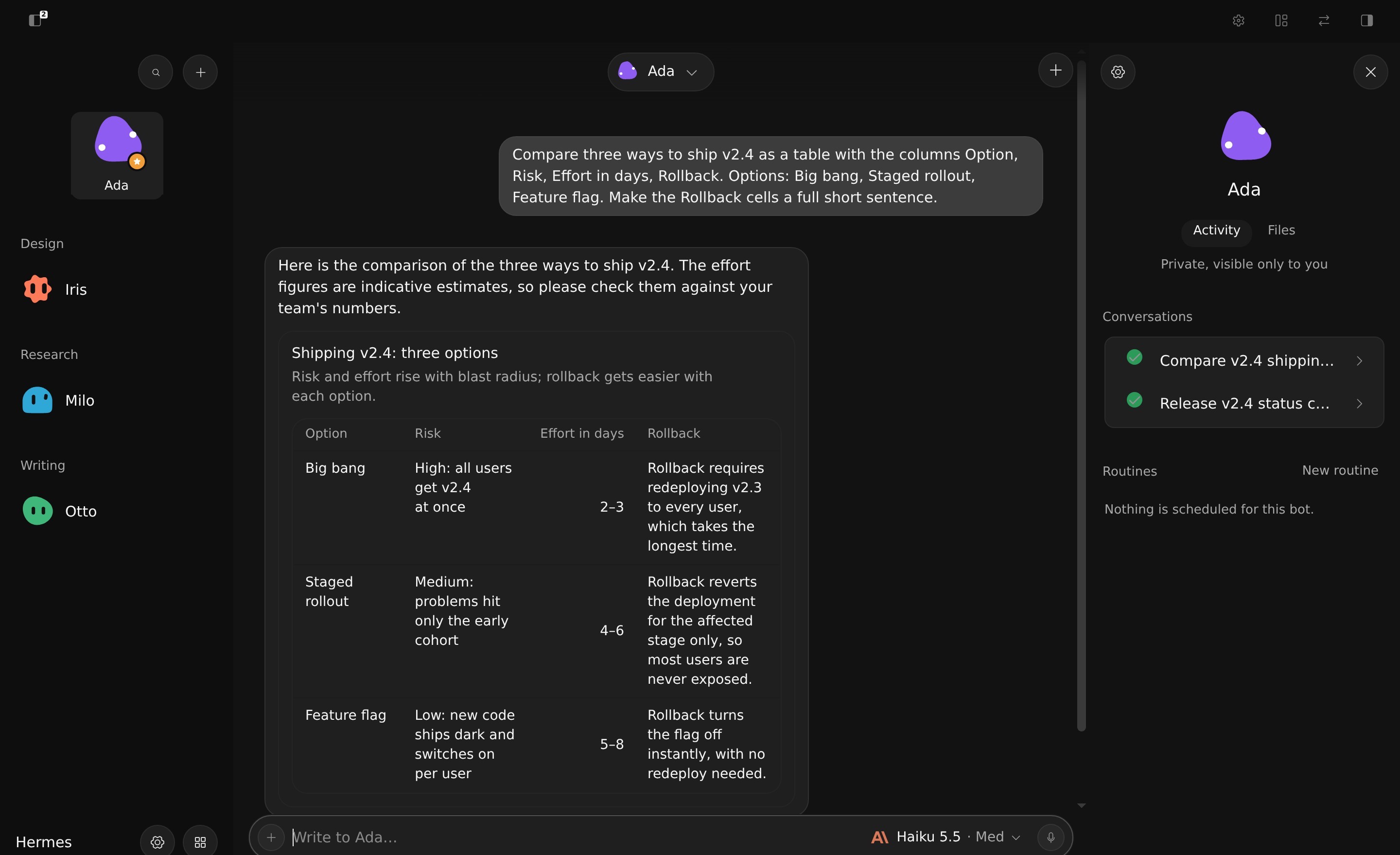
A comparison as a table: long cells wrap instead of being cut at the edge.
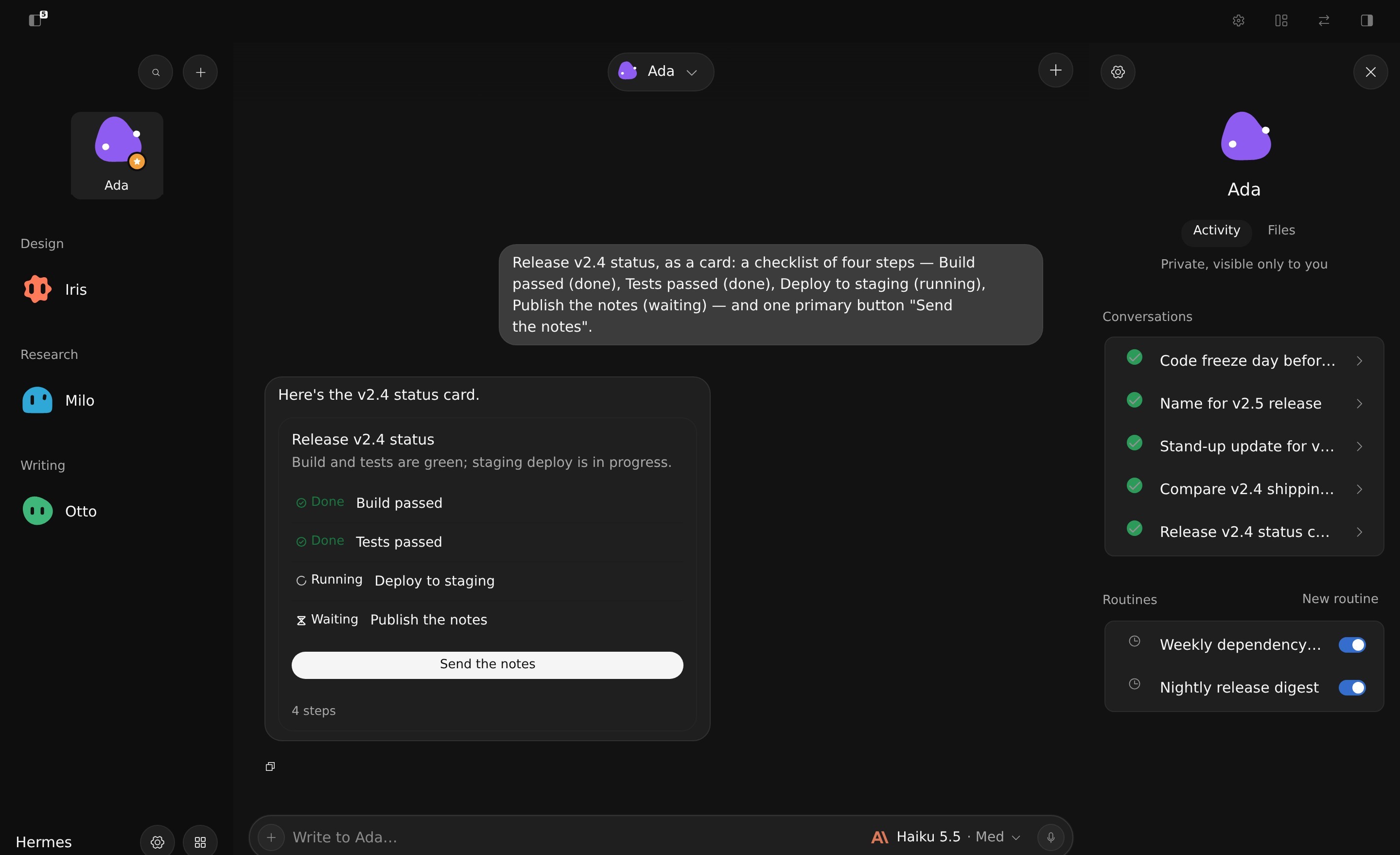
The bot panel. The open bot's mark and name, then two views: Activity (its conversations, the running one marked
live, and its routines with a switch that pauses or resumes them) and Files (what the conversation read, wrote or
ran).
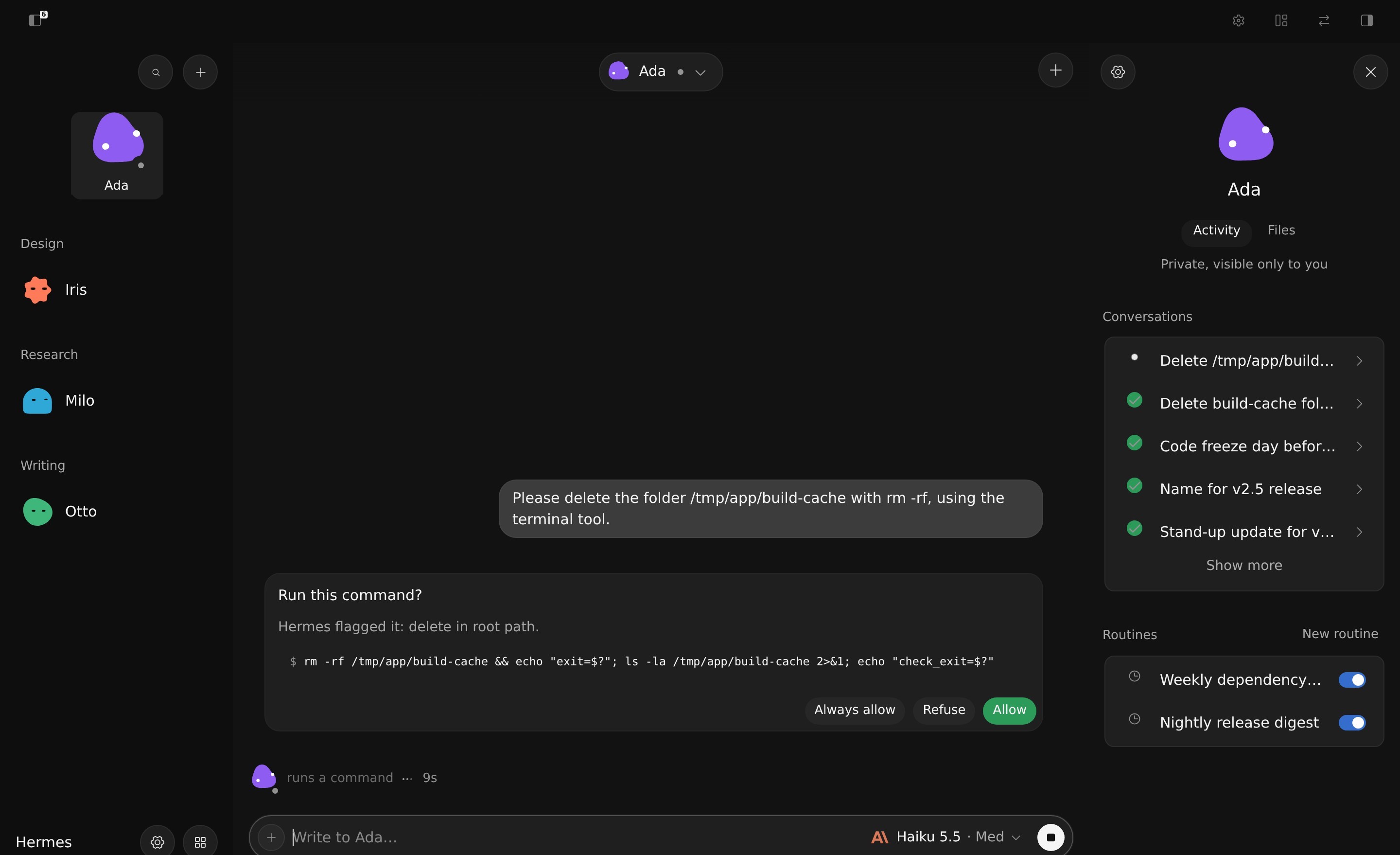
Approvals inline. The card says why Hermes stopped (“recursive delete”) and answers in
one click — Always allow, Refuse, or the green Allow; the working line under the thread keeps the clock.
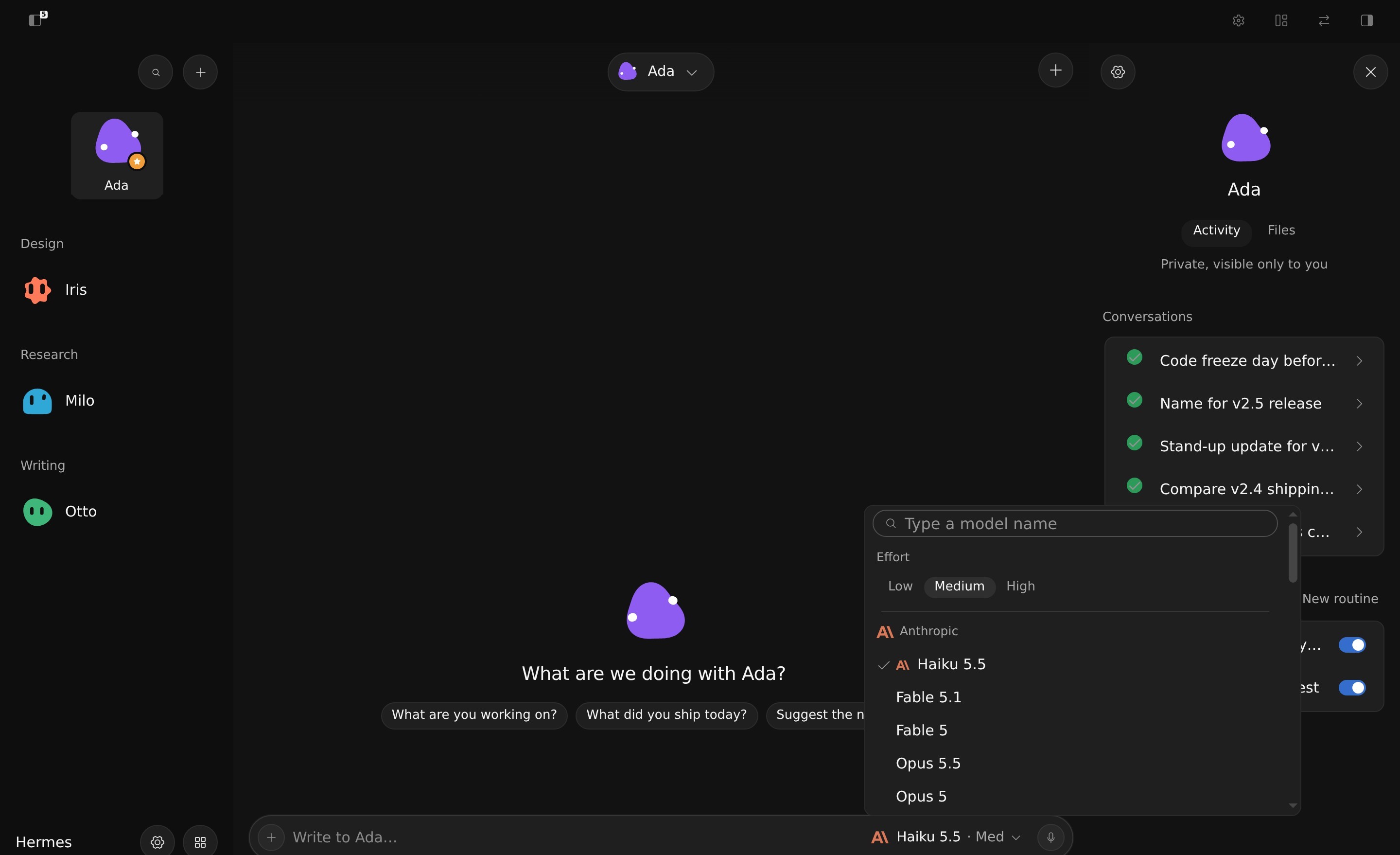
The model menu, opened from the composer: Low / Medium / High effort, then each provider with its logo.
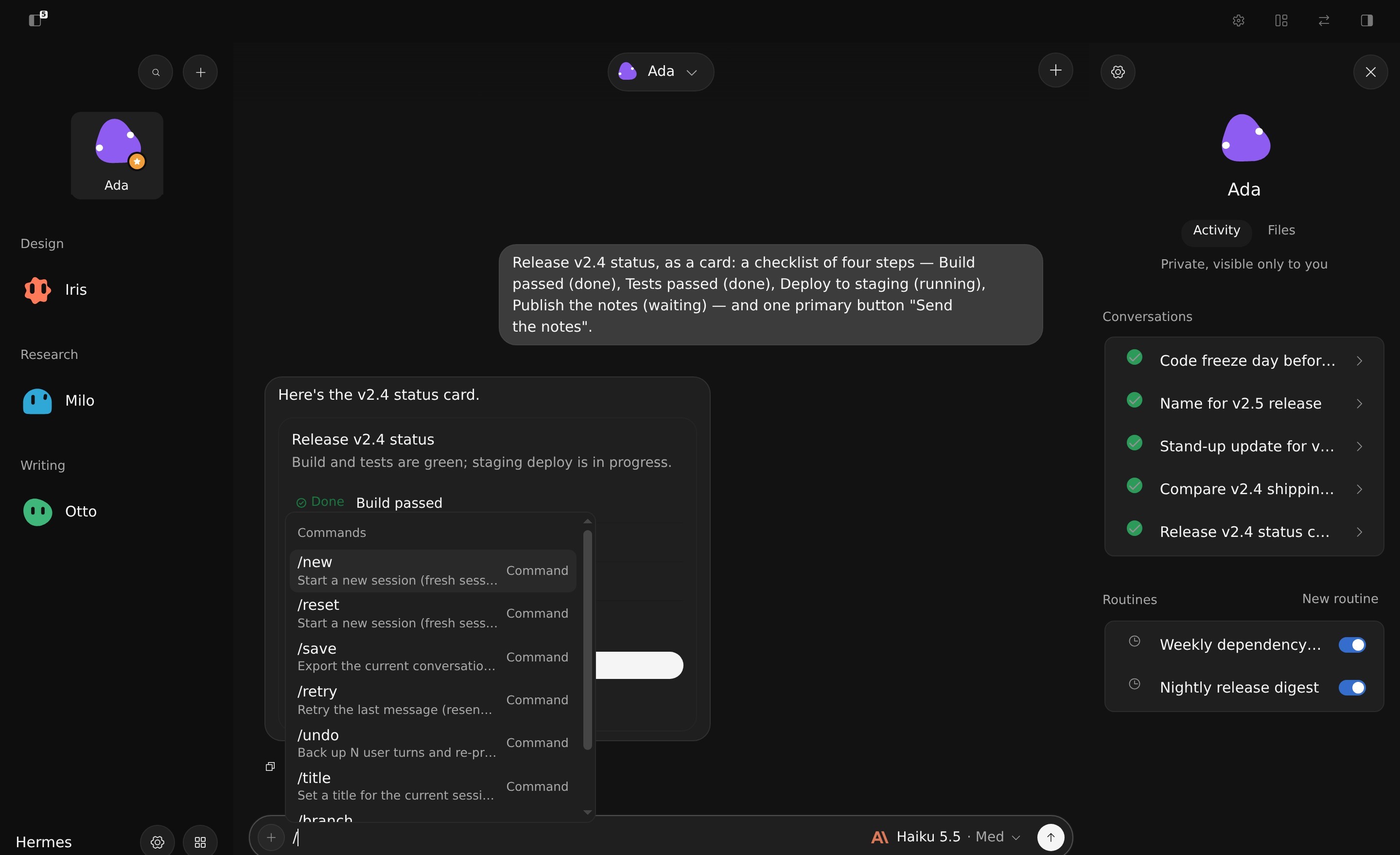
/ opens the profile's own commands, with the gateway's description of each.
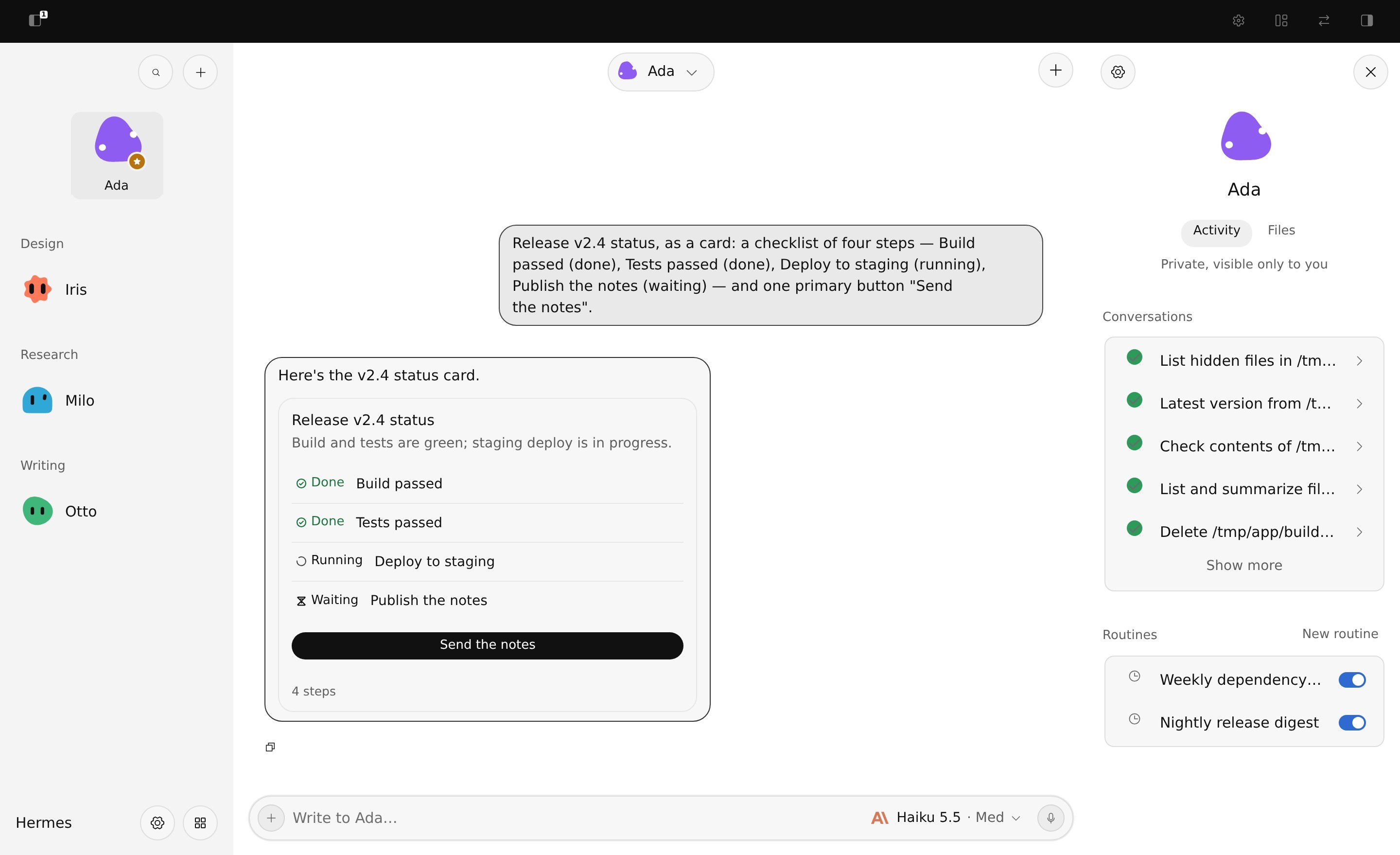
Light theme (Settings ▸ Hermes UI ▸ Theme: System, Dark or Light).
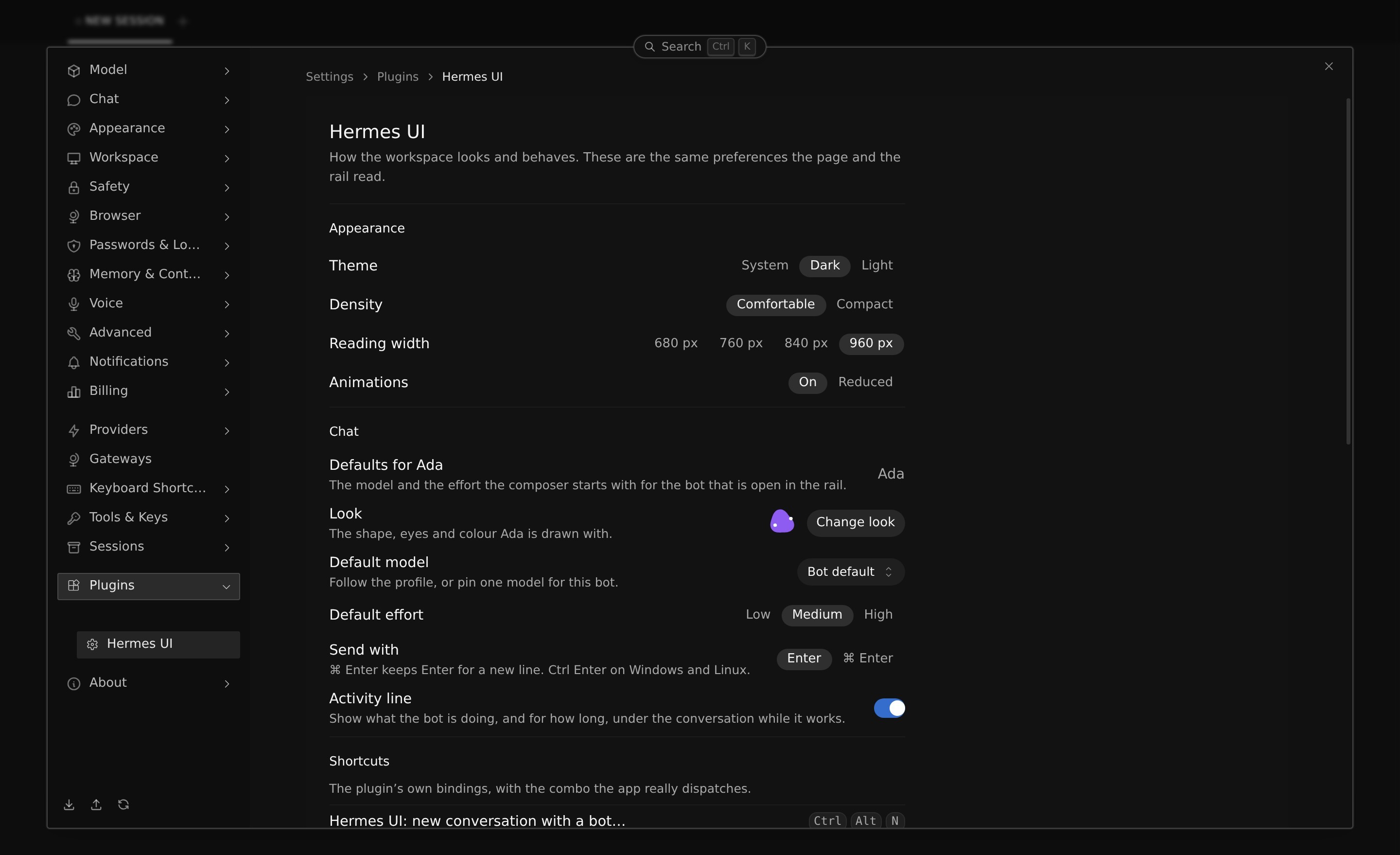
Settings ▸ Plugins ▸ Hermes UI: appearance, the chat defaults and the look of the open bot, and the plugin's shortcuts.
What you get
- Bots rail with the pinned bots as tiles, then the team in the roster's own sections: one row per bot, its name
and last line. - Floating bot pill above the thread: the open bot and conversation, and every conversation of the bot one click away.
- Live activity line — thinking, working, delegating — that folds into “Worked for 12s” when the turn ends.
- Reasoning folded under the reply as “Thought for 8s”, opened on demand. Tool calls are not listed in the thread:
the activity line says what the bot is doing, and only a call waiting for your permission shows its card. - Queued messages: what you write while the bot works waits above the composer and goes, in order, when its turn
ends (edit, reorder, remove, or send now). - Approval cards for the commands and tools that ask before they run, and question cards for the choices a
bot asks mid-turn (free text when it offers none, and its own countdown). - Streaming replies, with the thread fading under the bot's badge instead of being cut off.
- Rich replies: tables, code blocks, images.
- Slash commands that execute —
/help,/model,/newand the profile's own — from the composer. - Per-bot model and effort in the composer, with provider logos, a search field that names a model from any
provider, and the full catalogue behind a submenu. - Bot panel: the bot's card, its conversations, its routines (pause and resume in place) and the files the
conversation touched, with a preview. - Light / dark / system, density, reading width and reduced motion, in Settings.
Design
The page has its own visual language (src/styles/theme.css), laid over the vendored component library: the
platform's UI font at a 15px reading size, neutral surfaces with one clear step between the page, the rail and
anything raised, solid controls (no glass, no gradients), real elevation for what floats — menus, the bot pill — and
none for what sits in the page. Light and dark are both first-class. A bot's colour and shape come from Hermes' own
Bots roster when you picked one there.
Why this is not a prompt or a skill
A skill tells the agent what to do. This plugin changes what Hermes is: it registers a route the app renders in place
of its home, reads the gateway's own session events, and drives turns, approvals, attachments and slash commands
through the SDK. Nothing here is a wrapper around the chat — the thread, the rail, the panel and the composer are
components of this plugin, and the app's own pages (Settings, Capabilities, Messaging, Cron, Artifacts) stay intact
behind it.
Three things follow from that, and none of them are reachable from a prompt:
- Per-bot memory of the model and the effort, written with the profile and restored on the next turn.
- Attachments that actually reach the model — the page attaches the bytes through
image.attach_bytes, checks the
reply, and carries the returned absolute path into the prompt, which is what the vision tool resolves. - A stable reading of a stored conversation — a turn earns its place only if it has an answer or a tool it ran, so
a resumed thread never paints a column of empty "Thought for a moment" rows.
Install
From the catalogue:
hermes plugins install Ilyassbm/hermes-ui --enable
From the desktop app: Capabilities → Plugins → Install from Git, and paste the repository URL.
From a local clone:
hermes plugins install file:///path/to/hermes-ui --enable
Then restart the app — desktop plugins load at launch. The page becomes the home: #/hui is what the app opens,
and the native chat routes redirect to it.
Keyboard shortcuts
| Keys | Action |
|---|---|
⌥1 … ⌥9 | Go to bot 1 to 9, in the rail's order (pinned first) |
⌘⌥N | New conversation with a bot… (type a digit 1–9 to pick one, Escape to close) |
⌘⇧O | New conversation with the current bot |
⌘⌥K | Search bots and conversations |
⌘⌥B | Show or hide the right panel |
/ | Focus the composer and open the command list |
⌘J / ⌃` | The desktop's own dev panes |
Every one of them is an ordinary keybind action, rebindable in Settings ▸ Keyboard Shortcuts. The plugin's own are
registered under hermes-ui.* (hermes-ui.search, hermes-ui.newChatWithBot, hermes-ui.toggleAside, …); the last
row is the desktop app's, not the plugin's. On Windows and Linux, ⌘ reads Ctrl.
Settings
Settings ▸ Plugins ▸ Hermes UI hosts the page, and the gear in the rail opens it: Appearance (theme, density,
reading width, animations), Chat (the default model, effort, send key and activity line for the open bot),
Shortcuts (the plugin's bindings with the combo the app really dispatches) and About (version, repository,
licence, what the plugin reaches on the network).
How it works
The plugin uses the Desktop plugin SDK only: ctx.registerRoute for /hui, ctx.registerPaletteCommand for the
palette entries, ctx.registerKeybind for the shortcuts, ctx.registerSettingsPage for Settings ▸ Plugins, and
host.request / host.onEvent for the gateway — a small dashboard backend served through the plugin host (/bots,
plus the panel's read-only /file and /blob) on top. The contributions go through the SDK's own areas (ctx.registerMany), so an older desktop ignores
what it does not know. There is no DOM reach into the app, no core override and no monkey-patching.
The interface is Glaze (design.how), with the components vendored in src/components/glaze and locked by lint —
glaze/no-shadow and glaze/no-raw-color — plus scripts/check-css.mjs, which refuses a global selector that
escaped .glaze.
Privacy and network
No telemetry. The page talks to your own Hermes gateway and to nothing else.
GET /api/plugins/hermes-ui/bots reads each profile's state.db read-only to show the last line each bot said.
No credential is read, held or returned by the backend.
The right panel's preview, and the thread's media blocks, are served by two read-only routes, GET /file?path=… (UTF-8 text, 1 MiB cap) and
GET /blob?path=… (base64, 8 MiB cap). Both resolve the path with expanduser().resolve() and refuse it (HTTP 400,
{"error": "refused"}) when it lands outside the profile home (HERMES_HOME, or the profile root Hermes reports) and
outside ~, when a symlink leads out of those trees, for everything Hermes itself refuses to read
(agent.file_safety.get_read_block_error: credential stores, vault/, browser-profile/, the skills hub cache…), and
for the files Hermes manages or keeps credentials in, wherever they sit: .env and .env.*, auth.json, auth.lock,
config.yaml, credentials, .git-credentials, webhook_subscriptions.json, .anthropic_oauth.json, google_*,
.netrc, .pgpass, .npmrc, .pypirc, *.pem, *.key, id_*, and anything under a .ssh/, .aws/, .gnupg/,
secrets/, mcp-tokens/ or pairing/ component. A model reply that names MEDIA:~/.aws/credentials is refused like
any other path. dashboard/test_file_routes.py covers each class on a throwaway home. Each profile's images
folder (<root>/images, <root>/profiles/<profile>/images) is allowed on its own, and nothing else of that profile is.
Directories, special files
and unreadable files are refused the same way; a path that does not exist is 404 {"error": "missing"}, and a file
over the cap is 413 {"error": "too_large", "size": …}. No traceback is ever returned.
Known limits
- The page takes over the app's home route by reading the hash (
#/and#/<session>), the sanctioned door: it never
touches the app's DOM. On a shell that loads plugins late, the first paint can be the native home for a moment
before the page takes over; the sidebar entry Hermes UI always opens it. - The desktop half is a single
plugin.js; older shells that read plugin sources through the 512 KiB preview path
refuse anything larger. Update Hermes Desktop, or use the Webapp.
Compatibility
Hermes Desktop and the Webapp, >=0.23. The page works with any provider and model the profile already has; the
per-bot model menu lists only the providers the profile is authenticated for.
Development
npm ci
npm run build     # esbuild bundle + Tailwind + the checks
npm run lint
node scripts/build.mjs --install   # publish into a local Hermes home
npm run build runs the gates, in this order: check-menus, check-menu-open, check-model-menu, check-slash,
check-keybinds, check-overlay-unmount, check-request-timeouts, check-css, check-bundle, check-surface.
desktop/plugin.js is a committed artefact: the app loads it as-is, so it is rebuilt and committed with every change
under src/.
The UI linter reads ui-policy.json (fonts, sizes, control gaps, viewports) and the data-ui-* markers in the JSX.
Serve the page, then check it at a viewport and a colour scheme:
npm run lint:ui -- --url http://localhost:3000 --viewport 390x844 --scheme light
--out writes the JSON report (default cache/lint-ui.json), --keep saves the screenshot beside it, --ready sets
the selector that marks the page ready (default .glaze). Exit codes: 0 passed, 1 findings, 2 did not finish.
A look of its own
Every bot is drawn as a flat body with two capsule eyes: eight shapes, eight pairs of eyes, thirteen colours or any hex.
Change it from the bot's right-click menu in the rail (Change look) or by clicking its avatar in the panel; Auto
leaves a field to the bot's own (its colour and shape in Hermes' Bots roster, else drawn from its name), Shuffle tries
one, Back to automatic takes the look back.
The look is saved in the profile, under ui_meta['hermes-ui'].mark in profile.yaml, through profiles.configure with
the per-key revision Hermes uses for its own roster — so it follows the profile, and it never touches the hermes-bots
key Hermes writes. A mark is checked on the way in: an unknown shape, or a colour that is not hex, reads as "not set".
Credits
- Glaze design system by design.how (MIT).
- thinking-state and thinking-reasoning motion adapted from aicss (MIT, vendored with its LICENSE in
src/vendor/aicss). - The bot's mark (one flat body, two capsule eyes) is drawn from scratch; the idea of a body, a pair of eyes and a colour to
choose from is after bloub (MIT). - Layout and editor inspiration from OpenBot (no code, no asset copied; PolyForm Noncommercial).
License
MIT — see LICENSE.
README from the reviewed commit 73cbb54; it updates when the author re-pins.


