
 majorminorlabs
Hermes Visual Memory
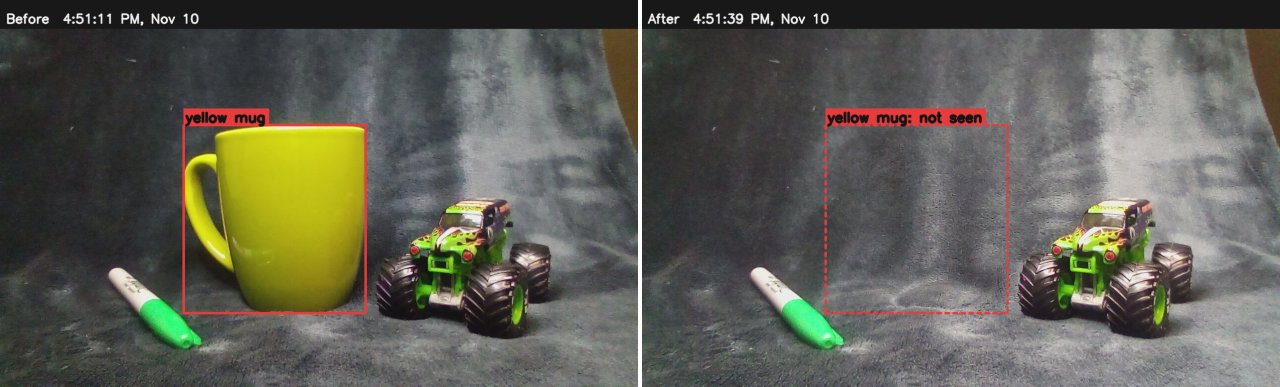
Hermes remembers what the Echo Show's camera saw and can answer "What changed?", "Where did you last
see my red screwdriver?" or "What was on the desk earlier?", and show the before/after pictures on the
Echo's screen.
The point isn't spotting which of three things you took away. It's an agent that keeps track of a workspace
over days: where something was last seen, what was on the bench when you stopped, whether anything moved
while you were out. The camera is a used Echo Show (about $20) running Hermes Eye, and the looking can be
done by a vision model on your own computer.
It installs as a Hermes plugin (below), or runs as a standalone service with an MCP server. It runs on
the same computer as Hermes. It takes one picture a second from Hermes Eye (the Show's camera
app, docs/eye.md) and decides locally when the desk has really changed. A vision model
looks only when it's turned on, when the camera is uncovered, and when someone asks. Memory is a SQLite file
and a folder of snapshots.
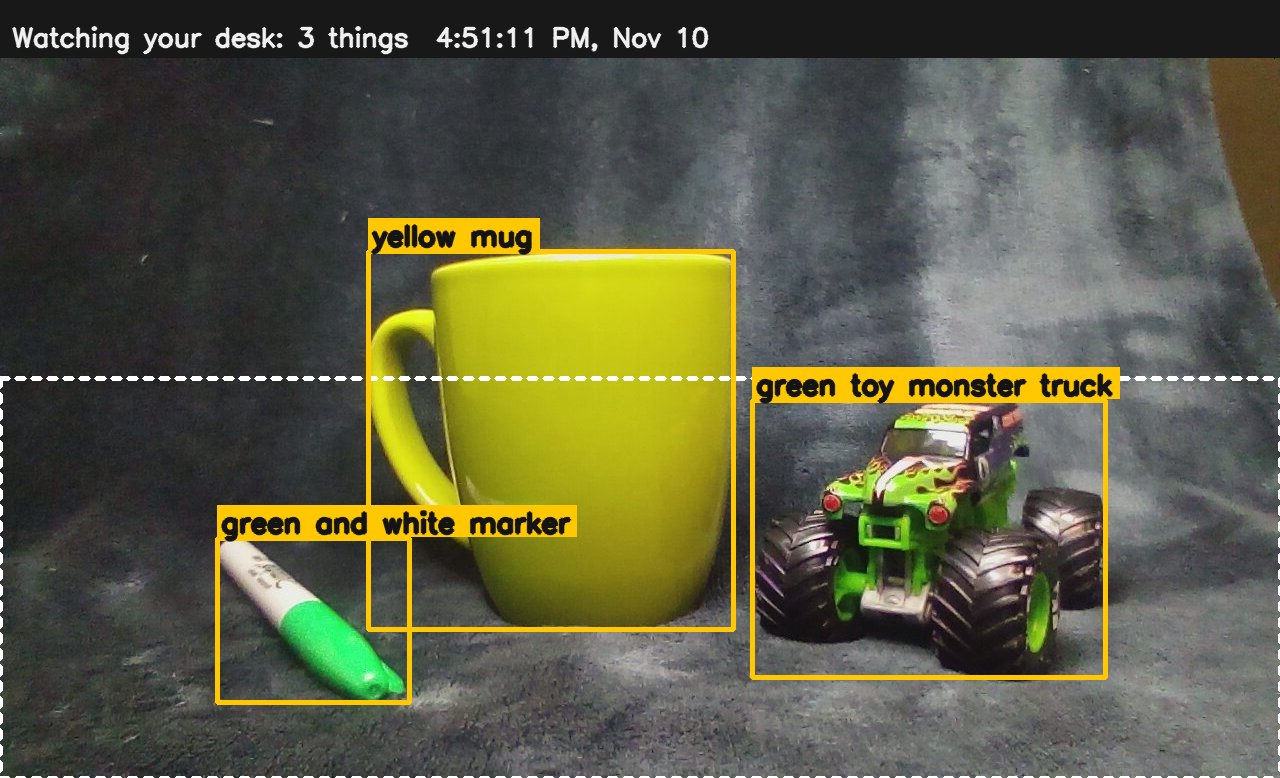
The demo: three things on the desk. "Hey Hermes, turn on visual memory" ("OK, I'm watching your desk"; the
Echo shows the desk outlined and the things on it boxed). "What's in front of you?" Cover the camera, take
one thing away, uncover. "What did I take away?" ("The keys are gone", with before/after on the screen.)
Install as a Hermes plugin
You need:
- A camera: an Echo Show 5 running Hermes Eye, the camera app from this repository
(docs/eye.md; thehermes-voice-setupskill builds and installs it). It serves a
snapshot on your network and shows a red REC badge while the camera is in use. Note its address and token. - A vision model, either of:
- the one Hermes already uses for pictures (the default,
vision = "hermes"). The plugin registers its own
model slot, Visual memory, which follows your vision model until you pick another for it in
hermes model→ Configure auxiliary models. Hermes holds the credentials; the plugin never sees a key. - a model on your own computer through any OpenAI-compatible server (
vision = "local"): Ollama, LM Studio,
llama.cpp or vLLM. Tested withqwen3.6:35b-a3bin Ollama (about 5 s a look on a Mac Studio M1 Max).
- the one Hermes already uses for pictures (the default,
- The Echo's screen (optional): the Hermes screen page from the
hermes_voiceHome Assistant integration
shows the before/after pictures and a "Visual memory on" chip.
hermes plugins install hermes-visual-memory        # asks for EYE_TOKEN (the camera's token)
hermes config set plugins.entries.hermes-visual-memory.settings.eye_url http://<echo-ip>:28940
# Optional: a local model instead of Hermes's vision model
hermes config set plugins.entries.hermes-visual-memory.settings.vision local
hermes config set plugins.entries.hermes-visual-memory.settings.local_model qwen3.6:35b-a3b
hermes gateway restart
Then say or type "turn on visual memory". Settings are in plugins.entries.hermes-visual-memory.settings
(also on the plugin's page in the Desktop app); every key is listed in plugin.yaml.
Update the hermes_voice Home Assistant integration from this repository for screen images. The display
feed accepts the screen origin automatically when Home Assistant is opened over HTTP on the feed host's IP
at port 8123. For a hostname, a different port, or a separate Home Assistant host, set display_origin to
the origin of the screen page, for example http://homeassistant.local:8123. Use the scheme, host, and
port from the address, without a path or trailing slash. Restart the plugin after changing the setting.
What the plugin does on your computer (disclosed for the catalog):
- Nothing runs until the first visual memory tool call. That call starts, inside the Hermes process: a camera
loop (one snapshot a second from Hermes Eye on your network, only while visual memory is on), a small
API on 127.0.0.1 that the tools use (token-protected), housekeeping that deletes old pictures, and a
display feed on your network (port 28951) that checks both the client IP and the Home Assistant screen's
browser origin before serving events or pictures. These threads stop when Hermes stops. - Network calls: the camera on your network; the vision model, wherever Hermes routes the Visual memory
task (a cloud provider if that's your vision model), or the local server you set. Nothing else, no
telemetry. - Data: a SQLite file and the analysed snapshots in Hermes's data directory for the plugin
(<hermes home>/plugin-data/hermes-visual-memory/). Pictures are deleted after 14 days, observations
after 90; "delete all visual memory" deletes everything. - Credentials: only
EYE_TOKEN, read through Hermes. No shell commands; the plugin never runs the Codex CLI
(that option exists only for the standalone service). - A second Hermes session of the same profile uses the service the first one started.
How it decides
turned on → first look: finds the desk, names what's on it (the Echo shows it)
camera (1 picture/s) → quality check → desk steady for 2.5 s? → changed vs the last look?
                                                                 │ no: nothing to do
                                                                 │ yes: picture saved on this computer
question ("what changed?", "what's in front of you?") or camera uncovered → one look, comparing with the
last one → memory: what stayed, moved, appeared; what can't be seen, and why
-
Looks only when needed. No look runs in the background: a day where nothing is asked costs nothing
beyond the first look. Changed views are kept locally (for a later search back through the day).
With a local model, looks are free, so it also looks whenever the desk changes and settles (at most one
every 10 s,look_when_settled): "what's in front of you?" then answers at once. With Codex,
auto_analyze = truebrings back a look at every settled change, with the limits below. -
The desk, not the room. The first look also marks the work surface (desk, table, counter, shelf).
Only that part of the picture is compared, and only things standing on it are tracked: someone sitting
behind the desk, a chair or a doorway is not a change. "Watch the whole room" (area = "all") watches
everything. The first look doesn't wait more than 4 s for a still view, so someone moving in front of the
camera doesn't hold it up. -
Uncovering the camera starts the comparison at once (
look_after_uncover), so "what did I take
away?" is answered in time: one look per cover. -
Picture quality: clear, uncertain or unreadable. A closed shutter, a hand over the lens, darkness,
glare or heavy blur make it unreadable: memory stops updating and keeps the last reliable scene. A hand
right over the lens is bright (auto-exposure) but has almost no detail, so detail is compared with this
view's recent normal (it drops from ~320 to 20–55 on the Show 5). Hermes says "the camera may be
obstructed", never more than that. -
Change: brightness patterns and edges must change, after evening out exposure and a small nudge of
the camera, so room light and soft shadows don't count. Movement (a hand passing) never settles, so
it is never analysed. -
After an obstruction the next steady scene is compared with the one before. If it looks the same, no
model call is made and "What changed?" says nothing changed. -
An object not found again is judged from the pictures, not just the model's word:
- its spot looks exactly as before → unconfirmed (very likely still there; the model missed it);
- something new now covers its spot → possibly obstructed ("I last saw it on the left, but the view may
be obstructed now"); - its spot is visible and changed, nothing in front → missing ("it was on the left, but I don't see it
there anymore" — never "it was taken"). - When the model was shown the spot and said the object is gone (or, with a local model, simply didn't
list it), it's missing unless something covers at least 80% of its spot. Before this, moving a mouse
onto 41% of a snow globe's spot made the globe "maybe hidden" instead of gone.
-
What counts as a thing on the desk. The model is asked only for loose things lying or standing on the
work surface, that someone could pick up and take away. It skips lamps, microphone stands, monitor arms
and anything clamped, mounted or hanging (a desk lamp and a hanging pendant used to show up as desk items).
Something is on the desk when its bottom edge is inside the desk area and at least 35% of its height is
over it. -
One thing, one name. A thing made of parts is one object: the model is told so, and if it still lists
"snow globe" and "van-shaped snow globe base" with touching boxes, they are merged into one ("snow
globe"), so taking the globe doesn't report the base as a separate change. Names are tidied for speech
("green-capped-marker" → "green-capped marker"). -
Objects are remembered by what they look like (category, colours, markings, position, neighbours), not
by permanent identities. The model links an object to an earlier one; if it doesn't, the same kind of
thing (one candidate, no clashing colour) or the same spot and size links it. A colour that wasn't clear
is not stored, so "the red screwdriver?" can be answered "I saw a screwdriver whose colour I couldn't
make out".
Positions are said as the user sees them facing the Echo, and pictures are shown mirrored (like the
video-mode window), so "on the left" matches the screen.
The vision model
As a plugin, the model Hermes routes the Visual memory task to (default; your vision model unless
you pin another), or a local model as below. The standalone service uses the user's own Codex CLI
(its default), or a local model on any OpenAI-compatible server
(Ollama, LM Studio, llama.cpp, vLLM): vision = "local", local_url, local_model (setup:
vismem_setup.py --profile voice --local-model <name> [--local-url …]). With a local model, pictures never
leave the network. Local models are shown only the current picture (model_compares = "auto"): given
the earlier list to compare with, qwen3.6 copied it back in 2 of 3 tries ("still there" for a snow globe
that had been taken), so the matching to earlier objects is done locally, by kind and spot. Only objects
seen in the last look are compared with; older ones aren't brought back (they once made it report things
long gone from the desk). Ollama models are loaded when visual memory is turned on and kept loaded for
local_keep_alive (a cold load took 30–60 s). A look waits up to 180 s for that load before its own
timeout starts. If the first look still fails, it is tried again 5 s later, and until it succeeds
nothing is called "new" (Hermes says it doesn't have a first view yet). Before this fix, a first look
that timed out was never retried, so everything on the desk was later reported "added".
| local model (Mac Studio M1 Max, Ollama) | one picture | compare two | notes |
|---|---|---|---|
| qwen3.6:35b-a3b | 5.4 s | 7.5–12 s | good names and boxes |
| gemma3:12b | 12.5 s | – | vague names ("device", "base"), boxes off |
The Codex CLI (codex exec, images attached, a JSON schema for the answer, --ephemeral,
read-only sandbox, no tools used). It runs on the ChatGPT/Codex plan already in use: no new account, API key
or bill; each analysis counts toward that plan's usage limits. Measured on a Mac Studio (M1 Max):
| model | one look | notes |
|---|---|---|
| gpt-6.1-sol (default) | 10–19 s (median ~14 s), ~19.8k tokens in (≈15k of them Codex's own instructions), 130–330 out | names things most reliably ("metal keys on ring") |
| gpt-6-luna (quick, used for every look someone waits for) | 5–7 s, at busy times 12–22 s | about twice as fast, vaguer names |
Speaking in time. The Echo stops waiting for a spoken answer 15 s after the question. So looks someone
is about to wait for (the view just before the camera is covered, the one after, and a question's own
look) use the quicker model (quick_model, ~6–9 s), a question waits at most quick_wait (9 s) for its
look, and Hermes says one short line ("The keys are gone. New: a phone.") while the pictures and details
go on the screen. If the look isn't done, Hermes says so and the pictures appear when it is.
Limits: at most manual_per_hour (20) looks an hour, 0 for no limit. (With auto_analyze, automatic looks
also have a 60 s gap and 10 an hour / 30 a day.) Every call is logged with time, tokens and success
(vismem usage).
Install as a standalone service (MCP)
The way it ran before the plugin, and still supported: a background service of its own, with the tools over
MCP. It can also use the Codex CLI for vision. Needs Python ≥ 3.11, Hermes Eye on the Show, and a vision model
(the Codex CLI signed in, or a local one).
The setup skill does all of this: skill/hermes-voice-setup/scripts/vismem_setup.py --profile voice (with --check, --dry-run, --uninstall). By hand:
cd extras/visual-memory
uv venv -p 3.11 .venv && uv pip install -p .venv/bin/python -e '.[mcp]'
cp config.example.toml ~/.config/hermes-voice/visual-memory.toml   # set eye_url
.venv/bin/python -m vismem.cli install-service                     # a launchd agent; starts now and at login
macOS: a background service needs Local Network access to reach the Echo. If vismem status says the
camera is "offline" while curl reaches it, allow the Python that runs the service in System Settings →
Privacy & Security → Local Network (or build the venv from a Python that already has it, e.g. the one
Hermes runs on).
Connect it to a Hermes profile (back up its config first):
hermes -p <profile> config set mcp_servers.vismem \
  '{"command": "<path>/extras/visual-memory/.venv/bin/python", "args": ["-m", "vismem.mcp_server"]}'
hermes -p <profile> gateway restart
The Echo's screen (the Hermes screen page, custom_components/hermes_voice/screen) connects by itself to
<this computer>:28951 and shows a "Visual memory on" chip and the pictures Hermes shows.
If the screen uses a custom origin, set display_origin in the standalone TOML file as described above.
Use
By voice: "turn on visual memory" (or "watch the whole room"), "what's in front of you?", "what changed?",
"what did I take away?", "where's my red screwdriver?",
"show me where you saw the keys", "what was here before the camera was covered?", "was there a black box
here yesterday?", "turn off visual memory", "delete all visual memory".
From a shell (vismem = .venv/bin/python -m vismem.cli):
vismem status [-v]            on/off, camera state, last reliable scene, items, calls and tokens today
vismem on | off               start / stop observing (off stops all pictures at once)
vismem changed | scene [now|before_obstruction|earlier|yesterday|<iso time>]
vismem find red screwdriver   vismem history keys --since yesterday
vismem show comparison|item <words>|scene     vismem hide
vismem usage [days]           model calls, failures, median time, tokens
vismem forget all|images|session | forget older <days>
vismem install-service | uninstall-service
Hermes tools
Registered natively by the plugin, or over MCP by the standalone service (vismem/tools.py holds both):
visual_memory (on/off/status), what_changed, find_object, describe_scene, object_history,
show_evidence, forget_visual_memory. Each calls the local API and returns text written to be spoken,
which keeps the visible / possibly obstructed / gone distinctions.
Local API (127.0.0.1:28950, Authorization: Bearer <data_dir/api_token>): GET /status /changed?fresh=1 /find?q= /scene?which= /history?q=&since=&until= /usage?days= /evidence/{comparison|item|scene}/<id>.jpg,
POST /session {on, mode} /show {what, query} /hide /forget {scope, days}.
Privacy
- Off until turned on, and never resumes by itself after a restart (
resume_after_restart = false). While
on, the Echo shows Hermes Eye's red REC badge and a "Visual memory on" chip. - One still picture a second is looked at in memory and dropped; no video is recorded. Snapshots are kept
only for analysed scenes, and are deleted afterretention_days(14); observations afterhistory_days
(90).vismem forget …deletes on request. - With Codex, snapshots leave this computer only when analysed: they go to OpenAI through the user's
Codex CLI. With a local model they never leave the network. The model is told to ignore people. There is no face recognition and no record of who was there. - The camera's shutter and the Echo's mute button are respected: both stop the picture at the source.
- Data lives in the plugin's data directory, or
~/.local/share/hermes-visual-memoryfor the standalone
service (this account only, 0700/0600). The API listens on
127.0.0.1 with a token; the display feed listens on the LAN but only answers the Echo's own address, and
serves only the picture currently shown, under a random name.
Tests
.venv/bin/python -m pytest — 61 tests: picture quality, light and camera nudges, a hand over the lens,
cover/uncover with no change (no model call), missing/moved/added, a box in front of an object, a thin
thing laid over an empty spot, an object the model overlooks or renames, ambiguous screwdrivers, persistence
across a restart, rate limits, the HTTP API, token, display allow-list and evidence pictures. Added after
the local-model tests: a failed first look is retried; parts merged into one thing; spoken answers skip
small nudges; looks when the desk settles; something taken while another thing moves onto its spot; and
a replay of the live snow globe failure (fails on the old code). Synthetic scenes and a scripted model;
no real photos are in the repository.
Live results on the Echo Show 5 (2026-11-08):
| test | result |
|---|---|
| A recognition | passed: camper snow globe, white marker, metal keys/ring, scissors with turquoise handles, a phone; boxes on the right objects. Labels vary between looks ("metal ring" / "metal keys"). |
| B cover, no change | passed: a hand over the lens is "may be obstructed" for the whole time; no object reported missing. |
| C/D/E remove, move, add (demo) | passed by voice with before/after on the screen: marker moved, keys and phone new. C re-run after F (keys hidden behind a box, then taken away): Hermes said "no longer visible"; the stored judgement was still "spot unchanged" because the spot was compared with the box picture, so spots are now compared with the picture where the object was last seen, with a per-spot measure (real keys: 1.0 changed; unchanged objects ≤ 0.1). |
| F box in front | passed live: "where are my keys?" with a box in front of them → "last seen on the right; the view may be obstructed" (a fresh look, 10 s; the box covered their spot completely). |
| G ambiguous | passed live: yellow pencil, yellow and blue writing tools; the right one found by colour, and "I haven't seen one" for a colour that wasn't there. |
| H unreadable | passed live (hand, shutter); fixtures for dark and blur. |
| I persistence | passed live: baseline and items survived service restarts. |
| J unchanged scene | fixtures: 1 call in 10 minutes. Live with a person in view: about 1 call a minute (each settle after someone moves), held to the hourly cap. |
| K voice | passed: "what changed?" on the Echo, answered by the voice profile from memory (6.7 s). |
| L evidence | passed: before/after pictures on the Echo's screen, changes boxed. |
Live with a local model on the Echo Show 5 (2026-11-09, qwen3.6:35b-a3b-nvfp4 through Ollama on a Mac
Studio M1 Max, about 24 GB of memory while loaded). Each problem found, and what was changed:
| what happened | why | fix |
|---|---|---|
| Took one thing away; Hermes said the other two were "added" | the first look hit the 30 s timeout while the model was still loading, and was never retried | wait for the load, retry the first look, never call things new without one |
| A snow globe was listed as "snow globe" and "van-shaped snow globe base" | the model named parts separately | prompt: one thing, one name; touching boxes with a shared name are merged |
| A desk lamp and a hanging pendant were tracked as desk items | the prompt asked for objects on the surface, and the model read that loosely | prompt: loose things only; the 35%-on-the-desk rule |
| Snow globe taken and a mouse moved onto its spot: only "marker moved" | the mouse covered 41% of the globe's spot, so the globe was judged "maybe hidden" | gone when the model doesn't see it, unless 80% of its spot is covered |
| Answers mentioned things no longer on the desk | items from older looks were compared again, and a big box overruled "gone" | compare only with the last look's objects |
| "the coffee mug moved" for a small nudge | every move was spoken | the spoken line skips moves within the same spot; when something is missing it says only that, plus anything new |
| Turning on: "OK, I'm watching" came after 7.8 s | the agent checked the status again after turning on | the tool's reply says no status check is needed (the agent may still do it) |
All of these were fixed in code and replayed against the saved pictures from those sessions (the snow globe
case: before the fix "maybe hidden", after it "gone"). The fixes have not been retested live on the Echo
yet.
What still doesn't work well with qwen3.6: keys and small metal things get a different name on nearly every
look ("keychain", "metal keys", "metal clip", "metal cross"), and sometimes aren't listed at all. Bigger,
distinct things (a snow globe, a marker, a mouse) are reliable.
Times (the 11:05 PM run, three things on the desk):
| step | time |
|---|---|
| one look by the model (warm) | 4.7–6.9 s |
| first look after a cold start | 30–60 s (model load) + one look |
| question → spoken reply | 8.4–9.5 s |
| … the agent choosing the tool | ~2.5 s |
| … the tool (usually waiting for a look already running) | 2–3.5 s |
| … the agent writing the reply | 2.5–3.6 s |
About 5 s of every answer is the voice agent itself, not the camera or the vision model. "What did I take
away?" is often quicker than "what's in front of you?", because the comparison starts the moment the camera
is uncovered.
Limitations
-
A question answered by a fresh look takes as long as the look (5–7 s with Codex's quick model, 12–22 s
when Codex is busy; 5–7 s with qwen3.6 locally). Pastquick_wait(9 s) Hermes says it's still looking
and the pictures appear on the screen when done; the Echo stops waiting for speech 15 s after a question.
On top of that, the voice agent itself takes about 5 s per answer. -
Small metal things (keys, clips) are named differently on nearly every look by local models, and sometimes
missed. Bigger, distinct objects work much better for the demo. -
The first look after the local model was unloaded waits for it to load (30–60 s).
-
A hand or arm resting on the desk is a change like anything else (it is only saved, not looked at).
-
Analyses take 10–19 s with
gpt-6.1-sol. "What changed?" asked right after uncovering waits for the
comparison (up to ~22 s); asked later it answers from memory at once. -
Object names vary between looks; matching by spot and kind covers most of it, not all.
-
Positions are coarse (left/middle/right, top/bottom of the view), not desk coordinates.
-
Mirrored evidence pictures show text backwards.
-
A question about the present takes a fresh look first when the view changed since the last one (10–20 s);
when the automatic looks are at their limit, every such question pays that.
Next
- Search back in time. "Where did my phone go?" / "what was here yesterday?": look through the saved
pictures newest first (or within the time asked), halving the range, so a day of changes takes a handful
of looks. - Limits by voice ("no limit on visual memory"), a "still using visual memory?" card every 30 minutes, a
larger REC badge, and the live picture in a corner of the Echo's screen while on.
Rollback
Say "delete all visual memory" first if you want the observations and pictures gone.
Plugin: hermes plugins remove hermes-visual-memory. Its data directory stays until you delete it
(<hermes home>/plugin-data/hermes-visual-memory/).
Standalone service:
.venv/bin/python -m vismem.cli forget all            # deletes memory and pictures
.venv/bin/python -m vismem.cli uninstall-service     # stops it
hermes -p <profile> config set mcp_servers.vismem null   # or restore the profile backup
Credits
- Hermes Agent by Nous Research: the agent, its plugin system
and the model routing the plugin uses. - echo-dot-assist by Gamer92000 (and the unlock work it
builds on): the Echo as a Home Assistant voice satellite. - Qwen 3.6 by Alibaba's Qwen team: the local vision model it was tested with.
- Ollama: runs that model locally.
- OpenCV and NumPy: the picture checks done without a model.
The whole project's credits: CREDITS.md.
Reuse
Written for this project; MIT. where-i-put was reviewed: it
publishes no license (so no code could be reused) and is a Rust/RTSP/YOLO stack; only its general idea
(an observation log with appeared/disappeared events and snapshot evidence) informed this design.
README from the reviewed commit 86598e5; it updates when the author re-pins.


