 winsznx
Fix what the page actually shows. INSET is a Hermes Agent plugin that opens your site in a real browser at phone, tablet and desktop widths, inspects every page section separately, points to the exact element that breaks, lets Hermes fix the source with its normal tools, then rechecks the same URL and viewport to say whether the problem is actually gone.
Demo (58s, real local run in Hermes Desktop): docs/inset-demo.mp4
Why
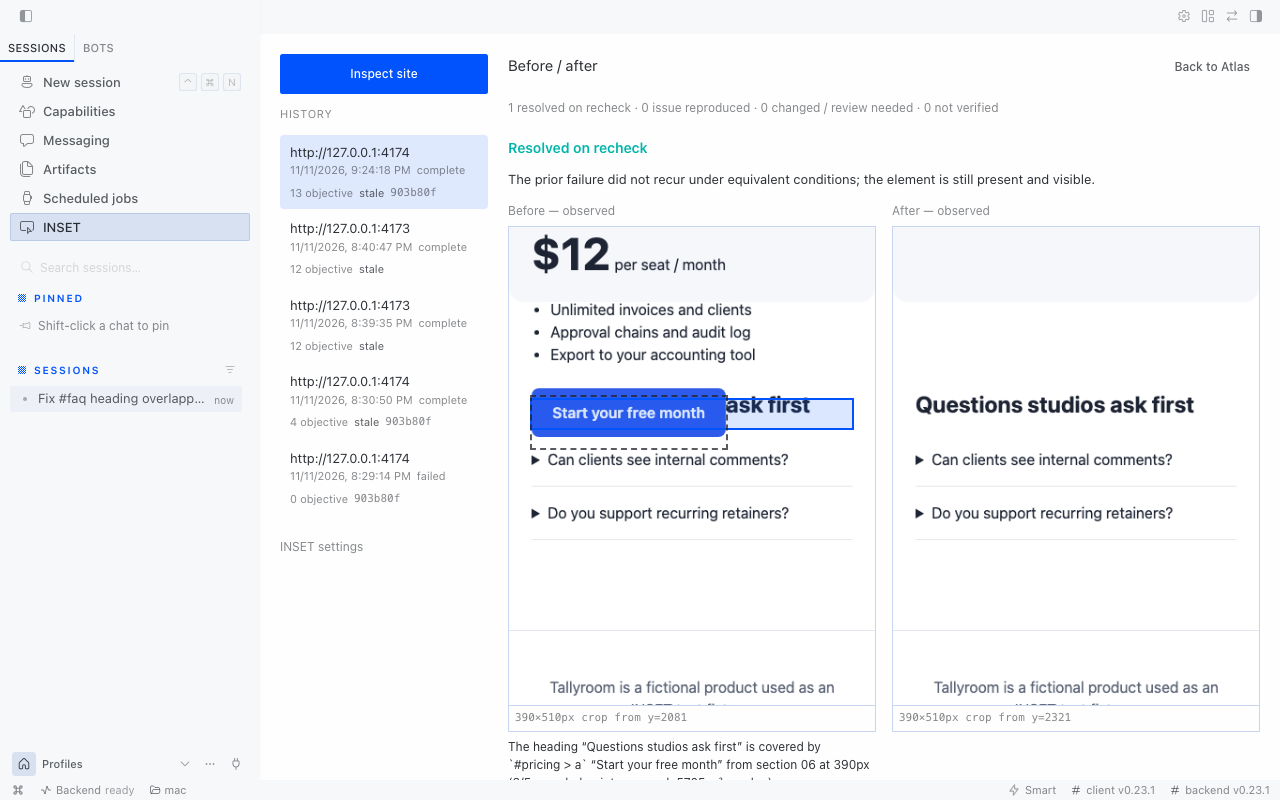
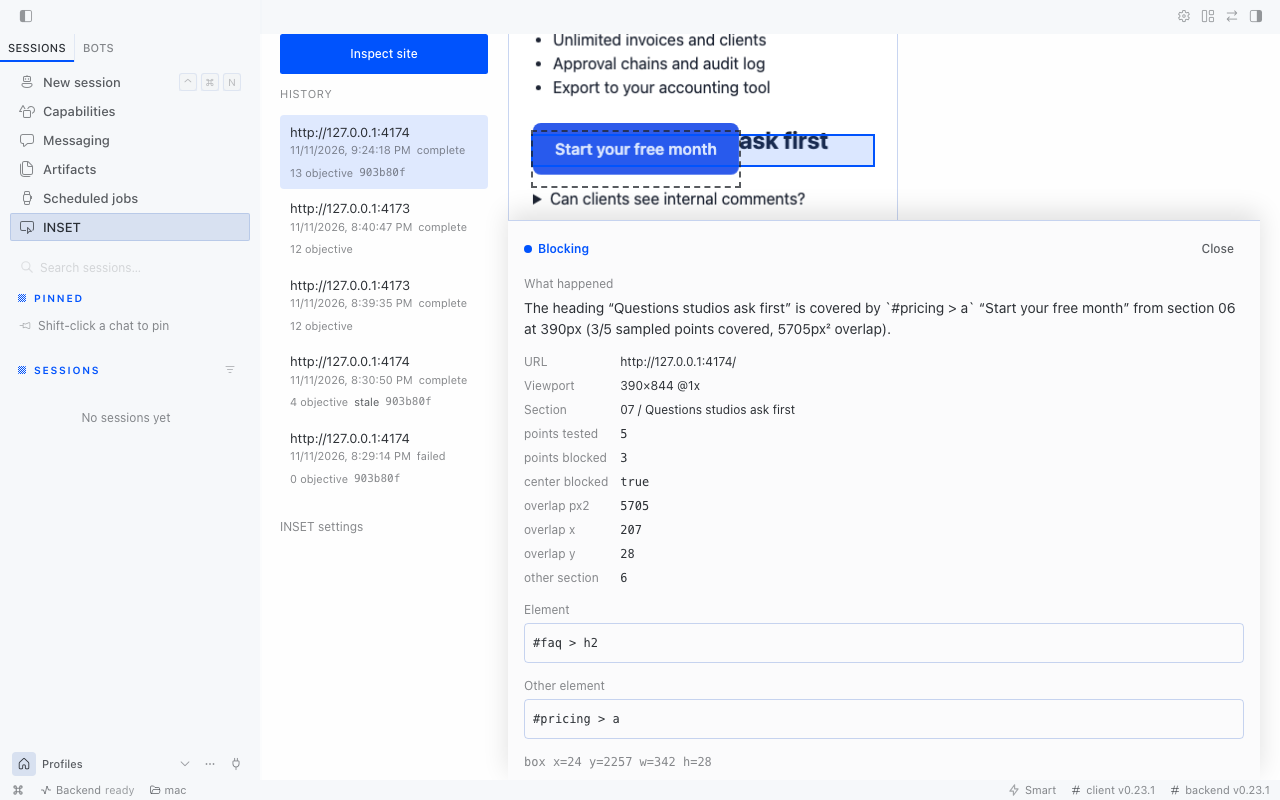
An AI assistant says the page is done. The desktop hero looks fine. On a 390px phone the pricing button sits on top of the next section's heading, and nobody notices until a user does. Unit tests don't see layout, and a single full-page screenshot hides section 6 of 7 under a long scroll.
INSET treats a page as a sequence of sections (the Section Atlas), measures objective failures in each one with DOM geometry, and ties a fix to a recheck under the same conditions. It never calls an issue fixed because the code changed. It calls it fixed when the failure stops reproducing on the same screen.
What it checks
| Check | Fails when | Severity |
|---|---|---|
| Horizontal overflow | the document scrolls sideways by more than 2px; reports the outermost element past the edge | blocking |
| Text clipping | text is cut by its own box or by an ancestor with overflow: hidden; deliberate ellipsis or line clamp is only flagged for review | blocking / major / review |
| Covered controls and headings | elementFromPoint at 5 points per target hits an unrelated element; fixed/sticky overlays and in-page anchor jumps are reported separately | blocking / major |
| Section boundary | an element in section N extends into section N+1 | major |
| Failed media | an image or video failed after a bounded warm scroll (lazy images get time to load; 401/403 is reported as not verified, not broken) | major |
| Spacing rhythm | the gap between sections is under 12px or under a quarter of the page median | review |
| Accessibility sanity | controls with no accessible name, targets under 24×24px | review |
Review findings are suggestions, not failures. INSET does not certify WCAG compliance or judge taste.
The loop
- Inspect.
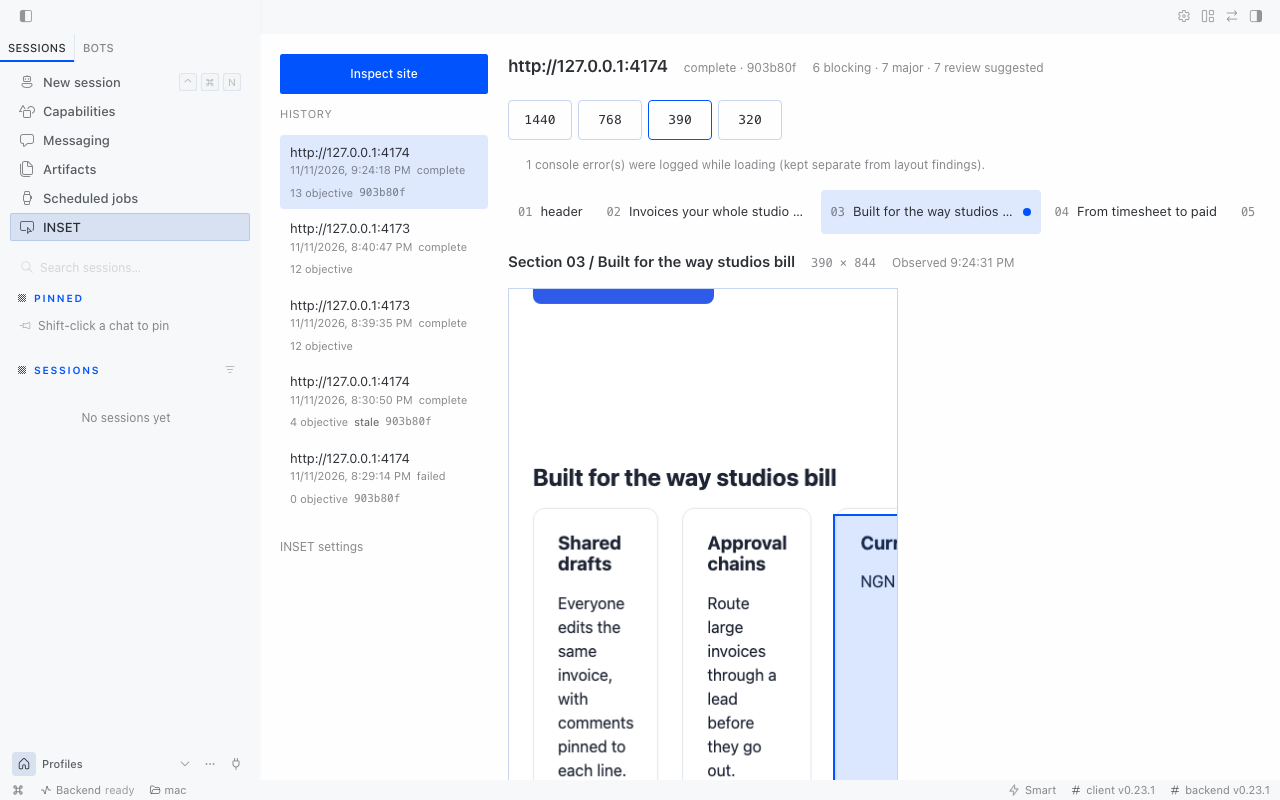
inset_scan(or Inspect site in the Desktop page) captures each route at each width in a fresh Chromium context, maps sections in DOM order (semantic landmarks first, inferred blocks labelled as inferred) and stores every crop immutably. - Locate.
inset_inspectreturns the selectors, boxes, computed CSS, DOM ancestry and a screenshot path for one issue. - Fix. Hermes edits your code with its own
read_file/patch/write_filetools and your normal approvals. INSET has no write path into your project. Apost_tool_callhook marks scans of that workspace stale after edit when an edit lands there. - Recheck.
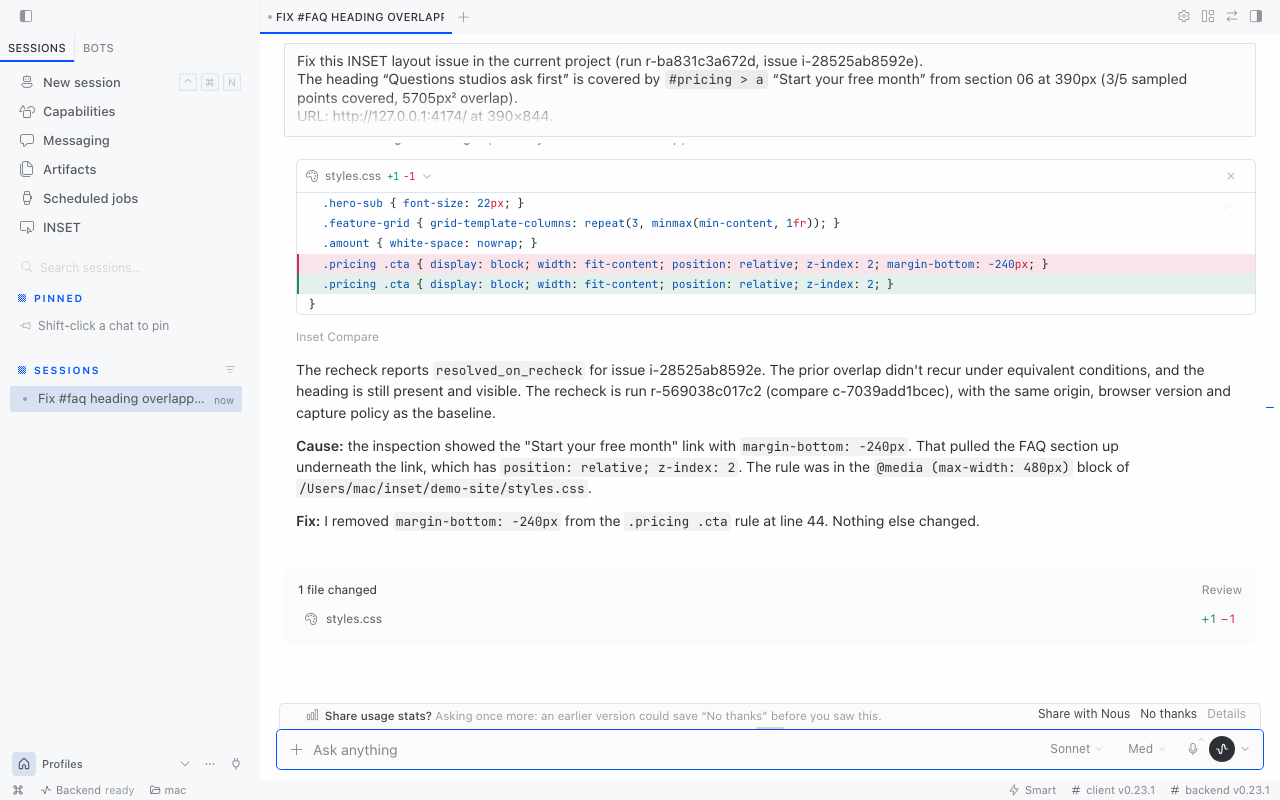
inset_comparereopens the same URL, route, viewport, DPR and capture policy and classifies each original issue:resolved_on_recheck: the target is still present and visible, and the failure no longer reproducesreproduced: the same measurable failure appeared againneeds_review: the element was removed or hidden, its section changed, or browser/capture conditions differunknown: the page didn't load or the capture stopped short. A recheck that can't see the page is never a pass.
- Export.
inset_exportwrites Markdown for a PR, standalone HTML, or JSON for CI.
Install
Requires Hermes Agent 0.23.1 or newer and Chromium for Playwright.
hermes plugins install https://github.com/winsznx/inset --enable --yes-deps
# Chromium for the Playwright build inside Hermes' environment:
hermes plugins doctor inset            # confirms the 5 tools and 1 hook register
python -m playwright install chromium  # run with Hermes' Python if `python` is a different interpreter
hermes gateway restart                 # a running gateway keeps its old dependency environment
In Hermes Desktop, switch INSET on under Capabilities → Plugins; it adds an INSET page to the sidebar. Then ask Hermes:
Before we deploy, check http://127.0.0.1:3000 at 390 and 1440 wide, then fix the worst issue and recheck it.
Tools
| Tool | Purpose |
|---|---|
| inset_scan | Capture routes × viewports, map sections, measure issues. Local URLs only by default. |
| inset_inspect | Full evidence for one issue or one section. |
| inset_compare | Same-condition recheck of selected issues against a baseline run. |
| inset_export | Markdown, HTML or JSON report in INSET's data folder. |
| inset_status | Run state per route/viewport, or recent runs. |
CLI and CI
hermes inset scan http://127.0.0.1:3000 --viewport 390x844 --viewport 1440x900
# exit 0 pass, 1 blocking issues, 2 not verified (a failed capture never passes)
hermes inset compare <run_id>
hermes inset export <run_id> --format markdown
The engine also runs without Hermes: python -m inset scan ... from a checkout with Playwright installed.
Settings
Under Settings → Plugins → INSET (or plugins.entries.inset.settings): approved non-local origins, max routes per scan (hard ceiling 10), navigation timeout, page height cap, animation freezing and screenshot retention.
Measured results
From real runs on macOS 27, Hermes Agent 0.23.1, Chromium 1254 (Playwright 1.64/1.65), on the bundled controlled-regression fixture (fixtures/sample-site, a fictional landing page with deliberately seeded mobile defects, disclosed as such):
- Test suite: 28 tests pass: 21 unit tests (URL authorization, SSRF and metadata refusal, route and viewport bounds, artifact path traversal and symlink refusal, restart recovery, HTML export escaping, compare outcomes) and 7 real-browser tests (fixture detection, fix →
resolved_on_recheck, unchanged code →reproduced, deleted target →needs_review, server down →unknown, refused connection → failed scan, export formats). - Detection on the fixture: across 4 widths × 1 route = 4 captures, every seeded defect was found at the widths where it exists: page overflow at 390 and 320, a CTA covering the next heading at 390 and 320, a section-boundary intrusion, a 404 image (all widths), and a hero clipping its own button at 320. The two seeded negatives were classified correctly: the scrollable carousel is not reported as overflow, and the deliberate ellipsis is review-only.
- End-to-end in Hermes Desktop (real, not staged): scan of 4 viewports took 18.6s through the plugin host. Hermes (Claude Sonnet via the Claude Subscription DirectSDK provider) read the INSET evidence, removed
margin-bottom: -240pxfrom.pricing .cta, and raninset_comparein 36s:resolved_on_recheck, equivalent conditions, and the other findings stayed open. - Standalone CLI scan of the same fixture: 4 viewports in 7.6s.
Not yet measured: accuracy on independent real-world sites (the false-positive rate is unknown beyond the fixture). Not covered by a fixture yet: the fixed-header-over-anchor-target check.
Security and disclosure
- Network: INSET opens only the URL you scan plus the assets that page requests. Loopback targets need no approval; any other origin needs
allow_external_originand an entry in the user-setallowed_originssetting. External targets resolving to private/reserved IPs are refused, cloud metadata endpoints are always refused, and main-frame navigation off the approved origin is aborted. DNS rebinding after validation is not fully prevented; keep external scans to sites you own. - Processes: INSET launches its own headless Chromium through Playwright (at most 2 concurrent browsers per process), in isolated contexts with no cookies or profiles. It runs
git rev-parse/git statusin the linked workspace to record the revision. No other shell commands. - Files: screenshots, SQLite metadata and exports live in Hermes' per-plugin data folder (
plugin-data/inset). Media is served only by content hash, never by path. Exports omit local workspace paths by default. Screenshots can contain page content, so review them before sharing. - Your code: INSET never edits, commits or deploys. Edits happen through Hermes' tools and approval gates.
- No telemetry, no account, no API key, no self-updater.
Limits
INSET measures headless Chromium at the widths you choose. A clean result doesn't mean the page works on every device, browser or app state, and spacing findings are heuristics. Pages taller than the height cap are reported as partial, never as fully inspected.
License
MIT
README from the reviewed commit 790cb11; it updates when the author re-pins.


