 jerrygooch
Hermes Provider Usage
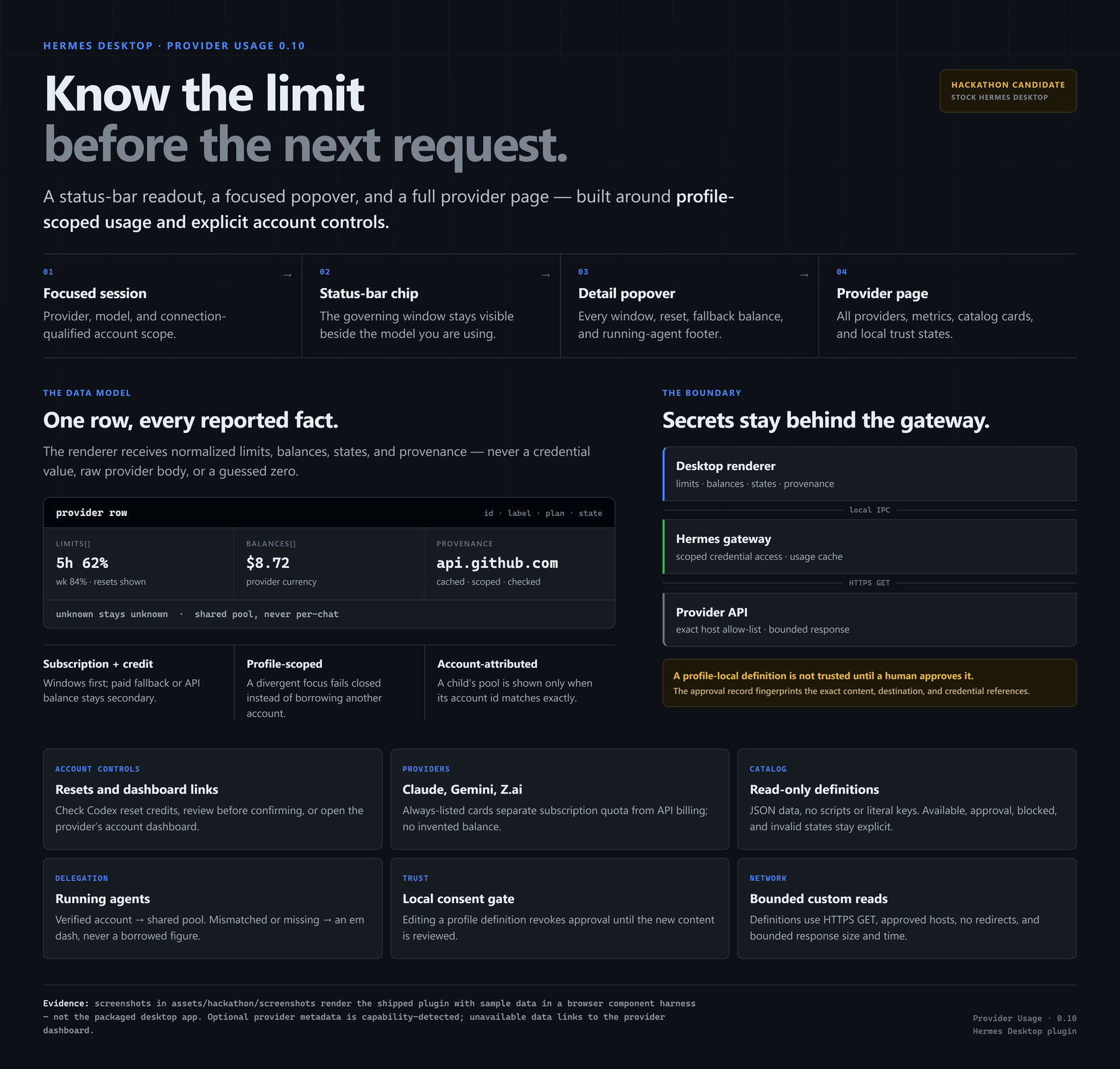
Your agent is only as useful as the account limit it can still spend. Provider Usage puts that limit beside the model you are already using in Hermes Desktop: a compact status-bar chip, a detail popover, and a full page for every provider and window.
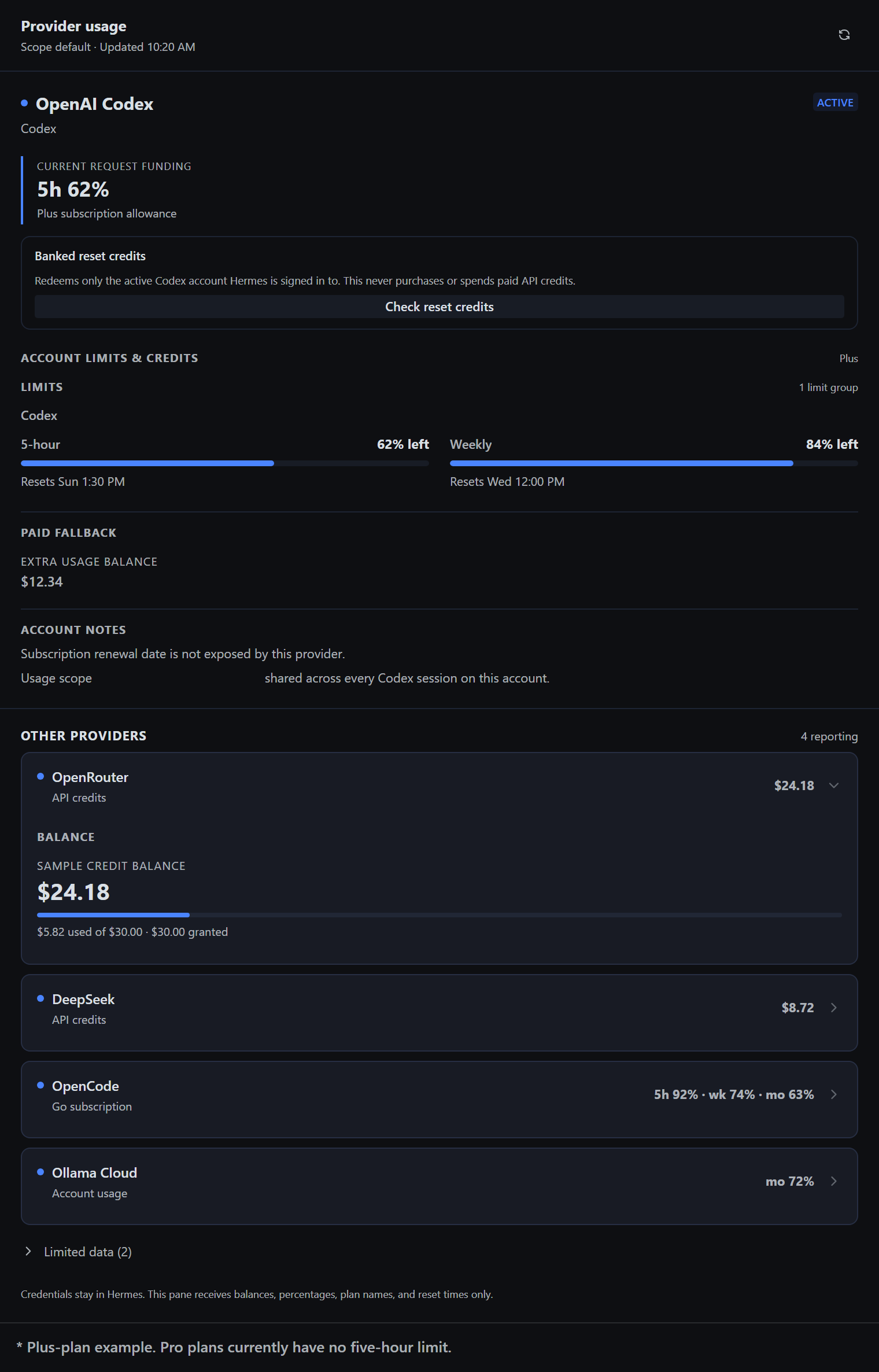
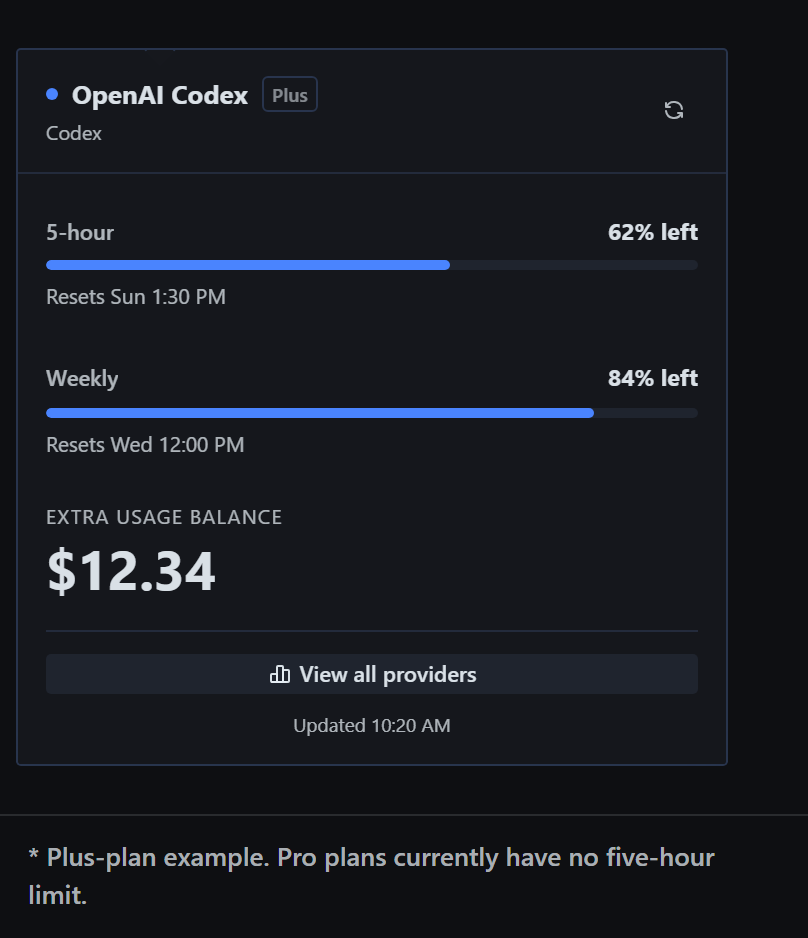
Click the chip to see the active provider's governing windows, reset times, fallback balance, and account state. View all providers opens the full page, also reachable from the sidebar and the ⌘K palette.
The plugin reports the shared account resource behind a provider. It does not divide a Codex, Claude, or OpenCode allowance between chats. Five sessions on one account all draw from the same pool.
Look at it
These images are sample data rendered in a browser component harness from the plugin's real components and SDK primitives with the built-in Nous dark theme. They are not screenshots of the packaged Electron app, and no real account values appear. See harness/ for the reproducible capture.
More: the 12-shot gallery, feature and trust-boundary infographic, full demo, and the hackathon guide with the shot list, evidence tiers, and build notes.
What it does
- Adds a small active-provider meter to the Desktop status bar.
- Shows every governing subscription window, not just the one that fits in the chip.
- Keeps subscription allowances primary and paid fallback balances secondary.
- Refreshes against the focused profile and session when you switch bots or profiles.
- Keeps API keys and OAuth credentials in the Python backend.
- Marks missing data Unavailable or Unknown instead of filling gaps with guesses.
- Adds a running-agents footer to the popover when the gateway reports live delegated children.
Codex can report separate 5-hour and weekly limits. The chip summarizes the governing allowance, while the page keeps both meters and their reset times visible. An exhausted weekly limit does not make the still-full 5-hour meter disappear.
Don't see the chip?
The chip lives in the Desktop status bar at the bottom of the window, and that bar can be hidden as a per-machine preference. When it is hidden, every status readout disappears with it.
- Ctrl+Shift+S (⌘+Shift+S on macOS) toggles the status bar.
- Or right-click the app → View → Toggle status bar.
- Or open the command palette and search Toggle status bar.
If the bar is visible but the chip is not, check Settings → Plugins and confirm the backend is enabled for this profile (see Install).
Provider support
| Provider | What you get | Evidence |
| --- | --- | --- |
| OpenAI Codex | Shared subscription windows, Spark windows, resets, access state, subdued extra-usage balance, and banked-reset inventory when the host returns it | Stock compatibility tests |
| OpenCode Go | 5-hour and weekly usage in the chip; all three subscription windows in the page | Stock compatibility tests |
| OpenCode Zen | Authenticated API-credit product state; wallet balance stays unavailable because OpenCode does not expose it to API keys | Limited by the provider |
| DeepSeek | API balance in the currency DeepSeek returns | Stock compatibility tests |
| OpenRouter | Remaining API credit, key quota, and spend detail | Stock compatibility tests |
| Ollama Cloud | Session, weekly, and monthly windows plus per-model request counts | Experimental endpoint; plans differ |
| Nous Portal | Portal credit snapshot when the installed Hermes runtime exposes it | Host-dependent |
| Claude / Anthropic | Always-listed card. Claude subscription limits through the existing Claude Code OAuth read; Anthropic API Admin usage is a separate organization product and is not metered here | Subscription read uses the existing core adapter; card is fixture-tested, not live-verified in this release |
| Google Gemini API | Always-listed setup and capability card: API-key setup and documented per-project rate limits. No supported account balance/quota endpoint, so usage stays in Google AI Studio | Setup only; no account adapter and no live account test |
| Z.ai / GLM | Always-listed setup and capability card: GLM Coding Plan quota versus standard pay-as-you-go billing, with global and China endpoints. Hermes has no zai account-usage hook, so no quota or credit is invented | Setup only; no account adapter and no live account test |
| xAI / Grok | On stock Hermes 0.23.1 there is no xAI broker, so the row is unavailable with the official Grok dashboard link. Subscription credits appear only when the host brokers xai-oauth | Stock: link only; broker is optional |
| Declarative JSON | Any fixed read-only HTTPS usage or balance endpoint you describe with the bundled schema; GitHub rate limits ship ready to use | Tested boundary and GitHub live check |
OpenCode is one family in the UI, but its products stay separate. Go is subscription-funded. Zen is API-credit-funded. They use different routes and credentials, and the plugin never treats one as the other's balance.
The Claude / Anthropic, Google Gemini API, and Z.ai / GLM cards are always listed, including with no credentials. They are connection and capability cards, not meters: an unconnected card says Not connected, and none of them invents a zero balance, remaining quota, or local spend total. Gemini and Z.ai have no account-usage read in this build; their numbers stay in the provider's own console.
The Grok billing response exposes quota data but no trustworthy plan-tier name, so the plugin uses the conservative label SuperGrok and does not infer a higher tier.
See PROVIDER_SUPPORT.md for tested capabilities, selection rules, and the exact stock/enhanced split in docs/stock-support.md.
Reset credits, carefully
On a Codex row where the host exposes banked resets, Banked reset credits shows a read-only summary for the active signed-in account. Preview reset opens a separate confirmation block naming that account and the banked/applicable counts. Only the confirm button mutates, and it spends one subscription reset, never a paid API credit.
- There is no exact-credit selection: core picks the credit, and the API accepts no credit selector, force flag, caller URL, or purchase flag. There is no purchase action anywhere.
- Success is reported only after an independent same-identity readback shows a lower banked count. A missing, unchanged, or mismatched readback is uncertain, not success, and is never retried automatically.
- Core redemption is account-implicit, so the active-account binding is a point-in-time re-check, not an atomic reservation. With multiple pooled Codex credentials, a credential switch between preview and redeem cannot be excluded; the panel stays limited to the account Hermes currently resolves rather than offering a multi-account selector.
No reset is redeemed by the tests, the harness, or the screenshots. The design record is docs/reset-capabilities.md.
Running agents
When the popover is open and the gateway reports live delegated children, a subordinate footer lists them and, where an exact account identity is published, the shared pool they draw from. On stock 0.23.1 the provider/account identity inventory is often absent, so the footer shows an unknown account (or no footer) instead of borrowing another account's figure. It never divides usage per agent or invents a per-agent cost. Details: docs/running-agents-footer.md.
Bring your own read-only usage API
Provider Usage 0.10 supports declarative definitions: versioned JSON that describes a fixed read-only HTTPS endpoint and maps its JSON into provider cards. It is data only — no scripts, eval, templates, arbitrary headers, or literal credentials.
Three definitions ship in the catalog:
- GitHub API rate limit — credential-free; core, search, and GraphQL request windows for this machine or the configured token.
- Moonshot / Kimi balance — prepaid balance; references
MOONSHOT_API_KEY. - ElevenLabs subscription — character allowance and reset; references
ELEVENLABS_API_KEY.
The page distinguishes Connected, Available to connect (with the missing variable), Requires approval, Blocked, and Invalid definition states. Missing mapped values stay Unavailable, never zero.
To add one, start from dashboard/definitions/TEMPLATE.json, then:
python scripts/validate_definition.py ~/.hermes/provider-usage/providers/my-api.json
python scripts/approve_definition.py ~/.hermes/provider-usage/providers/my-api.json
Approval names the destination and every credential reference, reads no secret, and requires you to type approve. It writes $HERMES_HOME/provider-usage/approvals.json, outside the definitions directory. Editing the file changes its fingerprint and revokes approval until you review it again. Nothing in a definition or the packager can approve itself.
The boundary is HTTPS GET only, exact host allow-list, no redirects, a pinned public peer, and a bounded response. Credential references resolve only through Hermes' profile-scoped agent.secret_scope.get_secret; there is no os.environ fallback. See dashboard/definitions/README.md for the schema and trust model.
Approval is a local consent boundary, not a sandbox. Code running as the same OS user can edit both the definition and the approval record, and can read profile credentials directly. It prevents an unreviewed definition from using a profile secret without a human seeing the destination first; it does not defend against malicious same-user code or a compromised Hermes process.
Install
Requirements: stock Hermes Desktop 0.23.1 or newer, a local Hermes gateway, and a current Desktop build. No core patch, private worktree, or unmerged core commit is required.
hermes plugins install jerrygooch/hermes-provider-usage
The unified package ships both halves: the Desktop UI and the profile backend. Hermes installs it under the profile and Desktop loads the Desktop half. The installer confirms before enabling. Add --enable to skip that prompt, or enable later:
hermes plugins enable jg-provider-usage
Fresh installs use the plugin id jg-provider-usage. The visible name stays Provider Usage, and the repository is still jerrygooch/hermes-provider-usage. The namespaced id lets this package coexist with an unrelated plugin that already owns provider-usage: installs, enable flags, routes, and desktop registrations do not replace or merge with it. If you previously installed the older provider-usage build in a profile, disable or remove that plugin yourself; this package does not adopt, edit, or migrate another plugin's profile config or state. Declarative definitions under $HERMES_HOME/provider-usage/ remain compatible.
For a reproducible install, pass an exact 40-character commit:
hermes plugins install jerrygooch/hermes-provider-usage --ref <40-character-commit-sha>
Recycle that profile's gateway after install. Do not copy files into Hermes core, apply a core patch, or hand-edit the profile plugin folder.
Per profile. The Python backend loads only in the profile where jg-provider-usage is enabled. Run the install once for each profile that should expose usage; installing in one profile does not enable or modify another. The plugin never auto-enables or auto-installs into a profile. A profile without the backend returns /overview 404, and both the page and chip say "Provider usage isn't enabled or installed in <profile>."
Optional host helpers — exact account identity inventory, provider credential summary, banked-reset details, or the xAI broker — are detected at runtime. Their absence changes one row or one value to Unavailable; it does not disable the plugin.
Profile scoping and focus divergence
ctx.rest reaches the active socket's profile and connection, never the focused chat's. The plugin treats a focused session as readable only when its connection-qualified owner matches that active source. When a focused chat belongs to another profile or connection, or the SDK reports the focus as ambiguous, the surfaces fail closed with "The focused chat is in … — switch to view its usage" and issue no fetch or probe for a foreign account. Home-account rows are never shown under another account's focus. On return to a matching profile, cached rows come back.
Development
The shipped desktop/plugin.js is plain ESM with no runtime npm dependencies. The development harness adds jsdom, react, and react-dom; the browser harness bundles the plugin with the Hermes desktop SDK source for a faithful component render.
npm ci
npm run check          # syntax, Node suites, Python suites, definitions, py_compile
bash scripts/validate.sh
The browser evidence is separate and uses real Chromium/Edge with real SDK primitives:
node harness/build.mjs && node harness/capture.mjs && node harness/verify.mjs
node harness/popover-verify.mjs
The live GitHub rate-limit definition can be checked without credentials:
python scripts/live-check-github.py
The fixture suite covers shared Codex limits, Spark windows, Plus 5-hour usage, DeepSeek balances, OpenCode Go/Zen funding semantics, SuperGrok's conservative label, paid fallback after exhaustion, and declarative catalog states. The Node and Python suites are automated tests, not live-account proof: the Claude, Gemini, and Z.ai cards were not exercised against real accounts in this release.
Status and limits
Provider Usage 0.10 is an experimental plugin. Provider account APIs change without notice, especially OAuth and web-app endpoints; experimental adapters are labelled in the support table rather than presented as permanent integrations. Stable documented APIs are preferred, and missing data stays missing.
The plugin is read-only for usage. The only mutation is the separately gated Codex banked-reset action described above; it cannot buy credits, enable paid usage, change a plan, or purchase a reset. The Desktop renderer never receives API keys, OAuth tokens, authorization headers, or raw credential objects; provider requests run in the backend.
No security review can promise more than its boundary. This one is a reviewed local consent and credential-isolation design with documented residual risks, not an unlimited guarantee.
Help wanted
- Adapters for more providers, backed by a real account-level usage or balance source.
- Testing across plans and account types without sharing private data.
- Hermes-native UI work, accessibility fixes, and visual polish.
- Fixtures for model-specific limits and unusual reset behavior.
- Documentation of provider quirks and honest unavailable states.
Read CONTRIBUTING.md before opening a pull request. Never attach API keys, OAuth tokens, raw provider responses, account screenshots, or request logs to an issue.
License
README from the reviewed commit 543afc7; it updates when the author re-pins.


