 zkasuran
Kestra On-Call for Hermes Agent
Hermes watches your Kestra executions. When one fails, it reads the failed task, the error logs and what changed since the last good run, proposes the smallest fix to the flow and asks you in chat. After one approval it saves the fix as a new flow revision and replays the failed execution from the task that failed, so tasks that already succeeded are not run again.
It also turns every Kestra Pause task into a chat question you can answer from any Hermes surface, including your phone.
| Hermes reply, typed approval and result | Kestra after the replay | Dashboard tab |
|---|---|---|
|  |
 |
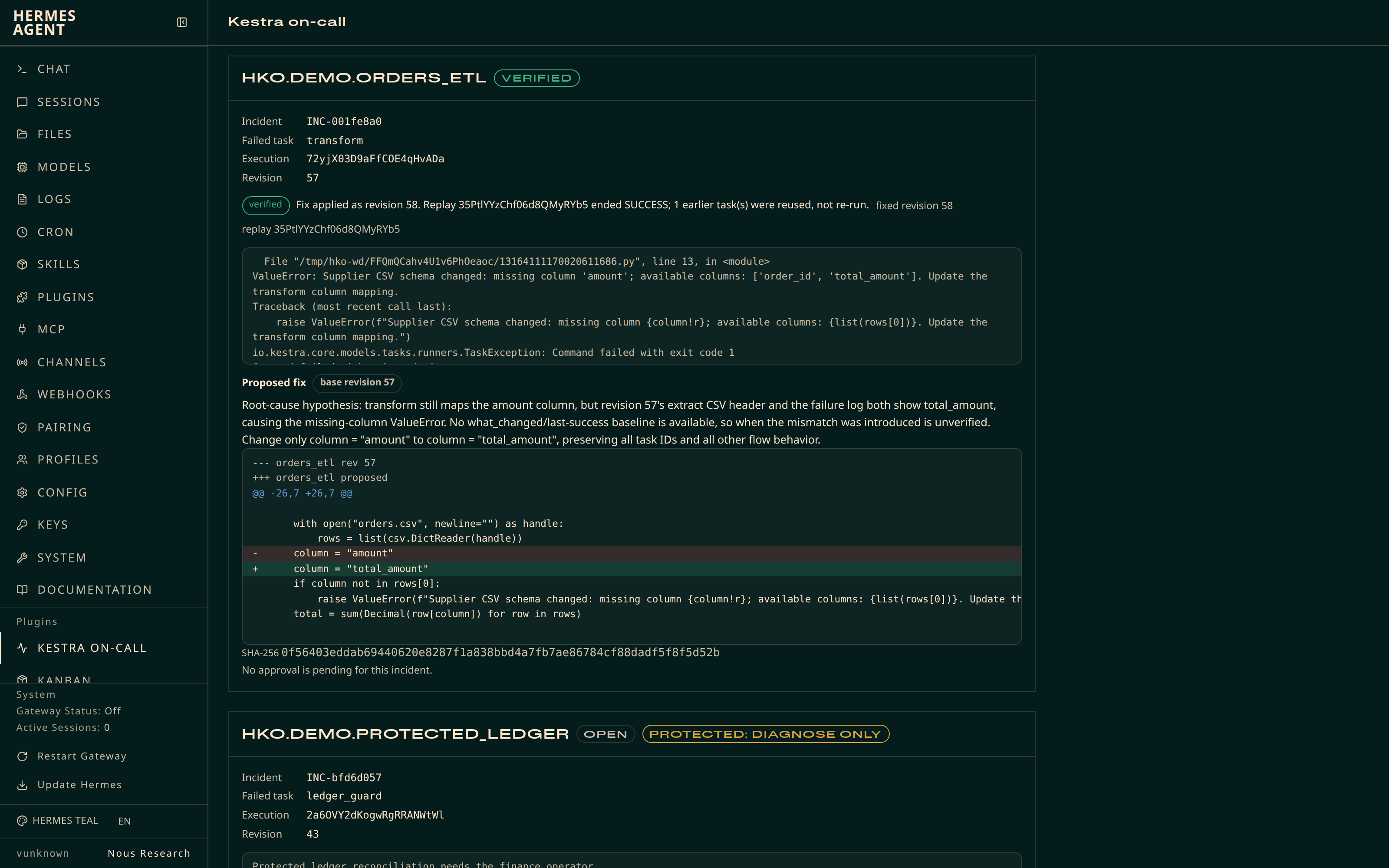 |
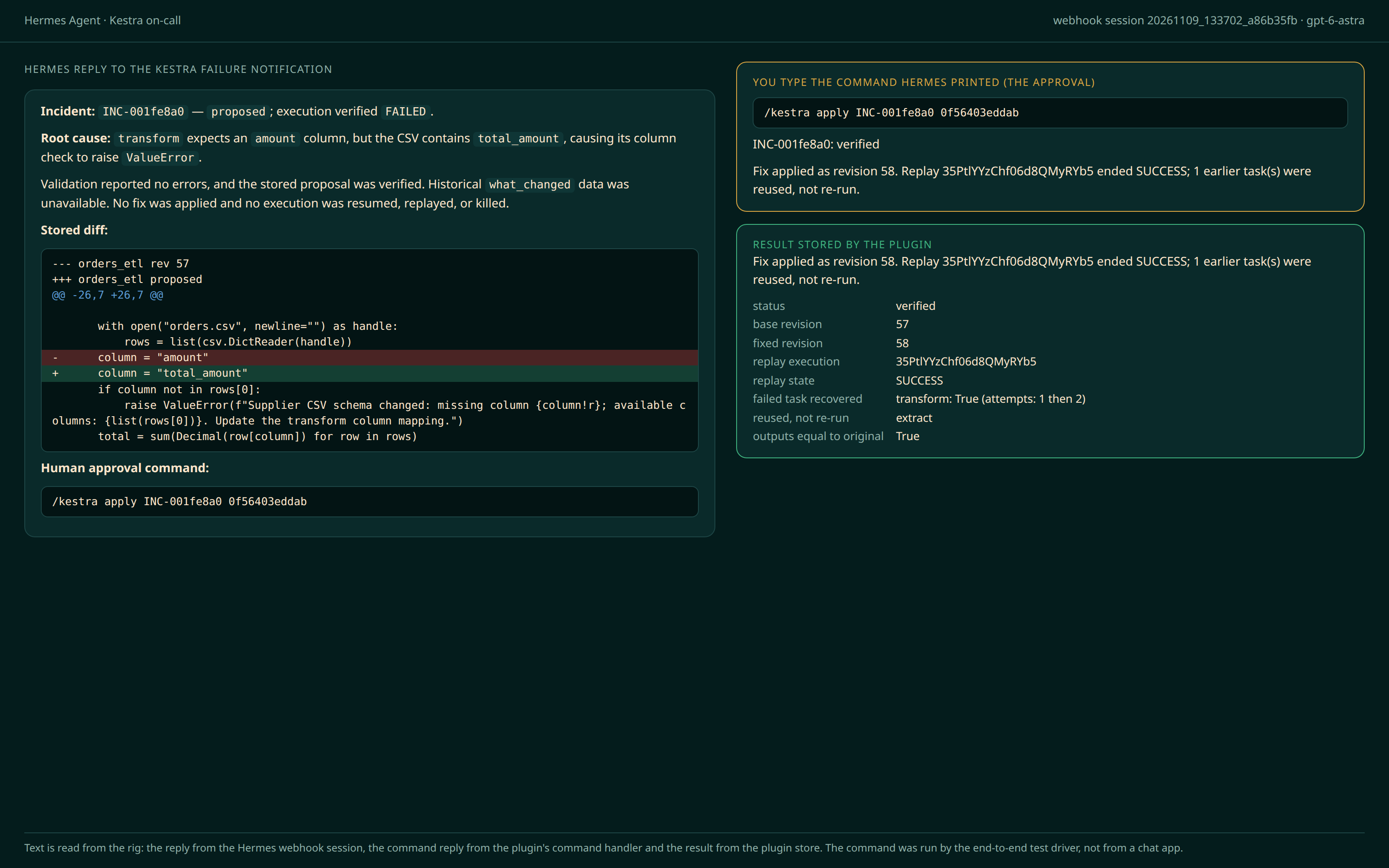
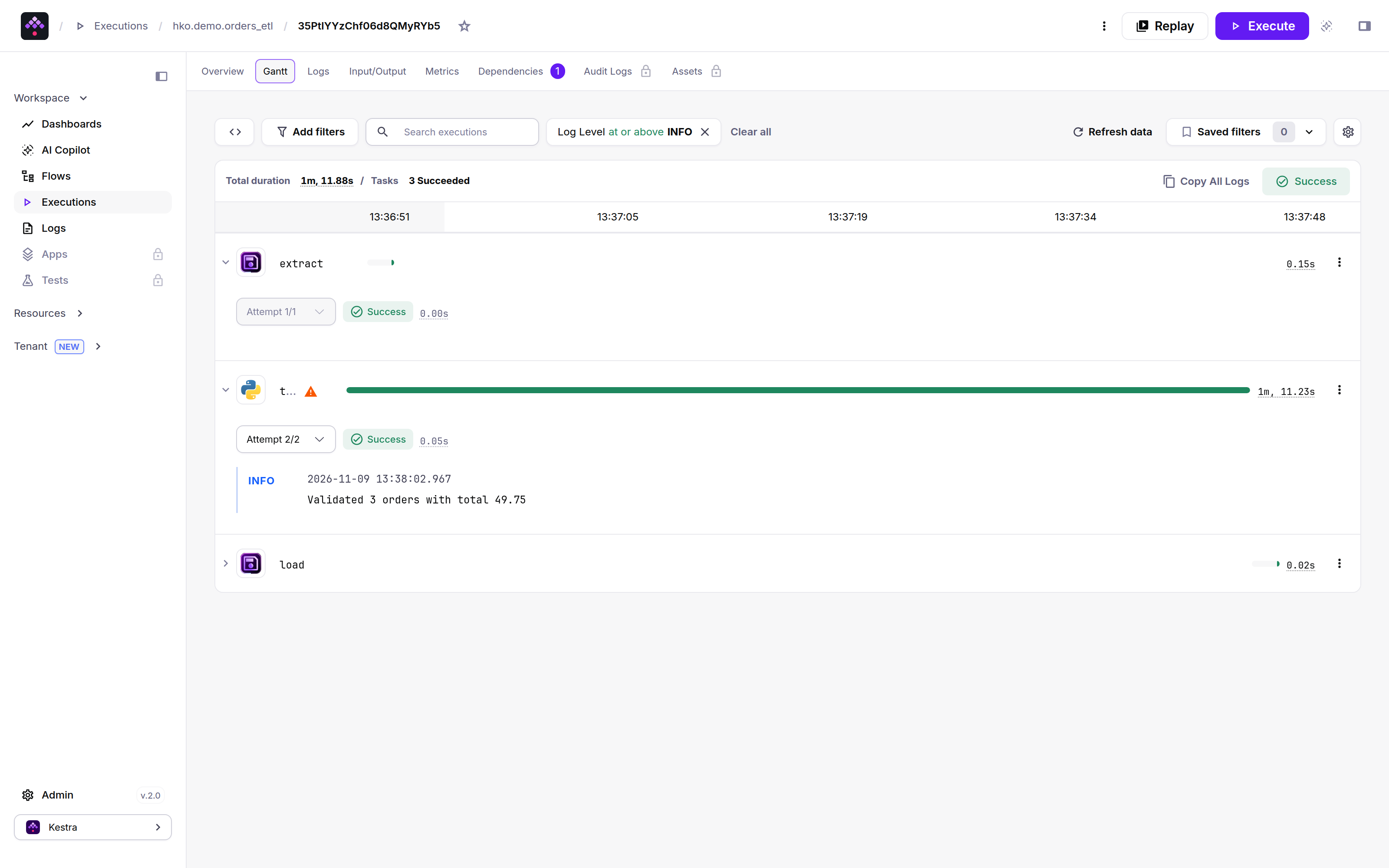
The pictures come from the end-to-end rig on Kestra 2.0.9. The left one is rendered from recorded text (the webhook session's reply, the plugin's reply to the typed command and the stored result), because the rig has no chat app and the test driver typed the command. The middle one is the Kestra UI. The right one is the real dashboard tab reading the rig's incident store. The scripts that made them are on the development branch (see Development).
What it does
- A Kestra flow trigger forwards each failed execution to a Hermes webhook route.
- Hermes opens an incident: failed task, error logs, task inputs and outputs, the flow source at the failing revision and a diff against the last successful run.
- Hermes proposes a replacement flow. The plugin validates it with Kestra, stores it and shows you the exact diff and its SHA-256.
- You approve once by typing the command Hermes gives you:
/kestra apply <id> <hash>, where<hash>is the start of the SHA-256 of the proposal you read. Hermes updates the flow, replays the failed execution from the failed task and follows the replay. - The plugin checks that the failed task is now
SUCCESSand that the earlier task runs were reused, then reportsverified. If the replay fails and the flow is still at the fixed revision, it restores the previous revision.
How it works
sequenceDiagram
    participant K as Kestra
    participant F as Forwarder flow
    participant H as Hermes
    participant P as Plugin store (SQLite)
    participant U as You (chat)
    K->>F: execution FAILED in an allowed namespace
    F->>H: POST /webhooks/kestra-oncall
    H->>K: read execution, logs, flow revisions
    H->>P: store incident and validated proposal
    H->>U: root cause, diff, /kestra apply INC-... <hash>
    U->>H: types /kestra apply INC-... <hash> (the approval)
    H->>K: re-read flow, stale check
    H->>K: update flow (one new revision)
    H->>K: replay from the failed task run
    H->>K: follow replay, verify, roll back only if needed
    H->>U: verified / rolled_back / pending / stale / conflict / needs_human
The model can read Kestra, open incidents and store proposals. It cannot write to Kestra by itself. Two tools write: kestra_apply_fix and kestra_pause_decide. Each needs a person, who either types the slash command or asks Hermes to run the tool and answers its approval card. The text on the card is built from the plugin's own store, not from anything the model wrote.
Why you type a command instead of tapping a card. Hermes shows an approval card only while an agent turn is running. A slash command runs outside a turn, so on Telegram, Discord or Slack a card raised from /kestra apply could never be answered. The plugin therefore makes the typed command the approval: /kestra apply <id> <hash> only works if the hash matches the stored proposal you were shown by /kestra show. A model cannot type slash commands. (ctx.dispatch_tool also skips pre_tool_call hooks on Hermes main and v0.23.0, so the plugin does not rely on a hook for the command path.)
Safety model
| Control | What it does |
|---|---|
| Fail-closed allowlist | namespaces is a list of namespace prefixes. Empty means nothing is allowed: no incident, no proposal, no write, no pause listing. |
| Protected flows | protected_flows (namespace.flowId) are diagnosed only. A proposal for them is refused. |
| Approval bound to the proposal | Two ways to approve, both tied to the stored bytes. The typed command /kestra apply <id> <hash> needs at least 8 characters of the proposal's SHA-256 and refuses if a newer proposal replaced the one you read. The approval card (when you ask Hermes to apply) shows the whole diff, a one-line change summary and the SHA-256. Control and bidirectional characters from untrusted text are stripped from what is shown. |
| Diffs you can read | A diff over 120 lines or 3000 characters cannot be approved in chat. The command and the card both refuse. Ask Hermes for a smaller fix. Nothing is approved from a truncated view. |
| Stale guard | Right before the write the plugin re-reads the flow. If its revision or source hash differs from what the proposal was written against, the status is stale and nothing is written. |
| Read-back | After the update it reads the flow again. If the revision is not base + 1 or the source is not the proposal, the status is conflict and it stops with no replay and no rollback over someone else's change. |
| One replay | The replay id is stored right after the call. A retry or a resumed apply adopts the existing replay instead of starting a second one. Applying a verified proposal again is a no-op. |
| Guarded rollback | If the replay fails, is killed or times out and rollback_on_failure is true, the previous source is restored only if the flow is still at the fixed revision, then read back. Otherwise the status is needs_human. |
| No unattended writes | The write tools run only on surfaces on an allow-list: the local CLI, TUI and desktop and known chat platforms. Webhook, cron, single-query, API-server and any unknown surface are refused, before and inside the handler. The write handler also needs a one-shot ticket that the approval card or the typed command issues. The webhook prompt tells the model not to apply. |
| Approval bypass | While Hermes approvals are bypassed (--yolo, gateway /yolo, approvals.mode: off) the write tools refuse to run through the model and hermes kestra-oncall doctor reports it. A typed command still works, because a person typed it. |
| Secrets through Hermes | Credentials are read with Hermes secret scope, never from files or the YAML. Errors and records are redacted before they reach the model, chat or dashboard. |
| Read-only dashboard | The dashboard tab and Desktop pane only read. They show the exact command to type in chat. |
Quick start
You need Docker, Hermes Agent 0.23.0 or newer and a chat surface you can approve from (CLI, Telegram, Discord, Slack and so on). Two more requirements:
- The webhook adapter needs
aiohttp, which ships in Hermes'smessagingextra. If the gateway log saysWebhook: aiohttp not installed, install the extra for your install method (for examplepip install 'hermes-agent[messaging]'orhermes pm install --extra messagingon a managed install) and restart the gateway. Enabling a plugin that declarespython_dependencies(this one pinsruamel.yaml) can make Hermes switch to a managed environment underHERMES_HOME/installs. If that environment lacksaiohttp, install the same pinned version into it. Without the adapter nothing reaches Hermes and you can still use the plugin by hand with/kestra. - Keep the default plugin isolation,
plugins.isolation: in_process. Inhostmode Hermes does not register plugin CLI commands (hermes kestra-oncall ...). The/kestracommand path was only tested in-process.
1. Start Kestra 2.0.9 with basic auth and the two forwarder secrets. Pick your own username and password. The shared webhook token is made here and reused in step 4. With the Kestra OSS image a secret is an environment variable named SECRET_<NAME> that holds a base64 value.
export WEBHOOK_SECRET=$(openssl rand -hex 24)
docker run --rm -d --name kestra -p 127.0.0.1:8080:8080 \
  --add-host host.docker.internal:host-gateway \
  -e KESTRA_CONFIGURATION='kestra: {server: {basic-auth: {username: admin@example.com, password: change-me-Aa1}}}' \
  -e SECRET_HERMES_WEBHOOK_URL=$(printf '%s' 'http://host.docker.internal:8644/webhooks/kestra-oncall' | base64 -w0) \
  -e SECRET_HERMES_WEBHOOK_TOKEN=$(printf '%s' "$WEBHOOK_SECRET" | base64 -w0) \
  kestra/kestra:v2.0.9 server local
2. Install and enable the plugin.
hermes plugins install zkasuran/hermes-kestra-oncall
hermes plugins enable kestra-oncall
3. Configure it. Allow only the namespace you want Hermes to touch.
hermes config set plugins.entries.kestra-oncall.settings.kestra_url http://127.0.0.1:8080
hermes config set plugins.entries.kestra-oncall.settings.namespaces '["demo"]'
hermes config set plugins.entries.kestra-oncall.settings.protected_flows '["demo.protected_ledger"]'
hermes config set KESTRA_USERNAME admin@example.com
hermes config set KESTRA_PASSWORD 'change-me-Aa1'
hermes kestra-oncall doctor
doctor checks the connection, the Kestra major version, that the credentials are accepted and that at least one namespace is allowed.
4. Add the webhook route. Preview first, then install it. --deliver and --chat-id say where Hermes sends its reply for this route. Without them the route uses deliver: log and the reply only appears in the gateway log, not in your chat.
hermes kestra-oncall setup            # prints the route and the forwarder steps
hermes kestra-oncall setup --apply --deliver telegram --chat-id <your chat id>
hermes config set WEBHOOK_SECRET "$WEBHOOK_SECRET"
hermes config set platforms.webhook.enabled true
hermes gateway setup                  # configures the chat platform itself (for example the Telegram bot token)
--deliver accepts telegram, discord, slack, signal, matrix and log. setup --apply adds only the kestra-oncall route to config.yaml. hermes gateway setup is separate: it configures the platform, not this route's target.
Anyone who holds WEBHOOK_SECRET can start a model run against your Kestra. Those runs can read Kestra and store proposals. They cannot write to it. Treat the secret like a password.
5. Deploy the forwarder flow to Kestra. The shipped flow kestra/flows/hermes_oncall_forwarder.yaml lives in namespace ops and has two places to edit: the namespace list in the trigger (['CHANGE_ME']) and kestra_public_url. Until you replace CHANGE_ME it forwards nothing. Each listed namespace matches itself and its children, never a namesake such as prod2. The flow never forwards a failure from its own namespace, so it cannot loop. Set both and deploy in one step:
sed -e "s#\['CHANGE_ME'\]#['demo']#" \
    -e 's#^  kestra_public_url: .*#  kestra_public_url: "http://127.0.0.1:8080"#' \
    kestra/flows/hermes_oncall_forwarder.yaml |
  curl -s -u 'admin@example.com:change-me-Aa1' -X POST http://127.0.0.1:8080/api/v1/main/flows \
    -H 'Content-Type: application/x-yaml' --data-binary @-
Kestra needs about 20 seconds to register a new flow trigger, so wait before you run the demo flow. A failure in that window is not forwarded. Keep that list in step with the namespaces setting in Hermes. The Kestra secrets HERMES_WEBHOOK_URL and HERMES_WEBHOOK_TOKEN were set in step 1. Kestra 2.0.9 does not expose flow variables inside a trigger condition, which is why the list sits in the trigger and not in a variable.
6. Break the demo flow. kestra/demo/orders_etl.yaml extracts a CSV and then fails in transform because the supplier renamed amount to total_amount. protected_ledger.yaml is a second flow that always fails and is listed in protected_flows, so Hermes only diagnoses it. Deploy both into namespace demo and run orders_etl:
for f in orders_etl protected_ledger; do
  sed 's/^namespace: .*/namespace: demo/' kestra/demo/$f.yaml |
    curl -s -u 'admin@example.com:change-me-Aa1' -X POST http://127.0.0.1:8080/api/v1/main/flows \
      -H 'Content-Type: application/x-yaml' --data-binary @- > /dev/null
done
curl -s -u 'admin@example.com:change-me-Aa1' -X POST http://127.0.0.1:8080/api/v1/main/executions/demo/orders_etl -F x=1 > /dev/null
The execution fails. The forwarder posts it to Hermes. Hermes replies in your chat with the incident id, the cause, the diff and a ready-to-type command: /kestra apply INC-xxxxxxxx <hash>. Type it. Kestra then shows a new revision of orders_etl and a replay execution that is green, with extract marked as reused and transform succeeding on its second attempt.
Commands
Slash command /kestra (works in any Hermes chat surface):
| Command | What it does | Writes to Kestra |
|---|---|---|
| /kestra status | Kestra version, connection, policy and incident counts | No |
| /kestra incidents | Recent incidents with status and flow | No |
| /kestra show <id> | One incident: stored proposal, base revision, whole diff and hash, plus the ready-to-type apply command | No |
| /kestra apply <id> <hash> | Apply the stored proposal. <hash> is at least 8 characters of the proposal SHA-256 that show printed. | Yes: flow update, replay, maybe rollback |
| /kestra pauses | Executions waiting on a Pause task, with the question, the declared inputs and the ready-to-type commands | No |
| /kestra resume <exec> <taskrun> [k=v ...] | Resume a paused execution with the given inputs. <taskrun> is at least 8 characters of the paused task run id that pauses printed. | Yes: resume |
| /kestra kill <exec> <taskrun> | Kill a paused execution | Yes: kill |
CLI: hermes kestra-oncall doctor and hermes kestra-oncall setup [--apply] [--deliver ...] [--chat-id ...].
Tools (toolset kestra_oncall)
| Tool | Purpose | Write |
|---|---|---|
| kestra_status | Connectivity, version, policy, counts. Works while Kestra is down. | No |
| kestra_incident_open | Open an incident for a FAILED execution. The same execution always gives the same incident id. | No (local row only) |
| kestra_incidents | List incidents or read one with its proposal | No |
| kestra_propose_fix | Validate and store a complete replacement flow with a rationale | No (local row only) |
| kestra_apply_fix | Apply the stored proposal, replay, verify, roll back if needed | Yes, approval card required |
| kestra_pauses | List paused executions and save the snapshot a decision is checked against | No |
| kestra_pause_decide | Resume or kill the exact paused task run that was read | Yes, approval card required |
A bundled skill, kestra-oncall:kestra-oncall, teaches Hermes the triage procedure and tells it never to apply in an unattended run.
Configuration
Settings live under plugins.entries.kestra-oncall.settings.
| Key | Default | Meaning |
|---|---|---|
| kestra_url | http://127.0.0.1:8080 | Kestra origin. HTTPS is required unless the host is loopback (or private, see allow_insecure_http). No path, query or credentials in the URL. |
| tenant | main | Kestra tenant id. |
| namespaces | [] | Allowed namespace prefixes. Empty allows nothing. |
| protected_flows | [] | namespace.flowId entries that are diagnosis-only. |
| rollback_on_failure | true | Restore the base source after a failed replay if the fixed revision is still current. |
| replay_timeout_seconds | 300 | Longest wait for the replay, 1 to 300. |
| max_log_lines | 200 | Most error log lines stored per incident, 1 to 200. |
| allow_insecure_http | false | Allow plain HTTP to a private-network or Docker host such as http://kestra:8080 (private IPs, single-label names, .local, .internal, .lan). Public hosts always need HTTPS. Loopback needs nothing. |
Credentials are Hermes secrets (set with hermes config set NAME value, which writes the profile .env): KESTRA_USERNAME and KESTRA_PASSWORD for basic auth or KESTRA_API_TOKEN. The webhook adapter has its own WEBHOOK_SECRET; the plugin never reads or writes it.
Dashboard tab and Desktop pane
hermes dashboard gets a Kestra on-call tab. It lists incidents (flow, failed task, status, error log, proposed diff, hash, outcome of the last apply) and pending pauses with the chat command for each. It refreshes every ten seconds. The routes behind it are GET /api/plugins/kestra-oncall/overview and GET /api/plugins/kestra-oncall/incidents/<id>. There is no route that writes. Hermes Desktop loads desktop/plugin.js, a pane over the same routes.
The dashboard tab was run in a real hermes dashboard against the plugin's core and Kestra 2.0.9. The Desktop pane passes hermes plugins validate (desktop surface check) but was not run in a Desktop build.
Disclosure
- Network: only the Kestra URL you configure, with the credentials you give Hermes. No other host. The forwarder flow, which you deploy yourself, calls your Hermes webhook from Kestra. No telemetry.
- Writes to Kestra: a flow update, a replay, a rollback to the previous revision and resume or kill of a paused execution. All are approval-gated and refused in unattended runs. Nothing else in Kestra is written. The original failed execution is left as it is, apart from the label Kestra adds when it is replayed.
- Writes to Hermes:
setup --applyadds one named route toconfig.yamland refuses to replace a different route with the same name. It does not deploy a Kestra flow or write a webhook secret. - Stored data: incidents, flow sources, error logs, task inputs and outputs, proposals with their diffs, a step journal and pause decision records, in the plugin's profile-scoped SQLite database. Flow sources and logs can contain sensitive values, so treat that database like the Kestra instance. Credentials are not stored there.
- Data sent to your model provider: the tools return flow sources, error logs, task inputs and outputs, execution inputs and labels and Pause descriptions to the model, so that data goes to whichever LLM provider the Hermes profile uses. Flow YAML sometimes holds credentials that someone pasted into it. Keep secrets in Kestra secrets and use a provider you are allowed to send that data to.
- Who can see it: the dashboard tab and Desktop pane show diffs, log lines and Pause questions to anyone who can open that Hermes dashboard. Do not expose the dashboard on a public interface.
- Who can start a run: anyone who holds
WEBHOOK_SECRETcan start a model run against your Kestra. Those runs can read Kestra, store incidents and proposals and cannot write to Kestra. Treat the secret like a password and use TLS if the webhook crosses a network. - Reads outside the plugin: the active profile's
config.yamlplugin settings and Hermes secrets through secret scope. - No background processes, shell commands or self-updating code.
- Implementation was AI-assisted.
Limits
- Kestra has no compare-and-set on a flow update. The plugin re-reads the flow right before the write and reads it back after, so the window for a concurrent edit is narrowed, not removed. A concurrent edit in that window is detected afterward and reported as
conflict. - The plugin checks recovery of the replayed execution. It does not prove the fix is right for your data, so read the diff before you approve.
pending: three cases give this status: the replay is still running afterreplay_timeout_seconds; the replay stops at aPausetask; a read fails after the write. The fix stays live and nothing is rolled back. Type the same/kestra applyagain to keep following it; it never writes twice. If a replay is stuck, killing it in Kestra makes the next apply roll the fix back.- A replay assigns new task run ids. Reuse of earlier tasks is shown by their original attempt timestamps and equal outputs, not by id.
- Kestra gives no idempotency for replays. The plugin avoids a second replay by adopting an existing one only when its own journal shows a replay was about to start for this proposal. Even then it adopts only a replay that really continues the original from the failed task.
- Only the first failed leaf task of an execution is the replay target. The proposal must keep that task's id. A failure with no failed task run is diagnosis-only.
- On Kestra 2.0.9 a failed
Loopcannot be replayed (Kestra answers "No restartable loop sub-execution found"), so it is diagnosis-only. A failedSubflowis diagnosis-only too: open an incident on the child execution instead. A failure insideParallelworks. - If one execution has more than one
Pausetask waiting,resumeis refused (Kestra resumes an execution as a whole).killstill works and ends the whole execution. - Pause answers are strings. Declared
onResumeinputs are shown and Kestra validates them before the resume. - A diff over 120 lines or 3000 characters cannot be approved in chat. Only the latest 5 proposals per incident are kept.
- A second failure of the same flow and task within six hours still opens its own incident, with a pointer to the earlier one.
- Tested against Kestra 2.0.9 with the open-source edition and basic authentication only. Run
hermes kestra-oncall doctorafter a Kestra upgrade. - With
plugins.isolation: host, Hermes skips CLI command registration. The dashboard routes and the command path were not tested there. Use the default in-process mode. - If you enable YOLO or
approvals.mode: offon a profile with this plugin, the model-driven write path refuses. Do not rely on a bypass to approve writes.
Tested with
- Kestra 2.0.9 (
kestra/kestra:v2.0.9), open-source edition, basic authentication. - Hermes Agent main at
c3354eafor the full run. Hermes v0.23.0 ran scenarios S1, S1b, S2 and S3 on59c2bd7(all passed), plushermes plugins validate,hermes plugins doctorand a live plugin test. - Plugin commits: S1, S1b, S2 and S3 ran on
59c2bd7. The other scenarios ran on6d7e9f8. The only runtime file that differs between them iscli.py, which holds just the webhook route prompt thatsetupinstalls. Only the model-driven webhook run reads it, so S4 to S12 were not repeated. The evidence manifest on thedevbranch records the hashes and the commit of each scenario. - A real model (
gpt-6-astra, withgpt-6.1-solandgpt-5.6-solas fallbacks when the shared pool rate-limits) wrote the proposals in S1 to S3. The other scenarios use scripted proposals so the model cannot race them. hermes plugins validate --install-depspasses on the tree that is pinned for the catalog, with one warning: the private importtools.approval.is_approval_bypass_activeinsettings.py. The plugin uses it to refuse model-driven writes while Hermes approvals are bypassed. It fails closed if the check raises.
End-to-end scenarios, 189 of 189 assertions passed. Every assertion reads state back from Kestra's API or the plugin store (revisions, replay originalId, attempts, outputs), not from the plugin's own answer.
| Scenario | What it proves | Assertions |
|---|---|---|
| S1 | A failure reaches Hermes through the forwarder and webhook. A real model opens an incident and stores a proposal. The healthy flow, the lookalike namespace and the protected flow create no proposal. | 19/19 |
| S1b | A wrong token is rejected, a duplicate delivery is ignored, a failure in the forwarder's own namespace never loops. | 6/6 |
| S2 | Deny writes nothing. Webhook and cron runs cannot apply. A hash that is not the stored proposal is blocked before any prompt. The typed command /kestra apply <id> <hash> then makes exactly one revision (49 to 50 in the recorded run) and one replay from transform, with extract reused (identical attempt timestamps and outputs) and load run. The original stays FAILED. | 25/25 |
| S3 | Applying the same proposal again changes no revision, no execution and no journal row. | 5/5 |
| S4 | A flow edited after the proposal makes apply answer stale and write nothing. A new proposal on the new revision verifies and keeps the edit. | 11/11 |
| S5 | A proposal that validates but still fails ends rolled_back: the flow source is byte-identical to the base again. | 12/12 |
| S6a, S6b | The apply process is killed after the flow update and before the replay. The next apply adopts the written fix and starts exactly one replay. | 8/8, 15/15 |
| S7 | A paused execution appears in /kestra pauses and resumes with inputs that the next task sees. Resuming from an old snapshot after an out-of-band resume is refused. Kill ends the execution. | 18/18 |
| S8 | Two sessions approve the same proposal at the same moment: one write, one replay. | 8/8 |
| S9 | A slow replay returns pending and is not rolled back. The next apply follows the same replay and verifies. | 21/21 |
| S10 | The typed command works on a Telegram-like session where no approval card can exist. | 7/7 |
| S11 | Parallel branch fixed and verified. Loop and Subflow failures are diagnosis-only. A replay that reaches a Pause is pending and then verified. A failure that is not a task failure is refused. | 26/26 |
| S12 | Slash commands typed into the real terminal UI (hermes chat --cli in a pseudo-terminal), with no scripted callback and no model turn. | 8/8 |
The README quick start, run in order on an empty HERMES_HOME:
| Step | Seconds |
|---|---|
| 1 Start Kestra with basic auth and the two forwarder secrets | 7.9 |
| 2 Enable the plugin (includes the dependency install) | 31.8 |
| 3 Configure and run doctor | 2.9 |
| 4 Webhook route, WEBHOOK_SECRET, start the gateway | 6.3 |
| 5 Deploy the forwarder | 25.0 |
| 6 Deploy the demo flows and run orders_etl | 1.6 |
| 7a Wait for the incident and the model's proposal | 117.0 |
| 7b Type /kestra apply <id> <hash> in the real terminal UI and reach verified | 113.3 |
That is 305.8 s in total. These timings used a local plugin path instead of hermes plugins install zkasuran/hermes-kestra-oncall, --deliver log because that machine has no chat bot, a model block written into config.yaml and the aiohttp workaround from the requirements above. Step 7a depends on the model and the provider's rate limits, so it varies.
Not covered:
- No live Telegram, Discord or Slack client was used. The typed command ran through the plugin's command handler on a session that looks like a chat platform (S10) and in the real terminal UI (S12). Nobody clicked a Hermes approval card: the answer to the card on the model-tool path is scripted through Hermes's approval callback. The card text is captured and checked.
- Interruption is simulated by killing the apply process at the replay call. Other kill points are covered only by the unit tests.
- The concurrent apply test uses two processes on one machine and one SQLite store. Separate hosts with separate stores would not share the lock.
- Kestra Enterprise, RBAC, API tokens and Kestra versions other than 2.0.9 are untested.
- The dashboard tab ran in a real
hermes dashboard. The Desktop pane passeshermes plugins validatebut was not run in a Desktop build.
Troubleshooting
| Symptom | Check |
|---|---|
| /kestra status says no namespaces allowed | Set namespaces. Empty is deliberate. |
| doctor says authentication not accepted | KESTRA_USERNAME and KESTRA_PASSWORD (both) or KESTRA_API_TOKEN are set in the Hermes profile that runs the plugin. |
| kestra_url must be an HTTP(S) origin | Use https:// for remote hosts. Leave out any path such as /ui. For a Docker Compose Kestra such as http://kestra:8080, set allow_insecure_http: true. |
| Failed execution, no message in chat | In Kestra, did the forwarder run? Check its execution and its secrets. In Hermes, is the webhook adapter enabled and WEBHOOK_SECRET equal to the Kestra token? Is the delivery target set (hermes gateway setup)? |
| Kestra cannot reach the webhook | From a container, localhost is the container. Use host.docker.internal (add --add-host host.docker.internal:host-gateway on Linux) or the host address. |
| Webhook logs "aiohttp not installed" | Install Hermes's messaging extra for your install method, see the requirements above and restart the gateway. |
| Incident is not opened | The execution is not FAILED or its namespace is not allowed. |
| Status stale | The flow changed after the proposal. Ask Hermes for a new proposal. |
| Status conflict | The write did not land as expected. Look at the flow history in Kestra before trying again. |
| Status pending | The replay was still running, stopped at a Pause or a read failed. The fix is live. Wait or resolve the Pause, then type the same /kestra apply <id> <hash> again. |
| Status needs_human | The replay failed and the flow was no longer at the fixed revision, so nothing was rolled back. Read the flow history. |
| Writes blocked in a webhook run | Intended. Type /kestra apply <id> <hash> in an interactive chat. |
| apply says the hash does not match | A newer proposal replaced the one you read. Run /kestra show <id> and type the printed command. |
| apply says the diff is too long | The limit for approving in chat is 120 lines and 3000 characters. Ask Hermes for a smaller fix. |
| The model's apply is refused with a note about approvals | Hermes approvals are bypassed (--yolo, /yolo, approvals.mode: off). Turn the bypass off or type the command yourself. |
| Dashboard tab missing | The plugin must be in plugins.enabled. Run curl http://127.0.0.1:9119/api/dashboard/plugins/rescan or restart hermes dashboard. |
Development
hermes plugins validate . --install-deps
hermes plugins doctor .
python -m pytest tests/unit dashboard/tests -q
The test rig is not part of the catalog tree. The end-to-end runner (tests/e2e), the rig scripts (rig/), the recorded evidence (evidence/), the live tests (tests/live) and the picture scripts (docs/screenshots) are on the dev branch of zkasuran/hermes-kestra-oncall. The numbers under "Tested with" come from that branch at the commit named there.
License
MIT. See LICENSE.
README from the reviewed commit 9714ac0; it updates when the author re-pins.



