 dacheah
Hermes Live Video
Point your phone at the room, talk to your agent, and let it see.
Live Video gives Hermes a duplex voice conversation with a camera attached. Open a
page on your phone, speak normally, and the agent answers in under a second while
watching the feed. When you ask it to tell you that something has come into view, it
checks the frames and speaks the moment it appears — then goes quiet again.
The plugin is the control surface. The relay beside it is the capability: a Node
service that carries the audio, streams frames to Gemini Live, runs a local
frame-change tracker, and verifies sightings with a second model.
  phone browser ── audio + frames ──► relay (Node, :8098) ──► Gemini Live (duplex voice)
                                          │
                                          ├── vision_tracker.py   "has the scene changed?"
                                          └── watch verifier      "is the thing there yet?"
                                                    │
  you ── "let me know when …" ─────────────────────┘
                                                    │
                            agent speaks: "The blue screen is showing now, sir."
What it actually does
- Duplex voice, sub-second. Model audio streams back while you speak; measured
first-token latency on a modest VPS was 0.57 s and 1.03 s across two turns. - Sees, and says what it sees. Ask "describe what you're seeing" and the agent
answers from the current frame — a white desk, a blue globe, a toy car — and it is
instructed to say plainly when it cannot see, rather than inventing detail. - Watch mode. "Let me know when the kettle boils" arms a 90-second window. The
relay looks at the view every few seconds and, on a sighting, asks the model to say
so. If nothing appears, it asks whether to keep watching. One scene is described
once, not once per glance. - A transcript you can review. Every session writes
transcript.log; the plugin
turns it into counts, turns, watch receipts and verifier latencies, so you can ask
your agent afterwards what happened.
Why this is a plugin and not a skill
A skill could describe this workflow. It could not carry 16 kHz audio in both
directions, run a change detector on 224×224 frames at four frames a second, hold a
90-second window open across conversational turns, or verify a sighting against the
image before claiming it. That is real-time code on both sides of the conversation,
which is the point of the plugin system.
Requirements
| Piece | Needs |
|---|---|
| Relay | Node.js 18+ (ws) |
| Frame tracker | Python 3 with numpy, Pillow, torch (CPU is fine; no model download) |
| Model | A Gemini API key with access to gemini-3.8-live; watch mode verifies with gemini-3-flash-preview |
Linux, macOS and Windows are supported. On Windows the relay is spawned into its own
process group and stopped with taskkill /T, so the frame tracker is not orphaned; if
node or Python is not on PATH, set node_bin and PYTHON_BIN explicitly.
On the free tier, gemini-3-flash allows 20 generate-content requests per day per
project, which one 90-second watch can exhaust. Watch mode realistically wants a
billing-enabled key; without it, the relay spends its budget, says so in the log, and
stops asking.
Install
The plugin directory is the relay: plugin.yaml, server.js, public/ and the
vision tracker ship in one tree, so what Hermes loads is the code the catalogue
pinned. Nothing is copied out of the repository.
# from the catalogue, or straight from the pinned commit
hermes plugins install live-video
hermes plugins install dacheah/hermes-live-video
hermes secrets set GEMINI_API_KEY                  # the plugin passes it to the relay

# the relay's own dependencies, in the plugin directory
cd ~/.hermes/plugins/live-video && npm ci
python3 -m pip install numpy pillow torch
On Windows, in PowerShell, the same three steps are:
hermes plugins install live-video
hermes secrets set GEMINI_API_KEY
cd "$env:USERPROFILE\.hermes\plugins\live-video"
npm ci
py -m pip install numpy pillow torch
npm ci and pip are only needed once per install; the relay reads ws from its own
node_modules, and the tracker picks the interpreter that can import numpy, PIL
and torch.
Then, in a Hermes session:
You: start live video
Hermes: (live_video → start) Relay is up on
http://127.0.0.1:8098/.
Reaching it from a phone
The relay binds to 127.0.0.1 by default: nothing on the network can open it, and
nothing needs a token. That is the right default, and it is the only mode a
catalogue install uses unless the user changes it.
A phone is not on the loopback interface, so reaching the relay from one means
either a tunnel in front of it (keep the loopback bind — recommended, and camera
access requires a secure origin anyway) or an explicit LAN bind:
plugins:
  entries:
    live-video:
      bind: 0.0.0.0
On a non-loopback bind the plugin mints a random token per start, writes it to
<HERMES_HOME>/plugin-data/live-video/relay.token with mode 0600, passes it to
the relay as LIVE_TOKEN, and returns URLs that already carry it —
http://192.168.1.24:8098/?token=…. The relay refuses /, the static files and
the /ws upgrade without that token, and refuses any request whose Origin is
not the host it was addressed as. /healthz stays open so a supervisor can probe
it; it reports no key material. Stopping the relay deletes the token.
The tool
One tool, six actions:
| Action | What it does |
|---|---|
start | Launch the relay if it is not already up; returns local and LAN URLs, pid and health |
stop | Stop a relay this plugin started (a systemd-run relay is left to systemd, and stop says so) |
url | The address to open on the phone, plus health |
status | Relay health, service state, tracker processes, watch state |
session | Recent transcript: counts by tag, window, user turns and replies |
checks | Watch verifier behaviour, grouped per armed window: triggers, verdicts, latencies |
start reads GEMINI_API_KEY through Hermes' secret scope and hands it to the child
in its environment. It never writes the key to disk. A relay you run yourself as a
service keeps running its own way — the plugin does not restart, reconfigure or
attach to it.
Configuration
Everything is optional. The defaults are this plugin's own directory — the relay
ships in the same reviewed tree as the manifest — port 8098, and a loopback bind.
plugins:
  entries:
    live-video:
      relay_dir: ""                    # empty = this plugin's own directory
      port: 8098
      bind: 127.0.0.1                  # loopback; see "Reaching it from a phone"
      node_bin: ""                     # default: node on PATH, else Hermes' bundled node
      unit: hermes-live-video          # systemd user unit, if you run it as one
      window_s: 90                     # watch window length used when reading logs
      page_title: ""                   # name on the phone page; empty = "Live Video"
Relay-side tuning lives in the environment, not the source:
| Variable | Default | Meaning |
|---|---|---|
LIVE_USER_NAME | the user | Name used in relay-injected context |
LIVE_USER_ADDRESS | sir | How the agent addresses you |
LIVE_PAGE_TITLE | Live Video | Name in the phone page's heading and tab (the plugin sets it from page_title) |
LIVE_SYSTEM_PROMPT_FILE | — | Path to a text file with the full system instruction |
WATCH_WINDOW_SECONDS | 90 | Watch window |
WATCH_HEARTBEAT_MS | 5000 | Re-check interval; 0 disables heartbeat checks |
WATCH_MAX_CHECKS | 18 | Verifier calls per window (the spend cap) |
WATCH_VERIFIER_MODELS | gemini-3-flash-preview | Comma-separated REST fallback models |
WATCH_VERIFIER_MODE | auto | live (short Live session), generate (one REST call), auto (live, REST on failure) |
WATCH_VERIFIER_TIMEOUT_MS | 8000 | Ceiling for one verdict |
LIVE_MODEL | models/gemini-3.8-live | The Live model, used for the conversation and for verification |
What goes over the network
Audio and video go from your phone to the relay, and from the relay to Google's
Gemini Live endpoint. Watch-mode frames go to the verifier model, also Google. Nothing
else leaves the machine: no telemetry, no analytics, no updates fetched at runtime.
The relay reads its key from GEMINI_API_KEY or its own config.env — never from
another application's credential store.
If you expose the relay beyond your network, put authentication in front of it. An
open relay spends its owner's key: the page takes camera frames and starts model
sessions for anyone who finds it.
Honest limits
- The frame tracker is a change detector, not an object detector. It answers
"has the view changed enough to look?" with a seeded random-projection sketch, and
leaves "is the thing there?" to the verifier model. With the heartbeat disabled it
can only react to a change large enough to move the sketch — a small object
arriving in a still scene is the case it misses. - The verifier is slow: 3–7 seconds per look in testing. A sighting is voiced a few
seconds after it appears, not instantly. - One watch window at a time, 90 seconds by default, with a per-window check cap.
- The tracker needs PyTorch. It downloads no weights, but the dependency is large.
- Windows is exercised, but not through the Hermes loader. The relay path has been
run on Windows 11 (Node 24.18.0, Python 3.14.6, torch 2.12.1+cpu): detached spawn,
/healthzwith a key and the tracker available,taskkill /Tteardown, pid gone, port
free and no tracker orphaned — reproduced twice, and reachable here without Hermes via
py tools.py --selftest(see docs/windows-test.md). What has
not been exercised on Windows is the Hermes plugin loader calling those same
functions; if that misbehaves, the log tail fromstartsays where. A real phone on
the LAN against that relay has since held a full spoken exchange with the camera in
view, which is the only configuration that exercises the access token.
Tests
python3 tests/test_handlers.py          # 42 tests, stdlib only
node tests/test_token_gate.js           # 10 checks: the access token, the page's assets, its title
py tools.py --selftest                  # host self-test: spawn, health, stop, orphans
node tests/test_verifier.js             # 11 checks against the live API (needs a key)
hermes plugins validate .               # manifest, capabilities, security scan
test_verifier.js is not a mock: it opens real Live sessions and asserts the verdicts —
blue frame for "the screen turns blue" must answer YES, a red frame must answer NO, and
a one-millisecond timeout must return null rather than hang the watch loop.
Fixtures are real relay log lines, not synthesised ones, so a parser that stops
matching fails a test instead of returning an empty answer.
Screenshots
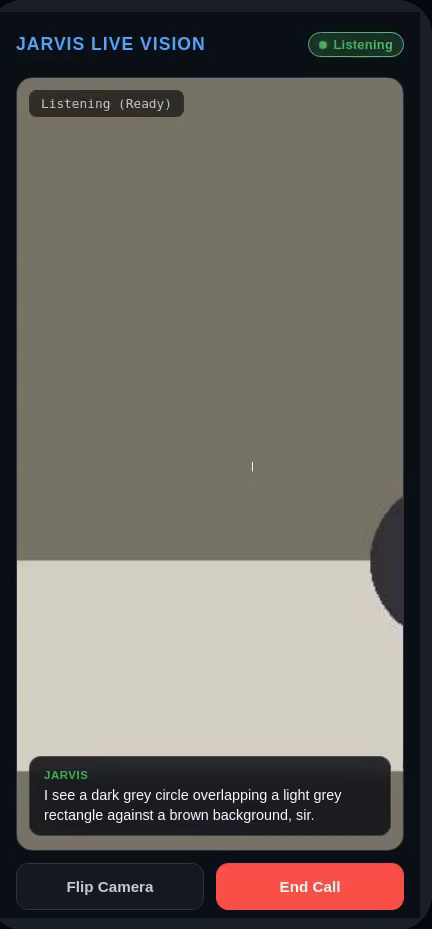
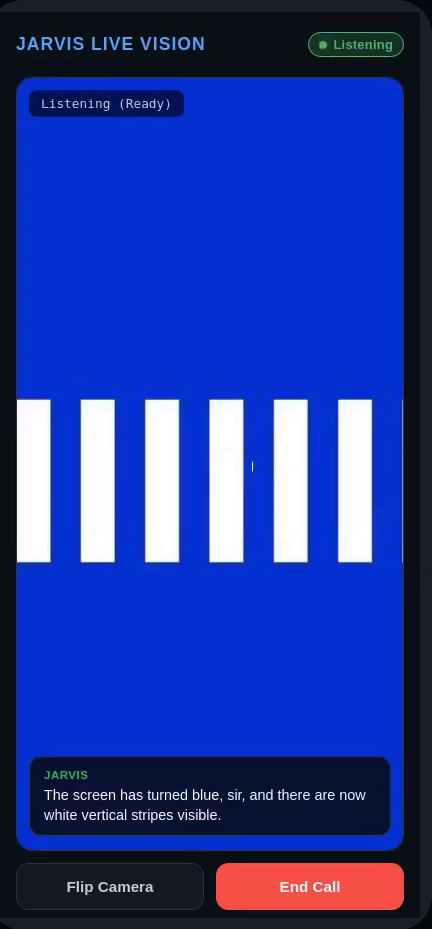
assets/live-page-answer.png and assets/live-page-sighting.png show the page mid-session —
the camera in view, the agent answering from the frame, then the sighting spoken once.
assets/live-transcript.png is the relay's own transcript for that session: WATCH_ARMED,
the VISION_EVENT, the WATCH_CHECK verdict and WATCH_FIRED visible (check 1, 971 ms).
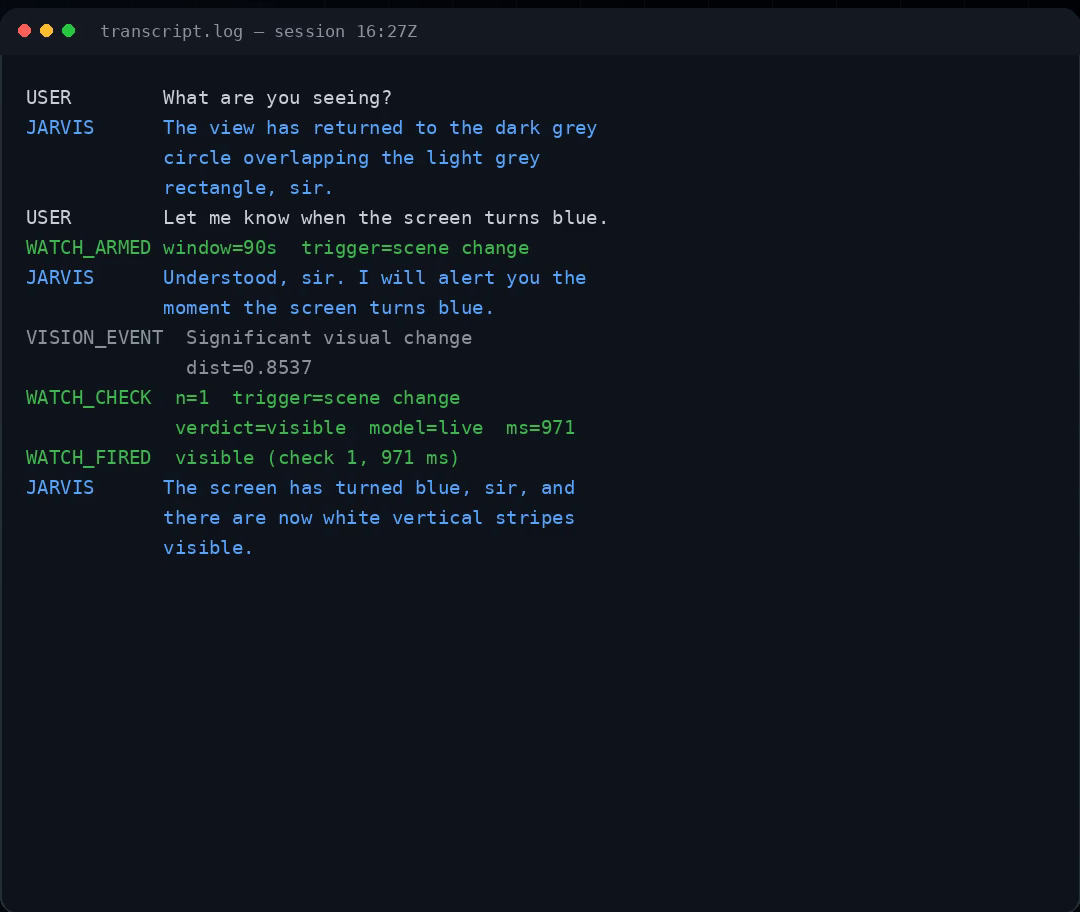
All three are frames from the demo recording described in docs/demo.md. The page, the
model's answers and the transcript rows are real; the camera frames in that recording are
synthetic stand-ins for a desk and a screen, and the voice on the user's own lines is
synthesised.
Licence
MIT. See LICENSE.
README from the reviewed commit 2474b58; it updates when the author re-pins.



