
 samirsawarkar
hermes plugins install samirsawarkar/lumina
Contents
- Why Lumina
- The three protections
- Quick start
- Everything you can ask
- Private by design
- How it works
- First run & permissions
- Requirements · Limits · FAQ · Development
Why Lumina
Almost everyone photographs their passport, a bank card or a Wi-Fi password at some point. Those photos then sit in the camera roll for years, next to holiday pictures, and get sent around unedited.
An AI agent with access to your files makes this riskier: one careless tool call can upload the raw image. A prompt or a skill can only ask the model to be careful. Lumina is a plugin, so it can enforce it: a hook checks every outbound tool call before it runs.
The three protections
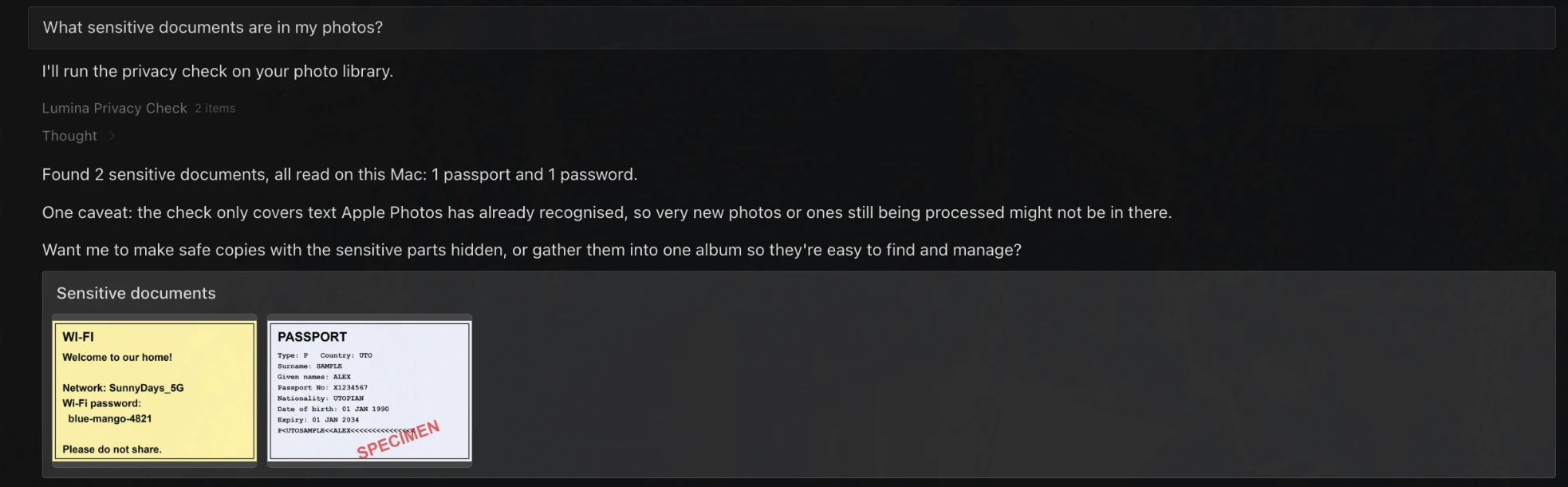
1. Privacy check-up — find them
"What sensitive documents are in my photos?"
Lumina reports how many passports, payment cards, passwords and ID documents are in your library. The model gets counts and kinds, never the values.
2. Safe Send — share a copy that is proven clean
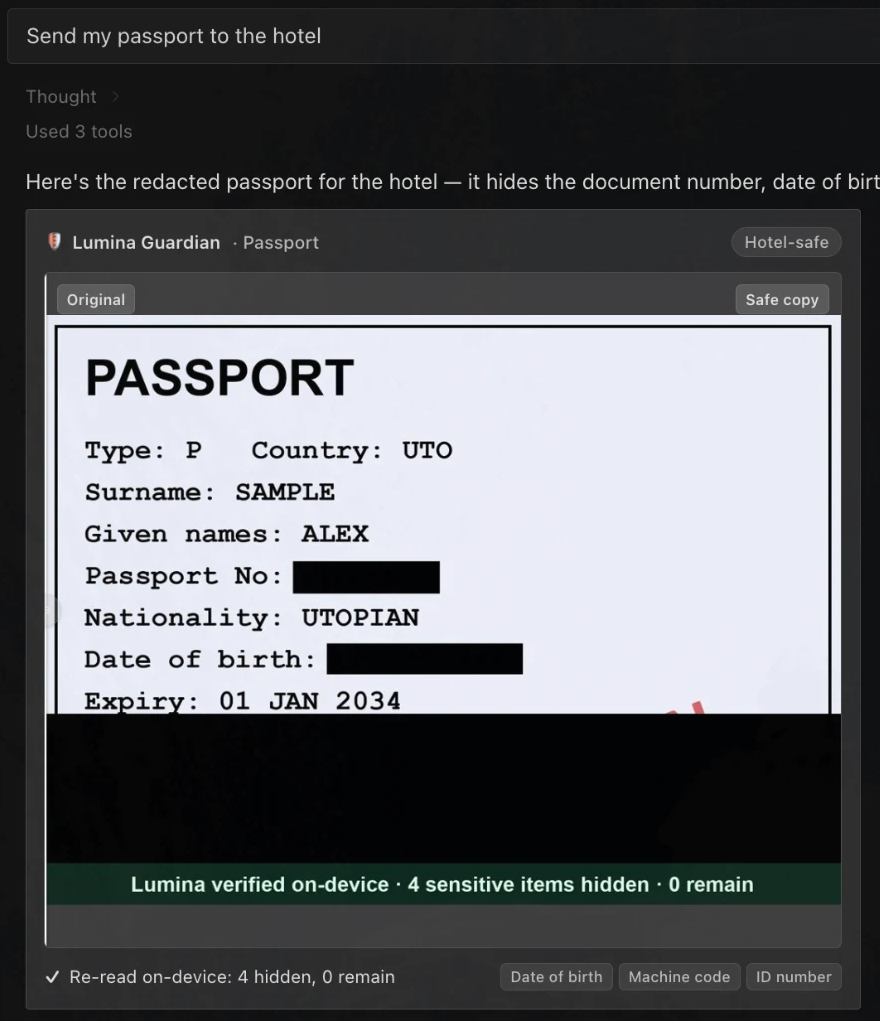
"Send my passport to the hotel"
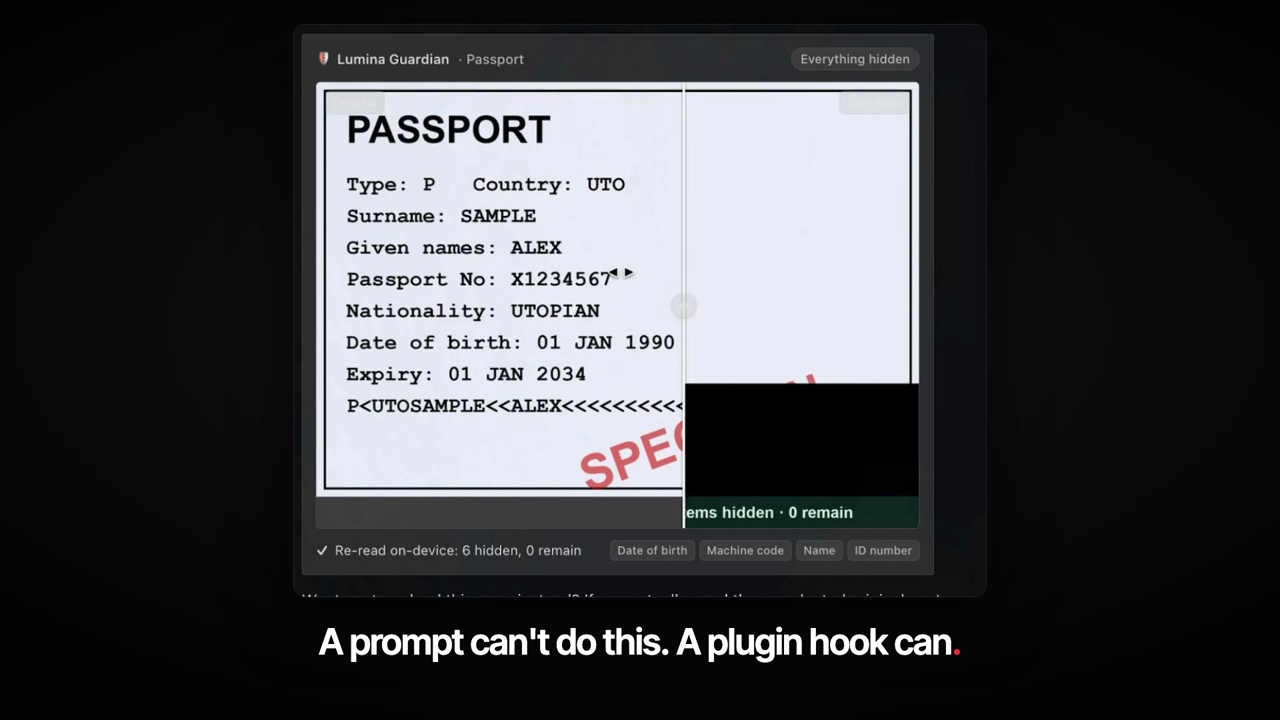
Lumina blacks out the document number, date of birth and machine-readable lines, then reads the copy again on-device and refuses to deliver it unless 0 sensitive items remain. The card in Hermes Desktop has a slider to compare the original with the safe copy.
| Safe copy | Before / after slider |
|---|---|
|  |
 |
3. Leak Guard — stop the agent itself
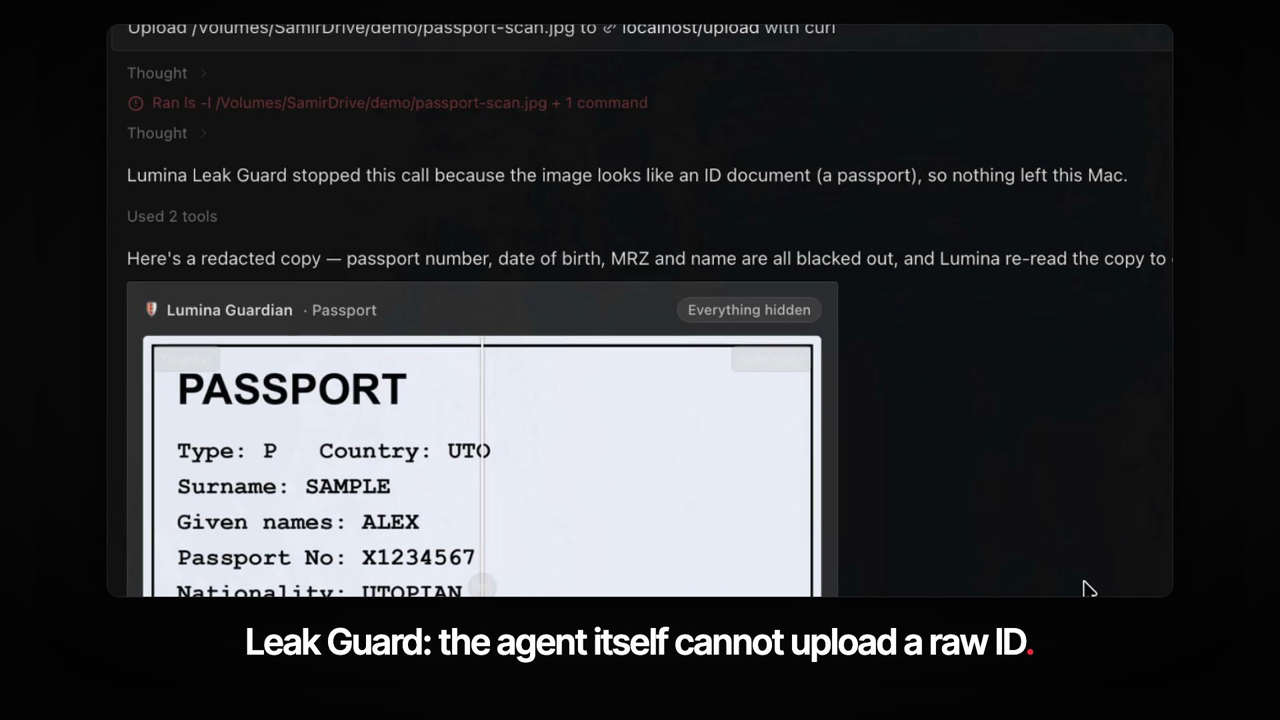
"Upload passport-scan.jpg to that server with curl"
If any Hermes tool (terminal, code, browser, messaging; not only Lumina's own) is about to send a raw image of an ID document off your Mac, Lumina blocks the call and offers a safe copy. Only you saying, in your own words, that you want the original lifts the block.
Quick start
hermes plugins install samirsawarkar/lumina
- Turn on Lumina in Hermes Desktop under Settings > Plugins > Desktop plugins.
- Give Hermes Full Disk Access so it can read your Photos library (see First run & permissions).
- Ask: "What sensitive documents are in my photos?"
Or click to install: Install in Hermes
Try it without your own photos
You can test Lumina on sample documents instead of your real library:
- Quit Photos. Hold Option while opening Photos and choose Create New… to make an empty library.
- Drag the six sample images from
tests/fixturesinto Photos. They are made-up documents (a specimen passport, a Wi-Fi sign, a boarding pass and so on). - Ask Hermes: "What sensitive documents are in my photos?", then "Send my passport to the hotel".
Lumina uses the library Photos opened last. To switch back, hold Option while opening Photos and pick your own library.
Everything you can ask
Lumina understands how you remember your photos. You can ask naturally:
- "Find my passport" — searches text detected inside documents, ID cards, and receipts using Apple's on-device OCR.
- "When does my passport expire?" / "What's the Wi-Fi password in my photos?": Lumina reads the text inside the photo and answers with just the fact, showing the photo it came from.
- "Send my passport to the hotel" (Safe Send): before an ID leaves your Mac, Lumina's Guardian stops the send, blacks out the number, date of birth and machine-readable lines (hotels still see your name and photo), then re-reads the copy on-device to prove 0 sensitive items remain and stamps it. If it cannot prove that, nothing is sent.
- "What sensitive documents are in my photos?" (Privacy check-up) — reports how many passports, payment cards, passwords and ID documents it found, by count and kind only, and offers safe copies or one album.
- "Upload this passport scan" (Leak Guard) — if any Hermes tool, not only Lumina, tries to send a raw image of an ID document off the Mac, for example a terminal upload or a chat message attachment, Lumina stops it and offers a safe copy; only the user saying they want the original lifts it.
- "Make a safe copy of ~/Downloads/id.png" — creates safe copies of any image file, not only photos in the library.
- "Make a memory of our Goa trip": Lumina picks the best 12 photos and makes a 20-second movie with slow zooms and captions. It plays right in Hermes, or arrives on your phone.
- "Is anything of mine expiring soon?": Lumina reads your photographed passport, cards and memberships and tells you what expires first. Ask Hermes to remind you before the date.
- "Photos of Mom at the beach" — combines recognized family members with scene classifications.
- "Make an album of our Goa trip" — finds photos from your holiday and creates a ready-to-share album in Apple Photos.
- "Send me my passport photo" (from your phone) — message Hermes while on the go via Telegram or WhatsApp and get the photo sent directly to your chat.
- "On this day" — surface favorite memories captured on today's calendar date across previous years.
- "Show me receipts from last December" — finds expense records by date range and extracted text.
- "Show screenshots from this week" — gathers recent screenshots without mixing in camera shots.
Private by design
Your photos are deeply personal. Lumina is built with a strict privacy architecture:
- Runs 100% on your Mac: All database queries and thumbnail rendering happen locally on your computer.
- No cloud, no API keys: Lumina itself makes no network requests and needs no accounts. Photos leave your Mac only when you ask Hermes to send one to your phone: that photo is then delivered through the messaging app you chose (Telegram, WhatsApp, …).
- Uses Apple Photos' on-device analysis: Powered by
osxphotos, Lumina reads the faces, scene labels, and OCR text that macOS has already indexed locally on your device. - Never deletes photos: Lumina is strictly read-only, with the single exception of creating new albums in Apple Photos when you explicitly ask. There is no delete or cleanup capability.
- Never writes into your photo files: Text Lumina reads from a photo is kept only in its own cache inside the Hermes data folder on your Mac. Nothing is attached to or changed in the files of your Photos library.
- iPhone photos work as they are: HEIC photos are read directly; safe copies are saved as JPEG.
- Local thumbnails only: Image previews are generated on demand and served only to your local Hermes Desktop window over a local loopback connection (
localhost).
What the AI sees (and what it doesn't)
We believe in complete transparency:
- What your chosen AI model sees: When Hermes searches your library, it receives the photo metadata needed to answer your request — dates, place names, recognized people names, scene labels, and short snippets of detected text (up to 80 characters). When you ask a question about a photo ("when does my passport expire?"), the full text of that photo (at most 5 photos) is sent so the model can answer. For the privacy check-up, the model receives counts, kinds, a fixed document type name, photo ids and dates; never the recognised text or values.
- What your chosen AI model never sees: the images themselves and deleted or hidden photos. When you ask to send a photo to your phone, the model only handles the attachment line for the exported copy, not the image. Leak Guard reads images on the Mac to check for sensitive documents, so raw images are never sent to the model.
How it works
Lumina connects Apple Photos with Hermes through tools, hooks and a Desktop UI:
At a glance
flowchart LR
    U[You in Hermes] --> M[Model]
    M -->|tool call| G{Lumina hook<br/>pre_tool_call}
    G -->|raw ID image going out| B[Blocked<br/>safe copy offered]
    G -->|anything else| T[Tool runs]
    M -->|lumina_* tools| L[Lumina]
    L --> P[(Apple Photos library<br/>read-only)]
    L --> V[Apple Vision<br/>on-device text reading]
    L --> D[Desktop UI<br/>photo grid, Safe Send card]
Plugin Tools
Lumina provides 10 tools:
lumina_search: Fast metadata and OCR search across people, places, scene labels, dates, media types, and recognized text. Returns photo IDs and metadata, never disk paths.lumina_create_album: Automates Apple Photos to create or update albums using photo IDs from previous searches.lumina_library_info: Checks library status, counts of photos and videos, and top recognized people.lumina_export: Sends full photos to messaging channels (like Telegram and WhatsApp) using HermesMEDIA:attachments.lumina_read_text: Reads the full on-device OCR text of up to 5 photos so Hermes can answer questions like "when does my passport expire?".lumina_redact: Safe Send. Finds sensitive fields with Apple Vision text boxes (presets: hotel, airline, all), draws black bars on a pixel-only copy (no EXIF/GPS), re-runs OCR on the result and refuses to deliver unless 0 sensitive strings remain. Accepts a photo ID or a filepathto safe-copy any image file on disk.lumina_privacy_check: Privacy check-up. Finds sensitive documents in the library (passports, payment cards, passwords, ID documents), reporting counts and kinds without exposing values.lumina_make_memory: Renders up to 12 photos into a ~20 s MP4 (Ken Burns zoom, captions) with ffmpeg, or an animated GIF if ffmpeg is not installed. Returned as aMEDIA:line, so Hermes Desktop plays it inline and messaging apps deliver it.lumina_expiry: Finds expiry dates in the on-device OCR text of document photos and lists them soonest first.lumina_on_this_day: Gathers photos taken on today's month and day from earlier years.
Text search, expiry radar and the check-up read the text Apple Photos has already recognised (the same index Photos search uses), so they do not have to read every photo first. This is tested on a small library; very large libraries are not yet measured. Photos added in the last few days are read directly. On Macs without that index Lumina reads photos itself a few seconds at a time and says when a result is partial.
Lifecycle Hooks
pre_llm_call: Detects photo-related requests in chat and provides prompt context nudging the agent towardlumina_search.post_tool_call: Remembers the visual photo grid directive generated during the search.transform_llm_output: Automatically appends the photo gallery directive (::lumina-photos{...}) if the language model forgets to include it.pre_tool_call(Guardian): blocks sending the original of a photographed ID document throughlumina_exportand points Hermes tolumina_redactinstead, unless you explicitly ask for the original.pre_tool_call(Leak Guard): checks every outbound tool call in Hermes, not only Lumina's (terminal uploads, message sends, browser tools). If an image in the call shows an ID document, the call is blocked and a safe copy is offered.transform_llm_output(Leak Guard): on chat apps, removes an attachment line for a raw ID image before the reply is delivered.pre_tool_call: Validates album creation requests to protect against empty names or invalid IDs before touching Photos.
Desktop UI & Thumbnail API
- Inline Transcript Directive:
::lumina-photos{ids="..." title="..."}renders a native, responsive photo grid right inside the conversation thread. Clicking any thumbnail highlights that photo in Apple Photos. - Side Pane: A dedicated right-hand layout pane (
PANES_AREA) displays medium-resolution previews for large result sets alongside library health and status. - Local Thumbnail Service: An internal FastAPI service (
/api/plugins/lumina/thumbs) serves cached, downscaled JPEGs extracted directly from Apple Photos' derivative caches.
First run & permissions
On your first search, macOS prompts for permission to access your photo data and automate Apple Photos.
1. Full Disk Access (Reading Photos)
Lumina reads Apple Photos' local database. macOS requires Full Disk Access for this read-only access:
- Open System Settings > Privacy & Security > Full Disk Access.
- Toggle on Hermes (or your terminal application if running Hermes from the command line).
- Restart Hermes.
2. Automation (Creating Albums & Viewing Photos)
When you ask Lumina to create an album or click a photo to open it in Apple Photos, macOS requests Automation permission:
- A system dialog asks: "Hermes wants to control Photos". Click OK.
- If you ever need to verify or re-enable this, open System Settings > Privacy & Security > Automation, find Hermes, and turn on Photos.
Requirements
- Operating System: macOS (tested on macOS 26 on Apple Silicon).
- Hermes Agent: Hermes >= 0.23.
- Optional:
ffmpeg(brew install ffmpeg) for MP4 memory videos; without it Lumina makes an animated GIF. - Apple Photos: the library Photos last opened. To use a different one, set
LUMINA_LIBRARYto its.photoslibrarypath.
Limits
- macOS only: requires macOS and an Apple Photos library.
- Relies on Apple's text recognition having processed the library: text search, expiry radar and the privacy check-up depend on macOS indexing.
- Leak Guard catches the common routes (file paths in tool calls and chat attachments) and is not a guarantee against a determined attacker.
- The check-up reports only four kinds (passports, payment cards, passwords and ID documents) and prefers missing a document over a false alarm.
- Setting
LUMINA_LEAK_GUARD=offturns the guard off.
FAQ
Does any photo leave my Mac? Not through Lumina. It makes no network requests. A photo leaves only when you ask Hermes to send one, and for ID documents the safe copy is offered first.
Does the AI model see my photos? No. It sees metadata and short text snippets, and the text of a photo only when you ask a question about that photo. See What the AI sees.
Can Lumina delete or edit my photos? No. It reads the library and can create albums when you ask. Safe copies are new files; originals are never changed.
What if the check cannot prove a copy is clean? Then nothing is delivered. Safe Send fails closed.
Can I turn Leak Guard off? Yes: set LUMINA_LEAK_GUARD=off. For a single message, just say you want the original.
Does it work with iCloud Photos? Yes for photos whose originals or previews are on the Mac. Photos that exist only in iCloud are not downloaded.
Development
git clone https://github.com/samirsawarkar/lumina
cd lumina
python -m pytest -q tests
The suite has 152 tests. Tests that need a real Photos library use the MIT-licensed test libraries from the osxphotos repository: set LUMINA_TEST_LIBRARY to one of its .photoslibrary folders.
Check the plugin against the Hermes catalog rules with:
hermes plugins validate .
| File | What it holds |
|---|---|
| __init__.py | Tool and hook registration, routing hints |
| photos.py | Search, expiry dates, albums, export, memory videos |
| privacy.py | Privacy check-up and document kinds |
| redact.py | Text boxes, redaction and the re-read verification |
| leakguard.py | Outbound tool-call checks |
| desktop/plugin.js | Photo grid and Safe Send card for Hermes Desktop |
| dashboard/plugin_api.py | Local thumbnail and before/after image service |
Bug reports and pull requests are welcome. For a security problem, see SECURITY.md. Changes are listed in CHANGELOG.md.
Credits & License
- osxphotos by Rhet Turnbull (MIT License) — powers on-device database queries, metadata extraction, and OCR access.
- PhotoScript by Rhet Turnbull (MIT License) — provides AppleScript automation for album creation and photo spotlighting.
- Demo placeholder images courtesy of Unsplash via Lorem Picsum.
Lumina is released under the MIT License. Copyright © 2026 Samir Sawarkar.
README from the reviewed commit aaced5b; it updates when the author re-pins.


