 stupidburgers
Pinpoint
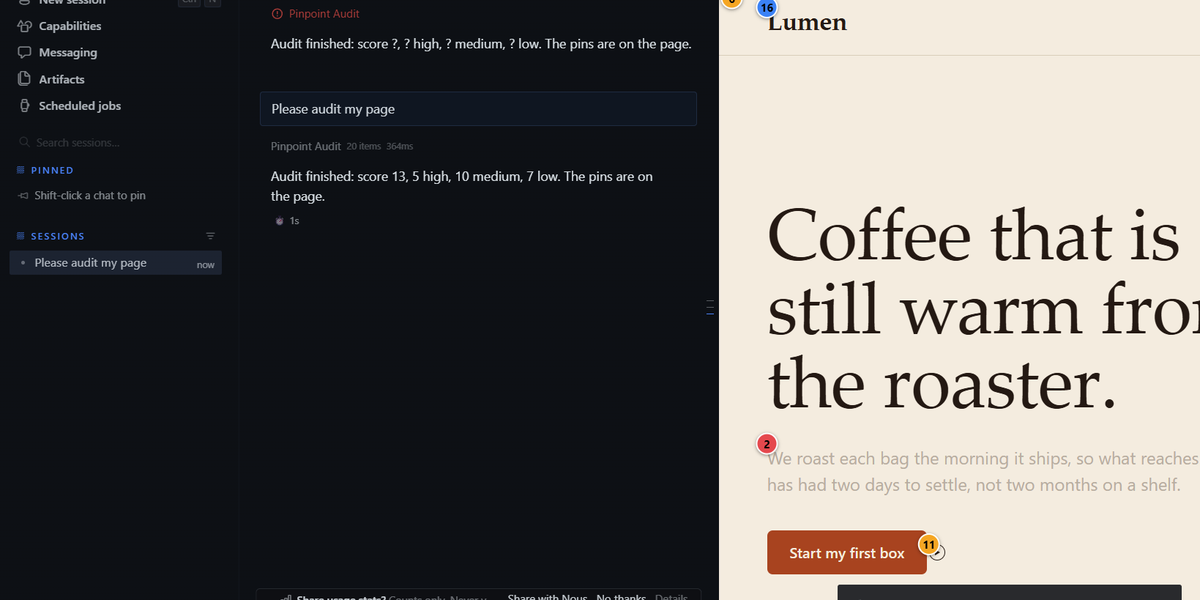
Pinpoint is two modes on the page open in Hermes Desktop's Browser pane.
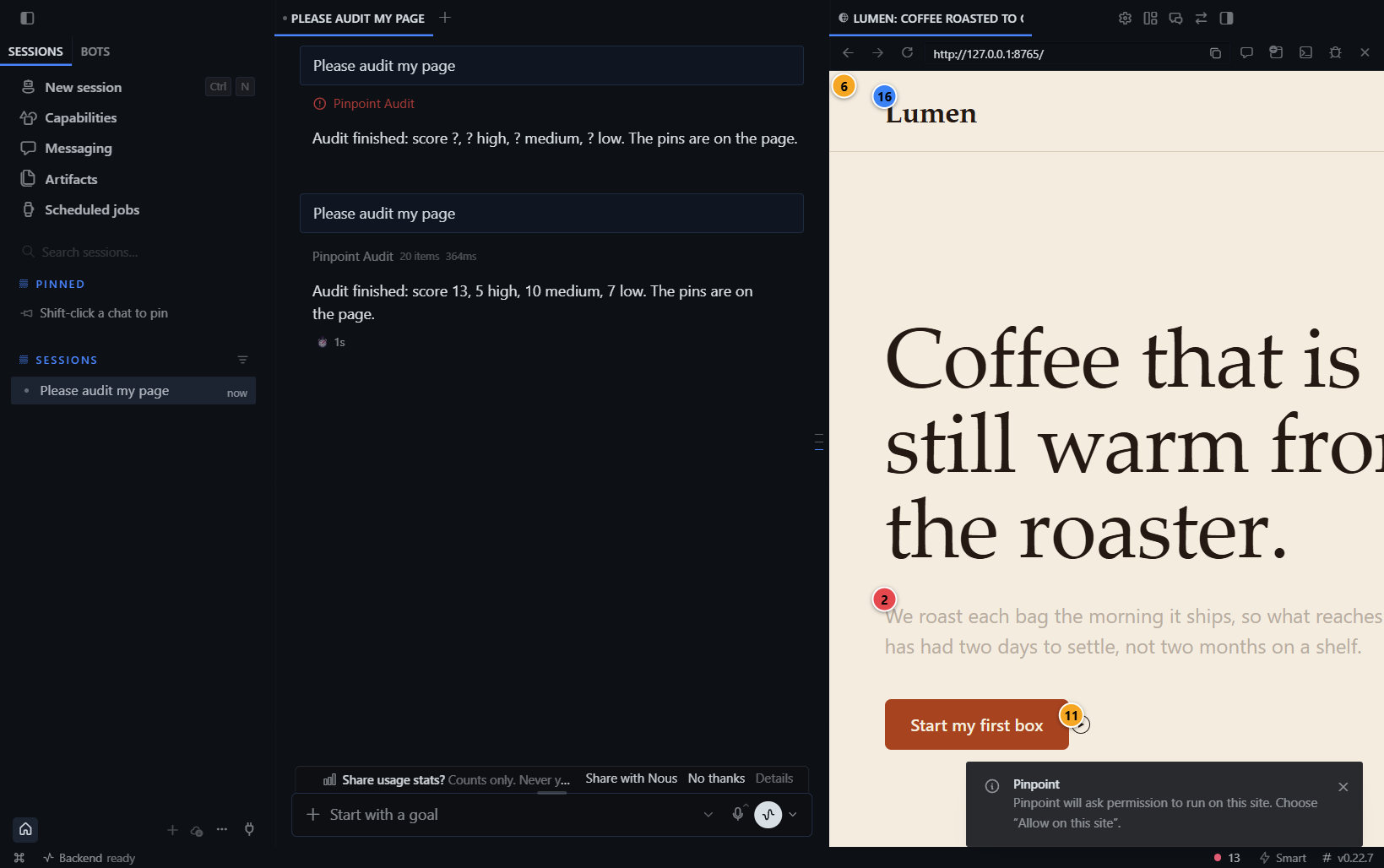
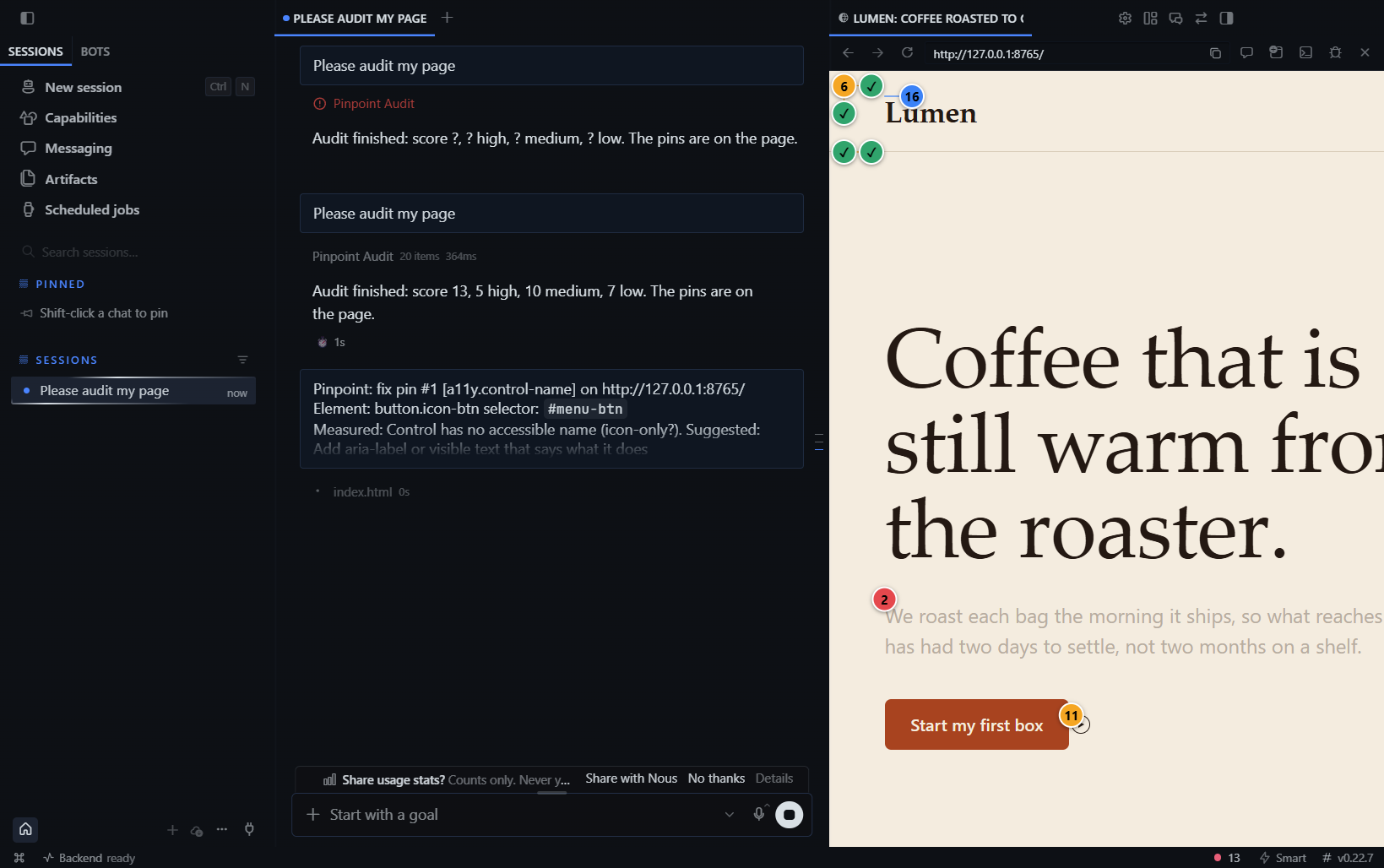
- Audit mode measures the live page, pins numbered markers on the real elements that fail, and lets you send a pin to the agent as a fix task. When the page changes it audits again: pins turn green and you get a score delta and a pasteable fix receipt.
- Design mode lets you point at any element, see its live box model, typography, layout and contrast, move through the DOM with the arrow keys, and send a targeted instruction to Hermes. The agent can do the same with
pinpoint_audit(inspect_selector=...).
The agent does not have to guess whether a CSS change worked. pinpoint_audit returns measured numbers (contrast ratio, pixel sizes, selectors), and a second call returns delta: ids that are fixed, gone or not rechecked, plus new and remaining ids (definitions below; this is evidence from a limited engine, not proof).
Install (30 seconds)
Needs Hermes Desktop with agent >=0.22.7.
hermes plugins install stupidburgers/pinpoint     # once listed: hermes plugins install pinpoint
hermes plugins enable pinpoint                    # Python half: tools, store
Then enable the second half in Desktop: Capabilities > Plugins > Pinpoint. Both halves must be on. On the build I tested, the Desktop half did not register until it was enabled explicitly.
Use it: open a page in the Browser pane (Ctrl+Shift+L), run Pinpoint: audit page from the command palette (or ask the agent to audit the page). The first time per site, Desktop asks "Let Pinpoint run scripts on this page?". Choose Allow on this site.
What you get
| Audit and pins | Pin card, Fix with Hermes | Re-audit after the fix |
|---|---|---|
|  |
 |
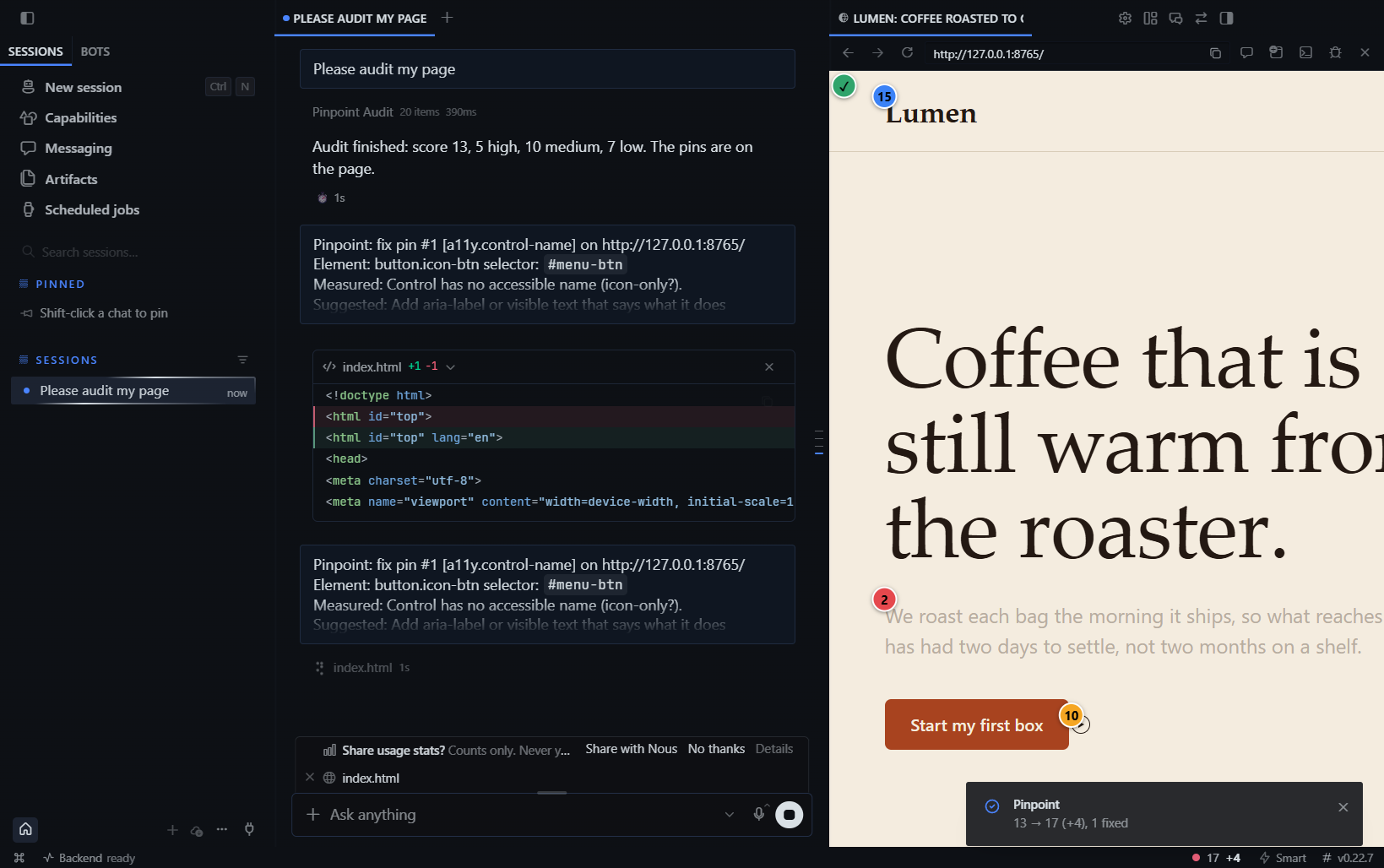 |
Design mode in the real Desktop Browser pane (hover HUD and card, then ArrowRight moves the selection to the next sibling):
| Select and inspect | Keyboard navigation |
|---|---|
| 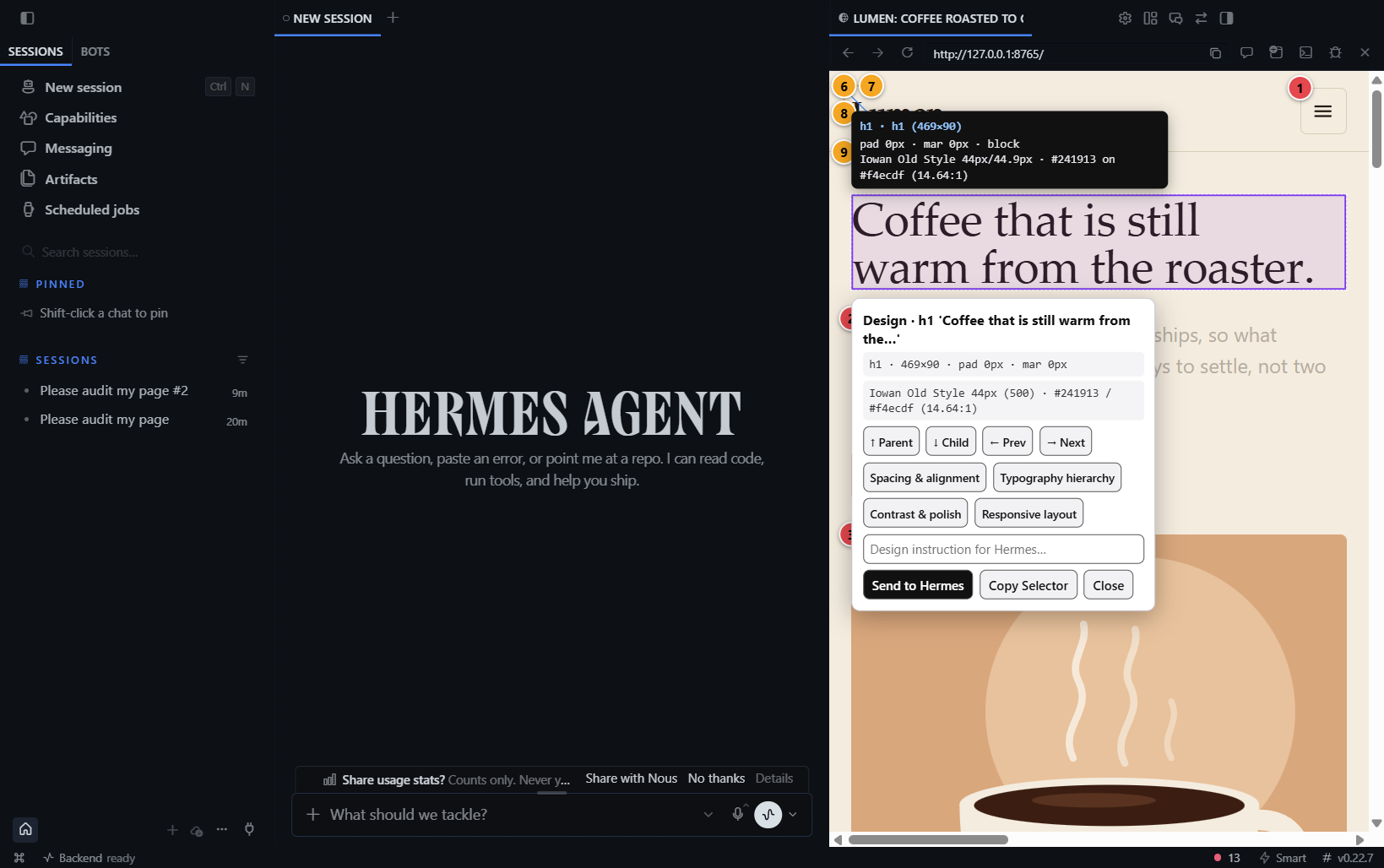 |
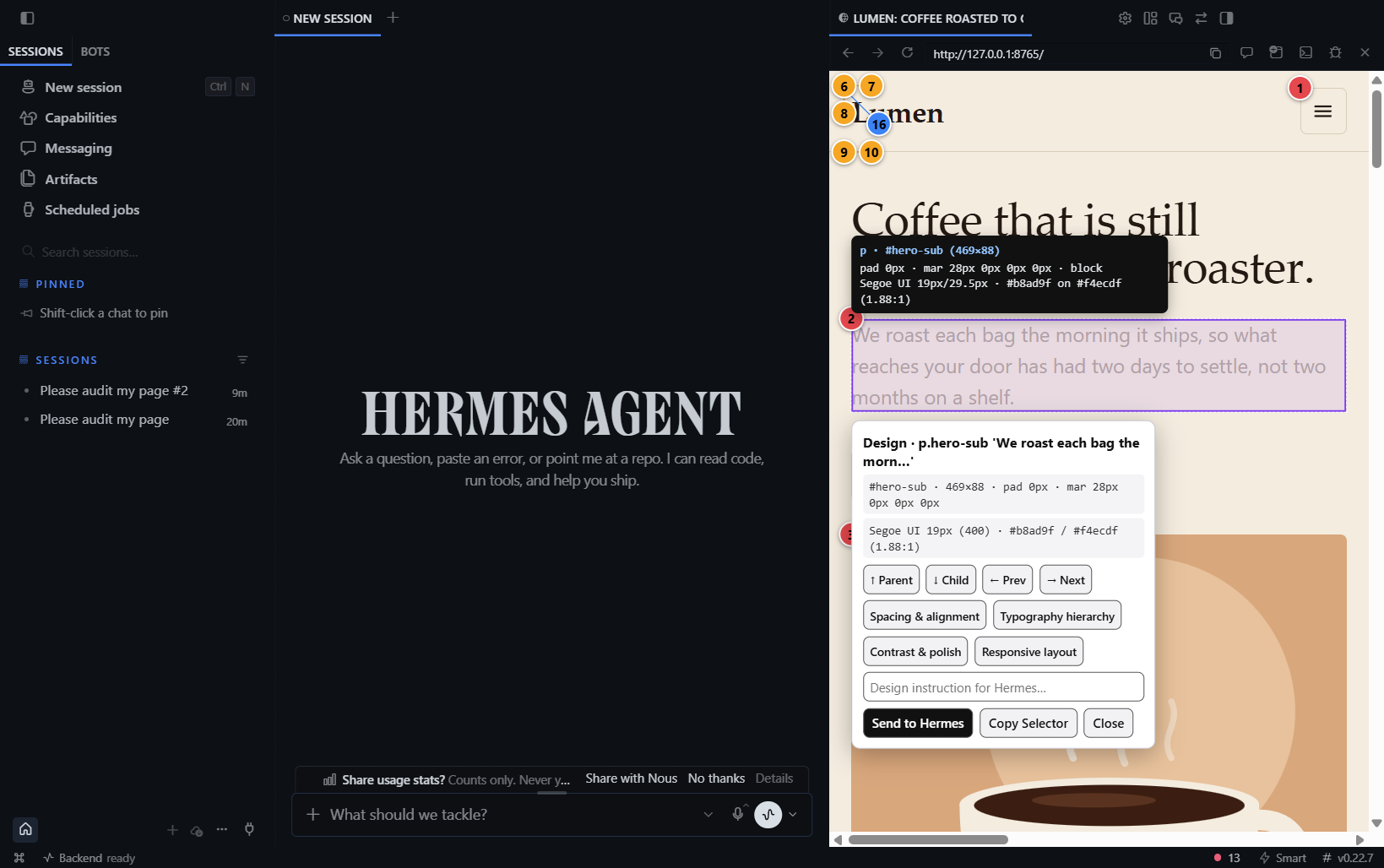 |
Two agent tools (the second mode needs no extra tool):
| Tool | Does |
|---|---|
| pinpoint_audit | Runs the checks on the open page, draws pins, returns findings (rule, severity, CSS selector, measured values, fix hint). Called again after an edit it adds delta: fixed, gone, new and remaining ids, score before and after, and a Markdown receipt. Optional inspect_selector also returns the live computed metadata of one element. |
| pinpoint_pins | list stored pins for a page, dismiss a finding as intentional (needs a reason, and the user's agreement), reopen, clear. |
14 rules, WCAG 2.2 thresholds: text contrast, tap-target size, missing alt, unlabeled form fields, unnamed buttons and links, heading order, focus indicator removed, lang, page title, zoom blocked by the viewport meta, horizontal overflow, text under 12 px, tight line height, tightly spaced targets. Full table in SPEC.md section 5.
How it works
flowchart LR
  M[Model] -->|pinpoint_audit| P[Python half<br/>tools, SQLite store]
  P -->|plugin event: audit.request| D[Desktop half<br/>plugin.js]
  D -->|executeJavaScript<br/>after consent| E[In-page engine<br/>window.__pinpoint]
  E -->|findings| D
  D -->|POST /result via ctx.rest| P
  P -->|compact JSON + delta| M
  E -. pin click, page change .-> D
  D -->|composer.submit: fix this pin| M
- The engine is one plain JS function, no dependencies. It reads computed styles and layout, never calls
.focus()or clicks anything. - Ids are stable hashes of the element's role and position in the page, not of the thing the fix changes. Fixed = a later audit no longer reports the finding, that rule ran without error, truncation or limits under the same audit options, and an element with the same signature is still on the page exactly once. Pinpoint does not re-measure that element, so fixed is not proof that it now passes. Gone = the element's signature is missing from a complete element inventory (removed, renamed or moved); never counted as a fix. Not rechecked = Pinpoint cannot tell (missing or malformed coverage, engine error, truncated or limited audit, incomplete inventory, duplicate or missing signature, changed audit options); the pin stays open. "Can't locate" in the pane only means the overlay could not find the element again; it never changes the verdict. See docs/delta-semantics.md.
- Only one Desktop window can complete an audit request, once: the winning window gets a server-minted claim token.
- Design mode never auto-sends. A pick in the page only fills the Pinpoint pane; you press Send. Page text in the prompt is labelled untrusted, and the overlay ignores synthetic clicks from page scripts.
- A pin click only submits a visible chat message when you click. Nothing is auto-sent.
- No hooks, no middleware, no subprocess, no network. Public SDK surfaces only.
How it differs from what is already around
| Existing | What it works on | Pinpoint |
|---|---|---|
| impeccable (hermes-plugin) | UI source files, via a hook and a CLI detector | Measures the rendered page, draws an overlay, no hook, no subprocess |
| redline | Markdown and code review, sidecar annotations | Different object: a live UI, with measurement |
| word-peek | Reads an HTML passage or selection through ctx.preview | Audits the whole page by rule and draws on it; same consent door |
| hardlight-ui | Design guidance, source inspection, a contrast calculator | Live page in the Desktop pane, verified fix loop |
| hermes-ios | Native iOS visual iteration | Different platform |
The claim I can back is narrow: a grep of the catalog descriptions for preview, a11y, contrast and wcag (2026-11-04) found no entry that draws measured findings on the live Browser pane. I did not read their source.
Consent
Desktop's host-owned dialog asks per site before any script runs in the page. Pinpoint cannot change its text, so the pane shows a short explanation card first. Deny and the audit returns consent_denied. Revoke any time under Capabilities > Plugins > Pinpoint.
Limits
- Contrast skips any text with a
background-imageor gradient behind it and says so inlimits. It does not guess. - The focus-indicator rule is a static CSS scan (same-origin stylesheets only), so it is a heuristic and is marked
heuristic: true. - Cross-origin stylesheets, cross-origin iframes and closed shadow roots are not scanned. Same-origin iframes are read to depth 2.
- Over 5,000 elements, only the viewport plus 2 screens above and below are audited.
- Pins render at most 60 per page. Targets outside the viewport get a pin once scrolled into view.
- Pin clicks and page changes reach the agent through polling (0.5-1 s), because the host has no page-to-plugin push.
- It measures. It does not tell you a design is good, and it is not a replacement for a screen reader pass.
Not verified yet
Items below are known to be open or unverified:
- macOS and Linux: no OS-specific code, but only Windows 11 was run.
- Hermes versions other than 0.22.7 (Desktop 2026.7363.3271.0).
- The consent Deny path was not exercised in the spike.
- Whether a real model reliably picks
pinpoint_auditunprompted (tools are deferred; a system-prompt line names both). - Multi-window claim race: the claim/token logic is unit-tested, not exercised with two real Desktop windows.
- Real-model runs: the end-to-end suite uses a scripted model, not a live provider.
- No session or window correlation: any authenticated Desktop window can claim a request (issue #18); completion is checked by the server-minted token only.
- The e2e desktop-only scenario (
test_6) fails on this build, also before the Design Mode work; the Python half stays reachable when disabled. - Design mode was exercised in the real Desktop Browser pane (isolated rig, hover HUD, click-to-select card, arrow-key navigation; screenshots below) by driving it over the debug port. The pane-side Design Mode inspector card and palette command were not clicked through in the real app.
Measured results
| rule | TP | FP | TN | FN | precision | recall |
|---|---|---|---|---|---|---|
| a11y.contrast | 8 | 0 | 9 | 0 | 1.00 | 1.00 |
| a11y.control-name | 7 | 0 | 6 | 0 | 1.00 | 1.00 |
| a11y.focus-indicator | 4 | 0 | 4 | 0 | 1.00 | 1.00 |
| a11y.form-label | 6 | 0 | 5 | 0 | 1.00 | 1.00 |
| a11y.heading-order | 4 | 0 | 20 | 0 | 1.00 | 1.00 |
| a11y.img-alt | 2 | 0 | 1 | 0 | 1.00 | 1.00 |
| a11y.lang | 1 | 0 | 1 | 0 | 1.00 | 1.00 |
| a11y.page-title | 1 | 0 | 1 | 0 | 1.00 | 1.00 |
| a11y.tap-target | 7 | 0 | 14 | 0 | 1.00 | 1.00 |
| a11y.viewport-zoom | 1 | 0 | 1 | 0 | 1.00 | 1.00 |
| layout.h-overflow | 4 | 0 | 4 | 0 | 1.00 | 1.00 |
| spacing.tight-targets | 2 | 0 | 2 | 0 | 1.00 | 1.00 |
| type.line-height | 3 | 0 | 3 | 0 | 1.00 | 1.00 |
| type.text-small | 5 | 0 | 4 | 0 | 1.00 | 1.00 |
| all | 55 | 0 | 75 | 0 | 1.00 | 1.00 |
These numbers are measured on this project's own hand-labeled 130-element corpus (docs/metrics.md), not on an independent benchmark. Treat 1.00 as "no misses on our fixtures", not as a general accuracy claim. Pinpoint has 14 rules and is not a replacement for axe-core or Lighthouse.
Develop
Use an external virtual environment and pytest basetemp. See
the reproducible full-tree validation recipe and
.github/workflows/ci.yml for pinned test dependencies and the floor Hermes
CLI installation. These checks are headless; they do not start the gateway.
desktop/plugin.js is generated from desktop/src/app.js plus the engine, because disk plugins cannot import sibling files.
Disclosure
Disclosure - Pinpoint's desktop half runs its own audit script inside the web page open in Hermes Desktop's Browser pane, only after you allow it for that site (Desktop's per-origin consent dialog; revocable under Capabilities > Plugins). The script reads computed styles, layout, the page's visible text, and the values of the attributes id, name, href, src, alt and aria-label (plus title and placeholder when it works out an element's accessible name); it contains no cookie access and does not read form-field values, and it draws an overlay. Findings (CSS selectors, short element labels that can contain page text, measured values) are stored locally in a SQLite file under the plugin-data folder (pinpoint/data.db; at most 20 pages, 200 pins and 50 audits per page; entries older than 7 days are pruned). They are sent to the model only when the agent calls pinpoint_audit/pinpoint_pins or when you click Fix, Fix all high or Send in the Desktop pane (or its command-palette action); an event raised by the page itself never sends a chat turn. Pinpoint also adds a short hint to the system prompt that names its two tools. The desktop half polls the page every 0.5-1 s while pins are shown (via executeJavaScript) and re-audits automatically after page changes (switch off in the pane). pinpoint_audit blocks up to 90 s waiting for the Desktop (configurable) and returns desktop_unavailable when no Desktop window answers, including under cron. No network calls, no subprocesses, no shell, no credentials, no telemetry, no files written outside plugin-data; it never edits your source (the agent does, under normal approvals). Limits: verified on Windows 11 with Hermes 0.22.7 only (macOS and Linux are untested). Results are a limited heuristic audit, not WCAG certification, and fixed / gone describe what this engine observed, not a guarantee about your page.
License
MIT. See LICENSE.
README from the reviewed commit 06b911e; it updates when the author re-pins.