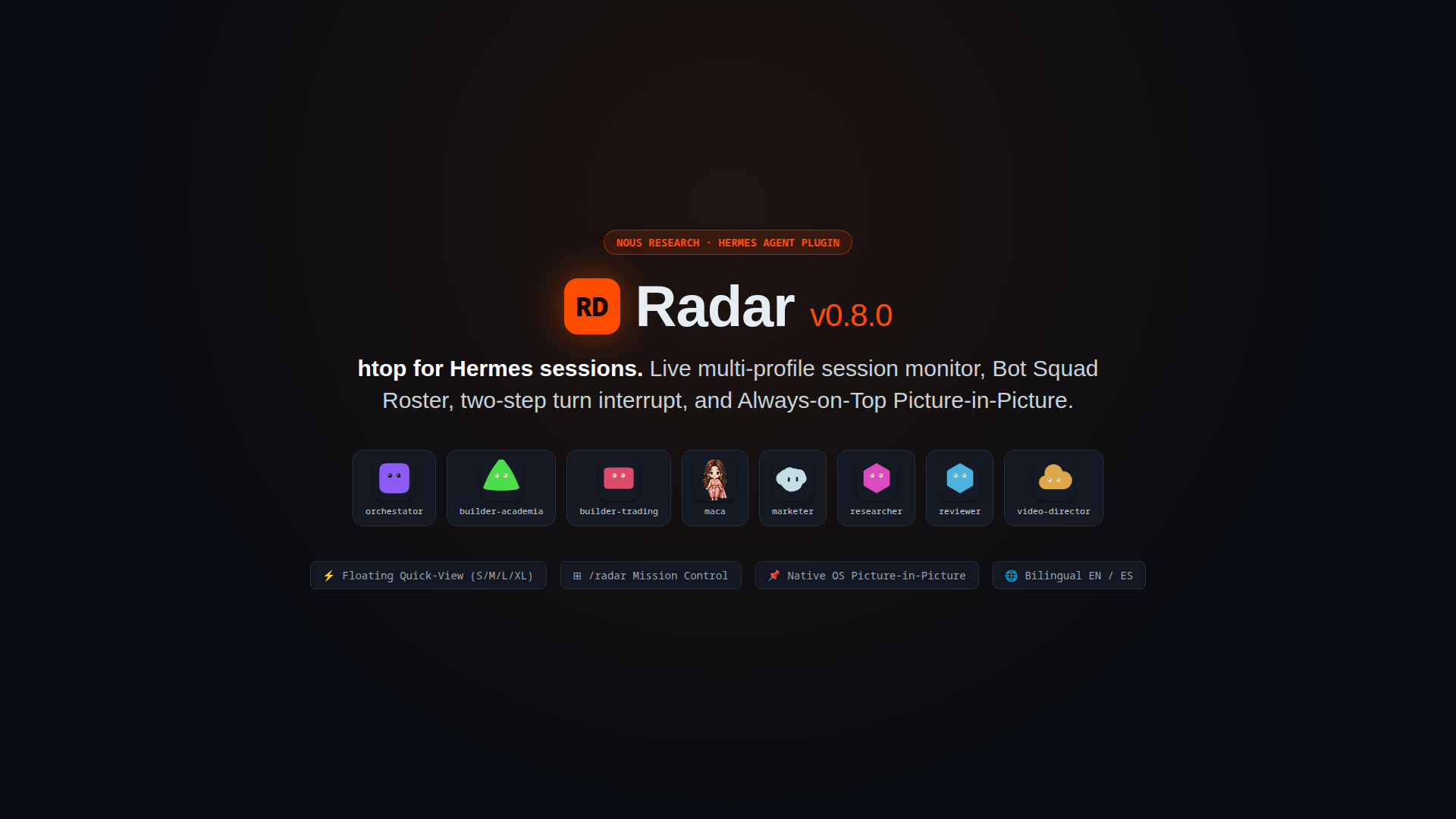
 Dieguezar
Radar
htop for Hermes sessions. A live, compact view of every Hermes session,
across every profile: what the agent is doing right now, in which session and
profile, with which model, for how long, whether it is waiting for you, and
whether something is stuck. A floating card (S/M/L/XL, 320 × 214 by default)
is the quick view; a resizable 380 px right side panel is the full, filterable
view. A hung turn can be stopped in two clicks from either one.
Radar keeps no history of its own: it reads the current state of each
profile's state.db on every refresh.
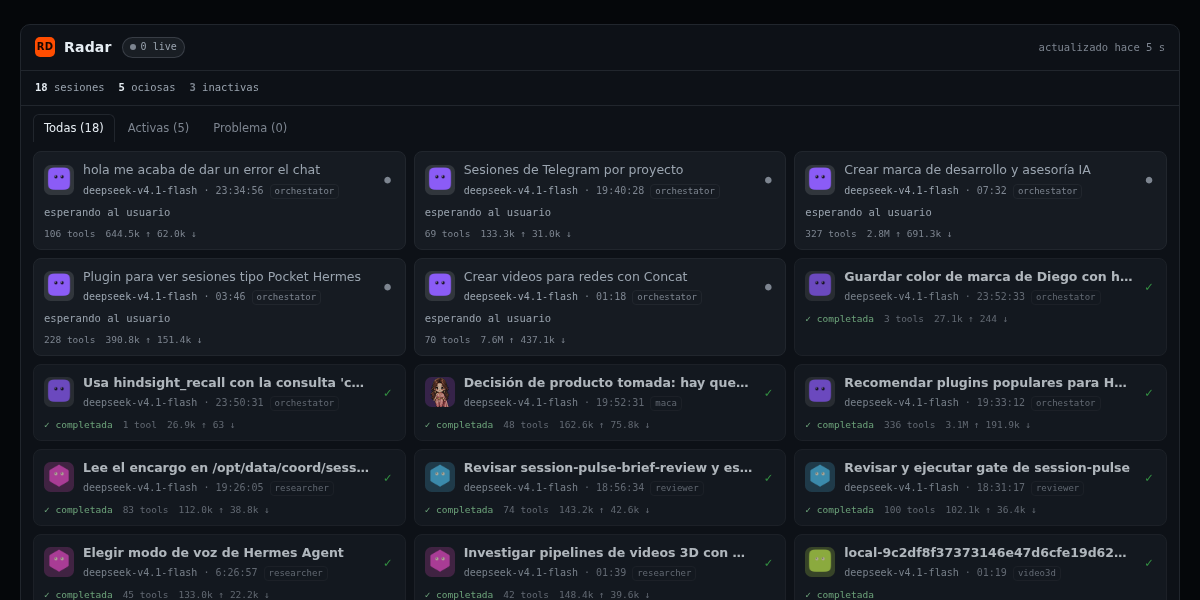
Real capture of the web mirror (
/view), 2:1 (1200 × 600) for the catalog
image:field, 24 h window. The same page supports?theme=light
(docs/view-light.png); it is the same markup with the light token set.
The Desktop half renders the same payload twice: the floating card (S/M/L/XL)
is the quick view, and the 380 px right panel is the full panel with grouped
rows, filters and settings.docs/view-waiting.pngis the same page with the
Esperan tab selected, so every amber «espera» row is on screen.
What it does
- Discovers the root Hermes home (
state.db) and every named profile
(profiles/<name>/state.db). - Classifies each session from its turn lease, admissions queue, async
delegation state and last activity. - Shows the in-flight tool (the last
assistantmessage withtool_callsand
no matching tool result), falling back tolast_activity_description. - Serves three surfaces from one backend:
GET /live— JSON snapshot.GET /view— self-contained HTML mirror (no CDN, no build step).GET /avatar/{profile}— the profile's real PNG avatar as a data URL.
- Paints the real bot avatar, not a generic initial: the same
assets/avatar.pngthe Bots roster shows, clipped to the profile's stored
silhouette, plus itsui_meta['hermes-bots']title, shape and color. - Ships a Desktop half (
desktop/plugin.js) with four integrated surfaces, bilingual i18n (ES/EN), and extensible localization:radar— the floating quick view (placement: 'floating', anchored
bottom-right) at one of four sizes, S 320 × 214 by default, one compact row
per session. Automatically hides whenever the right side panel or the
full-page/radarview is open so views never overlap, and restores when
returning to chat.radar:panel— the full 380 px right panel (placement: 'right') with
grouped rows, filter tabs, large counters, settings, telemetry chips
(subagents⑂, tool calls⚙, tokens↑/↓, git branch⎇), row actions
and the profile's real avatar (PNG or vectorblobatarSvg).nav(sidebar.nav) +page(routesat/radar) — Left Sidebar
navigation entry (Radarwithpulseicon) that opens a full-page
multi-column Radar workspace featuring a Bot Squad Roster bar (1-click
visual filter by bot profile), aggregate token & tool telemetry pills,
instant search, and right-click Open in split support.- 📌 Siempre encima / Always on Top (Picture-in-Picture) — 1-click native
Chromium Picture-in-Picture mini-window (canvas.captureStream→
video.requestPictureInPicture()) that floats on top of all OS windows even
when Hermes Desktop is minimized. - 🌐 Bilingual & Extensible i18n (
ES/EN+registerRadarLocale) —
1-click language switch (ES/EN) across the floating card, side panel,
full-page/radar, Picture-in-Picture canvas, and/viewweb mirror,
persisted underradar.lang. Adding new languages takes a single dictionary
entry inLOCALESor callingregisterRadarLocale(code, strings).
- Emits
plugin.radar.changedat most once every 2 s, and only when
the visible snapshot changed.
States
| State | Meaning |
| --- | --- |
| running | A turn lease is live, or an async delegation is still in flight. |
| stalled | The lease expired while the session was active in the last 30 minutes, or an open row recorded a failing end_reason without an ended_at. Needs attention. |
| queued | An admission is waiting in the queue for that session. |
| idle | No live lease, but activity happened inside the requested window. Waiting on the user; painted amber as espera. |
| dormant | No live lease and activity outside the window. Counted as inactivas, never listed. |
| done / failed | The session has a terminal end_reason inside the window. |
dormant is not stalled: an abandoned session from last week is history, not
a hung turn now. Only a recent expired lease paints red.
The Desktop panes
Quick view — radar (floating, S/M/L/XL)
-
Header:
S · M · L · XL(320 × 214, 420 × 300, 520 × 380, 620 × 460), the
active one highlighted and remembered asradar.size. The same header has a
⤢button that reveals the full side panel (host.revealPane, when the host
exposes it). Choosing a size re-registers the pane by id: same body, new
width/height. -
One compact row per session in panel order:
running→stalled→queued
→idle→done→failed.dormantis never listed. -
Idle rows carry an amber espera badge and an amber left edge: the turn
ended and the user is awaited. Stalled rows stay red (!). -
Footer:
N trabajando · M esperando · K colgadasplushace Xs, or
sin conexiónwhen the last fetch failed (the previous snapshot stays on
screen). A profile that could not be read is named there too:
sin conexión · <perfil>. -
Click a row to open that session (
host.openSession). A running or stalled
row exposes parar: the first click asks¿seguro?, the second sends
session.interrupt.
Full panel — radar:panel (right, 380 px)
- Tiles into the Desktop's right sidebar role: use the right-sidebar
toggle to show or hide it. It is the full panel; the floating card stays the
quick view. - Three large counters in the header: trabajando, esperando and
colgadas.esperandoturns amber andcolgadasred only when they are
above zero. Clicking a counter selects the matching filter. - Filter tabs Todas · Trabajando · Esperan · Problema, each with its count.
The chosen filter is stored asradar.filterand restored on mount. - Grouped list with a header and count per group: Trabajando
(running+queued), Esperando (idle), Colgadas (stalled) and
Terminadas (done+failed, hideable). - Every row shows the 30 px profile avatar, the session title, the
profile_titlebadge, the current tool/activity line, the last-activity time
(hace …, falling back to elapsed) and three actions: open, parar
(running/stalled only) and copiar the session id (copiadoconfirms for a
moment). - Settings in Ajustes / Settings, persisted through the verified
ctx.storageAPI
underradar.*:- Idioma / Language:
ES/EN(radar.lang). - Perfiles / Profiles:
Todos/Solo el actual(radar.profiles). - Ventana / Window:
1 min/3 min/10 min/30 min/1 h/24 h(radar.window). - Mostrar terminadas / Show finished: sí / no (
radar.finished). - Densidad / Density: compacta / cómoda (
radar.density).
The panel requests/live?profiles=all|current&window=60|180|600|1800|3600|86400from those
values, and offers a 1-click Ver últimas 24 h / View last 24h button when
recent sessions are outside a shorter window.
- Idioma / Language:
- Both panes share the stop fence: before sending the interrupt they re-read
/livewith their current query and abort when the row disappeared, left
running/stalled, or advanced to anotherexecution_generation. That is
the real fence:session.interruptdoes not inspect generations itself. - Stalled rows say how long the heartbeat has been missing
(sin latido hace 12 min), not justsin latido. - Every colour derives from the Desktop theme tokens (
--dt-foreground,
--dt-muted-foreground,--dt-destructive) throughcolor-mix(), so the
avatar initial, the amber waiting state and the red stalled state stay
legible in light and dark skins. - Each pane refreshes every 2 s while it is mounted and listens to
plugin.radar.changedwith a 500 ms debounce. Both are deliberately
registered withoutlifecycleKeepAlive: collapsing or closing a pane
unmounts the body, and the poll stops with it.host.paneVisibility('radar')
is alwaysfalsefor a floating pane (it is not in the layout tree), so it is
not used as a refresh gate.
API
Mounted by the gateway under /api/plugins/radar/.
| Endpoint | Description |
| --- | --- |
| GET /live?profiles=all\|current\|<list>&window=180 | Snapshot JSON. profiles accepts all, current or a comma-separated list. window is seconds (15–86400). |
| GET /view?profiles=...&window=...&theme=dark\|light&tab=all\|working\|waiting\|problem | HTML mirror of the same view, refreshing every 2 s. The page embeds the profile list already resolved by select_profiles(), never the raw query, so the selector cannot inject markup. theme only switches the palette; tab only selects the initial tab. Both are validated against closed sets. |
| GET /avatar/{profile} | {"data_url": "data:image/png;base64,..."}, or {"data_url": null} when the profile has no image. Only names returned by discover_profiles() are served, the file is always <profile>/assets/avatar.png ($HERMES_HOME/assets/avatar.png for the root), the PNG signature is validated and files over 512 KB are refused. Unknown or traversal-shaped names return 404. |
Example payload:
{
  "generated_at": 1793853258,
  "profiles": ["default", "maca"],
  "window_s": 180,
  "sessions": [
    {
      "id": "20261105_030552_19a2c2",
      "profile": "default",
      "profile_label": "default",
      "profile_title": "orchestator",
      "avatar": {
        "has_image": true,
        "shape": "blobatar",
        "color": "#ff4d00"
      },
      "title": "Plugin para ver sesiones",
      "model": "deepseek-v4.1-flash",
      "state": "running",
      "activity": "terminal",
      "tool": "terminal",
      "since": 1793853041,
      "last_activity_at": 1793853041,
      "elapsed_s": 216,
      "messages": 77,
      "tools": 46,
      "tokens_in": 102789,
      "tokens_out": 31273,
      "cost_usd": 0.0,
      "cwd": "/home/user/project",
      "git_branch": "main",
      "parent_id": null,
      "source": "desktop",
      "stalled": false,
      "waiting_for_user": false,
      "waiting_reason": "",
      "can_interrupt": true,
      "execution_generation": 4,
      "delegating": 0
    }
  ],
  "totals": {
    "running": 1, "queued": 0, "stalled": 0, "idle": 4,
    "done": 0, "failed": 0,
    "working": 1, "waiting": 4,
    "live": 1, "dormant": 7, "sessions": 5
  }
}
profile_titleisui_meta['hermes-bots'].title, else the profile's
display_name, else the profile name. The badge renders this, never the slug.avatarcarries only metadata:/livenever inlines the image.shapeand
colorcome fromui_meta['hermes-bots']; a missing color is derived from the
profile name with the same 31-multiplier hue hash the Desktop SDK uses, and
the root profile stays neutral. Both are cached by filemtime/size.waiting_for_useristrueexactly forstate === "idle": no lease is live
and the activity is inside the window, so the turn ended and the user is
awaited.waiting_reasoncarries that row'sactivitytext (or""when
there is none) and is always""for every other state.totals.workingisrunning + queued;totals.waitingisidle. Every
per-state counter (running,queued,stalled,done,failed,live,
dormant,sessions) is unchanged.can_interruptistrueforrunningandstalledonly. A queued request is
cancelled through the admission API, not interrupted.execution_generationmirrorssessions.runtime_generationand isnull
when the column does not exist. The Desktop re-reads/liveimmediately
beforesession.interruptand aborts if the row disappeared, is no longer
running/stalled, or reports a different generation. The RPC itself does
not check the generation: the fence is client-side, and there is no retry.delegatingcountsasync_delegationsrows still in flight for that session.profile_errorsappears only when a profile database could not be read
(locked, corrupt, missing tables); the rest of the snapshot is unaffected.- Rows are ordered by state, then by
elapsed_sdescending.
Disclosure
Read this before installing:
- Reads every profile's
state.db, read-only. Each file is opened through a
SQLite read-only URI (mode=ro) withPRAGMA query_only = ON. The plugin
never writes, creates or migrates a database. It reads session rows, turn
leases, admissions, async delegations and a bounded lookup inmessagesfor
the in-flight tool call. - Can interrupt any session's turn, in any profile. The stop button sends
the gateway RPCsession.interrupt, which cancels the running turn. This is
a real state change, not a read; it requires two clicks in the panel and is
never automatic. For a session owned by another profile, the Desktop routes
the RPC through that profile's route descriptor and refuses (sin ruta al perfil …) rather than guess. - No network access from the plugin, no telemetry, no credentials. Nothing
leaves the machine and no secret file is read. The stop travels over the
already-open Desktop gateway socket.
The manifest says exactly this: radar is a read-only observer of
SQLite state and a gateway client that can stop a turn. It declares no
capabilities of its own.
Installation
Requirements: Hermes >= 0.22, the Desktop app for the floating pane, and a
Unix-like or Windows host. See Platforms.
From the catalog
hermes plugins search radar
hermes plugins install radar --enable
The catalog install picks up the unified package: the dashboard backend and the
desktop/plugin.js half.
From Git
hermes plugins install https://github.com/Dieguezar/hermes-radar --ref <40-char-sha> --enable
Manual
Unified package (backend + Desktop half) into the Hermes home:
git clone https://github.com/Dieguezar/hermes-radar \
  "$HERMES_HOME/plugins/radar"
Desktop half only (no backend, no /view) into the Desktop plugin door:
mkdir -p "$HERMES_HOME/desktop-plugins/radar"
cp desktop/plugin.js "$HERMES_HOME/desktop-plugins/radar/plugin.js"
Then make sure the plugin is enabled in config.yaml:
plugins:
  enabled:
    - radar
Restart the gateway only if it was already running (the dashboard backend
mounts at gateway startup); the Desktop half loads at app startup. Session
Radar registers no tools, hooks, middleware or commands.
Platforms
- Linux — supported and verified here.
- Windows — supported by design, verified on Linux. Every path goes through
Path.as_uri()(drive formfile:///C:/...), and the SQLite fallbacks cover
Windows locks: if the open fails with a-walsidecar present,
mode=ro&readonly_shm=1is used. There is no Windows execution in this
release; treat it as argued, not proven. - macOS — not tested by this release; it is not declared in the manifest.
Limits
- No history. Radar persists nothing; closing the panel loses the
view. - Floating pane vs. Always-on-Top PiP.
placement: 'floating'is a
renderer-level card inside the Hermes workspace; minimizing Hermes to the OS
hides that card. To keep watching sessions while Hermes is minimized, click
📌 Siempre encima (sp-pip) in any Radar surface (or/view) to pop out
the native Chromium Picture-in-Picture Always-on-Top overlay window. placement: 'floating'is not in the public SDK doc. The renderer
implements it (floating-panes.tsx) and the type is exported
(sdk/index.ts), andhermes plugins validateaccepts it, but a public
documented flag is not the same guarantee. Re-verify on a Desktop upgrade.- Bounded scans. At most 200 sessions per profile, one
LIMIT 1tool
lookup per visible active session (cached 6 s, purged on write), and no full
messagesscan. The change watcher stops itself after 60 s without/live
requests and the next request relaunches it. - Hidden sessions are excluded. Rows with
hidden = 1are not listed. - WAL reads. A WAL database in
mode=roneeds its-shm/-walsidecars
while a gateway is writing. If the primary open fails and there is no-wal
sidecar, Radar retries with?mode=ro&immutable=1; on Windows it
retries with?mode=ro&readonly_shm=1. A profile that still cannot be read
is skipped and reported inprofile_errors. - Costs come from
sessions.estimated_cost_usd; profiles that do not
populate it report0.0.
Local verification (no gateway restart)
cd ~/projects/hermes-radar

# Backend tests (also runnable with pytest when available)
/opt/hermes/.venv/bin/python tests/test_api.py

# Hermes admission checks
/opt/hermes/bin/hermes plugins doctor .
/opt/hermes/bin/hermes plugins validate .

# Standalone harness (does not touch the live gateway)
/opt/hermes/.venv/bin/python -m uvicorn --app-dir tools devserver:app --port 8791
curl -s 'http://127.0.0.1:8791/api/plugins/radar/live?profiles=all'
curl -s -o /dev/null -w '%{http_code}\n' 'http://127.0.0.1:8791/api/plugins/radar/view'
Set RADAR_HOME to point the harness at another Hermes root;
RADAR_DISABLE_WATCHER=1 disables the background watcher (used by the
tests).
The Desktop half is checked statically:
node --input-type=module --check < desktop/plugin.js
hermes plugins validate .    # includes the "desktop surface" rule
README from the reviewed commit 80435fa; it updates when the author re-pins.


