
 StarAtNyte
sentinel-vision
Tell Hermes in plain English what to watch ("tell me if someone takes my coffee mug"). It watches a webcam, your screen or a stream, and sends you an alert with a photo when it happens.
A local change detector reduces calls to your vision model, under hard call caps you set. Some rules also use periodic checks. Ask later: "what happened at my desk today?".
Try it (no camera needed)
- Install and enable the plugin. Until the catalog entry is merged, use the local checkout instructions under Install.
- Add
plugins.entries.sentinel-vision.allow_gateway_injection: truetoconfig.yaml(needed for alerts outside the classic CLI) and routeauxiliary.sentinel_visionto a vision-capable model (Required setup). - In the chat where you want alerts, run
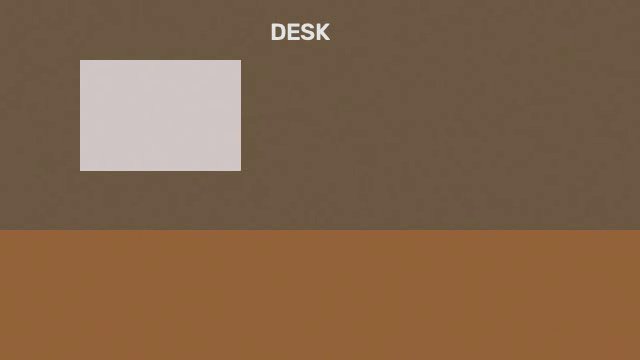
/sentinel setup --test-delivery. It sends a test message and reports whether Hermes accepted it. Check that the test actually appears in your chat; acceptance alone does not verify photo rendering. On Telegram or Discord, send/sentinel hereto bind the route. - Put a short MP4 of a desk with a mug that is then taken away somewhere (or generate one with the script in docs/LIVE_TEST.md).
- Tell Hermes:
watch file:/home/me/mug.mp4 and tell me if someone takes my coffee mug(add?loop=trueto replay it). - When the mug leaves, check for the alert and snapshot. Timing and accuracy depend on your model and settings. Ask
what happened today?to query stored events.
60-second demo: watch your build page
- Open your CI or test dashboard on one monitor.
- Tell Hermes:
watch screen:1 and tell me when the page shows a red "Build failed" banner(add@x,y,w,hto watch only part of the screen, for examplescreen:1@0,0,760,1080). - Hermes writes the rule and starts watching. Break a test.
- A few seconds later (Sentinel confirms across several looks before it speaks), an alert arrives in the chat with a screenshot of the failing page. Ask
what happened on my build page?to read it back from event memory.
Verified live, and what is not
Run on 2026-11-07 against Hermes v0.23.0 in an isolated home, with a real vision model, in the classic CLI and a file: video source: from one plain-English request the agent found the Sentinel tools, created a rule, and when the mug left the video it stored an event with a snapshot and injected an alert (one judge call, confidence 0.98). Not yet verified: the real Hermes Desktop app (the Desktop pane was only rendered in a stub host), Telegram delivery with a photo, and a real-webcam retest of the latest cost fixes. Details in docs/LIVE_TEST.md.
What it does
You tell Hermes what to watch. Sentinel checks frames on your machine with a cheap change detector and asks a vision model about a frame only when something changed. When the answer is confirmed across several looks, it wakes the agent in the chat that created the rule.
Illustrative conversation (the wording is typical, not a recording; the recorded run is in docs/LIVE_TEST.md):
You:    watch my webcam and tell me if someone takes my coffee mug
Hermes: Watching "camera:0" for: "Is the coffee mug missing from the desk?". Checks only
        when something moves. Cap: 60 vision checks/hour, 500/day.
        ...
Hermes: [photo] Sentinel: the mug was picked up by a person in a grey hoodie
        (confidence 0.92, event #14). Reply "false alarm" if that is wrong.
You:    false alarm, that was me
Hermes: Marked event 14 as a false alarm. The photo is now a "should not trigger" example
        and the rule is slightly stricter.
You:    what happened at my desk today?
Hermes: 3 events: 09:12 mug placed, 11:40 someone sat down, 14:03 mug taken [photos]
It is built for the classic CLI, messaging platforms and Hermes Desktop (which adds a Sentinel pane, see Desktop pane). Only the classic CLI has been tested against real Hermes so far; in it the alert turn was stored but not rendered live. Desktop and Telegram delivery still need live verification.
Features
- Plain-English rules, compiled once into a precise yes/no visual question, a mode, hold time and cooldown.
- Sources: webcam, screen (whole monitor or a region), RTSP and HTTP streams, snapshot (JPEG) URLs, an image folder, and local video files (
file:, with optional looping) for repeatable demos and tests. - Three rule modes:
trigger,condition(true for N seconds),absence(expected thing missing for N seconds). - Six bundled recipes that need no setup and no rule-compiling call.
- A local change gate that rejects sensor noise, lighting changes, shadows and small camera shake before any model is called, plus a slow-drift check that still notices gradual changes such as a rising liquid level or a door opening slowly.
- Movement questions ("walking toward the door", "the level is rising") are shown to the model as a short ordered sequence of recent frames in one call.
- Rules that fire on the same camera frame share one vision call; borderline positive verdicts get one stricter second look at a higher-resolution crop.
- k-of-n confirmation (2 of 3 by default), confidence threshold, per-rule cooldown, global alert rate limit.
- Hard budgets on vision calls per hour and per rolling 24 hours, persisted across restarts.
- Event memory: captions, times and photos in a local SQLite database, searchable by text and time.
- Feedback loop: mark alerts correct or false alarm (a false alarm raises the rule's confidence threshold, a correct alert lowers it a little); teach rules with example images.
- Delivery self-test:
/sentinel setup --test-deliverysends one small message and reports whether Hermes accepted it (at most one test a minute; a repeat answers "already tested recently"). - Optional agent action: a rule can carry an instruction ("turn on the porch light") that the agent carries out when it fires.
- Active-hours schedules per rule, region-of-interest per rule.
- Alert text built to resist prompt injection from what the camera sees.
How it works
 Source          Change gate            Vision judge          Confirmation        Alert / action
 ------          -----------            ------------          ------------        --------------
 camera:N   -->  local, no model   -->  one structured   -->  k-of-n verdicts  --> event stored
 screen          grayscale, blur,       call to your          >= confidence,       (SQLite + JPEG)
 rtsp://         brightness-normalise,  vision model          hold time,           inject_message
 snapshot:       compare to running     (aux task             cooldown             into the chat,
 folder:         background, ROI        sentinel_vision)                           MEDIA: photo,
                 changed? or idle tick?                                            optional action
        |                |                     |                    |
        +-- frames never leave the machine until the gate says "changed" or a tick is due
Why it can be cheap: the local gate filters quiet frames before model calls. Trigger rules do a start-up look and have an idle tick of at least 6 hours. A second, slow reference (the last judged frame) lets the gate notice gradual changes that its fast background would absorb. Condition and absence rules re-check on idle_check_seconds (default 300 s) so they notice states that do not involve motion. Rules in cooldown are not judged at all. A queue holds at most one pending job per rule and eight overall.
Why it is reliable: one noisy verdict cannot fire a rule (k-of-n, confidence threshold), one rule cannot flood you (cooldown, 20 alerts/hour overall), and a failing source or model is reported once and retried with backoff rather than repeated. Every external failure is caught; nothing blocks the agent loop.
Requirements
- Hermes Agent 0.22.5 or newer (
requires_hermes: ">=0.22.5"). - Python 3.11 or newer.
- A vision-capable model reachable through Hermes (see Required setup).
- Python packages installed by Hermes from
plugin.yaml:numpy>=1.26,<3,opencv-python-headless>=4.8,<6,mss>=9,<11. - A webcam, a screen, or a network camera, depending on what you watch. Screen capture needs a display (not available on a headless server).
Install
Once the catalog entry is merged:
hermes plugins install sentinel-vision
Until then, or for development, link a local checkout. From the repository root, the helper script prints the commands and changes nothing unless you pass --apply:
scripts/dev_install.sh                     # dry run against $HERMES_HOME or ~/.hermes
scripts/dev_install.sh --home /tmp/h --apply   # try it in a scratch Hermes home
scripts/dev_install.sh --uninstall --apply     # remove the link again
It symlinks sentinel-vision/ into <home>/plugins/, runs hermes plugins enable sentinel-vision --no-allow-tool-override and then hermes plugins doctor sentinel-vision --ci. Applying against your real ~/.hermes edits its config.yaml; prefer a scratch --home.
Required setup
Three things must be in place or alerts will not arrive.
1. Enable the plugin.
hermes plugins enable sentinel-vision
2. Allow alert injection. Sentinel delivers alerts by injecting a message into your chat session. Outside the classic in-process CLI, Hermes refuses this unless you allow it. This is off by default. Add to ~/.hermes/config.yaml:
plugins:
  entries:
    sentinel-vision:
      allow_gateway_injection: true
Hermes gives plugins no way to read this setting, so Sentinel cannot check it ahead of time. To find out before the first real alert, run /sentinel setup --test-delivery (or ask Hermes to run sentinel_setup_check with test_delivery=true): it sends one tiny message to this chat, which starts one agent turn, and reports delivered or blocked. It never runs on its own. If every delivery fails, /sentinel status and the tool replies show this exact snippet until a delivery succeeds.
3. Point the vision judge at a vision-capable model. Sentinel registers two auxiliary tasks you can route independently in Hermes' model settings (the auxiliary.<task> block of config.yaml, or the auxiliary-task picker):
| Task | Used for | Model needed |
|---|---|---|
| sentinel_vision | Judging frames, sentinel_look, /sentinel test | Vision-capable. This is where cost goes. |
| sentinel_rules | Compiling plain-English requests into rules | Text only; a small fast model is enough. Without it, a deterministic fallback is used (the text becomes the question). |
Example (names depend on your providers):
auxiliary:
  sentinel_vision:
    provider: openrouter
    model: google/gemini-2.5-flash
  sentinel_rules:
    provider: openrouter
    model: google/gemini-2.5-flash-lite
Telegram, Discord and other chats. In a messaging chat Hermes does not hand tools the chat's routing key; slash commands get it. Any /sentinel subcommand teaches Sentinel the route of the current session; send /sentinel here once in that chat to bind rules to it. /sentinel here all moves your existing rules in that chat to the current one. A rule created in a chat is delivered to that chat (by platform and chat id, never to the local CLI session of the process that happens to run it), and that chat only sees its own rules. If the chat route cannot be used, the alert is reported as undelivered rather than sent elsewhere.
Desktop pane
Hermes Desktop shows a Sentinel page (sidebar entry) and a status-bar chip. It is enabled by default. The page has:
- source tiles with the latest captured frame (refreshed about once a second while the page is open, paused when the window is hidden), online/offline state and the number of rules using each source;
- the rules list with mode, state, vision calls per hour, last event and cooldown, and Pause / Resume / Delete (delete asks to confirm). Long status text such as
source offline: ...wraps instead of overflowing; - a Watch form: a plain-English text, a free-text Source field (leave empty for the default source; examples
camera:0,screen; suggestions never include masked keys) and an optional recipe. Credentialed sources are masked in listings and cannot be typed back; use a namedstream_urlsentry with${SECRET}placeholders; - the event timeline with snapshot thumbnails and correct / false-alarm buttons that feed the same tuning as the
sentinel_feedbacktool; - a compact Setup checklist (fetched once from
GET /setup, without probing cameras; a button runs the device probe) shown while any check is not ok; - a budget meter and, if Hermes refuses injected alerts, the exact
allow_gateway_injectionYAML to copy.
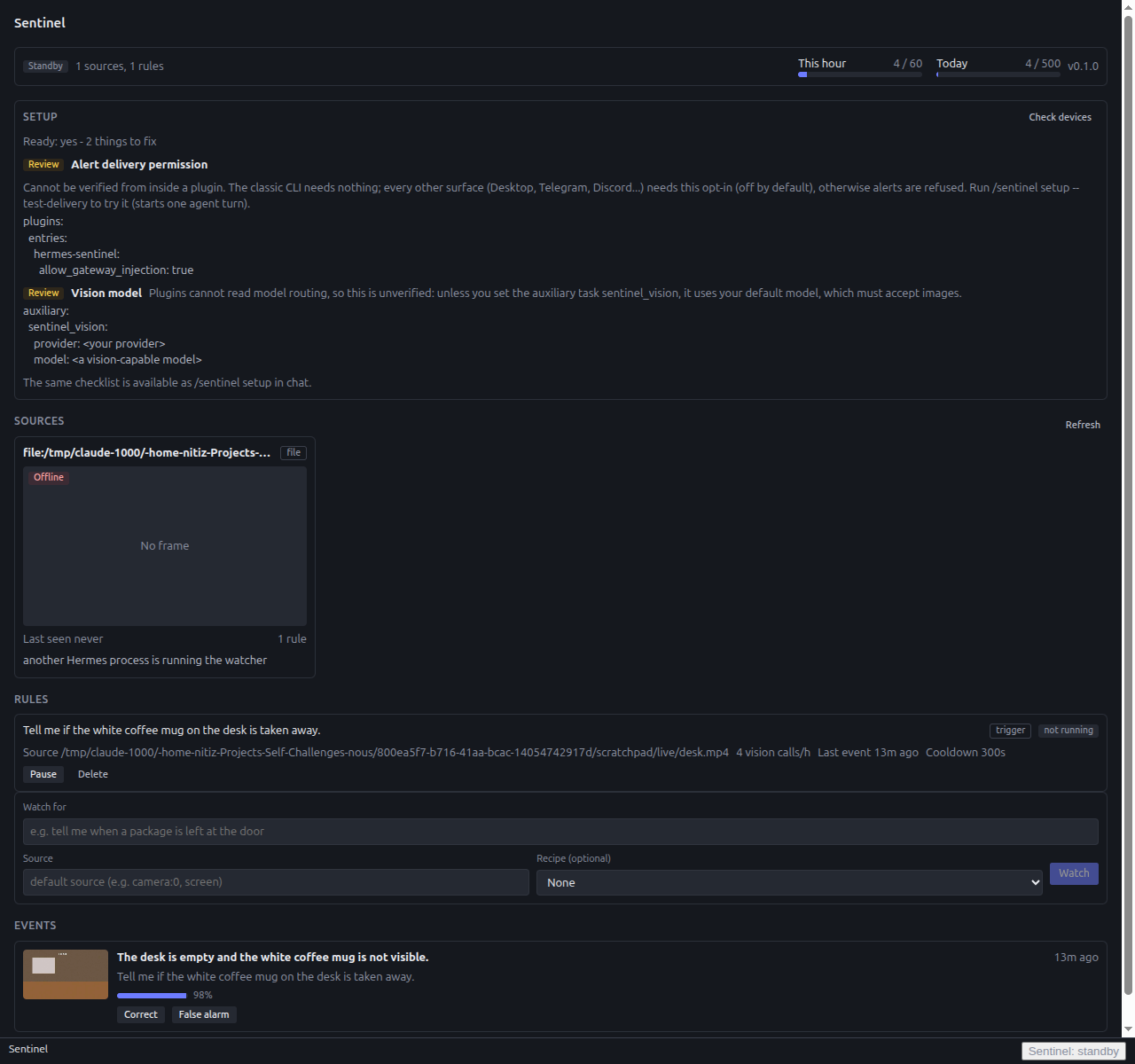
Rendered in a stub host against a live backend; the real Desktop app was not run.
It polls the plugin's REST API at /api/plugins/sentinel-vision/ (no websocket) and fetches frames and snapshots as JSON data URLs (?encoding=data_url; without the parameter the endpoints return a raw JPEG). URL credentials are masked in every response, including token-only userinfo and secret-looking RTSP path segments.
Which process hosts the pane. dashboard/plugin_api.py is a thin view over the Sentinel running in the process that loaded the plugin (it finds it by scanning sys.modules for hermes_plugins.sentinel_vision or the profile-scoped hermes_plugins.sentinel_vision__home_* names). Camera frames only exist in the process that owns the watcher (engine.lock). If Desktop is served by a separate dashboard process that never loaded the plugin, the pane shows "Sentinel is not loaded in this process" and writes return 503; start Desktop against the Hermes process that runs your agent. Everything else (CLI, chat, alerts) is unaffected.
Quick start
/sentinel setup                               # step 1: checks packages, config, cameras, delivery, storage; tells you what to fix
/sentinel setup --test-delivery               # optional: send one small message to this chat to prove alerts get through
/sentinel status                              # then: state of the watcher; shows budget and the YAML above
/sentinel here                                # once per session while Sentinel does not know its key (chat or local)
"Hermes, use the package-at-door recipe on camera:0"   # or any plain-English request
"Watch file:/home/me/clip.mp4?loop=true for someone taking the mug"   # no camera needed
Then, any time: /sentinel list, /sentinel test <rule_id>, /sentinel pause <rule_id>.
Sources
| Spec | Watches | Notes |
|---|---|---|
| camera:N (or just N) | Webcam by OpenCV index | Default is camera:0. webcam, cam:N, webcam:N and a bare camera/webcam (index 0) also work. sentinel_sources probes indexes 0-4. |
| screen, screen:N | Monitor N (1 = primary, 0 = all) | Needs a display. monitor:N is an alias. |
| screen:N@x,y,w,h | A region of a monitor | Pixels, relative to the monitor. |
| rtsp://host/path | RTSP stream | Via OpenCV/FFmpeg. rtsps, rtmp, rtmps, udp and tcp URLs work too. Network sources must be set up in stream_urls (see below); the model can't pass a raw URL. |
| stream:http://host/video.mjpg | HTTP(S) MJPEG or video stream | URLs ending .mjpg, .m3u8, .mp4 and similar count as streams. Config only, like RTSP. |
| snapshot:https://host/cam.jpg | A JPEG URL, fetched once per read | A plain http(s):// URL without a video extension is also a snapshot. Config only, like RTSP. Redirects are followed; the Authorization header is dropped when the host changes. |
| folder:/path/to/dir | The newest image file in a folder | Useful for cameras that drop files, or for testing. dir:/path and a bare existing directory path work too. |
| file:/path/clip.mp4 or a bare clip.mp4 path | A local video file (.mp4 .mkv .mov .avi .webm .m4v) | For repeatable demos and tests; no network. ?loop=true restarts at the end, ?speed=3 delivers every 3rd frame. Sentinel reads about 2 frames per second whatever the file's rate, so a 30 fps clip plays in slow motion unless you use ?speed=15 (60 fps: ?speed=30). Without loop the watcher stops with one "finished" notice at the end instead of replaying. The path must be a regular readable file. |
| stream:<name> or <name> | A named stream from stream_urls | See below. |
Named streams and secrets. Network cameras (RTSP, HTTP streams, snapshot URLs) have to be listed under stream_urls in your config, and you point at them by name (stream:door). The same goes for default_source. A URL typed into a chat, a tool call or the Desktop Watch form is refused. That's deliberate: a prompt-injected URL could otherwise point Sentinel at 127.0.0.1 or a cloud metadata address, or smuggle in a ${SECRET} placeholder and send one of your Hermes secrets to a host someone else picked. Passwords go in config as ${SECRET} placeholders; they are resolved through the Hermes secret scope when the source connects, and only for sources that come from your config. They are never written to disk, rules or error text. A literal password in a URL is rejected.
plugins:
  entries:
    sentinel-vision:
      settings:
        stream_urls:
          door: rtsp://admin:${DOORCAM_PASSWORD}@10.0.0.5/live
Then ask for stream:door.
Whole-URL secret slots. Four optional secret settings, SENTINEL_STREAM_URL_1 to SENTINEL_STREAM_URL_4, hold a complete camera URL (credentials included). Set them in the plugin settings (they go to the profile .env, never config.yaml) and reference them as ${SENTINEL_STREAM_URL_1}:
        stream_urls:
          door: ${SENTINEL_STREAM_URL_1}              # a video stream (rtsp://, http://...mjpg)
          yard: snapshot:${SENTINEL_STREAM_URL_2}     # a JPEG endpoint
Secrets at start-up. In a normal single-profile Hermes a ${SECRET} is readable on any thread, so rules loaded at start-up connect straight away. On a multiplexing gateway the secret scope only exists inside a tool or command call; a camera opened by the start-up or scheduler thread then shows "waiting for secret scope" (not offline, no notice) and connects within seconds of the next /sentinel command or any sentinel_* tool call. To make that work, every such call copies the secrets your sources reference into an in-memory cache. The cache is never written to disk and is cleared on unload; a fresh read always replaces it. /sentinel setup has a "Camera secrets" row that names (never shows) secrets that are unset or waiting.
Rule modes
| Mode | Fires when | Example |
|---|---|---|
| trigger | The question is confirmed true (k of n looks). Latches until it is confirmed false again. | "someone takes my coffee mug", "package left at the door" |
| condition | The question has been true continuously for hold_seconds. One alert per episode. | "the stove is on and nobody is in the kitchen for 5 minutes" |
| absence | Something expected is confirmed missing for hold_seconds. The question stays positive ("Is the dog on its bed?") and a confident "no" counts. | "the dog is not on its bed for 10 minutes" |
Giving hold_seconds > 0 to a trigger rule turns it into a condition rule. Other per-rule options: cooldown_seconds (quiet time after an alert, default 300), roi ([x, y, w, h] fractions of the frame; only changes inside it count), schedule (start/end as HH:MM, optionally crossing midnight, and days), and action_prompt (an instruction for the agent when the rule fires).
Recipes
Recipes are hand-tuned rules that skip the compiling call and behave the same offline. Ask for one by name. Details and tuning tips are in docs/RECIPES.md.
| Recipe | Mode | Hold | Cooldown | Suggested source |
|---|---|---|---|---|
| package-at-door | trigger | - | 30 min | camera |
| pet-on-couch | trigger | - | 15 min | camera |
| print-failure | condition | 60 s | 30 min | camera (threshold at least 0.75) |
| training-loss-plateau | condition | 15 min | 60 min | screen |
| desk-intruder | trigger | - | 10 min | camera |
| stove-unattended | condition | 5 min | 30 min | camera |
Tools
The agent uses these; you normally just talk to Hermes.
| Tool | Purpose |
|---|---|
| sentinel_sources | List webcams, monitors and configured streams (probe_cameras=false skips the probe). |
| sentinel_watch | Create a rule from plain English (what) or a recipe; options source, roi, hold_seconds, cooldown_seconds, schedule, motion, action_prompt. |
| sentinel_rules | List rules with status (watching, paused, source offline, starting), last event and checks used. |
| sentinel_update | pause, resume, delete (optionally purge_events) or edit a rule. |
| sentinel_look | Grab a frame now and describe it or answer a question. Returns a MEDIA: photo. Costs one vision check. |
| sentinel_events | Search captured events by text, rule, time range (today, yesterday, 2h, ISO-8601) and feedback. |
| sentinel_feedback | Mark an event correct or false_alarm. A false alarm becomes a negative example and raises the rule's confidence threshold by 0.05 (to at most 0.95); a correct alert lowers it by 0.01 (never below 0.6; a threshold you set lower is left alone). Repeating the same verdict changes nothing. |
| sentinel_setup_check | Readiness check with the exact fix for each problem (same as /sentinel setup). Optional test_delivery=true also sends the one-message delivery test. |
| sentinel_teach | Add a yes or no example image from a file, an event photo, or the live frame. The two newest of each kind are sent with every check. |
At most 50 rules can exist in total, across all chats (not 50 per chat). Plain-English compiling is limited to 10 per hour per running plugin instance (recipes are not counted).
Slash commands
/sentinel [subcommand] (alias for status when empty):
| Command | What it does |
|---|---|
| setup (check, doctor) | One-command readiness check: Python packages, allow_gateway_injection, vision model, cameras and monitors, default_source, watcher, storage and disk, alert route, budget, rules. Ends with Ready: yes - N items to review or Ready: no - N things to fix. Probes cameras for a few seconds. |
| status (or st) | State of the watcher, sources, rules, budget, delivery problems and config warnings. |
| list (ls, rules) | Rules with state and last event. |
| pause <rule_id> / resume <rule_id> | Disable or enable a rule. |
| test <rule_id> | Look once and report what the judge says and whether it would count as evidence. Uses one vision call from the budget. |
| budget | Vision calls used this hour and in the last 24 hours, and when capacity returns. |
| setup --test-delivery | Also sends one small message to this chat (starts one agent turn; never automatic) and reports delivered or blocked, with the exact allow_gateway_injection YAML when blocked. |
| here [<rule_id>\|all] | Send alerts from this session's rules (or one rule, or all of your rules) to the chat where you typed it. |
| help | Usage line. |
In a messaging chat you only see and control the rules created in that chat. Local sessions (CLI, TUI, Desktop) see everything.
Configuration
Every setting has a safe default, and most people change none. Set them under plugins.entries.sentinel-vision.settings.<key> in config.yaml. The ones you are most likely to touch: vision_calls_per_hour (default 60), vision_calls_per_day (500), confirm_k / confirm_n (2 of 3), confidence_threshold (0.7), retention_days (7), max_storage_mb (500). The full table (all 21 keys, ranges and meanings) is in docs/CONFIGURATION.md; /sentinel status lists any invalid values.
Cost control
Sentinel is designed so that a quiet scene costs nothing and a busy one hits a ceiling you chose.
- Gate first. No frame reaches the model unless the local gate saw a change, an idle tick is due, or a rule is collecting its confirmation looks.
- Idle ticks. Trigger rules: one start-up look, then ticks no more often than every 6 hours. Condition/absence rules: every
idle_check_seconds. - k-of-n. A candidate event needs 2 positives out of 3 looks by default. Looks are spaced about 2 seconds apart, or
hold / (n - 1)for rules with a hold time. - Cooldown. After an alert a rule is not judged until its cooldown ends, including while it stays latched in
firingbecause the scene is still active. A webcam showing a person who keeps moving would otherwise send a frame to the model every few seconds. - Per-rule pacing. Whatever keeps the gate firing, one rule makes a judge call at most every
rule_min_interval_seconds(10 s), at most everylatched_min_interval_seconds(60 s) while it is latched, and at mostrule_calls_per_hour(30) per rolling hour. For a continuously moving scene that is 2 calls to fire, none during the cooldown, then about 1 call per minute while latched (at most 30 per hour) until a look shows the scene cleared./sentinel statusshows each rule's use of its hour and the dashboard rule payload carriesjudge_cap_hour. - Queue. At most one pending job per rule and eight overall; the oldest is dropped.
- Budgets. 60 checks per hour and 500 per rolling day by default. When exhausted, judging pauses, you get one notice, and the gate keeps running.
/sentinel budgetsays when capacity returns. - Batching. Rules that fire on the same frame share one vision call and one budget unit (rules with teaching examples or a motion question are judged on their own). Batched calls are charged to a shared
batchusage id, not to one rule. If the model's batch reply cannot be used, the rules it did not answer are judged one by one, each call counted, and those rules get no second opinion. The worst case for a frame with N batched rules is therefore N + 1 calls (the batch plus one per rule), plus second opinions only for rules the batch did answer. - Second opinions. A positive verdict whose confidence lies in the borderline band (0.5-0.8) gets one more look at a higher-resolution crop of the changed region, only when it would start or confirm an alert. It costs one budget unit, is capped per hour, and is skipped for confident verdicts and for rules latched or cooling down. Averaged agreement confirms; disagreement cancels; a failed or refused second look leaves the first verdict as it was. Movement (motion) rules never get one, because a still crop cannot show movement.
- Slow drift. A gradual change that the gate's fast background would absorb is caught by comparing against the last judged frame about once a second; two agreeing comparisons start one normal judged look, so it costs what any other change costs. Drift thresholds are internal (not settings).
- Alert rate. At most 20 alerts and 6 notices per hour overall, and one alert per rule every 30 seconds. Suppressed alerts are stored as events and counted in the next alert.
Typical numbers, from the logic above: a trigger rule on a quiet doorway uses 1 call at start-up plus about 3 per real event (one detecting look and up to two confirming looks). A condition rule on a quiet scene uses at most 12 calls per hour (every 300 s), plus motion-driven looks. A scene that changes on every frame (a person moving in front of a webcam) costs 2 calls to fire a trigger rule, none for the whole cooldown, and then at most one call per 10 s up to the per-rule cap: at most 30 calls per hour per rule, however long the movement lasts. A very busy scene is bounded by the 60 per hour cap, and because 500 per day is about 21 per hour, sustained maximum activity is limited by the daily cap. sentinel_look and /sentinel test each use one call from the same vision budget. Rule compiling is a separate text call, limited to 10 per hour.
Privacy and security
- What leaves your machine. Frames, and only changed frames or scheduled ticks, go to the vision model you configured for
sentinel_vision, through Hermes' own LLM interface (ctx.llm), as JPEG of at most 1024 px, optionally with a close-up crop of the ROI and up to two positive and two negative example images. Movement rules send up to three recent frames (from roughly the last second or two, downscaled so the images total about 1.2 MB or less); a second opinion sends a crop of the changed region at up to 1536 px; a batched call sends one frame with several rules' questions. Rule text goes to thesentinel_rulesmodel. Nothing else is sent anywhere by this plugin. - Where snapshots live.
$HERMES_HOME/plugin-data/sentinel-vision/:sentinel.db(SQLite),snapshots/YYYY-MM-DD/*.jpg,examples/<rule_id>/*.jpg,routes.json(chat and session identifiers: platform, chat id, session key, so alerts return to the right chat) andengine.lock. - Retention. Events and snapshots are deleted after
retention_days(7) and the oldest photos go first whenmax_storage_mb(500) is exceeded. Pruning runs hourly. Deleting a rule withpurge_eventsalso removes its events and photos. - Prompt injection. Text in the scene (a sign that tries to give the agent orders) reaches the agent only as a caption. Alerts list their instructions first, then the photo, then the caption and reason inside a quoted
BEGIN/END UNTRUSTED OBSERVATIONblock, with the agent told never to follow anything inside it. Captions are length-capped, stripped ofMEDIA:tokens, slash-leading lines and forged markers. The judge prompt treats example images as past references, not instructions. - Chat isolation. A rule created in a messaging chat is delivered only by its own platform and chat id, never through a session key or local route that a classic CLI process could take; other chats cannot list, edit or read its events. Local sessions (CLI, TUI, Desktop) can see all rules.
- Credentials. Stream and snapshot secrets are read only through the Hermes secret scope and never stored on disk (an in-memory copy is kept while the plugin is loaded, so capture threads can reconnect on a multiplexing gateway). Literal passwords in URLs are rejected, and URLs are redacted in errors.
- Nothing waits on a human. No approval prompts, no blocking input. Alerts are fire-and-forget; under cron or a gateway the plugin never stalls. If delivery is refused, the event is still stored.
Disclosure
This section covers the catalog's rule 13.
- Network calls. (a) Vision and rule-compiling requests to the model provider you configured through Hermes (
ctx.llm), containing camera or screen frames and rule text. (b) Requests to the stream and snapshot URLs you list in your own config (stream_urls,default_source), including${SECRET}-authenticated ones. URLs coming from the model or the chat are refused. No other hosts are contacted, except redirect targets of your configured snapshot URLs (redirects are followed, with theAuthorizationheader dropped when the host changes). - Camera and screen capture. Opens local cameras (and briefly probes indexes 0-4 when listing sources), captures the screen with
mss, and reads image files fromfolder:sources, video files fromfile:sources and fromimage_pathgiven tosentinel_teach. These reads are only of what you point it at. Afile:path must be a regular readable file with a video extension; it is resolved to an absolute path and never handed to OpenCV as a URL. - More vision calls than one per look. Batching shares one call across rules, but a second opinion on a borderline positive verdict is an extra call (capped at 6 per hour by default, counted in the vision budget), and a failed batch reply is retried as separate calls (at most one per rule, without second opinions, so N + 1 calls for N rules). Movement rules send more images in a call (still one call). All of it stays inside the hourly and daily budgets.
- Long-running background activity. A watcher with daemon threads (one capture thread per source, two judge workers, a scheduler, a standby thread while another process holds the lock, short-lived camera and screen probe threads, a boot timer and a background prune thread) starts when a rule exists, about 25 seconds after load if enabled rules already exist, or when a tool adds a rule. It stops on plugin unload. An exclusive lock file
engine.lockin the plugin data directory keeps two Hermes processes on one profile from opening the same camera; the second waits in standby. - Alert content. Alert photos and captions are injected into the chat session, so they go to the agent's main model and, through
MEDIA:, to the messaging platform you are using. Rule text and captions also go to the agent. - Gateway injection opt-in.
allow_gateway_injection: truelets this plugin inject messages into your chat sessions (outside the classic CLI, Hermes refuses it unless you opt in). Leave it off if you do not want that; alerts then cannot be delivered. - Local storage. Rules, events, captions, snapshots, teaching examples, usage counters and chat routes are stored under
$HERMES_HOME/plugin-data/sentinel-vision/, as listed above. Photos may contain people and private spaces. - Telemetry. None. No analytics, no update checks, no downloads of code.
- Credentials. None stored on disk. Secrets are read through
agent.secret_scope.get_secretonly when a URL in your config contains a${NAME}placeholder or uses one of the fourSENTINEL_STREAM_URL_*secret slots declared inplugin.yaml; an in-memory copy is held while the plugin is loaded and cleared on unload. - No shell commands, and no writes outside the plugin data directory.
Troubleshooting
| Symptom | Check |
|---|---|
| Anything does not work | Run /sentinel setup; it lists what is missing and the fix. |
| No alerts arrive | Run /sentinel status. If it shows a delivery problem, add allow_gateway_injection: true (see Required setup) and restart. On Telegram/Discord send /sentinel here. Check the rule is watching, not paused, and inside its schedule. |
| "Camera not found" or source offline | Run sentinel_sources. Another app may hold the webcam; try another index. On Linux check /dev/video* permissions. For streams, test the URL in a player; a camera marked "waiting for secret scope" connects after the next /sentinel command. |
| Too many false alarms | Reply "false alarm" to alerts (each one tightens the rule by 0.05). Raise confidence_threshold, set confirm_k 3 of 4, add a roi, add no examples with sentinel_teach, or rewrite the question to be more specific. |
| Budget paused | /sentinel budget shows usage and when capacity returns. Raise vision_calls_per_hour / vision_calls_per_day, lengthen idle_check_seconds, or narrow the ROI. |
| /sentinel status says "standing by" | Another Hermes process on this profile owns the cameras. This one takes over when it exits. |
| Dependency install fails | The plugin needs numpy, opencv-python-headless and mss (declared in plugin.yaml). Run hermes plugins doctor sentinel-vision and install any missing package into Hermes' environment. Sentinel reports a missing package with an install hint instead of crashing. |
| Judge errors in status | The sentinel_vision model is unreachable or not vision-capable. Check the auxiliary task config. Sentinel backs off (5 s up to 5 min) and posts one notice per failure episode. |
Limitations
What was a limitation and is now handled, what is reduced but not gone, and what remains.
Fixed
- Video files:
file:/path/clip.mp4(also?loop=true,?speed=N) plays a local recording. At the end of an unlooped file the watcher stops with one "finished" notice. - Camera secrets at start-up on single-profile Hermes:
get_secretworks on any thread there, so rules with${SECRET}URLs connect straight away.
Reduced
- Motion: a rule about movement (auto-detected from words such as walking, rising, opening, or set with
motion) shows the model up to three recent frames in time order in one call, instead of one still. The frames are at least 0.25 s apart and come from a buffer the gate keeps (at least 0.5 s apart). It is a few frames, not video, so fast or subtle motion can still be missed, and with no earlier frame the rule gets a single still. None of the six recipes is a motion rule. - Rules judged separately on the same frame: rules that fire on one captured frame share one call and one budget unit (up to 4 by default). Rules with teaching examples or a motion question are still judged alone, a rule's region is described in words rather than cropped, and an unusable batch reply falls back to separate calls (more calls, not fewer).
- Slow drift: the gate also compares against the last judged frame and catches gradual, compact, local changes (a rising level, a slowly opening door). It does not catch changes that are very small (under about 0.4% of the region), changes that cover more than about 15% of the region (treated as lighting), or diffuse changes. Its thresholds are not settings.
- Alert injection permission: Hermes offers plugins no way to read
allow_gateway_injection, so it cannot be checked ahead of time./sentinel setup --test-deliveryis the closest check: one opt-in test message that reports delivered or blocked with the exact YAML. It is never automatic because it starts an agent turn. - Camera secrets on a multiplexing gateway: the secret scope exists only inside a tool or command call, so a camera that needs a secret and loaded at start-up shows "waiting for secret scope" (no offline notice, retried every 5 s) until the first
/sentinelcommand orsentinel_*tool call in that run. Hermes gives plugins no hook to learn the scope at boot. Single-profile Hermes is not affected. - Rules from an older session of a chat: the chat's route is learned from any
/sentinelsubcommand in the new session, and that session's own route-less rules are then bound automatically. Tool calls carry no chat route, so Sentinel still cannot do this before you run a/sentinelcommand;/sentinel listandsentinel_rulesshow a hint for such rules. Rules are never shown to a chat they cannot be tied to. /sentinel herewithout a rule id binds this session's rules, else the only rule that has no destination yet. With several candidates it lists them with the exact/sentinel here <id>command andhere all; it does not guess.- Accuracy depends on the vision model. Borderline positives get a second opinion (one extra budget unit, at most 6 per hour by default), and feedback tunes rules (a false alarm raises the threshold by 0.05, a correct alert lowers it by 0.01, never below 0.6) and teaching examples help. These reduce misses and false alarms; they do not remove them, and a second opinion that disagrees can cancel a real event.
Remains
- Classic CLI rendering: in
hermes --clian injected alert turn was not shown live in the terminal during the live test (it is stored in the session history), and the photo is sent as a file path. Desktop, Telegram and Discord render gateway turns and native images; use one of them for alerts you want to see. Desktop and Telegram were not tested live yet. - No audio: Sentinel is vision-only.
- No video-site streams such as YouTube: extracting them conflicts with the sites' terms and needs downloaded binaries, which the catalog forbids. Use a camera URL you own or a local
file:recording. - Screen capture needs a display, so it is not available on a headless server.
- Desktop pane: needs a Hermes Desktop that hosts the plugin REST bridge and the agent in one process (see Desktop pane); it is read-mostly, and the agent tools remain the full interface.
- Not a safety device. A failed camera, model call, network or delivery means no warning.
Development
From the repository root (needs uv):
bash scripts/check.sh              # ruff, plugin tests, tool tests, rule_lint
bash scripts/check.sh --with-hermes   # also hermes plugins validate and doctor, in an isolated home
uv run --group dev pytest sentinel-vision/tests
Tests never import Hermes. sentinel-vision/tests/harness/ provides a fake plugin context (FakeCtx), a scripted fake LLM, Hermes module shims and synthetic scenes; see its README. scripts/rule_lint.py statically checks the catalog admission rules. Architecture notes are in docs/ARCHITECTURE.md; contribution notes in the repository's CONTRIBUTING.md.
License
MIT. See LICENSE.
README from the reviewed commit 059c917; it updates when the author re-pins.


