
 OutstandingVick
Sightline
Give your Hermes agent a Solana wallet without giving it your wallet.
- Pays only inside limits you set. Grants (token, cap per day, week or month, per-payment
max, recipients, expiry) are created by you, never the model. Everything else needs your
approval or is blocked. - Checks every transaction before signing. Simulated on the RPC, explained in plain English,
and blocked on drains, unknown programs or any mismatch. The model never sees the key. - Works for real payments, even unattended. Pays Solana Pay links (memo + reference), and cron
jobs or bots can pay inside a grant with nobody watching.
A transaction firewall plugin for Hermes Agent. Devnet by default.
Judges: the 2-minute path
hermes plugins install OutstandingVick/sightline --enable --yes-deps
hermes sightline setup        # creates a devnet wallet, prints its address
hermes gateway restart        # only if a Hermes gateway is already running
Then in a Hermes chat (any devnet address works as
<addr>):
You type Funded wallet Empty wallet (0 SOL) /sightline grant 0.05 SOL to <addr> for 1h max 0.01grant created grant created "send 0.01 SOL to <addr>"ALLOW, sent, Explorer link BLOCK: "covered by grant g_…, but wallet has 0 SOL" "send 0.01 SOL to <another addr>"APPROVE: Hermes asks you BLOCK: "no grant covers this … (Also: wallet has 0 SOL …)" "pay this: solana:<addr>?amount=0.01&memo=test"ALLOW, sent with the memo BLOCK: "covered by grant g_…, but wallet has 0 SOL" "send all my SOL to <addr>"BLOCK: drain / 0.01 SOL reserve BLOCK: drain, same reason /sightline grant 0.02 SOL per week to <addr2> max 0.01, then pay<addr2>0.01 three timesALLOW, ALLOW, then APPROVE: "exceeds the 7d cap" BLOCK each time (wallet has 0 SOL) /sightline revoke all, then pay againAPPROVE again BLOCK: no grant covers this
/sightline logshows every decision;/sightline verifychecks the hash chain.
Funding takes a minute at https://faucet.solana.com (see Get devnet SOL);
without it, every decision above still shows the firewall's real reason.
Quickstart (devnet, under 5 minutes)
You need Hermes Agent with a model set up.
hermes plugins install OutstandingVick/sightline --enable --yes-deps
hermes sightline setup
hermes gateway restart
(hermes gateway restart only matters if a Hermes gateway is already running; where no
service manager exists, e.g. a container, it runs the gateway in the foreground.)
hermes sightline setup (or /sightline setup in a chat) creates a devnet wallet,
saves the key to ~/.hermes/.env without showing it, prints the wallet address and
asks the devnet RPC for an airdrop (usually refused these days).
Get devnet SOL
Paste the address hermes sightline setup printed into https://faucet.solana.com
(signing in with GitHub raises the limit). Backups:
https://faucet.quicknode.com/solana/devnet · https://www.alchemy.com/faucets/solana-devnet.
Run hermes sightline setup again to see the balance.
No funds? You can still try previews, grants and the firewall decisions — sends will be
blocked until the wallet is funded.
Then, in a Hermes chat — grant a small allowance and ask the agent to pay:
/sightline grant 0.05 SOL to <any devnet address> for 1h max 0.01
send 0.01 SOL to <that address>          → ALLOW, sent, explorer link
send 0.01 SOL to <a different address>   → APPROVE: Hermes asks you
send all my SOL to <that address>        → BLOCK (keeps 0.01 SOL for fees)
Already have a key? Put it in ~/.hermes/.env as SIGHTLINE_SECRET_KEY= (base58,
or the JSON array from a Solana CLI keypair file) instead of running setup.
Pay links, budgets and unattended payments
Solana Pay links. Paste a payment request from a shop, invoice or QR code: "pay this:
solana:76nK…?amount=0.01&label=Demo%20Cafe&memo=invoice-1001". Sightline adds the memo and
reference keys the merchant needs, shows "You send 0.01 SOL to Demo Cafe (76nK…TRX1). Memo:
"invoice-1001"" in the preview, and checks it against your grants like any payment.
Transaction-request links (solana:https://…), which would hand over a ready-made transaction,
are refused. More.
Unattended payments. A grant is a standing permission, so a cron job or a bot can pay
inside it with nobody at the keyboard. Anything outside the grant needs approval, which an
unattended run can't give, so it's refused:
hermes cron create "0 9 * * *" "Pay this link with sightline_pay (as link): solana:<addr>?amount=0.01&memo=daily"
Tested live: the job paying inside the grant was sent with its memo; the one paying a
stranger was refused. More.
Weekly and monthly budgets. A grant's cap can apply per rolling day, week or month — an
allowance, a subscription, a supplier budget:
/sightline grant 5 USDC per week to <alice> max 2 note "allowance"
/sightline grant 20 USDC per month to <supplier> for 90d
Every payment inside the budget goes through on its own; the one that would exceed it needs
you. More.
Why
An agent with a wallet reads web pages, emails and tool output. Any of them can carry
hidden text telling it to send your funds somewhere else (prompt injection). Prompts, system messages
and skills can't fix that, because the model itself is what gets attacked: whatever
it can be talked into, it can do.
So Sightline takes the decision away from the model. The model can ask to pay. Code
it can't influence decides whether that payment matches a limit a human set, and
checks what the transaction would actually do before it is signed.
How it works
flowchart LR
    H([You]) -- "/sightline grant" --> G[(Grants)]
    M([Model]) -- "sightline_pay(recipient, amount, token)" --> B[Build transfer]
    B --> S[Simulate on RPC]
    S --> F{Firewall}
    G --> F
    F -- "BLOCK" --> X[Nothing sent]
    F -- "APPROVE: no grant covers it" --> A{You approve?}
    A -- no / nobody to ask --> X
    A -- yes --> K
    F -- "ALLOW: inside a grant" --> K[Sign + send]
    K --> L[(Hash-chained audit log)]
    F --> L
- Grants — you create them with a slash command: token, daily cap, max per
transaction, recipients, expiry. Sightline gives the model no way to create, widen or
revoke them (see the shell caveat under Security model). - Simulate — the exact transaction runs on the RPC first; Sightline reads the
real balance changes, programs and accounts it would touch. - Firewall — BLOCK (hard rules, below), ALLOW (inside an active grant)
or APPROVE (no grant covers it: Hermes asks you once; with nobody to ask, it is
blocked). It runs in Hermes'pre_tool_callhook and again right before signing. - Sign — only then, with a key the model never sees.
- Audit — every decision, send and grant change goes into an append-only,
hash-chained log (/sightline verify).
Security model
Through Sightline's own tools:
| The model CAN | The model CANNOT |
|---|---|
| read status, balances and grants | see or export the private key |
| preview a payment (simulate, never signs) | submit raw transactions or instructions |
| request a SOL or SPL token transfer | create, widen, extend or revoke a grant |
| skip simulation or the firewall | |
| pay outside a grant without you approving that one payment |
Grants are human-only as far as Sightline goes: no model-callable tool writes them, the CLI has no
grant, and the Desktop pane can only revoke.
Shell access is outside that guarantee. Grants are rows in
plugin-data/sightline/data.db
and the key sits in your profile's.env. If the agent also has Hermes' local terminal backend,
its shell runs as you and could edit that file or read the key. Sightline makes edits hard to use:
a grant only counts if it matches the hash-chained audit entry written when you created it, and
if the log itself fails verification no grant is trusted. But a process with your file access
could still read the key. For real funds (mainnet): use a sandboxed terminal backend (e.g. Docker)
or keep terminal commands on approval.
Details and known limits: docs/security-model.md.
Desktop pane
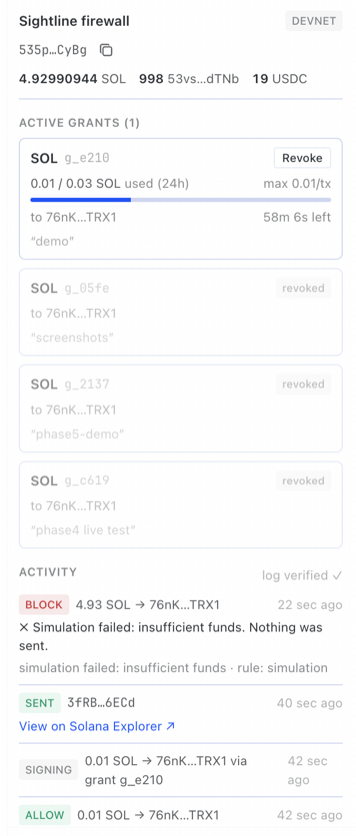
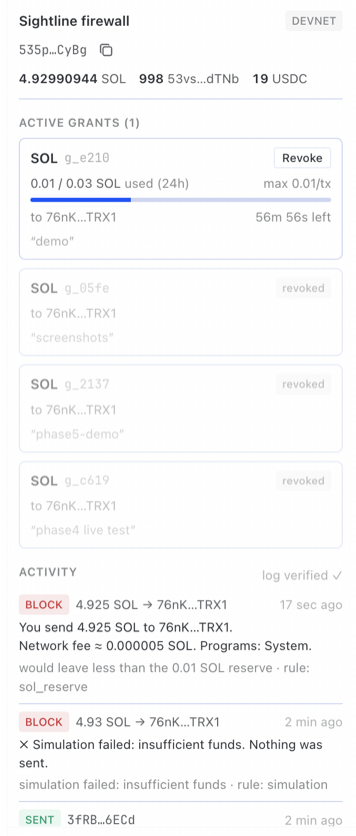
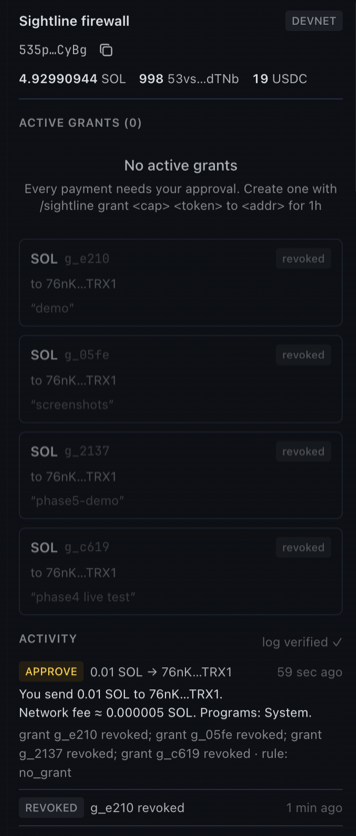
Hermes Desktop gets a Sightline pane: network, wallet and balances, active grants
(usage bar, countdown, Revoke) and a feed of every ALLOW / APPROVE / BLOCK with
explorer links. Turn it on in Capabilities → Plugins, then ⌘K → Sightline: Open
firewall. More: docs/desktop-pane.md.
| ALLOW inside a grant | Drain blocked | APPROVE after revoke (dark) |
|---|---|---|
 |  |  |
Reference
Slash commands (you only)
| Command | Does |
|---|---|
/sightline setup [--no-airdrop] | create + fund a devnet wallet; keeps an existing one |
/sightline grant <cap> <token> [per day|week|month] to <addr>[,<addr>]|any [for 30m|1h|7d|30d] [max <per_tx>] [note "…"] | create a grant (cap per 24h by default; a weekly or monthly cap lasts at least that long; max per tx = cap) |
/sightline grants | list grants and what's left of each |
/sightline revoke <id>|all | revoke one or every grant (no id: pick from a list) |
/sightline log [n] | last n audit entries |
/sightline verify | check the audit log's hash chain |
<token> is SOL, a known symbol (USDC) or a mint address. Recipients must be named;
to any is allowed but has to be typed out.
The same commands except grant also work in a terminal: hermes sightline setup|grants|revoke|log|verify.
grant is chat-only on purpose — the agent's own terminal tool could run a CLI command.
Tools (what the model gets)
| Tool | Does |
|---|---|
sightline_status | network, wallet address, grants (read-only) |
sightline_balance | SOL and every SPL token balance |
sightline_preview(recipient, amount, token="SOL" | link) | simulate + explain in plain English; never signs |
sightline_pay(recipient, amount, token="SOL" | link) | send SOL or an SPL token through the firewall; creates the recipient's token account if needed |
link is a Solana Pay payment link (solana:<address>?amount=…&memo=…), in place of
recipient/amount/token. amount: "all" is accepted only to be refused as a drain.
Every error comes back as {error, message, next_step} — for example
missing_secret, rpc_timeout, unknown_token, insufficient_token,
blockhash_expired — never a traceback.
Firewall rules
Hard BLOCKs, which no grant or approval overrides:
- simulation failed, RPC error, or balance data missing
- simulated effects differ from the request (amount, recipient, token)
- a program outside System, Token, Token-2022, Associated Token, Compute Budget, Memo
- approve / set-authority / close-account / assign instructions, or ones it can't decode
- the wallet would drop below 0.01 SOL
- more than 90% of a token balance in one transaction
- mainnet without
SIGHTLINE_ALLOW_MAINNET=1
Otherwise ALLOW when an active grant covers token, network, recipient, per-tx max
and the rolling 24h cap; else APPROVE.
Configuration
Set in ~/.hermes/.env (restart Hermes after changing):
| Variable | Default | Meaning |
|---|---|---|
SIGHTLINE_SECRET_KEY | — (required) | wallet key: base58, or a JSON byte array. /sightline setup writes it |
SIGHTLINE_RPC_URL | https://api.devnet.solana.com | Solana RPC endpoint |
SIGHTLINE_ALLOW_MAINNET | off | 1 to allow mainnet |
Mainnet
Off by default; a custom RPC is checked against the mainnet genesis hash so it can't
slip through. With SIGHTLINE_ALLOW_MAINNET=1 and a mainnet RPC, every preview and
block message starts with ⚠ MAINNET — real funds, and the pane's network badge
turns red. These are real, irreversible payments. The firewall limits what a
compromised agent can do; it doesn't make mainnet risk-free. Use a dedicated wallet
holding only what you're prepared to lose, small grants, and a sandboxed terminal backend
(or terminal approvals), so the agent's shell can't read the key from .env.
Tests
279 Python tests (277 offline + 2 opt-in live devnet) and 8 JS tests for the
Desktop half. 79 are attack cases (pytest -m attack): prompt-injected payments,
payments outside or above a grant, unknown programs and authority/approve/close
instructions, simulation mismatches, bypassing the hook, "always approve" turning into
a blanket approval, parallel payments racing one cap, the model trying to create a
grant, key leakage through any output, audit-log tampering, drains and policy at zero
balance, and Solana Pay links that try to widen a grant or smuggle in a transaction, and splitting payments
to get around a weekly budget, and grant rows edited or forged outside Sightline. 15 more cover every
newcomer failure path (missing key, RPC down, faucet limits, …).
pip install "solana>=0.36,<0.37" "solders>=0.26,<0.27" pytest pyyaml fastapi httpx
scripts/check.sh                     # pytest, ruff, JS tests, hermes doctor + validate
SIGHTLINE_LIVE_TESTS=1 pytest tests/test_live_devnet.py   # sends 0.001 devnet SOL
Limitations and roadmap
- Solana only; SOL and SPL token transfers (typed or from Solana Pay transfer links). No swaps,
staking, transaction-request links or arbitrary programs yet. - Don't set Hermes'
approvals.cron_mode: approveorapprovals.single_query_mode: approve: they
auto-approve everything outside your grants in unattended runs. - Approval prompts need an interactive Hermes session;
hermes chat -q, cron and
unattended bots block anything that needs approval (by design). - An agent with Hermes' local terminal backend can read your profile's
.env(the wallet key)
and editplugin-data/sightline/data.dbor Hermes' config. Edited grants are refused (they must
match the audit log), but reading the key can't be prevented from inside the plugin. Use a
sandboxed terminal backend or terminal approvals when the wallet holds real value. - Anyone who can type slash commands to your Hermes (e.g. on a shared messaging
gateway) can create grants. - The Desktop pane refreshes every 5 s rather than instantly.
Roadmap: swaps through an allow-listed DEX with slippage limits, multisig-backed approvals.
Disclosures
What this plugin touches:
- Keys: reads
SIGHTLINE_SECRET_KEYthrough Hermes' secret route and keeps it in
memory to sign./sightline setupwrites a newly generated key to~/.hermes/.env.
The key is never logged, shown, returned to the model or sent anywhere. - Network: talks only to the configured Solana RPC (devnet by default); setup asks
that RPC for a devnet airdrop. - Signing: signs only SOL/SPL transfers that passed simulation and the firewall,
inside a grant or after you approved that one payment. - Storage: grants and the audit log in Hermes' plugin data directory
(plugin_db("sightline")). - Desktop: the pane reads
/api/plugins/sightline/state(public data only) and
can revoke grants.
Docs
Security model · Troubleshooting ·
Solana Pay links · Budgets · Unattended payments ·
Desktop pane · Simulation report ·
Devnet tokens · Changelog · Live results:
1, 2,
3+4, 5, 0.6.4, 0.6.5
License
MIT
README from the reviewed commit 05a2c3c; it updates when the author re-pins.


