
 CarmaOS-Dev
Smart-Model-Swap 🐉
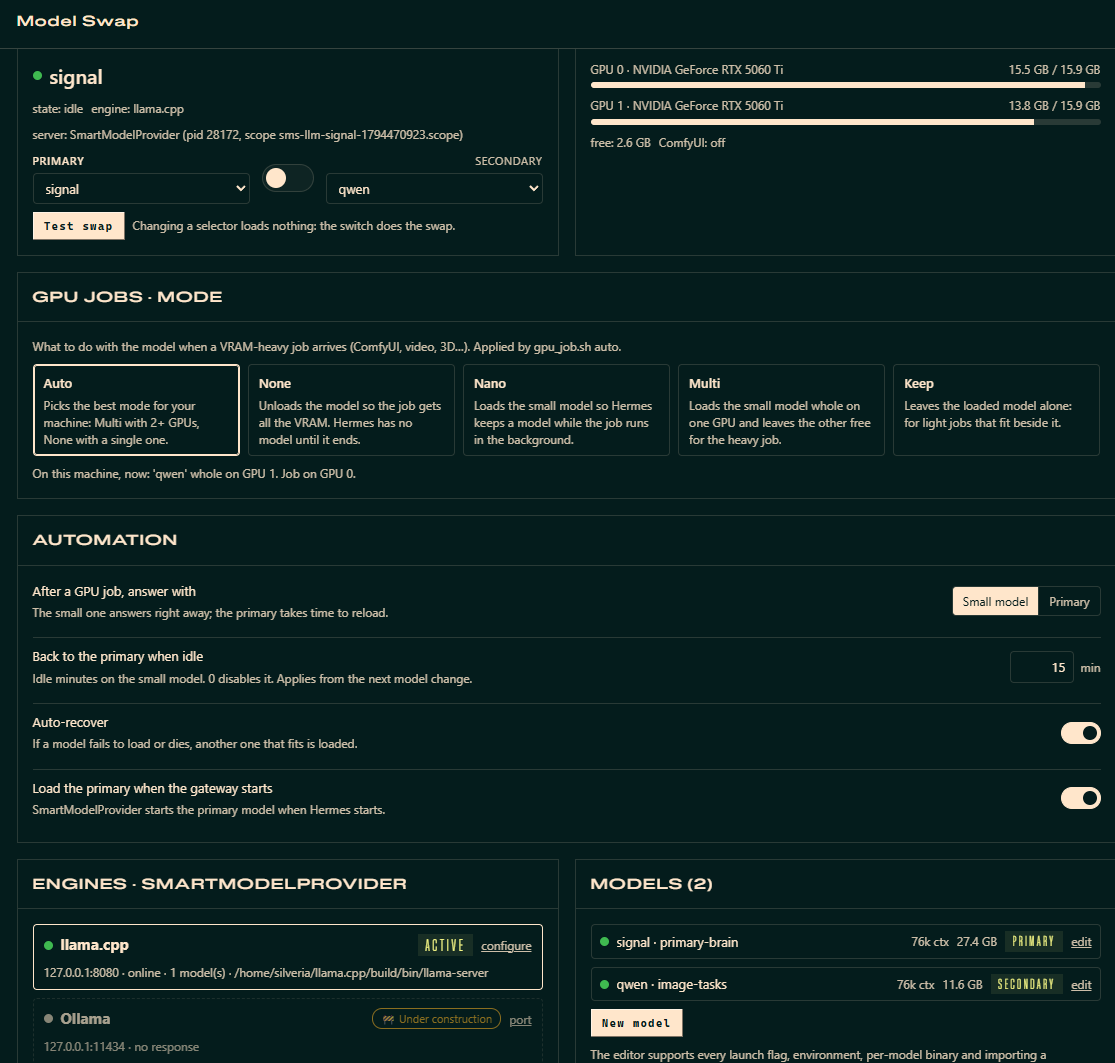
Run a big and a small local LLM on one rig and let the agent switch between them by task:
- the small one for quick or voice chat, and to free VRAM for GPU jobs such as ComfyUI;
- the big one for deep work.
Swaps run in the background without cutting the agent's reply. The plugin checks per-GPU VRAM before loading a model and brings the big model back on its own when idle.
Requirements
- Linux or WSL2 with an NVIDIA GPU and
nvidia-smi. - A built llama.cpp
llama-server. - GGUF models on disk.
- Optional: a systemd user session, so the engine runs in its own transient scope and survives gateway restarts.
SmartModelProvider (SMP) is the engine manager inside the plugin. It launches
the inference engine you picked and manages the models on it — no systemd unit.
The engine only has to be installed already; SMP needs its path and endpoint.
Each model's launch line is editable from the UI, in the style of
Llamacpp-Model-Launcher.
Built for the Hermes Agent Plugin Hackathon (Nov 2026).
Why
Big brain = slow for small tasks, and it eats VRAM you need for image generation.
Smart-Model-Swap cuts the swap from a 13-minute manual ritual to one tool call:
sms_plan— "ComfyUI needs ~6 GiB free" → recommends the right model.sms_swap model=qwen dry_run=true→ validates files, VRAM fit, runner liveness.sms_swap model=qwen→ grace countdown (10 s) so the agent finishes its turn, then a
detached runner stops the model, settles VRAM, loads the target, health-checks.sms_restore→ brain back (SMP relaunches the primary with its own command line).
When the Hermes gateway starts, SMP loads the primary model by itself
(autostart_primary), replacing a smaller model that was left serving.
Zero dependencies beyond the Python standard library.
Tools
| Tool | What it does |
|---|---|
sms_status | Swap state machine, current model, per-GPU VRAM, ComfyUI status, last result |
sms_plan | VRAM-budget recommendation across the model registry |
sms_swap | Background hot-swap with grace + preflight (dry_run supported; gpu=N loads the model whole on one GPU) |
sms_restore | Restore the primary model (SMP relaunches it) |
Slash: /swap qwen [dry], /swap restore [dry], /swap plan 6, /swap status.
CLI (hermes sms …):
| Command | What it does |
|---|---|
status | Swap state, engine, per-GPU VRAM, current model, ComfyUI |
plan [--needed-free-gb N] [--task T] [--any-gpu] | Recommend a model for a VRAM budget |
swap <model> [--dry-run] [--force] [--gpu N] [--wait] | Hot-swap to a model; --gpu N loads it whole on that GPU |
restore [--dry-run] [--force] [--wait] | Restore the primary model |
check [model] [--wait N] | Release gate: may this model (default: the primary) load now? |
wait [--target model] [--timeout S] | Block until no swap/restore/start is in flight |
start | Load the primary now if nothing is serving |
stop [--graceful] | Unload the model; --graceful adds the grace countdown and drain of a swap |
cmd <model> | Print the exact launch command of a model |
job-layout [--mode M] [--task-gpu N] [--model M] [--plain] | Where the LLM and a GPU job go (used by gpu_job.sh auto) |
after-job [--prefer model] | End of a GPU job: keep or load the model that answers (used by gpu_job.sh) |
provider status|install|remove | The optional model-provider half |
--waitblocks until the runner finishes and exits 0 only if the requested model is serving. This lets
scripts (and the agent's terminal) continue on the new model.hermes sms waitdoes the same for a
swap that is already running.- A swap or restore to the model that is already serving is a no-op (
"skipped"). Use--forceto
reload it anyway, e.g. after editing its flags. - Release gate. A model is loaded only when every GPU it uses has room for its share.
- The share is measured on each load and kept in
cache/smart-model-swap/vram_profile.json. Until a
model has been measured, it is estimated frommin_free_vram_gband-ts/--device/-sm. - The preflight refuses a swap or restore while other heavy GPU processes (ComfyUI, …) hold that VRAM,
without cutting the current model. - After stopping the current model, the runner waits up to
release_wait_s(default 120). If the VRAM
is not released, it reloads the previous model (or the smallest one that fits) instead of the target. hermes sms check [model] [--wait N]runs the same gate from scripts.sms_statuslists
gpu_holders.
- The share is measured on each load and kept in
- Bundled skill. The agent's big-vs-small routing rules ship with the plugin as
skill_view("smart-model-swap:smart-model-routing")(skills/smart-model-routing/). It includes
templates/gpu_job.sh, which frees VRAM, runs a job and always leaves a model serving (the small one by default). Plugin skills are not listed in the
system prompt; the tool descriptions and hints point the agent to it.
Engines
| Engine | State | What SMP does |
|---|---|---|
llama.cpp (llama-server) | managed | Builds the argv, spawns it, health / drain / identity checks, stops it by signal |
| Ollama | 🚧 under construction | Detection only: health + model list on its endpoint |
| vLLM | 🚧 under construction | Detection only |
| LM Studio | 🚧 under construction | Detection only |
Engines are configured in the Engines card of both UIs (or in models.json →
engines). For llama.cpp, set the binary (a file, or the folder that holds
llama-server), host, port, environment, and the common args every model gets.
SMP adds -m <gguf> --host <host> --port <port> itself, so these never belong in a
model's args. Only a managed engine can be the active one.
Model registry (models.json, v2)
{ "version": 2,
  "engines": { "llamacpp": { "bin": "…/llama-server", "host": "127.0.0.1", "port": 8080,
                             "env": {"CUDA_VISIBLE_DEVICES": "0,1"}, "common_args": ["-ngl", "99", "…"] },
               "ollama": {"host": "127.0.0.1", "port": 11434}, "…": {} },
  "active_engine": "llamacpp",
  "models": [ { "name": "qwen", "engine": "llamacpp", "gguf": "…", "mmproj": "…",
                "args": ["-c", "65536", "--temp", "1.0", "…"], "env": {}, "bin": "",
                "min_free_vram_gb": 7.0, "load_timeout_s": 300 } ] }
The launch line is bin -m gguf --host H --port P <common_args> <model args>, with
the active preset applied on top. Use hermes sms cmd <model> to print it. A per-model
bin overrides the engine's binary (for example a CUDA build vs a Vulkan build), and a
per-model env adds variables. Point models_file at your own JSON to override.
Migration from 0.2: a v1 file is migrated on first load and the original is kept as
models.json.bak-v1. The migration does the following:
start_modeis removed.common_argsand--host/--portmove toengines.llamacpp.llama_binandbase_urlare read once from the old settings.- The old servers in
ui.jsonbecome engines. Environment=lines from the oldllama-server.servicebecome the engine env.
Model names.
- Allowed: up to 64 characters of letters (any case, accents included), digits and
. _ - + ( ) [ ] ,.
The first character must be a letter or a digit. - Not allowed:
- spaces, because
/swapand the CLI split on them; /and\, because the name becomes a log file name;:, because Hermes uses it to separate provider and model.
- spaces, because
- Names are unique case-insensitively, and lookups ignore case:
hermes sms swap qwenfindsQwen3.5-9B.
Shells need quotes around names with( ) [ ].
Launch-parameter editor
Click edit on a model (dashboard tab or desktop pane) to open the editor:
- Fields: name, engine, GGUF, mmproj, per-model binary, environment variables, VRAM need and load timeout.
- Parameters: one row per flag (value, or a switch) that you can reorder or remove, plus a manual "add".
- Catalog: a searchable catalog of parameters with descriptions. It is checked against your build's
llama-server --help, so removed flags are marked and flags your build has but the database lacks are listed under
"Detectado en tu build". - Import a command line: paste
llama-server -m … --temp 0.7 …to fill the editor. - Validate: the exact argv is parse-checked with
--version, so nothing loads. You also get the final command and
suggested fixes for obsolete or duplicate flags. - Model actions: save, reset, duplicate and delete.
Changes apply the next time the model is loaded.
Sampling parameters and presets
The quick editor changes six sampling parameters: temperature, top-p, top-k, min-p,
presence penalty and repeat penalty.
- Save writes them into the model's
args. - Save as preset stores them under a name in the model's
presetsand marks it asactive_preset.
The active preset overrides the base args on the command line the next time the
model is loaded.
models.example.json ships two placeholder entries, signal (the big primary, 98 k ctx) and qwen (the small
model, same context). Rename them and point them at your own GGUFs.
SmartModelProvider (optional model-provider half)
The plugin can also expose the registry's models to Hermes as a provider called
SmartModelProvider (id smart-model-provider), so they show up in /model
with their real context window and no custom_providers block is needed.
Hermes loads model providers from their own directory, so this half is
installed only when you ask for it: the "Install SmartModelProvider" button
in the dashboard tab / desktop pane, or hermes sms provider install.
- What it writes:
$HERMES_HOME/plugins/model-providers/smart-model-provider/
(__init__.py,plugin.yaml,catalog.json,.sms-managed.json), copied
from this plugin'sprovider/folder. Nothing is downloaded. - Kept in step: once installed, the plugin rewrites
catalog.jsonwhen the
model registry, the primary model or the base URL change. Hermes picks up a
changed model list after a gateway / serve restart. - Not usable alone: it registers nothing if this plugin is removed.
- Remove it: the "remove" action in the UI or
hermes sms provider remove.
A directory with that name that the plugin did not create is never touched. - No key: it talks to the active engine's endpoint; set
SMS_BASE_URLto override. - Picking a model in
/modeldoes not load it. Loading is still the swap
(switch,sms_swap,/swap). The context Hermes uses is read live from the
server (/props), so it follows whichever model is actually loaded.
Safety model
- No systemd unit. SMP spawns the engine itself and stops it by signal: SIGINT to
the process group it started, then SIGKILL after 25 s. A llama-server SMP did not
start that holds the engine's port (for example from a terminal) gets the same
signal on its PID. A port held by a process that is not the engine is never touched.
There is never a machine-widepkill. - Own cgroup (
isolate_scope). The runner and the models run in transient user scopes
(sms-runner-*,sms-llm-*), so restarting the Hermes gateway does not kill them. This
only moves them out of the gateway's cgroup: no service, and start/stop never go through
systemd. Without a user systemd they just get their own session. - Autostart (
autostart_primary). This runs only in thehermes gateway runprocess and only
when no swap is in flight. Start-up always ends on the primary: with nothing on the port it is
loaded (waiting up togpu_wait_sfor the NVIDIA driver and the model file, a WSL mount, which
replaces the old unit'sExecStartPre); a registered non-primary model left serving (for example
across a gateway restart) is swapped for it through a normal restore. A runninggpu_job.shor
ComfyUI is left alone (the idle restore brings the primary back later), and so is anything on
the port that is not a registered model. - Grace countdown + drain: the stop happens after
grace_s(default 10 s) and only once
the engine reports no in-flight requests (up todrain_timeout_s), so the agent's reply is not cut. - Preflight: engine binary, GGUF/mmproj existence, exact argv accepted by the binary, and VRAM
fit are all checked before anything is touched.dry_runworks everywhere. - Stale runner detection: state tracks the runner PID; a dead runner unblocks new swaps.
- VRAM settle: after a stop we wait until VRAM stops moving before loading.
- Verified load: a start only succeeds when
/healthis OK and the server reports the
requested model; a process that dies during load fails immediately with its log tail. - Fail-safe / auto-recover: a model that fails to load, or whose server dies while serving, is replaced by
another model that fits (the primary first, then from small to big; settingauto_recover). A failed swap is
still reported as failed (ok: false,fallback: <model now serving>). - State and logs: state lives in
~/.hermes/cache/smart-model-swap/(state.json, runner, per-model and
GPU-job logs, cached--help). The full list is in INSTALL.md.
GPU jobs (gpu_job.sh)
skills/smart-model-routing/templates/gpu_job.sh <mode> -- <command…> frees VRAM, runs a GPU job
(ComfyUI, training, …) in the background and always leaves a model serving when it ends.
| Mode | What happens to the LLM during the job |
|---|---|
auto | Applies the mode picked in the UI (setting gpu_job_mode). Its default, also auto, chooses for the machine: multi with 2+ GPUs, otherwise none. |
none | Unloaded: all the VRAM goes to the job. |
nano | The small model stays loaded in its normal layout. |
multi | The small model is loaded whole on one GPU and the job gets another ($SMS_TASK_GPU). With one GPU it degrades to none. |
keep | The loaded model is left alone (light jobs that fit beside it). |
- A mode that is not possible on the machine degrades to
noneand says why.hermes sms job-layout
prints whatautowill do;sms_planreturns it asgpu_job_auto. - After the job (setting
after_gpu_job):small(default) delivers the result with the small model
— the one already loaded, or the smallest that fits afternone— and the primary returns on demand
(sms_restore) or through the idle restore.primaryreloads the primary right away. - The mode selector and the automation settings (
after_gpu_job,idle_restore_min,auto_recover,
autostart_primary) are in both UIs: the dashboard card and the Desktop section.
Automation (what happens without the agent asking)
-
Start-up on the primary (setting
autostart_primary, default on). When the gateway starts, the primary
is loaded. A smaller model left serving (for example across a gateway restart) is swapped for it, unless a
gpu_job.shor ComfyUI is running; in that case the idle restore brings it back. See the safety model above. -
Idle restore. After any swap to a non-primary model, the runner spawns a detached watcher
(runner.py idle_watch, ansms-runner-idle-*scope, pid incache/smart-model-swap/idle_watch.json).- It restores the primary once the engine has been idle for
idle_restore_minminutes (default 15; 0 disables).
Idle means: no tokens processed (/metricscounters), nogpu_job.shrunning (gpu_job.activemarker), and
no ComfyUI or other GPU users. - It restores only if the release gate passes. The gateway starts a watcher on start-up if a smaller model
stays serving (a GPU job is running, or the start-up restore was refused). - The same watcher runs for every model, the primary included, for auto-recover: if the server dies while
serving, another model that fits is loaded (settingauto_recover). A model that just failed is not
retried automatically for 30 minutes.
- It restores the primary once the engine has been idle for
-
Guard (
guard.py,pre_tool_call, settingguard_tools). It vetoesterminal/execute_codecommands that:- stop, kill or launch llama-server behind SMP:
systemctl … llama-server,pkill,kill $(pgrep …),
~/llama-server.sh, a hand-launchedllama-server -m; - start ComfyUI while the primary holds the GPU, unless they go through
gpu_job.shor carrySMS_ALLOW_GPU=1.
Shell scripts run by the command are scanned too. Read-only commands are never blocked. Blocks are logged to
cache/smart-model-swap/guard.log. - stop, kill or launch llama-server behind SMP:
-
Hints (
hints.py,pre_llm_call+pre_transcription). The hook injects one line, throttled to once per
20 min per session and never within 10 min of a swap, when:- a GPU job is requested while the primary is loaded;
- deep work is requested on the small model;
- a voice conversation is detected (2+ transcribed clips in 15 min) on the primary.
-
Unloaded on purpose ≠ error (setting
block_when_unloaded). While agpu_job.shholds the GPU, or a
swap or load is in flight, and the engine is not serving, a new turn is ended at once by thepre_llm_callveto
with an explanation, and the user is asked to resend. Without this, Hermes retries for minutes and fails with
HTTP 503: Loading model. Turns started while the LLM is down for an unknown reason are left to Hermes' own
recovery.gpu_job.sh noneunloads withhermes sms stop --graceful(grace + drain, like a swap), and the guard
refuses agpu_job.shthat is not run in the background. -
Progress-aware drain. Before cutting a model, in-flight requests are allowed to finish while they keep
generating, up todrain_max_s(600). A request is cut early only afterdrain_timeout_s(120) without progress. -
Measured VRAM. Each load records per-GPU usage. The median of the last 5 loads is kept in
vram_profile.jsonand drivessms_plan, which reasons per GPU and assumes by default a single-GPU task such
as ComfyUI. It also drives the release gate. The registry'smin_free_vram_gbis raised to the measurement,
never lowered. -
Same context on every model. Hermes caches one context length per model id, and the provider serves
every model under the configured one, so the editor and the API enforce one-cper engine.
Saving a model with a new-capplies it to every model of that engine; a model saved without-cgets the
shared one. Both UIs show this live under the parameter table, and the save message names the models that changed.
VRAM measurements are keyed by context, so a context change never mixes old and new numbers.
Languages (es / en)
- Both UIs, the dashboard tab and the Desktop pane, follow the Hermes language picker:
es*shows Spanish, anything else
shows English. Their strings live in anI18N = {es, en}table at the top ofdashboard/dist/index.jsand
desktop/plugin.js. - Every API call carries
?lang=, and the backend localizes its messages withsmp.i18n.t("es", "en")
(errors, warnings, engine notes). Withoutlang(agent tools, hooks, CLI), messages follow Hermes'
display.language: setdisplay.language: esfor Spanish; the default is English. - The parameter catalogue (names and descriptions from the llama.cpp parameter DB) is English in both languages.
Settings (plugin.yaml → Hermes Desktop settings)
primary_model, autostart_primary, gpu_wait_s, isolate_scope, models_file,
nvidia_smi, grace_s, drain_timeout_s, drain_max_s, release_wait_s, idle_restore_min,
gpu_job_mode, after_gpu_job, auto_recover,
vram_settle_mib, vram_settle_timeout_s, comfy_url, inject_status, guard_tools,
block_when_unloaded. The engine binary, host and port are now in the
Engines card (models.json → engines). llama_bin, base_url and
systemd_unit are only read once, to migrate a 0.2 install.
gpu_job_mode, after_gpu_job, idle_restore_min, auto_recover and autostart_primary can also be
changed from the plugin's own UIs (dashboard card and Desktop section); the rest are in the host's settings form.
Coming from the llama-server systemd unit
Disable the old unit so it does not race SMP for the port at boot:
systemctl --user disable --now llama-server. The unit file and its script can stay as
a backup; SMP never reads or starts them.
Install
From the plugin catalog:
hermes plugins install smart-model-swap
hermes plugins enable smart-model-swap
Or clone this repository into ~/.hermes/plugins/smart-model-swap and enable it. On first load the plugin
copies models.example.json to models.json; then set the engine binary and your models in the dashboard tab
or the Desktop pane.
No pip install required — pure standard library. For a full, step-by-step guide see INSTALL.md.
Security & disclosures
What the plugin does on your machine, so you can decide before installing:
- Long-running processes.
- It starts
llama-serveritself: in a transientsystemd-run --user --scopewhen available, otherwise in its own session. - A detached runner per swap, and a watcher per loaded model (idle restore, auto-recover).
- With
autostart_primary(default on), the primary model loads, and takes GPU memory, when the gateway starts.
A smaller model that was left serving is stopped and replaced by it (unless a GPU job or ComfyUI is running).
- It starts
- Signals. It sends SIGINT, then SIGKILL after a timeout, only to the engine process it manages, or to an engine
process of the same kind holding the engine port. It never touches unrelated processes; a port held by anything
else is reported, not killed. - Shell commands.
nvidia-smi,ss,systemctl --user show,systemd-run, andllama-server --help/
--version(to build the parameter catalog and validate launch lines). - Reads outside its folder.
/proc/<pid>of other processes, to identify the engine and GPU users.- With the guard enabled, the shell scripts a
terminalcommand is about to run, to block manual engine management. - Your
config.yaml, through Hermes' public config API.
- Writes outside its folder.
- Its own settings in
config.yaml, through the publichermes_cli.config.save_config. - On request only ("install" in the UI or
hermes sms provider install), a model-provider plugin in
~/.hermes/plugins/model-providers/smart-model-provider/, generated from templates in this repository. - State and logs in
~/.hermes/cache/smart-model-swap/.
- Its own settings in
- Agent behaviour.
- Adds one-line hints to turns.
- Can veto
terminal/execute_codecalls that would manage the engine by hand. - Can end a turn at once, with an explanation, while the LLM is unloaded on purpose.
- Network. HTTP only to the endpoints you configure: the engine (default
127.0.0.1:8080), ComfyUI (default
127.0.0.1:8188), and the health endpoints of the detection-only engines. No third-party services. - No telemetry, stored credentials, self-updater or approval bypass.
License
MIT. The command-line tokenizer, the --help introspection and the llama.cpp
parameter database are adapted from
Llamacpp-Model-Launcher
(MIT, © 2025 Kaspur2012). See NOTICE.
README from the reviewed commit b8c2c6d; it updates when the author re-pins.


