
 salismt
system-one
One tool for every System One decision model. Switch the provider, keep the code.
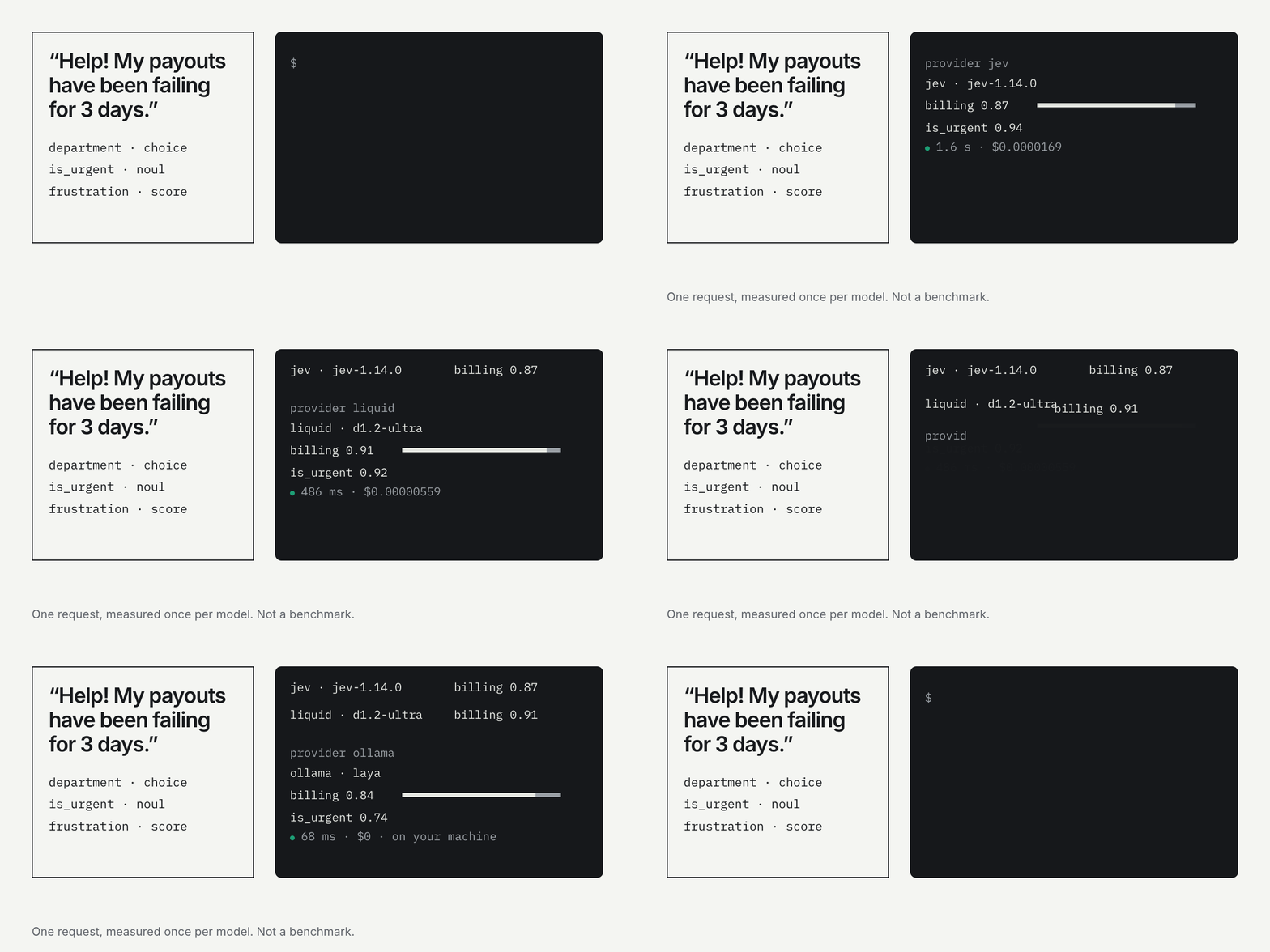
Real answers from one request, measured once per model on 2026-11-17 through this plugin. Not a benchmark.
A Hermes Agent plugin for typed judgments with
calibrated probabilities: TypeSafe Jev, Liquid d1.2, Upstage Solar Decide, Microsoft-Decision-1,
or open models such as Laya and Tev1 running in Ollama on your own machine.
Providers · Install · Run it on your own machine · Configure · Use · Key safety · Limits
The problem
Decision models answer questions like "which team owns this ticket?" or "is this message
urgent?" in one forward pass, with a probability for every option. They are fast and cheap,
and there are now many of them: hosted APIs from TypeSafe, Liquid, Upstage and Microsoft, and
open models you can run on a laptop.
They all speak the same contract, POST /v1/systemone, but each one ships with its own SDK,
host, auth header, model names and limits. So trying a second provider usually means new code,
a new key in a new place, and no shared view of what you have spent. A request with a question
type the model doesn't support is often billed before it fails.
system-one puts them all behind one tool. The provider is a setting.
What it does
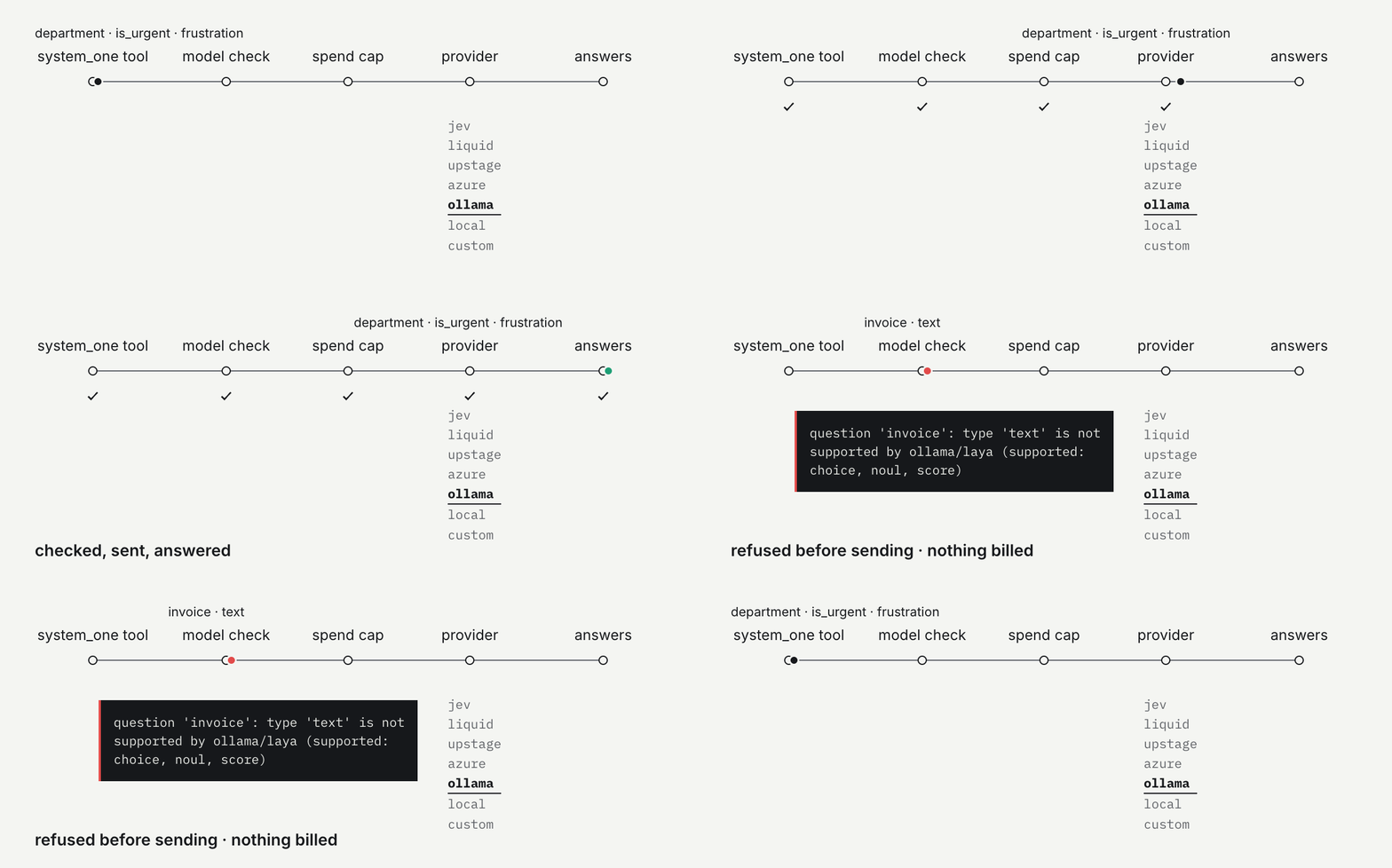
| One tool, seven providers | The agent calls system_one with a state and typed questions (noul, choice, score, plus whatever else the model supports). It gets the provider's answers back unchanged. |
| Provider is a setting | provider and model_name are read on every call. Change them in Desktop or with hermes config set and the next request goes to the new model. No restart, no code change. |
| Model check before sending | Each model's question types and limits are known: Laya takes 64 questions and 26 options, Liquid d1.2 takes text and spans, Jev doesn't. A request that can't work is refused before it is sent, so it costs nothing. |
| Spend caps before every call | Total, daily and per-call caps in USD, checked against a local SQLite ledger before the request goes out, then recorded with the real token count. |
| Keys stay with their provider | A Liquid key only ever goes to api.liquid.ai, an Upstage key only to Upstage's hosts, and so on. One changed setting can't send a key somewhere else. Details. |
| Local models are free | ollama and local run on your machine: no key, no bill, and with localhost nothing leaves the machine. |
/system-one | Shows the active provider, model, endpoint, price, spend against each cap, and which keys are set. |
| Bundled skill | system-one:system-one teaches the agent to write questions that hold up: judgments from the model, decisions in code. |
Providers
provider | What it is | Models | Price / 1M input | Key | Status |
|---|---|---|---|---|---|
jev (default) | TypeSafe API | jev-1.14.0 | $0.042 | TYPESAFE_API_KEY | tested live |
liquid | Liquid AI API | d1.2-ultra (default), d1.2 | $0.042 / $0.02 | LIQUID_API_KEY | tested live |
upstage | Upstage Solar Decide (global or Korea region) | solar-decide (default), solar-decide-flash | $0.10 / not published | UPSTAGE_API_KEY | from docs |
azure | Microsoft-Decision-1 on your Azure AI Foundry resource | your deployment name | $0.042 | AZURE_FOUNDRY_API_KEY | from docs |
ollama | Open models in Ollama on your machine | laya (default), tev1, tev1:0.8b, … | free | none | tested live |
local | Any self-hosted server, such as llama.cpp | whatever your server runs | free | optional | tested live |
custom | Any other hosted System One endpoint | yours | you set it | SYSTEM_ONE_API_KEY | unit tests |
Prices were checked on 2026-11-17 on each provider's own pages; confirm them before you rely on
the caps. "From docs" means built and unit-tested against the provider's published API but not
called live, because we don't hold a key for it.
Same request, every provider
Read this as one example, not a ranking. Each model answered the docs example once. The
point is the shape: the same request and code ran on every model, and the answers can be
compared directly. The two smallest models (0.8B) picked a different team, which is exactly why
you should run your own labelled examples before you switch. Raw numbers:
launch/measurements.json. Chart: python3 launch/make_chart.py.
Install
hermes plugins install salismt/hermes-system-one
hermes plugins enable system-one
Then pick a provider and add its key (next sections). The tool stays hidden until the active
provider is usable, so the agent never offers a tool that can't run. Needs Hermes 0.23 or later.
No other dependencies: the client uses only the Python standard library.
For local development, clone this repo into ~/.hermes/plugins/system-one and run
hermes plugins enable system-one.
Run it on your own machine
Run a decision model locally and nothing leaves your network or gets billed.
Ollama: Laya and Tev1 (recommended)
Ollama serves decision models on its own /v1/systemone endpoint, so there is no separate
server to install.
ollama pull laya                 # 846 MB · Convai Innovations · Apache 2.0 · needs Ollama 0.40+
ollama pull tev1                 # 4.4 GB · Together AI · Qwen3.5-4B fine-tune · needs Ollama 0.35+
ollama pull tev1:0.8b            # 1.5 GB · the small Tev1, for tight memory

hermes config set plugins.entries.system-one.settings.provider ollama
hermes config set plugins.entries.system-one.settings.model_name tev1   # blank = laya
Ollama runs in the background on http://127.0.0.1:11434, the plugin's default, so there's no
URL to set. Check the version with ollama --version.
| Model | Size | Good for | Notes |
|---|---|---|---|
laya | 421M | Routing, moderation, email triage | English only. Each question gets a 512-token budget covering instructions, options and state; longer states are truncated. Tags: laya:421m-english-bf16, laya:421m-typed-decisions-bf16, laya:322m-multilingual-bf16 (100+ languages), and -mlx-fp16 builds for Apple Silicon. |
tev1 | 4B | Policy checks, routing by rules | Context of about 2,000 tokens. Trained on 2 to 24 options; stay in that range. |
tev1:0.8b | 0.8B | Tight memory budgets | Less accurate than the 4B model. |
Both answer noul, choice and score, take 1 to 64 questions per request, 2 to 26 options or
levels, and request bodies up to 64 KiB. The plugin checks all of that before sending. For any
other decision model you pulled, set model_name to its name; unknown models aren't checked,
and Ollama's own error comes back as a provider error.
Laya's and Tev1's confidence is how concentrated the probabilities are, not the chance the
answer is right. Re-check any confidence threshold you carry over from a hosted model.
llama.cpp: any GGUF decision model
llama-server has served /v1/systemone since llama.cpp 0.6.0. Homebrew may still have an
older build (brew upgrade llama.cpp).
llama-server -hf LiquidAI/d1-2B-GGUF:Q4_K_M --port 8080   # Liquid's open-weight d1, 1.1 GB
llama-server -hf ggml-org/Kev-0.8B-GGUF:Q8_0 --port 8080  # 812 MB
llama-server -m ./d1-2B-Q4_K_M.gguf --port 8080           # a .gguf you already have

hermes config set plugins.entries.system-one.settings.provider local   # default http://127.0.0.1:8080
Decision models with published GGUFs include ggml-org/Kev-4B-GGUF, ggml-org/Kev-0.8B-GGUF,
ggml-org/Julia-1-GGUF (144M, 50+ languages), ggml-org/Laya-GGUF, ggml-org/Clef-GGUF,
LiquidAI/d1-2B-GGUF, LiquidAI/d1-Omni-2B-GGUF and LiquidAI/d1-omni-600M-GGUF. llama.cpp
answers noul, choice and score. Liquid's extraction types (text, number, spans, boxes)
need the Liquid API. To serve several models from one server, run llama serve with no model
and set model_name, e.g. ggml-org/Kev-4B-GGUF:Q8_0.
Running the model on another machine
Plain http:// is accepted only for localhost, 127.0.0.1 and ::1, so your text never
crosses a network unencrypted. For a GPU box elsewhere, either put it behind HTTPS (Caddy or
nginx with a certificate) and set base_url to https://…, or tunnel it and keep the default:
ssh -N -L 11434:127.0.0.1:11434 gpu-box     # Ollama
ssh -N -L 8080:127.0.0.1:8080 gpu-box       # llama.cpp
If the server sits behind an auth proxy, enter its token as Self-hosted server key
(SYSTEM_ONE_LOCAL_API_KEY). It's sent as a bearer token, only to the base_url you set.
Before you rely on a local model
Open models vary a lot. In the chart above, two of the five local models (both 0.8B) picked the
wrong team on the docs example. Run your own labelled examples through a hosted model and a local one
before switching a production workflow. With allow_provider_override on, the agent can send
one call to another provider, which makes that comparison a one-line change.
Configure
All settings live under plugins.entries.system-one.settings. Desktop shows them as a form under
Settings > Plugins > system-one. From the CLI:
hermes config set plugins.entries.system-one.settings.provider liquid
hermes config set plugins.entries.system-one.settings.model_name d1.2          # blank = provider default

# caps in USD: -1 = no cap, 0 = block every call
hermes config set plugins.entries.system-one.settings.total_cap_usd 5
hermes config set plugins.entries.system-one.settings.daily_cap_usd 0.5
hermes config set plugins.entries.system-one.settings.per_call_cap_usd 0.05
hermes config set plugins.entries.system-one.settings.cap_utc_offset_hours 7   # which day "daily" means
| Setting | Default | Meaning |
|---|---|---|
provider | jev | jev, liquid, upstage, azure, ollama, local or custom |
model_name | blank | Blank = the provider's default. Required for azure (your deployment name) and custom |
base_url | blank | azure: your Foundry resource. ollama/local: your server, if not the default. upstage: optional Korea region. custom: required. Fixed for jev and liquid |
usd_per_mtok | 0 | Price per 1M input tokens. 0 = the built-in list price (local models are free). Required for custom |
total_cap_usd | 5.0 | All-time cap across providers |
daily_cap_usd | 0.5 | Cap per calendar day |
per_call_cap_usd | 0.05 | Refuses any single request estimated above this |
cap_utc_offset_hours | 0 | Timezone that decides which calendar day the daily cap counts |
allow_provider_override | false | Let the agent send a single call to another provider whose key is set |
timeout_s | 90 | Request timeout |
log_payloads | false | Append requests and answers to payloads.jsonl (the state may be private) |
API keys
Keys are secrets, so they go in ~/.hermes/.env, never in config.yaml. In Desktop, enter them in
the masked fields on the plugin's settings page. From a shell, add the line to ~/.hermes/.env:
TYPESAFE_API_KEY=...          # jev
LIQUID_API_KEY=...            # liquid (console.liquid.ai > Dashboard > API Keys)
UPSTAGE_API_KEY=...           # upstage (console.upstage.ai > API Keys)
AZURE_FOUNDRY_API_KEY=...     # azure (your deployment's details page)
SYSTEM_ONE_LOCAL_API_KEY=...  # ollama / local, only behind an auth proxy
SYSTEM_ONE_API_KEY=...        # custom
Azure: Microsoft-Decision-1
- In Azure AI Foundry, deploy Microsoft-Decision-1 from the model catalog.
- From the deployment's details page, copy the resource endpoint, the deployment name and
the API key. - Configure the plugin, then enter the key as Azure AI Foundry API key:
hermes config set plugins.entries.system-one.settings.provider azure
hermes config set plugins.entries.system-one.settings.base_url https://<resource>.services.ai.azure.com
hermes config set plugins.entries.system-one.settings.model_name <deployment-name>
The plugin calls <resource>/providers/microsoft/v1/systemone with the api-key header. Use the
bare resource endpoint (no project path, no /openai); a pasted full endpoint is trimmed for you.
Microsoft Entra ID tokens aren't supported yet.
Use
Ask the agent in plain language ("classify these tickets by team with system_one"), or have it
call the tool directly:
{
  "state": "Help! My payouts have been failing for 3 days.",
  "questions": {
    "department": {"type": "choice", "instructions": "Which team should handle this?",
                   "criteria": {"billing": "Payments, invoicing, refunds",
                                "technical": "Bugs, outages, integrations",
                                "sales": "Pricing, upgrades, new accounts"}},
    "is_urgent": {"type": "noul", "instructions": "Does this convey urgency?"},
    "frustration": {"type": "score", "instructions": "How frustrated is the customer?",
                    "criteria": ["Calm", "Frustrated", "Very angry"]}
  }
}
Result (real jev-1.14.0 response, trimmed):
{"provider": "jev", "model": "jev-1.14.0",
 "answers": {"department": {"type": "choice", "choice": "billing", "probabilities": {"billing": 0.87, "technical": 0.13, "sales": 0.0}},
             "is_urgent": {"type": "noul", "noul": 0.94},
             "frustration": {"type": "score", "score": 1.02, "probabilities": {"0": 0.0, "1": 0.98, "2": 0.02}}},
 "usage": {"input_tokens": 402}, "usd": 1.688e-05}
Optional arguments: dry_run: true estimates tokens and cost and sends nothing; model
overrides the model for one call; provider sends one call to another provider (refused unless
allow_provider_override is on, because you decide which vendor gets your data); tag labels
the call in the spend ledger.
Errors come back as {"error": ..., "kind": "unsupported" | "budget_exceeded" | "provider_error" | "invalid_request"}
and are never turned into an answer. For example:
unsupported      question 'invoice': type 'text' is not supported by ollama/laya (supported: choice, noul, score)
budget_exceeded  per-call cap $0.00000001 (this call est. $0.00000449)
From your own scripts
system_one/ is a standard-library-only package with no Hermes imports, so a cron job or
service can use the same providers and caps:
import os, sys
sys.path.insert(0, os.path.expanduser("~/.hermes/plugins/system-one"))
from system_one import SystemOne, Settings, Caps, noul, choice, score, simplify

s1 = SystemOne(Settings(provider="ollama", model="laya", caps=Caps(total_usd=5, daily_usd=0.5, per_call_usd=0.05)),
               ledger_path="spend.sqlite", get_key=os.environ.get)
r = s1.ask({"message": "Help! My payouts have been failing."},
           {"urgent": noul("Does `message` convey urgency?"),
            "team": choice("Which team should handle `message`?", {"billing": "Payments", "technical": "Bugs"}),
            "anger": score("How frustrated is the sender?", ["Calm", "Frustrated", "Very angry"])},
           tag="my-job")
print(simplify(r["answers"]))
The helpers noul, choice, score, box and question build plain dicts in the exact shape
the TypeSafe SDK sends, so no SDK is needed. SDK objects (Choice, Noul, Score) also work.
Don't use the SDK's own client against Liquid: as of typesafe-sdk 0.7.5 it raises on the missing
x-typesafe-request-id header after the call has been billed.
What each model accepts
| Provider / model | Question types | Limits |
|---|---|---|
jev | noul, choice, score, box | |
liquid d1.2, d1.2-ultra | noul, choice (+multiple), score, text, number, date, spans, box, boxes | 128 questions, 4.5 MB body |
liquid d1, d1.1, d1-ultra (deprecated) | noul, choice, score | 128 questions, 4.5 MB body |
upstage | noul, choice, score | 26 options per choice |
azure | noul, choice, score | text only, 32,768 tokens (enforced by Azure) |
ollama laya*, tev1* (any tag) | noul, choice, score | 64 questions, 26 options or levels, 64 KiB body |
other ollama models, local, custom | not checked: depends on your server | not checked |
The System One contract
A provider is compatible when it accepts
POST {base_url}/v1/systemone            (Azure: /providers/microsoft/v1/systemone)
Authorization: Bearer <key>             (Azure: api-key: <key>; local servers: often none)
Content-Type: application/json

{"model": "...", "state": <string | object>, "questions": {"<id>": {"type": "...", ...}}}
and answers 200 with {"model": "...", "usage": {"input_tokens": N}, "answers": {"<id>": {...}}}.
To add a built-in provider, add an entry to system_one/providers.py and to PROVIDERS in
__init__.py, and a secret field to plugin.yaml. Tests keep the three in sync.
Key safety
| What happens to a key | How |
|---|---|
| Stored by Hermes, not the plugin | Keys are secret settings in ~/.hermes/.env (per profile), never in config.yaml. The plugin reads them only through Hermes's profile-scoped get_secret(). |
| Sent only to its provider | TYPESAFE_API_KEY → api.typesafe.ai; LIQUID_API_KEY → api.liquid.ai (base_url can't be changed for either). UPSTAGE_API_KEY → api.upstage.ai or kr.api.upstage.ai. AZURE_FOUNDRY_API_KEY → hosts ending in .services.ai.azure.com, .cognitiveservices.azure.com or .openai.azure.com. Only the dedicated SYSTEM_ONE_LOCAL_API_KEY and SYSTEM_ONE_API_KEY follow a base_url you choose. |
| Encrypted in transit | https:// only; plain http:// only to localhost, 127.0.0.1 or ::1, matched exactly (localhost.evil.com is refused). No credentials, query or fragment in URLs. Redirects are errors, never followed. TLS verified. |
| Never echoed | Keys with whitespace or control characters are rejected with a message that doesn't contain them. Error bodies that contain the key are redacted and passed through Hermes's secret scrubber before the model sees them. |
| Never stored by the plugin | The spend ledger and optional payload log hold no headers and no keys. The payload log is created with mode 0600. |
| Small surface | No dependencies, no self-update, no shell, no eval. Tests block all network access. |
Known limits
- The agent runs with your permissions. An agent that can run shell commands can read
~/.hermes/.envwithout this plugin. The plugin's guarantee is narrower: it adds no new path
for a key to leave your machine. - Caps use an estimate before sending (about 3 characters per token, so they trip early). Two calls
at the same moment can both pass the check, so spend can go slightly over a cap. Set
provider-side limits too where the provider offers them. - Upstage and Azure are built from their published docs and unit-tested, but haven't been called
live by the maintainer. - Calibration is measured by each vendor on their own benchmarks. A probability of 0.9 doesn't mean
the answer is right 90% of the time on your data; test thresholds on your own examples. - Keep high-stakes decisions in code. Use the model for the judgment, not as the only check.
Privacy and cost
- The
stateandquestionsgo only to the selected provider: TypeSafe, Liquid AI, Upstage,
your Azure Foundry resource, your own server, or your custom endpoint. Withollamaorlocal
onlocalhost, nothing leaves the machine. - Hosted requests are billed to your account with that provider, on input tokens only. The caps
use an estimate before sending and the reportedusage.input_tokensafter. - The ledger (
spend.sqlite) and optional payload log live in~/.hermes/plugin-data/system-one/,
outside the plugin folder, so they survive updates. - The plugin never updates itself. Updates arrive only through
hermes plugins update.
Develop
python -m pytest -q                                   # unit tests, no network
hermes plugins validate . --install-deps              # same check the catalog CI runs
hermes plugins doctor . --ci
python3 launch/make_chart.py                          # README chart from launch/measurements.json
launch/ holds the README graphics: FACTS.md (the only text allowed on screen), the HyperFrames
projects for the GIFs, and the chart script. It isn't part of the plugin.
License
MIT. The bundled skill is adapted from TypeSafe's typesafe-ai skill (MIT, (c) 2026 TypeSafe AI).
See LICENSE.
README from the reviewed commit 9a48299; it updates when the author re-pins.


