
 amitamit10
Token Stats — Hermes Desktop plugin
Lifetime token usage for Hermes Desktop: where your tokens went, which models
ate them, how fast they ran, and what they would have cost.
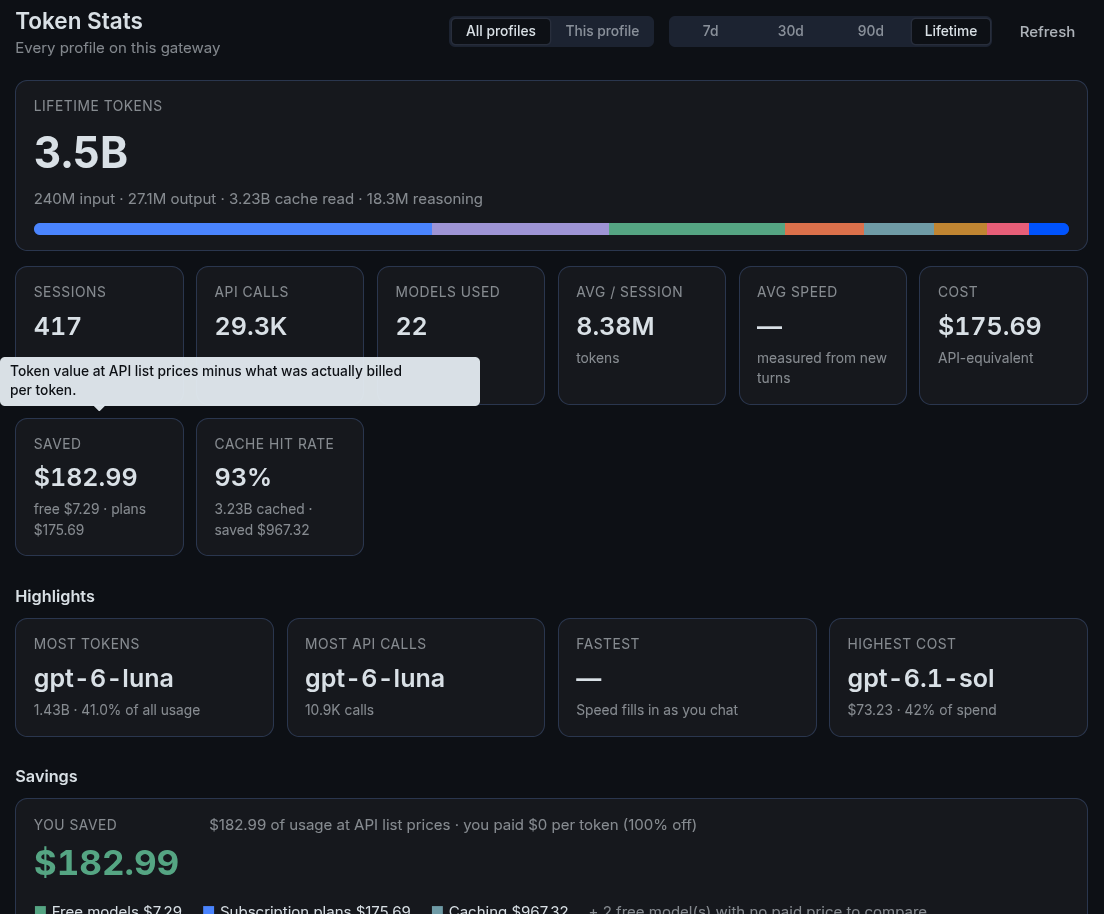
Open it from the Token Stats sidebar row, the Σ 7.6B tok chip in the
status bar, or ⌘K → Token Stats: open lifetime usage.
What it shows
- Lifetime total (input + output + cache read), with reasoning broken out
and a share bar per model. Switch between 7d / 30d / 90d / Lifetime and
between All profiles on the gateway or This profile. - Summary cards: sessions, API calls, models used, average tokens per
session, average speed, cost, savings and cache hit rate. - Highlights: most tokens, most API calls, fastest model, highest cost.
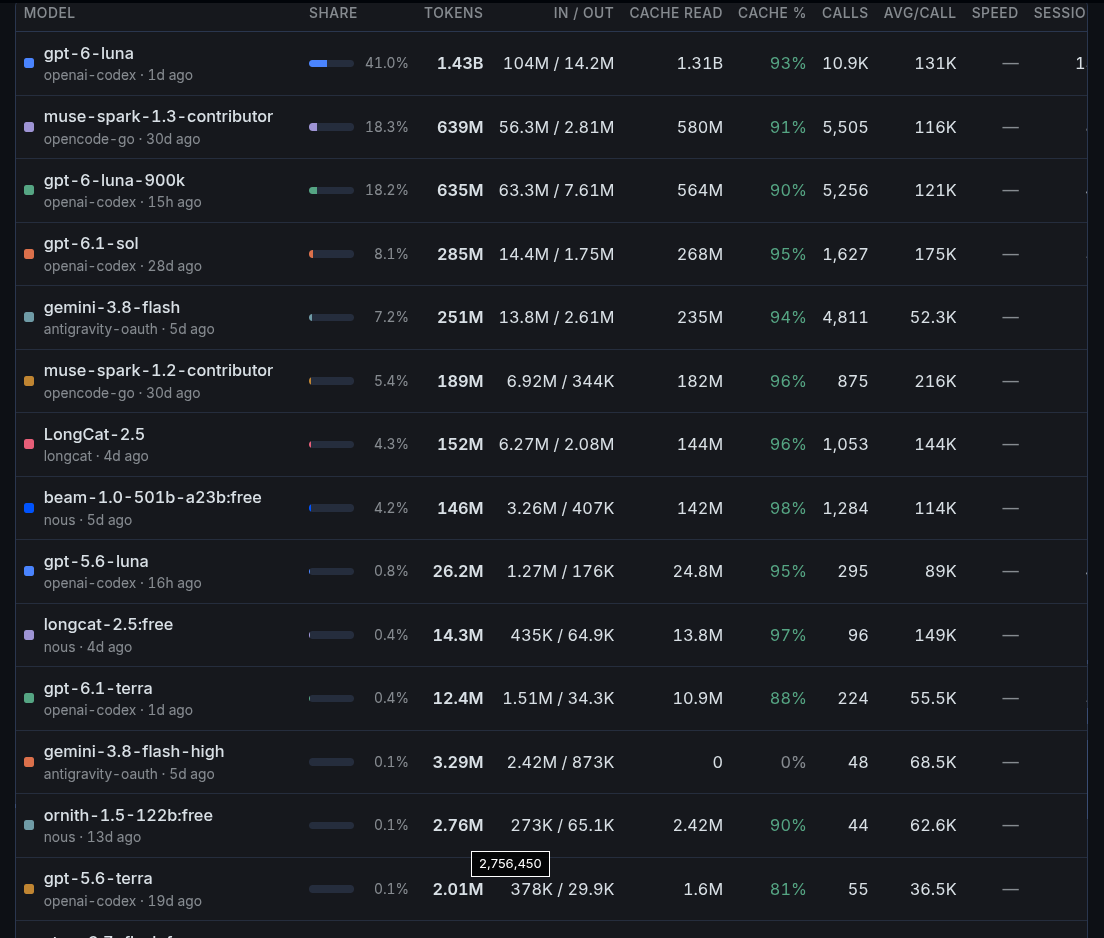
- Per-model table: share, tokens, in/out, cache read, cache %, calls,
tokens per call, measured speed, sessions and cost. Hover any cell for exact
numbers. - Savings: what your usage is worth at metered API list prices, split into
free models (valued at their paid sibling), subscription plans (OAuth
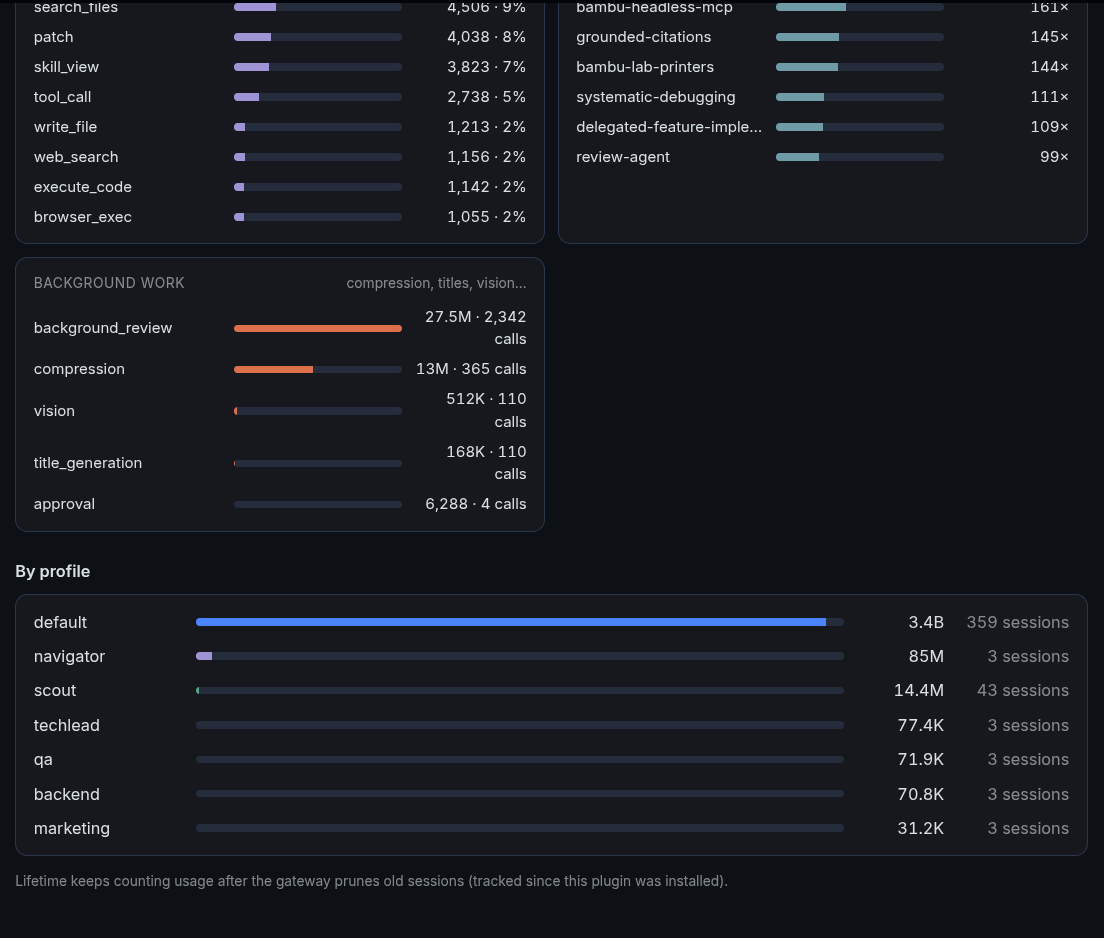
providers such as Codex that bill nothing per token) and prompt caching. - By provider, by profile and activity: active days, current and
longest streak, busiest day, this month vs last month with a projection,
and a weekday chart. - Daily usage chart (input, output, cache).
- Top tools, top skills and background work (compression, titles,
vision… the aux tasks Hermes runs on your behalf).
Where the numbers come from
- Tokens, sessions, calls, tools and skills come from the connected
gateway's own analytics routes (/api/analytics/modelsand
/api/analytics/usage), so they work the same against a local or a remote
gateway. Hermes caps those windows at 365 days. - Speed is not stored by Hermes. The plugin records the average
tokens/second and latency the gateway reports at the end of every turn,
and times turns itself for providers that report none (first streamed
token →message.complete). It fills in as you chat; ⌘K → Token Stats:
reset recorded speed samples clears it. - Cost uses Hermes's recorded billed cost when there is one. Otherwise it
prices the tokens with a snapshot of models.dev list
prices (first-party provider preferred;-thinking/-high/size variants
fall back to the base model). Plan fees are not subtracted, so "saved" is
an upper bound.
Lifetime past pruning
A gateway with sessions.auto_prune: true deletes ended sessions after
retention_days, and their usage leaves the database with them. Token Stats
keeps a small ledger in plugin storage: whenever a model's total drops, the
missing amount is banked, so the lifetime figure never goes down while the app
is open.
To bring back usage that was pruned before you installed the plugin, build an
archive.json from old state.db backups (Hermes writes them under
state-snapshots/ before updates and under profiles/.deleted/ when a profile
is removed):
python3 scripts/export-pruned.py \
  --live ~/.hermes/state.db \
  --backup '~/.hermes/state-snapshots/*/state.db' \
  --backup '~/.hermes/profiles/.deleted/*/*/state.db' \
  --connection my-server.example.com > archive.json
The script opens every database read-only and only exports sessions that are
missing from the live one, so nothing counts twice. Put the result in the
plugin's data folder (<Hermes Desktop user data>/plugin-files/data/token-stats/archive.json,
for example ~/.config/Hermes/plugin-files/data/token-stats/ on Linux). It is
added to All profiles · Lifetime on the connections you list (omit
--connection to apply it everywhere).
Privacy and behaviour
- Reads only: the gateway analytics routes, the profile list, the connection
list (to matcharchive.jsonto a connection) and live gateway usage
events. It never writes to the gateway. - Stores speed samples, the pruning ledger and the last loaded numbers in
plugin storage on this machine. It readsarchive.jsonfrom its own data
folder if you put one there. - No network calls of its own, no telemetry, no credentials.
- REST calls go through
window.hermesDesktop.apiwith the active
connection's routing (the SDK has no typed helper for the analytics routes
yet).
Install
hermes plugins install token-stats
Or copy desktop/plugin.js to ~/.hermes/desktop-plugins/token-stats/plugin.js;
the app loads it within a few seconds.
Layout
desktop/plugin.js— the plugin. Plain ESM; imports only
@hermes/plugin-sdk,reactandreact/jsx-runtime. No build step.scripts/export-pruned.py— optional backup →archive.jsonexporter.plugin.yaml— the manifest the catalog andhermes pluginsread.
License
MIT
README from the reviewed commit cef5577; it updates when the author re-pins.


