 saasagelabs
Twring for Hermes
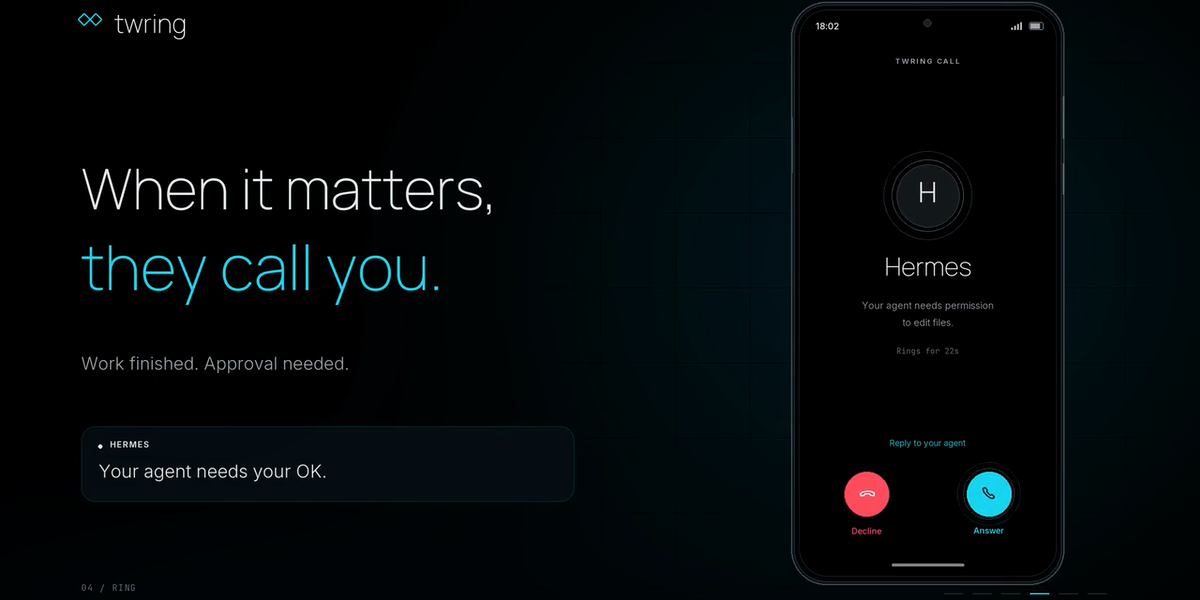
Call your Hermes. Hermes calls you.
Twring is a phone app (iPhone and Android) for the AI agents you already run. This plugin makes Twring a Hermes messaging platform, like Telegram, except you can also talk:
- Live two-way calls. Press Call in the Twring app and talk to your own Hermes. Twring turns your speech into text, Hermes streams its answer, and Twring speaks it as it arrives. Talk over Hermes at any time: its voice stops at once and its work carries on. When you go on to ask something new, Twring replaces the old turn, Hermes stops that run (as if you typed
/stop) and answers what you just said. Hang up instead, and Hermes keeps working. - Calls and chat in one conversation. Typed messages in the Twring app and spoken turns on a call reach the same Hermes conversation.
- Approvals by voice or tap. When Hermes needs your OK for a risky command, the request appears on your phone. Say "yes" or "no", or tap. The answer goes back through Hermes's own approval system: the plugin never approves anything for you, and silence means no.
- It rings you back. When a scheduled Hermes job delivers to
twring, its result lands in your Twring chat and your phone rings with the first sentence. Hang up while Hermes is still working, and the rest of its answer reaches your chat, with a ring if your Twring settings allow.
Hermes keeps its own model, memory, tools and permissions. Twring adds the call.
Set up (3 steps)
-
Install the Twring app from twring.com and sign in.
-
Link this Hermes to it:
hermes plugins install twring
hermes twring link
In the app, tap Add agent, On my computer or server, and scan the code (or type it).
-
Start the gateway so your phone can reach Hermes:
hermes gateway
That's it: Hermes now appears in the Twring app. Press Call.
hermes gateway setup offers the same link step. hermes twring status shows whether you're linked, and hermes twring unlink forgets the link on this computer (then delete Hermes in the app too).
Ring me when a scheduled job finishes
Deliver any Hermes cron job to twring. Its result is saved in your Twring chat and your phone rings with its first sentence (at most 140 characters). Set TWRING_RING_ON_DELIVERY=false for a notification instead of a ring.
Use one link, not two
If you already use Twring's twring-connect program for Hermes on this computer, stop it before linking the plugin. Otherwise the app shows two "Hermes" agents, and the two programs take the same link from each other.
Your own Twring server
Self-host Twring? Link to it with hermes twring link --server https://your-twring-server.
Settings
| Variable | What it does |
| --- | --- |
| TWRING_TOKEN | This computer's link token. Saved by hermes twring link; never printed |
| TWRING_SERVER | Twring server, default https://api.twring.com |
| TWRING_ALLOWED_USERS | owner (the linked Twring account), set by link |
| TWRING_HOME_CHANNEL | Where scheduled-job results go: owner, set by link |
| TWRING_RING_ON_DELIVERY | Ring for scheduled-job results (true by default) |
What this plugin does on your computer (disclosure)
- Network: one outbound WebSocket to your Twring server (
wss://api.twring.com/v1/connectors/socketby default) whilehermes gatewayruns, plus HTTPS calls to the same server to link, to post scheduled-job results to your chat and to ring your phone. Nothing else is contacted. Redirects are refused, and the token only travels in anAuthorizationheader to the server you linked. - What goes to Twring: the text of your turns comes from Twring, and Hermes's replies, approval questions (the command, cut to fit the card, and Hermes's reason) and scheduled-job results go to Twring, which shows them in your app and speaks them on calls. Tool output is not sent.
- Stored credential: one long-lived link token (
TWRING_TOKEN), saved through Hermes's own.envroute byhermes twring link. The plugin writes no files of its own. Revoke it by deleting Hermes in the Twring app. - Approvals: answered only by you, through Hermes's approval system. A command too long to show on the phone gets Hermes's Deny-only card: it can be declined from the phone and approved only at the computer.
- No shell commands, no background processes besides the gateway's own connection, no telemetry, no self-update (updates come only through the Hermes catalog).
How it works
Twring links agents on your own machine through one outbound WebSocket (cord-relay/1), with one channel per call or chat carrying cord-agent/1 frames. Twring does speech-to-text and text-to-speech on its server, so the plugin only exchanges text: a committed spoken turn arrives as a Hermes message, and Hermes's streaming drafts become Twring text deltas, spoken as they arrive. The protocol is specified in the Twring repository, docs/AGENT_ADAPTER_SPEC.md (sections 20 and 22).
| Twring | Hermes |
| --- | --- |
| user.turn (spoken or typed) | MessageEvent in one direct chat with the owner |
| text.delta (spoken as it arrives) | streaming drafts (send_draft) and the final send |
| activity (the phone shows "working") | the typing heartbeat |
| approval.required / approval.decision | native approval card / resolve_gateway_approval_card |
| a ring and a chat message | cron delivery to twring |
| turn.cancel (your next turn replaced this one) | /stop for the run; a hang-up does not stop it |
Develop
pip install pytest pytest-asyncio httpx websockets
python -m pytest -q        # protocol, linking and CLI tests
tests/test_adapter.py runs the adapter inside real Hermes against a fake Twring server; run it with Hermes's own Python. Then validate the plugin as the catalog does:
hermes plugins validate . --install-deps
License
Apache-2.0. Twring and its logo are trademarks of SaaSage Labs; see the Twring repository.
README from the reviewed commit 5a7083e; it updates when the author re-pins.


