All plugins

us-census

ACS population, income, age, and housing for a US place, with vintage year, variable id, and margin of error. This product uses the Census Bureau Data API but is not endorsed or certified by the Census Bureau. Disclosure — HTTPS only to api.census.gov, geocoding.geo.census.gov, and tigerweb.geo.census.gov (all US Census Bureau); your free CENSUS_API_KEY goes only as the data-call key; metadata, the geocoder, and TIGERweb are keyless; redirects are refused; on every surface, including gateways, no user list, so an admitted guest can estimate with this profile's key; schedule writes scripts/us-census-vintage.py and one local no-model morning job; the job, script, and vintage file remain after disable or removal.

TakeshiTGALToolsv0.1.0Updated 6 hours ago

About

ACS population, income, age, and housing for a US place, with vintage year, variable id, and margin of error. This product uses the Census Bureau Data API but is not endorsed or certified by the Census Bureau. Disclosure — HTTPS only to api.census.gov, geocoding.geo.census.gov, and tigerweb.geo.census.gov (all US Census Bureau); your free CENSUS_API_KEY goes only as the data-call key; metadata, the geocoder, and TIGERweb are keyless; redirects are refused; on every surface, including gateways, no user list, so an admitted guest can estimate with this profile's key; schedule writes scripts/us-census-vintage.py and one local no-model morning job; the job, script, and vintage file remain after disable or removal.

US Census

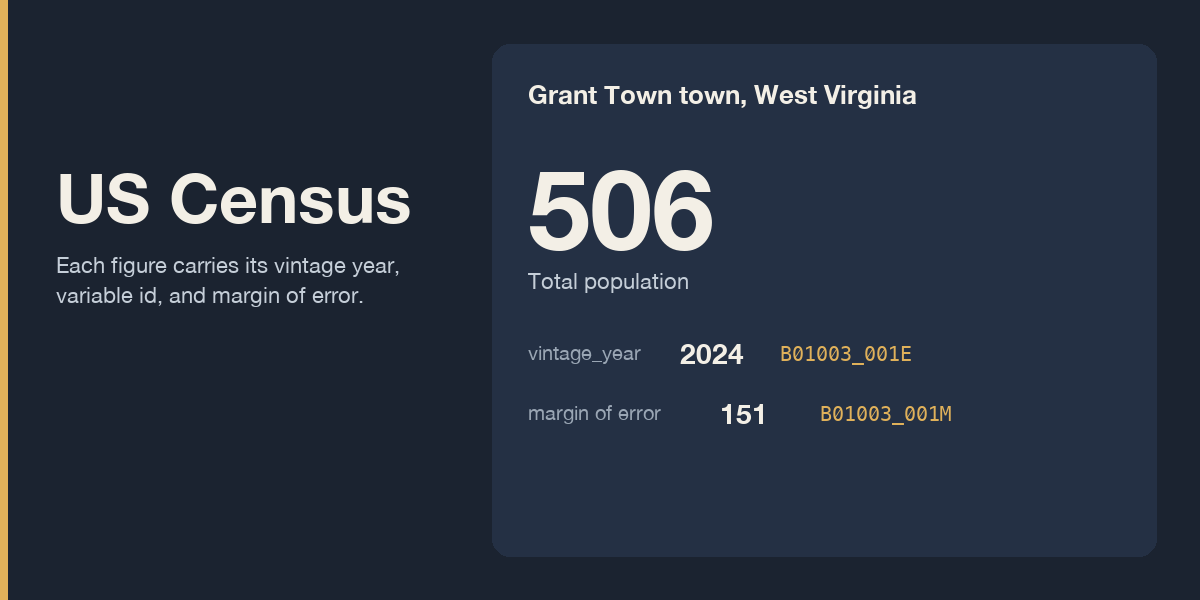
Ask for a US place and get official ACS population, median household income, median age, and housing figures. Each figure carries its vintage year, variable id, and margin of error. The vintage is the ACS product year. It stays an estimate when that year is also the calendar year.

This product uses the Census Bureau Data API but is not endorsed or certified by the Census Bureau.

The tools are census_datasets, census_geographies, census_variables, census_place, census_get, and census_compare.

Key

Estimate queries need CENSUS_API_KEY in this profile's .env. The key is free and you request it yourself. This plugin does not create a Census account and does not issue a key. Request one at https://www.census.gov/data/developers/guidance/api-user-guide.API_Key.html

The plugin reads the key on each data call through agent.secret_scope.get_secret. The profile .env wins when it sets the key. If it does not, and this process is not serving a routed profile, get_secret reads the process environment. A routed profile does not fall through to the process environment. Metadata, the geocoder, and TIGERweb are requested without the key. census_variables is one of those keyless calls.

If the key is unset, the data endpoint is not called. The tool returns one fixed sentence and the key page above. If the data server still answers HTTP 200 with an HTML page titled Missing Key, that HTML is dropped and the same kind of sentence is returned. If a data call is sent and the server redirects to its Invalid Key page or its Missing Key page on api.census.gov, the redirect is refused and that page is not fetched. The tool returns one fixed sentence and the key page above. A redirect to any other host stays a redirect.

Hosts

HTTPS only, to api.census.gov, geocoding.geo.census.gov, and tigerweb.geo.census.gov. A caller cannot pass a URL. Redirects are refused. HTTP_PROXY, HTTPS_PROXY, ALL_PROXY, http_proxy, https_proxy, NO_PROXY, no_proxy, all_proxy, and ftp_proxy are not used. Each request stops at 20 seconds. One tool call stops at 45 seconds and at 12 requests. A response over the size cap is a failure, and the cut-off body is not parsed.

A street address that starts with a number uses the Census geocoder (geographies/onelineaddress). A city, county, or state name uses TIGERweb. Several matches return candidates and no estimates, and the result says that several geographies matched. When that list was cut off, the result says the list was cut off. Zero matches do not invent a number, and the result says that no geography matched. A single longer name stays a candidate list. When the returned list is complete and exactly one official name is the asked name, or that name plus one Census class suffix, that place is selected. The asked name is kept whole. Kansas City matches Kansas City city. Grant Town matches Grant Town town. Carson City matches Carson City. Two or more official names that match in that way stay a candidate list, and no estimate is read. A cut-off list stays a candidate list. A name ending in city or CDP selects that place when it matches once. A bare state name that is also a place name stays a candidate list. A bare state name outside that known list is checked for an exact place or CDP before it is read as the state. If that check fails, the state is not chosen. The postal abbreviation selects the state. The state name followed by State selects the state. The matched geography name is the one on the sheet. State FIPS stays on the sheet. A county match includes county FIPS. A city from the place layer leaves county FIPS empty. An address geocode includes the county of that point. When an address matches several incorporated places, census designated places from that point stay on the candidate list. Census headquarters geocodes to Suitland CDP in Maryland, and the sheet says so.

census_compare keeps one vintage year. Different years are refused before any request. The default dataset is acs/acs5. acs/acs1 is the other allowed dataset for estimates. A 1-year table with no row for that geography does not borrow a county figure. A data call that returns HTTP 204 with an empty body is that empty geography for ACS 1-year and for ACS 5-year when the geography is on the Census roster. The result names the vintage and the geography. No county figure is substituted. A county or place FIPS that is absent from the TIGER roster is named as absent from the roster.

Negative special codes such as -666666666 are annotations. They are not counts. A null cell is not zero.

Schedule

There is no approval card. The tools only read.

Before you run hermes us-census schedule, write the target in the reply. The script is us-census-vintage.py under HERMES_HOME/scripts. The job name is us-census-vintage. Deliver is local. The job is saved for every morning with --no-agent. It fires only when a gateway serves this profile or a fresh ticker heartbeat is present. hermes cron list reports that the scheduler is not ready when neither is present. Creating the job does not start a gateway. It prints one line only when a newer ACS vintage is listed. Empty stdout on a zero exit sends nothing. A failed probe exits non-zero. The reason goes to stderr and stdout stays empty. An unreadable vintage file and an unwritable vintage file do the same. The cron run is then marked failed. The first run stores the listed vintage and stays quiet.

hermes us-census schedule
hermes us-census status
hermes us-census unschedule

hermes us-census schedule --deliver local is the only deliver target. Any other target is refused before the job is created, so this plugin does not post to chat. Running schedule again updates the one job of that name. If more than one job already has that name, nothing is written and nothing is changed.

status does not fetch. It prints the job and the stored vintage. unschedule removes the job and the script. If the job is already gone, unschedule still removes the script and says that the script was removed. If plugin-data/us-census/vintage.json is already stored, unschedule says that file remains until you delete it. If that file was never written, unschedule says that no vintage file is stored. Run hermes us-census unschedule while the plugin is still enabled, before hermes plugins disable us-census. After disable, hermes us-census is gone, and the job stays listed. Remove that job with hermes cron remove and the job id. hermes cron remove leaves scripts/us-census-vintage.py in the Hermes home, so delete that file too. The vintage file holds the vintage baseline. It does not hold the key or the last place. hermes plugins remove us-census deletes the plugin directory. The cron job us-census-vintage, scripts/us-census-vintage.py, and plugin-data/us-census/vintage.json stay in the Hermes home when they were created. Remove the job with hermes cron remove, then delete the script and the vintage file.

When HERMES_HOME is unset, the directory is the Hermes default, HOME/.hermes on this platform, from hermes_constants.get_hermes_home(). The macOS /var link is accepted, because mktemp lives there. Any other symlink in the Hermes home path is refused, and the reply says the vintage script was not written.

The tools are on for every surface, including gateways. This plugin keeps no user list. Anyone who can prompt an enabled surface can call an estimate, and that call sends this profile's CENSUS_API_KEY. A guest in a room the gateway admits, when that room has no per-person allowlist, can call an estimate with your key. Turn one surface off with hermes tools. Turning telegram off leaves cli on. There is no daily cap and no slash command. The agent can call the tools itself.

requires_hermes is >=0.21.4. python_dependencies is empty. The license is MIT.

Thirty second check

Run these from this repository with hermes on PATH. The check calls one keyless variable lookup. It does not need CENSUS_API_KEY.

Empty HERMES_HOME:

export HERMES_HOME="$(mktemp -d)"
hermes plugins install --no-enable "file://$PWD"
hermes plugins enable us-census
python3 - <<'PY'
import importlib.util
import os
import sys
from pathlib import Path

root = Path(os.environ["HERMES_HOME"])
plugin = root / "plugins" / "us-census"
spec = importlib.util.spec_from_file_location(
    "us_census_plugin",
    str(plugin / "__init__.py"),
    submodule_search_locations=[str(plugin)],
)
module = importlib.util.module_from_spec(spec)
sys.modules["us_census_plugin"] = module
spec.loader.exec_module(module)
print(module.tools.HANDLERS["census_variables"]({
    "code": "B01003_001E",
    "year": 2023,
    "dataset": "acs/acs5",
}))
PY

Unset HERMES_HOME, with HOME pointed at a new directory:

export HOME="$(mktemp -d)/user"
mkdir -p "$HOME"
unset HERMES_HOME
hermes plugins install --no-enable "file://$PWD"
hermes plugins enable us-census
python3 - <<'PY'
import importlib.util
import os
import sys
from pathlib import Path

root = Path.home() / ".hermes"
plugin = root / "plugins" / "us-census"
spec = importlib.util.spec_from_file_location(
    "us_census_plugin",
    str(plugin / "__init__.py"),
    submodule_search_locations=[str(plugin)],
)
module = importlib.util.module_from_spec(spec)
sys.modules["us_census_plugin"] = module
spec.loader.exec_module(module)
print(module.tools.HANDLERS["census_variables"]({
    "code": "B01003_001E",
    "year": 2023,
    "dataset": "acs/acs5",
}))
PY

What this plugin does not do

It does not rank every place in a state. It does not download the full variables file. It does not fetch Population Estimates Program tables. It does not save the last place. It does not send the morning note to chat. It does not open a payment page. The install copies the tests directory and pytest.ini with the plugin, and both stay unloaded. assets/catalog-banner.png is copied with the install and stays unloaded. After hermes plugins install, the plugin directory including .git is 644 kilobytes by du -sk.

README from the reviewed commit b411714; it updates when the author re-pins.

More by TakeshiTGAL

34 plugins by TakeshiTGAL in the catalog.

TakeshiTGALjp-subsidiesJapanese subsidy search and weekly watch, built on the jGrants public API. Disclosure — Searches api.jgrants-portal.go.jp with no API key and no daily request cap; each call waits at most 60 seconds and retries at most twice, and a result is a search match, not proof that every subsidy came back. The plugin has no user list of its own: anyone you allow on your Hermes gateway can call these tools and change this profile's watch, and the agent can set up a watch by itself. In a Chatwork room listed in CHATWORK_ROOMS, everyone can call them while CHATWORK_ALLOWED_USERS is unset. The tools are on for every platform, including gateways; turn them off per platform with hermes tools. While the plugin is enabled, its skill adds one line to the skills index of every session, including surfaces where the tools are turned off, and its pre_llm_call paragraph is added on those surfaces too. The /subsidies command is outside hermes tools; limit it with allow_admin_from or user_allowed_commands, or disable the plugin. The optional weekly watch is an unattended cron job that runs a script with no model call and is not a sandbox; delivering it to bot-chat instead runs one model turn on the fetched text. If delivery fails after the script runs, those subsidies are already marked seen and the text stays under cron/output/. Uninstall leaves the cron job, scripts/jp-subsidies-weekly-*.py and plugin-data/jp-subsidies/ until you run hermes cron remove and delete the files. The plugin does not store the name or ID of who asked. Not tested against a live gateway, with the Chatwork plugin loaded, or for result sets of several hundred rows. subsidies_detail compares a corporation's published industry, capital, employee count, and address with the call text as characters, returns a cap only when the call states one, and does not estimate an award. pre_tool_call blocks subsidies_search unless keyword is contained in industry text copied from a tool result, including a list of industry strings. A company name does not pass, including when the industry text is contained in the company name. When industry text was returned and the keyword is not that text, the block does not say the industry was missing. The block says the search was not run, eligibility is not_claimed, and no award was estimated. A company name contained in business_summary does not pass as an industry keyword. That holds when the name field is absent and the summary is トヨタ自動車は自動車を製造する。: トヨタ自動車 does not pass and 自動車 does. transform_tool_result remembers industry text and returns nothing, so the tool result is unchanged. pre_llm_call adds its paragraph only on a subsidy question (補助金, 助成金, jGrants, or 募集) or when subsidies_search, subsidies_detail, or subsidies_watch_setup was called in the previous turn, and adds nothing on other turns. A company name alone or an unrelated question does not add it. The paragraph says to call subsidies_search only with industry text copied from a tool result, that eligibility is not_claimed, and not to estimate an award or write 対象です.Communitytools1TakeshiTGALwyoming-voice-bridgeWyoming speech-to-text and text-to-speech for a Wyoming server you run (stt/tts provider wyoming), plus a wyoming_voice_status tool that lists the server's models and voices. Disclosure — Audio and text to speak go to the WYOMING_* host:port you set over cleartext, unauthenticated TCP (public addresses accepted). Once selected, the providers send speech in every session, including cron and webhooks. This build imports the installed package only when its file tree is the official wyoming 1.5.4 wheel, and a different tree sends nothing. This build lists no ffmpeg digest, so audio that is not already 16 kHz, 16-bit, mono WAV is not converted. wyoming_voice_status asks with one public pre_tool_call line. Choosing always stores one command_allowlist line for that same which and the same host:port list. A later call skips the question only when a person is present. cron, hermes -q, webhook, msgraph_webhook, and api_server do not send a describe, even after always. yolo and approvals off skip the prompt, and this plugin does not add a refusal for those modes. The plugin does not import Hermes approval, config, or write-guard modules. Hermes 0.21.4 does not list the skill. The v0.21.5 canary and Hermes 0.22.2 add one skill line to every session that loads the plugin, including a surface where the tools are turned off. The status tool is on for every surface, including the gateway, and a guest there can call it and approve it when a person can answer. Turn the wyoming_voice toolset off per surface with hermes tools.Communityvoice1TakeshiTGALauthor-feedEach watch run costs 0 tokens, and the unmanned run holds no tools. Read one public profile and watch one account, with profile_get, author_feed and author_watch. It reads public posts and profiles from the Bluesky social media network, which is built on the AT Protocol (atproto), without signing in. Disclosure — HTTPS GET only to public.api.bsky.app, no API key. Hermes starts the watch Python when the cron job fires. The tools are on for every surface, including gateways, and ask for no approval: anyone you allow on your gateway can call them. Turn a surface off with hermes tools. While the plugin is enabled, its skill adds one line to the skills index of every session, including surfaces where the tools are turned off. hermes author-feed schedule writes a script and creates one cron job that does not call a model. Each run costs 0 tokens and has no daily cap. Empty script output sends nothing. Delivered to local unless you pass --deliver, so no chat by default. Run hermes author-feed unschedule before removal. That removes the job and the script. A leftover job after the plugin is gone stops with hermes cron remove <id>. The scheduled script does not run under plugins.isolation: host, so that setting does not stop the watch. The author_watch tool still refuses a run that is not the saved cron job, including under plugins.isolation: host, and posts that notice on every run of the tool. The first run only records what is already there. One run reads at most the latest 3 pages and announces a new post by this account on them. When every row on those pages is new, with no saved post or mark, and the feed still offers another cursor, it also posts a possible-miss notice, at most once in 24 hours while that keeps happening. Replies, including the account's own thread continuations, are not announced. It relies on private Hermes parts, so an update can stop it. State stays in <HERMES_HOME>/plugin-data/author-feed after uninstall. Seen post URIs advance only on the saved cron job after a successful fetch. The script allows that when cron/executions.db shows that job running under the parent pid and cron/jobs.json names author-feed-watch.py. A direct run and another cron job exit 3 with no GET and no write. The author_watch tool allows that only for the saved job id. Delivery accepts origin, local, all, bot-chat, the Hermes 0.21.6 cron platform names, and public registry names that declare a cron delivery env var. A refused name can be set with hermes cron edit <id> --deliver. bot-chat places the watched account's post text in another model turn that has the profile's tools. hermes cron create cannot set a per-job tool list. A job made by 0.1.x keeps its model turn until the next schedule. On Hermes 0.21.4 and 0.21.5 this plugin does not load, and a leftover job keeps its model turn until hermes cron remove <id>. Running schedule again updates the interval and deliver target and switches an existing model job to the script.CommunitytoolsTakeshiTGALcsharp-game-editorGive it one feature for the Unity project open in your editor, and it builds the scripts, objects and scene in one plan, stops that plan when the compile reports an error CS line, and plays the scene when the compile is clean. Disclosure — Needs MCP for Unity pinned to v10.3.0, plus git and uv. Hermes starts mcpforunityserver==10.3.0 through uvx with telemetry and the update check off. Disk reads run at once. apply_plan asks once and puts back a file the plan did not name. A plan that deletes, runs editor code, can lose unsaved work or writes outside the project asks again, and that summary is sent only when every line fits the approval card; otherwise nothing is sent and confirm_risky_plan asks. unity_docs sends the query to docs.unity3d.com after Hermes asks. unity_generate can call paid providers you configured in MCP for Unity; that call was not part of the check. Tools are on by default on every surface, including the gateway. Only users the gateway admits can reach the tools, and this plugin keeps no user list of its own. Cron and a session with nobody to answer decline. Logs stay in <HERMES_HOME>/plugin-data/agent-plugin-csharp-game-editor-<hash>/logs. Stop with hermes plugins disable csharp-game-editor, or hermes tools for one surface. macOS only.Communitytools

Developer Mode

Explore built-in Hermes toolsets and actions.

HermesAgent

Developer?

Create a Hermes extension for Desktop or agent workflows.

Developer Section