
 ListeningPost
vibeline
A Hermes plugin that shows agent work as rails: one lane per
agent, child lanes branching at spawn, tool calls and acceptance-criteria results as marks along the track.
Three surfaces, same data:
| Surface | Command | What you get |
|---|---|---|
| Hermes TUI | /rails | Ink widget inside hermes --tui (parent/child rails, inspector, Esc/q closes) |
| Web | hermes vibeline web --open | Live page: every Hermes session on the machine (or several machines), Kanban Swarm runs, the harness ledger; stopwatch heatmap, feedback export, rewind and retry |
| CLI / model | hermes vibeline rails, tool vibeline_rails | Rich panel in the terminal, markdown for the model |
Runtime dependencies: Python 3.10+ standard library only. rich is used if present (Hermes ships it).
Screenshots
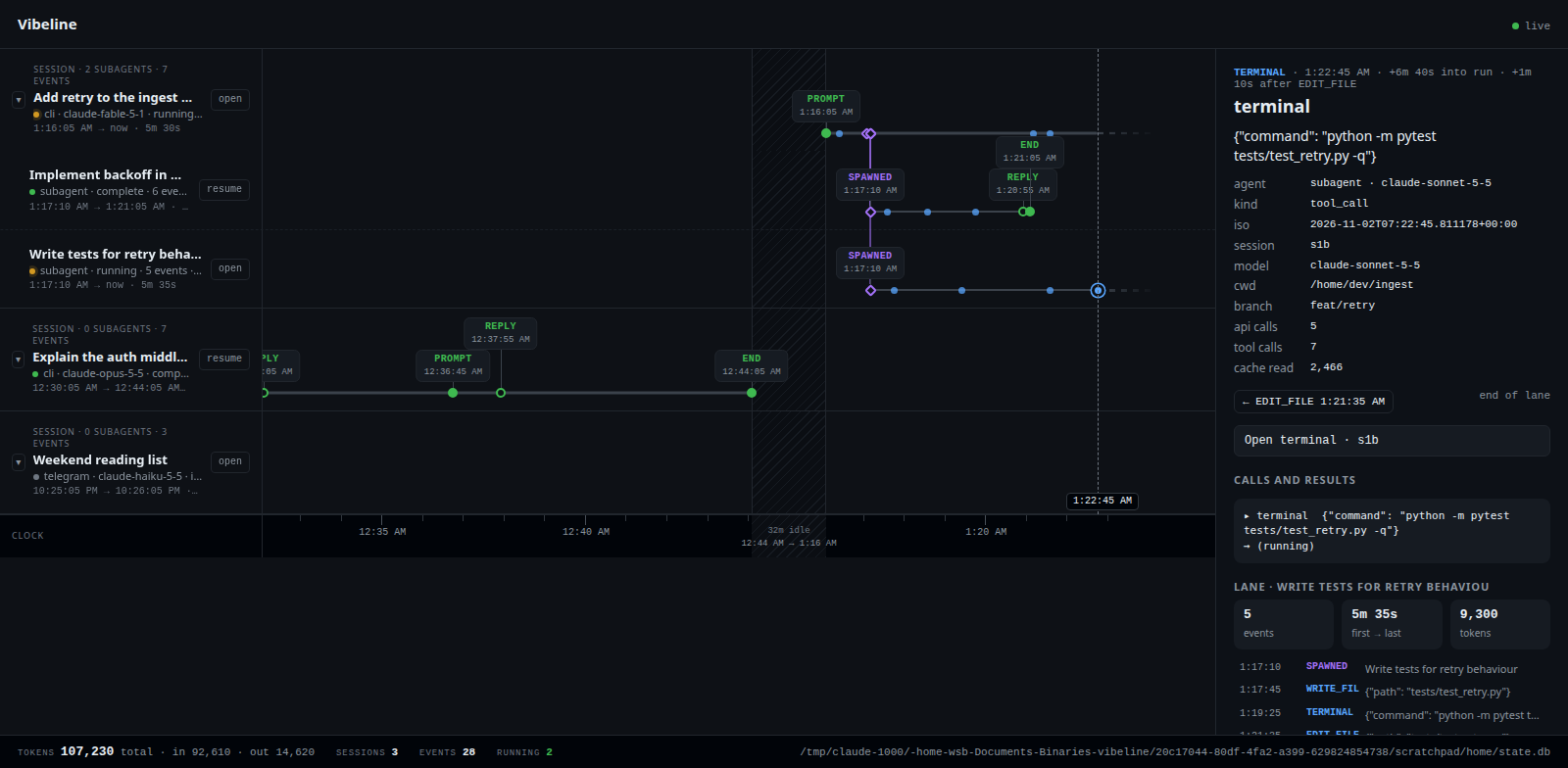
Web UI, Sessions view. Every Hermes session on the machine, subagents as child rails branching at spawn,
tool calls as dots. Clicking a mark opens the inspector on the right.
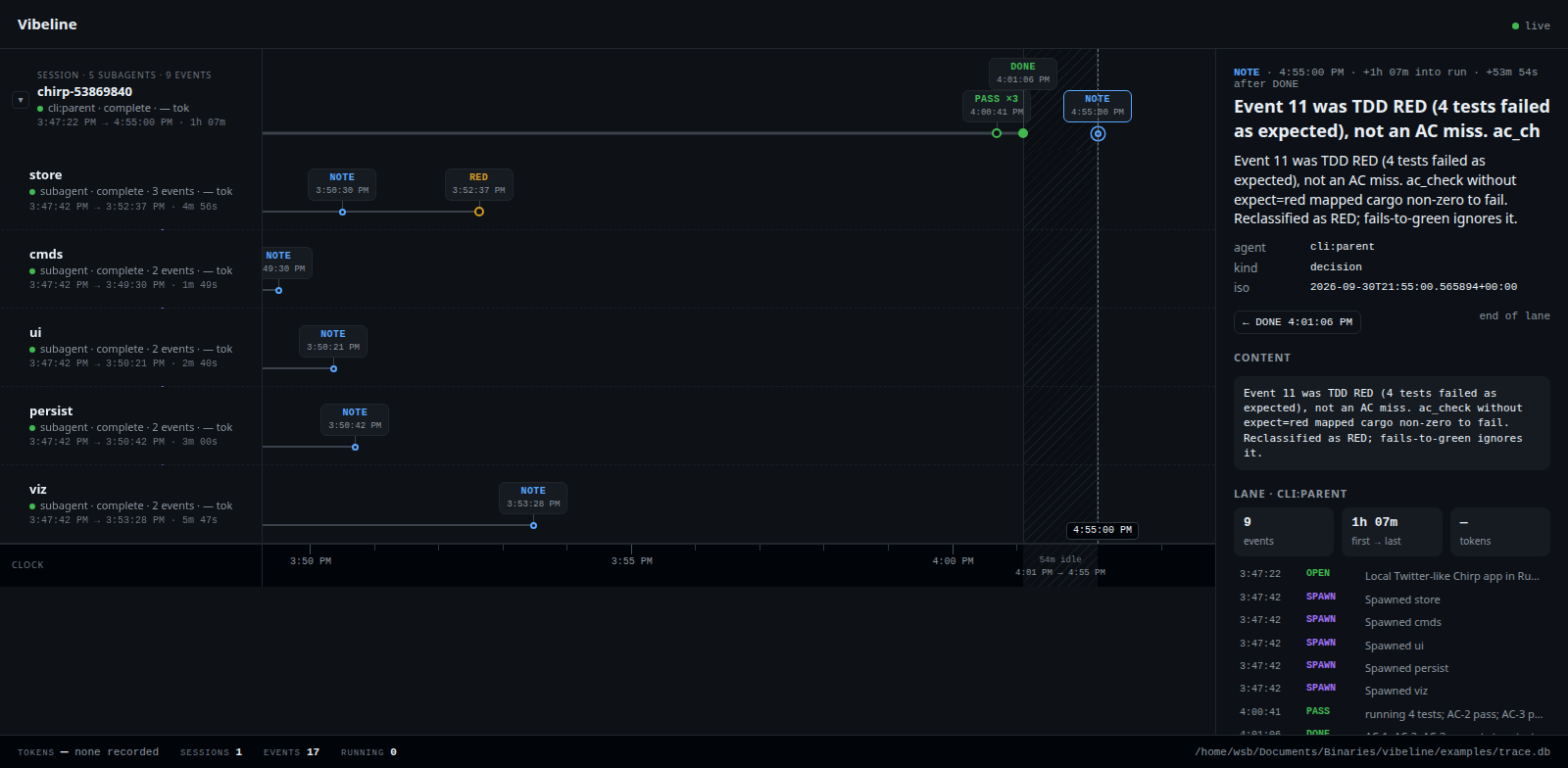
Web UI, Ledger view (/?src=ledger). The harness task ledger: parent lane, five spawned workers, the
expected TDD RED on store, and the acceptance-criteria PASS/DONE on the parent.
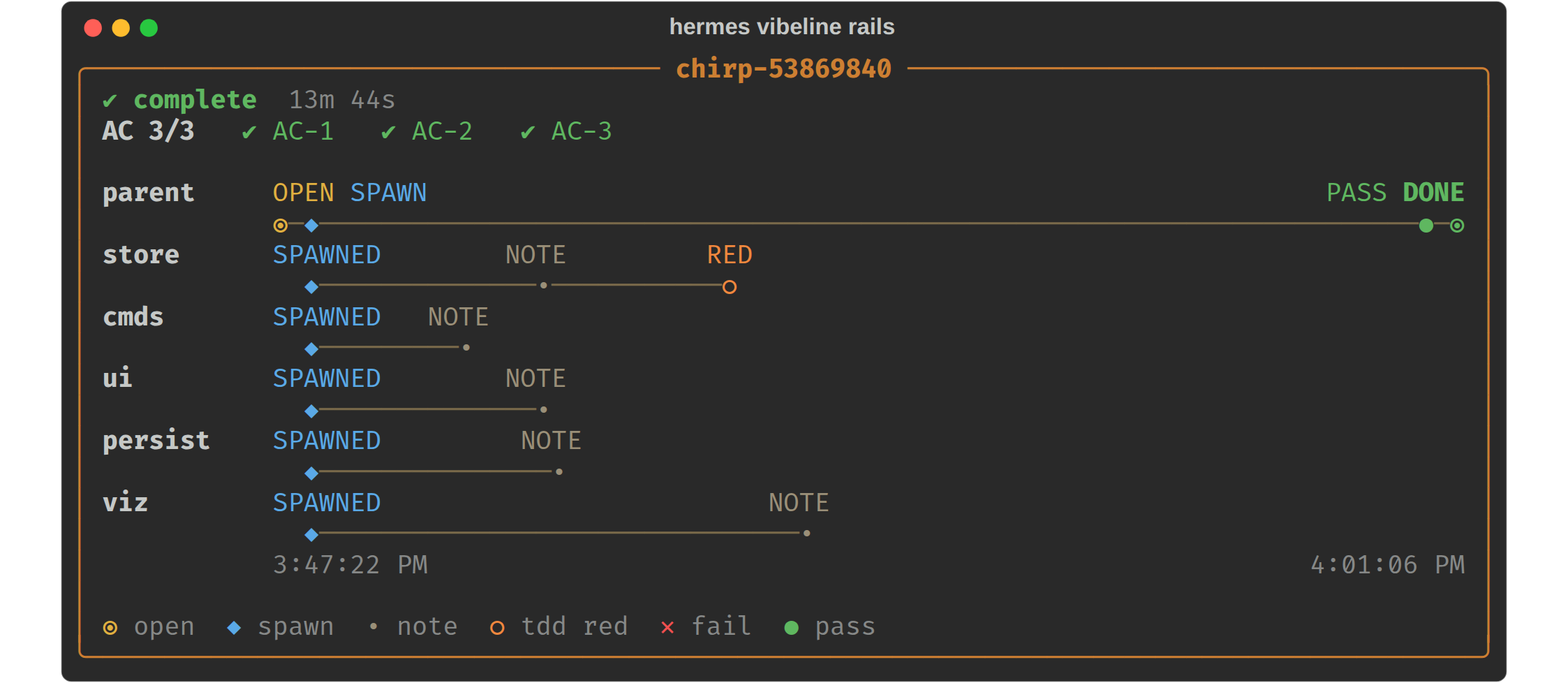
Classic CLI panel (hermes vibeline rails). The same ledger as a Rich panel in the terminal.
The web captures use a mock state.db and the bundled sample ledger, so what you see on a fresh install matches.
The Ledger tab is hidden until a real ledger is configured; /?src=ledger still opens the bundled sample.
Quick start (5 minutes)
git clone git@github.com:ListeningPost/vibeline.git ~/vibeline
cd ~/vibeline
./install.sh                            # links into ~/.hermes/plugins, enables, runs self-check
The install script is idempotent. It refuses to overwrite a plugin link that points somewhere else.
Then:
hermes --tui            # inside the TUI type:  /rails
hermes vibeline web --open
With no ledger configured, vibeline renders the bundled sample at examples/trace.db so you can see it work
before pointing it at real data. The Sessions tab of the web UI needs no configuration at all. It reads Hermes's
own ~/.hermes/state.db read-only.
Web UI features
Stopwatch (h). Colours every step by how long it took: blue fast, yellow typical, red with a glowing
outline slow. Tool time is the assistant message to the last tool result; model wait is the gap before a
step. auto compares a tool with its own median on screen (slow = 3x typical and at least 2s); pick a fixed
threshold (1s to 5m) instead if you prefer, and tick slow only to hide the rest. ?heat=1 opens a link in
this mode.
In the session list, timed steps get a coloured card with their duration, slowest first, wherever one fits
over its own dot. The rest stay dots until you zoom in.
Zoom and pan. Hold Ctrl (or ⌘) and turn the wheel, or pinch on a trackpad, to stretch the time axis around
the cursor; text and cards keep their size. + and - zoom, 0 resets, double-clicking an empty rail fits
everything, and the footer has the same controls. Hold the middle mouse button and drag to pan the timelines.
Shell steps. A terminal tool call is labelled with the program it ran, shell: pytest or shell: git,
read from the command line: cd, echo, sudo, timeout, pipes and bash -c wrappers are looked through,
and npx tsc or python -m pytest name the tool they run. The step title lists everything the script ran.
The stopwatch's typical is then per command, so a slow ls is not hidden by pytest being slow.
Feedback (f). Rate any step 👍 / 😐 / 👎, add a note saying why, and tick "tool is performing poorly"
to flag a tool across every call. Ratings live in ~/.hermes/vibeline/feedback.db (override with
VIBELINE_FEEDBACK_DB), never in Hermes's own database. Export from the header links or the CLI:
hermes vibeline feedback --format csv --out feedback.csv # or --format jsonl, --rated-only
One row per step of every session that has feedback (unrated steps ride along as context, with an empty
rating). Columns: machine, session_id, session_title, agent, lane_id, lane_name, event_id, time, kind, label, tools, title, content, duration_ms, wait_ms, rewound, rating, note, tool_flagged, tool_note. Tool
arguments and results inside content are capped at 1,500 characters each.
Rewind and retry. Select any step on a session's own rail and use Rewind to this prompt and retry (two
clicks: the first says how many steps will be dropped). vibeline calls Hermes's SessionDB.rewind_to_message,
the call behind /rewind, then opens a terminal on the session with the prompt resubmitted (hermes chat --resume ID -q PROMPT). The dropped steps are soft-deleted by Hermes and stay on the rail as ghosts. It
rewinds the conversation only: files the agent changed are not restored, a session mid-turn is refused, and a
terminal still attached to the session should be closed first. Needs the UI started through Hermes
(hermes vibeline web), not standalone. CLI: hermes vibeline rewind SESSION_ID m1234 [--dry] [--no-retry].
Swarm tab (?src=swarm). Hermes Kanban Swarm runs (hermes kanban swarm), read from kanban.db and any
named boards: the root card is the parent rail with its blackboard updates, and each worker, the verifier and
the synthesizer is a child rail with claims, comments, failures and run outcomes. Card-level only: a worker's
individual tool calls are on its own session in the Sessions tab.
Several machines
Each machine runs its own vibeline; one of them also shows the others.
# on every other machine (prints a URL containing a generated token)
hermes vibeline web --host 0.0.0.0 --name gpu-box

# on the machine you look at
hermes vibeline web --open --peer gpu-box=http://gpu-box:8877/?token=... --peer laptop=http://...
Sessions and swarms from every reachable machine are merged onto one page, labelled by machine; an unreachable
one is marked down and the rest keep working. Open, resume and rewind are forwarded, so the terminal opens on
the machine that owns the session. A machine with no graphical session (a server, a GPU box) starts the session
in a detached tmux session instead and the page shows the command to attach, e.g. tmux attach -t vibeline-<session>; run it there over SSH. VIBELINE_TERMINAL=tmux forces this on a desktop too. Feedback is
stored on the machine you look at, tagged with the source machine.
- Anything other than loopback requires the token (
--token,VIBELINE_TOKEN, or generated). A client is
loopback only if it connects from a loopback address and itsHostheader is127.0.0.1:<port>,
localhost:<port>or[::1]:<port>, so a web page that rebinds its domain to 127.0.0.1 is not trusted; behind
a local reverse proxy or a tunnel on a different port, use the token. To keep one token across runs, set the plugin'stokensecret in Hermes (stored as
VIBELINE_TOKENin the profile's.env) or export the variable. - Whoever holds a machine's token can read its sessions and open or rewind them. Add
--read-onlyon a
machine to refuse those actions and only publish its rails. - Traffic is plain HTTP. Use it on a network you trust, a VPN/tailnet, or an SSH tunnel.
VIBELINE_PEERSaccepts the sameNAME=URLentries, space or comma separated.
Manual install
If you prefer not to run the script:
ln -sfn /path/to/vibeline ~/.hermes/plugins/vibeline
hermes plugins enable vibeline
hermes vibeline check
hermes vibeline check verifies Python version, plugin link, ledger, state.db, widget directory and terminal
emulator. It exits non-zero on a hard failure. Run it first whenever something looks off.
Pointing at a real ledger
The harness ledger is an append-only SQLite file written by the harness MCP (table events, hash-chained).
vibeline only reads it. Resolution order:
--db PATHon the command line, or thedbargument on the tool- Plugin setting
plugins.entries.vibeline.settings.dbin~/.hermes/config.yaml VIBELINE_DB, thenTRACE_DBenvironment variables~/.hermes/vibeline/trace.db- The bundled sample
examples/trace.db
To set it once:
./install.sh --db /path/to/trace.db
# or
hermes config set plugins.entries.vibeline.settings.db /path/to/trace.db
Equivalent YAML:
plugins:
  entries:
    vibeline:
      settings:
        db: /path/to/trace.db
        show_tokens: false
Everyday commands
hermes vibeline rails [TASK_ID] [--db PATH] [--tokens]   # latest task if TASK_ID omitted
hermes vibeline dashboard                                 # task x AC table
hermes vibeline tasks                                     # list task ids
hermes vibeline web [--port 8877] [--host 127.0.0.1] [--open]   # tabs: Sessions, Swarm, Ledger
                    [--peer NAME=URL]... [--token T] [--name N] [--read-only]
hermes vibeline rewind SESSION_ID EVENT [--dry] [--no-retry]    # rewind to a prompt, reopen and resubmit
hermes vibeline feedback [--format csv|jsonl] [--out FILE] [--rated-only]
hermes vibeline open SESSION_ID [--dry]                   # new terminal running: hermes --resume SESSION_ID
hermes vibeline check [--db PATH]
In the web Sessions page, open / resume on a lane (or the t key) spawns a terminal in that session's cwd.
Terminal detection tries xdg-terminal-exec, gnome-terminal, kgx, ptyxis, kitty, konsole, wezterm, alacritty, foot,
xfce4-terminal, xterm in that order. Override with VIBELINE_TERMINAL=<name>. With no DISPLAY or
WAYLAND_DISPLAY (or with VIBELINE_TERMINAL=tmux) the session starts in a detached tmux session named
vibeline-<session> and the attach command is printed.
Standalone, without Hermes installed (ledger and web views only):
python3 /path/to/vibeline rails
python3 /path/to/vibeline web --open
What vibeline touches (disclosure)
- Reads outside its own data:
~/.hermes/state.db(Hermes session store),~/.hermes/kanban.dband named
boards (Swarm tab), and the ledger SQLite you point it at. All opened read-only. - Writes:
~/.hermes/tui-widgets/rails.mjs(the TUI widget) at registration and on each/rails;
~/.hermes/vibeline/feedback.dbwhen you rate something. - Changes Hermes state in one case only: an explicit Rewind (button or
hermes vibeline rewind) calls
Hermes's ownhermes_state.SessionDB.rewind_to_message, which soft-deletes the later messages of that
session. This imports a Hermes internal module, lazily, only for that action. - Shell commands:
hermes vibeline openand the web UI's open/resume button launch your terminal emulator
runninghermes --resume <id>(after a rewind:hermes chat --resume <id> -q <prompt>). Nothing runs without
that explicit action. - Background processes:
hermes vibeline webruns a local HTTP server bound to127.0.0.1until you stop it. - Network: none by default. With
--hostset to a non-loopback address the server accepts token-bearing
clients; with--peerit makes HTTP requests to the vibeline servers you name. No third-party resources. - Credentials and telemetry: no telemetry. The only secret is the vibeline token you pass or it generates;
it is kept in memory and printed once at startup.VIBELINE_TOKENis declared as a secret setting (token)
and read through Hermes'sget_secret, as isVIBELINE_PEERS(peer URLs carry tokens). vibeline reads no
.envor credential file itself. - Environment variables read:
HERMES_HOME,HERMES_KANBAN_DB,VIBELINE_DB,TRACE_DB,
VIBELINE_TERMINAL,VIBELINE_FEEDBACK_DB,VIBELINE_PEERS,VIBELINE_TOKEN(a secret),DISPLAY,
WAYLAND_DISPLAY.
Tools exposed to the model
vibeline_rails {task_id?, db?, show_tokens?}returns{ok, task_id, db, markdown}vibeline_dashboard {db?}returns{ok, db, markdown}
The bundled skill (skills/vibeline/SKILL.md) tells the model to open the widget rather than paste rails into
the transcript, because classic CLI mode strips markdown.
Rendering rules
- The parent owns the clock. Child rails start at their spawn event.
- FAIL stays on the rail. An expected TDD RED (
expect=red,whystartingRED:, or "as expected") is not an
acceptance-criteria failure. - Token counts are off unless
--tokensorshow_tokens: true.
Development
pip install -r requirements-dev.txt   # pytest only
make test                             # or: python3 -m pytest tests -q
make check                            # python3 . check
hermes plugins validate .             # Hermes's own manifest/security check
Layout:
__init__.py   register(): tools, /rails slash command, `hermes vibeline` CLI, skill
cli.py        subcommand tree          doctor.py   `check` self-diagnostic
ledger.py     read + verify the ledger sessions.py read ~/.hermes/state.db (read-only)
rails.py      classify events, build lane/rail geometry, markdown
widget.py     write tui/rails.mjs into ~/.hermes/tui-widgets, Rich panel
web.py        HTTP server + JSON API for web/index.html
spawn.py      terminal spawning for open/resume
swarm.py      read kanban.db swarm runs    feedback.py ratings store + CSV/JSONL export
rewind.py     rewind via Hermes SessionDB  peers.py    multi-machine hub (merge, forward)
examples/     sample trace.db          sketches/   design mockups, not shipped to Hermes
Troubleshooting
/railsdoes nothing in the TUI. Runhermes vibeline check; the tui-widgets dir must be writable. The
TUI hot-loads~/.hermes/tui-widgets/rails.mjs, which the plugin writes at registration and on each/rails.- "no ledger". Nothing in the resolution order above exists. Pass
--dbor set the plugin setting. - Web UI: "restart vibeline web". An older server process is still running on the port. Stop it or use
--port. openfails with "no terminal emulator found". SetVIBELINE_TERMINALto the binary name of your terminal.- Plugin not loading after a Hermes upgrade.
hermes plugins doctorandhermes plugins validate /path/to/vibeline.
License
MIT. See LICENSE. Copyright (c) 2026 ListeningPost.
README from the reviewed commit d5d0f42; it updates when the author re-pins.


