
 wiroai
Wiro AI media tools for Hermes
Make and edit images, video, speech, music, transcripts and 3D models in
Hermes Agent with Wiro AI's
catalog of 1,000+ models, all on one API key. The plugin adds thirteen wiro_* tools, a skill
with ready recipes, and Wiro AI as a backend for Hermes' own image_generate, video_generate,
text_to_speech and voice message transcription. Requires Hermes 0.22.6 or later. It has no
Python dependencies.
Connect
hermes plugins install wiro-media --enable
hermes config set WIRO_API_KEY <your-key>
Until the catalog listing lands, install from the repository:
hermes plugins install "https://github.com/wiroai/Wiro-Hermes#wiro-media" --enable.
Create the key under your project at wiro.ai/panel/project. For a
Signature project, the value is YOUR_API_KEY:YOUR_API_SECRET. The same key works for the
wiro model provider plugin, so Hermes can chat through Wiro AI's LLM
gateway too.
Then ask for what you want: "make a poster of a lighthouse", "remove the background of this
photo", "turn this picture into a five second clip", "transcribe this voice note".
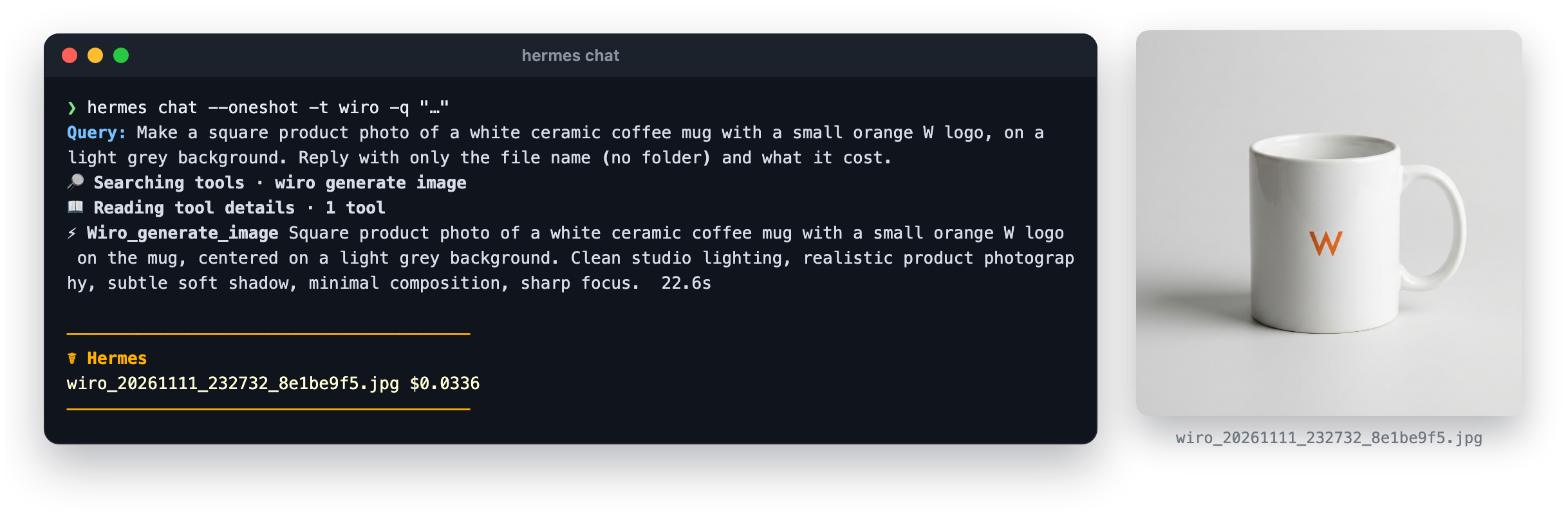
Tools
| Tool | What it does |
|---|---|
wiro_generate_image | Images from a prompt, optionally guided by reference images. Aspect ratio, resolution, count, seed. |
wiro_edit_image | Change a picture with a prompt (objects, style, background, text, combining images), upscale it, or remove_background. |
wiro_generate_video | Video from a prompt, or from a start image (and an end frame where the model takes one). Duration, aspect ratio, resolution, sound. |
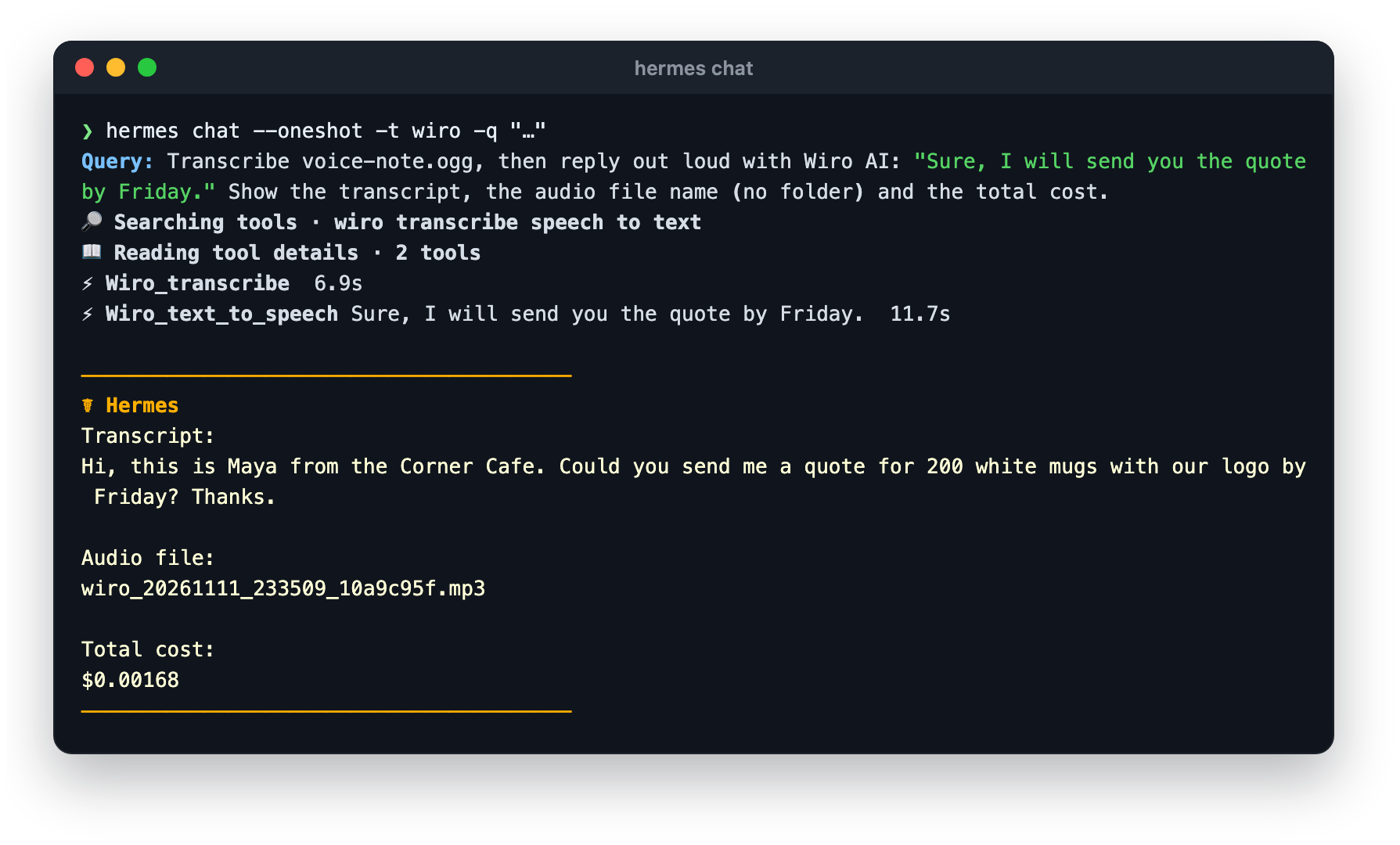
wiro_text_to_speech | Read text aloud in a chosen voice and language. |
wiro_generate_music | Instrumental tracks, or songs from lyrics. |
wiro_transcribe | Speech to text from voice notes, recordings or the sound of a video. |
wiro_generate_3d | A 3D model (GLB) from a picture of an object. |
wiro_search_models | Search the catalog by key words or category; every row has its price. |
wiro_model_info | One model's parameters, options, defaults and full price table. |
wiro_run_model | Run any model with its own parameters: lip sync, try-on, voice cloning, video to video, LLMs and more. |
wiro_task | Wait for a task that was still running and save its files, check it, stop it, or list recent tasks with their cost. |
wiro_workflows | Find your Wiro AI workflows (or the public gallery) and read their inputs. |
wiro_run_workflow | Run a workflow and save its outputs. |
The tools live in the wiro toolset, which hermes tools can switch on or off per platform.
Models
Every media tool takes any model ID in its model argument. Without one it uses a default, and
each default can be changed in the plugin settings:
| Setting | Default |
|---|---|
image_model | google/nano-banana-2-1 |
edit_model | google/nano-banana-2-1 |
upscale_model | xinntao/real-esrgan |
background_model | wiro/remove-background |
video_model | bytedance/seedance-v1-pro-fast |
speech_model | elevenlabs/eleven-v4-turbo |
music_model | elevenlabs/text-to-music-v2 |
transcribe_model | elevenlabs/speech-to-text |
model3d_model | microsoft/trellis-2 |
wait_seconds | 240 |
hermes config set plugins.entries.wiro-media.settings.video_model klingai/kling-v4-flash
A tool fills the model's own parameters from its arguments: the prompt, input files, aspect
ratio (the nearest one the model offers), duration (the nearest length it offers), resolution,
voice and the rest. Settings an argument does not cover go in params, keyed by the parameter
ids wiro_model_info lists. Required settings left out get the model's catalog default, and the
result says which.
Files
Inputs take a public URL or a local path. Local files are uploaded to your Wiro AI storage first:
files sent in a chat (they sit in Hermes' media cache), results of earlier wiro_* calls, and,
when the terminal backend is local, files in your workspace (a relative path is read from the
session's folder). A file is uploaded only when its bytes are the kind of media the argument
takes. System folders, credential folders such as ~/.ssh and ~/.config, and the Hermes home
outside its media caches are never read. With a sandboxed terminal backend (Docker, SSH, Modal
and the like), only files in Hermes' media cache are read. Voice notes in Ogg Opus (Telegram,
WhatsApp) and bmp, tiff or avif images are converted to m4a or png with your local ffmpeg
before the upload, when ffmpeg is installed.
Outputs are saved in Hermes' media cache, the folder and naming Hermes' own image and video
providers use:
~/.hermes/cache/generated/images/wiro_20261111_185327_a62fdd6d.jpg
~/.hermes/cache/generated/videos/   ~/.hermes/cache/generated/audio/
~/.hermes/cache/generated/3d/       ~/.hermes/cache/generated/files/
Each result lists the files with their path, Wiro AI URL and type, plus a media_tag line
(MEDIA:/path) per file, which delivers the file as an attachment on messaging platforms and in
the desktop app. Transcripts and LLM answers come back as text.
Long jobs
A tool waits up to wait_seconds (240 by default, at most 360, inside Hermes' tool time limit).
A task still running then keeps going on Wiro AI: the result carries its task_token, and
wiro_task waits for it and saves the files without starting a second run.
Skill
skill_view("wiro-media:wiro") loads the plugin's skill: which tool fits a job, how to pick a
model and read its price, file handling, long jobs, and recipes such as product photo to ad clip,
idea to 3D asset, and voice note to spoken answer.
Hermes' own media tools on Wiro AI
The plugin also registers Wiro AI as a backend for four of Hermes' built-in features. Each is off
until you choose it, in hermes tools or in config.yaml:
image_gen:
  provider: wiro
  model: google/nano-banana-2-1        # any Wiro AI image model
video_gen:
  provider: wiro
  model: bytedance/seedance-v1-pro-fast
tts:
  provider: wiro
  model: elevenlabs/eleven-v4-turbo
  voice: brian
stt:
  provider: wiro
  wiro:
    model: elevenlabs/speech-to-text
image_generate and video_generate then run on Wiro AI, text_to_speech speaks with a Wiro AI
voice (as a voice bubble on platforms that have them), and voice messages sent to the gateway
are transcribed by a Wiro AI model.
Pricing
Runs are paid as you go from your Wiro AI wallet, at each model's own price: per run, per output,
per second or per character, as the model's page shows. wiro_search_models and
wiro_model_info show prices before a run, every result reports what the run cost, and
wiro_task with action: "list" shows recent tasks with their cost. Failed tasks are not
charged. Searching, reading models and workflows, and checking tasks are free. Prices are on
wiro.ai/models.
Scope
- Network: requests go to
https://api.wiro.ai/v1with the key Hermes reads
(WIRO_API_KEY, through Hermes' secret scope): prompts, settings, and input files you pass.
Output files are downloaded only from Wiro AI hosts (*.wiro.ai). No other host is contacted. - Spending: every generation spends your Wiro AI balance without a Hermes approval prompt;
the model can choose costly options (high resolution, long video) when asked to. - Files: reads the local input files described above, writes outputs under
cache/generated/in your Hermes home, and runsffmpegto convert audio or images in the
formats above when it is installed. - Nothing else: no hooks, middleware, background work, telemetry or self-update. Update it
withhermes plugins update wiro-media.
MIT license.
README from the reviewed commit be81dea; it updates when the author re-pins.


