 Junkz3
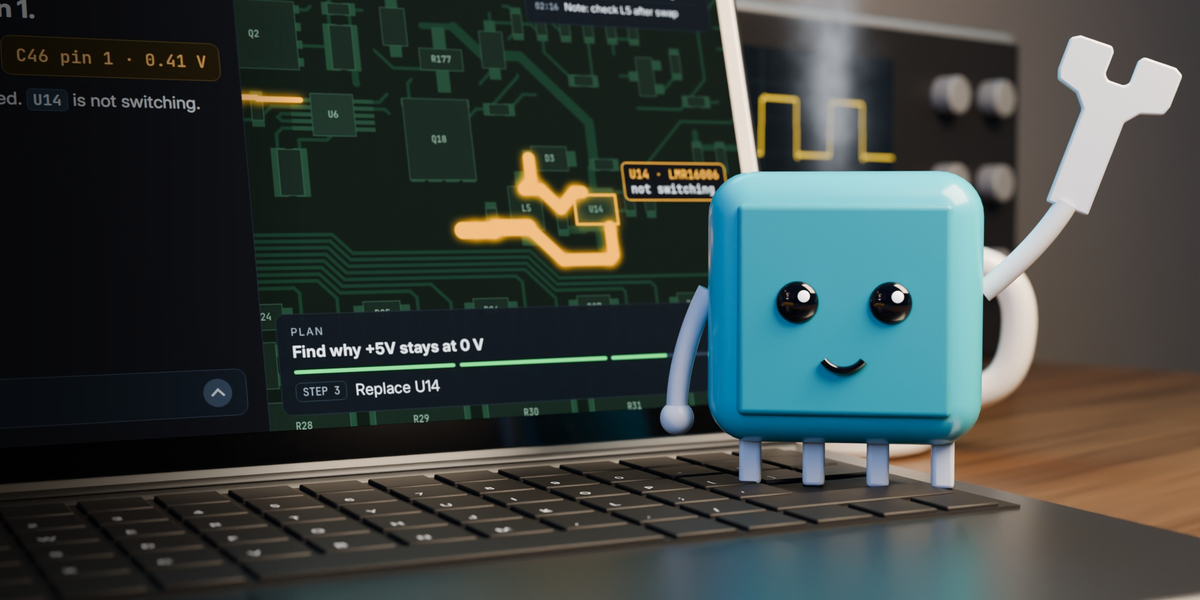
WrenchBoard for Hermes
Turn Hermes into a circuit board repair bench. You talk to the agent, the agent works on the real copper of your
board, and everything shows beside the chat: the board moving, the readings pinned on the pads, the schematic, the
test plan.
https://github.com/user-attachments/assets/f20e07cf-b297-4a81-b63a-c4e2e1e16f12
It is for people who repair electronics: phone and laptop repair shops, bench technicians, hardware engineers
bringing up a board.
It opens the boardview files a repair shop already has, in 14 formats: .brd, .fz, .tvw, .bdv, .pcb, KiCad
boards and eight more.
Try it in two minutes
You need Hermes Agent 0.23 or later and a WrenchBoard account. The account is free, is created in the browser when
you connect, and comes with an example board (the open-hardware MNT Reform motherboard), so there is nothing to
upload and no hardware to own. On that board a free account also reads the analysed schematic and the known faults.
hermes plugins install wrenchboard --enable
Not in your catalog yet? hermes plugins install Junkz3/hermes-wrenchboard --enable installs it from this
repository.
- In Hermes Desktop or the Webapp, open Capabilities, Plugins (Settings, Plugins, Manage plugins leads to the
same page), typeWrenchBoardin the search box if it is not listed, and switch it on. Hermes ships a plugin's
interface off, for each app and browser, so do it once on each: the agent reminds you if you forget. - The pane opens. Press Connect and sign in with your WrenchBoard account in the browser.
- Ask:
Show me the MNT Reform motherboard and light the +5V rail.
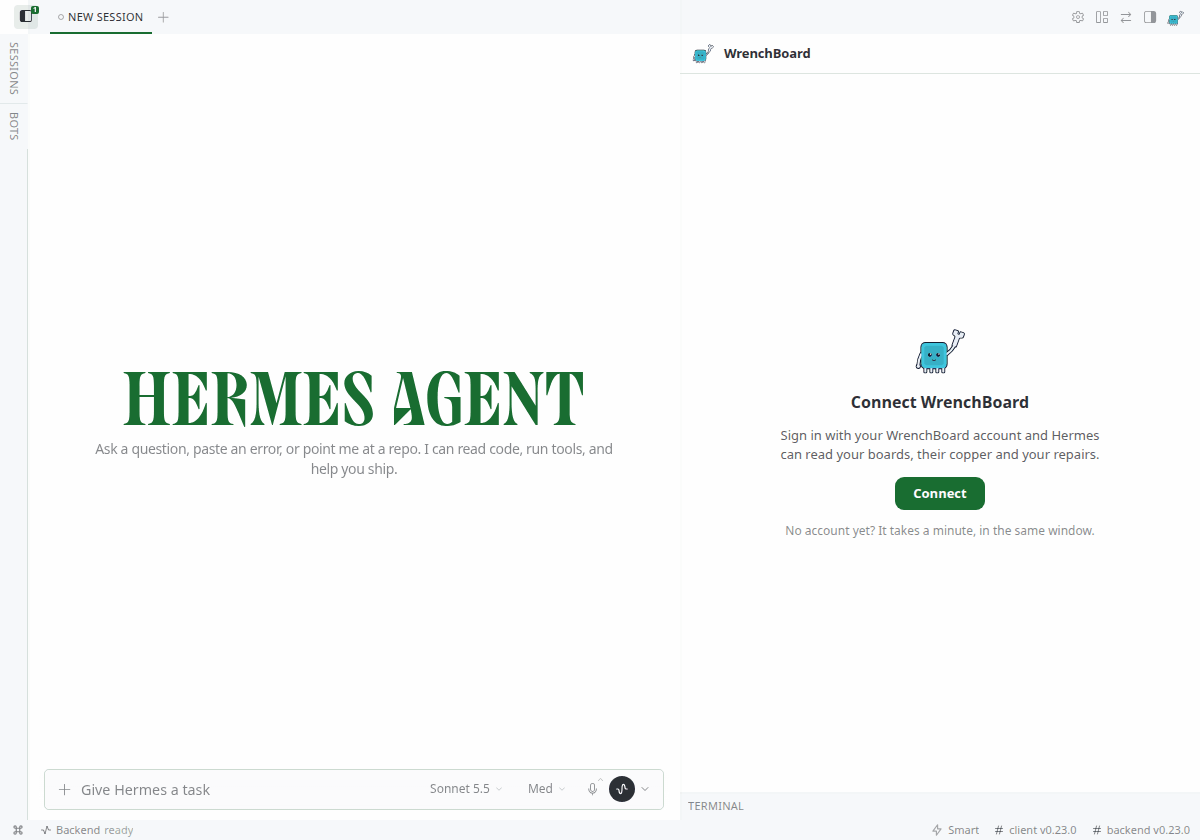
Working on another computer than Hermes, or in a terminal? hermes wrenchboard connect does the same and lets you
paste the address the browser could not reach. hermes wrenchboard status says what is set up and what is missing.
Try asking
| Ask | What happens | Account |
|---|---|---|
| Show me the MNT Reform motherboard and light the +5V rail. | The board opens beside the chat and the rail lights up on the copper. | Free |
| What is U12, and where does its ON/OFF pin go? | A part card drawn from the real pads, then the net followed on the board. | Free |
| @board:C18 what is this capacitor for? | The message carries what the copper says about C18: its pins, nets and neighbours. | Free |
| Find U12 on the schematic. What feeds it, and what does it power? (the example board comes with its schematic; for another board, drop its PDF on the Schematic tab first) | The agent reads the page, zooms on the region, and frames the part on the page and on the board. | Free |
| Drop a datasheet on the Documents tab, then What is the ON/OFF threshold of U12? | It finds the page, reads the table and cites it: file, page, value. | Free |
| On the example board (mnt-reform-motherboard), +3V3 is dead. What would explain it, and what do I measure first? | The agent reads the board's analysed schematic (power tree, boot order), ranks what explains the symptom and shows the suspects on the board. | Free on the example board |
| /wb boards | Your boards, straight from WrenchBoard, without asking the model. | Free |
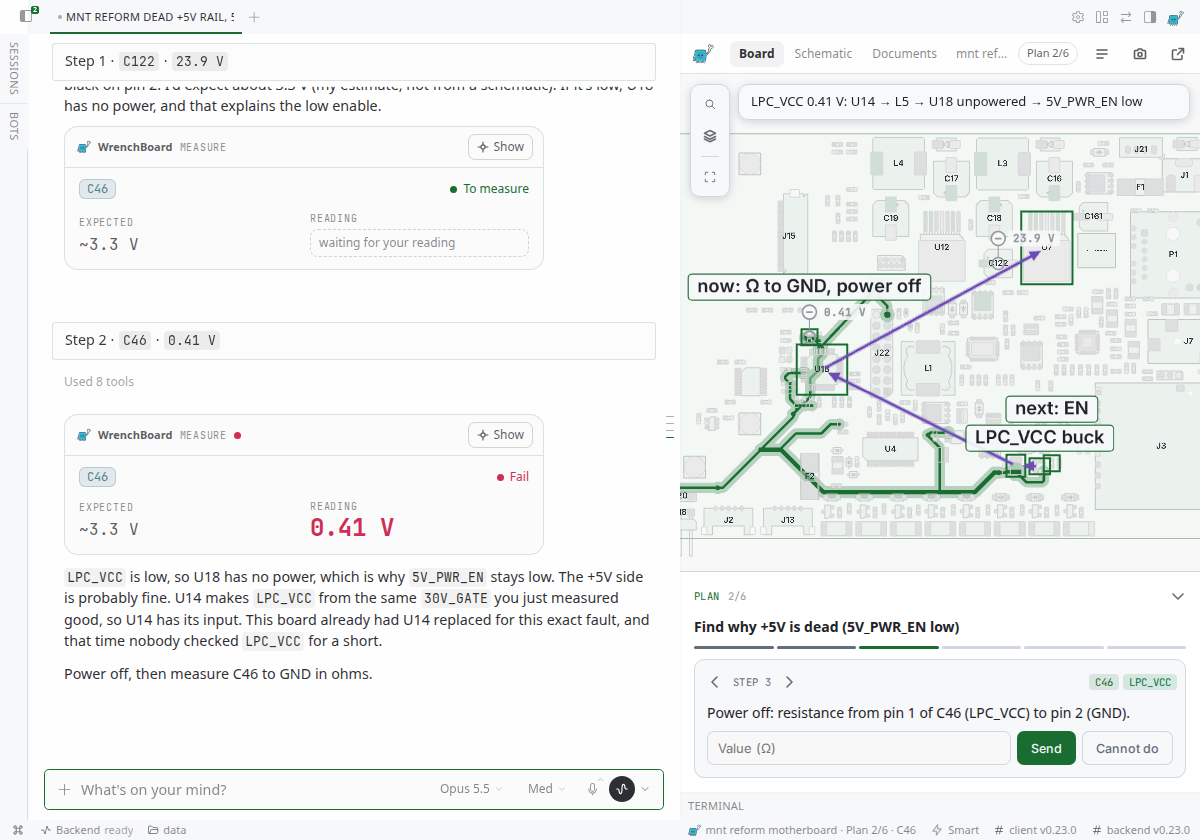
| +5V reads 0 V. Open a repair and give me a test plan. | A plan on the board. Accept it, type each reading, the agent revises the plan. | Pro |
| Where are my repairs? | The Repairs page, laid out by the agent over the pane. | Pro |
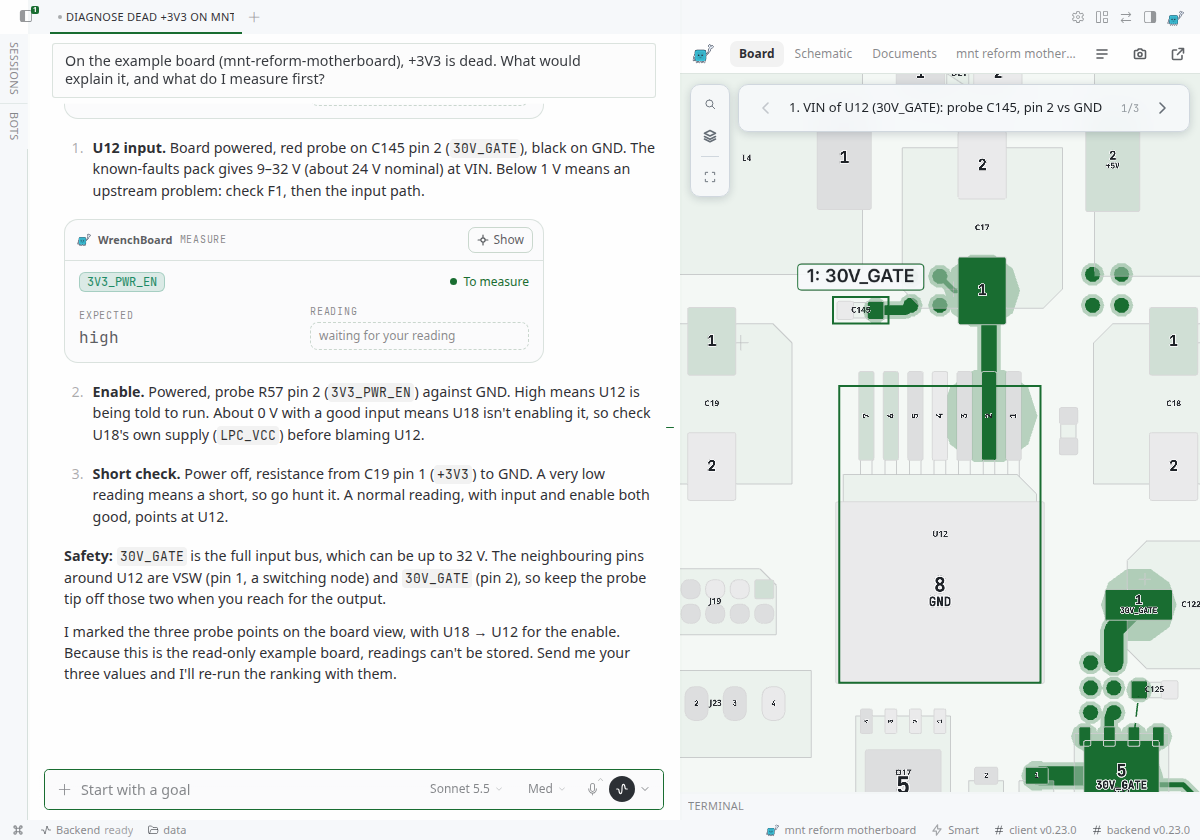
The example board is revision 2.5 of the MNT Reform motherboard. MNT Research publishes its schematics and design
files at source.mnt.re/reform/reform.
Replay the film's repair
The example board is read-only, so a repair runs on your own copy of the board. Its design files are published by
MNT Research under CERN-OHL-S 2.0. Repairs and test plans need a Pro account.
- The board. Download
mnt-reform-motherboard.kicad_pcb
(16 MB), click Import a board in the pane and drop it. - The schematic. Nothing to do. For this board the plugin ships the schematic MNT publishes (revision 2.5) and
opens it on the Schematic tab. For any other board, drop its PDF there: it stays on your computer. - The question.
New repair: +5V rail is dead on my MNT Reform: the 24 V input is there, 5V_PWR_EN stays low. Where do I start?Press Start on the plan, type each reading in it, then tell the agent what you fixed.
Why a plugin, and not a prompt or a skill
A prompt can tell a model how to repair a board. It cannot put the board on screen, check a part name against the
copper, or hear "C18" in a voice note. This plugin uses the parts of Hermes a prompt cannot reach:
- A pane, in both directions. The live boardview sits beside the chat. The agent moves it; you click a part,
accept a plan or type a reading in it, and the agent gets that as your message. - Cards drawn from data, not from the model. Board, part, measurement, plan and schematic-view cards fetch what
they show. A part that is not on the board says so on the card, whatever the model wrote. - Four hooks. One sends each board result to the pane and keeps the plan up to date. One tells the agent what
you did on the board since its last turn. One hands the speech-to-text model the names on your board. One keeps
card lines out of apps that cannot draw them. - Tools that run on your computer. The schematic and your documents are rendered from the PDF locally, page
first, then a sharp zoom on the region the agent needs. - The rest of the surface. A
/wbcommand that answers without the model,@board:references with
suggestions, a status bar item, a settings page, a model slot for document summaries, a skill for chat apps, and
a plan message edited in place on Telegram, Discord, Slack or Mattermost.
What it adds to Hermes
On the board
- The board beside the chat. The agent lights a rail, frames a part, walks through a power-up sequence. Click
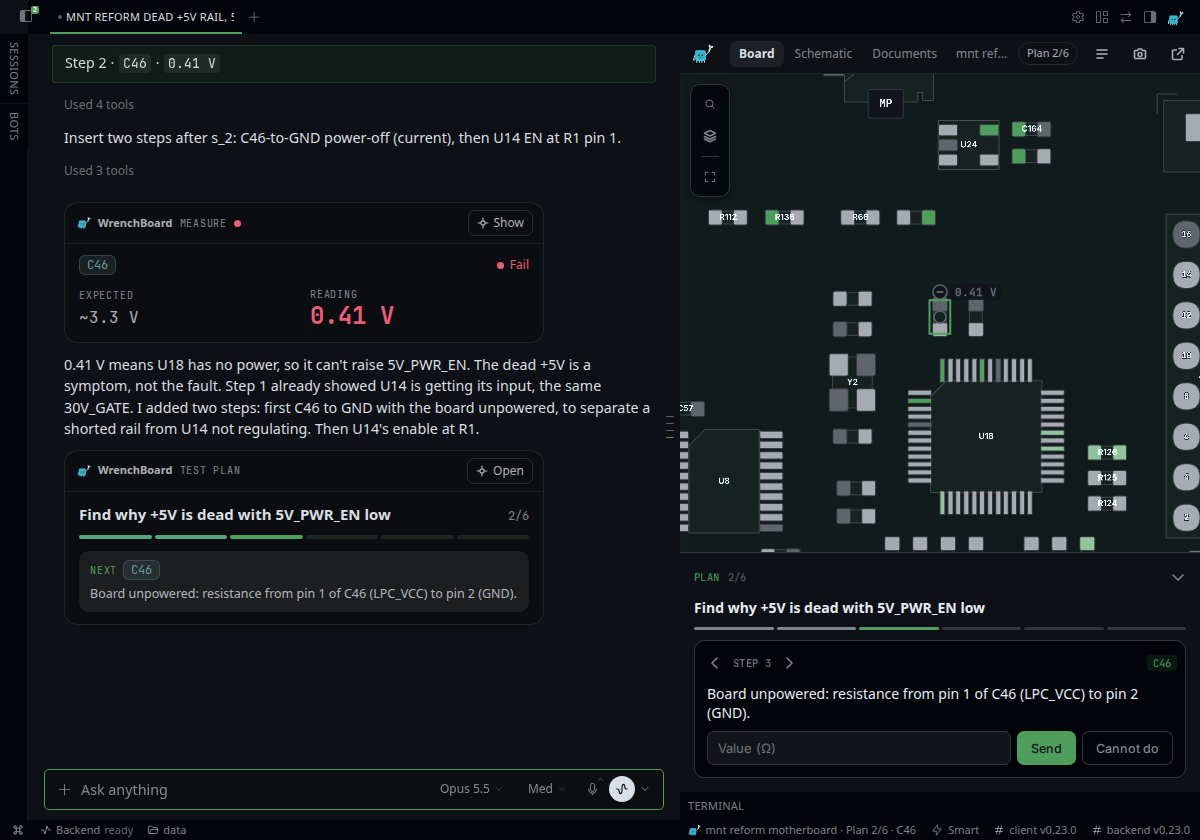
a part and the agent knows which one you mean. - A real test plan. The agent proposes measurements, you accept them on the board and type each reading. It
lands on the pad, green or red, with its value, and the agent revises the plan. When the agent closes the repair, the pane
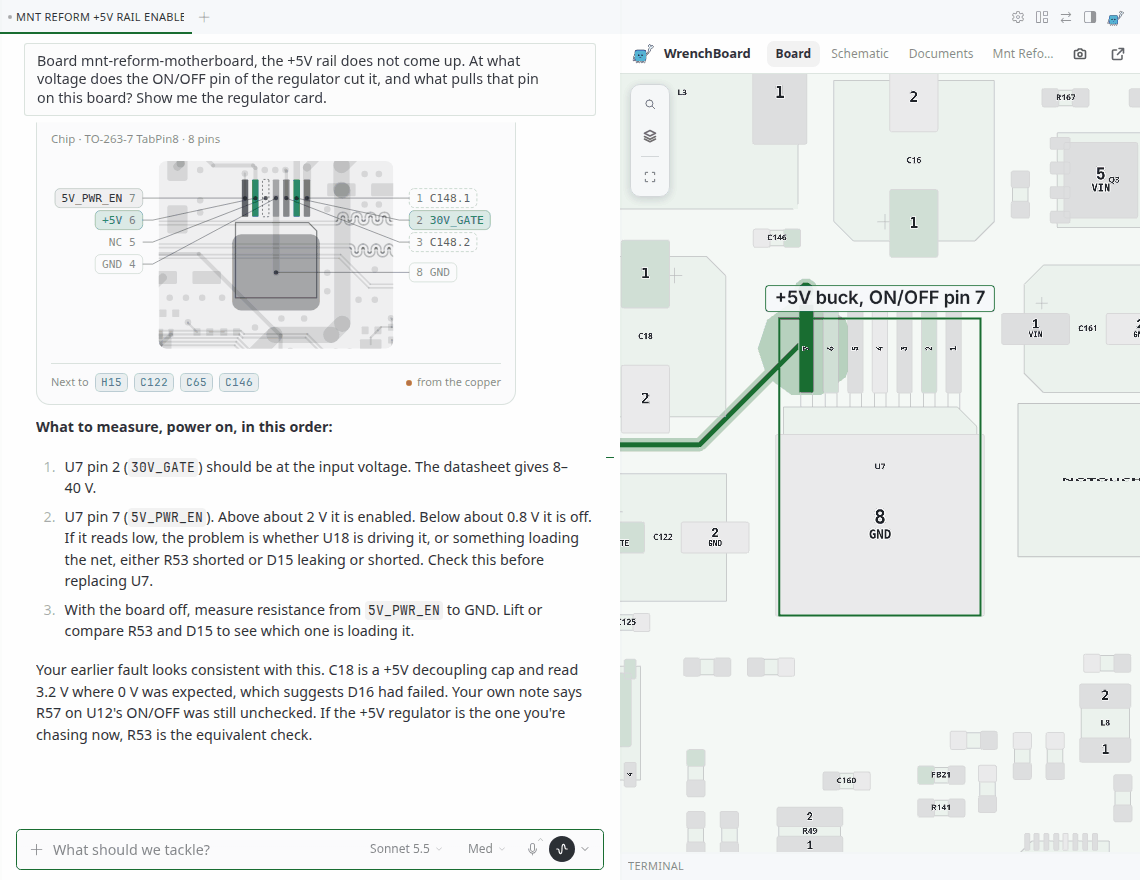
says so once, with what was recorded: the readings, the confirmed cause, the fix. - Live cards in the conversation. A part card draws the part as it sits on the board: its pads, outline and
silkscreen, the tracks around it, its value and package (U12 LM2677SX-3.3 · TO-263-7). Click a pad and its net
lights up on the board. @board:in the message box. Type@board:C18or@board:+5V: Hermes suggests the parts and nets of the
board on the bench, and the message carries what the copper says. A name that is not on the board is flagged,
with the closest names it does have.
Schematic and documents, kept on your computer
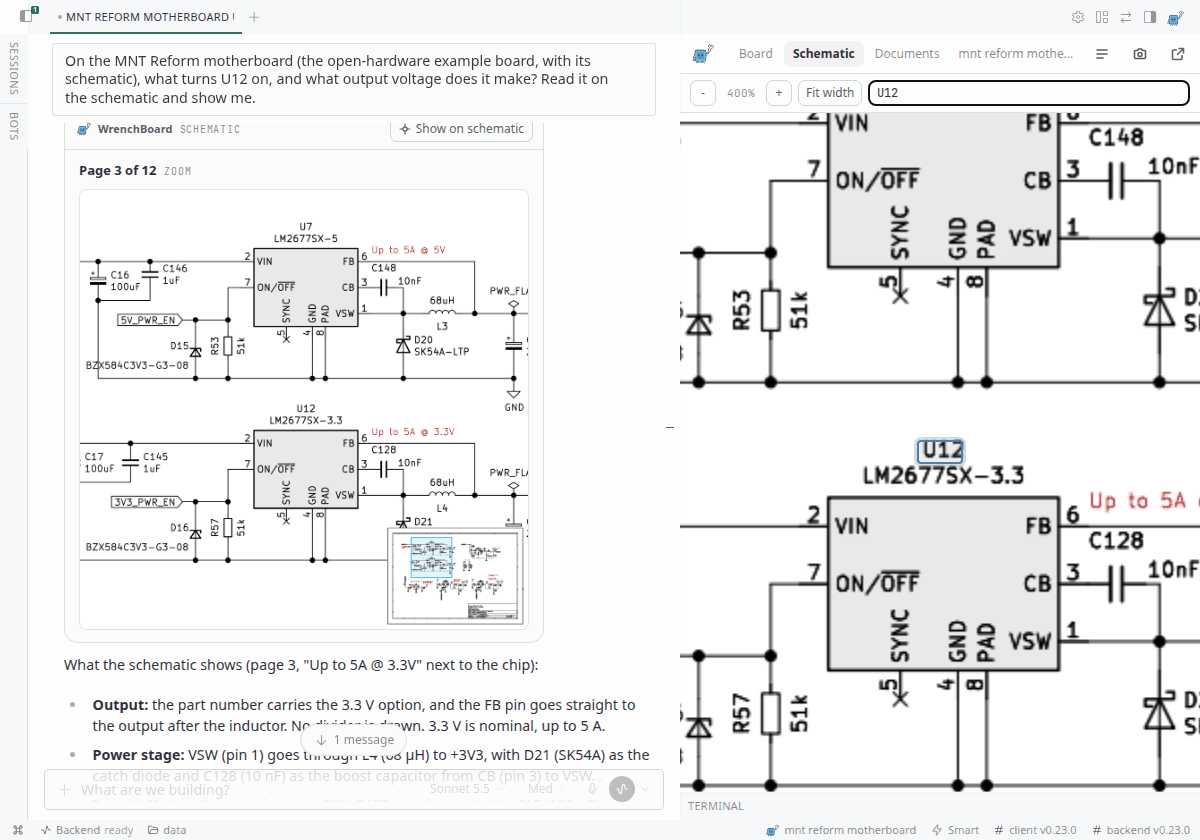
- Your schematic, cross-probed. Drop a PDF on the Schematic tab: pages with zoom, and search for a part, a
net or any word. Pick a part on the board or on the page and it is framed on both. The view the agent's answer
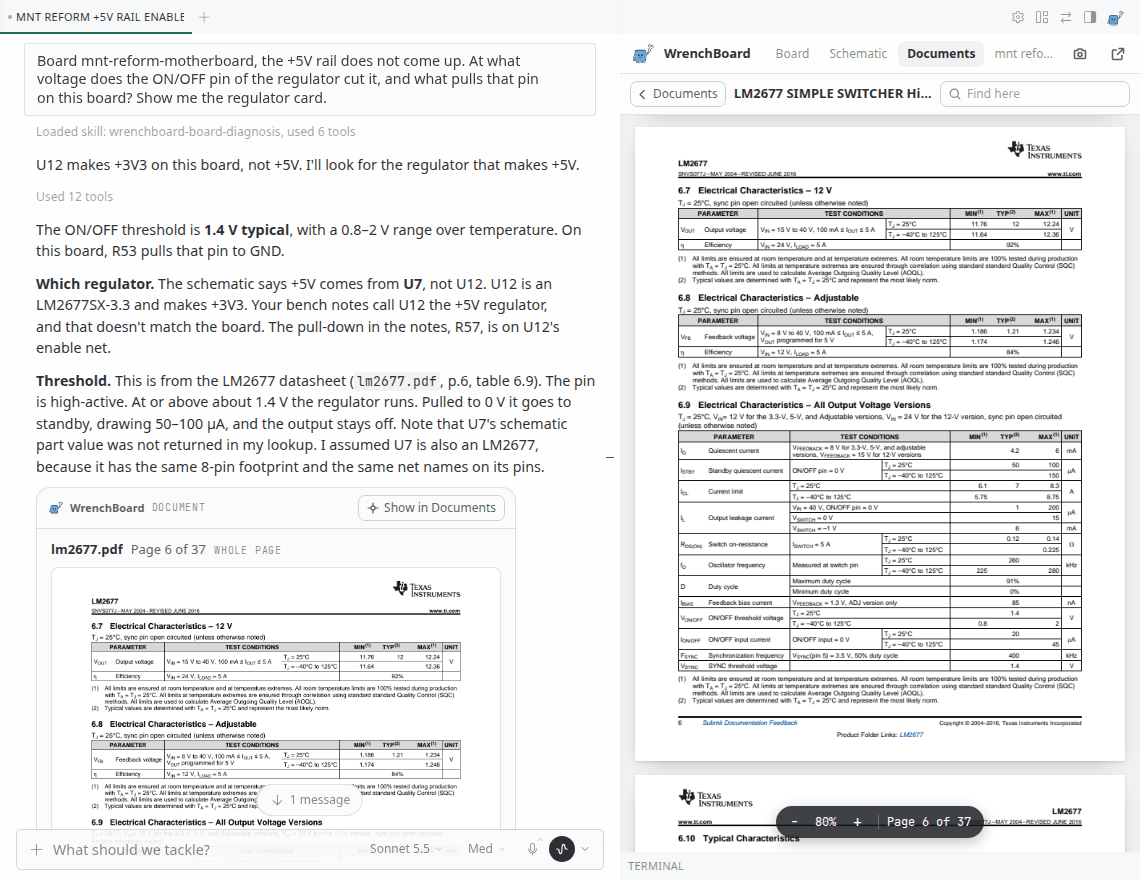
rests on comes as a card in the chat, with a small map of the page. - The board's documents, read for you. Drop datasheets, a service manual or bench notes (PDF, TXT, MD) on the
Documents tab. Your model writes each one a two-line card. The agent searches the shelf, reads the page and
cites it: "lm2677.pdf, page 6, V_ON/OFF 1.4 V typ". The card opens the tab on that page, the region framed.
At the bench
- Readings said aloud. Both probes on the board, send a voice note: "C18, 3.2 volts". The plugin hands the
speech-to-text model the parts and nets of your board, so C18 and PP3V3_S5 come out spelled as the board spells
them, not "see eighteen". - Camera and instruments. A webcam or USB microscope in a small window that floats over the pane. The agent
can ask for a picture, you allow it each time. On Desktop, it can read an instrument's window (thermal camera,
oscilloscope) with Hermes' computer use. - A Repairs page the agent lays out. Ask "where are my repairs?" or "how did the bench do this month?": every
repair with its board, symptom and state, the bench's numbers, and the agent's reading of them. The repairs and
numbers come from WrenchBoard, never from the model, and what the agent wrote is marked as its own.
Everywhere Hermes runs
/wbin every app./wb boards,/wb repairs,/wb plan,/wb status,/wb connect. The same in
Desktop, the Webapp, Telegram and the terminal.- A plan that keeps itself up to date in chat apps. On Telegram, Discord, Slack or Mattermost the plan is one
message, edited in place after every reading. Apps that cannot edit a message get it once. - A bench skill for chat apps. Where there is no pane, the
wrenchboard:benchskill runs the repair one
reading at a time, short answers, made for a phone held between two measurements. - The bench in the status bar. In Desktop, the board, the step and the point to probe now ("Plan 2/3 · C19"),
with a red dot once a reading failed. - It follows your Hermes. Your theme, light or dark, and your language, in the pane and in
/wb(English,
French, Spanish, German, Chinese, Japanese, Russian). Three board skins in Settings. On a phone, the pane goes
full screen.
| | |
|---|---|
|  |
 |
|  |
 |
Free and Pro
| | Free account | Pro |
|---|---|---|
| The live board, parts, part cards, @board: | Yes | Yes |
| Following a net, listing the rails | 25 reads a day | Yes |
| Importing your own boards (.brd, .bdv, .fz, .cad, .asc, KiCad and others) | Yes | Yes |
| Schematic tab, Documents tab, camera, voice vocabulary | Yes, on your computer and your model | Yes |
| Repairs, test plans, readings on the pads, the Repairs page | No | Yes |
| Known faults and the analysed schematic (power tree, boot order) | On the example board | Yes |
The plugin says so plainly, in one sentence, when you reach something your account does not have. Plans are on
wrenchboard.cloud.
Limits
- It needs the network and an account. The board view is served by WrenchBoard. There is no offline mode for
the board; the schematic and documents you dropped stay readable. - One bench per Hermes. The pane follows the board and repair you worked on last, not each chat session.
- A board is a boardview file. One of 14 formats:
.asc,.bdv,.brd,.brd2,.bv,.bvr,.cad,.cst,
.f2b,.fz,.gr,.kicad_pcb,.pcb,.tvw. The plugin does not rebuild a board from a photo. - The schematic is read by your model. It needs a vision-capable model, and its reading of a drawing is a
reading. What is connected to what always comes from the copper. - The analysed schematic exists for some boards only, those WrenchBoard has analysed. On the others the agent
works from the copper and from the PDF you drop. - Where it was tested. Built and tested on the Hermes Webapp, which runs the Desktop interface in a browser,
and on Mattermost. Telegram, Discord and Slack go through the same Hermes calls and were not each tested.
Disclosures
- Network. The plugin talks to the WrenchBoard connector you connect (
https://app.wrenchboard.cloudby default),
through Hermes' own MCP client, and loads the board view page and its assets from it. Once per board (again after
six hours), it also reads the board's drawing the view loads, through the same short link, to draw parts in chat
cards. Nothing else. No telemetry. - What WrenchBoard receives. The boardview files you import, and your repairs and readings.
- What stays on your computer. The schematic PDF, documents, notes, camera pictures and the schematic views the
agent read (the last 300, for the chat cards), each document's summary, a compact copy of each board's copper
drawing (pads, outlines, tracks, for the part cards), in
<hermes home>/plugin-data/wrenchboard/. They are never sent to WrenchBoard. - What your AI provider sees. Whatever your Hermes model sees: the pages of the schematic and of the documents the
agent opens, and the pictures you allow. When you add a document, the text of its first pages (at most 8 pages and
12,000 characters, or a picture of page 1 for a scan) goes to your model once, to write its summary; that call uses
the "WrenchBoard document summaries" slot when you set one, your main model otherwise. A document or a picture is
handed to the model as data, and the prompt tells it never to follow instructions found in one. - Shipped with the plugin. The schematic of the MNT Reform motherboard, as MNT Research publishes it (CERN-OHL-S
2.0, seeexamples/NOTICE.md). The plugin attaches it to that board on your computer the first time you open it,
unless you added one. Nothing is downloaded for it. - System prompt. In Hermes Desktop and the Webapp, the plugin adds four short sections to the agent's system prompt,
about 5,300 characters in all: a rule that keeps replies about a board or a repair short, how to write its cards, how
to use the pane and the files kept on this computer, and how to read an instrument's window. Hermes shares 8,000
characters between all plugins; these take about 72 % of it. Nothing is added in chat apps or the terminal. - Camera. Off by default. The agent cannot take a picture without your answer to a prompt, every time. A camera turned
on for one picture goes off right after. - The board view can write in the chat. It is a page served by the connector, in a sandboxed frame. When you accept a
plan or type a reading in it, it sends that as your message, so the agent answers. It can also call the few WrenchBoard
tools it needs (reading a repair, recording a step, moving the board), and no others. - Replies. When no app has the plugin's interface on screen, the plugin takes
::wb-card lines out of the agent's
reply, so they never print as raw text. It changes nothing else in a reply. - Hermes configuration. Pressing Connect, or running
hermes wrenchboard connect, adds thewrenchboardMCP server
and grants this plugin access to it (plugins.entries.wrenchboard.mcp_allowlist) inconfig.yaml. Nothing is written
before that. - Credentials. Hermes runs the sign-in and stores the token. The plugin never reads it; to say "connected" it only
checks that Hermes' token file exists. - Voice notes. When Hermes transcribes one, the plugin adds up to 40 part and net names WrenchBoard's tools mentioned
lately, on the board in use, after your ownstt.prompt. They are kept invocabulary.jsonin the plugin's data
folder, for 12 hours. Nothing is fetched for it and the audio is never touched. /wb plan. Reading a repair also tells WrenchBoard the connector has seen what you did in its app since; the plugin
passes that on to the agent with your next message, so it misses nothing.- Messages in chat apps. In a chat app, the plugin posts the test plan as a message in the conversation you are
working in, and edits it as readings come in. It never writes to another conversation, and posts nothing in Desktop,
the Webapp or the terminal. @board:. A message with@board:<name>looks the name up on the board you worked on last, through the
WrenchBoard connector, when you send it. While you type, names already mentioned are suggested without any
call; only a name none of them matches is looked up, to suggest the closest ones.- Commands.
hermes wrenchboard connectrunshermes mcp login wrenchboard. The plugin starts no other process. - Dependencies.
pypdfium2andpillow, both permissively licensed, to render the schematic and the documents.
Development
The plugin is a Python half (__init__.py, wrenchboard/), a pane backend (dashboard/plugin_api.py) and a Desktop half.
desktop/plugin.js is generated from desktop/src/ by scripts/build_desktop.py, and a test keeps the two in step.
The suite is 254 Python tests and 52 Node tests, and needs no account and no network.
python3 -m venv .venv && .venv/bin/pip install pytest pyyaml fastapi httpx python-multipart pypdfium2 pillow reportlab
.venv/bin/python -m pytest -q -c tests/pytest.ini tests
node --test 'tests/node/*.test.mjs'
hermes plugins validate . --install-deps
This plugin is a client of WrenchBoard's hosted connector: it declares that MCP server in Hermes when you connect,
and carries none of the board engine's code. The engine lives at
wrench-board.
MIT licensed. Made by RepairMind LTD.
README from the reviewed commit da468ac; it updates when the author re-pins.


