All plugins

ag4te

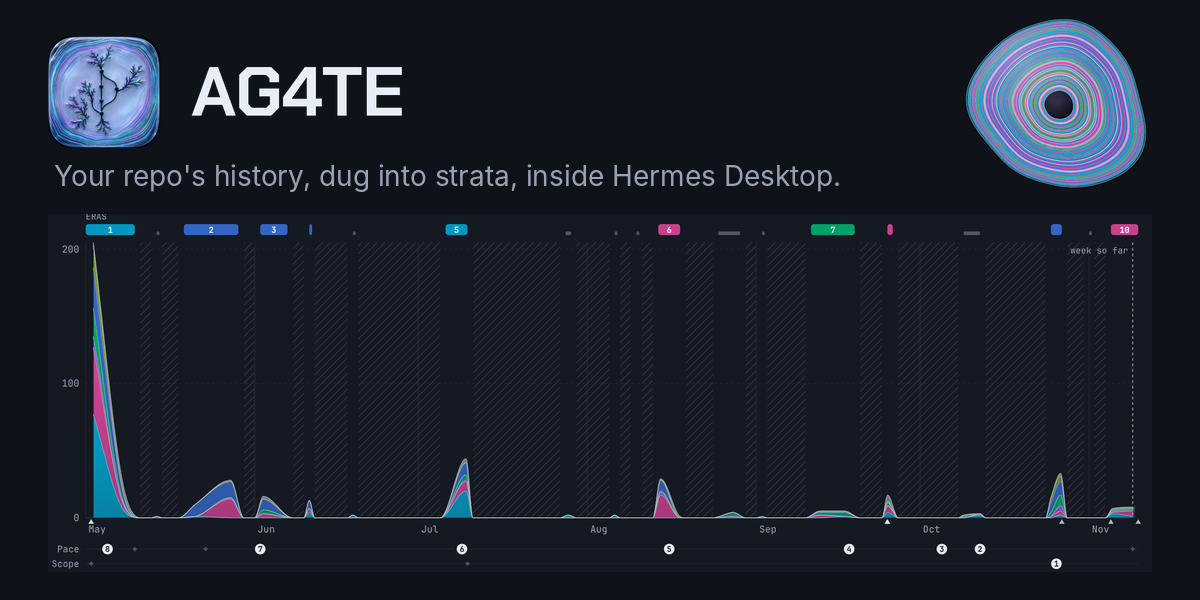
Git archaeology in Hermes Desktop: dig a local repository's history with DevArch and read it as strata, with commits per day stacked by kind of work, eras, quiet gaps, signals and turning points, weekly rhythm, lines added and removed, practice health, change size, hotspots, releases, and authors merged across spellings and split into people, agents and bots. Adds a Desktop page, /ag4te (list, show, status, dig, stop, resume) and a read-only ag4te_dig tool for agents. Disclosure — runs DevArch as a child process via `uvx --from git+https://github.com/KyaniteLabs/ag4te@<pinned sha> devarch` (uv downloads that pinned DevArch commit and its Python dependencies on first run, which the catalog pin does not cover; needs uv on the gateway host); reads `git log` of the one repository you choose, which must sit under the configured repo_roots (default ~/workspaces); stores digs under <HERMES_HOME>/plugin-data/ag4te; no LLM calls, no API key, no network besides the uv download; one dig at a time, each step time-limited (timeout_seconds); /ag4te dig and resume are off on chat platforms unless allow_dig_on_gateway is set.

KyaniteLabs3Toolsv0.2.0Updated 22 hours ago

About

Git archaeology in Hermes Desktop: dig a local repository's history with DevArch and read it as strata, with commits per day stacked by kind of work, eras, quiet gaps, signals and turning points, weekly rhythm, lines added and removed, practice health, change size, hotspots, releases, and authors merged across spellings and split into people, agents and bots. Adds a Desktop page, /ag4te (list, show, status, dig, stop, resume) and a read-only ag4te_dig tool for agents. Disclosure — runs DevArch as a child process via `uvx --from git+https://github.com/KyaniteLabs/ag4te@<pinned sha> devarch` (uv downloads that pinned DevArch commit and its Python dependencies on first run, which the catalog pin does not cover; needs uv on the gateway host); reads `git log` of the one repository you choose, which must sit under the configured repo_roots (default ~/workspaces); stores digs under <HERMES_HOME>/plugin-data/ag4te; no LLM calls, no API key, no network besides the uv download; one dig at a time, each step time-limited (timeout_seconds); /ag4te dig and resume are off on chat platforms unless allow_dig_on_gateway is set.

AG4TE for Hermes

AG4TE

You know a repository's code, but not the story of how it got that way: when the work happened, what kind of work it was, who did it, and where it went quiet. AG4TE digs a local git repository's history with DevArch and draws that story as strata in Hermes Desktop.

A dig gives you:

  • commits per day, split by kind of work (features, fixes, docs, tests, chores and the rest)
  • the repo drawn as a cut agate: one band per era, oldest at the rim and newest at the core, band thickness following √commits, and each band split by kind of work in time order, every kind at its exact share of that era's commits
  • eras, quiet gaps and notable signals
  • weekly rhythm and practice health
  • authors merged across name spellings and split into people, agents and bots

Digs run on your machine. They read only the repository you choose, keep their results under plugin-data/ag4te, and never call an LLM. The only network access is uvx fetching the pinned DevArch commit and its Python dependencies the first time.

What you get

  • Desktop: an AG4TE page. Pick a repository under your repo_roots, start a dig, watch its steps, and read the stone, a short Story of the repo in plain words, and the strata chart (Days, Weeks or Months), eras, gaps, signals, rhythm and authors. A running dig can be stopped and resumed.
  • Slash command: /ag4te list | show <project> | status <project> | dig <repo-path> [project] | stop <project> | resume <project>. On Telegram, Discord and other chat platforms, dig and resume are off unless you set allow_dig_on_gateway: true, because they read local files.
  • Agent tool: ag4te_dig gives agents a read-only summary of a finished dig, or lists the digs.

Install

AG4TE lives in the plugins/ag4te-hermes folder of KyaniteLabs/ag4te. Link it into your Hermes plugins folder and enable it:

git clone https://github.com/KyaniteLabs/ag4te.git
ln -s "$PWD/ag4te/plugins/ag4te-hermes" "${HERMES_HOME:-$HOME/.hermes}/plugins/ag4te"
hermes plugins enable ag4te

You also need uv on the gateway host, because AG4TE runs DevArch with uvx. Requires Hermes >= 0.21.6. If Hermes Desktop connects to a remote gateway, install AG4TE on the gateway host. Desktop loads the page from there.

Settings

Set these in Desktop (Settings → Plugins → AG4TE) or with hermes config set plugins.entries.ag4te.settings.<name> <value>.

| Setting | Default | What it does |
|---|---|---|
| repo_roots | ~/workspaces | Folders (comma separated) that repositories must sit under. |
| time_zone | host zone | IANA zone for bucketing days and hours, e.g. America/Los_Angeles. |
| history | head | head reads the current branch; all reads every branch and tag. |
| bots | none | Extra bot or service accounts, names or emails, * wildcards allowed. |
| timeout_seconds | 600 | Time limit for each DevArch step. |
| data_dir | <HERMES_HOME>/plugin-data/ag4te | Where digs are stored. |
| devarch_command | pinned uvx install | Override how DevArch is run, for example a local checkout. |
| allow_dig_on_gateway | false | Allow /ag4te dig and resume from chat platforms. |

What the numbers mean

Kinds of work come from commit messages and changed paths. They are keyword heuristics, not a reading of the code. Signals and eras are leads to investigate, not conclusions. The Story card is written by fixed rules from the same numbers (origin, shape, biggest push, turning points, who built it, the work, now), so the same dig always reads the same; no model writes it. Commit counts are not a productivity measure. See docs/DATA-MODEL-ROAST.md for how the data model was reviewed and fixed.

License

Apache-2.0. See LICENSE.

README from the reviewed commit d884f9a; it updates when the author re-pins.

More by KyaniteLabs

6 plugins by KyaniteLabs in the catalog.

KyaniteLabskinocutGuardrailed local video editing: Kinocut's MCP server plus two workflow skills (editing and short-form repurposing). Trim, caption, reformat and check quality with local FFmpeg. Portable Agent Plugins v1 configuration and skills, no plugin code. Requires uv and FFmpeg on PATH; launches uvx kinocut==1.16.4 over stdio. First launch downloads Kinocut and dependencies from PyPI. URL inputs download the requested media; font and model-weight features fetch assets from GitHub. Explicit Revideo dependency installation runs npm ci and may download renderer dependencies. Local FFmpeg editing and color grading need no account or API key. Kinocut's optional vision calls default off and require explicit configuration: legacy product descriptions use an Anthropic-compatible endpoint, while sampled-frame QC uses Anthropic. The README explains how to use the host's image model instead, including local models. Revideo and Hyperframes telemetry default off. Unverified Hyperframes browser previews and Docker renders require explicit telemetry consent. Hyperframes capture/snapshots disable implicit model analysis. These controls are not a network sandbox; see the plugin README for configuration and remaining network use. Disclosure — launches `uvx kinocut==1.16.4` over stdio, which downloads Kinocut and its dependencies from PyPI on first launch; edits and writes local video files with FFmpeg; URL inputs download the requested media, font and model-weight features fetch assets from GitHub, and an explicit Revideo install runs `npm ci`; optional vision features (off by default) send selected images or sampled frames to an Anthropic-compatible endpoint or Anthropic; Revideo and Hyperframes telemetry stay off unless the operator enables them.Communitytools264KyaniteLabsepochCalibrated time estimates on the Hermes Kanban board: when a worker claims a task, Epoch posts a Monte Carlo P50/P90 (plus P80/P95) estimate as a task comment, and when the run completes it records that run's wall-clock hours back to Epoch's ledger (auto_wallclock provenance, sanity-gated) so later estimates calibrate. Dispatcher and worker profiles can differ; the estimate-to-run binding lives next to the ledger, Kanban comments are display only. Also adds an epoch_estimate tool and /epoch. Disclosure — runs `npx -y @kyanitelabs/epoch@0.7.0` as a child process (downloads Epoch and its caret-ranged npm dependencies on first run, which the catalog pin does not cover; needs Node >=22), passing the task title and its three-point hint to the local CLI; the child env is scrubbed (allow-listed PATH/HOME/locale/Node/npm/proxy vars only, the parent environment is never passed through); estimates, actuals and run bindings live under <HERMES_HOME>/plugin-data/epoch/ and are shared by every profile; Epoch telemetry is forced off for plugin runs; no network besides the npm download, no API key; hook work runs on short-lived background threads and unfinished jobs resume when the plugin next loads; /epoch passes other Epoch subcommands through (it refuses serve, self-improve and telemetry/data mutations, and refuses ledger writes on gateway platforms unless opted in).Communitytools8KyaniteLabsinnerscapeGentle check-ins, journaling and an Unstuck Coach with your own Innerscape server: save a mood check-in in your words, save a journal entry or park an inbox item only after you say yes to the exact text, and look back on today. When you're frozen or overloaded, the bundled unstuck skill names what's in the way, gives one next move and holds the rest. The skills never score, label or diagnose a mood. Adds four tools, /innerscape, two skills, a Desktop page and a dashboard tab. Disclosure — calls your Innerscape REST API (default http://127.0.0.1:3001) with INNERSCAPE_TOKEN, read through Hermes secret scope, which can read and write your whole account; plain http only to this machine (https to any server you configure), no proxies or redirects; tool results go to your model provider and stay in session history, and mood and journal text is sensitive, so your provider sees it like any other chat; consent is model-mediated: save tools refuse unless the assistant has asked you and set user_confirmed, and Hermes has no separate approval step (see README); the Desktop page reads today and saves a check-in or journal entry with that same token through the plugin's dashboard routes (/api/plugins/innerscape/), so anyone signed in to your Hermes dashboard can read and write your Innerscape account; reads and saves are off on chat platforms by default and saves are off in scheduled runs; no telemetry, no background jobs.CommunitytoolsKyaniteLabsseleniteTakes friction off the person, treated as accessibility: one test, "does this step, wait or check earn its cost to you?", applied to steps handed to a person, agents parking Kanban work on each other for reasons that aren't real, and checks that can't change the decision. Calm mode switches the agent to no questions and one-line replies when your messages show overload. A read-only cleanse ranks what to clear across skills, plugins, hooks, approvals, runbooks and boards. Walls always stand: credentials, spend, publishing, destructive steps, legal, named freezes. Adds /frictionless, a selenite_ledger tool, two fake-gate tools, skills, a Desktop page and a dashboard tab. Disclosure — no network, no credentials and no shell from the plugin itself; hooks add a context note in Calm mode, and in fake_gate_mode "nudge" (default) or "ask" they add a note to, or hand back once with a question, a kanban_block that reads as agent bureaucracy (they never approve, unblock, close or edit a card, and any error fails open); when you approve a safe command once or for the session, its approval key is logged as an allowlist candidate (denials, timeouts and dangerous commands are never logged); writes a metadata-only ledger (no block reasons or prompt text, 0600, rotates at 4 MB), per-card question counts and a counts-only snapshot under plugin-data/antibeaurocracy/, and reports under the Selenite state directory (SELENITE_STATE, else XDG state, else HERMES_HOME); reads kanban.db read-only; the cleanse pass (the selenite_ledger tool, the Desktop page and the dashboard tab can run it) reads, read-only, the hook commands in ~/.claude/settings.json, the skill folders of Claude Code, Codex, OpenCode and ~/.agents, and Hermes plugin manifests; the `hermes antibeaurocracy audit` CLI also reads agent rule files (~/.claude/CLAUDE.md, ~/.codex/AGENTS.md, ~/.gemini/GEMINI.md) and the SOUL.md/AGENTS.md of every Hermes home and profile; the bundled frictionless skill's miner script, when the agent runs it, reads your own messages from local agent transcripts (Claude Code, Codex and Hermes state.db, all read-only) and keeps only counts plus a few redacted samples, 0600, in that state directory; the CLI's opt-in --judge runs a command you name, the plugin never does; all hooks turn off with hooks: false or SELENITE_HOOKS=0.Communityautomation

Developer Mode

Explore built-in Hermes toolsets and actions.

HermesAgent

Developer?

Create a Hermes extension for Desktop or agent workflows.

Developer Section