thealps01-netizen
Agent Station
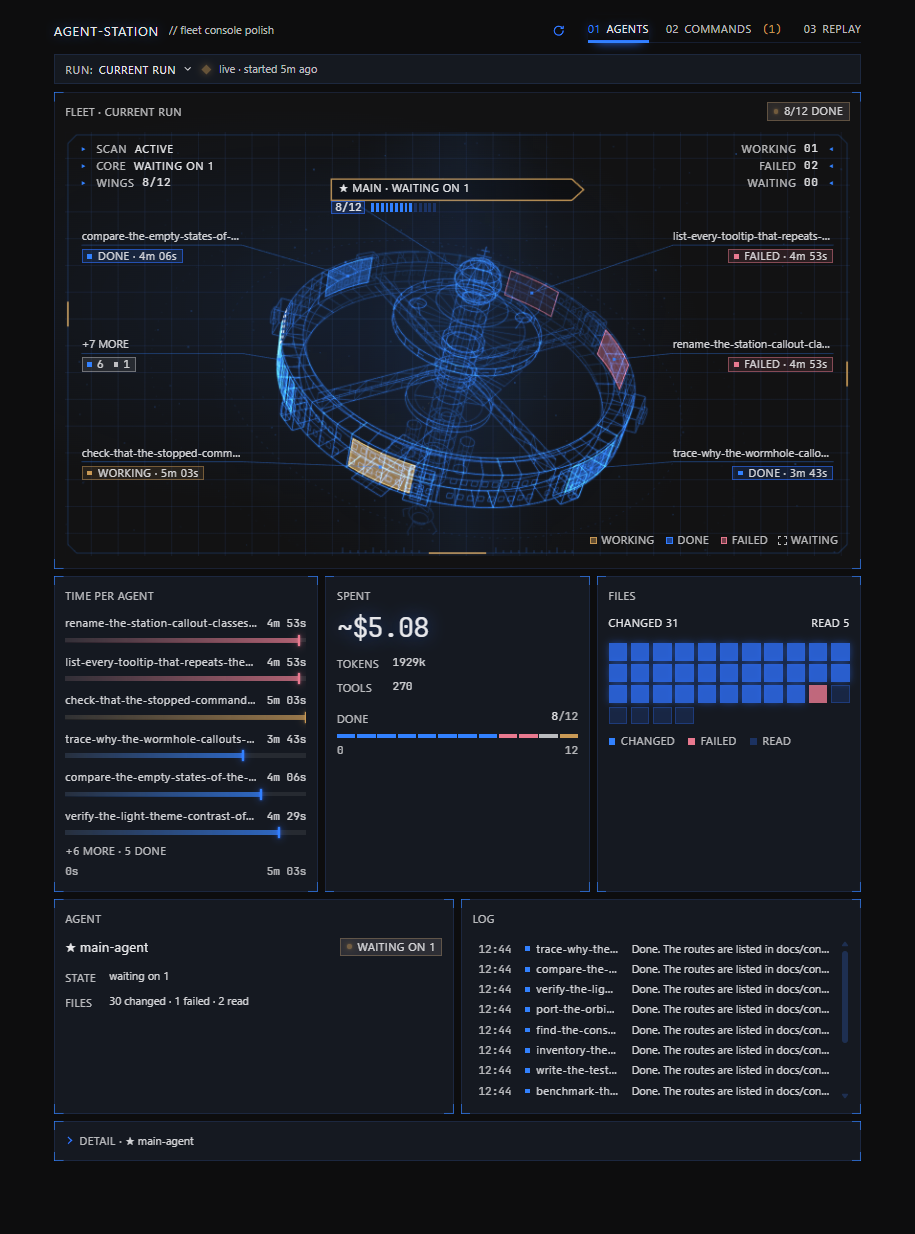
A Hermes Desktop plugin that shows what the AI in your focused chat is doing. One page shows the main
agent and the subagents it started (delegate_task), drawn live as a wireframe space station: what
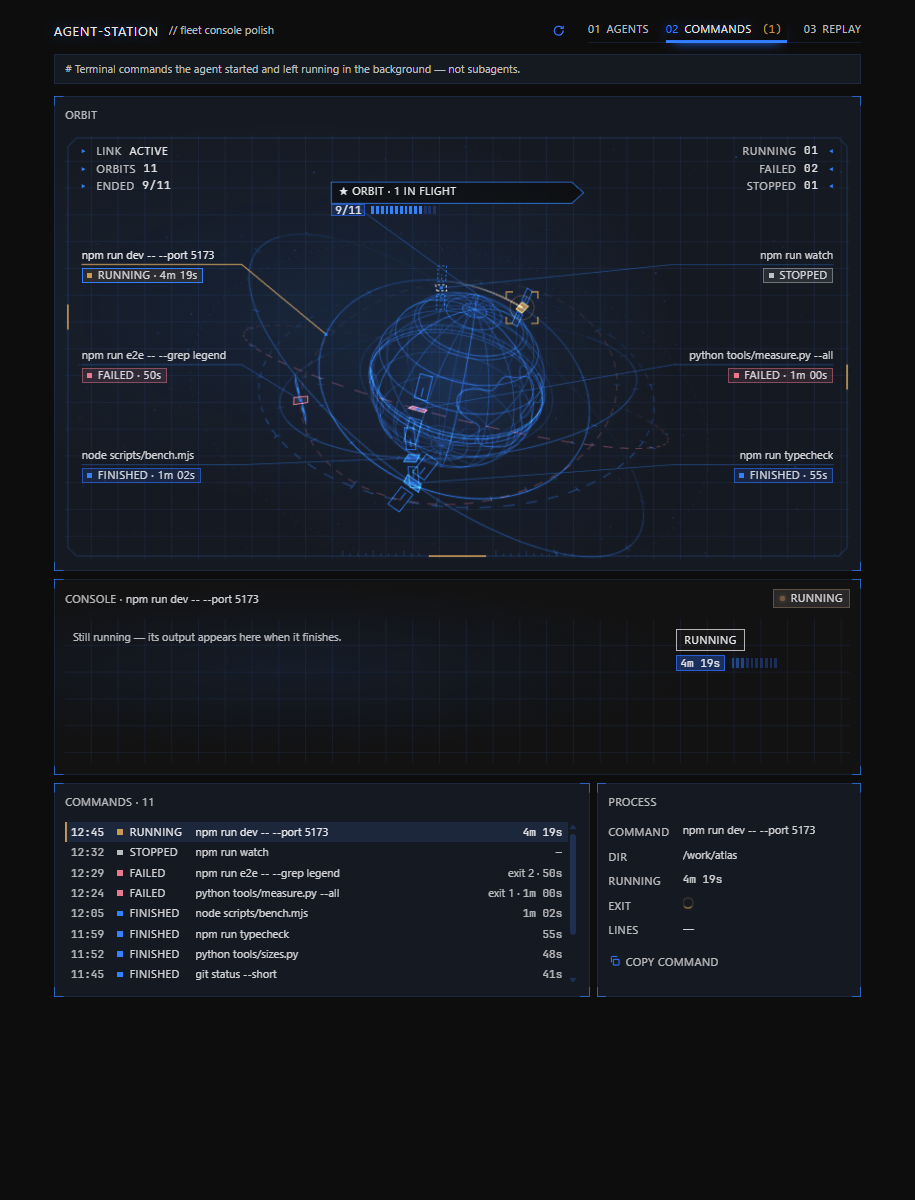
each one works on, the files it changed, its answer and its cost. A Commands tab lists the chat's
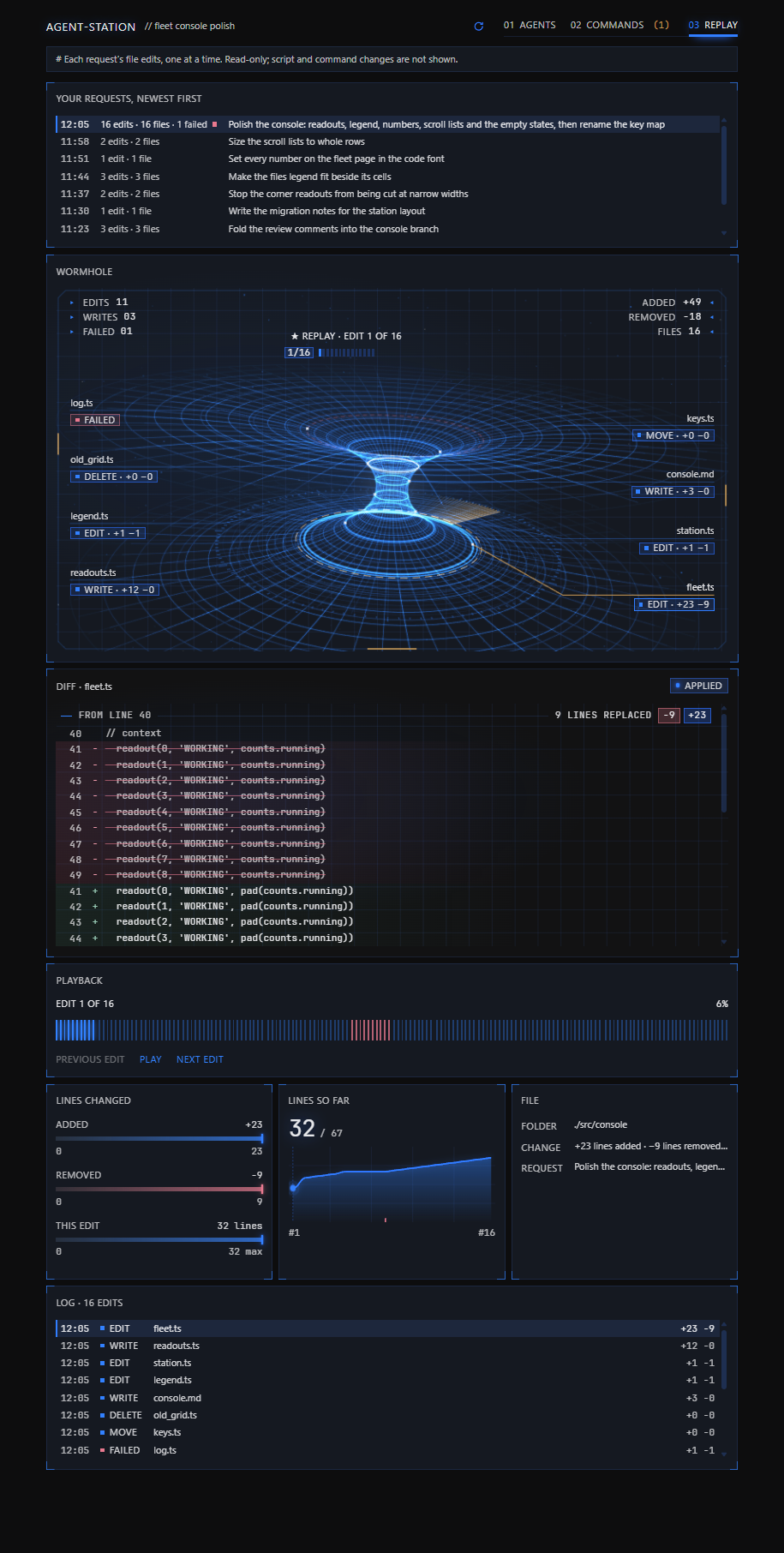
background shell commands, and a Replay tab steps through every file edit the AI made after each of
your requests. A status-bar chip shows the running batch's progress while the page is closed.
Everything is read-only.
Screenshots
Drawn from synthetic test data (the fixture home of tests/live.py), in the real app engine.
Supported Hermes versions
Requires Hermes 0.21.7 or newer, tested up to 0.22.2. Your Hermes version is in Settings → About
(or run hermes --version). An older Hermes refuses to load the plugin's agent half and says
"requires hermes >=0.21.7".
Install
In the Hermes app:
- Open Settings → Capabilities → Plugins → Install from Git.
- Paste this repository's web address (the page you are reading) into "Repository".
- Click Review repository.
- Leave "Enable agent plugin after install" on, then install.
- "Agent Station" appears in the sidebar.
Hermes copies the desktop page into place by itself; there is nothing to copy by hand.
From a terminal instead:
hermes plugins install <repository URL> --enable
Update
Install from Git again with the same address and tick "Force reinstall (replace if already
installed)", or run:
hermes plugins update agent-station
Uninstall
Settings → Capabilities → Plugins → the Agent Station row → Uninstall, or:
hermes plugins remove agent-station
Moving from Subagent Watch
Agent Station is the new name of Subagent Watch. Remove the old plugin first: Plugins → Uninstall
"subagent-watch", or hermes plugins remove subagent-watch. If a "Subagents" entry is still in the
sidebar afterwards, uninstall the remaining Desktop row or delete
<Hermes home>/desktop-plugins/subagent-watch. Then install Agent Station. Keeping both shows two
sidebar entries and two status-bar chips. There are no settings to carry over.
Languages
Agent Station follows the Hermes interface language. English (en) and Simplified Chinese (zh)
are included; other languages fall back to English. In Simplified Chinese the panel is named
智能体空间站. Agent names, commands, file contents and replies stay as recorded.
Translations live in BUNDLES in desktop/plugin.js. Keep message keys and interpolation arguments
aligned with English. Run node i18n_check.mjs from tests/ to check coverage; render_check.mjs
also checks language switching. Set SW_LOCALE=zh when running python live.py for Chinese layout
screenshots (English remains the default). Chinese screenshots are saved under tests/.out/live-zh/.
Privacy
- Read-only. The backend opens Hermes'
state.dbwith SQLitemode=ro, so it cannot write, and
it registers GET routes only. The static audit (tests/audit_static.py) fails if a writing route
or a file write ever appears. - Local only. The page talks only to your own Hermes. It makes no other network calls and sends
no telemetry. - One chat at a time. The page reads one chat at a time; a request for a worker, command or
edit that belongs to another chat is refused (403).
Troubleshooting
- No "Agent Station" in the sidebar. Turn on the plugin row's Desktop switch, click Rescan,
or restart Hermes (pages register when the app starts). - The page says something "could not be read". Turn on the row's Agent switch (the backend
only runs for enabled plugins), then restart Hermes. - Two entries in the sidebar, or two progress chips. The plugin's old version is still
installed under its old name; remove it as the moving section above says. - "requires hermes >=0.21.7". Your Hermes is older than the oldest supported version; update
Hermes.
For developers
Read AGENTS.md (the rules for changing this repository, setup and the gate order) and
Docs/agent-station-notes.md (where every number on the page comes from and why each status rule
is what it is) before changing anything.
Backend routes
Mounted at /api/plugins/agent-station/: GET /children · GET /output · GET /processes ·
GET /process_output · GET /files · GET /replay · GET /replay_step — all read-only.
state.db is opened with mode=ro; the process list reads the files Hermes writes itself
(processes.json, logs/process-results/). A session or process that belongs to another chat is
refused with 403.
Gates
Run from tests/ after npm ci. What each lock asserts is in the header of its file.
python check_api.py                 # backend against a fixture state.db   (--live: this home's too)
node render_check.mjs               # jsdom + real React, driven like a user
python audit_static.py              # i18n, a11y, colours, silent catches, read-only backend, release, name, licence, privacy
python contract_core.py             # everything read from the core still exists (--selftest)
python release_gate.py              # version / changelog / supported range / installed copy rules each fire
python canary_audit.py              # every mutation must turn its gate red
python live.py                      # the real panel in the core's Electron on fixture data (--selftest)
A rule that has never failed is not evidence: canary_audit.py, release_gate.py,
contract_core.py --selftest and live.py --selftest break every rule once and require the gate
to name it.
Portability
| Variable | Default | What it points at |
|---|---|---|
HERMES_HOME | %LOCALAPPDATA%\hermes, else ~/.hermes | the install root (state.db, the installed desktop copy) |
HERMES_AGENT_DIR | <HERMES_HOME>/hermes-agent when present | the core checkout — contract sources, compiled stylesheet |
HERMES_PYTHON | the core's venv, else the running interpreter | the interpreter with fastapi for check_api.py |
HERMES_ELECTRON | the core's apps/desktop/node_modules/electron | the binary for the measured render |
python env.py prints what a run resolved. A missing core is named (no Hermes core found), never
silently passed.
Continuous integration
.github/workflows/ci.ymlruns the backend check, the static audit, the core contract (and its
selftest), the release gate, the jsdom render check and the canary run on Ubuntu and Windows,
against a sparse checkout of the oldest supported core, pinned atCORE_SHA(v0.21.7). It runs once
per pull request (a newer commit cancels the older run) and on every push tomain; Actions → CI →
"Run workflow" runs it by hand..github/workflows/newest-core.ymlruns the backend check, the render check and the core contract
(and its selftest) every week against the newest core: the latest Hermes release and the head of
main. It also runs by hand from the Actions tab.live.pyneeds the core's built desktop app, its Electron and a display, so it stays local: run it
before a release.
main is protected by a repository ruleset: every change reaches main through a pull request whose
gates (ubuntu-latest) and gates (windows-latest) checks are green on a branch that is up to date
with main; force pushes and deletion are blocked, with no bypass. AGENTS.md gives the reasons.
Versioning
plugin.yaml is the source; bump plugin.yaml, dashboard/manifest.json and the top
CHANGELOG.md heading together (the release gate checks them). When the oldest supported Hermes
moves, bump requires_hermes in plugin.yaml, the range under "Supported Hermes versions" above and
CORE_SHA in ci.yml together. Release checklist: bump, run every gate (including live.py), then
tag.
License
MIT — see LICENSE. Copyright (c) 2026 Muhammed Enes Alpler.
README from the reviewed commit b0847ef; it updates when the author re-pins.