 mojomast
aircraft-doppler-geolocation
Hermes plugin that locates where (and optionally when) a recording was made from the Doppler curves of aircraft flying over, often too faint to hear, matched against ADS-B flight tracks. It ships one skill and three local scripts.
It is a community plugin by Kyle Durepos. It is not a Nous Research product. The method comes from colsto's video I discovered a sound that leaks your exact location (and it's everywhere). The author released no code; these scripts are an independent implementation of the steps he describes, not his pipeline.
What you get
One skill, aircraft-doppler-geolocation:aircraft-doppler-geolocation, and three scripts in skills/aircraft-doppler-geolocation/scripts/:
| Script | Job |
| --- | --- |
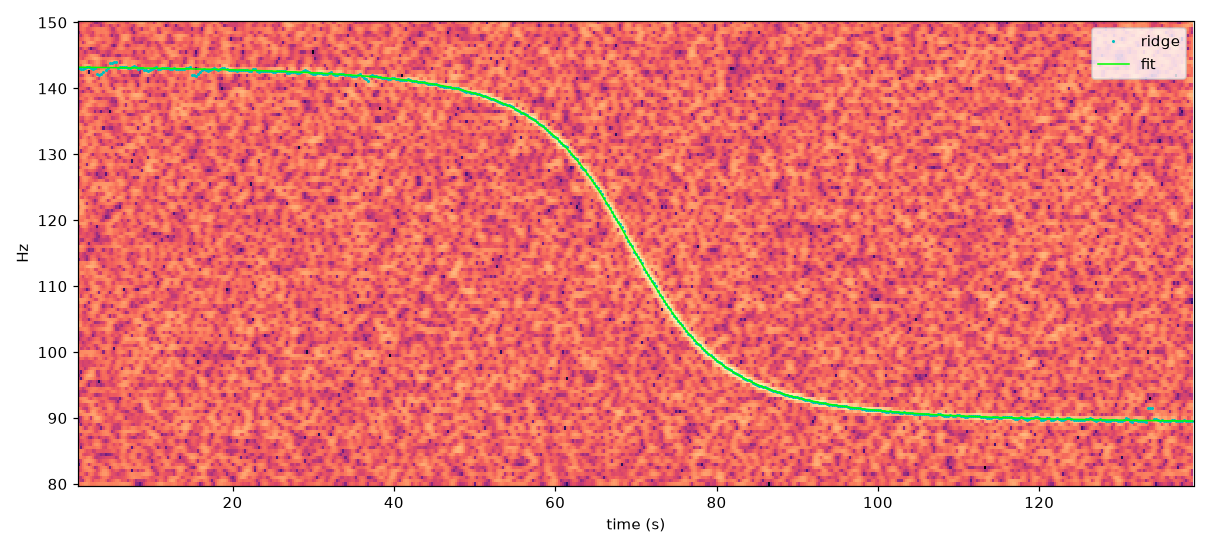
| doppler_track.py | Decode audio/video with ffmpeg, trace the flyover tone on a narrow-band spectrogram (Viterbi ridge), and fit base tone, speed, closest-approach slant distance, and closest-approach time. Writes CSV, PNG, JSON with a detected flag, ridge_snr_z, and rejected_because. Options --min-snr and --max-slope. |
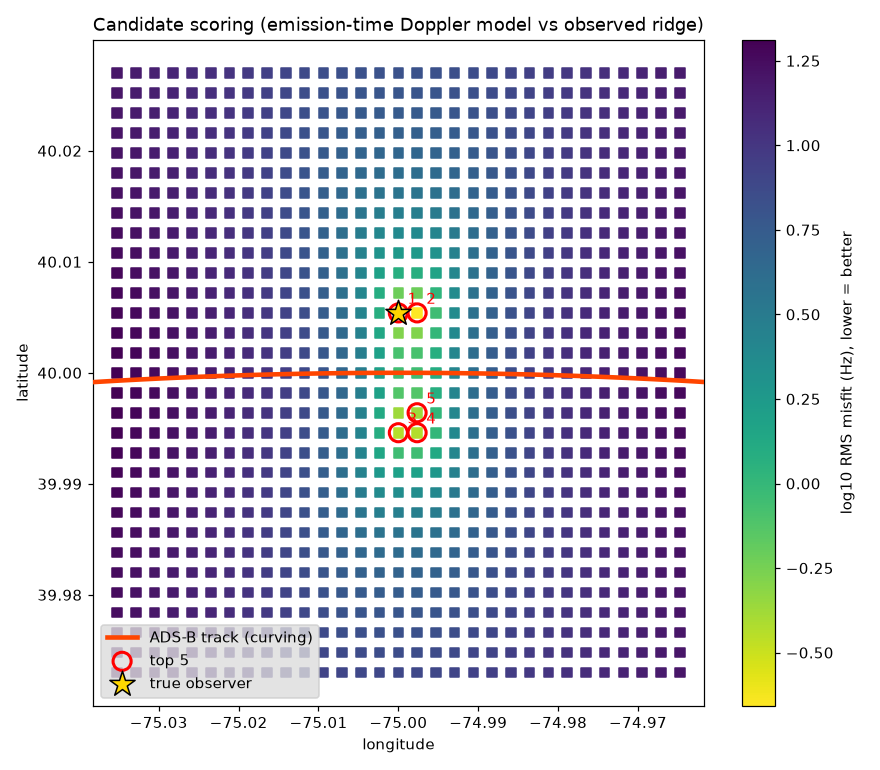
| score_candidates.py | For a real flight track (ADS-B CSV) and candidate points (lat, lon, ground elevation), model the exact curve each point would hear using the velocity at emission time, and rank points by misfit in Hz. --plot writes a heatmap. |
| make_synthetic_test.py | Offline self-test: synthetic curved flyover buried in noise, fit, then locate the observer on a grid. |
Disclosure
register()only callsctx.register_skill. No tools, hooks, or middleware.doppler_track.pyrunsffmpeg(no shell) on the path you pass. Scripts read only the paths you pass and write the outputs you name.- No network calls, credentials, telemetry, or self-updater. The plugin does not fetch ADS-B or elevation data; the skill names sources (pyopensky, traffic, adsb.lol, ADS-B Exchange, OpenTopography) for you to use.
- Enabling the plugin asks Hermes to install numpy, scipy, soundfile, and matplotlib (pinned ranges in
pyproject.toml). Installffmpegyourself.
Details are in SECURITY.md.
Install
Until a maintainer lists it in the Hermes catalog:
hermes plugins install mojomast/hermes-aircraft-doppler-geolocation --no-enable
hermes plugins enable aircraft-doppler-geolocation
After catalog acceptance, the reviewed install is hermes plugins install aircraft-doppler-geolocation.
Use it from a shell
S=skills/aircraft-doppler-geolocation/scripts
python $S/doppler_track.py clip.mp4 --fmin 60 --fmax 250 --out ev1
python $S/score_candidates.py track.csv candidates.csv ev1.csv --f0 110 --rec-start 1725827820 --dt-tol 2 --plot scores.png
python $S/make_synthetic_test.py
Self-test result
Images below come from real runs of the scripts on the synthetic self-test, not mockups.
doppler_track.py: band spectrogram with the traced ridge (cyan) and the fitted flyover model (green).
score_candidates.py --plot: misfit per candidate on a 200 m grid, the curving ADS-B track, the top 5 ranks, and the true observer (star). Rank 1 is the true point; the mirror-image cluster on the other side of the track is ranks 3 to 5.
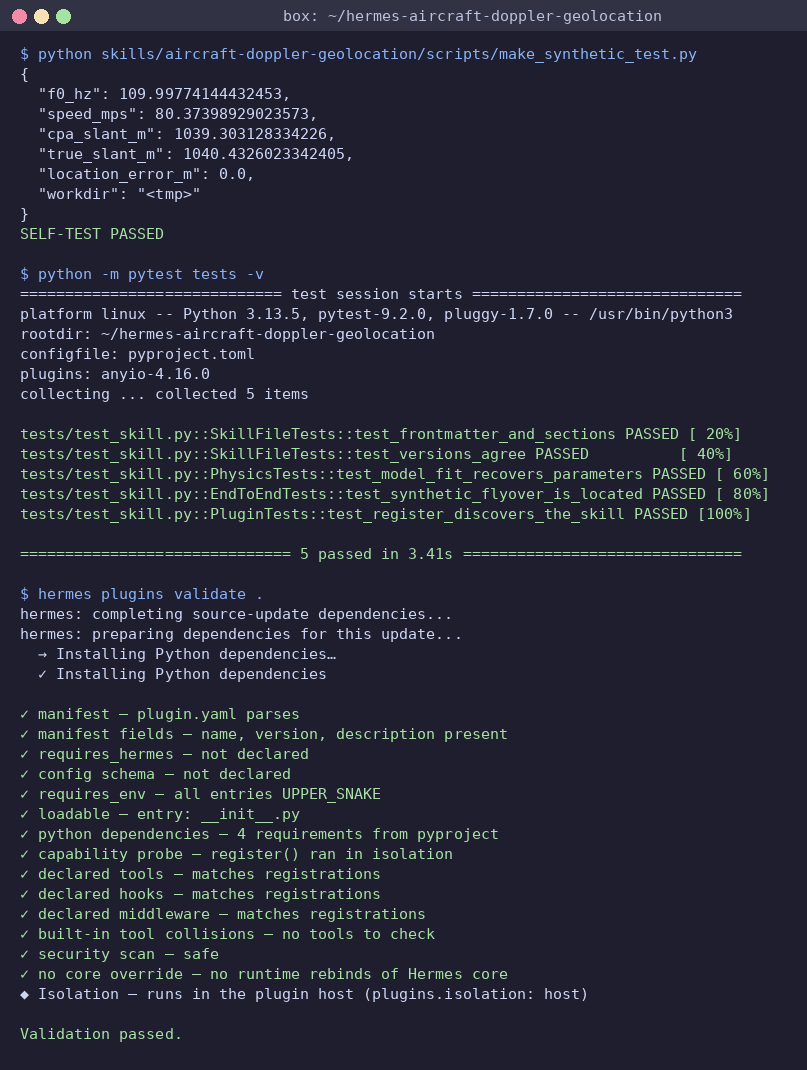
Terminal: the self-test, pytest, and hermes plugins validate . output captured from the box and rendered to PNG.
A synthetic propeller tone (110 Hz, 80 m/s, 900 m altitude, gently turning) with tone amplitude 0.29 against noise σ 1.0 is recovered as f0 110.0 Hz, 80.4 m/s, slant 1039 m (true 1040 m). With the recording start known to ±2 s, the true grid point ranks first (0 m error on a 200 m grid). Without a known time, a single flyover lands at the right distance but about 1.4 km off along the track, which is the ambiguity the video describes. A second flyover at a fixed offset, or a known time, is required.
Real-world test (v0.1.1)
Run on 5 public YouTube clips (audio only), 2026-11-02:
| Clip | Result |
| --- | --- |
| Planes Flying Overhead While the Birds Sing (City Limits Sound) | 2 flyovers detected: 94.9 Hz, 59 m/s, 1.53 km, 1.27 Hz rms; and 247.6 Hz (2nd harmonic), 97 m/s, 2.08 km, 0.61 Hz rms. The two harmonics of pass 2 disagree on speed by about 8%, so treat the stderr as optimistic. |
| Cessna 421 takeoff, Puerto Princesa (Palawan Skies Aviation) | Detected in 85-145 Hz: 109.4 Hz, 63 m/s (~122 kt), 295 m. A higher band failed: the tracker hops between crossing harmonics. |
| Cessna Conquest 425 flyby, Hannover (HD1080ide) | Rejected. The plane was turning, so the straight-pass model does not apply. |
| Evening City Ambience in Amsterdam (Jeronimo Ambience) | No detections. |
| Outdoor atmosphere with plane flying over (Your Film Sounds) | Broadband roar with no tone. 0.1.0 reported a false fit here; 0.1.1 rejects it (ridge_snr_z 1.7). |
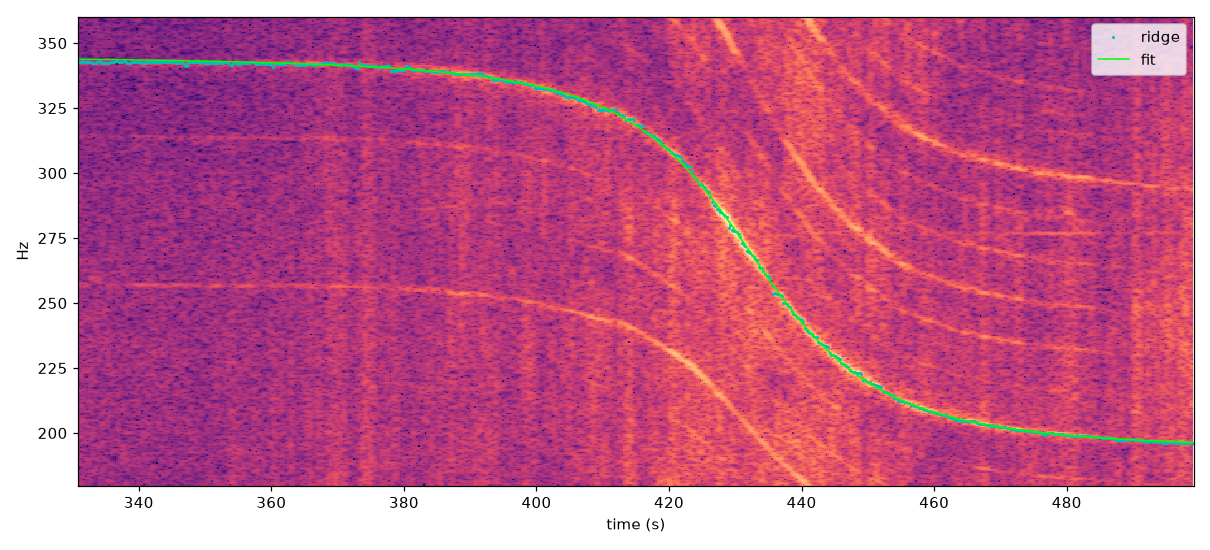
Spectrogram of audio from City Limits Sound's video Planes Flying Overhead While the Birds Sing in the Distance, with the traced ridge and fit.
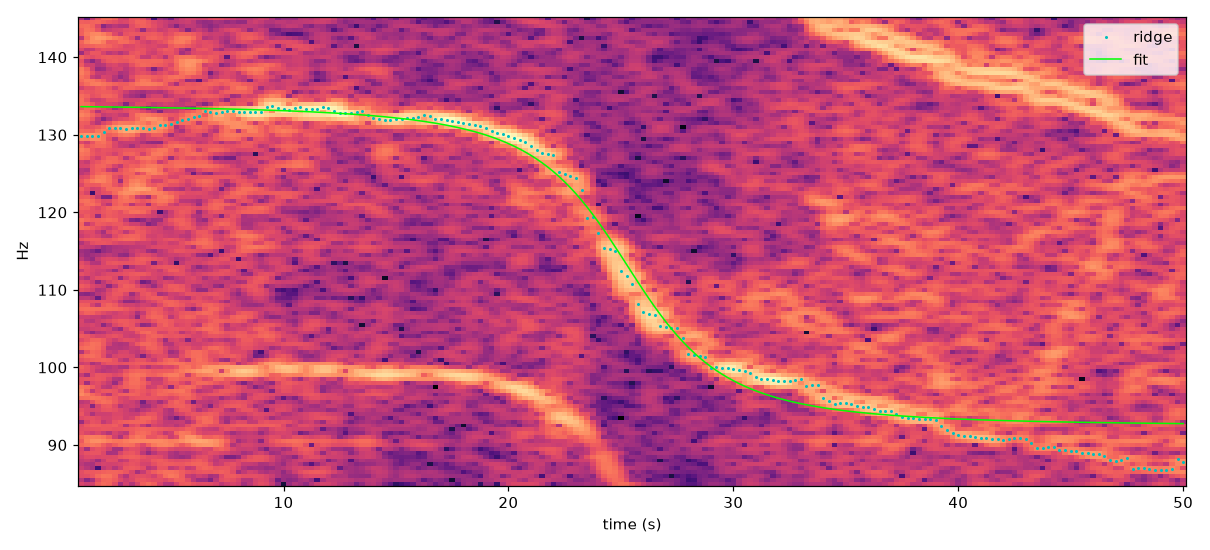
Spectrogram of audio from Palawan Skies Aviation's video Cessna 421 Golden Eagle takeoff at Puerto Princesa.
The tracker works on clean real tones. You still pick the frequency band and time window by eye from a spectrogram, and the detected flag is the guard against noise. Real tones scored 2.7 to 3.6 on ridge_snr_z and noise scored 1.7 to 2.0, so the margin is narrow. Geolocation scoring could not be tested: none of the clips gives a recording date or time, and no free historical ADS-B was used.
Limitations
- ADS-B fetch, jet-type filtering, DEM lookup, the time-offset and silence filters, and grid generation are described in the skill but not scripted yet.
- Detection is tested on real audio (above), but you choose the band by hand. Location scoring is tested on synthetic data only, not on real ADS-B.
- Harmonics that cross each other and turning flights break the tracker or the straight-pass fit.
- Needs ADS-B coverage, a date, and serious compute for large search areas.
Ethics
Use for forensics, journalism, research, or auditing your own recordings. Locating a person without consent can put them in danger; follow local law. Results are probabilistic and need independent visual confirmation. To protect your own clips: high-pass filters and talking over the tone do not reliably remove it, and it can survive phone compression; cutting segments, stronger noise suppression, and stripping timestamps help. Check your own spectrogram with doppler_track.py before publishing.
Tests
pip install -e ".[dev]"   # needs ffmpeg on PATH
python -m unittest discover -s tests -v   # or: python -m pytest tests -v
License
MIT
README from the reviewed commit 2c3ed20; it updates when the author re-pins.
