 LSUDOKO
BoardLoop is a Hermes Agent plugin that gives the agent a
real embedded toolchain and a simulated workbench. Hermes writes ESP32 or Arduino firmware, then
compiles it with arduino-cli, runs it in a virtual circuit on the
Wokwi simulator, tests its behaviour (sets sensor values, presses buttons,
checks LEDs, pins, serial output and OLED screenshots), fixes its own mistakes within bounded
attempts, and flashes a real board once you approve.
flowchart LR
  A[Hermes writes sketch + tests] --> B[mcu_verify]
  B --> C{arduino-cli compile}
  C -- errors --> D[fix_compile n/3<br/>parsed errors + hints] --> A
  C -- ok --> E{Wokwi behaviour tests}
  E -- failures --> F[fix_behaviour m/5<br/>reasons + serial + GPIO hint] --> A
  E -- all pass --> G[verified + OLED screenshots]
  G --> H[mcu_upload<br/>approval prompt] --> I[mcu_serial_read on the real board]
  D -. budget used .-> J[needs_human]
  F -. budget used .-> J
Why
AI-written firmware usually fails, and the model never sees the board. Published research shows
that feedback from the hardware is what fixes this:
| Study | Finding |
|---|---|
| EmbedAgent (ICSE 2026, arXiv 2506.11003): 126 tasks on Arduino, ESP32, Pico | The best model passes only 55.6%, and 29.4% on ESP-IDF tasks. Compiler feedback improves results. |
| EmbedGenius (arXiv 2412.09058) | Compile → fix (max 3) → flash → read output → fix (max 5) reaches 95.7% coding accuracy over 350+ tasks. |
| Englhardt et al., UW (arXiv 2307.03817) | Hardware-in-the-loop feedback took beginners from 25% to 100% success on a LoRa sensor task. |
BoardLoop is that loop, packaged for Hermes. The budgets in loop.py are the
EmbedGenius ones (3 compile fixes, 5 behaviour fixes). In simulation it works for anyone, with no
hardware. With a board, it also works on the real thing.
See it work
Proof from a real run
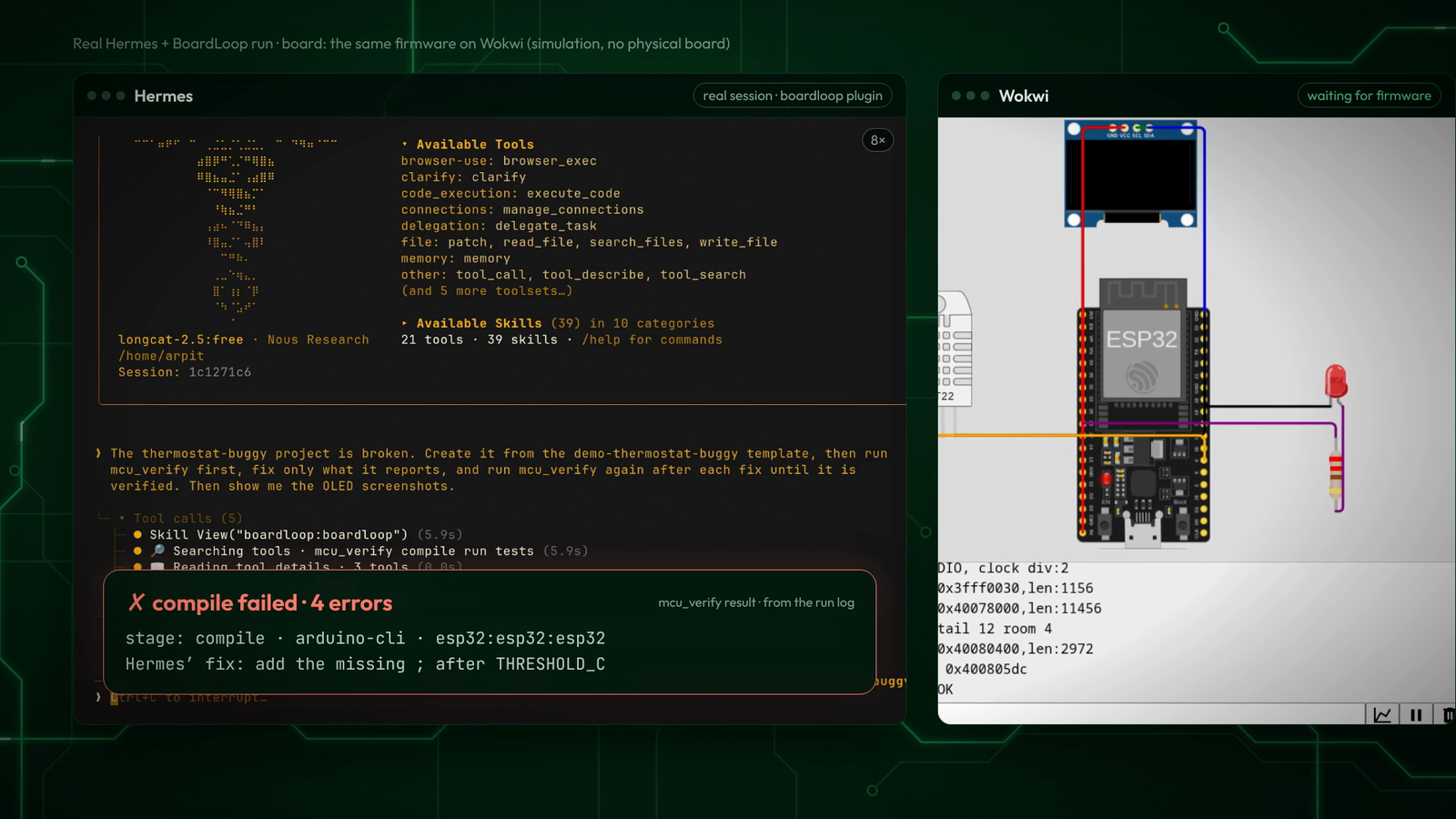
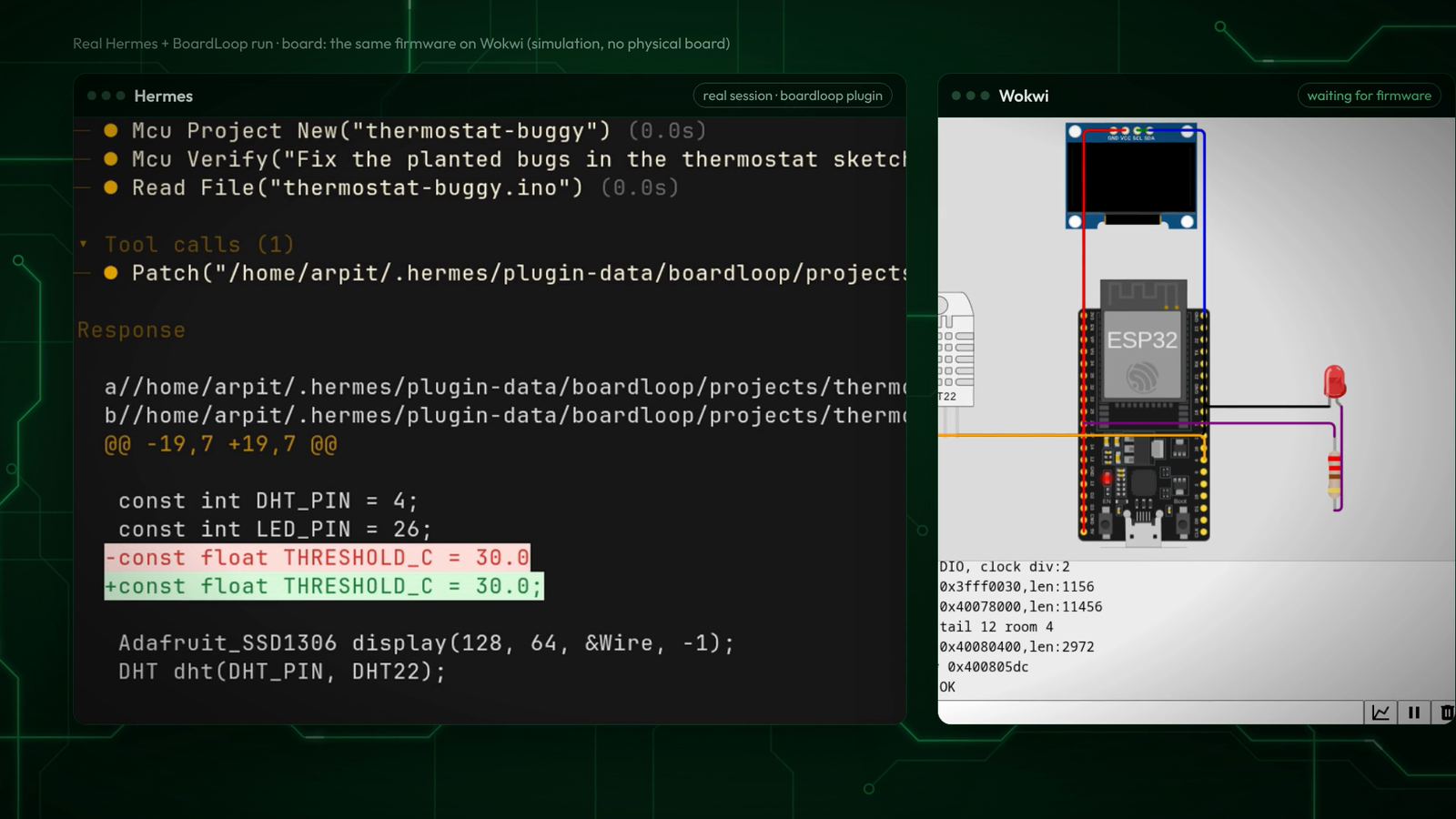
Every frame below comes from one unedited Hermes session (longcat-2.5:free, Hermes 0.23.0), with
results read from that run's folder (plugin-data/boardloop/runs/thermostat-buggy/). Prompt:
"Create thermostat-buggy from the demo-thermostat-buggy template, run mcu_verify first, fix only
what it reports, and run mcu_verify again after each fix until it is verified."
| 1. mcu_verify: the real compiler fails (4 errors) | 2. Hermes adds the missing ; |
|---|---|
|  |
 |
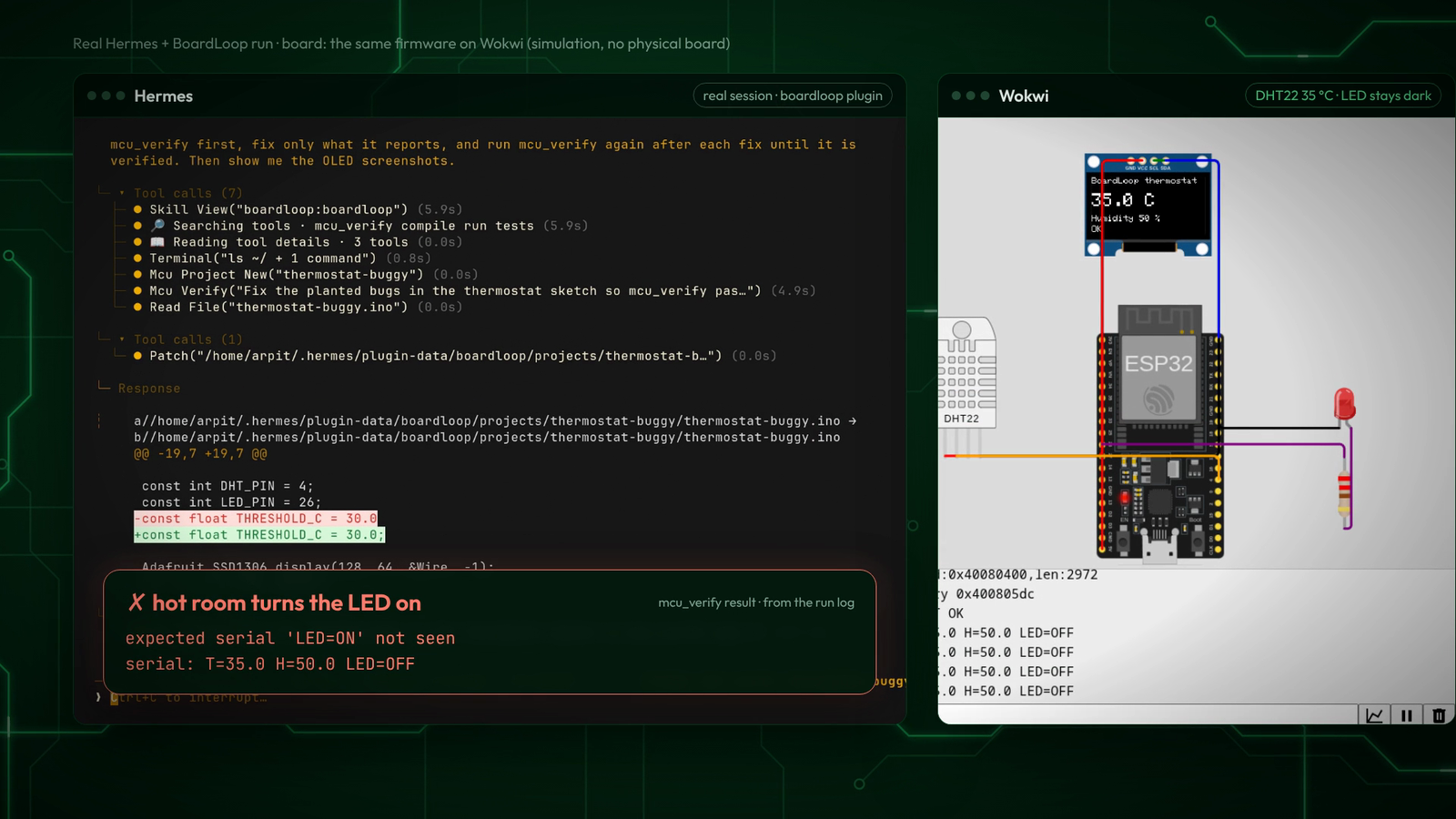
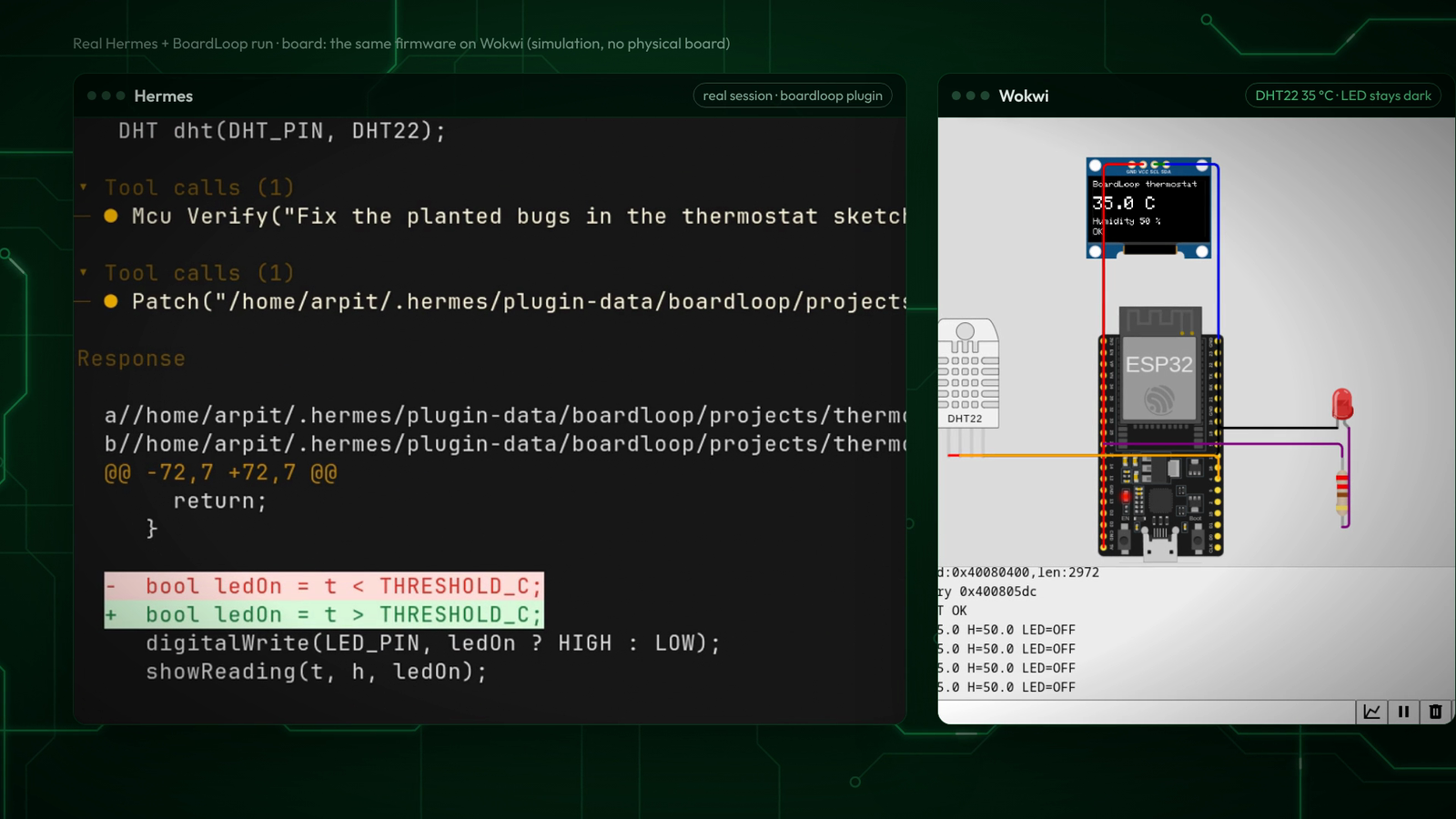
| 3. It compiles, but the hot-room test fails: expected serial 'LED=ON' not seen, serial T=35.0 H=50.0 LED=OFF | 4. Hermes flips the reversed comparison (< → >) |
|  |
 |
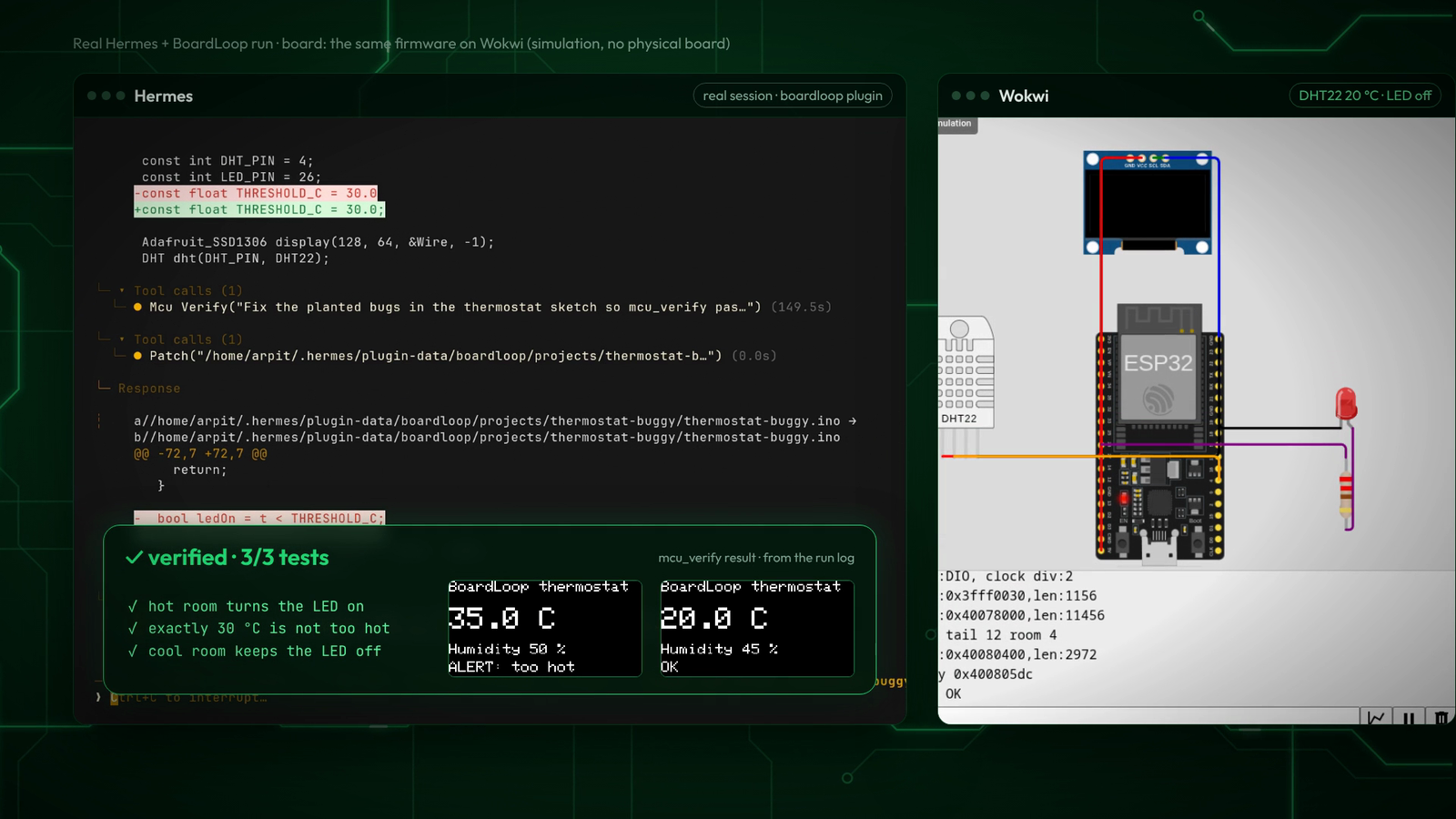
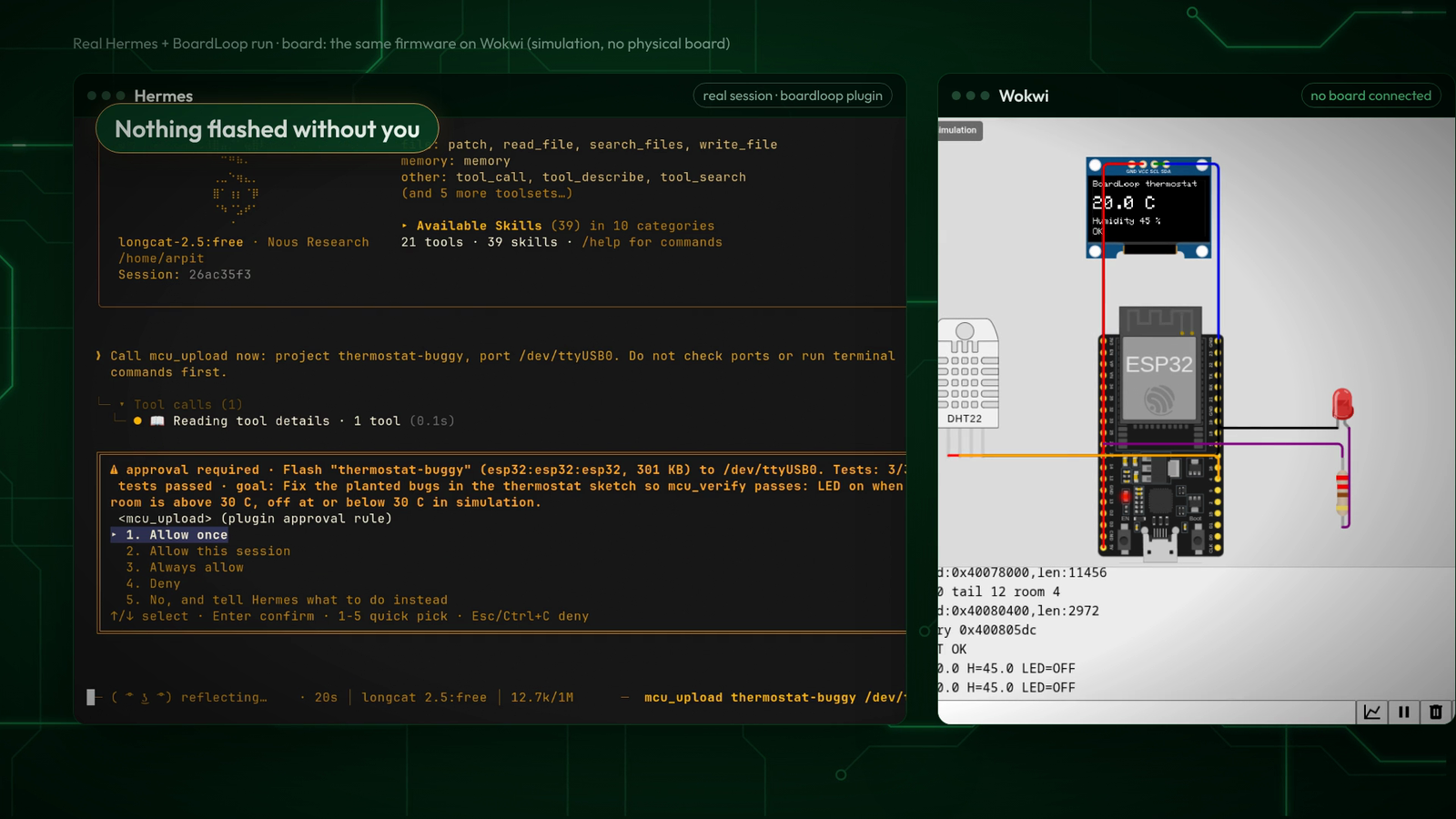
| 5. Verified 3/3, with the OLED screenshots the run saved | 6. mcu_upload stops at Hermes's approval prompt (no board connected; nothing was flashed) |
|  |
 |
The rest of the toolset, from the same Hermes install:
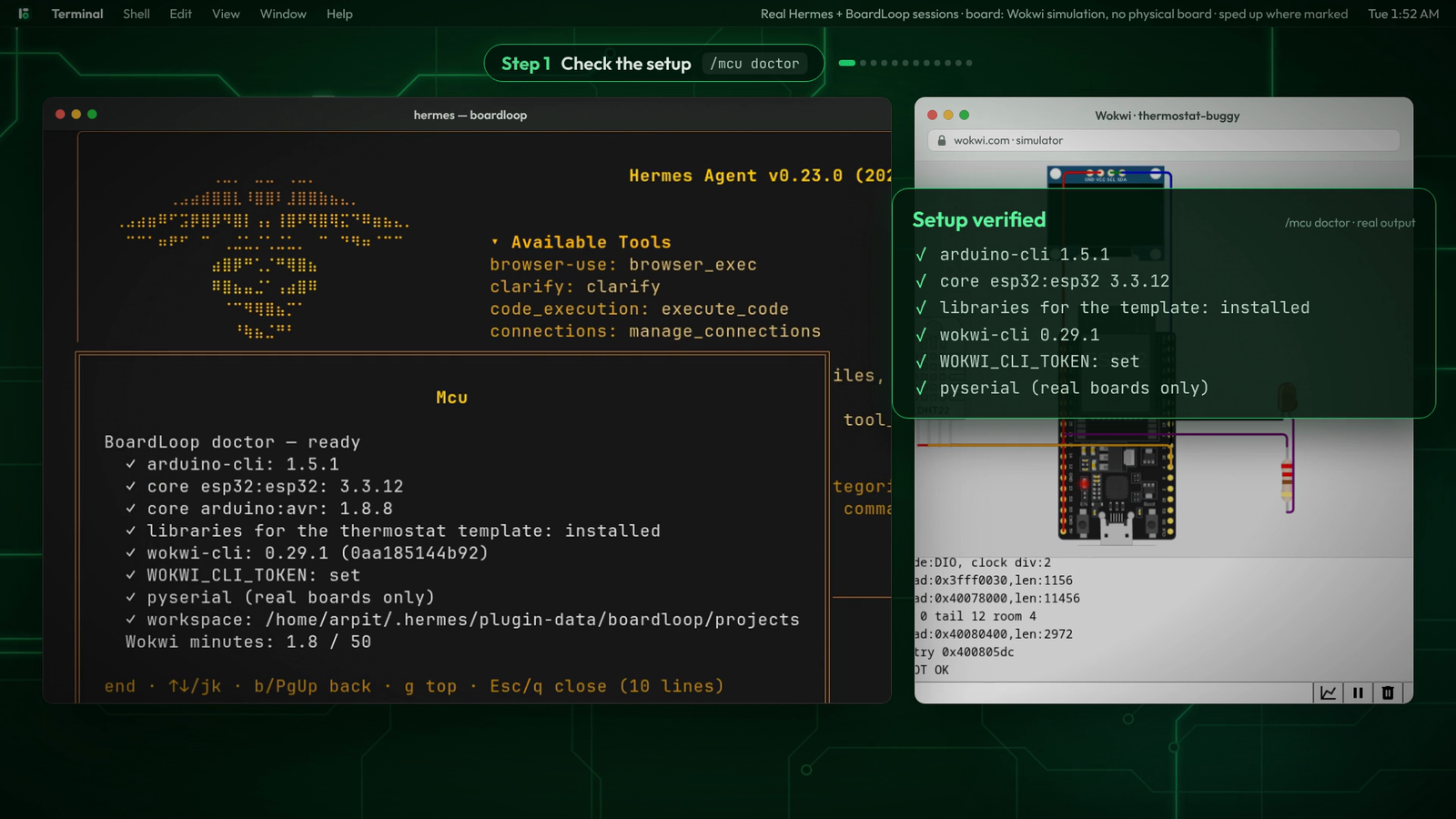
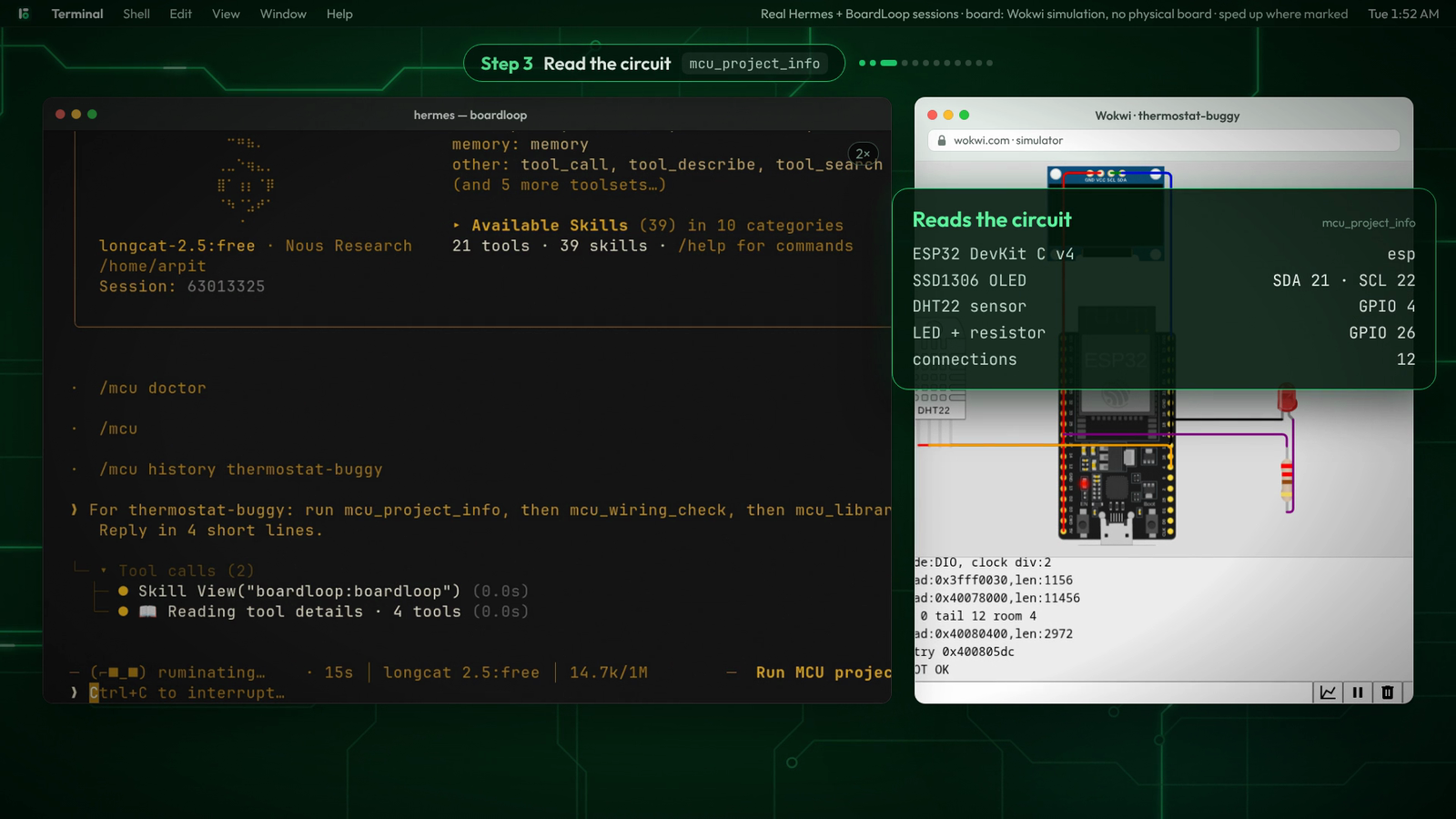
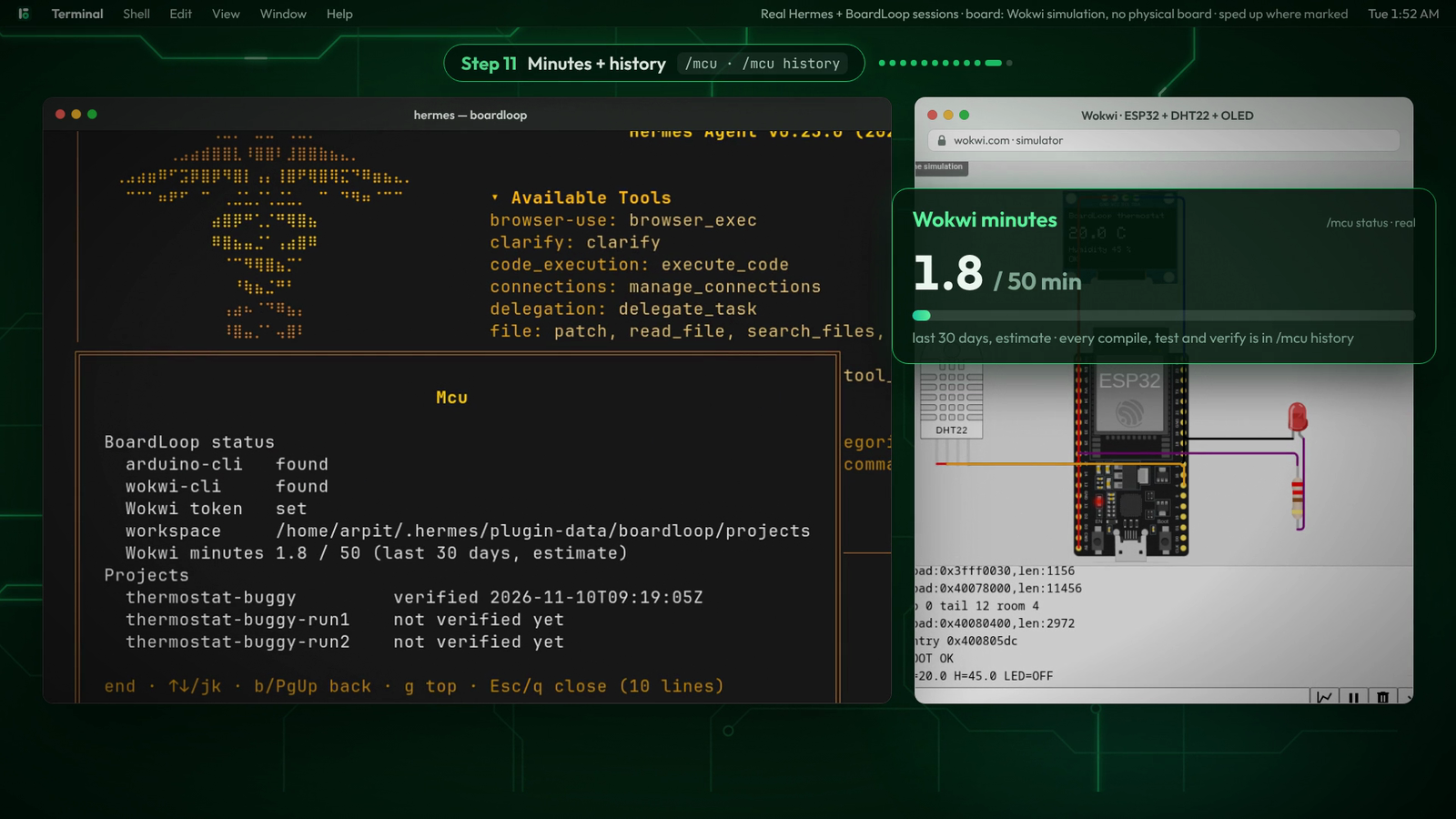
| /mcu doctor | mcu_project_info | /mcu minutes meter |
|---|---|---|
|  |
 |
 |
Replay
A real Hermes session, replayed: the agent's tool calls on the left, the simulated ESP32 on the
right. It fixes both planted bugs, rides out a dropped Wokwi connection, and stops when all three
tests pass. The circuit frames are real Wokwi captures. Full-quality video: assets/demo.mp4.
What it looks like
You: The thermostat-buggy project is broken. Make it pass its tests.
mcu_verify→ fix_compile 1/3:thermostat-buggy.ino:24:1: expected ',' or ';' before 'Adafruit_SSD1306'.
Hint: a statement just above this line is missing a;, with line 22 shown as context.- Hermes adds the
;→mcu_verify→ fix_behaviour 1/5 (1/3 tests passed):- hot room turns the LED on:
expected serial 'LED=ON' not seen; the firmware printedT=35.0 H=50.0 LED=OFF - cool room keeps the LED off:
expected serial 'LED=OFF' not seen
- hot room turns the LED on:
- Hermes flips
<to>→mcu_verify→ verified 3/3, with OLED screenshots of each test.
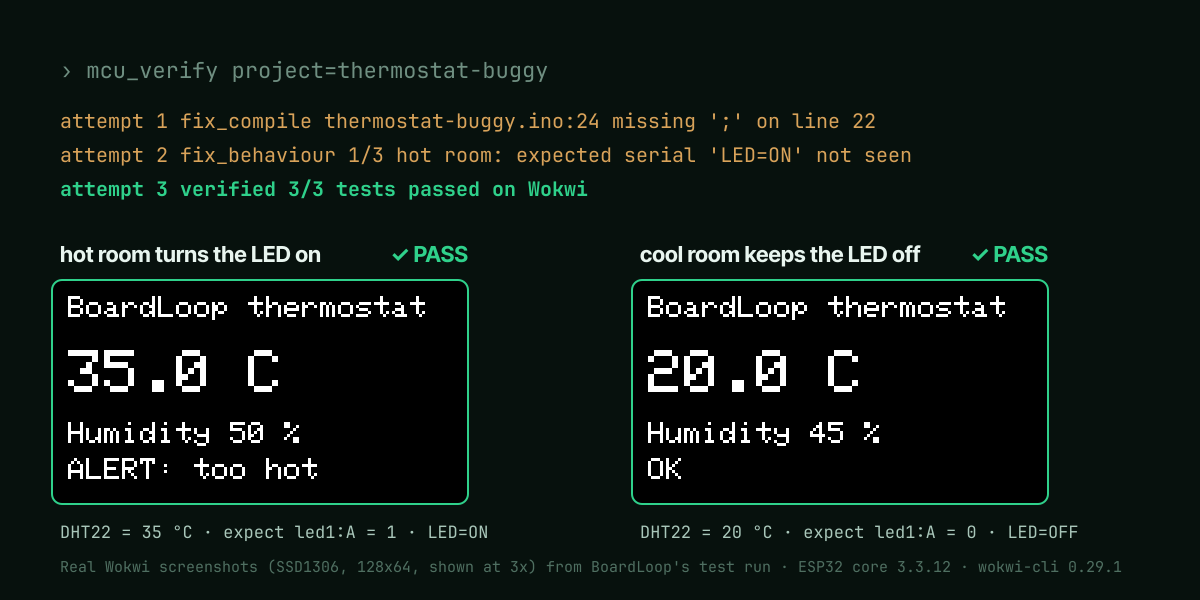
This exact sequence runs in CI against the fake tools
(tests/test_tools.py::test_the_demo_loop_fixes_the_buggy_sample) and on
the real toolchain (tests/test_real.py).
Watch it run live on wokwi.com
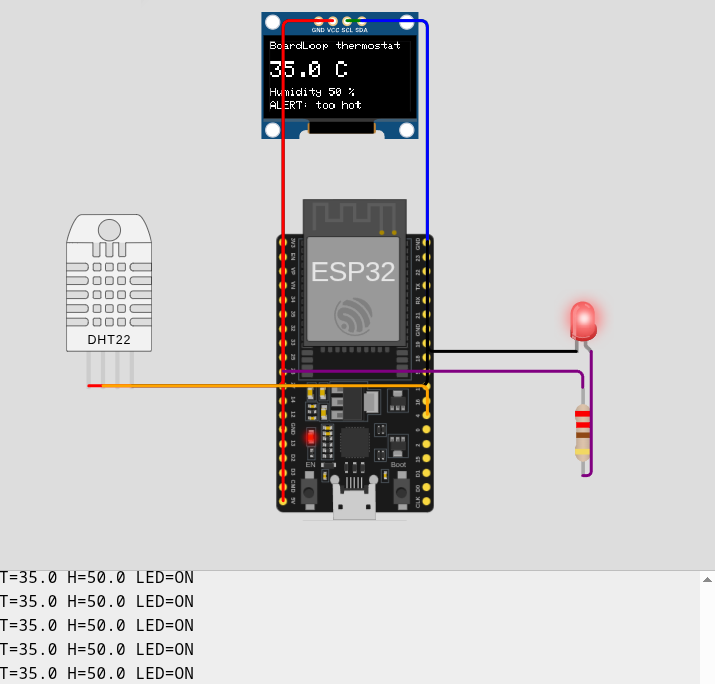
mcu_export writes the sketch, diagram.json and libraries.txt for the browser editor. Paste
them into a new project on wokwi.com and press play to
watch the same circuit BoardLoop tested: here the DHT22 is at 35 °C, the OLED shows the alert,
the LED is lit and the serial monitor streams the lines the tests check.
Tools
| Tool | What it does | Approval |
|---|---|---|
| mcu_doctor | Checks arduino-cli, cores, libraries, wokwi-cli, the token (never shown), pyserial, the workspace and Wokwi minutes; gives the exact fix for each gap | |
| mcu_project_new | Creates a project from a template: esp32-blank (esp32/s3/c3), esp32-thermostat, uno-blink, demo-thermostat-buggy | |
| mcu_project_info | Parts list, wiring table (dht1:SDA → esp:4), tests and last result, so code matches the circuit | |
| mcu_libraries | Search, install (and record in the project) or list Arduino libraries | |
| mcu_compile | Compiles; ≤10 parsed errors with source context and fix hints; flash/RAM use | |
| mcu_simulate | One Wokwi run: expect/fail text, serial tail, part screenshot | |
| mcu_test | Behaviour tests on simulated hardware, each in an isolated run folder; only=[...] reruns failures. target="real" runs them on a connected board: flash, reset, check the serial lines | real only |
| mcu_verify | The loop step: compile → test → one status with an attempt budget | |
| mcu_wiring_check | Catches input-only pins used as outputs, LEDs without resistors, buttons on strapping pins, parts without ground, plus wokwi-cli lint | |
| mcu_export | Exports the sketch, diagram and libraries for the wokwi.com editor, to watch the circuit live | |
| mcu_ports | Lists connected boards | |
| mcu_upload | Flashes a real board; the prompt shows board, port, size and whether tests passed | yes |
| mcu_serial_read | Reads a real board's serial output, optionally checking expect_serial | |
| mcu_serial_write | Sends a line to the board | yes |
Also: the /mcu command (status, projects, history, doctor), a bundled skill that teaches
the agent the workflow and how to write tests (skills/boardloop/SKILL.md),
a Wokwi minutes meter, and a Hermes Desktop half (desktop/plugin.js):
- a Workbench pane with the minutes meter, a project picker, the last verify, the latest
simulated and real-board results with OLED screenshots and failure serial tails, and history.
It readsdashboard/plugin_api.pyand refreshes when a test run ends; - a screenshot card that shows each OLED screenshot in chat with its test name, PASS/FAIL and reason.
Both are SDK-only (validate: desktop surface passes) and are tested with real React in jsdom
(tests/desktop/); the backend was checked live in the Hermes dashboard server.
Quick start
- arduino-cli, the cores and the libraries (install guide):
arduino-cli config init arduino-cli config add board_manager.additional_urls https://espressif.github.io/arduino-esp32/package_esp32_index.json arduino-cli core update-index arduino-cli core install esp32:esp32 arduino:avr arduino-cli lib install "Adafruit SSD1306" "Adafruit GFX Library" "DHT sensor library" "Adafruit Unified Sensor" - wokwi-cli (getting started) and a free CI
token from https://wokwi.com/dashboard/ci. - The plugin:
hermes plugins install boardloop --enable # from the catalog, once listed hermes plugins install LSUDOKO/BoardLoop --enable # or straight from GitHub - Put the token in Settings → Plugins → BoardLoop → Wokwi CI token (stored as a Hermes secret).
- In Hermes:
/mcu doctor. Every missing piece is listed with its install command.
Example prompts
- "Create an ESP32 project called demo1 from the thermostat template and verify it."
- "The thermostat-buggy project is broken. Make it pass its tests." (create it first with the
demo-thermostat-buggytemplate) - "Make a plant-watering alarm: soil moisture below 30% beeps a buzzer. Write the tests too."
- "Button on GPIO 27 toggles the relay; a long press resets it. Test both."
- "Flash it to my board on /dev/ttyUSB0 and check it prints BOOT OK."
- "Run the tests on my real board on COM5." (
mcu_test target="real": you approve the flash first)
Writing tests (boardloop.yaml)
name: thermostat
board: esp32                     # esp32 | esp32s3 | esp32c3 | uno | nano | mega, or set fqbn
sketch: thermostat.ino
libraries: ["Adafruit SSD1306", "Adafruit GFX Library", "DHT sensor library", "Adafruit Unified Sensor"]
boot_text: "BOOT OK"             # every test waits for this first
fail_text: "ERROR:"              # any line containing it fails the run
tests:
  - name: hot room turns the LED on
    sensors: { dht1: { temperature: 35, humidity: 50 } }   # patched into a copy of diagram.json
    run_ms: 3000
    expect_serial: ["LED=ON"]                               # in order
    expect_pins: [ { part: led1, pin: A, value: 1 } ]       # checked at the end
    screenshot: oled1
  - name: holding the button keeps the LED on
    controls: [ { part: btn1, control: pressed, value: 1 } ] # live Wokwi control after boot
    run_ms: 1500
    expect_pins: [ { part: led1, pin: A, value: 1 } ]
Each test becomes a Wokwi automation scenario (scenario.py). Every part id is
checked against diagram.json, so a test can't refer to a part that isn't in the circuit
(projects.py). The skill tells the agent to write a normal case, an opposite case
and an edge case for every behaviour. Teachers can hand out the tests and use them for grading.
On a real board
mcu_test target="real" port=... uses the same boardloop.yaml. It recompiles if needed and
flashes the board (after your approval). Then it resets the board, captures its serial output and
checks each test's boot_text and expect_serial. Tests that set simulated sensor values or
press simulated buttons can't be reproduced unattended on hardware, so they are reported as
skipped with what to do instead, never as passes. Pin expectations are listed as unchecked.
Supported boards and parts
ESP32 DevKit, ESP32-S3, ESP32-C3, Arduino Uno, Nano and Mega, and any part Wokwi simulates.
The examples use the DHT22, SSD1306 OLED, LEDs, resistors and pushbuttons. BoardLoop works with
any diagram.json; sensor values are part attributes and live inputs are Wokwi controls.
Settings
| Setting | Default | |
|---|---|---|
| workspace_dir | <HERMES_HOME>/plugin-data/boardloop/projects | where projects live |
| wokwi_token | – | secret, env WOKWI_CLI_TOKEN |
| wokwi_minutes_limit | 50 | your plan's limit (free plan: 50 per 30 days) |
| sim_timeout_ms | 6000 | default for mcu_simulate, max 20000 |
| compile_timeout_s | 300 | the first ESP32 build is slow |
| compile_budget / test_budget | 3 / 5 | fix attempts before needs_human |
| parallel_tests | 3 | Wokwi simulations run at once (1–5) |
| default_board, arduino_cli_path, wokwi_cli_path | | |
Privacy, safety and disclosures
What BoardLoop runs and sends
- Local programs: runs
arduino-cli(compile, library install, board list, upload) and
wokwi-cli(simulation, lint) as subprocesses with a fixed argv, no shell, a timeout, and a
whole-process-tree kill on timeout (procs.py). You install both tools yourself;
BoardLoop never downloads them. - Cloud simulation:
wokwi-clisends your compiled firmware and circuit diagram to Wokwi's
simulation service using your Wokwi CI token. Simulated time counts against your Wokwi plan;
BoardLoop shows an estimate (/mcu) and warns at 80%. Source.inofiles are not uploaded by
BoardLoop: each run folder holds onlywokwi.toml, the firmware,diagram.jsonand the scenario
(testrunner.py). - Network: arduino-cli downloads cores and libraries from their usual sources when you ask it
to. BoardLoop itself sends no telemetry. - Real hardware: with a board connected, BoardLoop can list serial ports, flash firmware and
read or write serial data. Flashing and serial writes always ask for your approval first
(approvals.py); under cron or the gateway, Hermes's approval policy refuses them. - Files: projects, build outputs, run folders, screenshots and a small SQLite history live in
Hermes's plugin data folder (<HERMES_HOME>/plugin-data/boardloop/) or your chosen projects
folder. Run folders older than 24 hours are deleted automatically. - Secrets: the Wokwi token is read only through Hermes's secret scope, passed only in
wokwi-cli's environment, and redacted from every tool result (config.py).
arduino-cli and wokwi-cli get a minimal allow-listed environment, never Hermes's own, so
provider API keys never reach them (procs.py).
Safety measures in the code, each with a test: path traversal and symlink escapes blocked; strict
patterns for project names, ports and library names; yaml.safe_load only; text read from serial
ports is labelled as data, not instructions; a guard test fails if a new
upload/write/flash/erase tool is added without approval (tests/test_approvals.py).
See SECURITY.md.
Wokwi minutes
The free plan gives 50 simulated minutes per rolling 30 days. Measured on the thermostat: each
test runs about 6 simulated seconds (boot, the DHT22's 2 s warm-up, a 3 s settle), and the CLI
exits as soon as a scenario's last step passes. So a full 3-test verify uses about 18 simulated
seconds, roughly 160 full verifies a month on the free plan. BoardLoop's meter records each
test's timeout budget (9 s) because Wokwi doesn't report the end time of a passing run, so
/mcu errs high (27 s per verify). While fixing, mcu_test only=[...] reruns just the failing
tests.
Wall-clock time is a different matter: ESP32 simulation runs several times slower than real time
in Wokwi's cloud, so one ESP32 test takes roughly 40–90 s and a full verify a few minutes. The first
ESP32 compile of a project also takes 1–2 minutes; later ones are faster.
How it fits with other plugins
esp32-debug diagnoses crashes and rigforge designs the machine; BoardLoop makes the code actually
work on the board. gadget uses ESP32s as voice terminals for Hermes. BoardLoop programs boards
with new code that the agent writes and tests.
Limitations
- Simulation isn't reality: timing, power, noise and some peripherals differ. Use real-board
mode (mcu_upload+mcu_serial_read) for the final check. - Wokwi is a cloud service: it needs a network connection and a token, and heavy use needs a paid plan.
- Scenario automation is marked "alpha" by Wokwi. BoardLoop pins its formats to recorded real runs
(tests/fixtures/wokwi/NOTES.md). - Sensors such as the DHT22 have no live Wokwi control, so their values are set per test before the
run, not changed during it. - The real-board tools (
mcu_upload,mcu_serial_*,mcu_test target="real") are tested with
fakes and a fake serial port, and their approval gates are checked through Hermes itself. They
have not yet been run against physical hardware for this release. Everything else
is verified end to end on the real toolchain (arduino-cli 1.5.1, ESP32 core 3.3.12, wokwi-cli
0.29.1;tests/test_real.py). - An ESP32 verify still takes a few minutes of wall time: the first compile plus cloud simulation.
Tests run in parallel (parallel_tests, default 3); lower it if your Wokwi plan limits concurrency.
Development
python -m venv .venv && .venv/bin/pip install -r requirements-dev.txt
.venv/bin/pytest                                 # ~180 tests, ~15 s, no network (fake tools)
BOARDLOOP_REAL=1 .venv/bin/pytest -m real        # real arduino-cli + Wokwi (uses minutes)
hermes plugins doctor . --ci && hermes plugins validate . --install-deps
python scripts/check_repo.py                     # no binaries / tokens tracked
<hermes-venv>/bin/python scripts/hermes_e2e.py ~/.hermes/hermes-agent   # through Hermes's own dispatcher
The fakes in tests/fakes/ reproduce the real tools' exit codes and messages,
recorded from real runs, and model the example circuits so behaviour tests are meaningful.
Architecture: docs/ARCHITECTURE.md. How the project maps to the
hackathon criteria: docs/EVALUATION.md.
Website and brand
boardloop.pages.dev is built from site/ (Vite, React,
Framer Motion) and deployed to Cloudflare Pages with npm run deploy. Its session replay uses the
transcript of a real Hermes run (site/src/session.json) and real Wokwi
frames. The logo, banner and social images are generated by
assets/brand/build.py from the open-licensed Outfit typeface.
License
MIT © 2026 Arpit Singh
README from the reviewed commit 950586c; it updates when the author re-pins.