 Ronitron007
Chat Tree
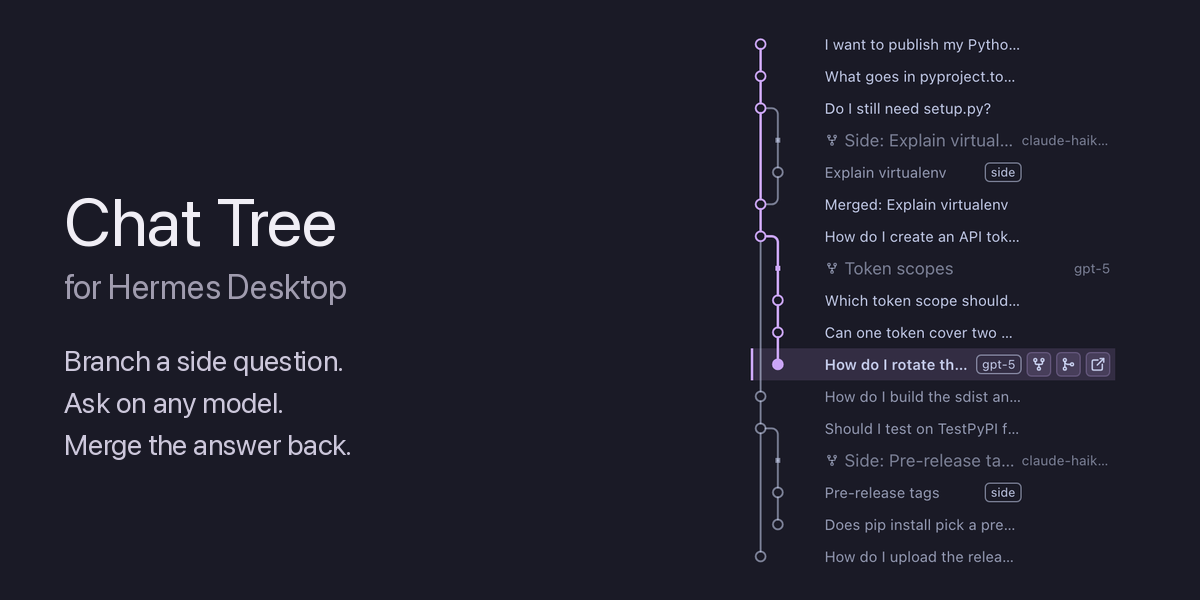
Chat Tree is a Hermes Desktop plugin. It is one window, a side pane that draws the open chat and its branches as a git graph. You branch, ask, and merge from the same pane.
What it does
-
Each node is one exchange, one user message and its replies.
-
Branch here starts a branch from a node. The branch is a new chat that continues after that exchange. Hermes names the branch. The button shows on each answered node. A node of another chat opens that chat first, because Hermes branches only a loaded chat.
-
A branch needs no question. Without a question, the pane makes the branch and opens it.
-
A new branch shows at its fork point at once.
-
A branch can use a cheaper model for a side question.
-
Branch names and a Branches mode. Each branch starts with a name row at its fork: the Hermes title of the chat and its model. The branch icon beside the refresh icon switches to the Branches view, which shows one row for each chat, with its number of exchanges and a
mergedmark. Double-click a branch name, in either view, to rename the chat. Enter saves the new name and Escape cancels. Hermes renames the chat withsession.title. -
Row actions. When you point to a row, up to three icons show: Branch here (the fork icon of Hermes), Merge into, and Open in a tab. Merge into opens a pick in two steps: the ancestor, then the mode, with the size and the fit check.
-
A merge brings a branch back into any ancestor chat on its path. Choose the ancestor chat in the target list. While you use the list, the path to the target has the hover colour. Then choose the mode:
-
Merge as-is sends the questions and answers as a message in the ancestor chat.
-
Digest gives the ancestor a short digest by the model.
-
-
Each chat has its own lane. A branch leaves its parent lane at the exchange where it starts. A merge curves back into a node on the ancestor lane.
-
The tree uses the colours of the Hermes theme:
-
The path from the first exchange to the open node has the primary theme colour (
--dt-primary). -
When you point to a node, its path to the first exchange has the theme text colour (
--dt-foreground). -
All other nodes have the muted text colour (
--dt-muted-foreground).
-
-
A long run of exchanges folds into one
+Nrow. Click the row to show the exchanges in it. -
Point to a node to see the chat title and its model. Click a node to open its chat.
-
Chat status. Each chat in the tree shows its status on its last row. A pulsing dot in the primary colour shows a chat that runs now. An amber dot shows a chat that needs you, and a hollow dot shows a chat that starts. A chat with no dot is idle. The Branches view also shows the status as a word after the number of exchanges. The pane reads the status from the gateway method
session.active_list. If one read fails, the pane keeps the last status. After two failed reads in a row, the pane shows no status and no error.
Parts
| Part | Files | Job |
|---|---|---|
| Desktop half | desktop/plugin.js (built from src/) | The tree pane |
| Python half | plugin.yaml, __init__.py | The digest and history RPC methods |
The digest method
The Python half follows the plugin RPC path that Hermes documents for ctx.llm from a frontend. The pane calls the method with host.request:
host.request('plugin.chat-tree.digest.write', { session_id, purpose, title, exchanges })
-
purposeisforkormerge. -
exchangesis a list of{ question, answer }objects, oldest first. -
The call answers
{ job }at once. A bad request fails the call with the reasonplugin_rpc_failed. -
At most 4 digests run at one time. A fifth call fails until one of them ends.
The model writes the digest in a worker thread. Then the pane gets the gateway event plugin.chat-tree.digest.written for that session:
-
{ job, digest }when the model wrote a digest. -
{ job, error }when the model call or its reply failed. The Python half never writes a digest of its own.
A fork digest has 3 to 5 bullet lines and fewer than 80 words. It covers the chat up to the fork. A merge digest has fewer than 120 words. It tells what the branch asked, what it concluded, and the key facts. Both digests use only facts from the exchanges.
The method sends at most 24,000 characters of exchanges to the model. It cuts each question and each answer to 6,000 characters. Then it leaves out the oldest exchanges first, and it tells the model how many it left out. It masks secrets in the text before the model call.
The history method
The pane draws the tree from the messages of each chat in the lineage of the open chat. The session.history method of Hermes answers only for a chat that the gateway holds in memory. Thus the Python half reads the other chats from the local session store of Hermes.
Privacy: the method opens the local session store of Hermes (state.db in the profile home) read-only. It reads only the chats in the lineage of the open chat. It never reads a hidden or archived chat. Nothing leaves the machine, and no model gets this text.
On each refresh, the pane sends one call for all chats with new messages:
host.request('plugin.chat-tree.history.read', { session_ids, session_id })
-
session_idsis a list of stored chat ids. The method reads the first 30 different ids. It ignores an item that is not a string. -
session_idis the id of the open chat. The call can also come without it. -
The method reads only the chats of one lineage. Two chats are in one lineage when their parent links go up to the same first chat. A
/newreset starts a new lineage. Withsession_id, it is the lineage of the open chat. Withoutsession_id, it is the lineage of the first chat that the method can read. -
The method skips hidden and archived chats. If
session_idis not in the store, it reads no chat. -
The call answers
{ histories, missing, skipped, truncated }. Thehistoriesobject maps each stored id to its rows, oldest first. Each row is{ role, text, branch_index, row_id }, androleisuserorassistant. Themissinglist holds the ids that are not in the store. Theskippedlist holds the ids that the method did not read. -
The
branch_indexof a row gives its place in the list thatsession.branchcuts withcount. That list also has rows that the tree does not show, such as[System:notes. Thus Branch here sendscount=branch_index+ 1 of the last answer of the exchange. Withoutbranch_index, the pane counts the rows that it reads. -
One reply holds at most 400,000 characters of text. Past that, the oldest exchanges lose their text first, in every chat at the same time, and
truncatedistrue. The rows stay, so the exchange numbers do not change. -
The method opens the store of the profile of the call one time, read-only (
hermes_state.SessionDB(read_only=True)). It reads the rows thatsession.branchcopies, withget_resume_conversations. -
A bad request fails the call with the reason
plugin_rpc_failed.
If the Python half is not enabled, the call fails with the error -32601. Then the pane reads each chat with session.history and shows this note: Enable the chat-tree plugin backend to see other chats (hermes plugins enable chat-tree).
How the method calls the model
-
register(ctx)in__init__.pyregisters the auxiliary taskchat_tree_digestand the RPC methodsdigest.writeandhistory.read. -
The worker thread calls
ctx.llm.complete_structuredwith the JSON schema{ digest: string }, temperature 0, andtask="chat_tree_digest". -
The thread then calls
ctx.emit_to_sessionwith the result.
Choose the digest model
Until you choose a model, chat_tree_digest uses the model of the built-in title generation task. To choose a model, set auxiliary.chat_tree_digest in config.yaml:
auxiliary:
  chat_tree_digest:
    provider: openrouter
    model: vendor/model-id
Hermes Desktop shows the same setting in Settings → Models → Auxiliary.
Install
You need Hermes 0.23 or later and Hermes Desktop.
Run the install script from the root of the repository, then run the commands that it prints:
bash scripts/install.sh
hermes plugins enable chat-tree
hermes gateway restart -y --detach
Then quit and relaunch Hermes Desktop. The root README gives all the steps. The script is scripts/install.sh.
Tests
npm run test:chat-tree
<hermes venv>/bin/python chat-tree/tests_py/test_digest.py
<hermes venv>/bin/python chat-tree/tests_py/test_history.py
The digest tests import agent.redact and agent.plugin_llm from the Hermes source. The history tests make a temporary session store with hermes_state.SessionDB. No test calls a model, and no test opens a real Hermes home.
Limits
-
A click on a node opens its chat with
host.openSession. The main chat does not move to that exchange, because the Desktop SDK has no scroll function. -
The tree reads the newest 500 chats and at most 30 chats of one lineage.
-
Without the Python half, the tree shows only the chats that the gateway holds in memory.
-
A digest needs a model call. If the call fails, the pane gets an error and no digest.
README from the reviewed commit 55c1c4d; it updates when the author re-pins.


