 CoinFello
 for Hermes Agent
A Hermes Agent plugin that connects the agent to CoinFello
through the CoinFello MCP server: sign in once, and the agent gets fast reads
over your automation wallet (balances, positions, LP ranges, open orders,
activity, prices, yields, swap/bridge quotes) plus Fello, CoinFello's DeFi
agent, which can execute on-chain actions for you.
Sign-in is Hermes's own OAuth: CoinFello is declared under oauth: in
plugin.yaml, you run hermes auth add coinfello:coinfello once, and Hermes
stores, refreshes and attaches the grant. The plugin never sees a token.
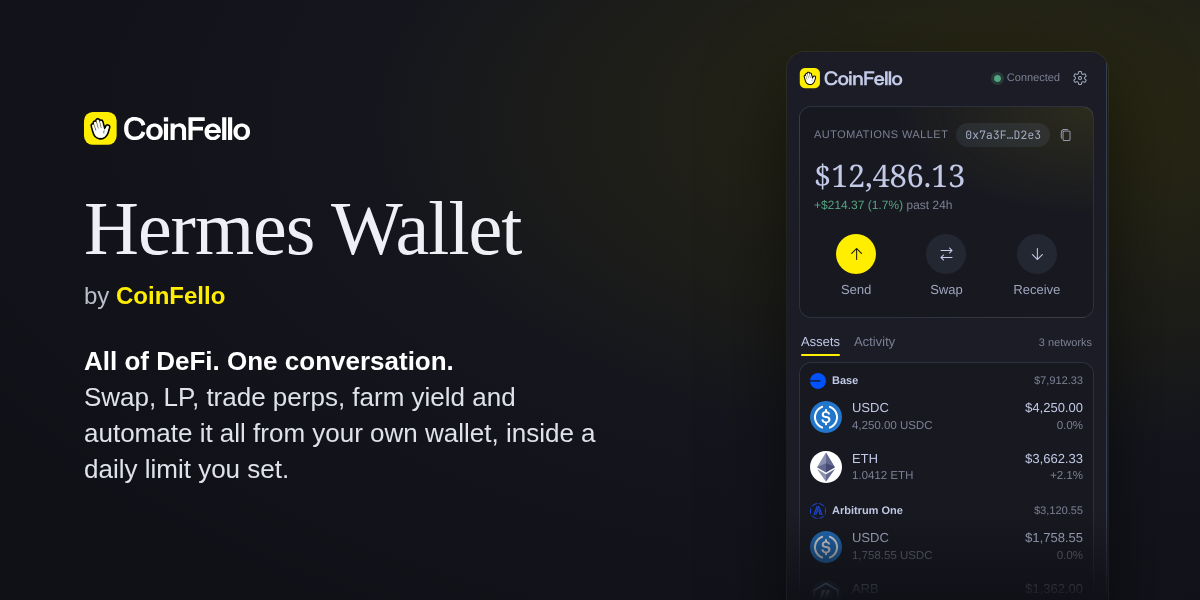
Includes a desktop pane: the sign-in command to copy, the automations wallet
(copy + QR to fund it), balances per network shaped like the CoinFello
Portfolio view, and CoinFello's MCP App cards (portfolio, quotes,
automations, yields, ...) when the agent shows one.
What you get
22 agent tools (toolset coinfello):
| Tool | What it does |
|---|---|
coinfello_status | Connection state, wallet (funding) address, expiry |
coinfello_connect | Start sign-in: browser approval link + code (email code on older servers) |
coinfello_poll_approval | Finish sign-in once the human approved in the browser |
coinfello_verify | Email-code sign-in, only for servers without browser sign-in |
coinfello_disconnect | Revoke the session now |
coinfello_chat | Ask Fello to do something; it stages fund-moving actions for coinfello_execute (each message needs your approval) |
coinfello_job_status | Poll a running Fello turn (its reply lists staged actions too) |
coinfello_balances / _positions / _lp_positions / _open_orders / _activity | Wallet reads |
coinfello_quote | Swap/bridge quote, for comparing (executes nothing, not executable by reference) |
coinfello_prepare_swap / coinfello_prepare_send | Validate, price and hold a trade as a 2-minute single-use intent (executes nothing) |
coinfello_execute | Run a prepared intent or a staged Fello action, only after you approve its summary in Hermes |
coinfello_transfer_status | What a swap/bridge actually delivered: completed, wrong_token, refunded, failed |
coinfello_yields / _prices | Market reads |
coinfello_show_card | Show a CoinFello card: drawn in the desktop pane; other surfaces get its text |
coinfello_set_daily_limit / _limit_status | Lower the daily limit, or ask the human to approve a raise |
Desktop pane (desktop half of the same package):
- Sign in with CoinFello: opens one approval page in your browser and
shows the code to match. Already signed in to CoinFello there? One click. - Automations wallet: address with copy button and a scannable QR to
fund it (same address on every EVM network). - Portfolio: total value with its 24h move, balances grouped per network
with token logos, using the same rules as the web Portfolio view
(coinfello_portfolio.pynames the web function each rule is ported from). - Portfolio / Strategies buttons open the full views in CoinFello.
- Cards the agent shows appear at the top of the pane (see below).
- Statusbar connection chip.
Install
git clone https://github.com/CoinFello/hermes-wallet.git
cd hermes-wallet
./install.sh                       # copies the plugin into ~/.hermes/plugins/coinfello
hermes plugins enable coinfello    # admits it AND installs its Python deps (segno)
Restart Hermes. The MCP tools appear as coinfello_*; the desktop pane
appears after Reload desktop plugins (⌘K) — the desktop half is opt-in
and inventories under Capabilities → Plugins.
Sign in
# CoinFello's public OAuth client id for this plugin (not a secret; PKCE protects the code)
echo 'COINFELLO_OAUTH_CLIENT_ID=coinfello-hermes' >> "$(hermes config env-path)"
hermes auth add coinfello:coinfello
hermes auth add opens CoinFello in your browser. Sign in, choose what the
agent may do (read only, or trade up to a daily limit), and approve. Hermes
then keeps the grant: it refreshes it before it expires, sends it only to
app.coinfello.com, and the plugin's requests go through Hermes's
credentialed_provider_request. Check it with
hermes auth status coinfello:coinfello. Hermes refuses hermes auth add from
an agent session, the messaging gateway or cron, so the agent can only tell you
the command (coinfello_connect), never run it.
The sign-in is an OAuth 2.1 authorization-code grant with PKCE against
CoinFello (/api/auth/mcp/authorize, /api/auth/mcp/token). Access tokens
last an hour; refresh tokens are single-use, and a grant ends 180 days after
you approve it.
The pane
- Header: the CoinFello logo (wordmark follows your theme's text colour),
connection state, and a Settings gear. - Home: the automations wallet card (address + copy, portfolio total and
24h change, Send / Swap / Earn / Receive, where Receive shows the funding
QR, and Full portfolio / Strategies right under them). Below that,
assets grouped by network and the wallet's activity.
Full portfolio and Strategies open CoinFello's own views in Hermes
tabs (main area) when the server offers them (create_embed_tokenwith
scopeportfolio/strategies, both read-only, so read-only sessions can
open them): they always show this plugin's account, with no browser,
cookies or wallet extension involved. Strategies is for browsing the
catalog, a strategy's details and what is running; to start one, ask the
agent. On servers without a view, its pill says "Coming to Hermes soon"
and opens nothing: the browser is not a fallback, because the web app
reconnects extension wallets, which can sign in as a different account.
A read-only session or a pending allowance change shows one notice that
opens Settings. - Settings: the trading allowance (daily limit, what's left in the last
24 hours, change it without signing in again), the account and sign-out,
Appearance (CoinFello colors), and the server in use.
The styling is one stylesheet scoped to .cf, injected at register and
removed on dispose. Surfaces, text, borders, fonts and gain/loss colours come
from the active Hermes theme (--ui-*, --font-*, --ui-green/--ui-red).
Buttons and highlights use the theme's accent (--dt-primary, the colour of
Hermes' own primary buttons) by default; Settings > Appearance > CoinFello
colors switches them to CoinFello's yellow (saved per app with
ctx.storage). CoinFello also contributes the logo, serif portfolio figures,
round token icons and rounded cards.
Signing out
coinfello_disconnect (or Sign out in Settings) asks CoinFello to revoke
the grant, which ends it at once for every copy of its tokens. Run
hermes auth logout coinfello:coinfello to also remove it from Hermes. Turning
off the Automation Wallet in the CoinFello app ends it too.
Trading from the agent
coinfello_prepare_swap(or_send) asks the server to quote and validate
the trade (balance, recipient, gas on the source chain) and to hold it as a
single-use intent for two minutes. Nothing moves.coinfello_executeruns it. Before it does, the plugin'spre_tool_call
hook puts it through Hermes' approval prompt, showing the server's
summary of that intent (cached at prepare time, never text the model
wrote), e.g. Bridge 0.004186 ETH on Ethereum Mainnet to at least 113.25
POL on Polygon via layerswap. Deny, and nothing is sent. The rule key is
per intent, so an "always" answer never covers another trade.- The server executes exactly the prepared arguments: a price below the
approved minimum (price_moved) or a different bridge than the approved
one (route_changed) is refused before anything is broadcast. - A bridge's success only confirms the source chain.
coinfello_transfer_status
reads LI.FI's status and says what arrived:wrong_token(e.g. Across
delivering WETH instead of native POL) andrefundedare failures to
report, not to repair with another trade.
coinfello_chat gets the same prompt for every message.
Actions Fello stages
Everything else (staking and yield, Hyperliquid perps, Polymarket, LP
positions, hedges, pausing or cancelling an automation) goes through Fello.
On servers that offer it, coinfello_chat asks Fello to
stage those actions instead of running them:
- The reply (from
coinfello_chat, orcoinfello_job_statusfor a long
turn) listsstaged_actions: anintent_id, the server's summary
(built from the arguments, never from Fello's prose), itseffect
(spend,returns,automationorother),usdandexpires_at
(ten minutes). Nothing has run. - The plugin registers each one with that summary. The agent shows you the
summaries and callscoinfello_executewith anintent_idyou agreed to.
Hermes' approval prompt shows the server's summary with what it costs,
e.g. Stake 0.5 ETH on Lido. Staged by Fello (enter_staking_yield). Spends
~$1,234.56, charged to the daily limit. One rule key per intent, so an
"always" answer never covers another action. - The result says which tool ran, its transaction hashes, and whether the
outcome is unknown (may have gone through: never retry) or the wallet
needs its automation permission. The agent then tells Fello the result on
the samechat_idso it can continue a multi-step plan.
A spend CoinFello could not price (usd: null) is blocked before any prompt:
the server would refuse it. An intent_id that did not come from this Hermes
(a prepare or a staged reply) is refused outright, as before. Older servers
never see the stage_actions flag.
Approvals follow your Hermes settings: --yolo or Approvals: off skip
the prompt for these tools too, and non-interactive runs (cron, -q) are
refused unless you configured them to auto-approve.
Servers without prepare_swap (older CoinFello servers) cannot
prepare trades; coinfello_transfer_status then reads LI.FI directly.
Cards (MCP Apps)
CoinFello's MCP server ships its views as MCP App cards: show_<card>_card
tools whose _meta.ui.resourceUri names a ui://coinfello/... HTML
document. The agent shows one with coinfello_show_card (portfolio,
status, quote, automations, needs_you, error, fund, yield,
lp_ranges, perp, send, dca, earn_deposit, spend_limit; the
sign-in card is left out, the pane has its own sign-in).
- The plugin calls the server's card tool with the stored session, sending
only the arguments the tool's schema declares, never a session token. - On Hermes desktop (
ctx.session_surface() == "desktop") the raw
result becomes a card record (memory and<hermes home>/coinfello/cards/,
0600, 24 hours), the pane is told (plugin.coinfello.card.shown), and the
agent is told the card is in the pane. On every other surface (Telegram,
CLI, ...) the agent gets the card's full text and no card is stored. - The pane fetches
/cards/{id}: the card's HTML with a CSP meta tag and
the theme injected, as adata:URL, plus the tool input and result. It
mounts it in aSandboxedFrame(allow-scriptsonly: opaque origin, no
storage, no popups) and answers the card's MCP Apps bridge.
What a card may call, checked in the pane and again in Python:
| Card | Relayed | Needs the human's Confirm in the pane |
|---|---|---|
| every card | its own show_*_card (refresh), whoami | |
| quote | prepare_swap, prepare_send, show_status_card | execute_intent |
| send / dca | its prepare_*, show_status_card | execute_intent |
| spend_limit | prepare_spend_limit | execute_intent |
| yield | show_earn_deposit_card, prepare_earn_deposit, show_status_card | execute_intent |
| earn_deposit | prepare_earn_deposit, show_yield_card, show_status_card | execute_intent |
| automations | pause_automation | cancel_automation |
| error | its Retry tool, if on the server's retryable list (reads and quotes) |
The yield and earn deposit cards are one flow in one frame: coinfello-web
builds both documents with both renderers, so a yield row's Deposit
calls show_earn_deposit_card({yield_id}) and draws the result's
structuredContent in place, and the deposit card's Browse yields does
the same with show_yield_card. The pane relays these like any
tools/call and hands the raw result back; it does not mount a second card
or open the Earn view. The frame keeps the record and allowlist of the card
that was shown, which is why each one lists the other's show tool and the
deposit's prepare and confirm.
show_status_card (a read) is relayed from the cards that can end in
"outcome unknown" after execute_intent, for their Check status button.
execute_intent runs only for an intent this card produced and Hermes
prepared (the server's summary, kept with the card record, is what the
confirmation shows), once and before it expires.
cancel_automation runs only for an automation the card listed. Sign-out,
Fello, sign-in, embed tokens and daily-limit changes are
never relayed, nor is anything not in the table. Credential-like keys are
stripped from arguments and results in both directions.
The card's CSP: default-src 'none'; script-src 'unsafe-inline'; style-src 'unsafe-inline' <resourceDomains>; font-src <resourceDomains>; img-src data:; connect-src 'none'; frame-src 'none'; base-uri 'none'; form-action 'none'.
Cards need Hermes 0.22.3 or newer (ctx.session_surface); on older Hermes
the tool returns the card's text everywhere. The plugin does not advertise
the MCP Apps extension to the server, so card tools always answer with
their full text plus structuredContent, on every surface.
Swap, Earn and Full portfolio: CoinFello's own UI in Hermes
The pane's Swap and Earn buttons host coinfello-web's /embed/swap
and /embed/earn (the app's real components) in a SandboxedFrame, and
Full portfolio docks /embed/portfolio in a main-area tab. One host
serves all three (desktop/plugin.js, the embed-host section): the frame
loads <app><path>?theme=dark|light, says coinfello:embed-ready, and gets
a 15-minute token minted for its scope (POST /embed-token {scope} ->
create_embed_token, never the session token) with a per-mount nonce. A
later token request must echo the nonce, and one within a minute of the
last token stops instead of looping on a dead session. Messages from any
window but the host's own frame are ignored; heights are clamped to
240-1200px.
-
Links: the sandbox has no
allow-popups, so an embed asks the pane
withcoinfello:open-url; only allowlisted https block explorers open, at
most once a second. An embed that can do this says so inembed-ready
(features: ['open-url']), and its own View button is the only one.
For older embeds the pane adds one fallback View under the frame. -
Results arrive as
coinfello:swap-result/coinfello:earn-result
(the portfolio view has none). An Earn result says "nothing was sent" only
for a cancel or failure with no transaction, and anything uncertain asks
the person to check it. -
Scopes: swap needs trading access; Earn is always asked of the server
(it may mint for browsing); portfolio is minted with a plain read call,
only when the server'sscopeenum listsportfolio. -
Earn preselects:
&opportunity=<yield id>, or&token=<SYMBOL>&chain_id=<n>,
validated and percent-encoded bycoinfello_earn.frame_query. -
From the agent:
coinfello_show_cardwithcard="earn_deposit"on
Hermes desktop opens the Earn view (with any preselect from its
arguments) instead of the typed-yield-id card, and calls no CoinFello tool.
Other surfaces keep the card's text. This reusescoinfello_show_card
rather than adding a tool: it is where the agent already goes to deposit,
and it keeps the desktop-or-text rule in one place. A yield card's Deposit
inside the pane is not this path: it stays in the card (see the table above). -
Read-only sessions may open Earn: the server decides whether to mint a
token for browsing, and a refusal is shown in plain words. -
Older servers (no
scopeoncreate_embed_token, or one without
earn): no Earn button, a one-line note, andearn_depositon desktop
shows theyieldcard when it has a token to show (otherwise the deposit
card, as before). The agent's note says whether its rows offer Deposit.
Security notes
- The plugin stores no credential and reads none: no
.env, noauth.json.
Hermes holds the CoinFello OAuth grant and attaches it to the plugin's
requests, only forapp.coinfello.com. The grant can move funds within the
daily limit you chose; revoke it withcoinfello_disconnect, or in the
CoinFello app (Automation Wallet), which ends it immediately. - Stored by the plugin: non-secret state in Hermes's plugin store
(plugin-data/coinfello/state.json): whether the last request was signed
in, the wallet address, the access level and a pending limit change. coinfello_chatexecutes on-chain actions without further
confirmation on the CoinFello side, so Hermes asks you to approve each
message. CoinFello enforces the daily limit you approved server-side.- Unattended runs (cron, the messaging gateway): sign-in never waits on a
person; without a grant every tool fails at once with the sign-in command.
coinfello_executeandcoinfello_chatneed Hermes's approval prompt. coinfello_executeruns only intents this Hermes process prepared, once,
after you approve the server's summary in Hermes.- Fast reads (
get_*) are read-only.
Privacy and usage data
The plugin sends no telemetry: no analytics SDK, no install id, no heartbeat
or other request made only to be counted.
It talks to CoinFello's MCP server (https://app.coinfello.com/api/mcp), and
while the desktop pane is open it refreshes status and balances every 30-60
seconds (every 5 seconds while it waits for you to sign in). Background work:
the pane's polling while open, and one background request to revoke the
grant when you sign out from the pane. Every request names the client in its User-Agent
(coinfello-hermes-plugin/<version> (Hermes; ...)). CoinFello records usage
of its service on its servers, under the
CoinFello privacy policy: at most once a day
per signed-in session, an activity event with your CoinFello account id, the
session's automation wallet address, the session id, and the client name and
version. That is how CoinFello counts daily and monthly active users and
installs. Signing out ends the grant; the plugin keeps no other identifier.
Other network calls: token and network icons from MetaMask's icon service
(static.cx.metamask.io) and CoinFello's site, LI.FI's status API for older
servers' bridge status, and block explorers you choose to open. CoinFello's
cards (see Cards) load their fonts from Google Fonts (fonts.googleapis.com,
fonts.gstatic.com), the only outside hosts a card's CSP allows, so Google
sees your IP address and the font request when a card is drawn; cards have no
other network access.
Development
uv run --no-project --with pytest --with fastapi --with httpx --with 'segno>=1.6,<2' pytest tests/
node --test tests/card_bridge.test.mjs   # the pane's card bridge (pytest runs it too when node is installed)
node --test tests/amount.test.mjs        # the pane's amount normalizer (likewise)
node --test tests/embed_host.test.mjs    # the pane's swap/Earn/portfolio embed host (likewise)
The test suite runs a local mock of the MCP streamable-HTTP transport — no
network or real credentials involved.
Layout
├── plugin.yaml            agent-plugin manifest (provides_tools)
├── pyproject.toml         Python deps (segno), installed by Hermes plugin admission
├── __init__.py            register(ctx) — registers the agent tools
├── coinfello_mcp.py       stdlib MCP streamable-HTTP client
├── coinfello_state.py     endpoint + non-secret pane state (no credentials)
├── coinfello_core.py      service layer (sign-in steps, reads, status)
├── coinfello_portfolio.py pane portfolio model, ported from the web Portfolio view
├── coinfello_tools.py     tool schemas + handlers
├── coinfello_trades.py    prepare/execute, the approval hook, transfer status
├── coinfello_cards.py     MCP App cards: show, card records, CSP, bridge allowlist
├── coinfello_earn.py      the Earn view: preselects, frame query, the agent's open request
├── dashboard/             web/desktop backend: FastAPI router at /api/plugins/coinfello/
├── desktop/plugin.js      desktop pane + statusbar chip + card frames
└── tests/                 mock-MCP test suite
Roadmap
-
Wide cards: cards target ~480px and the pane is ~320px, so a card that
overflows is scaled down. Opening a card in the main workspace
(host.openWorkspace) would give it full width. -
Embedded portfolio + strategies:
/embed/*routes in coinfello-web
(same components as the real pages, short-lived scoped token) hosted in a
Hermes full-page view, so web releases reach Hermes with no plugin change.
Until then the pane's buttons open CoinFello in the browser. -
Tier 2: MetaMask mobile via WalletConnect (QR pairing; transactions
approved on-device). -
Tier 3: MetaMask browser extension embedded in the Hermes desktop app
(extension-host pane; feasibility spike required).
README from the reviewed commit 064bbb6; it updates when the author re-pins.


