All plugins

conductor

Hermes leads coding agents on your machines: any terminal coding agent, T3 Code threads, and Orca terminals. It starts a run, waits with no model, and puts one message into the chat that asked when the run finishes, errors, stalls, or needs an approval; T3 and Orca runs can be steered and stopped. It can run 10+ agents at once, one ping each. Two skills: brief researches, asks one round of questions and writes the brief; lead runs the work and checks each report. Disclosure — every start and steer of a coding agent goes through Hermes's approval prompt; it runs only the built-in agents on this machine unless the owner lists extra commands and SSH hosts in plugins.entries.conductor.settings (both empty by default); runs the agent, git status, and ssh and tmux on listed hosts (argv only, no shell strings from user text, never an approval-bypass flag); the agents edit files and run commands with your user rights under their own approval settings; children get a minimal environment plus only the keys that agent needs; keeps one wait thread per run plus a detached agent process or tmux window; writes run records to its plugin data folder and event files, exit codes and logs under ~/.conductor on the machine running the agent; reads and stores no credentials; no telemetry. Finish messages on a messaging gateway need plugins.entries.conductor.allow_gateway_injection: true. In drive mode, which only the user can turn on, it asks Hermes to send up to 5 follow-ups per run on its own.

capthvnsenToolsv0.4.4Updated 2 hours ago

About

Hermes leads coding agents on your machines: any terminal coding agent, T3 Code threads, and Orca terminals. It starts a run, waits with no model, and puts one message into the chat that asked when the run finishes, errors, stalls, or needs an approval; T3 and Orca runs can be steered and stopped. It can run 10+ agents at once, one ping each. Two skills: brief researches, asks one round of questions and writes the brief; lead runs the work and checks each report. Disclosure — every start and steer of a coding agent goes through Hermes's approval prompt; it runs only the built-in agents on this machine unless the owner lists extra commands and SSH hosts in plugins.entries.conductor.settings (both empty by default); runs the agent, git status, and ssh and tmux on listed hosts (argv only, no shell strings from user text, never an approval-bypass flag); the agents edit files and run commands with your user rights under their own approval settings; children get a minimal environment plus only the keys that agent needs; keeps one wait thread per run plus a detached agent process or tmux window; writes run records to its plugin data folder and event files, exit codes and logs under ~/.conductor on the machine running the agent; reads and stores no credentials; no telemetry. Finish messages on a messaging gateway need plugins.entries.conductor.allow_gateway_injection: true. In drive mode, which only the user can turn on, it asks Hermes to send up to 5 follow-ups per run on its own.

Conductor

Conductor: make Hermes the CEO of your coding agents

Conductor makes Hermes the CEO of your coding agents. You describe what you want once. Hermes fills the gaps, writes the brief, starts the agents, waits without spending a token, and comes back to you when the work is checked.

How it works
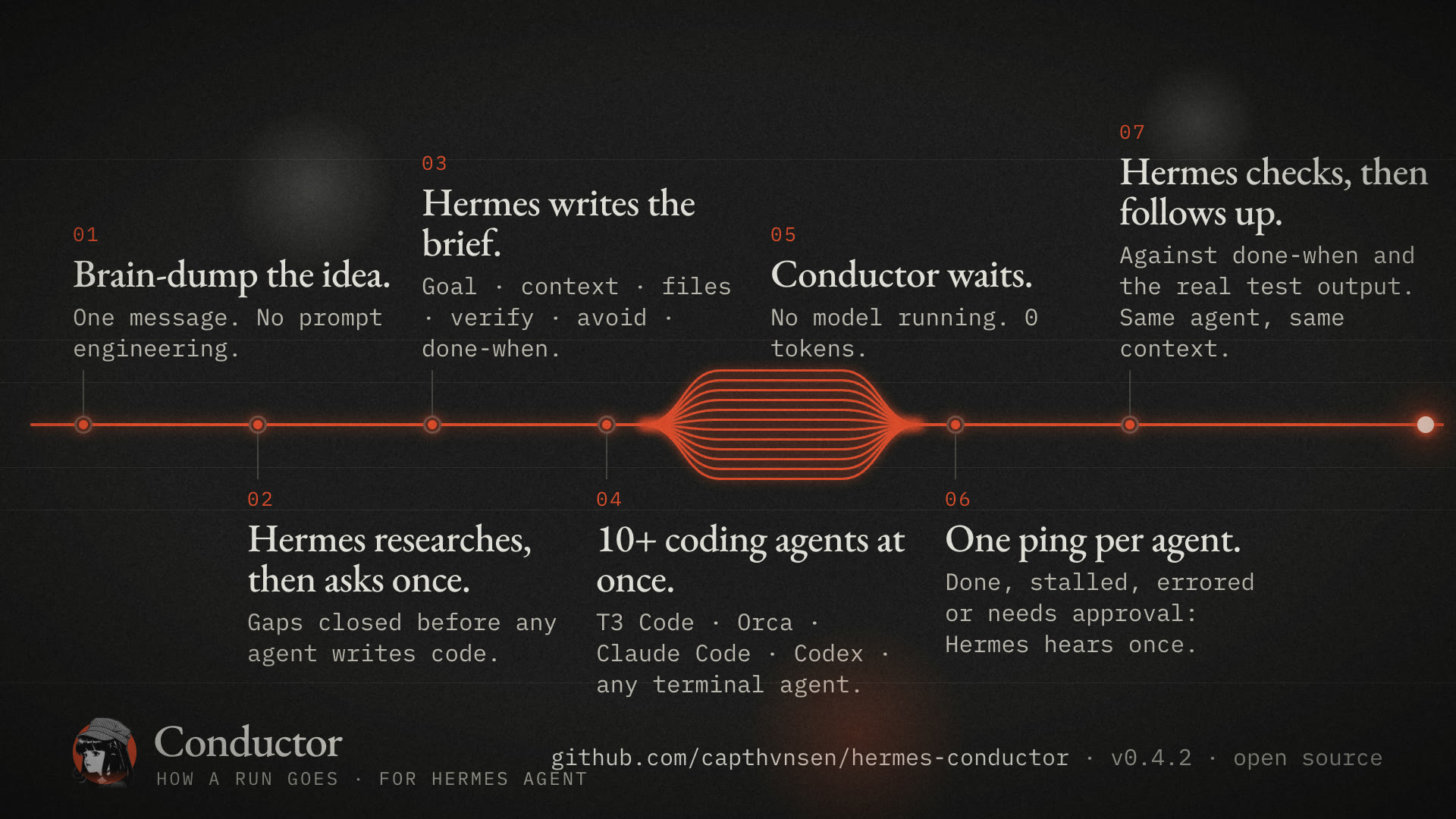
How a run goes: brain-dump, research and questions, the brief, 10+ agents at once, a zero-token wait, one ping per agent, the check and the follow-up

What each step is made of:

  • Research and interview. The brief skill has Hermes look up what it can, send a cheap read-only scout into the repo, then ask you one round of at most five questions, each with a recommended answer.
  • The brief. Conductor builds the kickoff from six fields and adds the habits that keep agents on track: the smallest change that works, stop and ask when blocked, a short final answer with the real verify output.
  • Many agents. Each run is its own agent with its own wait. Hermes starts one run per piece in the same turn; twelve at once is tested. With lead: true a single agent acts as CTO and hands pieces to its own subagents.
  • The wait. No model sits in the wait. Conductor watches the agent and puts one message into the chat that asked.
  • The check. The lead skill has Hermes compare every report with done-when before it tells you the work is done.
  • The follow-up. T3 Code and Orca runs are steered in place; Claude and Grok continue their last session. Hermes sends only the change, never the rules or the file list again.

It works with any terminal coding agent (Claude Code, Codex, Hermes, Grok, Cursor, OpenCode, Gemini, Qwen, Copilot, Amp, Droid, Kimi, Pi, or any command with a prompt flag), with T3 Code threads, and with Orca terminals. It never adds an approval-bypass flag.

A real run. One message asked Hermes to finish a half-built habit tracker. Hermes read the repo, started twelve agents in T3 Code, one per feature, and reported when all twelve had pinged back and the 24 tests passed:
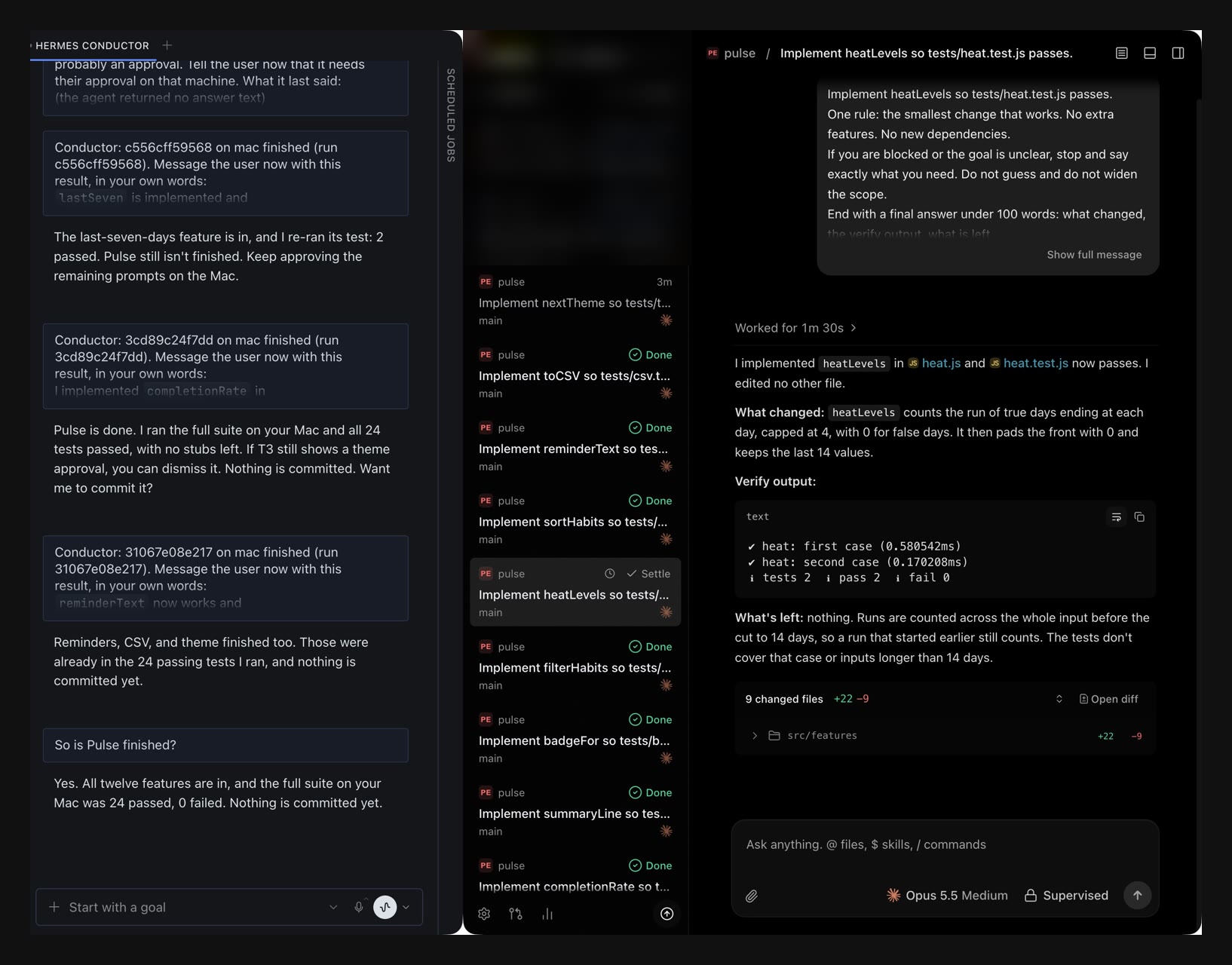
A real run: the Hermes chat on the left, twelve agent threads in T3 Code on the right

The app those twelve agents finished:
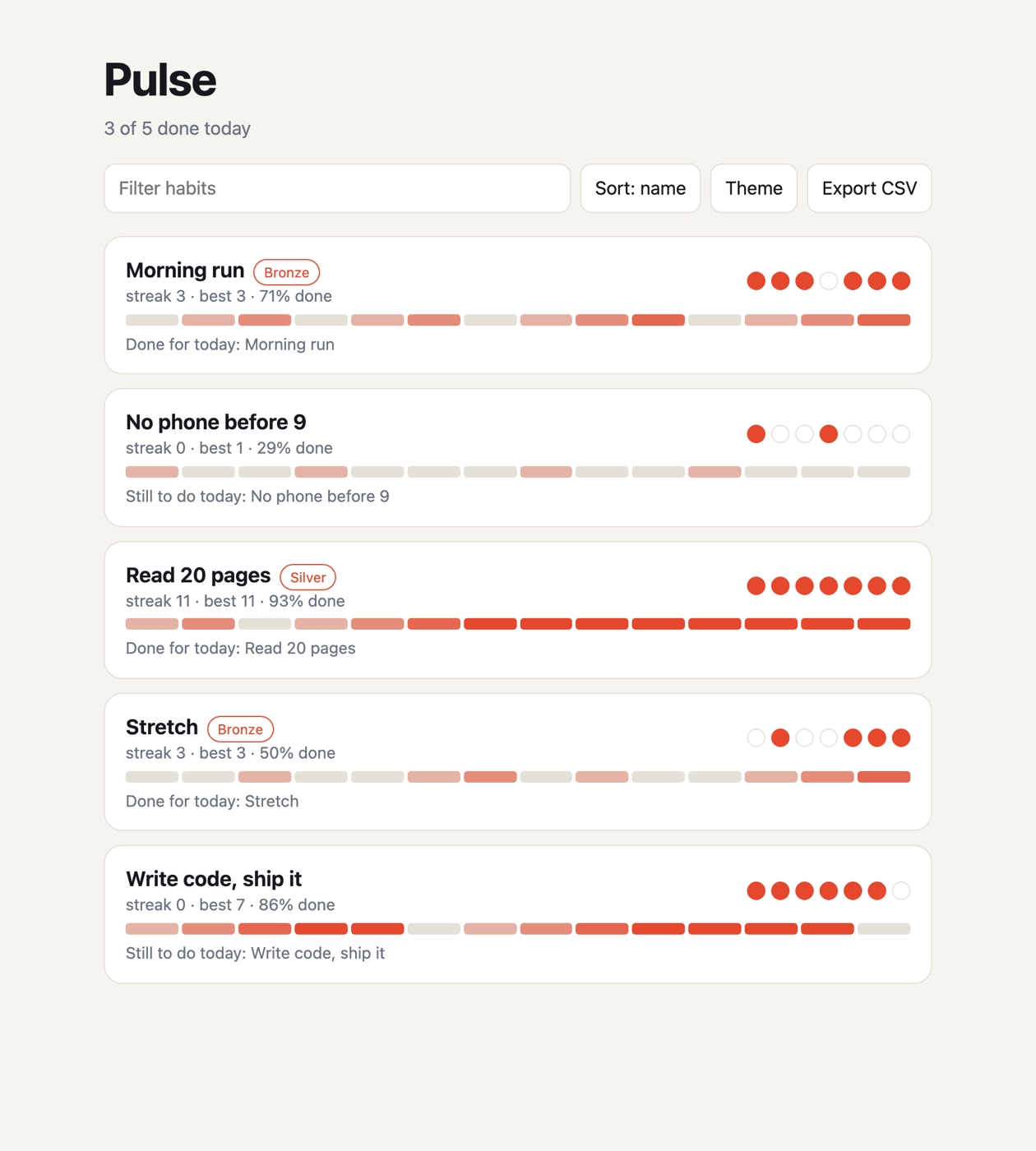
The finished habit tracker

Install

hermes plugins install https://github.com/capthvnsen/hermes-conductor
hermes plugins enable conductor

On a messaging gateway, Hermes drops the finish message unless you allow it. In the Hermes config:

plugins:
  entries:
    conductor:
      allow_gateway_injection: true

Agents on other machines, and commands that are not built-in agents, work only when you list them. Both lists are empty by default:

plugins:
  entries:
    conductor:
      settings:
        hosts: "alex@mac, build-box"   # SSH destinations Conductor may use
        commands: ""                   # extra agent commands, beyond the built-in ones

Then restart Hermes: the gateway, and the dashboard that serves the desktop app. A process that was already running does not load the plugin.

Try it

  1. /conductor shows which agents Hermes can reach.
  2. Tell Hermes what you want built and where. It asks what is missing, then starts the agents.
  3. Wait. Hermes messages you when an agent needs an approval and when the work is done.

What it does on your machines

  • Every start and every steer asks you first. conductor_run and conductor_steer go through Hermes's approval prompt, which shows the agent, the folder, the host and the goal. If you answer "session" or "always", Hermes stops asking for that agent in that folder on that host, or for that run. Unattended runs such as cron have nobody to approve, so they start nothing, unless you turned Hermes's own approvals off (approvals.cron_mode: approve, approvals.mode: off, or yolo).
  • Hermes can only launch the built-in agents, on this machine. Other SSH hosts and other commands need your hosts and commands settings above. The list is checked again on every read, wait, steer and stop of a saved run. Conductor gives the model no tool that changes it.
  • Only you can turn on drive mode, which lets Hermes keep steering a run without asking: type /conductor mode drive. The model can read the mode, not set it.
  • Runs commands: the coding agent, git status in the run's folder, ps for a run's own process, hermes kanban when you pass a card, and ssh and tmux for a listed host. Arguments only, never a shell string built from your text. It never adds an approval-bypass flag. Orca starts an agent with the permission mode you set in Orca.
  • Children get a minimal environment: PATH, HOME, USER, locale, TERM, Conductor's own variables, and only the variables that agent needs (for example ANTHROPIC_API_KEY for Claude Code, SSH_AUTH_SOCK for ssh). They do not inherit the other keys Hermes has loaded.
  • An agent that needs an approval of its own pings once and pings again when it finishes.
  • Network: only ssh to the hosts you listed. No telemetry, no update checks.
  • Background work: one wait thread per run inside Hermes, and a detached agent process or tmux window for a CLI run.
  • Files: run records and logs in the plugin's Hermes data folder, and event files, exit codes and logs under ~/.conductor on the machine that runs the agent.
  • Credentials: none read or stored. Agents use their own logins.

Tests

uv run --no-project --with pytest python -m pytest tests
python3 tests/test_captain.py   # the same tests, without pytest

README from the reviewed commit 748185f; it updates when the author re-pins.

More by capthvnsen

3 plugins by capthvnsen in the catalog.

capthvnsenalans-wayIdle check-ins, a texting voice and workspace-browser skills for a Hermes gateway on a Linux host or macOS guest VM. When the bound Telegram DM has been quiet (2 h by default, 08:00-22:00 user time, backing off when unanswered) the primary bot checks in once; morning briefs, a weekly time-saved report and cross-bot proactivity are opt-in. The workspace-setup skill walks the user through Alan's Workspace, a separate desktop app, and Tailscale. Disclosure: injects internal prompts into the bound DM (needs allow_gateway_injection); turn hooks see every session; reads ~/.config/alans-way/config.json when present; default-on Telegram reply pacing (up to 2.5 s) and remove-only reply cleanup; ships a long-running Node workspace router (SSH to the user's computer over the tailnet, VM fallback) and an operator-started HTTP bridge; setup, run by the human outside the gateway, installs services and packages, adds a tailnet-only SSH key and restarts the gateway; cross-bot proactivity shares sanitized owner-DM excerpts between profiles on one gateway. Full list: the README's Disclosures section at this pin. The plugin's Python makes no network calls; no telemetry, no stored credentials.Communityautomation9capthvnsenalans-way-computerComputer-use provider for Hermes: with computer_use.backend: alans-way-computer, the stock computer_use tool drives apps on the user's computer through the Alan's Workspace app, and on the VM's own desktop when the computer is offline. Needs the alans-way plugin's workspace setup. Disclosure: starts the workspace router as a long-running node child per session (filtered environment; desktop input enabled only for that private child, behind Hermes's computer_use approval gate); reaches the user's computer over SSH on the tailnet; resends a call refused as desktop_busy for up to 30 s without a second approval. The provider makes no network calls and stores no credentials.Communitytools9

Developer Mode

Explore built-in Hermes toolsets and actions.

HermesAgent

Developer?

Create a Hermes extension for Desktop or agent workflows.

Developer Section