emilianbold
DwarfStar (ds4) for Hermes
A community plugin that runs ds4 models from
Hermes Agent the way Hermes
runs llama.cpp models: it installs the engine, keeps a library of models,
starts and stops the server, and a model is one click away. No Hermes fork and
no core patches.
This is an unofficial release. It is not made, endorsed or supported by
Salvatore Sanfilippo (antirez) or the ds4 / DwarfStar project, by Nous
Research or Hermes Agent, or by DeepSeek. "ds4" and "DwarfStar" are the names
of the engine this plugin drives. It was written with the help of AI coding
agents and checked with tests and by running it against a real ds4-server.
What you need
- Hermes Agent 0.23.0 or later. The settings page needs Hermes Desktop.
- A Mac with Apple Silicon for the managed runtime (ds4's Metal backend).
On any other machine the plugin only attaches to ads4-serveryou run
yourself (see below). - Memory. ds4's hardware guide suggests
DeepSeek V4 Flash Q2 from 96 GB of memory. It plans about 84 GiB of it. - Disk. About 87 GB free for the default model (the V4.1 model is 366 GB
and streams from the SSD).
Install
In Hermes Desktop: Capabilities → Plugins → Install from Git, and paste
https://github.com/emilianbold/hermes-plugin-ds4. Or from a terminal:
hermes plugins install emilianbold/hermes-plugin-ds4
hermes plugins enable ds4
Both of the plugin's switches (its Python half and its desktop half) are off
after installing; that is how Hermes treats every plugin. Turn them on in
Capabilities → Plugins, then open Settings → Plugins → Local Models · DwarfStar and press
Set up for me. Setting up downloads the ds4 engine (about 2 MB), downloads the
model for your memory (about 87 GB), loads it and makes it the default for new
chats. It takes as long as the model download.
From a checkout instead: ln -s /path/to/hermes-plugin-ds4 ~/.hermes/plugins/ds4,
then hermes plugins enable ds4. Do not copy the folder into
~/.hermes/desktop-plugins/: that folder is for desktop-only plugins, and this
one also has a Python half.
From the terminal. hermes model lists DwarfStar (ds4) and uses the model
the settings page set up; the terminal cannot install the engine or download a
model. If it asks for an API key, any value works: ds4-server has no
authentication.
What you get
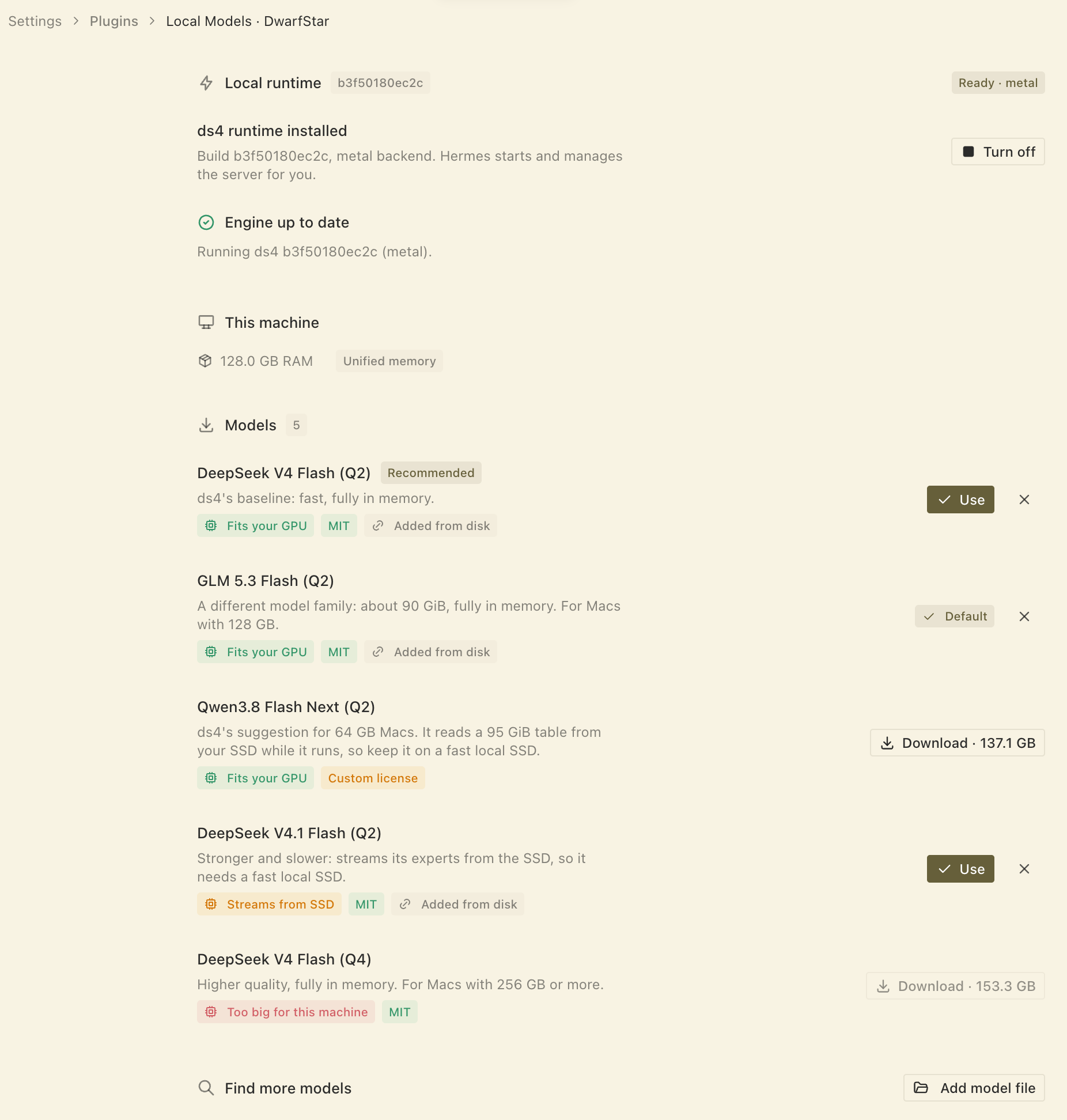
A settings page, Settings → Plugins → Local Models · DwarfStar, built to match Settings →
Providers → Local Models (same rows, wording, icons, pills and toasts):
- Set up for me: a full-pane setup with a stage rail (Engine, Model,
Finish), with Pause and Resume. - Local runtime: install the runtime, turn the server on and off.
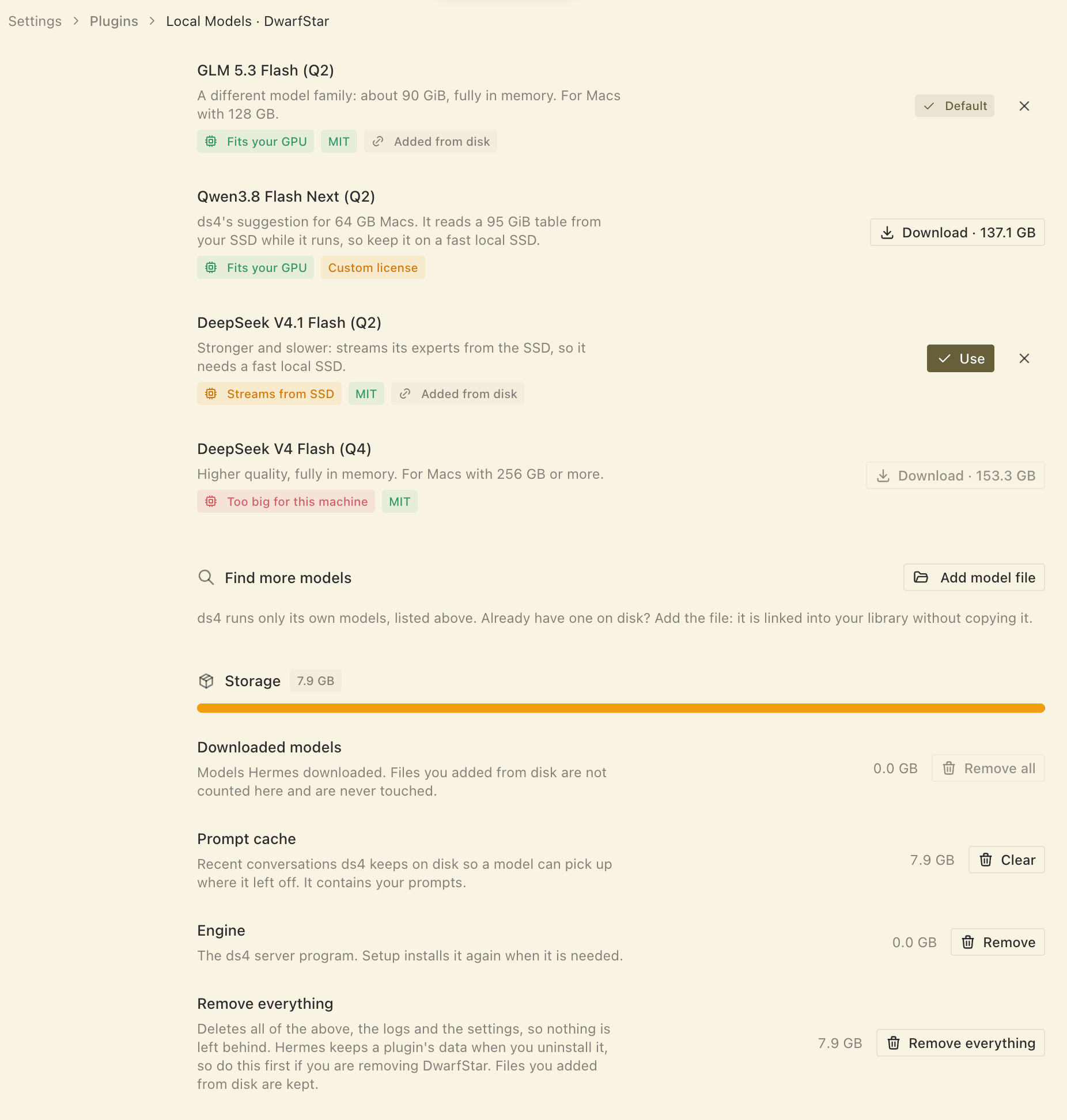
- Models: ds4's own GGUFs, with a fit pill, Use, an unload button that
frees the memory (the next message loads it again), remove, and downloads
with speed, time left, pause, resume and discard. - Find more models: ds4 runs only its own models, so there is no search;
Add model file opens the native file dialog and links a.ggufyou
already have, without copying it. Forget removes only the link. - Storage: what DwarfStar keeps on disk, as a bar and a row per kind
(downloaded models, the prompt cache, the engine) with its size and a button
to clear it, plus Remove everything. Do that before you uninstall the
plugin: Hermes keeps a plugin's data when you remove it, so the models and
the prompt cache would otherwise stay on your disk. Files you added from
disk are never deleted.
A provider, ds4 ("DwarfStar (ds4)" in the model picker):
- Models and the context window come from the running server.
- The server starts with your first message, stops after 15 minutes without a
request from Hermes (the same idle timeout Hermes uses for llama.cpp) and
when Hermes exits. It holds the whole model in memory, so it does not run
when nothing uses it. - Reasoning effort goes out in the form ds4-server parses.
- Conversation history is replayed so that ds4-server can reuse its live KV
state from turn to turn instead of reading the conversation again.
Using a ds4-server you run yourself
Leave the runtime off. Start ds4-server with --ctx 64000 or more and
choose DwarfStar (ds4) in hermes model. DS4_BASE_URL names a server that
is not at http://127.0.0.1:8000; DS4_API_KEY is sent as a bearer token for
a proxy in front of it (ds4-server itself has no authentication).
Third-party software and models
Nothing below is included in this repository. The plugin fetches it when you
ask, and each part stays under its own licence.
| What | From | Licence | How |
|---|---|---|---|
| ds4 engine | github.com/antirez/ds4, at one pinned commit | MIT (with small BSD-3 and MIT parts) | A small archive (about 2 MB) that this repository's GitHub workflow built from that commit, checked against the SHA-256 in catalog.json; the licences of everything compiled into it travel inside (LICENSE, NOTICE, licenses/, third_party/). ds4 itself publishes no binaries; nothing is compiled on your Mac. |
| DeepSeek V4 Flash (Q2, Q4) | Hugging Face, antirez/deepseek-v4-gguf | MIT (model card) | DeepSeek's model, quantised by antirez. Downloaded at a pinned revision, checked against the SHA-256 in catalog.json. |
| DeepSeek V4.1 Flash (Q2) | Hugging Face, antirez/deepseek-v4.1-flash-gguf | MIT (model card) | As above. |
| GLM 5.3 Flash (Q2) | Hugging Face, antirez/glm-5.3-flash-gguf | MIT (the original model, zai-org/GLM-5.3-Flash; the quantised repository has no card of its own) | Z.ai's model, quantised by antirez. As above. |
| Qwen3.8 Flash Next (Q2) | Hugging Face, antirez/qwen3.8-flash-next-gguf | Qwen Community License 1.0, not MIT (model card and the repository's LICENSE) | Qwen's model, quantised by antirez. As above. The licence is MIT-like with two conditions: products with over 100 million monthly users or US$20 million monthly revenue must display the model name, and a business that offers model access as a service or an AI coding or office assistant needs a separate licence from Qwen (your own use is not affected). Read it before commercial use. |
The licences are what the model cards state. The settings page tags every model
with its licence before you download it: MIT in green, and "Custom license" in amber
where the terms go beyond MIT (hover for a note; the full text is in the model's Hugging Face repository, named when you hover its name). Read
them before you redistribute anything. A .gguf you add yourself is yours and is never copied or deleted.
NOTICE carries the notice for the Hermes Agent wording this plugin
reuses.
What it does on your machine
- Engine. Downloads the engine archive listed in
catalog.json: a build of
ds4 made by this repository's workflow (.github/workflows/engine.yml) from
the pinned commit, published as a release here. It checks the archive's size
and SHA-256, unpacks it and runs it once. Each archive also has a GitHub
build attestation:gh attestation verify <archive> --repo emilianbold/hermes-plugin-ds4shows which workflow run built it. If the
download fails or does not check out, nothing is installed and setup says
so; the engine is never built on your Mac. Nothing is installed until you ask. - Models. Downloads the files you choose, resuming and retrying if the
connection drops, and publishes a file only when its size and SHA-256 match
catalog.json. - Server. Runs
ds4-serveron a fixed loopback port per profile with a
disk KV cache of up to 8 GiB. It is started with a short environment (PATH,
HOME, the locale, and ds4's ownDS4_*tuning variables), not Hermes' own,
so it never sees your provider keys. Each catalog model starts with its own recipe
(context and flags such as--ssd-streaming); a file you added starts with
--ctx 100000. ds4-server has no authentication, so any program on this Mac
can use that port, unlike the llama.cpp and oMLX servers, which Hermes starts
with a random key. - Files. Everything is under the profile's
plugin-data/ds4/:engine/,
models/,kv/,server.log,engine-build.log. A linked model file is
never moved or deleted. - Hermes config. Use and Set up for me set the profile's default
model, as the built-in Local Models page does, and store
DS4_API_KEY=dsv4-localin the profile's.env. That value is not a secret:
ds4-server ignores it. It is a precaution: Hermes' model picker can show a
provider with no key set as "missing usable credentials". In a fresh profile
we saw it list ds4 as ready without one, so the key may be unnecessary. - Privacy. No telemetry and no accounts. Once a model is running, chats go
only to the ds4-server on this Mac. As far as we read its source,
ds4-server fetches nothing itself (ds4's web access lives in its separate
agent, which this plugin does not run). ds4 keeps recent prompts in its disk
cache (plugin-data/ds4/kv/) and a log (server.log): delete them whenever
you like.
Limits
- The managed runtime is macOS on Apple Silicon only.
- The list is ds4's own, short, and the suggestion follows ds4's hardware
guide: Qwen3.8 Flash Next Q2 for 64 to 95 GB Macs, DeepSeek V4 Flash Q2 for
96 to 255 GB, V4 Flash Q4 from 256 GB. V4.1 Flash Q2 (streams its experts
from the SSD) and GLM 5.3 Flash Q2 (about 94 GiB planned, so a 128 GB Mac)
are offered but never suggested. V4 Flash Q2, V4.1 and GLM were measured on a
128 GB Mac; V4 Flash Q4 and Qwen3.8 were not, and rely on ds4's own guidance
and on your feedback. The Qwen entry starts with a 64K context, the least
Hermes accepts, because it is meant for 64 GB Macs. A.ggufyou add
yourself is never blocked, and is recognised by its size. - "Fits this Mac" compares ds4's own memory plan with this Mac's memory, not the
file size: V4.1 Q2 is a 341 GiB file that plans about 93 GiB. - The settings page is under Settings → Plugins, not inside the built-in
Local Models page: that page is compiled into the app and has no plugin
seam. - One model is loaded at a time; choosing another with Use restarts the
server. - Requests from other programs to the server's port do not count towards the
idle timeout, so they can find it unloaded. Turn off frees the memory
and keeps it free. - Images: ds4-server takes them only when started with a vision encoder,
which the managed runtime does not do yet. - The provider's client is a live SDK object, so the plugin runs in-process
(plugins.isolation: hostis not supported).
Use at your own risk
This software downloads and runs large files, uses most of your Mac's memory
while a model is loaded, and starts a local server without authentication. It
is provided as is, without warranty, as the MIT licence says.
Acknowledgements
ds4 is by Salvatore Sanfilippo and contributors; the models are DeepSeek's,
quantised by antirez. The settings page and its job handling follow the shape of
hermes-plugin-omlx
(MIT), and its wording and layout follow Hermes Desktop's Local Models page.
License
MIT, see LICENSE. Third-party notices are in NOTICE.
README from the reviewed commit 70b3215; it updates when the author re-pins.