itsflownium
Gambit for Hermes
Play a game. Understand a move. Revisit your own matches.
Gambit brings chess to Hermes terminals and Desktop. Run hermes gambit for a standalone terminal board, use /chess for text-board output in a Hermes CLI or TUI conversation, or open the optional graphical pane in Hermes Desktop. Play against Hermes, request hints, and replay or practice public Chess.com and Lichess matches.
Version 0.3.0 supports the standalone terminal board, ordinary CLI chat tools, the native Hermes TUI and the optional Desktop pane. Production checks cover model-backed play/coaching and the real CLI/TUI command flow. The CLI/Desktop film and anonymous public-source admission checks pass. The exact catalogue pin is recorded in the catalogue PR, which is ready for review. See the verification report. The catalogue scope remains macOS only.
Demo
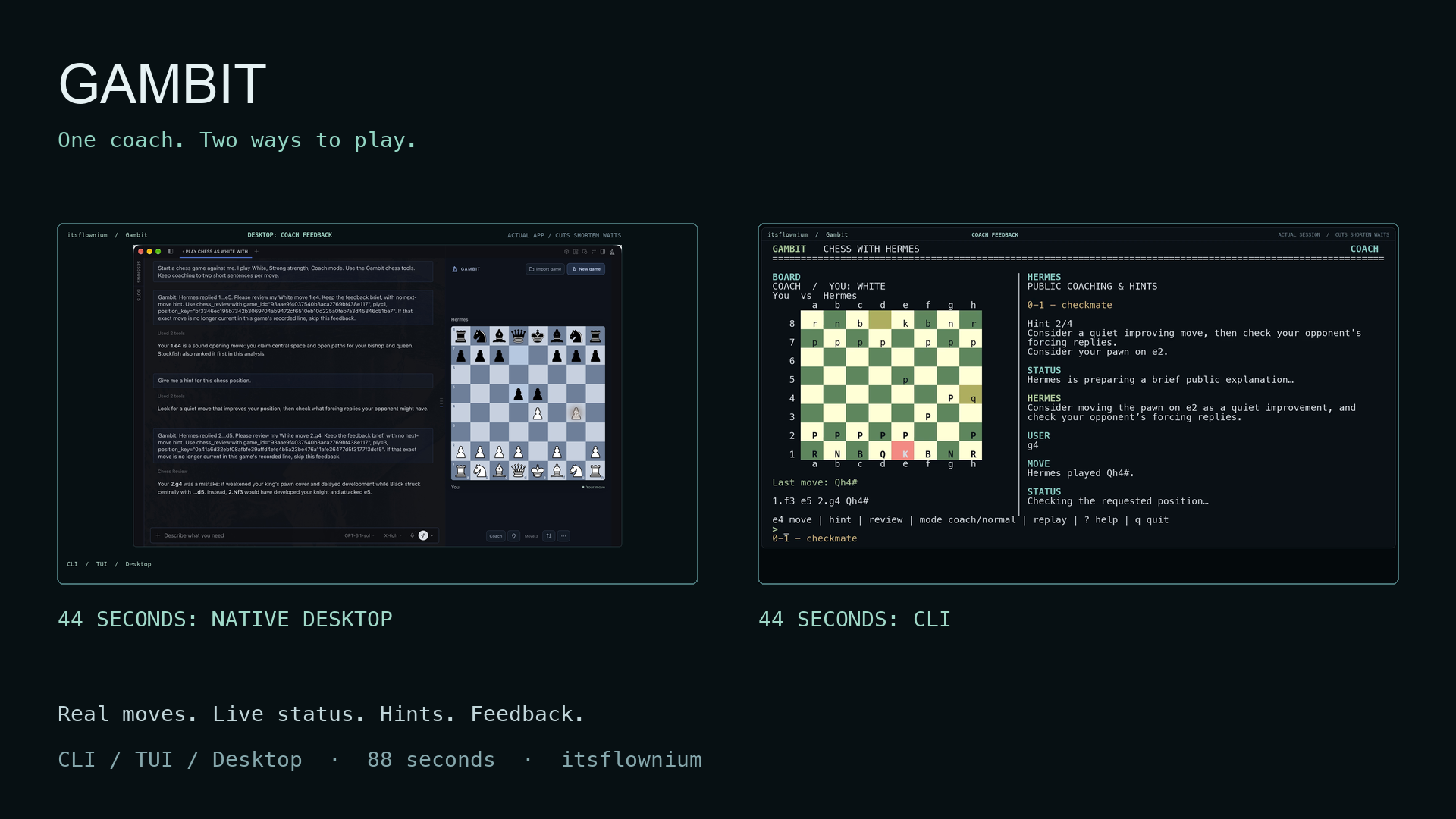
Watch the 88-second 50/50 Desktop and CLI demo. The first 44 seconds show the actual native Desktop app playing two turns, live thinking status, a requested hint, real mistake feedback and an exact public-match import. The next 44 seconds show the genuine CLI launch, replies, progressive hints, Coach feedback and quiet Normal play. The demo folder includes 19 English caption cues, nine chapters, the poster and review player. Timing cuts and source-snapshot limits are disclosed in capture provenance.
The CLI launch prompt uses the public alias itsflownium. The native Desktop host/device status strip is cropped for privacy, and the alias appears in added chrome throughout. The full film and its accompanying media have been checked for personal names and local paths. TUI remains a supported feature.
Start
Standalone terminal board
After installation, open an interactive macOS terminal and run:
hermes gambit
The curses dashboard is a separate terminal application with its own Gambit session. It uses the active Hermes profile's plugin data and configured provider; it does not attach itself to whichever Hermes chat happens to be visible. Hermes Desktop is optional.
Run hermes gambit --help for options. --colour white|black, --strength learning|balanced|strong and --mode coach|normal choose a new game's settings; --ascii uses ASCII pieces. --session resumes a saved standalone terminal:<32-hex> session in the active profile. Launch requires an interactive terminal; non-TTY invocation exits with a usage error. With plugins.isolation: host, Hermes skips standalone CLI command registration; use /chess in a Hermes conversation instead.
Hermes CLI or TUI conversation
Initialize chess in your current conversation:
/chess
Bare /chess starts a White, Balanced, Coach game when none is selected, or refreshes the current board. /chess and /chess play return the same text board across Hermes chat surfaces. Continue in your CLI or TUI conversation with ordinary chess requests. Each conversation keeps its own game; no dedicated chess profile is required. A CLI/TUI move tool waits for one opponent reply and returns the completed board. In Coach mode, Hermes uses the exact move-review evidence for brief feedback before showing that board.
Shortcuts such as /chess move e4, /chess hint 2 and /chess next return board output or local engine evidence directly. Use ordinary conversation when you want a model explanation. Text output updates on a command or chat turn.
Then use ordinary conversation:
Play against me. I'll play White in Coach mode.
Start a normal game against me, without automatic coaching.
My Chess.com username is USERNAME. Find my recent matches.
My Lichess username is USERNAME. Replay my latest completed game.
Explain my last move.
Give me a hint.
Give me a stronger hint.
Show my saved matches.
Export this match as PGN.
Optional Desktop pane
In Hermes Desktop, the knight button shows or hides a graphical board beside your existing chat. Choose Play Hermes or Import game. A fresh Play Hermes creates a normal chat automatically. The pane follows the chat on screen, including with All profiles selected, and keeps games separate. Graphical board actions run asynchronously while the pane updates; slash commands still return text directly. It adds no permanent sidebar entry or extra chat panel. Every graphical control has hover help.
Play modes
Coach: Hermes plays against you and gives short feedback about your preceding move in the standalone dashboard's coaching pane, an ordinary CLI/TUI chat turn, or the bound Desktop chat. Slash shortcuts return direct board/evidence output; use ordinary chat for narration. You can ask for more detail.
Normal: Hermes plays against you without automatic commentary. Hints and explanations are available whenever you ask.
Change mode through chat or the controls for your board. Games are untimed standard chess, and moves accept SAN or UCI notation through chat. The Desktop pane also supports selecting a piece and destination or dragging it, all four promotion choices, undo, resignation, and legal draw claims. Its resignation animation shows GG and fireworks before starting a fresh game as White after three seconds. The resigned match stays saved.
Optional shortcuts:
/chess play white normal
/chess play black coach learning
/chess chess.com USERNAME
/chess lichess USERNAME
/chess open 2
/chess move e4
/chess hint 2
/chess next
/chess status
Replay
In the Desktop pane, click Import game, choose Chess.com or Lichess, enter a username, and search. Select a returned match to open its replay; each result shows the players, date, searched player's colour, and result. Hover for the exact game ID, or use Older games to browse further back. Search again to return to the newest matches.
You can also tell Hermes the platform and username, for example, “My Lichess username is Alice.” Hermes returns a numbered list. Reply “game 2” to select that exact match, or explicitly ask for “my latest match.” A username alone does not select a game. Each chat keeps its own search list and player perspective. Coaching and requested hints stay in chat.
The Desktop board's match strip shows the selected platform, username, opponent, date, and original result, with a link to the official game. It faces that player's side. Move your pieces directly, or click Play from here, to play through the match yourself. Through chat, ask to practice from the selected position. This creates a saved practice game; the original match remains intact, and its identity stays visible during practice.
When you follow the recorded moves, the opponent plays exactly its next recorded reply. If you try a different move, Hermes calculates one legal reply. You move once, the opponent replies once, and it is your turn again. Back to recorded match returns to the source. You can also use first/previous/watch/pause/next/last controls or ask Hermes to jump to a move.
Desktop guided playback waits for chat coaching on the selected player's moves. Its guided-control toggle allows replaying without automatic explanations. Forward and back refer to individual White or Black moves, so every position is accessible.
Only completed public standard-chess matches are imported. Public APIs can delay availability of a newly completed match. A username is a lookup, not an authenticated account connection. Source links and the original PGN are preserved.
Search games checks the selected platform's public archive. After a search, Refresh games checks the source again instead of reusing the plugin's saved result. Empty searches expire after 30 seconds, so a new account's first published game is not hidden behind an hour-long empty cache. If the source fails, Gambit shows the error; saved nonempty results remain available with a notice.
Chess.com may still return its own cached data; refreshing Gambit cannot force Chess.com to publish a newly finished game sooner. Its public API documentation explains that delay. Bot and Coach games are private, so username search does not include them. Gambit is an independent plugin and is not affiliated with Chess.com or Lichess.
Requested hints
Hints reveal progressively: a clue, the piece/source square, the destination, then the exact move and a legal continuation. Later levels are withheld until requested. A new position starts again at the first level. Normal mode supports the same hints as Coach mode.
The move-time limit
The default move-response budget is 60 seconds, with an enforced maximum of 60. Hermes's structured move-selection request gets at most 45 seconds within that budget. A separate deadline worker reserves time to commit a precomputed legal local-engine move if the model stalls. Late model results cannot add another move or change a newer position.
Moves can finish sooner; Gambit never sleeps just to stretch a fast answer to 30 seconds. The intended ordinary response range is around 30–60 seconds when the configured model needs that time. The UI shows the remaining move budget.
The deadline applies to the board reply, not the speed of the separate conversational coaching response. If the configured model is unavailable or times out, the board labels the reply as engine-assisted, and the coaching evidence records that fallback. A rare engine failure uses an explicitly labelled legal recovery reply to preserve the deadline.
New chat explanations need working access to the configured Hermes provider. If that provider rejects calls because access or credits are unavailable, board play can continue with its labelled local-engine fallback; conversational coaching resumes when provider access is available again.
Calculation and coaching
Python-chess owns the legal game state. A local Stockfish process supplies move candidates, tactical lines, and position estimates. Hermes chooses among legal candidates and teaches from the calculation evidence through the user's configured model.
Opponent strength and full-strength review are separate. Learning, Balanced, and Strong are descriptive presets, not calibrated player ratings. Coaching does not invent accuracy scores or claim a position is checkmate merely because a source match ended by resignation or time forfeit.
Every accepted move is stored before any model request. Replay navigation cannot alter the original move sequence. Analysis, source PGN, results, and replay position survive restarts. PGN export includes saved review annotations.
Undo restores your turn, including after a final checkmating move. Coaching and saved annotations follow the retained move sequence: taking back a move removes its pending feedback, and a delayed analysis cannot attach to a different move or match.
For a full-game recap, ask in a Hermes conversation. The chess_replay summary tool may calculate in the background. Desktop can announce when it is ready; in CLI/TUI chat, request the recap again later. The standalone terminal dashboard supports move reviews and hints but has no full-match summary command.
Install
Requires Hermes Agent 0.23.0 or later, Python 3.11 or later, and a local Stockfish executable. The standalone terminal dashboard needs an interactive terminal with Python's curses support. Hermes Desktop is required only for the graphical pane. The catalogue scope is macOS; Linux, Windows, and a second physical computer have not been verified. Python dependencies are declared with bounded versions in pyproject.toml and prepared by Hermes's package manager.
Install the repository through Hermes's supported installer:
hermes plugins install https://github.com/itsflownium/gambit-hackathon --yes-deps --enable
An unpacked source ZIP can use the linked-folder installation below; the Git-URL installer expects a committed Git checkout.
For linked local development, place a link to the checkout in the active Hermes home's plugins/gambit directory and run hermes plugins enable gambit. For the optional Desktop pane, also enable Gambit Chess in Capabilities → Plugins and rescan if needed. If dependencies were installed after the gateway started, restart the gateway through Hermes's normal restart command.
Download Stockfish from its official site and choose its executable in Gambit's plugin settings, or install it on your system PATH. Gambit also recognizes an executable at its profile-local plugin-data/gambit/engine/stockfish path. It never downloads or updates an engine in the background.
Local verification used Stockfish 19 from its official macOS archive, checked against SHA-256 a1f0e3bcc5a6927a11fe6fc8e54a779754645f3c2bae2cf13420fd1957adaa77. The engine binary is not included in this repository.
Plugin settings
engine_path: optional absolute executable path.move_timeout_seconds: default 60, always capped at 60.analysis_seconds: default 0.4 seconds for initial local analysis; significant errors get a deeper check.
Settings live under plugins.entries.gambit.settings. Global Hermes model and reasoning settings are left intact.
Chat delivery and data
The /chess command and eight chess tools operate in their Hermes conversation. Ordinary CLI/TUI move tools wait for the single scheduled opponent reply, return a fixed-width board and carry an exact review request in Coach mode. Slash shortcuts provide deterministic board or engine evidence without autonomous model narration. The standalone terminal board keeps a separate Gambit session in the active profile. Its terminal presentation is not a widget embedded in Hermes's TUI.
In the optional Desktop pane, coaching is delivered through the native SDK's session-addressed desktop composer. It targets only the visible conversation bound to the board, waits while that conversation is busy, and acknowledges delivered events. If that chat is closed or another chat is selected, feedback waits for the correct chat to be visible again. No gateway message-injection permission is required.
Data is profile-local in Hermes's persistent plugin-data/gambit directory. Each selected match and replay cursor belongs to its conversation or standalone terminal session. Deleting a saved match removes its saved analysis and detaches its board from that session.
Network and process disclosure:
- Username searches request public game data from
api.chess.comorlichess.orgusing documented APIs. No account passwords, browser cookies, private game chat, or scraping are used. - Move selection and chat coaching use the user's existing Hermes model/provider. Normal provider usage applies. Chess positions and calculation evidence are supplied to that model.
- Stockfish runs locally as a bounded subprocess. The plugin uses small background threads for move deadlines and full-match reviews.
- No telemetry or separate hosted service is used.
- Imported text is treated as untrusted data, never executable instructions.
This independent plugin is not affiliated with or endorsed by Chess.com or Lichess. Its board colours, logo, and interface are its own. Open-source dependencies and piece-art attribution are described in THIRD_PARTY.md.
Development and verification
Native source is in src/. Rebuild the standalone SDK entry after edits:
python3 scripts/build_ui.py
From a development environment with the declared dependencies and pytest:
python -m pytest tests -q
node tests/desktop_contract.mjs
hermes plugins doctor . --ci
hermes plugins validate . --install-deps
The optional serve.py previews only the graphical chessboard in a local browser. It does not provide the terminal dashboard or a Hermes conversation. Install the development extras, then run:
python serve.py --demo --engine /absolute/path/to/stockfish
The preview binds only to loopback. It does not simulate a Hermes chat or pretend that local engine responses are model responses.
The committed preview bundle can be rebuilt after board changes with npm ci && npm run build from preview/. Its dependencies and integrity hashes are locked. Hermes Desktop itself uses the host's React and needs no Node dependency installation.
Release status
Version 0.3.0 adds the terminal board and /chess text presentation while retaining the optional Desktop pane. All 175 behavioral tests pass. Production dashboard play/coaching, CLI tool flow, native TUI commands, Desktop contracts and dependency-aware candidate validation pass. A supported Git install into a fresh default Hermes home also passed actual terminal play, help and clean exit without Desktop or copied model credentials; its reply was labelled engine fallback. The 88-second CLI and native Desktop film passes decode, captions, chapter seek, desktop/mobile player and privacy checks. The anonymous public candidate passed dependency-aware admission and the current catalogue structure, payload, confinement and self-updater gates. The catalogue PR records its published pin. Earlier Desktop results are preserved as historical evidence.
The existing upstream catalogue PR is ready for review and records the published source pin and media URLs. Social posting and the hackathon form are separate actions. See the release checklist and verification report.
README from the reviewed commit 9c725ad; it updates when the author re-pins.