All plugins

git-gui

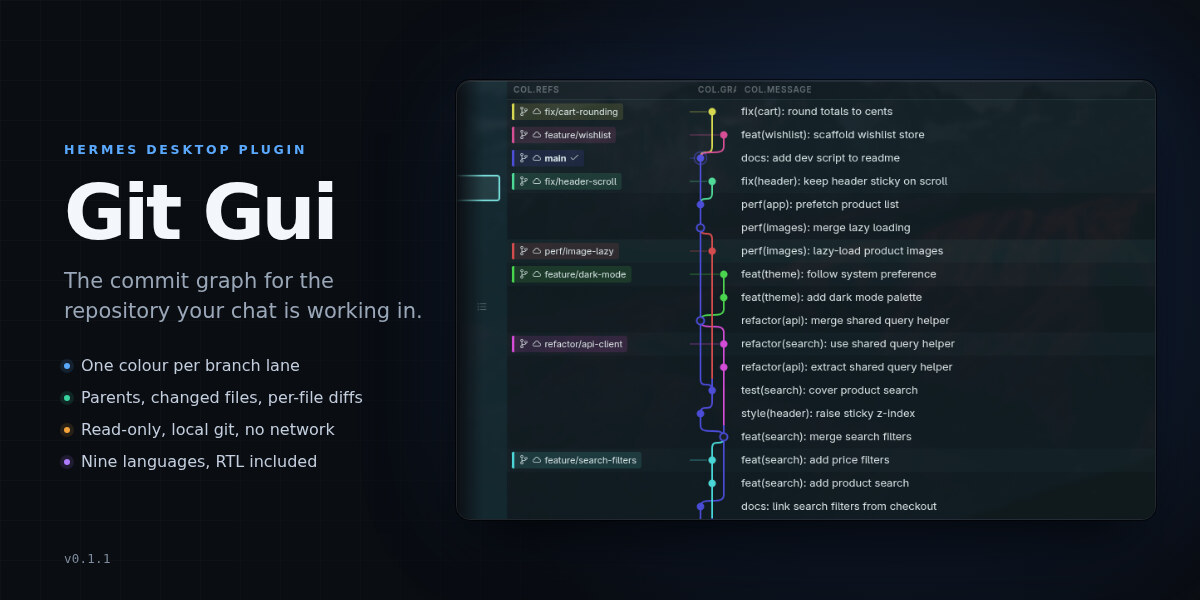
Read-only graphical git client for Hermes Desktop: the repository of the chat you are in becomes a lane-colored commit graph, as a compact right-sidebar pane and as a full three-column page (BRANCH / TAG | GRAPH | COMMIT MESSAGE) with draggable widths, ref chips, author and age on every row; clicking a commit opens a drawer with the full message, author/committer, clickable parents, changed files (Path or Tree) and a unified diff per file, and history loads 500 commits at a time as you scroll. Nine locales with RTL support. Disclosure — reads only: the Desktop half registers a page, a right-sidebar pane, a sidebar nav row and two palette commands through the plugin SDK, and the Python half is a read-only API mounted at /api/plugins/git-gui/ that runs the local git executable as a subprocess in the session's working directory (rev-parse, for-each-ref, log, show, diff; GIT_OPTIONAL_LOCKS=0, 15 s timeout, no fetch/checkout/index or ref writes). It persists only its own view state (column widths, drawer width, file-view mode, remote-branches toggle) through Hermes plugin storage, opens no file outside that repository, makes no network requests, needs no credentials, declares no agent tools, hooks or middleware, and its Agent entrypoint's register() is deliberately inert.

mykeura5Desktopv0.1.2Updated 11 hours ago

About

Read-only graphical git client for Hermes Desktop: the repository of the chat you are in becomes a lane-colored commit graph, as a compact right-sidebar pane and as a full three-column page (BRANCH / TAG | GRAPH | COMMIT MESSAGE) with draggable widths, ref chips, author and age on every row; clicking a commit opens a drawer with the full message, author/committer, clickable parents, changed files (Path or Tree) and a unified diff per file, and history loads 500 commits at a time as you scroll. Nine locales with RTL support. Disclosure — reads only: the Desktop half registers a page, a right-sidebar pane, a sidebar nav row and two palette commands through the plugin SDK, and the Python half is a read-only API mounted at /api/plugins/git-gui/ that runs the local git executable as a subprocess in the session's working directory (rev-parse, for-each-ref, log, show, diff; GIT_OPTIONAL_LOCKS=0, 15 s timeout, no fetch/checkout/index or ref writes). It persists only its own view state (column widths, drawer width, file-view mode, remote-branches toggle) through Hermes plugin storage, opens no file outside that repository, makes no network requests, needs no credentials, declares no agent tools, hooks or middleware, and its Agent entrypoint's register() is deliberately inert.

Git Gui

A read-only commit graph for Hermes Desktop, inspired by modern graphical Git clients.
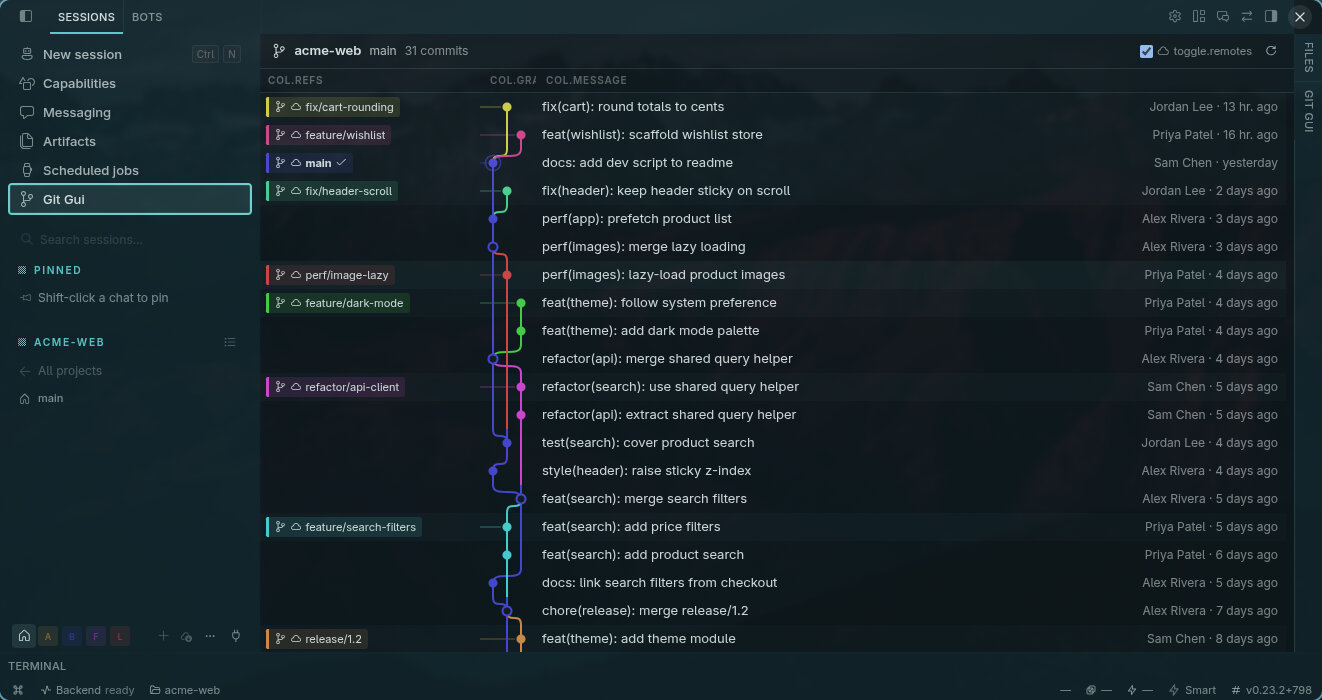
The Git Gui page — branches, graph and commit messages

The full three-column page: branch and tag refs, a lane-colored commit graph, and every commit's author and age.

Git Gui turns the repository your chat is working in into a visual graph: every branch gets its own clearly-colored lane, merges show as rings, and HEAD carries a subtle highlight. It only ever reads your repository — nothing here writes to it.

Features

  • Compact right-sidebar pane — the graph at a glance while you chat; click a commit to jump to the full view.
  • Full three-column page — BRANCH / TAG | GRAPH | COMMIT MESSAGE with draggable column widths, ref chips colored by lane, and author + relative time on every row.
  • Commit drawer — full message, author/committer, clickable parents, changed files (Path or Tree view), and a unified diff per file.
  • Follows your session — shows the repo of the chat you're in; polls every 15 s and only re-reads history when a branch or tag actually moves.
  • Nine languages, every theme — translated into all Hermes interface languages (RTL included) and colored from the app's own palette.

Screenshots
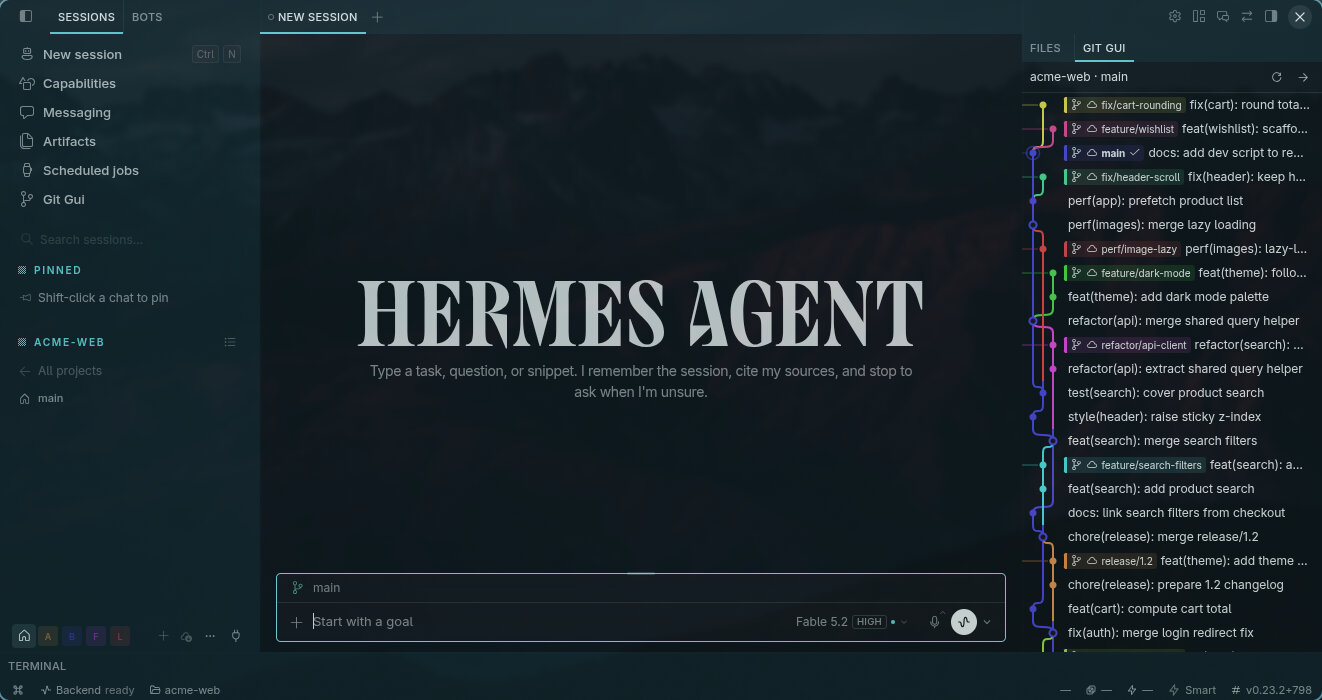
The compact pane next to a chat

The right-sidebar pane: the graph of main and its branches while you work.
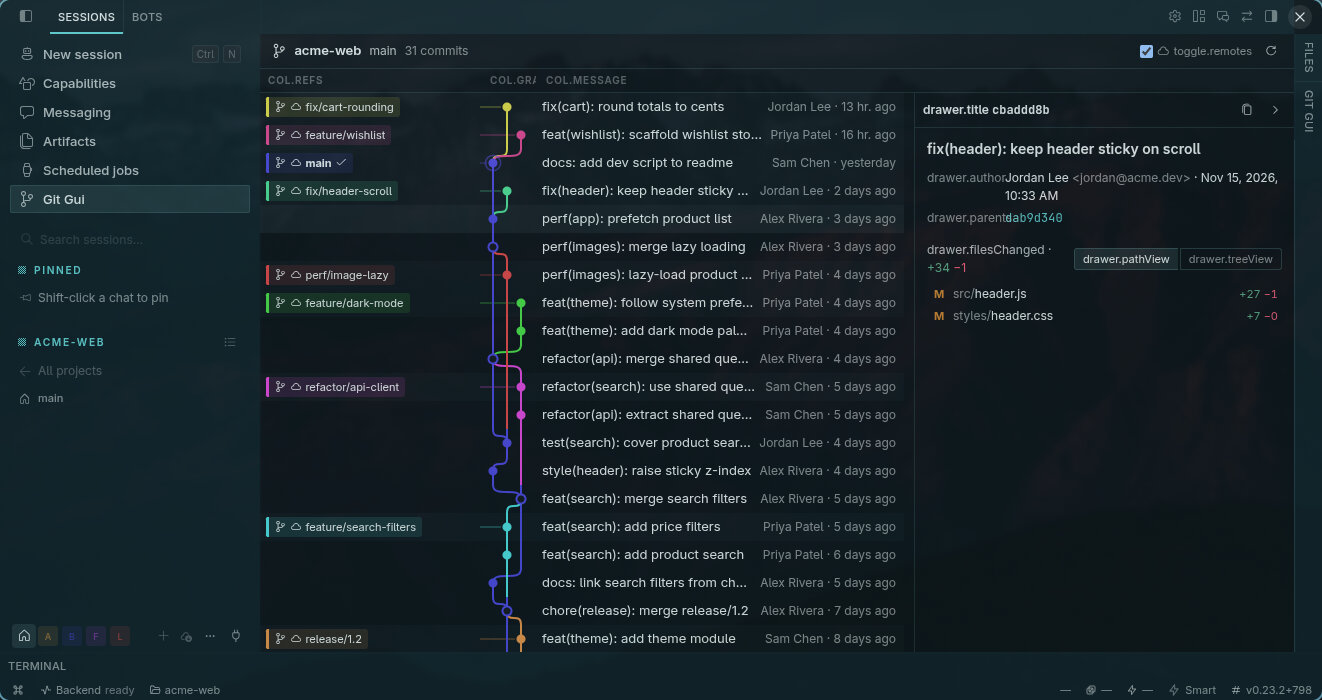
The commit drawer — message, author, parents and changed files

The commit drawer: full message, clickable parents and the changed-files list — click a file to read its diff.

Requirements

  • Hermes Desktop ≥ 0.23.1
  • git installed on the backend's PATH

Install

From the catalog (recommended)

Open Capabilities → Plugins, find Git Gui and click Install. One click enables both halves — the desktop UI and the small Python backend it talks to.

Manual install

Copy the git-gui folder so that plugin.yaml ends up at ~/.hermes/plugins/git-gui/plugin.yaml, then:

  1. Run ⌘K → Reload desktop plugins (or restart the app).
  2. Open Capabilities → Plugins and enable Git Gui.

Getting started

  • Click Git Gui at the end of the left sidebar's top block, open the pane in the right sidebar, or run Git Gui: Open from ⌘K (Ctrl+K).
  • It always shows the working folder of the chat you're in — switching chats switches repos.

Using Git Gui

  • Reading the graph: one color per branch line — they stay distinct even for branches merged one after another — and the main branch is always first in blue. Plain dots are commits, rings are merges, and HEAD gets an extra ring. Chips mark branches (check = current), a cloud marks a remote branch, and a tag icon marks a tag.
  • Columns: drag the dividers between BRANCH / TAG, GRAPH and COMMIT MESSAGE — widths are remembered. The Remote branches toggle in the header shows or hides remote-only refs.
  • The drawer: click a commit to open it. Copy the full hash, jump to a parent commit, switch files between Path and Tree, and click a file to see its diff. Binary files and truncated diffs are labeled as such.
  • Keyboard: ↑/↓ moves the selection, Enter opens the drawer, Esc closes it.
  • Refreshing: the graph re-checks every 15 seconds but only reloads history when refs change. The Refresh button forces it. More history loads automatically as you scroll.

FAQ & troubleshooting

"Backend is disabled" / Enable backend button — the UI and the Python backend have separate switches. Clicking Enable backend turns Git Gui on inside Hermes' own plugin manager (it adds git-gui to plugins.enabled in your config). One click, safe, no terminal.

"Not a git repository" — the chat's working folder isn't inside a git repo.

"No working directory" — no chat is open, or the chat has no working folder attached.

"git is not installed" — Git Gui needs the git executable on the backend's PATH.

Does it change my repository? No — it only runs read-only git commands (log, for-each-ref, show, diff).

Does it send my code anywhere? No — everything stays local; it never touches the network.

Big repositories? History loads in pages of 500 commits as you scroll, so even very large repos stay fast.

A red "Session controls unavailable: Session owner could not be resolved…" strip? That message comes from Hermes itself when reopening an older chat whose owner can't be resolved on multi-profile setups. It's unrelated to Git Gui and appears even with the plugin disabled.

Disable / uninstall / update — toggle it off in Capabilities → Plugins; delete ~/.hermes/plugins/git-gui/ to remove it; updates arrive through the catalog with hermes plugins update git-gui.

Privacy

Fully local and read-only. No telemetry, no network calls — just git running in your session's working directory.

Languages

English, Español, Français, Deutsch, Русский, 日本語, 简体中文, 繁體中文, العربية.

Development

npm install
npm run build        # bundle desktop-src → desktop/plugin.js
PYTHON=.venv/bin/python npm test   # pytest + node tests

A small way to support the project

If you are considering the Nous Portal Plus plan, you can use my Nous Portal referral link. Your first month costs $5 instead of $20, and I receive a $10 referral credit that helps cover the API usage behind my ongoing work on Git Gui and related Hermes plugins. It is entirely optional, but it is a simple way for both of us to benefit.

The offer is for new customers starting a new Plus subscription. It applies to the first invoice, and each payment card can be used for only one referral. If the card has already backed another referral, the discount is reversed and no referral reward is paid.

If you would rather support my work directly, you can also sponsor me on GitHub. Every bit helps me keep building and maintaining these open-source plugins. Thank you!

License

MIT — see LICENSE.

README from the reviewed commit 4814b7b; it updates when the author re-pins.
More by mykeura

5 plugins by mykeura in the catalog.

mykeuraminimalist-themesEighteen warm, readable palettes for Hermes Desktop, assigned natively per profile, with one embedded type system (Figtree + Geist Mono), matching terminal colors and a CLI banner painted per palette. Disclosure — theme-only plugin: it registers eighteen themes through the plugin SDK, and its stylesheet adjusts a few Desktop surfaces (profile-rail glyph contrast, Capabilities metadata, the MCP JSON editor and the Manage Profiles overlay) only while a Minimalist theme is active. It also ships optional CLI/TUI skins as plain YAML files the user copies; the Desktop side never reads them. Fonts are bundled; no network requests, no agent tools or hooks, no background processes. The package also ships an inert Agent entrypoint whose register() does nothing, so Hermes Agent imports it cleanly instead of reporting a missing module.CommunityDesktop app94mykeuraglass-themeTranslucent glass surfaces for Hermes Desktop in light and dark, teal accent, with terminal colors that match. Disclosure — theme-only plugin: it registers one theme through the Desktop plugin SDK and injects no CSS, no DOM access and no stylesheet of its own; the palette ships light and dark sets and the desktop terminal pane takes its colours from them. The package also ships two optional CLI/TUI skins (glass-light, glass-dark) as plain YAML files the user copies into ~/.hermes/skins, plus an inert __init__.py whose register() does nothing so the Agent loader imports the package cleanly instead of reporting a missing module. No network requests, no agent tools, no hooks, no background processes, no settings page.CommunityDesktop app8mykeuranous-girl-themeWarm monochrome ink-and-paper theme for Hermes Desktop in real light and dark palettes, with terminal colours that match and a CLI banner painted from the theme's own palette. Disclosure — theme-only plugin: it registers one theme through the Desktop plugin SDK and injects no CSS, no DOM access and no stylesheet of its own; the two Desktop palettes ship as light and dark sets, and the Desktop keeps its own typography. The package also ships two optional CLI/TUI skins (nous-girl-light, nous-girl-dark) as plain YAML files the user copies into ~/.hermes/skins, plus an inert __init__.py whose register() does nothing so the Agent loader imports the package cleanly instead of reporting a missing module. No network requests, no agent tools, no hooks, no background processes, no settings page.CommunityDesktop app4mykeurahopperAdd and manage custom OpenRouter models in Hermes without modifying the core catalog.Communitymodels

Developer Mode

Explore built-in Hermes toolsets and actions.

HermesAgent

Developer?

Create a Hermes extension for Desktop or agent workflows.

Developer Section