
 1lpredest1nato
Hermes Design Studio
A non-destructive image workshop inside Hermes Desktop. Build a shader stack with sliders, author a reusable shader, save a recipe, and export a PNG—entirely by hand or with a Hermes agent helping. The agent edits the same revision-checked project as the UI; it cannot approve its own tools.
Delivery status: P0–P3 verified locally; unpublished. Actual fresh-session tool calls, human approval, command ids, rendered frames and PNG export are independently correlated. The exact local Git installation tested was 610f92e7c8e1a697b909de22c357856b0ed191fc; later evidence/docs/privacy corrections do not change runtime code. Records are in BUILD-LOG.md, evidence/p3-final-install.json and evidence/p3-parent-validate-exact.json. Installation used the disclosed local scan override; exact-target validation passed with CAUTION, not SAFE. Catalog submission, public repository, PR, video, X post and form submission are not yet done. See verification and architecture and submission drafts.
What it does
- Seven built-in effects: Pixelate, Ordered Dither (Bayer 2/4/8, levels and optional two-color palette), Halftone, Gradient Map, Grain, Chromatic Aberration, and Levels (brightness, contrast, gamma, saturation).
- Ordered operations with enable/disable, opacity, normal/multiply/screen/overlay blending, parameter controls, seed, and backend undo/redo.
- Upload or drop a local image; fit/100% view and before/after comparison. Hermes Native and plugin-scoped Minimal interface themes do not change image pixels.
- Manual GLSL editor and parameter table, debounced compilation, line-numbered errors, and previews on the current image and a test fixture. Only a human can approve a checked draft.
- Reusable recipes freeze a versioned operation subchain and can expose selected parameters.
- Client Save as… and gateway Save to library are separate export paths.
- Agent previews include PNGs and numerical frame metrics. A vision-capable primary model is not required.
Requirements
- Hermes with unified Python/Desktop plugin support, the Desktop plugin SDK and plugin REST API. Check the package's
plugin.yamlfor its declared Hermes requirement. This build was exercised on the developer's Hermes fork; compatibility with other Hermes builds must be validated, not inferred from a version string alone. - A POSIX gateway: the backend uses
fcntlfile locking. Linux is tested; macOS is not verified here. A Windows gateway is not supported by this slice. - A connected Hermes Desktop window with WebGL2 and this plugin enabled. The Design Studio page may be closed; the service renderer lives for the window/plugin lifetime. A CLI/gateway alone cannot render, compile-check or export frames.
- No plugin Python dependencies, native-code payloads or WASM. The readable, unminified
desktop/plugin.jsis included; users do not need Node to install it.
Install in two steps
These instructions start with an existing local Git checkout. There is no published repository or catalog entry to fetch yet. Run step 1 on the gateway machine, in the checkout, using the intended Hermes profile/environment. The CLI options below were checked against real --help output. See the final delivery record for the exact locally installed Git commit and validation output.
-
Install the committed package and enable its backend:
hermes plugins install "file://$(pwd)" --ref "$(git rev-parse HEAD)" --force --enableLocal trust override:
--forcealso overrides the install scanner. This command is only for this reviewed, self-authored local checkout: the generic scanner flags development-log strings, negative security-test fixtures and legitimate image-header/base64 code. A normal local-source install was blocked with CAUTION; that result is preserved in the delivery evidence. Do not copy this override for unreviewed third-party plugins, and do not disable scanning globally.The source must be a Git repository;
--refpins its full 40-character commit, not uncommitted edits. Hermes acceptsfile://URLs and may show a local-source security warning. Review the source before confirming. Use your active profile'sHERMES_HOME; do not install into an unrelated profile. You can inspect the result withhermes plugins info hermes-design-studioand validate the installed directory withhermes plugins validate "$HERMES_HOME/plugins/hermes-design-studio"(use~/.hermes/plugins/hermes-design-studiofor the default home whenHERMES_HOMEis unset). -
Load and enable the Desktop half on the client:
With a local gateway, Desktop discovers the unified package's
desktop/plugin.js. In Capabilities → Plugins, rescan if needed and enable Hermes Design Studio. Reload/reconnect the actual serving backend/Desktop when Python routes or tool registration changed, then start a new agent session for new tools. Open Design Studio from the sidebar or command palette. Do not restart a gateway from the agent session it is serving.With a remote gateway, the backend install is not a client install. Copy the committed
desktop/plugin.jsto the Desktop computer's app-level$HERMES_HOME/desktop-plugins/hermes-design-studio/plugin.js, then enable/refresh it there and reconnect to the same gateway/profile. Keep frontend and backend on the same commit. The remote server's filesystem is not the laptop's filesystem. Use a gateway-token connection for Upload: the current SDK's multipart upload is unavailable over OAuth remotes. The plugin reports that limitation rather than bypassing authentication.
For existing installations, inspect hermes plugins install --help before using its --force replacement option. Backend enablement and Desktop enablement are independent. Source edits are not automatically a refreshed installed or app-level copy.
Use it without an agent
- Open Design Studio and choose Upload image, or drop an image on the workspace. This selects a file on this Desktop computer. The browser decodes it locally, checks the GPU texture limit, shows a local preview, then uploads a normalized PNG in chunks of at most 4 MiB. Wait for upload/project confirmation; a local preview alone is not persistence.
- Add effects from Tools. Select an operation to adjust its controls; reorder, disable or remove operations and change opacity/blend. Use Undo/Redo to revise the stack. If a color effect seems absent, inspect enabled state and later effects: grayscale dither after chromatic aberration removes its colored fringes.
- In Drafts, create/edit a shader and its parameter schema. Write the GLSL body, not the renderer's declarations. Inspect compilation errors and both previews, then explicitly click Approve tool. The checked shader and parameter-schema fingerprints must still match; edits invalidate the check. A new slider has no effect until the shader uses its
p_<name>uniform. - Add the approved version from Tools. In Recipes, choose operations and exposed parameters, then save the subchain. Applying a recipe appends its operations; it does not replace the source.
- Prepare PNG → Save as… opens the native save flow on the client. Save to library writes a PNG into gateway plugin-data and shows its path. A gateway path is not a local download; copy it explicitly if needed.
Use it with an agent
Load the bundled skill hermes-design-studio:usage in a new session. For example:
Read the current Design Studio project and catalog. Add a subtle halftone treatment, show a fresh preview, and save the result to the gateway library. Do not replace the source.
Or ask the agent to propose a new shader draft. Review and approve that draft yourself in the UI, then ask the agent to re-read the catalog and apply the approved version. The seven tools are:
| Tool | Purpose |
|---|---|
design_studio_catalog(query?) | Validated built-ins, approved tools, drafts, recipes and parameter schemas. |
design_studio_project(action, path?) | get, new, or import_image from an explicit gateway path. |
design_studio_apply(project_id, base_revision, commands) | One atomic command batch, returning command identity and the new document. |
design_studio_preview(max_size?) | PNG plus metrics; longest side at most 1600 px. |
design_studio_create_tool(name, description, params, shader) | Save a draft and request real compilation/fixture checking; never approval. |
design_studio_recipe(action, …) | Save/list a frozen subchain, or apply it using project identity and revision. |
design_studio_export(format: "png") | Full-resolution PNG in gateway exports/, with path, dimensions and SHA-256. |
Every mutation checks project identity plus base revision under the backend lock. A stale identity/revision returns 409 with the current document; no silent merge or replay into a replacement project. Re-read, reconsider the change, and explicitly retry against the intended project.
Without vision
Preview and tool-check results contain text_summary: dimensions, mean luma, contrast (luma standard deviation), shadow/highlight clipping percentages, five dominant colors and shares, detail density (mean gradient), source/previous-frame differences and a nearly-uniform flag. Unavailable comparisons are null, not fabricated zeros; source-less fixtures are labeled.
Hermes can substitute this summary for image content when the primary model lacks vision. It supports technical feedback, not equivalent visual judgment. An available auxiliary vision_analyze can inspect the returned PNG path, but is optional. Check project/revision and stale before claiming a preview represents the latest edit. No connected renderer means a pending/error response or an explicitly stale cached preview, not invented success; request waits are bounded at 10 seconds.
Files and remote topology
| Item | Where it lives |
|---|---|
| Backend package | Gateway: <HERMES_HOME>/plugins/hermes-design-studio/ |
| Desktop entry | Desktop computer: app-level desktop-plugins/hermes-design-studio/plugin.js |
Projects, commands.jsonl, assets, drafts, approved tools, recipes, requests/responses, diagnostics and exports | Gateway: <HERMES_HOME>/plugin-data/hermes-design-studio/ |
| Upload picker / drag-and-drop / native Save as | Desktop computer |
Agent import_image(path) | Reads an explicit path on the gateway, not the client |
The plugin never stores user creations in or rewrites its installed code. Content-addressed assets and versioned references make projects reusable. Unknown document/manifest formats are rejected without deleting them.
Architecture and limits
studio_core/ is a Hermes-independent Python state/catalog/filesystem core. core/ is a Hermes-independent WebGL2 renderer, metrics and diagnostics core. Thin Python and Desktop adapters connect them through revision-checked commands, durable file requests/responses, events and polling. The backend is the source of truth; JavaScript does not reimplement command semantics. See architecture and verification.
- Static images only. Project
timelineisnull; reserved shaderu_timeis always 0.0. Animation, timeline editing and animated export are not implemented. - Preview ≤1600 px on the longest side. PNG export ≤4096 px per side at source resolution; larger images fail explicitly, with no silent export downscale. The client's actual
MAX_TEXTURE_SIZEis another limit. - Server-path import supports PNG, JPEG and static WebP headers, including JPEG orientation metadata. This is a stdlib header/metadata check, not full image decoding. Corrupt compressed pixels may fail only when the browser decodes them. Animated WebP and other server-import formats are unsupported. There is no server-import file-size ceiling, but memory, disk, browser decode and GPU limits still apply. UI Upload uses the browser decoder and normalizes accepted images to PNG.
- Not a GPU sandbox. Backend static checks reject
while/do, nonliteral or over-256forbounds, shader source over 32 KiB, and invalid parameter declarations. Those checks only reject obvious risks; they do not prevent GPU hangs or guarantee bounded work. Do not run untrusted, deliberately expensive shaders or hang probes. - No arbitrary HTML/JavaScript tools,
eval, native payloads, WASM or minified bundle. These exclusions do not turn GLSL into a hardened sandbox. - sRGB 8-bit input, straight alpha, RGBA8 render targets; not a color-managed/HDR/print-production workflow.
- Human approval is a required review step, not a security audit. Only approve source you understand. A successful compile alone is not proof of a useful effect.
- OAuth remote multipart Upload is unsupported by the current SDK; use a gateway-token connection. Save as belongs to the client, library export to the gateway.
Verification snapshot
At code checkpoint f3aef873e24173a28677c8f28606175762e60b55:
- 355 Python tests passed, 55 JavaScript tests passed in the parent's recorded run. 8 known fork warnings remain from Linux multiprocessing in a multithreaded test process; they are not suppressed or counted as failures.
- P0 real Desktop evidence covers a detached renderer with the Studio page closed, chunked upload with matching SHA-256, multimodal preview through host isolation, and human-confirmed native Save as.
- P1 real Desktop diagnostics pass for all seven built-ins. The user manually authored/approved/applied a tool without the agent. A gateway PNG export was fully decoded and checked independently.
- P2 isolated integration exercised all seven registered handlers through a real PluginHost and separate Chromium WebGL renderer. That alone is not actual LLM/client proof. Separately, fresh session
20261111_222455_71cfd9was correlated with real command ids at revisions 28→29→30, the exact agent-authored/human-approved shader snapshot, current client frames and a SHA/Pillow-verified 1536×1024 export. Seeevidence/p2-runtime-verification.json. - P3 is recorded separately against its exact local Git installation commit; consult
BUILD-LOG.mdandevidence/p3-final-install.json. A draft catalog file is not a submitted/admitted entry, and validation is not publication.
The parent reran the complete unchanged-runtime suite for P3 closure: 355 Python tests passed with 8 known warnings; 55 JavaScript tests passed, exit 0 (evidence/p3-parent-final-suite.txt). Exact temp-installed target validation also passed with exit 0 using the existing default runtime; a previous temp-runtime bootstrap timeout remains a timeout, not a passing isolated-runtime test. Development test/build commands and evidence boundaries are in the verification guide.
Demo
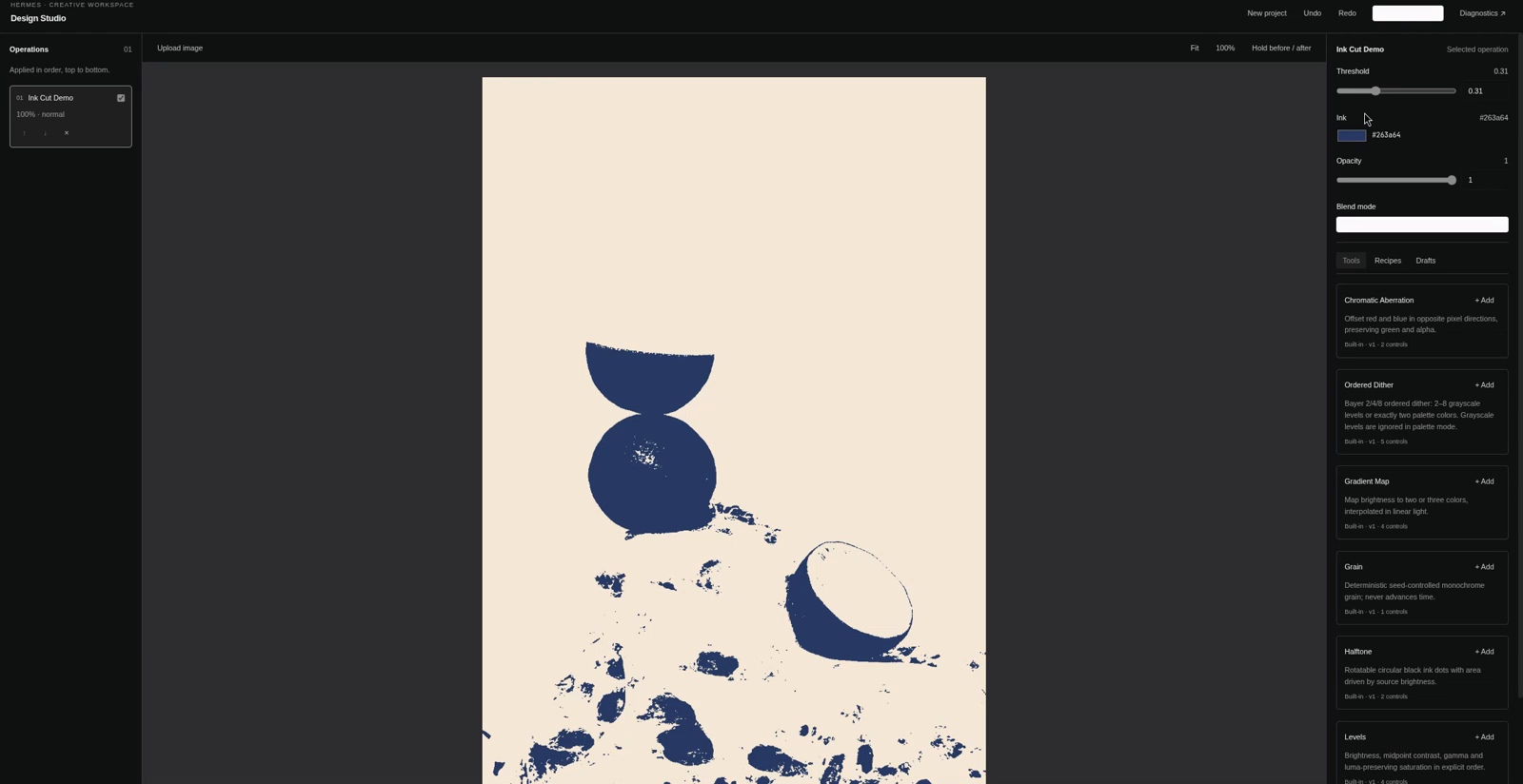
Frame from the recorded demo, showing an agent-authored shader with manual threshold and ink-color controls. The session sidebar and video-caption strip are excluded; the editor and image are not retouched.
Roadmap—not shipped
Animation/timeline controls and animated export; a branching node graph; composite-tool UI beyond saved recipes; tiled exports above 4096 px; Windows gateway locking support; broader server-path image formats/full decoding; additional color-management workflows. These are possibilities, not implemented features or delivery promises. Arbitrary executable HTML tools are outside this build.
License and AI-assisted disclosure
MIT. Created by 1lpredest1nato, with implementation, tests, documentation and review assistance from Hermes Agent by Nous Research. Human decisions, manual tool approval and final publication remain with the author. This is an independent community plugin, not a claim of official Nous Research endorsement. See SUBMISSION.md for the disclosure and unpublished submission drafts.
README from the reviewed commit 9354ba4; it updates when the author re-pins.


