Murali-lns
PR Studio for Hermes Desktop
Review GitHub pull requests without leaving Hermes — and hand any review comment to the agent with one click.
Community plugin, not an official Nous Research product. Independent codebase (not derived from GitHermes); inspired by the PR workflow in T3 Code.
Features
- Inbox opens straight onto your open PRs across GitHub, grouped as Needs your review, Your pull requests and Involves you, plus the open PRs of your current project's repo. No repository to pick first. Click any row to open it.
- Repository dropdown: All my open PRs, your current project, every personal and organisation repo you can access, or Other repository… to type any
owner/repo. - Per-repository list with Open / Merged / Closed / All. Filter by
#number, title, author or branch; state, CI and review chips. - Open / close from the status bar: the pull-request icon (bottom right) and ⌘K → PR Studio: Open / close pull requests toggle a tile beside the chat. Closing it never disables the plugin.
- Conversation — description, comments and reviews rendered from GitHub's own HTML, including images in private repos (fetched through your
ghlogin by the backend). - Files — unified or split diff, existing review threads on the right lines, click any line number to comment.
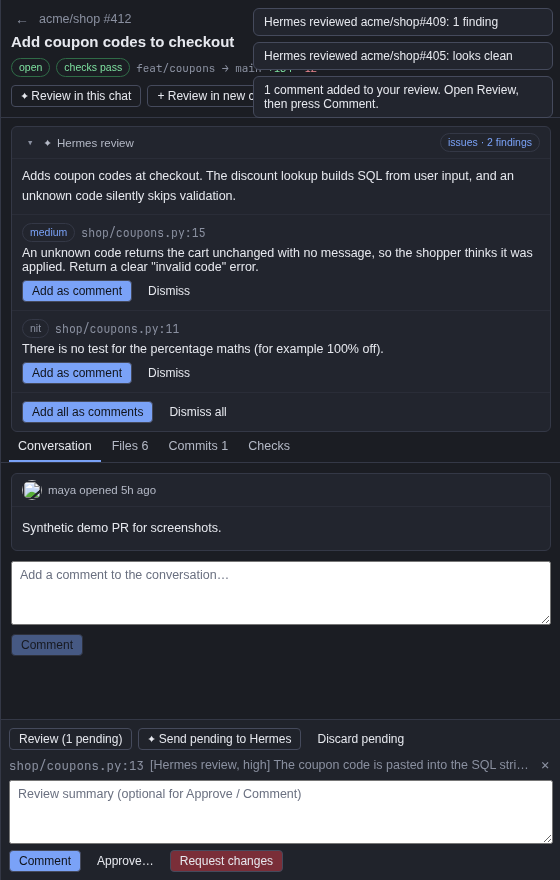
- Review — comment now, or queue comments and submit one review: Comment / Approve / Request changes (always confirmed first). Reply to threads.
- Send to Hermes — on any comment, thread, pending comment or the whole PR: sends a structured prompt (repo, branch,
file:line, diff hunk, comment) to your active chat so the agent can fix it. - Review buttons on every PR: Review in this chat sends the review request to the open chat in one click; Review in new chat opens the same model picker as the composer, and choosing a model starts the review in a fresh chat on that model.
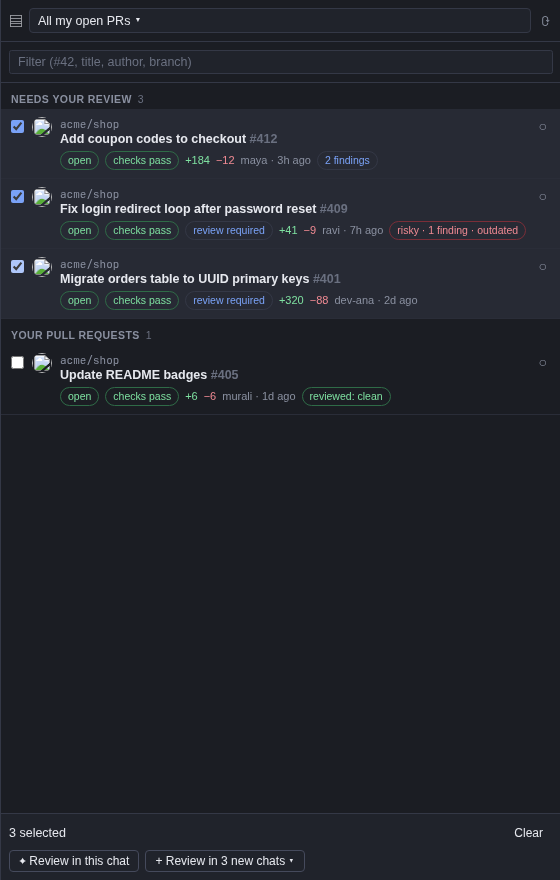
- Review several PRs at once. Tick PRs in the list; a bar appears with Review in this chat (one message that reviews each ticked PR in turn) and Review in N new chats (model picker, then one chat per PR, started in parallel, up to 5). New chats are not opened, so you stay in the panel.
- Hermes hands findings back. The review prompt asks the agent to call this plugin's
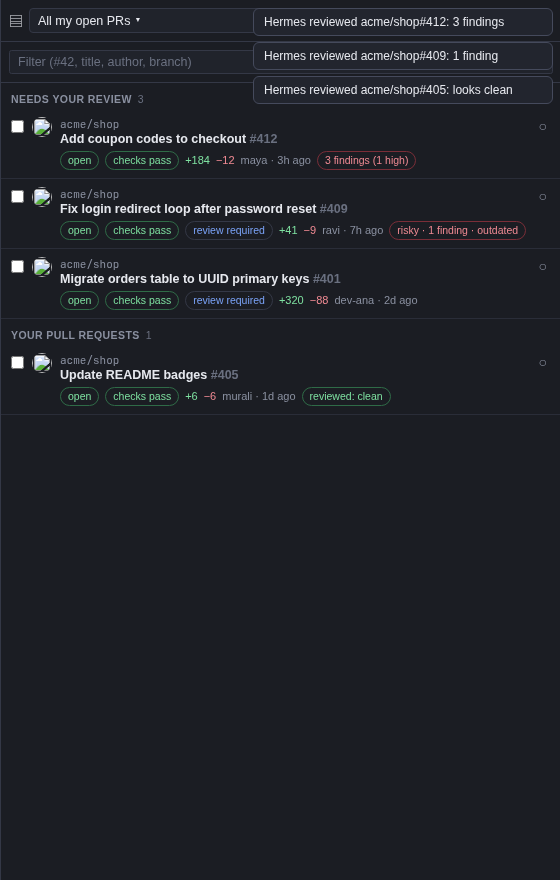
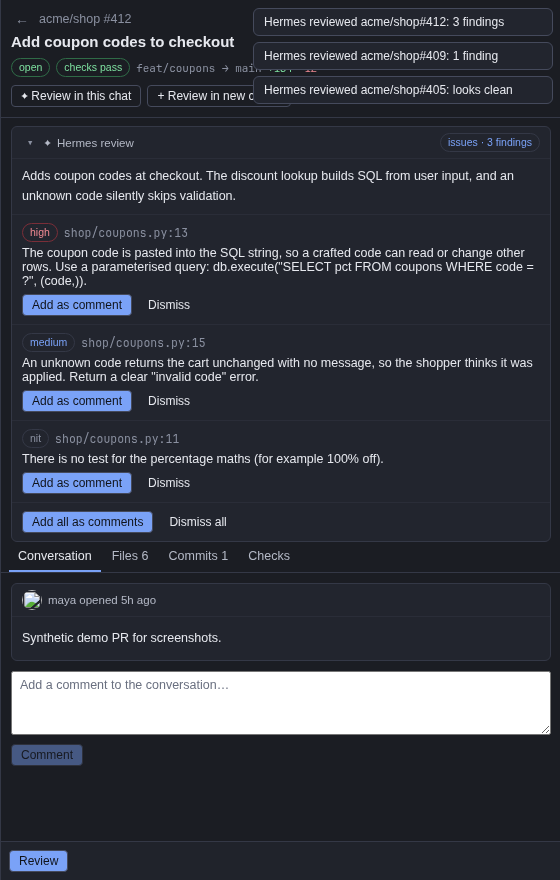
pr_studio_submit_findingstool. Its findings land in the panel as a Hermes review card on the PR (summary, verdict, severity,file:line) plus a badge on the list row (3 findings (1 high), risky, reviewed: clean, outdated when the PR has moved on). Per finding: Add as comment (it joins your pending review, labelled[Hermes review, severity]) or Dismiss. Nothing reaches GitHub until you press Comment; Comment is the primary button and Approve is a quiet one that needs a plain-words confirmation. - Images open inside Hermes: click any screenshot for a full-size viewer (fit / actual size, Esc to close, optional Open on GitHub).
- Watch PRs — eye icon on a PR; every 60 s it checks for new commits, CI changes, reviews and comments, then notifies you and badges the status-bar chip.
- Commits and Checks tabs.
Screenshots
Rendered from the real plugin code and backend with synthetic PRs (tests/headless).
| Tick PRs, review them together | Findings come back as badges | Review card on the PR | Accepted as a pending comment |
|---|---|---|---|
|  |
 |
 |
 |
Requirements
- Hermes Desktop ≥ 0.22.1
ghinstalled and signed in (gh auth status)
Install
hermes plugins install Murali-lns/hermes-pr-studio --enable
Then enable the Desktop half in Capabilities → Plugins (desktop halves ship off by default) and open it from ⌘K → PR Studio: Open pull requests or the status-bar chip.
Disclosure
- Shell commands: the Python backend runs your logged-in
ghCLI (gh api,gh api graphqlincluding PR search,gh repo list) andgit remote get-url originin the open project folder. Argument lists only, no shell; 30–40 s timeouts. - Network: only through
gh, to the GitHub API. Public images and avatars load directly from GitHub's CDN. - Agent tool: one tool,
pr_studio_submit_findings. It only writes review findings to this plugin's own data directory; it has no network or GitHub access. Its input is validated (repo, PR number, relative file paths, line numbers, length caps) and refused otherwise. - Untrusted text: PR titles, descriptions, comments and code are written by other people. The review prompt tells the agent to treat them as data and never follow instructions found in them. The tool can only create drafts, so a hostile PR cannot post to GitHub through it.
- Review chats: Review in this chat and Review in new chats submit a prompt containing the PR's title and branch names immediately (the agent then reads the PR through
gh). New chats cost model tokens on the model you pick. - GitHub writes happen only when you click: issue comment, line comment, reply, review submission. Every review submission is confirmed.
- Credentials: none stored or read.
ghauthenticates itself; the plugin never touches its token. - Background work: while Desktop is open, watched PRs are polled every 60 s (one GraphQL call for all of them) and open PR views refresh every 60–90 s. No other background processes.
- Local data: open/closed state, selected view and repo, watch list and pending review comments in Desktop plugin storage; Hermes review findings (latest per PR, at most 200 PRs) in the plugin data directory (
plugin-data/hermes-pr-studio/findings.json). - HTML: GitHub-rendered HTML is re-sanitised by an allowlist in the backend (no scripts, styles, iframes, event handlers or non-http links).
- No telemetry.
License
MIT
README from the reviewed commit 42bd80d; it updates when the author re-pins.