
 MadBonzz
Hermes Reliability Lab
Find where your agent breaks, explain the evidence, and check whether a change fixes it.
Reliability Lab is a native Hermes plugin for testing agentic systems. Give it a repository or local code directory: it inspects the architecture, finds relevant real-world usage datasets, generates scenarios, challenges them with independent reviewers, and evaluates the configured agent. Follow each campaign in the Hermes web dashboard or Desktop, then freeze an audited test set to track regressions across code changes.
Run it from chat, the dashboard, or hermes reliability. Hermes supplies the orchestration model; runtime adapters connect the agent you want to test.
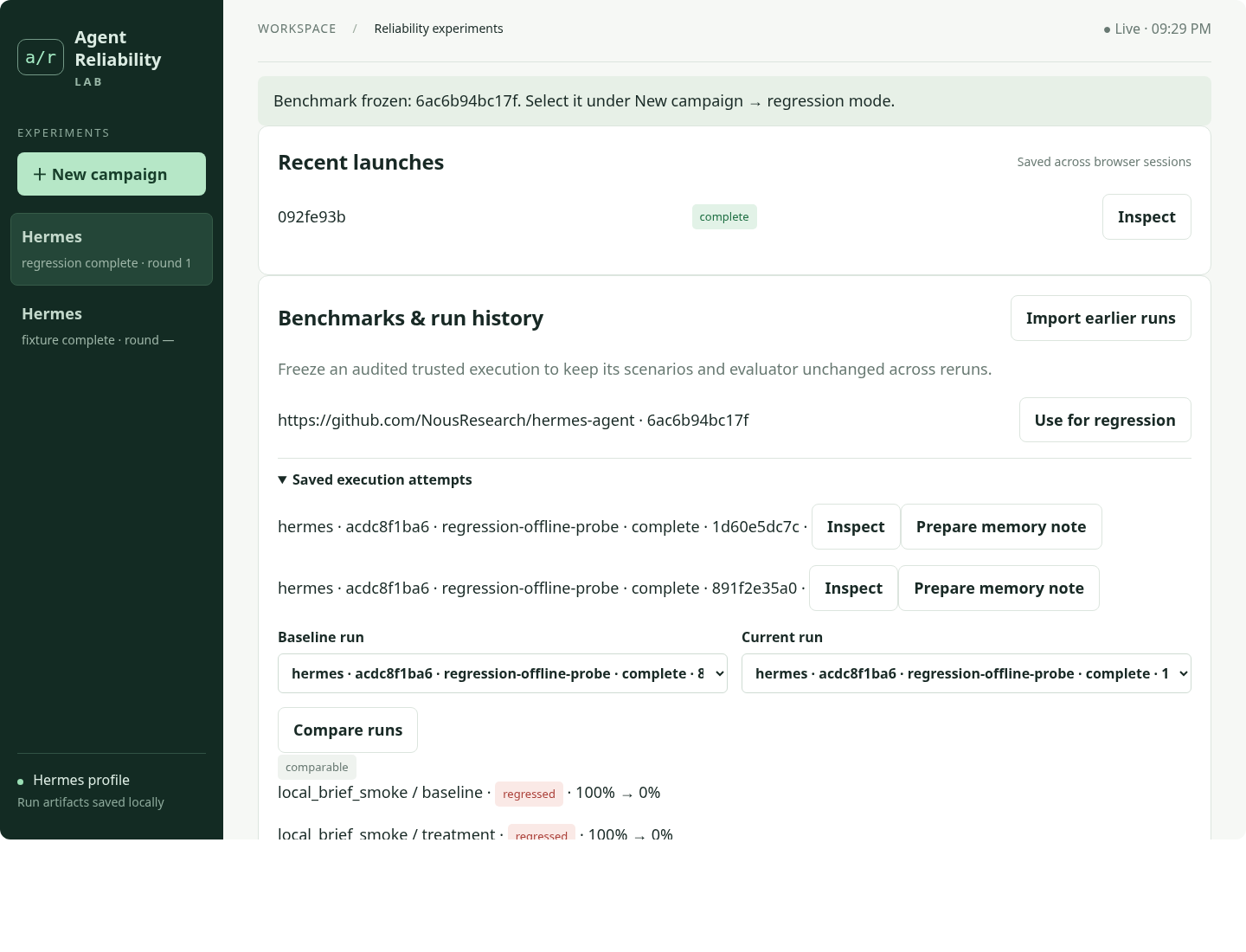
The regression workflow, demonstrated with a deterministic test model.
What it does
- Inspect the system. Freeze a private source snapshot, read its architecture and tool interfaces, and retain source hashes and citations.
- Find realistic workloads. Select relevant datasets before scenario generation. For unfamiliar agents, a model-assisted source profile guides Hugging Face and Zenodo API searches.
- Build experiments. Generate scenario JSON, controlled comparisons, assertions, and campaign-local evaluator changes. Validate schema, paths, assertion coverage, and source references.
- Challenge the design. Separate task-quality, experimental-validity, and verification/attribution reviewers inspect the proposal. Their conversations and judgments are saved independently.
- Execute when configured. Preflight prerequisite references and run candidate and frozen trusted evaluators against the target. Retain tool traces, service/file state, API evidence, audit results, and revision hashes.
- Explain and iterate. Analyze cited execution evidence, distinguish agent failures from evaluator defects and missing evidence, and refine within explicit request, generation, test-count, and round budgets.
Each campaign records scenario files, source citations, reviewer decisions, execution traces and validation results. Reviewer disagreement and incomplete evidence stay visible, so you can assess the findings and reproduce the checks.
flowchart LR
    A[Repository or local code] --> B[Source snapshot + dataset discovery]
    B --> C[Scenario and evaluator generation]
    C --> D[Three independent reviews]
    D --> E[Mechanical validation]
    E --> F[Candidate + trusted execution]
    F --> G[Evidence audit + causal analysis]
    G --> C
    G --> H[Hermes dashboard + saved findings]
Install in Hermes
Requires Hermes 0.21.5+ and Python 3.11+. Install into the Hermes profile you want to use:
hermes plugins install https://github.com/MadBonzz/hermes-reliability
hermes plugins enable hermes-reliability
hermes plugins doctor "${HERMES_HOME:-$HOME/.hermes}/plugins/hermes-reliability" --ci
Accept dependency installation if prompted, then restart your running Hermes session or gateway. For named profiles, use that profile's HERMES_HOME. Orchestration uses the active profile's configured model and authentication through ctx.llm. Session-only model overrides are not transferred into the background CLI worker.
Open hermes dashboard and select Reliability Lab. Hermes Desktop also has a Reliability Lab extension/page; enable its Desktop half in Plugins. Both use the same profile-local campaign store.
Your first campaign
Start with scenario design in chat:
Use Reliability Lab to design reliability tests for /absolute/path/to/my-agent.
Focus on recovery after interrupted tool calls and repeated external actions.
Or use the CLI:
hermes reliability start /absolute/path/to/my-agent --runtime custom \
  --scope "Recovery from interrupted tool calls and duplicate actions"
hermes reliability status
hermes reliability stop JOB_ID
hermes reliability evidence CAMPAIGN_ID campaign.json
In the dashboard, choose New campaign, enter the repository or local path, select the runtime, and set the scope and budgets. Scenario design works before target execution is configured. To run the tests, complete the target setup below and select Execute generated tests.
Launch returns a job ID. Campaigns run in background workers and continue after the browser closes. Stops take effect at safe boundaries; current requests and executions retain their timeouts. Interrupted jobs keep their evidence and generated scenarios for inspection or reuse.
The native tools are reliability_start, reliability_status, reliability_stop, reliability_evidence, reliability_history, reliability_freeze, reliability_compare, and reliability_memory. /reliability status lists campaigns.
Frozen benchmarks and regression history
There are two explicit modes:
- Explore discovers workloads, generates/revises tests, and runs independent design reviews and candidate/trusted evaluators. “Saved tests” seeds further exploration; the generator can revise them.
- Regression executes a frozen benchmark against a new source snapshot and compares its outcomes with a selected historical run. It uses the exact saved scenarios, assertions and trusted evaluator, preserving a consistent test across code changes.
After an execution campaign finishes, select Freeze selected round in the web dashboard, or Freeze latest valid trusted round in Desktop. Only a trusted execution with complete scenario coverage, matching input hashes and a passing evidence audit can establish a benchmark. A valid run may contain failed task assertions: that is a useful baseline for measuring improvements.
Each benchmark has a content-based ID covering its repository, runtime, scenario files, schema and evaluator. Changed assertions or evaluator code create a different benchmark version. Run history includes exploration, regression and design-only attempts, with execution validity recorded separately. Import earlier runs indexes existing campaigns in the active profile; baseline eligibility still requires verified input provenance.
Benchmarks retain hashed dataset provenance, proposals and review decisions where available. Regression runs reuse that saved design and record new execution outcomes.
hermes reliability history --refresh
hermes reliability freeze CAMPAIGN_ID --round-number 1
# Use the full benchmark_id and baseline_run_id returned above:
hermes reliability start /absolute/path/to/my-agent --runtime hermes \
  --mode regression --benchmark-id BENCHMARK_ID --baseline-run-id RUN_ID --execute
hermes reliability compare BASELINE_RUN_ID CURRENT_RUN_ID
The dashboard offers benchmark and baseline selectors, saved-run inspection, and comparison results. Regressions, improvements and unchanged outcomes are reported only when benchmark versions and recorded model/runtime settings match and both runs retain valid evidence. Changed models, endpoint URLs, budgets, runtime images or adapter implementations are labeled incomparable; missing, changed or invalid evidence is labeled invalid. Source revision is the intended variable and can differ. These are observed outcomes, not statistical significance from a single rerun. Installed dependencies and provider-side changes are not fully captured by configuration equality.
Fixed-benchmark execution works through any configured adapter that supplies the required evidence contract. Comparing two source checkouts within a single exploration campaign is supported for Hermes.
Remembering baselines with Hermes
Ask Hermes: “Freeze this campaign as a regression benchmark and remember its baseline.” The plugin validates the saved run and returns a compact reference containing repository, runtime, benchmark ID and baseline-run ID. Hermes then uses its native memory tool to save that note in the active profile. reliability_memory can prepare the same note for an existing baseline. At the next session, Hermes can resolve those IDs through reliability_history when you ask to check changes against the same benchmark.
Exact benchmarks, reports and traces remain in plugin storage. Memory holds references, not test answers or raw logs. A remembered baseline does not authorize execution: the usual explicit execution request and configured runtime are still required. Background workers retrieve the pinned records directly and do not depend on a conversational memory snapshot.
The web and Desktop Prepare memory note action produces a request to send to Hermes; it does not claim to write memory. Likewise, hermes reliability memory-note BENCHMARK_ID RUN_ID or freeze … --remember returns arguments for the native tool. Native memory writes require a live Hermes agent session and can be staged, disabled or rejected at capacity. The plugin never edits MEMORY.md directly, replaces the user's memory provider, or silently removes existing notes. Verify the native tool's result before treating a note as saved. Stale or foreign-profile references fail rather than selecting another baseline.
The tested agent's memory stays separate from these operator notes. The current Hermes evaluation harness starts with isolated target profiles and memory disabled; testing the target's memory behavior requires an explicit adapter/scenario implementation with controlled seeding and reset semantics.
Dataset grounding
| Target | Starting sources |
|---|---|
| Hermes | AssistantBench, WebLINX |
| OpenHands | SWE-chat, Pi development sessions |
| DeerFlow | Clem's ML Intern sessions, Lewis Tunstall's sessions, WebLINX, AssistantBench |
| Any other agent | Architecture-guided searches of the Hugging Face dataset catalogue/agent-traces collection and Zenodo records, followed by relevance selection |
No paid search service is required. Discovery obtains bounded dataset cards and user-message excerpts where available, preserving URLs, hashes, selection rationale, and sampling errors. It excludes answer keys, tool results, and recorded thinking from workload seeds. These are inspiration for controlled scenarios; the plugin does not replay entire public sessions or claim they all have equivalent provenance. Some sources are unavailable or gated, and a metadata-only source is labeled accordingly. An empty custom search fails visibly rather than silently substituting AssistantBench.
HF_TOKEN is optional for gated/private Hugging Face access. Configure it through Hermes's secret management, not a file in this repository. Public discovery works without it. dataset_discovery in plugin settings can select explicit sources or disable discovery for a controlled offline development run; disabled discovery is recorded in campaign evidence.
Executing targets
Any repository can be inspected and used for scenario design. Executing an arbitrary agent requires a compatible integration. Built-in adapters support Hermes, OpenHands, and DeerFlow; other systems use a trusted adapter factory. The plugin does not infer an unknown runtime's deployment, tools, checkpoint semantics, or credentials merely from a URL.
Execution is off by default. Configure the target and runtimes under plugins.entries.hermes-reliability.settings in the active Hermes profile. Example:
plugins:
  enabled: [hermes-reliability]  # retain your other enabled plugins
  entries:
    hermes-reliability:
      settings:
        execution_enabled: true
        requests: 100
        timeout_seconds: 180
        target:
          base_url: http://localhost:1234/v1
          model: your-exact-target-model-id
        runtimes:
          hermes:
            python: /absolute/path/to/target-hermes/.venv/bin/python
            max_iterations: 15
            timeout_seconds: 1800
          custom:
            factory: /absolute/path/to/integration.py:create_adapter
For a hosted target, configure RELIABILITY_TARGET_API_KEY through Hermes. The orchestration model's credentials are never extracted or copied. The target adapter receives only the separately configured target credential. An unauthenticated local model server may leave it unset. Target inference currently requires an OpenAI-compatible Chat Completions endpoint; orchestration follows the provider support of Hermes itself.
Model choice affects scenario generation and repair reliability. See the verification results for tested integrations, live-provider results and current limits.
Then explicitly request execution through the dashboard checkbox, the execute tool parameter, or:
hermes reliability start https://github.com/NousResearch/hermes-agent.git \
  --runtime hermes --revision TARGET_COMMIT --execute
Model-initiated execution passes through Hermes's approval hook. Persistent approval keys include a SHA-256 hash of the normalized source identity, requested revision, runtime and run mode, so approving one repository does not approve unrelated repositories. The CLI flag and dashboard checkbox are direct operator requests. Target Hermes runs retain their native approval gate; this plugin does not select auto-approval. An unattended target may refuse operations that require an interactive approval, and those refusals must be interpreted as such.
Preflight and execution children receive an explicit runtime environment allowlist. Hermes reference preflight receives no provider key; container preflight receives only the separately configured target key when needed, and target execution receives it as EVAL_API_KEY. These values come from the owning Hermes profile's secret scope, not the launch profile's environment. Host provider keys, passwords, connection strings, Python import hooks and approval flags are not inherited by these children.
Execution boundaries matter: the target Hermes process and generated evaluator Python run on the host. The existing OpenHands/DeerFlow adapters run target tools in pinned, nonroot Docker containers with their configured no-network/no-host-mount boundary; that does not sandbox the host evaluator. Custom integrations control their own target isolation. Use an appropriate test machine/environment for execution. Design mode never executes generated evaluator Python or target tools.
See runtime integration for adapter setup and compatibility details.
Evidence and privacy
State lives under <active Hermes home>/plugin-data/hermes-reliability/, outside the plugin install directory. Each job has its configuration, a frozen and hash-checked controller snapshot, and worker log; each campaign has private source snapshots, dataset provenance, scenarios, review decisions where applicable, evaluator snapshots, execution reports, and analysis or regression comparisons. benchmarks/<id>/ stores frozen evaluator/scenario snapshots and history/<run-id>.json stores execution references, hashes, validity and summaries. Original evidence remains with its campaign and must be retained for comparison. Evidence reads are bounded and confined to the selected campaign. The web dashboard uses Hermes authentication and the documented dashboard SDK; it exposes no separate unauthenticated listener.
Source excerpts, sampled dataset user messages, and campaign evidence are sent to the configured model provider during orchestration. Public catalogues receive search queries; Git contacts the requested repository. Target execution may incur separate model costs. Recognized credential values are redacted, but repository and task contents can still be sensitive. Campaign artifacts are stored locally in the active Hermes profile.
Local source requests are checked before job creation and again by the worker against Hermes's shared read guard. Home directories and their ancestors, the active/default Hermes homes and their contents, and credential/profile directories cannot be selected as source. Directory snapshots and model-visible source inventories exclude credential files such as auth.json, config.yaml, .netrc and .git-credentials, credential directories and browser profiles. Symlink aliases do not bypass these checks. Ordinary local code directories, including uncommitted custom-agent code, remain supported. Source checking requires the host's shared file-safety guard; compatibility with that guard is covered by the tested-host verification notes.
Development and verification
uv sync --group dev
uv run python -m unittest discover -s tests -q
uv run ruff check .
node --check dashboard/index.js
node --check dashboard/workbench/app.js
node --check desktop/plugin.js
hermes plugins doctor . --ci
hermes plugins validate . --install-deps
Tests use synthetic fixtures and run without paid inference or dataset downloads. Docker-dependent target tests skip without their images. Integration tests cover source preparation, generation, independent reviews, request budgets, evidence, cancellation, approval gating, frozen benchmarks and regression comparisons. Browser verification exercises the workbench through an authenticated Hermes backend and SDK test shell. See verification notes for results and limits.
README from the reviewed commit 4db5b6b; it updates when the author re-pins.


