
 Johaan Jis
Hermes Screen
A Jellyfin-first plugin for Hermes Agent.
Work in progress for the November 2026 Hermes Agent Plugin Hackathon.
Implemented today
Twelve tools are registered:
library_statuschecks your configured Jellyfin server, resolves a user, and
returns the server name/version and available library counts.library_pick(max_minutes, optionallimit1 to 3, default 3) picks up to
three watchable items from your Jellyfin library, in this order: unfinished items
to resume, Next Up episodes, then never-watched movies/videos. Resume and Next Up
items must fit in their remaining time and unwatched items in their full runtime,
strictly withinmax_minutes; items with unknown runtime are never picked. Each
pick carries a one-line reason drawn only from Jellyfin's watch state and metadata.
It only reads the library: it does not start anything on the TV.tv_play(item_id, optionalmedia_source_id,start_time_s) validates that the exact Jellyfin item is a directly
playable local MP4/M4V file (H.264 video up to 1080p, AAC/MP3 or no audio), mints
an expiring single-item LAN capability URL (/cast/<token>/video.mp4), launches
the Chromecast Default Media Receiver (CC1AD845) atchromecast_host, and waits
until the receiver reports a freshPLAYINGstatus for that exact capability URL.
If that exact item is alreadyPAUSEDon the receiver with a valid capability,
callingtv_playwith the sameitem_idresumes the session.tv_pause(no arguments) pauses the active Hermes Screen media session on the
configured Chromecast and verifies that the receiver transitions toPAUSEDon
the same capability URL and media session.
Play rock-paper-scissors with Hermes
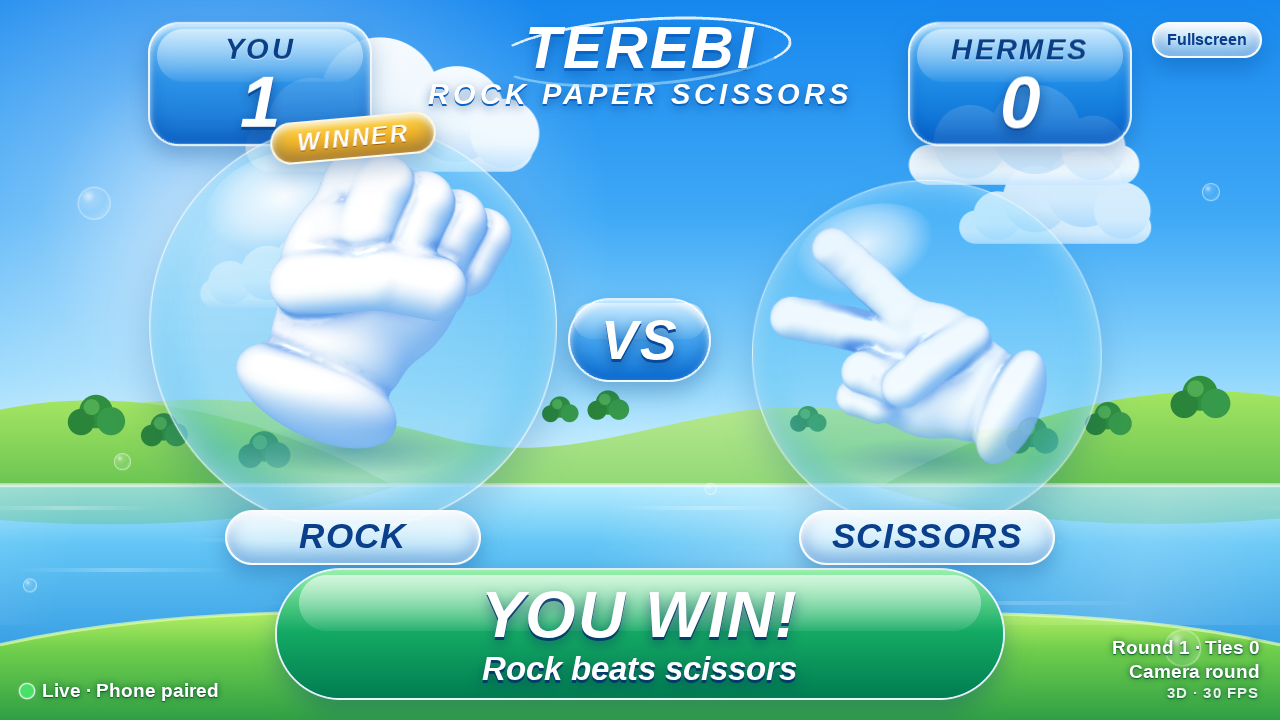
Say “Let's play rock-paper-scissors.” Hermes returns an expiring phone pairing
link and a display link. Open the camera page in iPhone Safari; mirror the display
from Mac Chrome to Den TV. Hold a fist, open palm, or V through the shared
countdown and the phone submits the recognized move automatically. Images stay
on the phone. Retry unclear gestures without changing the score; tap buttons are
a separately labelled fallback.
The TV display and camera flow are verified live on hardware: Den TV
(Chromecast Gen 2), iPhone Safari camera rounds, gesture practice, and
"Stop the game" all passed in the isolated Telegram gateway. With a registered
Custom Receiver the TV launches the game automatically; without one, manual
Chrome mirroring is the fallback. The TV display is silent by default —
you can add your own background track when deploying the game service (see
fresh-device setup). See
setup, pairing and receiver registration.
Describe a saved scene
Save a scene description with a timestamp verified against your exact Jellyfin
edition, then ask for it in your own words. For example, a saved description
“Bunny wakes up and comes out of his burrow” can match “Play the part where the
rabbit gets up and goes outside.” Hermes looks up local descriptions and aliases,
then uses the existing exact-source timestamp playback path. It reports the saved
scene and the receiver-confirmed start position.
Use library_scene_save with item_id, media_source_id, label, verified
start_time_s, and description. Optional aliases teach additional phrasings;
optional end_time_s is metadata and does not stop playback. Records stay in
profile-local marker state, separately from the movie file. Existing label-only
markers remain available and are not silently treated as scene descriptions.
For requests in the user's own words, Hermes calls library_scene_find with
description, rather than the subtitle query parameter. A clear match returns
one candidate; ambiguous results require a user choice. An unmatched description
offers an explicit timestamp and starts nothing. Lookup itself never starts
playback. Choices are edition- and session-bound and expire after 15 minutes.
Changed scene records or editions require a fresh lookup before playback.
Matching uses a small local phrase/synonym vocabulary and saved aliases. It has no
embedding model, subtitle indexing, or video/frame analysis in this path. Some
paraphrases will not match; it does not understand arbitrary visual scenes.
The Big Buck Bunny three-scene demo is verified live through Telegram
(descriptions played and receiver-confirmed); see
demo record status.
Play a scene from your edition
Ask Hermes: “Find the line ‘keep the lamp burning’ in Lighthouse,” then choose
one of the returned timestamps and ask to play it. library_scene_find resolves
movie and edition choices, searches that source's text subtitle track, and shows
caption evidence with original timestamps. Multiple matches require your choice.
Exact and approximate lexical matches are labelled; semantic ranking is disabled
until a local embedding model is approved. It cannot recognize an uncaptioned
visual scene.
For those scenes, supply a timestamp or save a manual marker: “Save one-minute
test scene at 01:00 in BigBuckBunny_320x180.” library_scene_save stores the marker
for the selected edition locally. Later ask: “Play one-minute test scene from
BigBuckBunny_320x180.” tv_scene_play consumes the selected candidate, starts or
seeks the exact source, and confirms the receiver is PLAYING near its timestamp.
tv_pause confirms pause afterward. Ordinary play without a timestamp keeps its
existing resume behavior; an explicit timestamp seeks and starts playing.
A subtitle index refreshes when its source, track or fetched text changes. Subtitle
tracks and indexes stay in local profile state; only matching excerpts are returned
in chat and may be seen by your model provider. Saved markers are user evidence,
not generated scene descriptions. Changed editions invalidate saved markers.
Pending scene choices expire after 15 minutes and belong to the requesting
conversation (or trusted Hermes session on v0.22.0; resetting the session requires
a fresh lookup). Playback rechecks the edition and caption evidence before acting.
The offset must be finite, nonnegative, and below the selected source's runtime.
The receiver's measured position must be within 3 seconds before the requested
point or 3 seconds plus elapsed playback after it. A loaded movie at the wrong
position is reported as unverified. Unsupported video formats still require a
separate transcoding solution; this slice adds none.
Failures return a short reason and a hint. A failed Jellyfin lookup is reported as
an error or a partial result, never as "nothing to watch".
The Jellyfin client also implements library search and Roku /Sessions playback
verification (verify_playback); those methods are not exposed as tools.
All twelve tools are verified live against the Jellyfin 12.2.0 server
(terebi), the user's Chromecast Gen 2, YouTube on that Chromecast, and the
standalone game service in the isolated Hermes v0.22.0 runtime (per-tool
evidence in docs/evidence and docs/HARDWARE.md).
The Telegram pick/play/pause, scene, game and YouTube flows are verified.
Programmatic Roku control, TV/CEC wake, /watch and Friday voting are not
included.
Install and configure
Follow the fresh-device setup path — it covers installing the
plugin at an exact commit, Jellyfin + Chromecast settings (including Docker
port forwarding), saved scenes, YouTube with optional title search, the game
service, and Custom Receiver registration, each with a smoke test and a
troubleshooting step.
For local development:
python -m venv .venv
source .venv/bin/activate
pip install -e '.[dev]'
pytest -q
ruff check .
ruff format --check .
Hermes loads the repository as a native directory plugin with plugin.yaml and
__init__.py at its root. Install/enable that directory using your Hermes plugin
workflow. A Python wheel contains the same layout under hermes_screen_plugin;
installing the wheel alone does not enable it in Hermes.
In Hermes plugin settings, set jellyfin_url (including any server base path),
optional jellyfin_user (exact, case-sensitive username or GUID), and the
JELLYFIN_API_KEY secret (Jellyfin Dashboard > API Keys). If user is omitted, the
server must have exactly one enabled user. For Chromecast playback (tv_play /
tv_pause), also set chromecast_host, cast_media_base_url, and
cast_relay_bind. Settings and secrets are read through Hermes on every tool call;
the plugin does not read .env files.
Roku settings are not part of the public configuration because Roku control is not
implemented.
Version compatibility
- Declared Hermes floor:
requires_hermes: ">=0.22.0"(in bothplugin.yamland,
later, the catalog entry). - The compatible source floor was checked against released Hermes v0.22.0
(e06df9c2eae6901f4c88f464e0ae6e753c0428b8): official doctor, isolated
validate, mocked tool smoke (library_status,library_pick,tv_play,
tv_pause), and live Jellyfin 12.2.0 + Chromecast Gen 2tv_play/tv_pause
acceptance passed. - The installed ZimaOS Hermes is v0.16.0, below this plugin's declared
minimum; testing uses a separate v0.22.0 runtime without upgrading that
installation. - Jellyfin requests follow the upstream 12.4.0 OpenAPI and have been verified
live against Jellyfin 12.2.0 (terebi) forlibrary_status,
library_pick(max_minutes=20),tv_play,tv_pause,get_cast_source,
authenticatedHEAD/Rangestreaming, and Roku 3/Sessions+verify_playback. - Python 3.11+; production dependencies are
httpx>=0.27,<1and
pychromecast>=14,<15.
See integration evidence for exact commands and revisions.
Supported configuration and secrets
Public config_schema entries (settings via ctx.get_config, secrets via
agent.secret_scope.get_secret, read on every call):
jellyfin_url— string, required.jellyfin_api_key— secret, envJELLYFIN_API_KEY, read only through Hermes's
secret scope (agent.secret_scope.get_secret). Never from.envor
os.environ.jellyfin_user— string, optional (exact case-sensitive username or GUID).chromecast_host— string, required fortv_play/tv_pause(Chromecast LAN IP
or hostname, e.g.192.168.1.50).cast_media_base_url— string, required fortv_play/tv_pause(LANhttp://host:port
URL the Chromecast fetches from, e.g.http://192.168.1.20:8765; never loopback
or0.0.0.0).cast_relay_bind— string, required fortv_play/tv_pause(localIP:port
for the temporary media relay listener, e.g.192.168.1.20:8765on host or
0.0.0.0:8765inside a bridge-networked container with port8765published).
Non-text settings are rejected.
Validation
Official Hermes v0.22.0 doctor (12 tool(s), 0 hook(s)), hermes plugins validate . --install-deps, mocked loader smoke (tests/hermes_smoke.py), and
live Jellyfin 12.2.0 + Chromecast Gen 2 acceptance pass; 943 automated Python
tests, 73 camera JS tests and Ruff pass. hermes plugins validate --install-deps passes with a visible security scan — caution
(bind_all_interfaces on playback.py:85, plugin.yaml:58, relay.py:158,
relay.py:166, and tunnel_service on games/deploy/compose.yaml:22) because
containerized setups can configure cast_relay_bind as 0.0.0.0:8765 and the
game deploy intentionally runs a tunnel sidecar. Details are in
integration evidence. Catalog rules distinguish a
validation failure from a caution finding requiring review.
Catalog submission
This plugin is being prepared for the Hermes plugin catalog:
docs/SUBMISSION.md holds the checklist, the draft catalog
entry, and the verified-versus-mocked evidence summary. The pinned commit for
the upstream catalog PR is recorded there once this PR lands.
Live verification record
- Live
tv_play/tv_pausethrough the integrated relay passed on Chromecast
Gen 2 from the isolated Hermesv0.22.0runtime. - Roku 3 programmatic control remains unavailable (Roku's third-party ECP
restriction; live/SessionsconfirmsSupportsMediaControl: falseon
Jellyfin Roku3.2.4). The Roku path was abandoned in favor of Chromecast. - TV/CEC wake is out of scope and unverified.
library_pick,tv_play,tv_pause, scene save/find/play, game
start/stop, and YouTube play/pause are verified from Telegram;/watchis
not built.
Troubleshooting
- Missing settings: set
jellyfin_url,JELLYFIN_API_KEY, and (for Chromecast)
chromecast_host,cast_media_base_url, andcast_relay_bindin Hermes, then retry. - Ambiguous user: set the exact username or GUID; the plugin never picks the first user.
- Authentication failure: check the API key and user permissions.
- Connection failure: check the Jellyfin URL, Chromecast IP, and LAN reachability.
- Chromecast stays
IDLEontv_play: verifycast_media_base_urluses the host's
LAN IP reachable from the Chromecast and thatcast_relay_bindport is forwarded
to the Hermes runtime.
Privacy and network use
library_statusandlibrary_pickmake HTTP requests only to the configured
Jellyfin server with explicit 8-second timeouts (follow_redirects=False).tv_playandtv_pauseconnect directly to the configuredchromecast_hoston
TCP port8009(no mDNS broadcast discovery is required when an IP is given) and
run a localThreadingHTTPServerbound tocast_relay_bindwhile a capability is
active.JELLYFIN_API_KEYis never placed in capability URLs or sent to the Chromecast;
the relay mints a single 256-bit random capability token (/cast/<token>/video.mp4)
with a bounded TTL (15 minutes to 4 hours,duration_s + 900s), forwardsGET/HEAD
and byte-range requests to Jellyfin's static stream endpoint withAuthorizationin
the upstream header only, redacts capability paths from logs, and revokes the
capability + closes the listener on expiry or plugin unload (ctx.on_unload).- Server/user names and library data returned in chat may be seen by your model provider.
tv_youtube_play/tv_youtube_pauseconnect to the configured Chromecast and
let YouTube serve the video directly;library_youtube_search(optional) calls
YouTube Data API v3 with your Hermes-stored key. No scraping, download or media
relay for YouTube.- The game service is a separate deployment you own: the phone camera page, the
TV receiver/display and a small JSON API. Camera frames and landmarks never
leave the phone. The public HTTPS origin (typically a Cloudflare Quick Tunnel)
carries game pages, tokens and API requests; camera images do not cross it.
Game credentials are one-use pairing links, expiring read-only viewer
capabilities and a generated admin token kept in Hermes secret scope. - The TV display/receiver loads Google's CAF v3 SDK from
www.gstatic.com; the
game's background music track is served same-origin from the game service.
Contributing
Read AGENTS.md, SOUL.md and the plan.
All automated HTTP and Cast tests use mocks/fakes; live hardware verification is
recorded in docs/HARDWARE.md.
License
MIT
Direct Chromecast game launch (registered Custom Receiver)
Configure games_receiver_app_id with a Google Cast Custom Receiver ID and use
the existing chromecast_host. Deploy the game service's /receiver/ page and
register that trusted HTTPS URL in Google's Console. Unpublished tests require
registering the Chromecast as a test device. See setup and acceptance steps.
Hermes launches the game and sends only the session's read-only display capability.
It reports the TV ready only after the receiver acknowledges rendering the same
session. The iPhone pairing link is still returned in Telegram. Failed or
unconfigured launches retain the manual Chrome display link. Starting a game
replaces the current Chromecast app; TV wake and HDMI switching are separately
tested device behavior, not implied by receiver readiness.
YouTube on Chromecast
Send Hermes a YouTube video link or ID: “Play https://youtu.be/aqz-KE-bpKQ on TV.”
tv_youtube_play uses the configured chromecast_host; YouTube serves the video
directly. No API key, media relay or download is needed for a link. This replaces
the current TV app. tv_youtube_pause pauses only the YouTube video/session this
plugin context verified. Asking to play the same paused video resumes it.
Existing tv_pause continues to control Jellyfin movies.
Success requires fresh receiver evidence for the requested video ID and state.
app_opened means the YouTube app opened but playback was not confirmed. Check the
TV for ads, sign-in, age/region restrictions or unavailable/private videos; never
interpret an app launch as confirmed video playback. Supported inputs: an
11-character video ID, HTTPS watch/youtu.be/shorts/embed/live video links.
Playlists and timestamp offsets are not supported.
For optional title search, enable YouTube Data API v3 in your Google Cloud
project and configure YOUTUBE_API_KEY through Hermes secret settings. Restrict
the key to that API and set an appropriate quota. library_youtube_search returns
up to five titles/channels; choose a result before playing. Without the key, Hermes
asks for a direct link. No YouTube page scraping is used. Search availability is
independent of playback availability on the TV.
Stop rock-paper-scissors
Tell Hermes “Stop the game” or “Exit rock-paper-scissors” in the conversation
that started it. The game ends, old links are revoked, the phone shows Game ended
and releases its camera, and the matching TV receiver exits to Chromecast artwork.
Other apps and newer games are left alone. A repeated stop is safe. Hermes reports
session end separately if TV closure cannot be confirmed. Start again for a fresh
pairing link. See the stop protocol and live checklist.
README from the reviewed commit ddee305; it updates when the author re-pins.


