 Tsurgcom
Hermes Teleoperator - Debug your Mom's PC
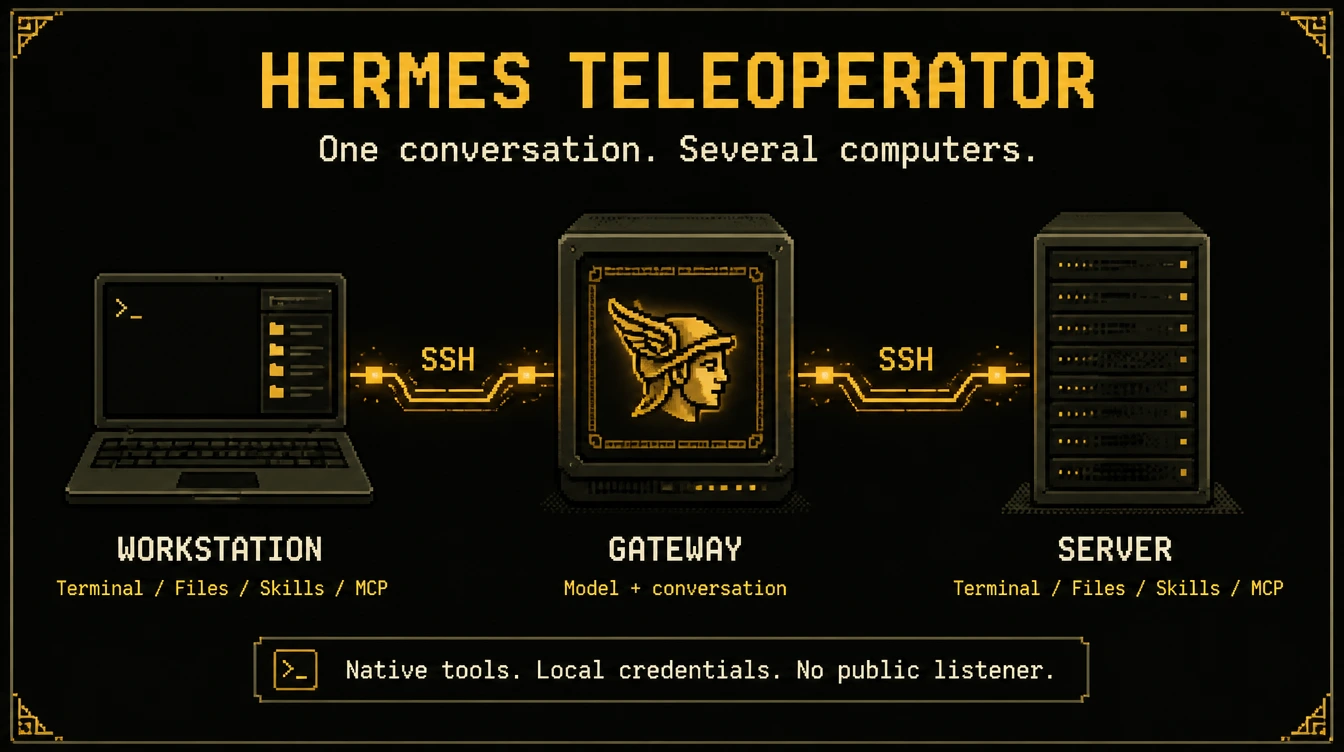
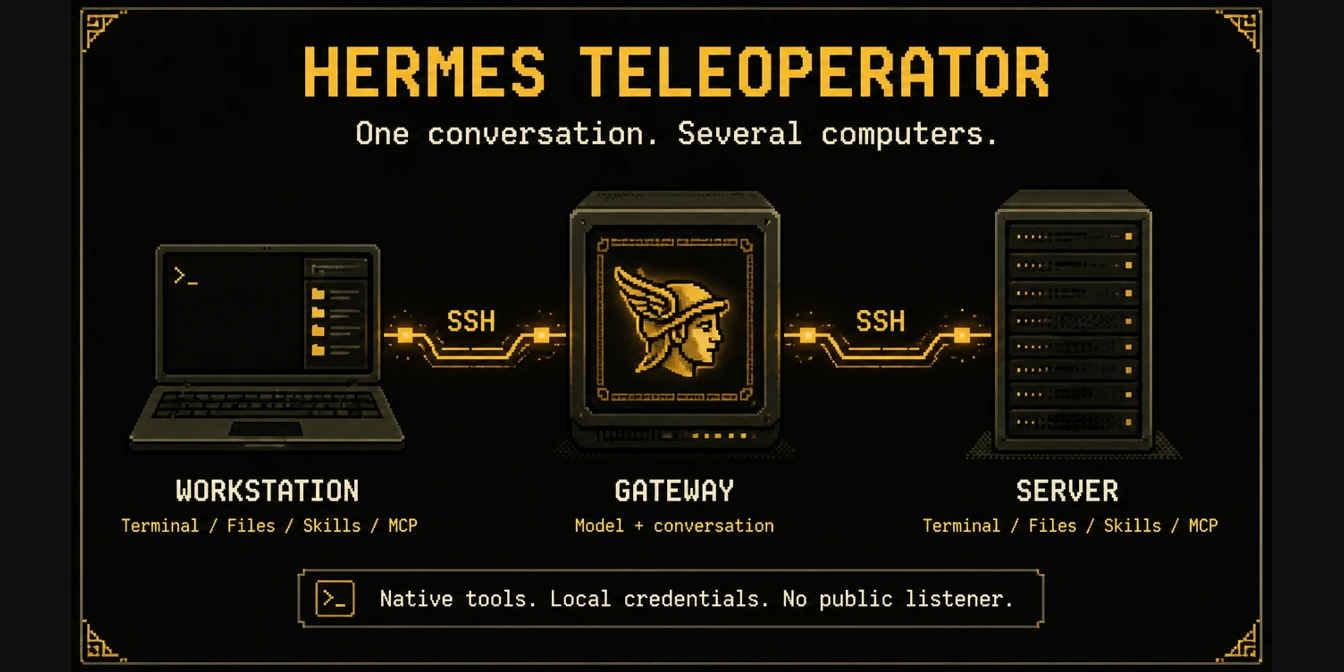
One conversation. Several computers. No agent installation on the receiving end.
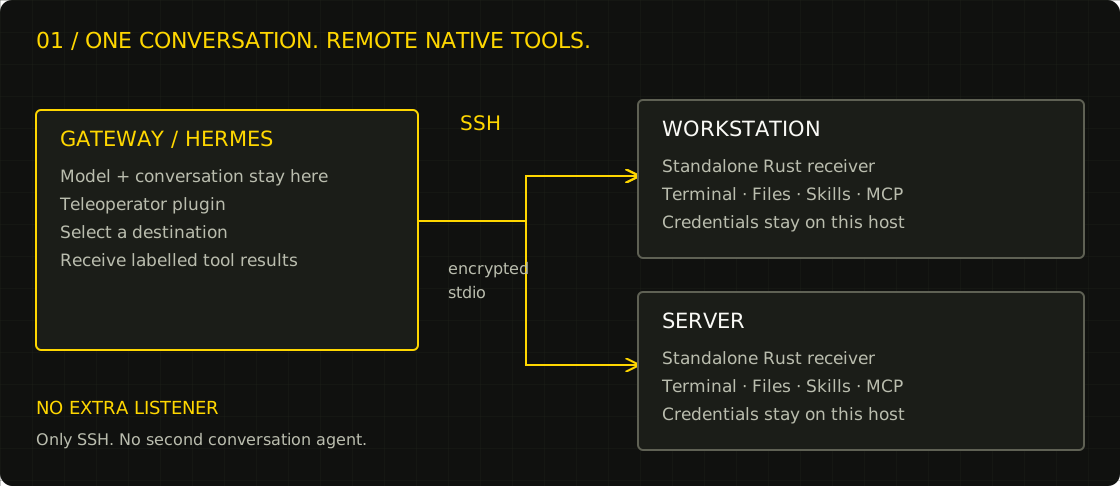
Teleoperator has two parts:
- A Python plugin in the Hermes gateway that owns your conversation.
- A standalone Rust receiver, started on demand over SSH on each destination.
The model and conversation stay on the gateway. The receiver provides shell, files, skills and explicitly configured MCP tools on the destination. It needs no Hermes Agent, Python, Bun, Node, model account or API subscription. It opens no network listener. MCP servers you choose to run may have their own runtime requirements.
Want your agent to set it up? Copy and paste this prompt into Hermes:
I want you to install the Hermes Teleoperator plugin, to help with accessing other machines. Prompt me through the setup, with the useful `hermes-teleoperator` accompanying skill.

Install the plugin first. (read https://github.com/Tsurgcom/hermes-teleoperator)
Prompt me to restart the gateway when needed, and guide me through the rest of the setup. Fetch and read the raw installation guide before starting: https://raw.githubusercontent.com/Tsurgcom/hermes-teleoperator/main/INSTALL_FOR_AGENTS.md
How it fits together
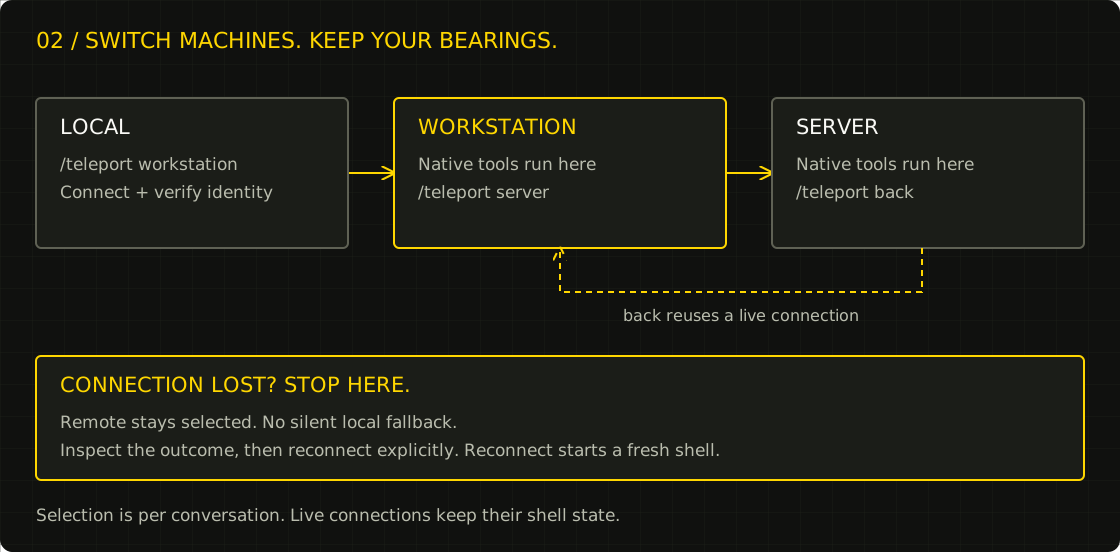
/teleport back returns to the previous machine. /teleport local returns home. A failed remote call never silently becomes a local command. Switching back reuses shell state while the connection remains open; reconnect starts a fresh shell.
Requirements
Gateway: Hermes with documented plugin/tool-execution middleware, Python 3.11+, OpenSSH client.
Linux x86_64, aarch64, armv7, i686, riscv64, ppc64le or s390x, macOS 11+ on x86_64 or arm64, an OpenSSH server, Bash and the standalone binary. Installation uses Bash, curl, GNU coreutils and OpenSSH's ssh-keygen when generating a public-key authorization entry. No language toolchain is needed. Windows is not supported: the receiver is Unix-only by design (openat/linkat/renameat file handling, Unix sockets, POSIX process groups, Bash).
Measured x86_64 musl release build on Linux 7.0.14, 2 vCPU: 2.3 MiB static binary, about 0.5 ms from spawn to first response, roughly 1.4 MiB RSS including its idle Bash shell after 20 commands. Those are scripts/measure_receiver.py results, not a comparison against Python/Bun, and exclude SSH and MCP server processes. The receiver exits at stdin EOF; it is not a resident daemon.
Release targets, libc and linkage
Two linkage models ship for Linux from the same source, because "which libc" is the thing that decides whether a binary runs on an old server:
- musl, fully static — no libc, no dynamic loader, no interpreter on the destination.
x86_64,aarch64,armv7(musleabihf),i686,riscv64gc. - glibc, dynamic — linked against a glibc 2.17 symbol floor, so it also runs on RHEL/CentOS 7-era systems and anything newer.
x86_64,aarch64,armv7(gnueabihf),i686,s390x.powerpc64leuses a 2.19 floor because zig has no older glibc for that ABI. Pick these when a distro policy wants dynamic binaries or when the host must share a glibc-versioned toolchain. - macOS —
aarch64-apple-darwinandx86_64-apple-darwin. Unsigned and not notarised, so Gatekeeper needs an override.
The static musl binary is the default recommendation. install.sh currently auto-downloads Linux x86_64/aarch64 only; other Linux builds require an explicit --binary and trusted --sha256. The target-side installer is Linux-only and uses GNU utilities; use the gateway-led deployment helper for macOS. The glibc floor is enforced in CI: the release job fails if any GLIBC_* symbol in a dynamic binary is newer than that target's floor (2.17, or 2.19 for ppc64le).
Test coverage per target is not uniform, and the release notes say so. The full gateway protocol, file transfer, skills, real-SSH and clean-chroot suites run on x86_64-unknown-linux-musl. aarch64-unknown-linux-musl runs 8 receiver tests under qemu-aarch64-static (its clean-chroot test is excluded because the host QEMU wrapper is deliberately absent from that jail). Every other Linux target is cross-compiled and only checked for linkage (PT_INTERP present/absent and the glibc floor); macOS binaries are built on a macOS runner but not executed in CI. Emulated timings are not representative.
Version 1.1 replaces the old Python/Hermes receiver. Old python/hermes_home machine settings are rejected with a migration error, never silently used.
Gateway installation
Install this repository as a native directory plugin, using your active Hermes profile:
mkdir -p "$HERMES_HOME/plugins"
ln -s /absolute/path/to/hermes-teleoperator "$HERMES_HOME/plugins/hermes-teleoperator"
hermes plugins enable hermes-teleoperator
hermes plugins doctor /absolute/path/to/hermes-teleoperator --ci
Restart the conversation after enabling it. Alternatively pip-install the gateway package; choose one discovery method, not both. No core files are patched.
Desktop companion
The optional desktop/plugin.js adds a Teleoperator control to the bottom status bar in Hermes Desktop. Enable the desktop half in Capabilities → Plugins as well as the agent plugin; the two toggles are independent. Click the control to see and select machines for the focused conversation. The plus button opens a manual form for adding a machine: it saves settings only and never connects, installs a receiver, authorizes a key, or accepts private key contents. Install and enable the matching updated gateway plugin and restart the gateway before using the form. Connected machines show their hostname when available and can be disconnected; a disconnected selected machine remains selected and can be reconnected. Switching is disabled while that conversation is busy. Status is reloaded every time the control is opened; reopen it to pick up a change made elsewhere. Errors are shown rather than assuming local. Machine names status, back, disconnect and reconnect cannot be selected from the control because they are reserved slash-command words. This companion controls tool routing, not a remote desktop.
The control requires a live conversation and a Hermes version supporting desktop plugins, focused session state and slash.exec for plugin commands. It does not configure SSH or deploy receivers.
Configure and verify normal SSH first. Verify the host fingerprint through a trusted channel. Teleoperator uses strict host-key checking, batch authentication, no agent forwarding, no port forwarding and no automatic mutation retries. SSH aliases and ProxyJump work.
Receiver installation
Preferred flow: run setup on the gateway, using the Python environment containing this plugin. The destination needs SSH and ordinary OS utilities, not Python or internet access.
# Read-only detection: shows the selected package, exact version and SSH identity.
python -m hermes_teleoperator.deploy me@workstation --probe

# Use a separate administrative credential for installation.
python -m hermes_teleoperator.deploy me@workstation \
  --identity-file "$HOME/.ssh/workstation-admin" \
  --public-key-file "$HOME/.ssh/teleoperator-workstation.pub"
The helper probes the destination's actual userland ABI over strict SSH, downloads the exact gateway-matching release onto the gateway, verifies the asset against a per-asset SHA256 committed in hermes_teleoperator/version.py for that release tag, then transfers bytes over SSH for offline installation. It never selects latest, downloads on the client, or transfers a private key. --version v1.2.0 is optional and must match the gateway exactly. --port, --known-hosts and --teleoperator-home are supported. Root requires --allow-root; sudo-derived identity is rejected. SHA256SUMS is fetched and cross-checked so a rewritten release is reported, but the source pin is the trust root; neither is an independent publisher signature.
Selection prefers static musl on supported Linux targets, falling back to glibc only for s390x and ppc64le with proven version floors. It checks ELF word size/endianness (including 32-bit userland on a 64-bit kernel), ARM hard-float, RISC-V ISA, CPU/kernel minimums, macOS version and Rosetta. Ambiguous or unsupported combinations fail rather than guessing. A staged receiver must pass an exact version/protocol/identity handshake before the live launcher switches atomically. Existing skills, config and unrelated SSH keys are preserved; a failed transfer or staged handshake leaves the live launcher unchanged. Old content-addressed binaries are retained for inspection, not automatically pruned. Disconnect live sessions before upgrading. SSH mutations are never automatically retried; inspect ambiguous failures before rerunning.
Gateway and receiver versions must match exactly when connecting. Upgrade/reload the gateway, deploy from that same environment, then reconnect. Old receivers with no version field are rejected; changing a JSON setting cannot bypass parity. Run --probe before mutating a target; a missing exact release asset is an error, never a fallback to an older release.
Deployment exit code 3 means the live launcher switch committed but its final handshake failed, or the commit command failed and the switch outcome is conservatively treated as unknown. The error identifies the launcher and original cause. Do not retry automatically: inspect the target launcher and receiver first. No automatic rollback is attempted. Exit code 1 denotes other deployment errors; exit code 2 denotes invalid CLI arguments. Neither deployment error code implies that staging left no remote files. Successful deployment exits 0.
The gateway generates a dedicated key with ssh-keygen -t ed25519 -f "$HOME/.ssh/teleoperator-workstation". Its private key stays on the gateway; setup accepts only its .pub file. Deployment returns ssh_authorization_entry containing a restricted, forced-command entry. Review that entry and have the destination administrator add it to that account's SSH authorization file; neither installer reads or modifies SSH authorization files. Do not replace an existing administrative key. Keep separate administrative access: once authorized, the Teleoperator key is forced to the receiver and cannot run deployment/repair shell commands.
Standalone target-side installer (alternative, Linux only)
Run as the intended SSH user, not through sudo. Root is supported only with explicit --allow-root.
Release installation, after a release containing binaries has been published:
REF=REVIEWED_FULL_COMMIT_SHA
curl -fsSL "https://raw.githubusercontent.com/Tsurgcom/hermes-teleoperator/$REF/install.sh" |
  bash -s -- --version v1.2.0 \
    --public-key 'ssh-ed25519 AAAA... gateway-key'
The gateway generates a dedicated key with ssh-keygen -t ed25519 -f "$HOME/.ssh/teleoperator-workstation". Its private key stays on the gateway. Only the public key goes into --public-key or --public-key-file. For inspection, download and read the script before running it. Do not pipe private keys or credentials into it.
The installer selects a Linux static musl binary by architecture and checks its SHA256 against a digest embedded in install.sh for the exact release tag. It also downloads SHA256SUMS and refuses to continue if that manifest disagrees with the embedded digest; the manifest is never the trust root. Supplying --sha256 for a release install must match the embedded pin. Supply --binary with a trusted --sha256 to install independently verified bytes instead. The bootstrap script itself is trusted through its reviewed revision and GitHub HTTPS. A --sha256 or SHA256SUMS match is not a publisher signature; releases additionally carry GitHub build-provenance attestations (see RELEASING.md).
Offline/local build installation:
cargo build --release --locked --manifest-path receiver/Cargo.toml
BIN=$(realpath receiver/target/release/hermes-teleoperator-receiver)
SUM=$(sha256sum "$BIN"); SUM=${SUM%% *}
bash install.sh --binary "$BIN" --sha256 "$SUM"
Cargo is needed on the build machine only. The installer writes a checksum-named binary at ~/.local/lib/hermes-teleoperator/receiver-<sha256> and atomically switches the launcher at ~/.local/bin/hermes-teleoperator-receiver. Earlier binaries, including the legacy receiver, are retained; repeated upgrades consume disk space and require manual cleanup when no launcher or process uses them. It rejects unsafe writable/foreign-owned/symlinked installation paths. It does not install Hermes, start a daemon, or read or modify SSH authorization files. Disconnect before upgrading.
If upgrading an older Python-based receiver whose SSH forced command points to .local/lib/hermes-teleoperator/python, an administrator must update the restricted key's forced command to the new launcher. Installation does not change SSH authorization.
When a public key is supplied, the installer prints an entry using restrict and a forced launcher command for manual administrator approval and installation. It does not authorize the key. The restriction controls connection entry, not shell commands the receiver can execute with the user's authority. Use a dedicated SSH account for narrower authority. Keep separate administrative SSH access: the restricted key cannot run ordinary setup/repair commands.
Configure the gateway
Create $HERMES_HOME/teleoperator.json:
{
  "transfer_dir": "/home/gateway/hermes-teleoperator-transfer",
  "allow_local_delete": false,
  "machines": {
    "workstation": {
      "host": "me@workstation",
      "executable": "/home/me/.local/bin/hermes-teleoperator-receiver",
      "teleoperator_home": "/home/me/.config/hermes-teleoperator",
      "identity_file": "/home/gateway/.ssh/teleoperator-workstation",
      "timeout": 120
    },
    "server": {
      "host": "me@server",
      "executable": "/home/me/.local/bin/hermes-teleoperator-receiver"
    }
  }
}
Optional fields: port, known_hosts. Use absolute paths. local is reserved. Keys stay in SSH files or its agent, not this JSON. Settings are read lazily; reload/restart after changes.
Gateway-local transfers are disabled until transfer_dir is set to an existing absolute directory. Every gateway-side source and destination path is resolved (including symlinks) and must stay inside that directory; paths inside $HERMES_HOME and ~/.ssh are always refused. allow_local_delete defaults to false: moving a file from the gateway host is refused unless it is set to true. Remote receiver endpoints keep their existing behaviour and limits.
Skills and MCP on the receiver
Receiver configuration lives at $TELEOPERATOR_HOME, default ~/.config/hermes-teleoperator. Skills are ordinary skills/<name>/SKILL.md files there. The receiver reads skill text; it does not execute Hermes preprocessing, dependency installers or profile plugins. Existing Hermes installations are optional, not required.
Remote MCP access is off by default. Explicitly configure stdio servers in the receiver's config.json and expose only intended names:
{
  "expose_mcp": ["example"],
  "mcp_servers": {
    "example": {
      "command": "/absolute/path/to/mcp-server",
      "args": [],
      "env": {}
    }
  }
}
The receiver uses MCP initialize/tools-list/tools-call directly. It advertises no sampling capability and rejects server callbacks requiring a model or interactive approval. It does not load Hermes config, auth stores, plugins or OAuth pools. Credentials come from the SSH user's environment or explicit server environment. HTTP/SSE MCP transports and forwarded interactive approvals are not implemented. Install the dependencies of each chosen MCP server separately.
Use
/teleport workstation
/teleport status
/teleport server
/teleport back
/teleport local
/teleport disconnect
/teleport reconnect workstation
Terminal, file and skill tool names follow the selected computer. The remote implementation is standalone, not the Hermes native dispatcher. Use teleoperator(action="describe", name="terminal") for the actual remote schema; unsupported options return errors rather than silently doing something else. Foreground terminal calls reject workdir: use an explicit cd in the command (which changes the persistent shell's cwd), or use background: true with workdir. Background relative workdirs resolve against the receiver's cwd, and the response reports the job's physical starting cwd.
Every routed call is approved by Hermes first. terminal uses the same dangerous-command gate as a local shell (tools.approval.check_all_command_guards, with remote SSH authority as the backend class): hardline commands are refused, flagged commands ask the person through the normal CLI prompt or gateway card, deny rules and allowlists apply, and --yolo/approval mode means the same thing remotely as locally. write_file, patch, skill_manage, state-changing process_manage actions and mcp__* calls take the human-approval gate (tools.approval.request_tool_approval) with one allowlist entry per machine and remote directory, skill or tool — answer "always" once and that grain stops asking. Reads keep local parity (no prompt), except credential files (.env, id_*, auth.json, .pem/.key, anything under .ssh), which are refused rather than returned unredacted. A denied or unavailable gate refuses the call: it never runs remotely and never falls back to local.
The model-facing gateway supports:
action=status|switch|back|reconnect|disconnectaction=search, query="capability"action=describe, name="<returned-tool-name>"action=call, name="<returned-tool-name>", arguments={...}- Optional
machineaddresses a configured remote without changing selection. action=transferwith explicitsource_machine,source,destination_machine,destination,move=false.
Transfers support regular files up to 8 MiB, SHA256 verification, no destination overwrite, and copy-before-delete moves. When an endpoint is the gateway host, its path must be absolute and resolve under the configured transfer_dir, and $HERMES_HOME/~/.ssh are always refused; moving a gateway-local source additionally requires allow_local_delete: true. Stop concurrent writers before moving. Use scp/sftp/rsync for large files or directory trees. Transfers do not preserve metadata and are not atomic across two hosts.
Recovery
There is no service to restart. /teleport reconnect workstation starts a fresh receiver through SSH. Do not replay ambiguous mutations without checking whether they ran.
Smoke-test the installed receiver:
printf '%s\n' '{"id":"health","method":"ping"}' |
  ssh -T -o BatchMode=yes -o StrictHostKeyChecking=yes \
    -i "$HOME/.ssh/teleoperator-workstation" me@workstation \
    '/home/me/.local/bin/hermes-teleoperator-receiver'
Expect protocol 2 and runtime standalone-rust, then verify a harmless pwd. If reconnect fails, switch local, use separate administrative SSH to check id -un, $HOME and the executable, then rerun the installer if needed. Never use broad pkill, restart unrelated agents or disable host-key checks.
Uninstall after disconnecting: remove only the enrolled key line, the launcher, ~/.local/lib/hermes-teleoperator, and the gateway machine entry. Keep unrelated SSH keys and optional skills/config unless you intend to delete them.
Boundaries
- Machine selection is conversation-scoped and process-local. A new conversation starts local.
- Disconnect leaves the remote selected; errors never fall back to local.
- Results carry
teleoperator.machineand hostname. Identity cwd is a connection-time snapshot. - The prompt, memory, initial skill index and AGENTS.md are not migrated. Load remote instructions explicitly.
- Model execution, browser/desktop, cron, delegation, connectors and local memory stay on the gateway. Unsupported tool names are blocked while remote; switch local to use them. Web search/extract and clarification remain local.
- This is SSH-user authority, not a sandbox. Every routed call passes Hermes' dangerous-command gate (
terminal) or its human-approval gate (writes, patches, skill edits, state-changing process actions,mcp__*) before it leaves the gateway, for both routed native tools andteleoperator(action="call"); read-only tools keep local parity (no prompt), except credential files (.env,id_*,auth.json,.pem/.key, anything under.ssh), which are refused rather than returned unredacted. A refused or unreachable gate fails closed. Remote calls still do not get Hermes' full guard path: other plugins'pre_tool_callblocks, the agent's tool guardrails, and the gateway-side secret redaction for directory-wide searches run inside the dispatch callback that this plugin's execution middleware replaces, so they never see a remote call and cannot block it. The terminal-backend seam cannot replace the middleware becauseterminal.backendis profile-scoped and no per-conversation switch exists; tracked in hermes-agent#152963. Remote terminal execution can access everything the SSH user can, and only explicitly exposed MCPs run, but their code is trusted with the same authority. - Skill text/file semantics, regex search and plain-text patching are not full Hermes feature parity. Document extraction, fuzzy patches, PTY/interactive terminal sessions and HTTP MCP are outside this receiver's initial scope. Use direct SSH/appropriate tooling for those tasks.
- EOF cleans receiver-owned subprocesses. State is preserved only while the channel lives; no daemon, agent or model process remains intentionally resident.
- Every
sshsubprocess receives an explicit minimal environment:PATH,HOME,USER,LOGNAME,LANG/LC_*,SSH_AUTH_SOCK, andTERMonly when set. Gateway credentials are never inherited, so aSendEnvorProxyCommandin the user's SSH configuration cannot carry them off-host.
Build and verify
cargo test --locked --manifest-path receiver/Cargo.toml
cargo build --release --locked --manifest-path receiver/Cargo.toml
python3 scripts/sync_receiver_digests.py --check
TELEOPERATOR_RECEIVER="$PWD/receiver/target/release/hermes-teleoperator-receiver" \
  python3 -m unittest discover -s tests -v
hermes plugins doctor . --ci
The standalone SSH fixture uses an isolated OpenSSH server, temporary keys and receiver homes; it does not modify production SSH configuration. It runs the receiver where Hermes cannot be imported. Two loopback users/homes exercise switching and isolation; a second physical machine is not a claim made by this test.
Layout: hermes_teleoperator/ is the gateway-only Python plugin; receiver/ is the Rust companion; install.sh installs release binaries; tests/ covers gateway, installer, process and SSH integration.
README from the reviewed commit 4dfb08e; it updates when the author re-pins.


