seppegadeyne
Hermes Themes Pack
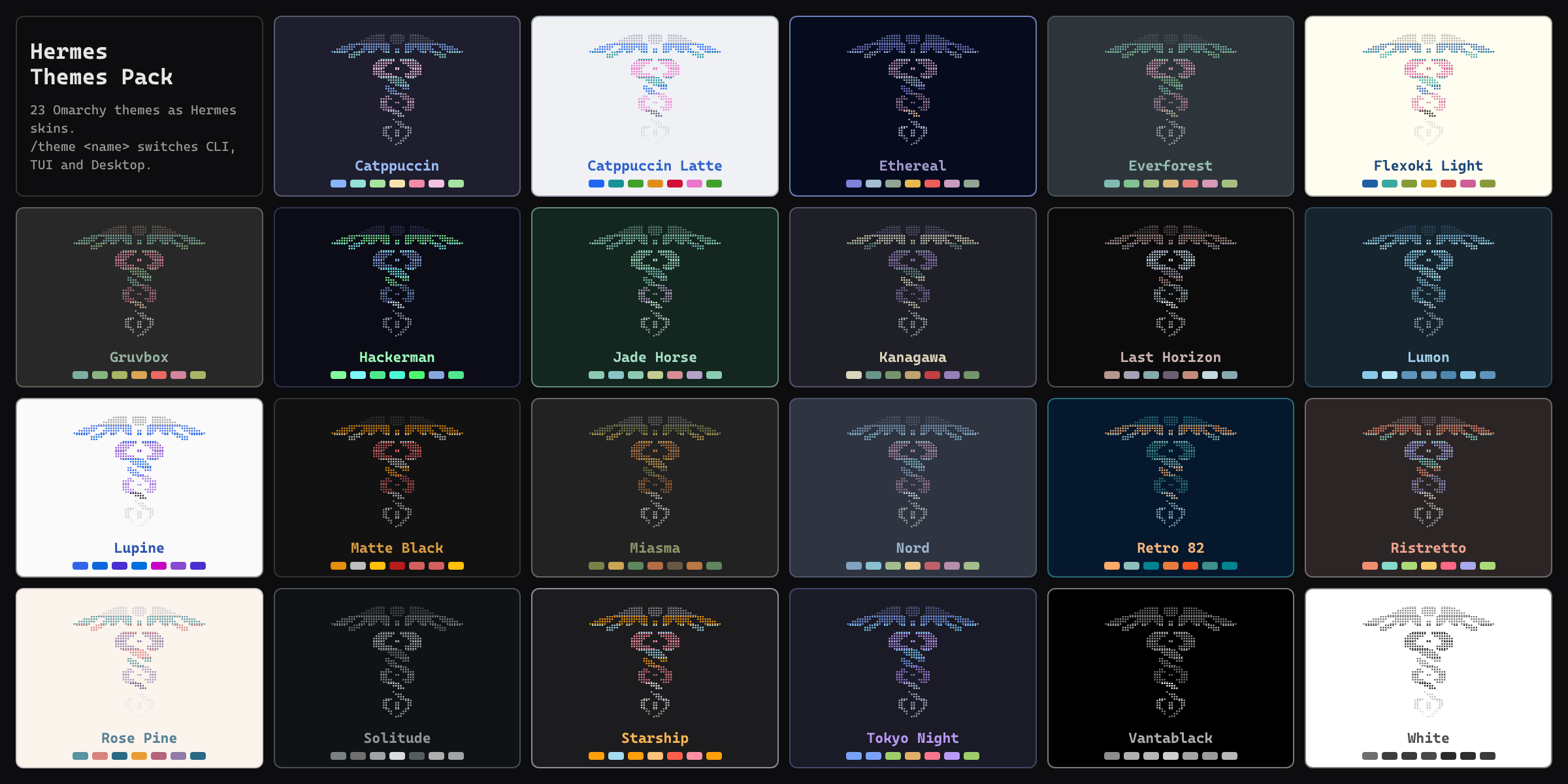
All Omarchy themes as Hermes skins, plus one command to switch them: /theme.
A skin is Hermes' single theme unit: the CLI, the TUI and the Desktop app all
repaint from it within a second. Optionally Hermes follows the Omarchy theme:
pick a theme in Omarchy and Hermes switches with it.
No core patches, monkeypatches, load-time side effects, network calls or remote
fonts. MIT licensed. Independent community package, not an upstream Hermes or
Omarchy product. Replaces the separate hermes-tokyo-night and
hermes-jade-horse packages.
Requires Hermes 0.22.5 or newer. Works without Omarchy too: the Omarchy parts
(/theme omarchy, /theme follow) are optional.
Compared with Omarchy's own omarchy skin
Omarchy already renders one generic omarchy skin from the current theme. This
pack adds a separate, named skin for every theme (so all of them show up in
/skin and Desktop Appearance at once, also on machines without Omarchy),
hand-tuned Tokyo Night and Jade Horse skins, banner art recolored per theme, and
one /theme command that works in every Hermes surface.
Commands
/theme                 current skin, Omarchy theme, follow state and the list
/theme <name>          switch every Hermes surface (e.g. /theme nord, /theme "Tokyo Night")
/theme omarchy         match the current Omarchy theme once
/theme follow on|off   follow Omarchy theme changes automatically
/theme install         install/update all pack skins without selecting one
/theme uninstall       remove the pack's managed skins (selection unchanged)
/theme works in the CLI, the TUI, the Desktop composer and messaging
gateways. The same verbs are available as hermes theme ... in a shell when
plugins.isolation is in_process (Hermes wires plugin CLI subcommands only
then); otherwise use /theme or python3 ~/.hermes/plugins/hermes-themes-pack/installer.py.
Switching always goes through Hermes' own writer
(hermes config set display.skin <name>), which updates the active profile and
makes the running gateway broadcast the change to every surface.
Install
From the Hermes plugin catalog:
hermes plugins install hermes-themes-pack
hermes plugins enable hermes-themes-pack
Straight from GitHub:
hermes plugins install seppegadeyne/hermes-themes-pack --no-deps
hermes plugins enable hermes-themes-pack
Then in any session: /theme nord, or /theme follow on.
From a local clone use hermes plugins install "file://$(pwd)" --no-deps.
--no-deps keeps a plugin disabled until the explicit enable (the package has no
dependencies).
Following Omarchy
/theme follow on installs a small hook at
~/.config/omarchy/hooks/theme-set.d/50-hermes-themes-pack. Omarchy runs it after
every theme switch with the theme slug; it calls this package's installer, which
selects the matching pack skin. A theme that is not in the pack (for example
osaka-jade, which ships no palette, or a theme you installed from git) falls
back to Omarchy's own generated omarchy skin. The hook does nothing when the
package is removed, and /theme follow off removes only an unmodified copy.
Following is per user and covers every profile: Omarchy runs the hook without a
HERMES_HOME, so it switches the default home (~/.hermes) and every profile
under ~/.hermes/profiles/ that has the pack installed, in parallel. Homes without
the pack are skipped. A profile that should not follow: remove the pack there.
Omarchy itself also writes an omarchy skin on every theme switch and activates
it only when Hermes is on default/omarchy, so it never overrides a pack skin.
What it does on your system
What you should know before installing. Nothing happens at plugin load; every
change below is caused by a /theme command you run.
- Files written, only inside the active profile's
HERMES_HOME:
skins/<name>.yamlfor the pack's 23 skins and the receipt
theme-packages/hermes-themes-pack.json. Personal or edited skins with the
same name are skipped, never overwritten (unlessinstall --replace, which
backs them up into the receipt and restores them on uninstall). - Commands run:
hermes config set display.skin <name>and
hermes config get display.skin(Hermes' own config writer, 60-second
timeout). The pack never editsconfig.yamlitself. - Files read outside
HERMES_HOME:~/.local/state/omarchy/current/theme.name
(the current Omarchy theme) and the pack's own hook file below (to show the
follow state), for/theme,/theme omarchyand/theme follow. - Only with
/theme follow on: one executable hook script at
$XDG_CONFIG_HOME/omarchy/hooks/theme-set.d/50-hermes-themes-pack
(default~/.config/...). Omarchy runs it on each theme switch; it runs
python3 <home>/plugins/hermes-themes-pack/installer.py omarchy <slug> --home <home>
for~/.hermesand each~/.hermes/profiles/<name>that has the package
installed (90-second timeout each), which installs the pack skins in that home
and selects the skin through the firsthermesonPATH(else
~/.local/bin/hermes). Homes without the package are skipped.
/theme follow offremoves it only if it is unmodified. - No network calls, no background processes, no Hermes tools, hooks or
middleware, no credentials, no telemetry, no self-updater. Updates come only
throughhermes plugins update.
Themes
Every Omarchy stock theme with a palette (23). Desktop built-in names are avoided
because a backend skin with such a name never paints in the Desktop app:
catppuccin → catppuccin-mocha, everforest → everforest-dark.
Tokyo Night and Jade Horse use hand-tuned skins; the others are generated from
the theme's colors.toml with recolored banner art.
Add a theme: create themes/<slug>/colors.toml (copy an Omarchy theme's file),
optionally skin.yaml (hand-made, wins) and meta.json
({"skin": "...", "label": "..."}), then run python3 tools/build.py and commit
skins/. The slug should equal the Omarchy theme slug so following works.
Live repaint per surface
The TUI (hermes --tui) and the Desktop app repaint within a second after any
switch: /theme, /skin, hermes config set display.skin or an Omarchy follow.
The classic CLI (hermes / hermes chat without --tui) does not watch for
skin changes: it reads the skin at start-up, and only /skin <name> typed in
that same window repaints the prompt, rules and status bar there (the banner and
earlier output keep the old colors until the next start). So after /theme, an
Omarchy theme switch or a switch from another window, a running classic CLI
keeps its old colors. Start a new session, or run /skin <name> in it. This is
a Hermes core limitation that a plugin cannot fix through public APIs; upstream
tracks it in https://github.com/NousResearch/hermes-agent/pull/58932.
Desktop
There is no separate desktop half: the Desktop app converts the active skin into
its own palette, so /theme (or Appearance) covers it. Light themes paint light.
Desktop appearance is per profile; a switch from /theme is applied to the
profile it runs in.
Uninstall
/theme follow off
/theme uninstall
hermes config set display.skin default
hermes plugins remove hermes-themes-pack
The installer keeps a receipt at $HERMES_HOME/theme-packages/hermes-themes-pack.json.
It never overwrites a personal skin with the same name (/theme install --replace
backs it up and restores it on uninstall), and it leaves skins you edited alone.
Development and tests
python3 tools/build.py
~/.hermes/hermes-agent/venv/bin/python tools/preview.py   # docs/ images (needs Chromium)
python3 -m unittest discover -s tests -v
HERMES_REPO=/path/to/hermes-agent "$HERMES_REPO/venv/bin/python" tests/hermes-integration.py
hermes plugins validate .
The integration test uses a temporary HERMES_HOME and XDG_CONFIG_HOME.
Changelog
- 1.2.0: the Omarchy follow hook switches every profile under
~/.hermes/profiles/that has the pack installed, not only the default
profile. Re-run/theme follow onto refresh an installed hook. - 1.1.1: README documents that a running classic CLI does not repaint on a
skin switch (Hermes core, upstream PR #58932); the TUI and Desktop do. - 1.1.0: declare
requires_hermes >=0.22.5; catalog banner and screenshots
(docs/, rendered from the skins bytools/preview.py); README disclosure;
follow onnotes that the hook switches the default profile; a hung
hermes configcall reports an error instead of a traceback;--replace
applies only toinstall; uninstall ignores unknown receipt names. - 1.0.0: 23 Omarchy skins,
/theme, Omarchy follow hook.
Credits
Palettes from the Omarchy stock themes by David Heinemeier Hansson and theme
contributors (MIT), https://github.com/basecamp/omarchy. Jade Horse:
https://github.com/dhh/omarchy-jade-horse-theme.
README from the reviewed commit c3147a9; it updates when the author re-pins.