 danbiocchi
Instant Context Compactor (Hermes VCC Engine)





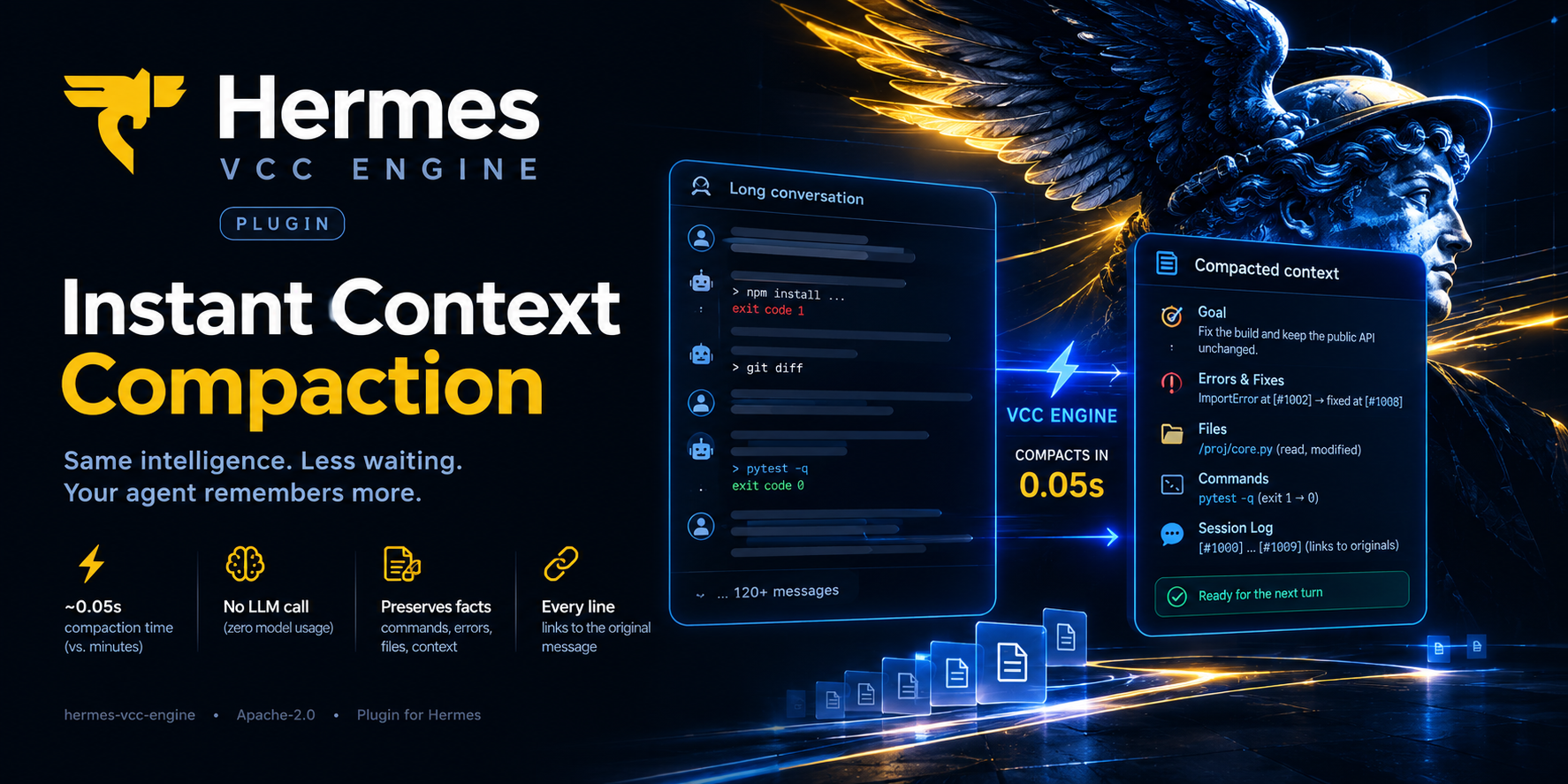
Hermes compaction in milliseconds, not minutes, and the agent remembers more afterwards.
When a Hermes Agent conversation fills its context window, Hermes stops and asks your model to write a summary of everything so far. On a local model that takes minutes (a median of 8 in our benchmark, up to 21), and you wait the whole time. This plugin builds that summary in about 0.05 seconds, without calling the model. The summary keeps the exact commands, exit codes, errors and files, and every line links back to the original message.
Based on the research paper View-oriented Conversation Compiler for Agent Trace Analysis (VCC, arXiv 2603.29678).
Install in 30 seconds
hermes plugins install danbiocchi/hermes-vcc-engine --enable
hermes config set context.engine vcc
Restart Hermes (CLI, gateway or web UI). Every compaction now logs vcc: projected N turns into M chars in X ms (no LLM call).
Changed your mind? hermes config set context.engine compressor puts the stock compressor back.
Works with Hermes 0.21.7 or newer. The engine tests pass on the v0.21.7, v0.22.2, v0.22.4, v0.22.5 and v0.23.0 releases, and a live compaction with a local model was checked on v0.22.2.
Who it's for
- ✅ You run Hermes on a local or slow model, and long sessions stall for minutes every time the context fills up.
- ✅ You do long coding or ops sessions that compact again and again.
- ✅ You need the agent to keep the facts straight: which command failed, which error appeared, which files it read or changed.
- ➖ On a fast cloud API the stock summary already takes seconds, so the speed gain is small. The recall results below were measured on a local 27B model, not a frontier one.
What you get
| Stock Hermes | VCC Engine | |
|---|---|---|
| How the summary is made | Your model rewrites up to ~160,000 characters of history | Facts are copied from the recorded messages by fixed rules |
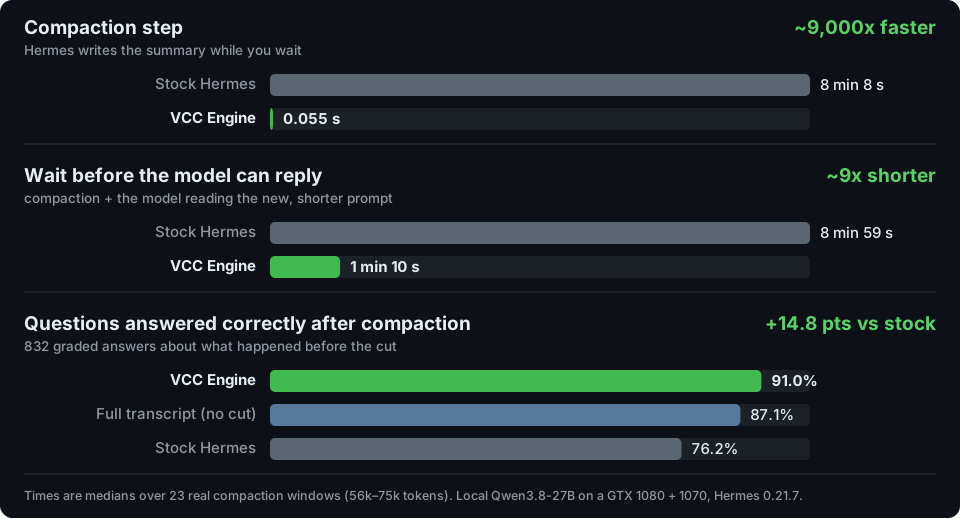
| Summary time on a local 27B model | 8 min median, up to 21 min | 0.055 s |
| Model calls per compaction | 1 long generation | 0 |
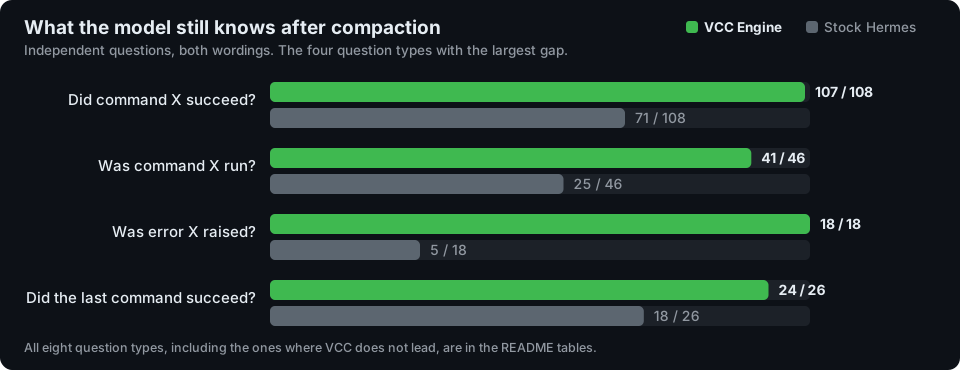
| "Did command X succeed?" answered correctly | 71 / 108 | 107 / 108 |
| "Was error X raised?" answered correctly | 5 / 18 | 18 / 18 |
| Same input gives the same summary | No | Yes |
| Getting back a detail that was cut | Search the history by keyword | Jump straight to it: every line carries a [#N] link to the original message |
How it works
Hermes compacts by keeping the start and the most recent part of the conversation and replacing the middle with a summary. VCC Engine changes only one thing: who writes that summary. Instead of asking your model, it reads the middle of the conversation and pulls out what an agent needs to keep working:
- 🎯 Goal: what you asked for, in your own words
- ⚠️ Errors & fixes: what failed, the error text, and where the same call later succeeded
- 📁 Files: every file read, modified or written
- 💻 Commands: every command, with its exit code and outcome
- 📜 Session log: a short excerpt of each message, tagged
[#N](if space runs out, the newest are kept)
Nothing is deleted. Hermes archives the original messages in its session database, and the agent can open any [#N] in full with session_search.
flowchart TD
    A["Prompt reaches the compaction threshold"] --> B["Hermes splits the conversation<br/>head / middle / recent tail"]
    B --> C["VCC Engine summarizes the middle<br/>rules only, no model call, ~0.05 s"]
    C --> D["Hermes adds its own extras<br/>redaction, verbatim user messages, anchors"]
    D --> E["Model continues with<br/>head + summary with [#N] links + tail"]
    B --> F[("Hermes session database<br/>originals archived, not deleted")]
    E -. "session_search(around_message_id=N)" .-> F
Everything else stays Hermes: when to compact, what stays verbatim, tool-call pairing, redaction and archiving. On the next compaction the previous summary is merged rather than summarized again, so the original goal and the file and command lists carry forward.
What the summary looks like
From the test fixture tests/transcripts.py:fix_the_build (not a real session). The user asks for a fix, the tests fail, the agent patches a file, and the tests pass.
## Goal
The build in ~/proj is red, please fix it and keep the public API unchanged.

## Errors & Fixes
- [#1001] terminal `cd ~/proj && pytest -q` — ERROR exit 1: E ImportError: cannot import name 'parse' from 'proj.core' 1 failed → fixed at [#1008]

## Error Names Seen
Named errors that appeared in tool output:
- ImportError (first at [#1002])

## Relevant Files
Every file read or changed with a file tool in this part of the session; terminal commands may have touched others.
- /home/u/proj/proj/core.py — read; modified (patched)

## Commands Run
- `cd ~/proj && pytest -q` — failed (exit 1), then succeeded (exit 0)

## Detailed Session Log (oldest first)
[#1000] user: The build in ~/proj is red, please fix it and keep the public API unchanged.
[#1001] → terminal: `cd ~/proj && pytest -q`
[#1002] ← terminal ERROR exit 1: E ImportError: cannot import name 'parse' from 'proj.core' 1 failed
[#1005] → patch: `/home/u/proj/proj/core.py`
[#1008] ← terminal exit 0: 48 passed in 1.2s
[#1009] assistant: Fixed: 'parse' was renamed to '_parse' in core.py. All 48 tests pass.
The session log is shortened here; the real output has one line per message plus a header explaining the [#N] links. The full fixture output is in docs/HOW-IT-WORKS.md.
The evidence
Every number on this page comes from real Hermes sessions run on real hardware: Qwen3.8-27B (IQ3_S, llama.cpp) on a GTX 1080 + GTX 1070, Hermes 0.21.7. Current report: hermes-vcc-engine 0.4.0. The full method, statistics and threats to validity are in docs/HOW-IT-WORKS.md.
Recall: does the model still know what happened?
The test used 23 real compaction windows from 4 sessions, with 416 machine-graded questions, each asked in two wordings (832 answers per context). The model got the exact message list Hermes sends after compaction, followed by the question.
| Context the model was given | Correct | |
|---|---|---|
| hermes-vcc-engine 0.4.0 | 757 / 832 | 91.0% |
| Full window, never compacted | 725 / 832 | 87.1% |
| Stock Hermes (LLM summary) | 634 / 832 | 76.2% |
| Other hermes vcc plugin¹ | 620 / 832 | 74.5% |
¹ The other VCC-based context engine in the Hermes plugin catalog, version 0.1.0 at its pinned commit.
Each comparison below is paired, so every answer is matched with the same question under the other context. The p-value comes from a sign-flip permutation test over windows, and the 95% interval from a bootstrap over windows.
| 0.4.0 vs | Only 0.4.0 right | Only the other right | Difference | 95% CI | p |
|---|---|---|---|---|---|
| Other hermes vcc plugin | 151 | 14 | +16.5 pts | +11.8 to +21.6 | < 0.001 |
| Stock Hermes | 134 | 11 | +14.8 pts | +10.7 to +19.1 | < 0.001 |
| Full window | 62 | 30 | +3.8 pts | −0.1 to +8.1 | 0.10 |
- Questions written independently: 247 questions came from
bench/questions.py, which was written without reading the summarizer. The order still held: 0.4.0 scored 88.3%, the full window 83.8%, stock 70.4% and the other plugin 67.4%. - Windows never seen during development: 10 windows cut at 64k were never inspected while the summary format was designed. On those, 0.4.0 scored 90.4%, the full window 90.2%, stock 81.1% (p = 0.008) and the other plugin 80.1% (p = 0.011).
- "I don't know" answers: 0.4.0 gave 23, the full window 27, stock 71 and the other plugin 94.
All eight question types (independent questions, both wordings):
| Question | 0.4.0 | Full window | Stock | Other plugin |
|---|---|---|---|---|
| Did command X succeed? | 107 / 108 | 100 / 108 | 71 / 108 | 55 / 108 |
| Did the last command succeed? | 24 / 26 | 21 / 26 | 18 / 26 | 10 / 26 |
| Was command X run? | 41 / 46 | 33 / 46 | 25 / 46 | 29 / 46 |
| Was error X raised? | 18 / 18 | 1 / 18 | 5 / 18 | 0 / 18 |
| Was file X changed? | 86 / 88 | 86 / 88 | 74 / 88 | 84 / 88 |
| Was file X changed? (it was only read) | 55 / 62 | 55 / 62 | 54 / 62 | 55 / 62 |
| Which word was in the user's request? | 90 / 102 | 93 / 102 | 88 / 102 | 83 / 102 |
| How many times was tool X called? | 15 / 44 | 25 / 44 | 13 / 44 | 17 / 44 |
Speed
| What was measured | Stock Hermes | VCC Engine | |
|---|---|---|---|
| The summary step, on the 23 windows (~56–75k tokens) | median 488 s (279–1,261 s) | median 0.055 s | ~9,000x faster. 2 of 23 stock runs went past Hermes's 15-minute limit. |
| Summary + the model reading the new prompt | median 539 s (347–1,409 s) | median 70 s (22–138 s) | ~9x shorter wait before the model can start replying (2.9x to 28x per window) |
| Whole pause in real use, including the next full reply (Hermes logs) | median ≈ 443 s (n = 39) | median ≈ 216 s (n = 12) | ~2x shorter |
Why aren't the last two rows 9,000x? After any compaction the model has to read the new, shorter prompt, and in real use it then writes a full reply. That work is the same under either engine. The real-use row comes from the author's Hermes logs while versions 0.1 and 0.2 were installed. It compares different sessions and context sizes, so treat it as indicative. The summary step's speed hasn't changed meaningfully since 0.2.
Integrity: does the summary misquote anything?
| Check | Result |
|---|---|
| Every word in every session-log line appears in the message that line cites | 937 / 937 lines |
| The same check, with a fake word planted to prove it can fail | 17 / 17 caught |
[#N] links in real stored summaries, opened with Hermes's session_search | 436 / 436 open the right message |
| Failed commands reported as failed, checked against the raw tool results (69 windows, ~490 commands) | 43 / 43, with 0 wrong outcomes |
| Model calls during a normal compaction | 0 (the tests fail if one happens) |
The fine print
- Who it was tested on: one user's sessions and one model. Your workload and model may give different numbers.
- What the questions cover: they are factual and machine-graded. They don't test whether the agent finishes its next task. They don't ask about decisions, reasoning or preferences either, which is what an LLM summary is written to capture.
- Against the full window: 0.4.0's +3.8 point lead over never compacting isn't statistically significant. Read it as "about as good as the full transcript", not better.
Configuration
Everything is optional, set under context.vcc in config.yaml. Out-of-range values are clamped, and values that can't be parsed fall back to the default.
| Key | Default | Range | Effect |
|---|---|---|---|
budget_ratio | 0.06 | 0.01–0.30 | Summary size as a share of the context window |
min_budget_tokens | 1500 | 300–50,000 | Smallest summary budget |
max_budget_tokens | 8000 | 500–100,000 | Largest summary budget |
fallback_to_llm | true | bool | If the summary raises an error, use Hermes's stock LLM summary for that pass |
fast_anchors | true | bool | Build Hermes's anchor index with vcc/anchors.py, which is checked against Hermes's own builder and switches itself off on any mismatch |
only_local_models | false | bool | Write the summary only while the chat model runs locally. With a hosted model, Hermes's stock LLM summary runs instead, unless /vcc on is set (below) |
The budget is the smallest of budget_ratio × window, Hermes's own content-scaled summary budget, and max_budget_tokens, but never less than min_budget_tokens. Hermes doesn't pass its compression: settings to plugin engines, so the engine reads the same keys the built-in compressor reads, with the same defaults (threshold, protect_last_n, target_ratio, the proactive_prune_* keys and the rest; see vcc/engine.py:_compressor_kwargs).
With only_local_models: true, the engine checks the chat model's endpoint at every compaction, using Hermes's own is_local_endpoint. Loopback, LAN, link-local, .local and Tailscale addresses count as local. Only network endpoints (http, https, ws, wss) can be local: a bridge such as process://claude-subscription-directsdk-experimental, which drives the Claude Code CLI on this machine, is a hosted model. A local model gets the instant summary, with no LLM call. A hosted model (Anthropic, the Claude Code CLI, OpenRouter and so on) gets Hermes's stock summary, written by the model Hermes uses for summaries, and the summariser's context window caps the trigger, as with the built-in compressor. The check follows model switches and fallbacks within a session, and vcc_engaged, vcc_model_local and vcc_remote_passes in the engine status show which path ran.
Switching vcc for hosted models from a chat: /vcc
Type these in any Hermes chat (WebUI, Discord, CLI):
| Command | Effect |
|---|---|
/vcc | Show whether hosted models use vcc now, and why |
/vcc on | Hosted models use vcc too |
/vcc off | Hosted models get Hermes's stock LLM summary |
/vcc default | Back to the config: vcc for hosted models unless only_local_models is on |
A local model always uses vcc; the switch only decides for hosted ones. It is one switch per Hermes profile, kept in <HERMES_HOME>/vcc_state.json, so it reaches every chat and every Hermes process and survives restarts. It is not per chat, because Hermes's WebUI calls plugin commands without saying which chat they came from. A change applies from the next compaction. If it changes who writes the summary mid-session, the engine recomputes the trigger as update_model would, so the summariser's window caps it exactly while Hermes summarises. The engine status reports vcc_hosted_models (on/off) and vcc_hosted_source (config or /vcc).
If a memory provider plugin gives Hermes text to preserve at compaction time (on_pre_compress), the summary keeps it in a ## Memory Provider Context section. It is treated as data, capped like ## Earlier Summary, and carried into later summaries until the provider sends new text.
Security and privacy
What the plugin's runtime code (__init__.py and the vcc/ folder) does and doesn't do:
- Network: no network calls of its own, and no model call on the normal path. If
fallback_to_llmis on and a summary raises an error, Hermes's own summary call runs for that pass, to the model Hermes is configured to use. - Files: reads Hermes's
config.yamlthrough Hermes'sload_config_readonly. The only file it writes is<HERMES_HOME>/vcc_state.json, and only when someone types/vcc on,offordefault: one boolean, written atomically at mode 0600 (defaultdeletes it). Engines read that file at each compaction check (onestatwhile it hasn't changed). It doesn't openstate.db. - No subprocesses, shell commands, environment variables, credentials, background threads, telemetry or self-update. Python standard library only.
- Session history: it works only on the message list Hermes passes in. It never modifies or deletes messages; archiving is Hermes's own behavior.
- Untrusted tool output is treated as data:
- ANSI escapes, control characters and bidi characters are stripped.
- Chat-template markers (
<|im_start|>,[INST],<<SYS>>,<think>) are neutralized. - Quoted text can't open a new
##section. - Fuzz tests cover these.
- Secrets: the summary goes through Hermes's own
_redact_compaction_textbefore Hermes stores it. The plugin relies on that redactor and has no redaction tests of its own. - Failure handling:
- At startup, if any Hermes internal it needs is missing, the engine runs as the stock compressor and logs a warning.
- If a summary raises an error, that pass falls back to the stock LLM summary.
- On 2 of 71 benchmark windows with no user-written messages, Hermes's own provenance check rejected the summary and the pass fell back.
- Hermes internals: the engine uses private
ContextCompressormethods (_generate_summary,_augment_summary_lean,_ground_historical_task_snapshot,_derive_trigger,_apply_threshold_tokens_capand others), and private helpers and constants inagent.context_compressor(the anchor index builder, its patterns, redaction, skill markers,_typed_user_text),agent.conversation_compression,agent.auxiliary_client,agent.agent_initandagent.skill_commands. These aren't a documented plugin API and can change in a Hermes update. That is why the startup check and fallback exist.
The bench/ scripts are separate and never loaded by Hermes. When you run them by hand, they read ~/.hermes/state.db read-only, call your local model server, and write results to ~/.cache/hermes-vcc-engine/ at mode 0600. They print only counts, scores, ids and hashes. Before each model call, the GPU benchmarks check that nobody else is using the server (bench/idle.py reads the WebUI's /health, the router's /models and /slots, and the llama-server journal), and they never load or swap a model.
bench/continuation.py is different: it runs a real Hermes agent, with shell and file tools, on a generated coding task. The agent runs inside bwrap with the whole filesystem read-only except the task folder (~/vcc-bench-tasks), its own Hermes home (~/vcc-bench-home, outside your profiles so your running gateway never serves it) and Hermes's runtime lock files. Its model calls go through a proxy on 127.0.0.1:18080. Both folders are recreated for every run and deleted at the end.
Limitations
- It quotes; it doesn't reason. There are no Key Decisions or rationale sections. Reasons survive only as excerpts of what the assistant wrote.
- The section rules are heuristics:
- "Fixed" means the identical call later succeeded.
- "Error Names Seen" lists error names found in any tool output, including output from successful commands.
- The summary is capped:
- 40 files, 25 commands, 12 blocked entries, 12 fixes and 20 error names.
- The session log keeps the newest lines that fit.
- Anything dropped is still in
state.db.
- The
[#N]links help only if the agent uses them by callingsession_search. Messages Hermes hasn't saved yet get[tN]labels, which can't be opened that way. - The prompt cache still resets. Every compaction rewrites the prompt, with or without VCC Engine, so the model re-reads it afterwards.
- Hermes's pruning comes first. Large old tool results reach the engine as Hermes's one-line stubs. The command and exit code survive, but the output text doesn't.
plugins.isolation: hostis untested. The engine is built and tested against the default in-process mode.
Run the benchmarks yourself
Your sessions never leave your machine. Everything is stored under ~/.cache/hermes-vcc-engine/ at mode 0600, and the scripts print no transcript text.
PY=$(ls -d ~/.hermes/tools/python-*/bin/python3 | head -1)   # the interpreter Hermes uses

# Quick, CPU only
$PY -I bench/proofs.py --synthetic       # faithfulness checks on generated transcripts (runs in CI)
$PY -I bench/proofs.py                   # the same on your own sessions, plus [#N] link checks
$PY -I bench/bench.py --check-golden     # timings, and fail if any output byte changed

# The full head-to-head (needs your local model server; takes hours)
$PY -I bench/certainty.py freeze 98304 65536      # cut your sessions where Hermes would compact them
$PY -I bench/certainty.py compact STOCK           # stock summaries on your model (slow)
$PY -I bench/certainty.py compact v0.4            # this checkout
$PY -I bench/certainty.py ask v0.4 STOCK FULL     # ask the questions under each context
$PY -I bench/certainty.py report                  # scores and paired statistics

# An agent continuing a coding task through several compactions (needs bwrap and the local model server)
$PY -I bench/continuation.py run --arms vcc,stock  # 3 task variants per arm; resumable
$PY -I bench/continuation.py report
The GPU benchmarks use VCC_BENCH_MODEL (default: Hermes's model.default), wait until that model is loaded (they never load it themselves), and pause while anyone else is using the server.
To benchmark another context engine with the same harness, set VCC_OTHER=<path to its package>. The older round-1 harness, bench/headtohead.py, is still included.
Development
git clone https://github.com/danbiocchi/hermes-vcc-engine && cd hermes-vcc-engine
uv venv --python 3.14 && uv pip install pytest
.venv/bin/python -m pytest tests -q    # 142 tests; CI runs Python 3.11 to 3.14
The projector tests run anywhere. The engine and anchor tests need a Hermes checkout (HERMES_AGENT_DIR, default ~/.hermes/hermes-agent) and skip without one. They:
- replace the LLM client with one that fails if called
- run full
compress()passes - compare the fast anchor index against Hermes's own
- load the plugin through Hermes's loader in a sandboxed
HERMES_HOME
hermes plugins validate . --install-deps passes on this repository. Version history is in docs/CHANGELOG.md; known problems and planned work are in docs/BACKLOG.md.
Research background
- VCC (Lvmin Zhang and Maneesh Agrawala) compiles agent traces into reduced views whose lines keep stable references to the full trace. This plugin is an independent, Hermes-specific implementation of that idea, not the authors' compiler. The paper's AppWorld results don't transfer to Hermes compaction; the numbers on this page are this project's own.
- The Complexity Trap found that for software-engineering agents, simply masking old tool output performs about as well as LLM summarization, at lower cost.
- Factory's compression evaluations found file tracking was the weakest area of every compressor they measured.
- NoLiMa and Sufficient Context explain why wording matters: models find facts less reliably when the question and the text share no words, and they abstain when the context seems insufficient.
License
Apache-2.0. vcc/anchors.py mirrors the structure of Hermes's anchor index builder (MIT); see vcc/NOTICE.
README from the reviewed commit 4d8add7; it updates when the author re-pins.


