 tuancookiez-hub
hyatlas — HyAtlas memory provider for Hermes Agent
Persistent 8-layer memory for Hermes, backed by HyAtlas: a pure-Go,
single-binary memory server (Apache-2.0) that runs on your machine. It has an
embedded vector store (chromem-go), in-process BGE-small embeddings (onnxruntime-go,
no Python, no GPU), LLM fact extraction with a selectable mode (lite, pro,
ultra; lite makes no LLM call), and a bitemporal knowledge graph with source
citations.
This plugin is the Hermes side: a MemoryProvider (a thin HTTP client), four
agent tools, a /hyatlas slash command, a hermes hyatlas CLI, a Desktop pane
with a graph view, and a web dashboard panel. The server is a separate binary,
hyatlas-go, and this plugin does not include it.
What you get
- Cross-session memory. Each completed turn is saved to the server, which
keeps the raw text (L2) and, inproandultra, extracts profile, fact,
intention and entity-page layers (L1, L3, L7, L8), dates facts and intentions,
records task experiences, and writes one summary (L4) per episode of work. In
ultrait also builds knowledge and schema layers (L5, L6) (see the mode table
below). - What the agent sees. The recall block lists the Now page first, then entity
pages, profile and schemas, open intentions, task experiences and other facts.
Each line carries its date, "happened YYYY-MM-DD" when the fact has an event date,
and a "was: …" line when it replaced an older fact. - Recall. Before each turn, Hermes calls the provider's
prefetchwith the
user's message. The plugin searches the server with that message and returns the
matches for the turn. If the search fails, it returns the last recall for the same
session. After each turn,queue_prefetchruns a background search and stores the
result as that session's fallback. - Agent tools.
hyatlas_status,hyatlas_search(channels: pages, profile,
proactive, experiences, normal),hyatlas_recent,hyatlas_add. - No credential files. The plugin never reads Hermes's login or any other
tool's credentials. The extraction key is your own (see Credentials). - Built-in
memorytool. Anaddthrough Hermes'memorytool is sent to
the server as a plain add and stored as a raw memory (L2), tagged with its
target in the metadata. It is not written to L1 Profile directly. L1 fills
later, when extraction labels the memory as a user preference (proand
ultra). Areplaceorremoveforgets the entry it replaces or removes, using
the old text Hermes sends asprevious_content. The server marks those raw rows,
and what was derived from them, as forgotten, which keeps them restorable. A
replacethen adds the new content as anadddoes. Aremovethat comes with no
old text does nothing. - Session-aware recall. Searches carry the session id Hermes gave the provider, so
the server ranks that session's open intentions above other sessions'. The recall
block lists the channels in the order the server sends (order), and in the plugin's
own order for an older server. - Local calls skip proxies. The plugin ignores
HTTP_PROXYandHTTPS_PROXYfor
its calls to the HyAtlas server, so memory writes, searches and the key hand-over
never go through a proxy. - Desktop pane. Overview (health and layer counts), Graph, Memories, Search,
Add. Its design is indesktop/SPEC.md. - CLI and slash command.
hermes hyatlas status|doctor|search|add|recent|start|stop
and/hyatlas status|search <q>|add <text>|recent|start|stop. Thehermes hyatlascommand appears only whilememory.providerishyatlas. - Recent memories.
recent(and thehyatlas_recenttool) includes raw (L2)
rows by default inlite, the only layer that mode stores. Inproandultra
raw rows are left out by default.hermes hyatlas recent --include-rawand
--no-include-rawoverride the default, andhyatlas_recenttakes the same
include_rawargument.
Install
The plugin needs the HyAtlas server (hyatlas-go) running on this machine.
Install the server from the project repository first, with its scripts/install.sh
(see the repository README). For a release binary, that script downloads the
prebuilt build. A release binary is embedded and is about 160 MB (approximate),
because it carries the embedding model. For a source build, the script fetches
the model (about 133 MB) and the onnxruntime library that matches your CPU, and
the server then needs the model folder (its search order is in the repository
README's Model assets section). See Disclosure
for what the installer downloads.
Then install and enable the plugin:
# or straight from the repository. The subdirectory must be part of the identifier:
hermes plugins install tuancookiez-hub/HyAtlas-Memory/plugins/hyatlas

hermes plugins enable hyatlas
The bare name hermes plugins install hyatlas works only once the plugin is in
the Hermes catalog. Equivalent forms: tuancookiez-hub/HyAtlas-Memory#plugins/hyatlas
and https://github.com/tuancookiez-hub/HyAtlas-Memory.git#plugins/hyatlas. The
GitHub forms install the repository's default branch as it is at that moment.
To install from a local clone, use a file:// URL with the subdirectory fragment:
hermes plugins install file:///path/to/HyAtlas-Memory#plugins/hyatlas
A plain local path such as ./HyAtlas-Memory/plugins/hyatlas does not work. Hermes
reads it as owner/repo and tries GitHub.
Select it as the memory provider, either with hermes memory setup or in
~/.hermes/config.yaml:
memory:
  provider: hyatlas
Setup
hermes memory setup picks the provider, then asks five questions (Enter keeps the
default). It prompts only on a real terminal. Without
one it only selects the provider, and the values are then set as described under
Without a terminal below. On a terminal, it writes memory.provider to
config.yaml, the answers to hyatlas.json (added to what is already there, so
running setup again keeps your advanced settings), and the key to .env. It does not
start the server.
The questions, in order:
- How much should HyAtlas think? A menu:
ultra(recommended),proorlite.
Enter takesultra. Your memories and embeddings stay on this machine in every mode;
onlyproandultrasend memory text to the AI endpoint in question 2. - AI endpoint. Any OpenAI-compatible API. Enter takes the Nous Portal
(https://inference-api.nousresearch.com/v1). Not used inlite. - API key for that endpoint. Entered masked and saved in Hermes's
.envas
HYATLAS_LLM_KEY. Enter skips it, which is right forlite. - Model. Enter takes a free Nous Portal model (
meituan/longcat-2.5-preview:free).
Not used inlite. - Auto-start the HyAtlas server with Hermes? (y/N) Enter means no. Answer
y
unless you start the server yourself, for example with the launcher or a service.
That's it. Run hermes hyatlas doctor to check everything works. Advanced settings: hermes hyatlas settings or Desktop → Settings → Plugins → hyatlas.
Everything else is an advanced setting (wait for extraction, server address and port,
user and agent IDs, binary path, launcher script, data folder, request timeout). It is
not asked during setup. hermes hyatlas settings lists every setting with its value and
where the value comes from (default, hyatlas.json, config.yaml or env), with a
one-line explanation for each advanced one. hermes hyatlas settings set KEY VALUE
changes one after checking it; for example hermes hyatlas settings set server_port 19600. It refuses llm_key, which belongs to hermes memory setup. The same settings
are in Desktop → Settings → Plugins → hyatlas.
lite needs no endpoint, model or key: the server makes no LLM call at all. The
wizard's default endpoint and model are the Nous Portal and a free model, written to
hyatlas.json when you press Enter; the server itself has no default endpoint or
model, so a server you start without them stays unconfigured.
If pro or ultra has no endpoint, model or key, the server reports
llm: "unconfigured" (or "awaiting_key" when only the key is missing) in
/api/v1/status, and writes return extraction_status: "unconfigured" instead of
failing silently. The raw trace is still stored.
The key and a server you start yourself. Hermes stores the key in .env as
HYATLAS_LLM_KEY; the plugin passes it to a server it starts, or hands it over
localhost to a server on this machine that is waiting for a key (llm: "awaiting_key"), so a server started with the launcher or a service needs no extra
step. The hand-over is checked when Hermes loads the plugin and when a session
begins, then at most every 10 minutes, and only for a loopback server_host. The
plugin shares only this key, never a Hermes sign-in or provider token, and never logs it.
Then run hermes hyatlas doctor to check everything works. hermes memory setup cannot
test anything after it finishes, so the doctor does: it checks that the server answers,
that its version matches the plugin, which mode it runs, that the AI key arrived, that the
model answers (one tiny call), that a test memory can be written, found and deleted, and
whether turns are waiting for extraction. Each line is marked ✓, ! (worth a look) or
✗ (broken), and every ! and ✗ has a Fix: line. The exit code is 1 when anything
failed. It never prints the key, and its test memory is written under its own user id
(hyatlas-doctor), so it does not mix with your recall.
Without a terminal
Where there is no terminal to prompt on, set the values in any of these places. A
later source wins over an earlier one (see Settings below). The keys are the
setting names from the table, so mode is mode, not HYATLAS_MODE.
{ "mode": "pro", "llm_base": "https://your-endpoint.example/v1", "llm_model": "your-model" }
That JSON goes in $HERMES_HOME/hyatlas.json. The same keys can go under
plugins.entries.hyatlas.settings in config.yaml:
plugins:
  entries:
    hyatlas:
      settings:
        mode: pro
        llm_base: "https://your-endpoint.example/v1"
        llm_model: "your-model"
The LLM key is the exception. Export HYATLAS_LLM_KEY, or keep the value the wizard
writes to .env. The plugin does not use a key found in hyatlas.json or
config.yaml.
Settings
| Key | Env var | Default | Purpose |
|---|---|---|---|
| server_host | HYATLAS_SERVER_HOST | 127.0.0.1 | Server host the plugin connects to. A DNS name is refused by the server with 403 unless the server's HYATLAS_ALLOWED_HOSTS lists it (see below). |
| server_port | HYATLAS_SERVER_PORT | 19528 | Server port |
| user_id | HYATLAS_USER_ID | default | Default user scope for memories |
| agent_id | HYATLAS_AGENT_ID | default | Default agent scope (overridden per session) |
| auto_start | HYATLAS_AUTO_START | false (the wizard asks y/N) | Start the server binary when it is unreachable |
| binary_path | HYATLAS_BINARY_PATH | (discover) | Path to hyatlas-go |
| launcher_path | HYATLAS_LAUNCHER_PATH | (none) | Windows only: a hyatlas-go.ps1 that hermes hyatlas start\|stop runs instead of the binary |
| request_timeout | HYATLAS_REQUEST_TIMEOUT | 15.0 | HTTP timeout for server calls, in seconds |
| data_dir | HYATLAS_GO_DATA | (conventional) | Server data directory. Also used by hermes backup |
| llm_base | HYATLAS_LLM_BASE | Nous Portal (from the wizard) | Base URL of an OpenAI-compatible extraction endpoint |
| llm_model | HYATLAS_LLM_MODEL | a free Nous Portal model (from the wizard) | Model id at that endpoint |
| llm_key | HYATLAS_LLM_KEY | (none) | Secret. The setup wizard stores it in .env (0600), never in hyatlas.json. The plugin passes it to a server it starts, or hands it over localhost to a server on this machine that is waiting for a key. Never logged. |
| mode | HYATLAS_MODE | ultra | ultra | pro | lite. The wizard stores the whole menu line; only the first word counts. |
| sync | HYATLAS_SYNC_EXTRACT | default (off for a spawned server) | Whether a write waits for extraction: default | on | off |
All fourteen are listed by hermes hyatlas settings and editable in Desktop → Settings → Plugins → hyatlas, in
plugins.entries.hyatlas.settings in config.yaml, or through the environment
variables above (an environment variable wins). Empty or unset values mean the
default. llm_base, llm_model and mode are forwarded to a server the plugin
starts, and so is HYATLAS_LLM_KEY when it is in Hermes's environment (see
Disclosure).
Two notes on the table:
- Hostnames. The server accepts only
localhostand IP literals in theHost
header, unless the name is in itsHYATLAS_ALLOWED_HOSTS. This applies to every
route, including/healthz. So aserver_hostthat is a DNS name (a LAN name, or
a box that is not this machine) reports the server as unreachable until the
server's allowlist names it.HYATLAS_ALLOWED_HOSTSis a server setting. It is not
a plugin setting, so set it where the server runs. Entries are hostnames, and a
port in an entry is ignored. - User scope. Graph data written before owners were recorded has no owner. It
stays visible under everyuser_idfilter, which is how single-user data from
older releases keeps working.
Server-side search settings. These are server variables, not plugin settings.
Set them where the server runs, in its environment, not in hyatlas.json or
config.yaml.
HYATLAS_USER_ALIASES: groups of user IDs that are one person, for search. Groups
are separated by;, and IDs within a group by,. Example:
HYATLAS_USER_ALIASES="221727702992945152,default,hermes-memory-archive". Use it
when the same person reaches Hermes under several user IDs, such as a
messaging-gateway ID and the CLI'sdefault. A search for any ID in a group covers
the whole group. Unset means no aliases.HYATLAS_MIN_SCORE(default0.60): search drops vector hits below this cosine
similarity, so an off-topic query returns nothing.0disables the floor.HYATLAS_DEDUPE_SCORE(default0.92): a new fact at or above this similarity to
the owner's nearest fact supersedes that fact.0disables it.
Every search the plugin makes names its owner. Memories with no owner at all, written
by releases before owners were recorded (in an older store, most knowledge-graph
relations), are returned under any owner. On a server shared by several people, data
from those older releases is therefore visible to all of them.
The server accepts more HYATLAS_* variables than these (for example
HYATLAS_EMBED_BASE, HYATLAS_CONSOLIDATE_EVERY, HYATLAS_RAW_RETENTION). The
plugin passes any of them through to a server it starts. The server's own
documentation, in the repository README and .env.example, describes them.
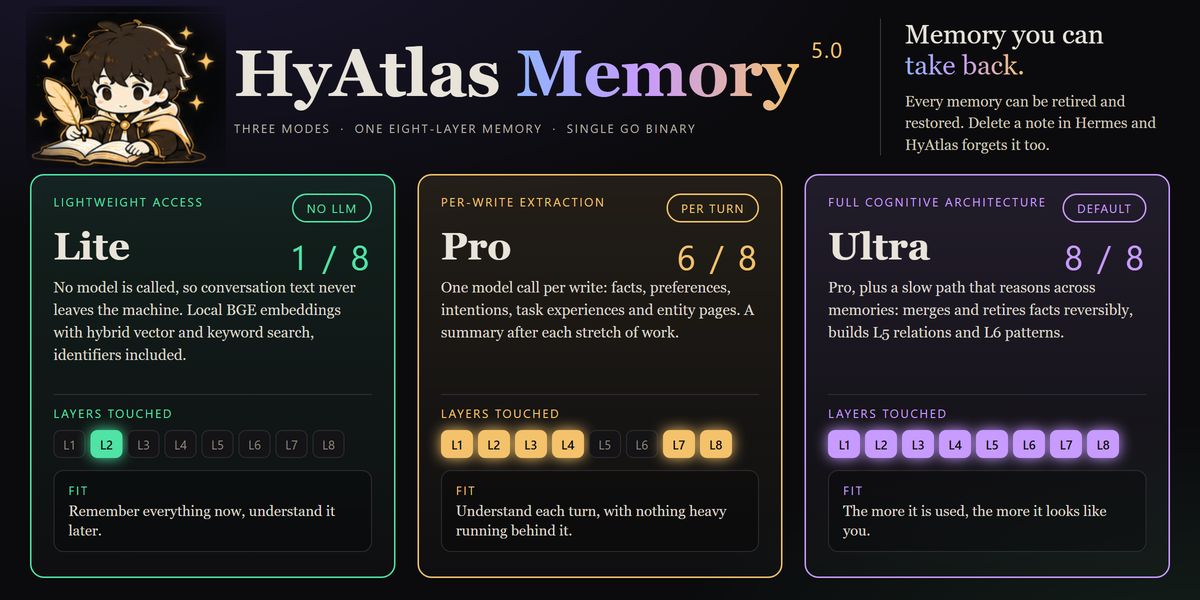
Mode
| HYATLAS_MODE | LLM calls | Reasoning scope | Layers filled | Periodic consolidation |
|---|---|---|---|---|
| lite | none | none | 1 / 8: L2 raw | no |
| pro | one per write, plus one per episode summary | within that one turn | 6 / 8: L1, L2, L3, L4, L7, L8 | no |
| ultra (default) | one per write, plus one per episode, plus a periodic batch | across memories and time | 8 / 8 at steady state (7 / 8 with HYATLAS_CONSOLIDATE_GRAPH=off) | yes, every 6 hours |
HYATLAS_RECONCILE=on adds one more call per write (meant for a local model).
L5 (knowledge) and L6 (schema) come only from the consolidation pass, because a
relation needs corroboration from more than one turn and a schema is a pattern
across many turns. So only ultra fills them, and only when a pass finds such
relations and patterns. Each L5 relation is kept in the graph (which the Desktop starmap and the dashboard
draw) and as a searchable memory, so recall can return it. Setting
HYATLAS_CONSOLIDATE_GRAPH=off on the server stops L5 and the arc.
Whether a write waits for extraction is a separate setting, HYATLAS_SYNC_EXTRACT.
A server the plugin spawns defaults to off, so a Hermes turn never waits on
the LLM; pro still extracts every write, just behind the response. With
sync: on, a write waits; the plugin's request timeout (request_timeout,
15 s by default) still applies on the plugin side. A server you start yourself
follows its own default (pro waits, ultra does not).
Under ultra, each pass works on one owner (a user_id / agent_id pair) at a
time. An owner is sent when its facts changed since its last pass, or when not every
window of its facts has been covered since that change. An owner with a single fact,
or with nothing due, is not sent. An owner with more facts than
HYATLAS_CONSOLIDATE_BATCH (default 50) is walked one window per pass, not sent in
one call. After a change, a pass alternates between the newest window and the next
window of the walk. A walk window that fails three passes in a row is skipped and reported.
Updating
The plugin never updates itself. A catalog entry pins one exact commit, and that
pin is the trust model: a self-updater would let an installed copy move to a
commit nobody reviewed. Updates arrive when a re-pin lands in the catalog, and
you apply them deliberately:
hermes plugins check-updates          # read-only: is anything newer available?
hermes plugins update hyatlas         # apply it
Restart the gateway afterwards so the new code loads. The Desktop pane's version
badge reads the version from the running server's /api/v1/status, so a stale
server shows up as a stale badge.
The server binary is separate. hermes plugins update hyatlas updates the
plugin only. It does not change hyatlas-go. Re-run the server's installer, or
replace the binary with a newer release asset, when you want to move the server.
Requirements
- Hermes Agent
>= 0.21.4 - The HyAtlas server. Release assets are built for Linux amd64, macOS arm64 and
Windows amd64. On other platforms, the installer builds from source, which needs
Go 1.26 or newer and a C compiler. - No Python dependencies beyond Hermes core
Disclosure: what this plugin does on your machine
This section describes what the code in this repository does. The statements are
checked against the plugin source and the server source at this commit.
Network
The server has two maintenance endpoints under /api/v1/admin/. They are off (403)
unless the server runs with HYATLAS_ADMIN=on, and compact_raw irreversibly
removes stored tool output. See the upgrade section of after-install.md.
- Plugin to server. All plugin traffic goes to the server at
server_host:server_port(default127.0.0.1:19528), over plain HTTP. The plugin
contacts no other host. Before each turn, Hermes calls the provider'sprefetch
with the user's message, and the plugin searches the server with that message. If
that search fails, the plugin returns the last recall for the same session. After
each turn,queue_prefetchruns a background search and stores the result as that
session's fallback. Hermes callssync_turnafter each turn, which posts that turn
to the server to be stored. The turn is the user's message and the assistant's text
only. Tool calls, tool output, system messages and context-compaction summaries are
not sent. Each message is capped at 4,000 characters and the turn at 12,000. If the
plugin missed earlier messages of the same session, their user and assistant text
is also sent, under the same caps. Eachhyatlas_*tool call is also a request to
the server. - Server to an LLM endpoint. The server calls an LLM only when
HYATLAS_LLM_BASE,
HYATLAS_LLM_MODELandHYATLAS_LLM_KEYare all set, and only inproorultra.
Inlite, no LLM call is made.- In
proandultra, each write's text is sent to that endpoint for extraction.
A failed call or an unparseable reply is retried once, so one write can cost
two requests. - In
ultraonly, every 6 hours by default, the consolidation pass sends one
request per owner that is due (see Mode). An owner with one fact, or with
nothing due, sends none. Each request carries up to 50 of that
owner's live facts (HYATLAS_CONSOLIDATE_BATCH, default 50), each cut to 400
characters with its fact ID and source turn ID. It also carries up to 20 of that
owner's existing schema patterns, each cut to 200 characters. These are facts
already in memory, not just the current turn. An owner's facts are never mixed
with another owner's in one request. - The pass's results are applied as follows. Merged and dropped facts are
superseded, not deleted: they are kept, hidden from search, and each drop stores
its reason. L5 knowledge edges and the cross-session arc are written unless the server runs
withHYATLAS_CONSOLIDATE_GRAPH=off. - The server has no default endpoint. The setup wizard's Enter answer is the Nous
Portal, shown in the prompt and written tohyatlas.json; a blank endpoint is
not forwarded, and nothing is sent without a key you entered.
- In
- Server to an embedding endpoint. By default embeddings are computed locally
by the bundled BGE-small model. IfHYATLAS_EMBED_BASEis set to an
OpenAI-compatible URL, the server sends each memory's text, and each search query,
there to embed it. This applies in every mode, includinglite. The plugin has no
setting for this variable and does not set it. It reaches the server only if you
export it. - Server's web page. The server serves a dashboard at
/dashboard/. Its page
loads a stylesheet fromfonts.googleapis.com(which serves the font files) and
the Chart.js script fromcdn.jsdelivr.net, in your browser when you open it. The Desktop pane is part of the Hermes Desktop
app, and its network use is not in this repository. - No telemetry. The plugin has no analytics or usage reporting. The server's
only outbound HTTP calls are the LLM and embedding requests listed above.
Background process
- Only when
auto_startistrue(defaultfalse), or when you run
hermes hyatlas start(or/hyatlas start), does the plugin start thehyatlas-go
binary as a child process. - Binary lookup, in order: the
binary_pathsetting;hyatlas-goonPATH; a
bin/folder next to the plugin;/usr/local/bin/hyatlas-go;
/opt/hyatlas/hyatlas-go;~/hyatlas/hyatlas-go; and on Windows
C:/hyatlas/hyatlas-go.exeandC:/Program Files/hyatlas/hyatlas-go.exe. startspawns nothing when a server already answers atserver_host:server_port.
The result isok: truewithalready_running: true, and includes the existing
pid whenhyatlas.pidnames a livehyatlas-go. Nothing is written over a live pid.- Two Hermes sessions that auto-start at the same time share a lock file, so only
one of them starts the server. The lock wait is bounded (45 seconds by default).
On a filesystem without file locking, the start goes ahead without the lock and a
warning is logged, so two simultaneous starts are not serialised. - The server's working directory is the binary's folder. Its stdin is
/dev/null.
Its stdout and stderr are appended to$HERMES_HOME/logs/hyatlas.log
(HERMES_HOMEdefaults to~/.hermes). Its PID is written to
$HERMES_HOME/logs/hyatlas.pidonly once the child is seen alive. A child that
dies during startup (for example because the port is taken) is reported as
ok: falseand leaves no pidfile. - The plugin does not stop the server when Hermes exits. Stop it with
hermes hyatlas stop, which sends SIGTERM to the PID inhyatlas.pid(on Windows
it usestaskkill), but only if that PID is still ahyatlas-goprocess. It
then checks that the server stopped answering. The result isok: truewith
stopped: trueonly when that is so. - If the server answers but there is no usable pidfile,
stopreturnsok: false
withrunning: true: the server was not started by this plugin, its pid is
unknown, and the plugin will not guess one. Stop it from the process that started
it. With nothing running,stopreturnsok: truewithrunning: false. - The auto-start wait is bounded. The plugin waits up to 30 seconds, probing the
server's health endpoint every 0.25 s with a 2-second probe timeout. Then it logs
a warning and carries on with the server unreachable. Auto-start is skipped in
cron and flush contexts.
Shell commands
The plugin runs no shell. It starts child processes in these cases only:
- Windows,
launcher_pathset.hermes hyatlas startandhermes hyatlas stop
run that script withpowershell -NoProfile -ExecutionPolicy Bypass -File <script> start|stop.
Its output goes tohyatlas-launcher.outin the system temp folder. The script is
never discovered automatically. Only setlauncher_pathto a script you trust.
The repository'shyatlas-go.ps1reads no credentials. Onstartit also runshyatlas-go.local.ps1from its own folder, if
that file exists: a git-ignored file for your ownHYATLAS_*settings (model,
batch size, owner aliases); seehyatlas-go.local.ps1.example. - Windows, stop and liveness checks. Before it stops the process the plugin asks the
server to write its buffered state (POST /api/v1/flush, best effort). It runs
taskkillto stop the pidfile's process, andtasklistto confirm the pid is ahyatlas-go. - macOS, liveness check. The plugin runs
psto confirm the pid is ahyatlas-go.
On Linux it reads/procinstead.
Files
Read:
$HERMES_HOME/hyatlas.json: settings saved by the setup form.$HERMES_HOME/config.yaml: theplugins.hyatlasblock and the
plugins.entries.hyatlas.settingsblock.HYATLAS_*environment variables.$HERMES_HOME/logs/hyatlas.pid, to find a server it started.- The data directory, only to check that it exists, for
hermes backup.
The plugin does not open .env, auth.json, any other tool's token store, or a
browser profile.
Written:
$HERMES_HOME/hyatlas.json, mode 0600 where the platform supports it, when the
setup form saves settings.$HERMES_HOME/logs/hyatlas.logandhyatlas.pid, when the plugin starts the server.hyatlas-launcher.outin the system temp folder, only with a Windowslauncher_path.
The server writes its memory store, including the vector store and graph.json,
to its data directory (HYATLAS_GO_DATA). The default is ./data, relative to
the server's working directory, which is the binary's folder when the plugin
starts it.
Credentials
llm_keyis declared secret. The setup wizard writes it to Hermes'.env
asHYATLAS_LLM_KEY, with mode 0600, andsave_configstrips it from
hyatlas.json. Hermes loads it into the environment asHYATLAS_LLM_KEY; a
server the plugin starts inherits it, and the plugin hands the same key over
localhost (POST /api/v1/llm/key) to a server on this machine that reports
llm: "awaiting_key", never to a remote host. The plugin does not log it. If the
key is written intohyatlas.jsonorconfig.yamlby hand, the plugin does not use it.- Environment passed to a started server. It receives a short list of OS
variables (such asPATH,HOME, TLS trust paths), everyHYATLAS_*variable from
your environment, andHYATLAS_LLM_BASE,HYATLAS_LLM_MODEL,HYATLAS_GO_HOST,
HYATLAS_GO_PORT,HYATLAS_GO_DATA,HYATLAS_MODEandHYATLAS_SYNC_EXTRACTfrom
settings where you have not exported a value yourself. It does not receive other
tools' keys (for exampleOPENAI_API_KEY). AHYATLAS_LLM_KEYexported in your
environment does reach it. - The extraction key is your own. Save it with
hermes memory setup(the
llm_keysecret), or exportHYATLAS_LLM_KEY, or pointHYATLAS_LLM_KEY_FILEat
a plain-text file. A Nous Portal API key or any OpenAI-compatible provider key
works. The plugin never takes Hermes's own provider or sign-in token (Hermes
catalog rule 11). The server also accepts a key from a launcher or tool you run on
the same machine throughPOST /api/v1/llm/key; it is refused from any other
address, kept in memory only, and never logged. HYATLAS_LLM_KEY_FILEis a server feature. If you export it, the server reads
the bearer token from that file on every call. The plugin has no setting for it,
but it passes the variable through. Point it only at a key file of your own:
pointing it at another program's credential file (such as Hermes'auth.json)
is the pattern antivirus software flags as credential theft, so the server accepts
only a plain-text token file there and refuses a JSON one.- The plugin does not read another tool's login, token store or browser profile.
Listening address
A started server listens on HYATLAS_GO_HOST:HYATLAS_GO_PORT. Unless you export
those yourself, the plugin sets them from server_host and server_port, which
default to 127.0.0.1:19528. Keep it on loopback unless you have a reason not to.
The server has no authentication. Its guard refuses browser-originated and
DNS-name requests, as described in the repository README.
Links
- Server and full documentation: https://github.com/tuancookiez-hub/HyAtlas-Memory
- License: Apache-2.0
README from the reviewed commit 0428086; it updates when the author re-pins.