 nicolasbuelvas
Hermes Incognito
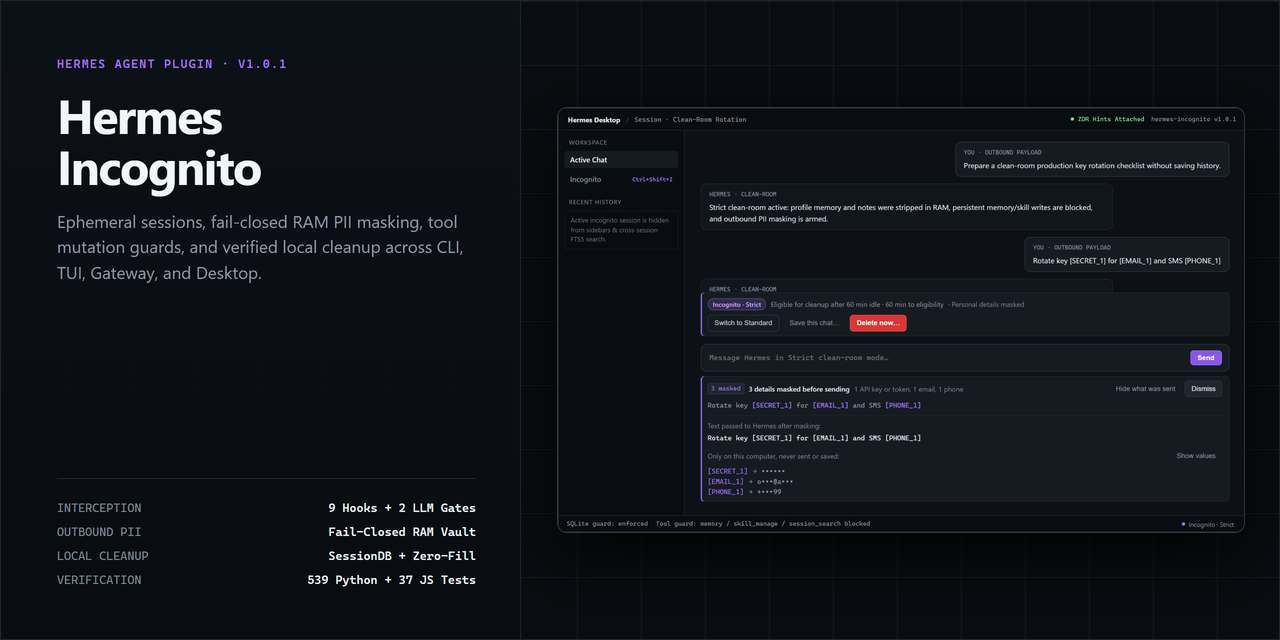
Ephemeral clean-room sessions, fail-closed RAM PII masking, tool mutation guards, and verified local cleanup across Hermes Agent CLI, TUI, Gateway, and Desktop.
Architecture
Hermes Incognito operates as an in-process security and privacy layer intercepting lifecycle events, tool calls, and model communication:
┌─────────────────────────────────────────────────────────────┐
│                      Hermes Agent                           │
├───────────────┬─────────────────────────────┬───────────────┤
│ CLI / TUI     │ Desktop (React / SDK)       │ Gateway / RPC │
└───────┬───────┴──────────────┬──────────────┴───────┬───────┘
        │                      │                      │
        ▼                      ▼                      ▼
┌─────────────────────────────────────────────────────────────┐
│                   Incognito Engine                          │
├──────────────────────────────┬──────────────────────────────┤
│ Lifecycle Hooks              │ Security Interceptors        │
│ • on_session_start           │ • pre_tool_call (Tool Guard) │
│ • on_session_end             │ • pre_llm_call (Middleware)  │
│ • post_compaction            │ • RAM-Only PII Vault         │
├──────────────────────────────┴──────────────────────────────┤
│ Local Cleanup & Verification                         │
│ • SQLite row removal (`state.db`)                           │
│ • File zero-filling & unlinking (`sessions/*.jsonl`)        │
│ • Cleanup receipt generation                          │
└─────────────────────────────────────────────────────────────┘
- State Isolation: Ephemeral sessions are tagged in an isolated, volatile registry and filtered out of standard conversation lists and sidebars.
- Tool Mutation Guard: Active incognito chats intercept
pre_tool_call. Attempts to mutate persistent storage (memory,skill_manage) or inspect historical chats (session_search,cronjob_managein strict mode) are blocked with structured explanations returned to the agent. - RAM-Only Middleware: In strict mode, user profiles and personal notes are stripped from outbound prompts in RAM before reaching model providers. With Mask personal details on, personal details become placeholders such as
[EMAIL_1]before anything is sent, and a send that can't be checked is blocked. See Masking personal details. - Lifecycle & Compaction Tracking: When context compaction occurs, incognito status, TTL leases, and active RAM vault tables transfer to the continuation session. The compacted sessions become ancestors: they have no TTL of their own, are never swept or finalized on their own, and are deleted together with the live continuation when it is burned.
- Local Cleanup: With automatic cleanup enabled, closing a chat starts cleanup. A sweep can clean up chats after their idle TTL expires: associated SQLite database rows are deleted, transcript files are overwritten with zeros and unlinked, hook output caches are removed, and volatile RAM vaults are wiped.
Feature Matrix: Standard vs Strict Mode
| Security Feature | Off (Standard Hermes) | Standard Incognito | Strict Clean-Room |
|---|---|---|---|
| Session Persistence | Retained permanently | Ephemeral (Auto-purged) | Ephemeral (Auto-purged) |
| Visible in Sidebars/Lists | Yes | Hidden | Hidden |
Memory Writes (memory) | Allowed | Blocked | Blocked |
Skill Mutations (skill_manage) | Allowed | Blocked | Blocked |
Cross-Session Search (session_search) | Allowed | Allowed | Blocked |
Scheduled Tasks (cronjob_manage) | Allowed | Allowed | Blocked |
| Outbound Profile / Notes Stripping | No | No | Enforced in RAM |
| Mask personal details (fail-closed) | Disabled | Optional (redact_pii) | Optional (redact_pii); on by default when Desktop starts a Strict chat |
| Provider Non-Retention Hints (ZDR) | No | Attached | Attached |
| Zero-Fill Prior to Unlink | No | Yes | Yes |
| Local Cleanup Check | N/A | Supported | Supported |
Installation
Install using Hermes Plugin Manager:
hermes plugins install nicolasbuelvas/hermes-incognito
Or install locally for development:
hermes plugins install ./hermes-incognito
To enable the plugin:
hermes plugins enable incognito
Usage
1. Command-Line Interface (CLI)
# Check global and session status
hermes incognito status

# Arm next interactive chat in strict mode with 30m TTL
hermes incognito arm --mode strict --ttl 30

# Disarm pending session
hermes incognito disarm

# Run orphan sweeper across all expired sessions
hermes incognito sweep

# Keep an Incognito chat (asks first), then change your mind
hermes incognito save <session_id>
hermes incognito undo <session_id>

# Check local session artifacts
hermes incognito verify <session_id>
2. Slash Commands
Within any active Hermes conversation:
/incognitoor/incognito status: View privacy status, active mode, and metric counters. It never changes the mode./incognito on [standard|strict]: Transition the current chat into incognito mode./incognito off: Disable incognito mode and retain future conversation history./incognito save: Explain what saving does;/incognito save confirmmoves the chat to normal history./incognito undoreturns it to Incognito during the undo window./incognito mask [on|off]: Mask personal details in this Incognito chat./incognito toggle: Switch incognito mode on or off for the current chat./incognito arm [standard|strict]: Arm the next new draft chat./incognito burn: Immediately scrub, zero-fill, and unlink the active session./incognito sweep: Purge idle or orphaned incognito sessions./incognito verify [session_id]: Audit local files and database state for residual traces.
3. Agent Tool Calling
The plugin registers two tools for autonomous or user-guided privacy operations:
incognito_control: Manages privacy for the active session and arms the next session. Itsstatusreports only the active session. Use/incognito burn, the CLI, or the Desktop burn control to delete a session.{ "action": "enable", "mode": "strict", "ttl_minutes": 45, "redact_pii": true }incognito_verify: Audits database tables, disk transcripts, and memory vaults.{ "session_id": "sess-current-id" }
4. Desktop Integration
When used with Hermes Desktop, Incognito provides native integration:
The Desktop UI uses the Hermes UI kit (Badge, SegmentedControl, ToggleRow, Tip, ConfirmDialog) and theme variables, so it follows the active Hermes theme. Newer kit pieces are feature-detected, with plain fallbacks on older Desktop builds.
- First-run hint (
COMPOSER_AREAS.top): A dismissible note above the composer explains the two levels and offers Try Standard and Compare levels. It stays dismissed after you close it, try a level, or open the Incognito page. - Chat banner (
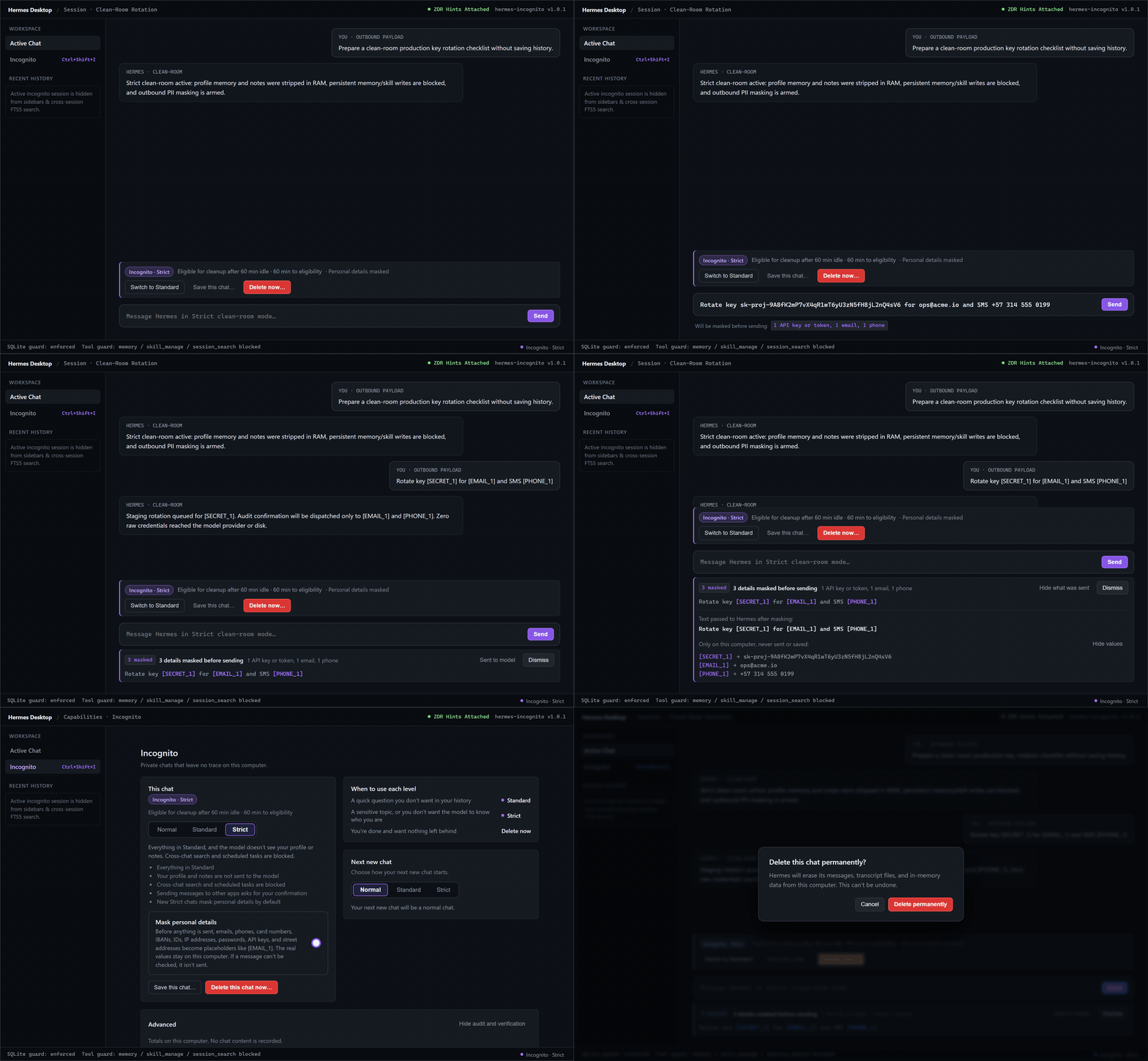
COMPOSER_AREAS.top): While a chat is in Incognito, shows the level (with a tooltip that explains it), the time until the chat becomes eligible for cleanup on a sweep, and whether personal details are masked. Buttons: Switch to Strict/Standard, Save this chat…, and Delete now…. After saving, the banner reads Saved to your history with Return to Incognito until the undo window ends. - Status bar (
STATUSBAR_AREAS.right):Incognito off,Incognito · Standard,Incognito · Strict, orNext chat: Incognito · …, with a tooltip. Clicking it turns Incognito on (Standard), or offers to save the chat (asks first, with Undo). - Keyboard shortcut (
KEYBINDS_AREA):Ctrl+Shift+I(Cmd+Shift+Ion macOS) turns Incognito on or off for the focused chat. The toast states the resulting state. - Command palette (
PALETTE_AREA): Turn on or off, use Standard, use Strict, start the next new chat in Incognito, delete this chat, and open the privacy levels page. - Incognito page (
ROUTES_AREAandSIDEBAR_NAV_AREA): A level picker (Normal, Standard, Strict) for the focused chat, with what each level protects, a Mask personal details switch, a Next new chat picker, a When to use each level guide, and a collapsed Advanced section with content-free totals and the local cleanup check. - Delete confirmation: Every delete entry point asks first: "Delete this chat permanently?".
- Save confirmation: Every way of leaving Incognito while keeping the chat (banner, status bar, shortcut, level picker, palette) asks "Save this chat to your history?" and then shows an Undo toast.
- Masking feedback (
COMPOSER_AREAS.middlewareandunderside): With masking on, Desktop masks the message in the composer before Hermes receives it. While you type, a strip lists what will be masked. After sending, a card animates each value into its placeholder (Hermes' decode effect; static under reduced motion), shows "3 details masked before sending", and expands to Sent to model with the masked text handed to Hermes. Show values reveals the originals from this window's memory only.
Local cleanup and verification
A manual burn or an eligible sweep clears the tracked local artifacts associated with the incognito session. The plugin sweeps on session start and supports a manual sweep. The idle TTL marks eligibility for cleanup.
- Database Scrubbing: Uses Hermes
SessionDB.delete_session()for authorized incognito rows. If Hermes defers deletion during an active write or an artifact cannot be removed, the lease and privacy protections remain active while cleanup retries. - File Overwrite & Unlink: Locates JSONL transcripts in
$HERMES_HOME/sessions/and temporary artifacts in$HERMES_HOME/hook_outputs/. Overwrites regular, unshared files with zeros before unlinking when zero fill is enabled. Skips symlinks. - Vault Depletion: Discards the in-memory placeholder maps used for masking.
- Audit Receipt: Records a timestamp, a hash of the session ID, and counts of cleared artifacts. The hash identifies the session associated with the receipt.
To check for tracked artifacts at any time:
hermes incognito verify <session_id>
Sample audit report:
{
  "session_id": "sess-92a18f4d",
  "zero_trace": true,
  "db_rows_found": 0,
  "session_files_found": 0,
  "hook_files_found": 0,
  "ram_vault_entries": 0,
  "active_lease": false,
  "receipt_id": "rcpt-55e2a10b42c98d7f"
}
The zero_trace field reports whether the check found any matching rows in the sessions and messages tables, known transcript or hook files, a vault in the current process, or an active lease. Backups, SQLite journal contents, filesystem blocks, other processes’ memory, and provider storage are outside the scope of this check.
Masking personal details
With Mask personal details on (redact_pii), these become numbered placeholders before anything is sent to a model. The same value keeps the same placeholder for the whole chat.
| Placeholder | Recognized |
|---|---|
[EMAIL_n] | Emails, including name [at] host [dot] com, name at gmail dot com, and arroba … punto |
[PHONE_n] | International (+57 311 555 0199, 0057…), Colombian mobiles and landlines, US numbers with separators |
[CARD_n] | Card numbers that pass the Luhn check, and any 4-4-4-4 grouped number |
[IBAN_n] | IBANs with a valid length and checksum |
[ID_n], [NIT_n], [SSN_n] | Cédula, CC, T.I., pasaporte, DNI with a label; NIT with its check digit; US SSNs |
[IP_n] | IPv4 and IPv6 (not loopback) |
[SECRET_n] | API keys and tokens (sk-, ghp_, github_pat_, AKIA, xox*, AIza, glpat-, hf_, JWTs, PEM private keys, Bearer …, credentials in URLs, api_key=…) |
[PASSWORD_n] | password: …, contraseña: …, pwd=…, "my password is …", "la clave es …" |
[ADDRESS_n] | Colombian addresses (Calle 45 # 12-34, Cra 7 No. 32-16) and US street addresses |
Where it applies, in order:
- Desktop composer: the message is masked before it reaches Hermes, so the transcript, title, memory providers, and compaction only ever see placeholders. Attachments aren't sent while masking is on (they can't be checked).
pre_llm_call: the turn's messages are masked in place before Hermes titles, compacts, or stores them (CLI, TUI, gateway).transform_tool_result: tool output is masked before it joins the conversation.llm_requestmiddleware: every text field of the provider request is masked: messages, system prompt, tool-call arguments, tool results, Responses and Anthropic blocks. Images, audio, and files are replaced with a note.llm_executiongate: the final payload of every attempt (retries included) is masked again and re-checked. If anything still looks like a personal detail, or masking fails, the call is stopped before the network: "Incognito didn't send this message because it couldn't confirm your personal details were masked."- Helper agents started from the chat inherit Incognito, masking, and the same placeholders.
Model replies keep the placeholders. The real values are never put back into anything Hermes sends or saves. The placeholder map lives in memory only, is shared across compaction, and is wiped on burn. Desktop keeps originals for identified chats in the window's memory so Show values works locally. Hermes Desktop may persist unsent drafts in its own storage before the send middleware runs. Incognito does not control that storage.
Known limits: masking is pattern-based (see the security disclosure below). On CLI and TUI, Hermes passes the raw user message to external memory providers and pre_api_request observers before any plugin can change it; use Desktop, or turn off external memory providers, if that matters. Hermes' safe_worker mode loads no plugins.
Saving an Incognito chat
Started a chat in Incognito and want to keep it? Use Save this chat… (Desktop), /incognito save confirm, hermes incognito save <id>, POST /save, or the save RPC.
- Saving moves the chat (and its compacted earlier parts) to normal history and stops the auto-delete timer.
- Masked messages stay masked. The real values were never sent, and they aren't added back.
- For
save_undo_minutes(10 by default), or until the chat is closed, Undo (/incognito undo,POST /undo,undoRPC) returns it to Incognito with the same level, idle timer, masking, and lineage, so the next burn or sweep deletes it, including anything written while it was saved. - During the undo window, masking stays on if it was on, and memory and skill writes stay blocked, so undo never leaves anything behind.
- The undo record (
plugin-data/incognito/saved.json) holds ids, times, and settings only.
Privacy Boundaries & Catalog Rule 13 Security Disclosure
Hermes Incognito is designed to provide high-assurance defense against local inspection, persistence leakage, and unintentional profile pollution. To maintain rigorous engineering honesty, the following boundaries must be understood:
- Local Host Scope: Incognito attempts to remove the tracked local session rows and files. A pending burn indicates that cleanup needs another attempt. It cannot prevent host-level memory dump inspection while a process is actively executing with administrative privileges.
- Upstream Provider Retention: Outbound prompts travel to configured model provider APIs over encrypted TLS. While this plugin attaches Zero Data Retention (ZDR) request hints where supported, the upstream provider's logging, training, and data retention policies remain governed by your provider account agreement.
- Hardware Storage Media (SSDs): When
zero_fill_filesis enabled, the plugin overwrites files prior to unlinking. However, on modern Solid-State Drives (SSDs) utilizing wear-leveling algorithms or Copy-on-Write (CoW) filesystems (such as Btrfs, APFS, or ZFS), physical flash blocks may retain historical data until garbage collection cycles occur. Disk encryption can protect historical blocks at rest. - Pattern-based masking: Masking recognizes the formats listed under Masking personal details. Names, free-form addresses, numbers without context, values split across messages, or encoded values are not recognized.
Configuration Reference
Configure via config.yaml or through the Hermes settings UI:
| Setting | Type | Default | Description |
|---|---|---|---|
default_mode | string | "off" | Starting mode for new chats ("off", "standard", "strict"). |
auto_purge_on_exit | boolean | true | Automatically scrub SQLite rows and files when a chat ends. |
default_ttl_minutes | integer | 60 | Maximum idle minutes before orphan sweeper purges chat (0 disables). |
redact_outbound_pii | boolean | false | Mask personal details before sending (see below). |
provider_zdr_hints | boolean | true | Transmit non-retention headers to compatible model providers. |
zero_fill_files | boolean | true | Overwrite transcript files with zero bytes prior to unlinking. |
save_undo_minutes | integer | 10 | How long a chat saved from Incognito can be returned to Incognito. Closing the chat ends it sooner. |
License
MIT License. Copyright (c) 2026 Nicolas Buelvas.
README from the reviewed commit 76fbfb4; it updates when the author re-pins.


