 user1303836
Kumi for Hermes
Kumi puts Hermes inside Ableton Live, REAPER and Renoise: it hears your mix, makes the changes you ask for (each
recorded in HISTORY, most undoable), and turns your own samples into new sounds.
Quick start
- Install:
hermes plugins install kumi, thenhermes plugins enable kumi. In Hermes Desktop, also turn on
Kumi's Desktop switch under Capabilities → Plugins. - Set up: ask Hermes to "set up Kumi for Live" (or REAPER, or Renoise). Hermes asks before each step: Kumi's
runtime, then its part in your DAW. Then choose AbletonMcpBridge as a Control Surface in Live, restart REAPER,
or enable Kumi's tool in Renoise. - Ask: "connect Kumi", then "what am I looking at?", "turn the drums down 2 dB" and "undo that".
No DAW? The sound map, the palette and Make don't need one: once setup has installed Kumi's runtime (its first
step), open the sound map in its tab in Hermes Desktop, type or choose your sample folder under Sample folders
(any folder of WAV or AIFF files) and press Add and scan; or run hermes kumi samples add <folder> in a terminal
and ask Hermes to scan it. For the DAW side too, REAPER's free evaluation takes about two minutes: install it from
reaper.fm, then ask Hermes to "set up Kumi for REAPER".
What it does
Kumi reads the project you have open, makes the typed changes you ask for in it, records every change in its HISTORY,
measures audio on your computer, and maps the sample folders you choose so you can find, audition and place sounds.
Hermes stays the agent: Kumi gives it a DAW to work in.
- Master your mix like a reference track. "Listen to my mix and master it like this reference track."
- Kumi listens to a window of your mix (in Live, through the Kumi Ears device, before Main's fader)
and measures it beside the reference: loudness, true peak, spectral balance, stereo width and dynamics. - It proposes EQ, glue compression and a limiter on the master track as one change.
- It listens again and compares again, for at most three rounds.
- Kumi listens to a window of your mix (in Live, through the Kumi Ears device, before Main's fader)
- Write a beat or a bassline. "Write a four-on-the-floor kick with offbeat hats on a new track", "now a bassline in
A minor". "Play it" starts playback; "make three variations" writes takes beside it, never over it. - Find a sample and use it. "Find me a dusty, dark snare", then "use it on the snare" or "put it on pad 2". Kumi
searches your own sample folders by how each sound measures and by the words in its name and folder, then puts it in
a Simpler (the snare's, or a new one on a new track) or on a Drum Rack pad, an empty one included (Live), on a new
track (REAPER) or in a new instrument (Renoise). - Build from a tutorial. "Make the bass from this tutorial: ." Hermes reads its transcript and,
for values only on screen, views those moments in its browser; Kumi builds it. No video is downloaded. - When no change fits, a script or a device. Hermes can run a script (Python in Live, Lua in REAPER and Renoise),
or build a Max for Live audio effect from GenExpr code; each is asked before it runs, in every chat: Hermes Desktop
shows its code; the terminal's prompt has room for its purpose, its size and SHA-256, a first line at most, and, for
a script, the file that holds all of it. - A preset for a plug-in you have (Live). "Make a Pro-Q 4 preset that cuts the mud around 300 Hz." Kumi builds it
for the version installed (Serum 2, Pro-Q 4 or Ozone 12), shows every setting, and puts it in your User Library (asked
first with Ask before each change on). - Ask in plain words, from any Hermes surface. The TUI, Hermes Desktop, the web dashboard and messaging all use the
same tools. - Kumi makes the changes you ask for, records each in HISTORY, and can undo most while it runs. By default Hermes
doesn't ask before each change; turn on Ask before each change (ask_before_changes) and it asks, showing
exactly what will change. Scripts, devices, setup steps, sample folders and Mirelo jobs always ask. Kumi undoes a
change only while the runtime that made it is running, and a few only your DAW's own Undo takes back (in Live, a rack
chain, a device move or a pad load; a script in any DAW): Kumi says so. - Kumi knows what you're looking at. When what you've selected changes, the chat connected to Kumi gets a short
note of the track, device and clip (FOCUS), and of what changed in the project while Kumi was away. - Your own sounds, on a map. Kumi learns the sample folders you list and lays them out by how they sound; in
Hermes Desktop the map opens in its own tab, where a click auditions a sound and "Use" asks Hermes to place it. - Measured, not imagined. Loudness, true peak, loudness range, spectrum and tempo are measured on your
computer. Kumi never claims to have heard what it hasn't measured.
What it looks like
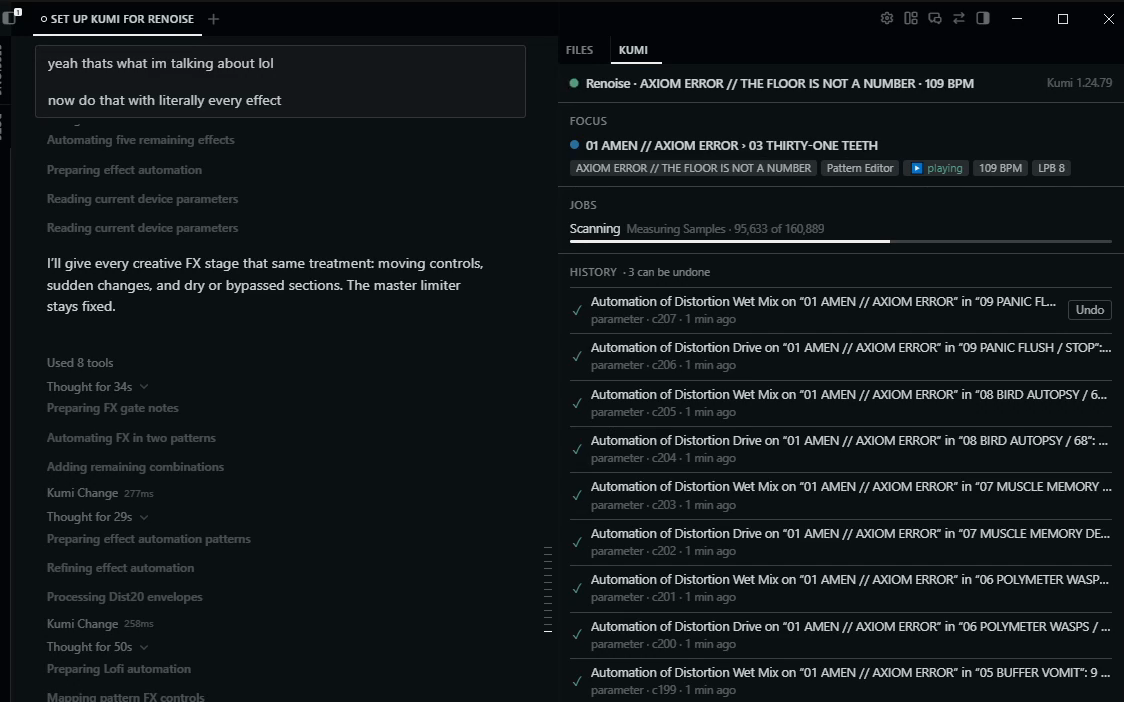
Hermes Desktop with Kumi's pane in a real Renoise session: the chat ("now do that with literally every effect", Hermes's steps and Kumi's changes) beside the pane, showing the project at 109 BPM, FOCUS on the playing pattern, a sample scan running (95,633 of 160,889), and HISTORY at change 207 with Undo on the newest.
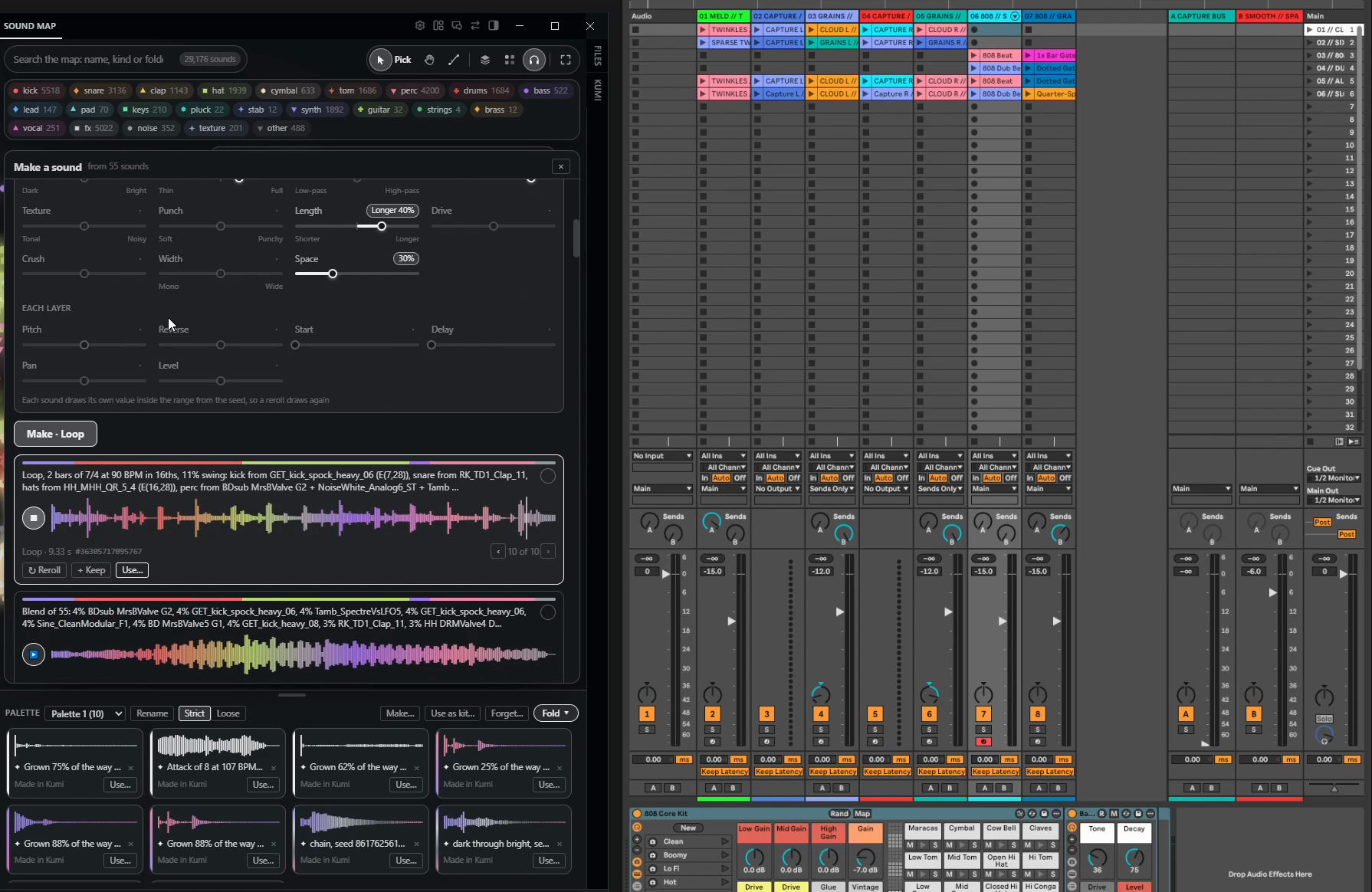
A real Ableton Live session: the set Hermes built from a video tutorial in an empty Live set (seven tracks, two returns, their clips and an 808 Core Kit), beside Kumi's sound map of 29,176 of the producer's own samples, Make playing a 2-bar loop in 7/4 at 90 BPM made from them, and a palette of sounds made in Kumi.
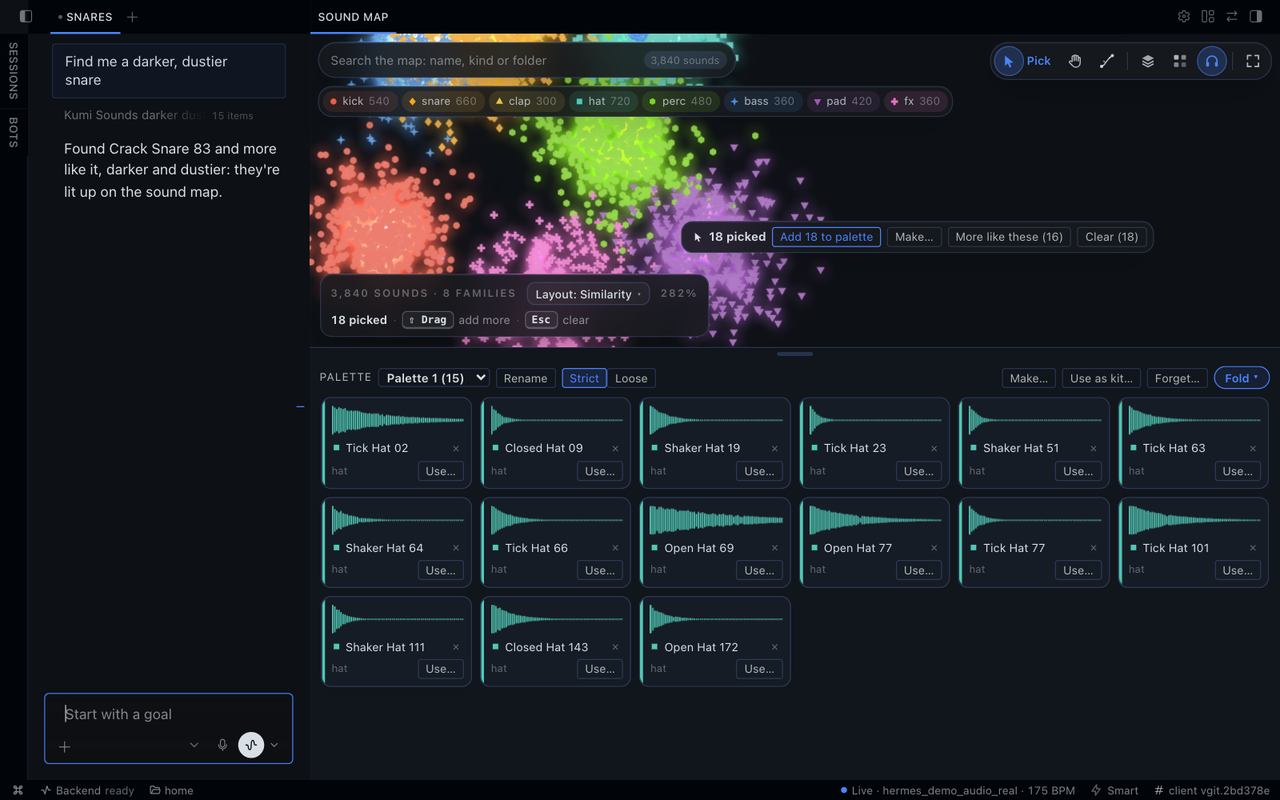
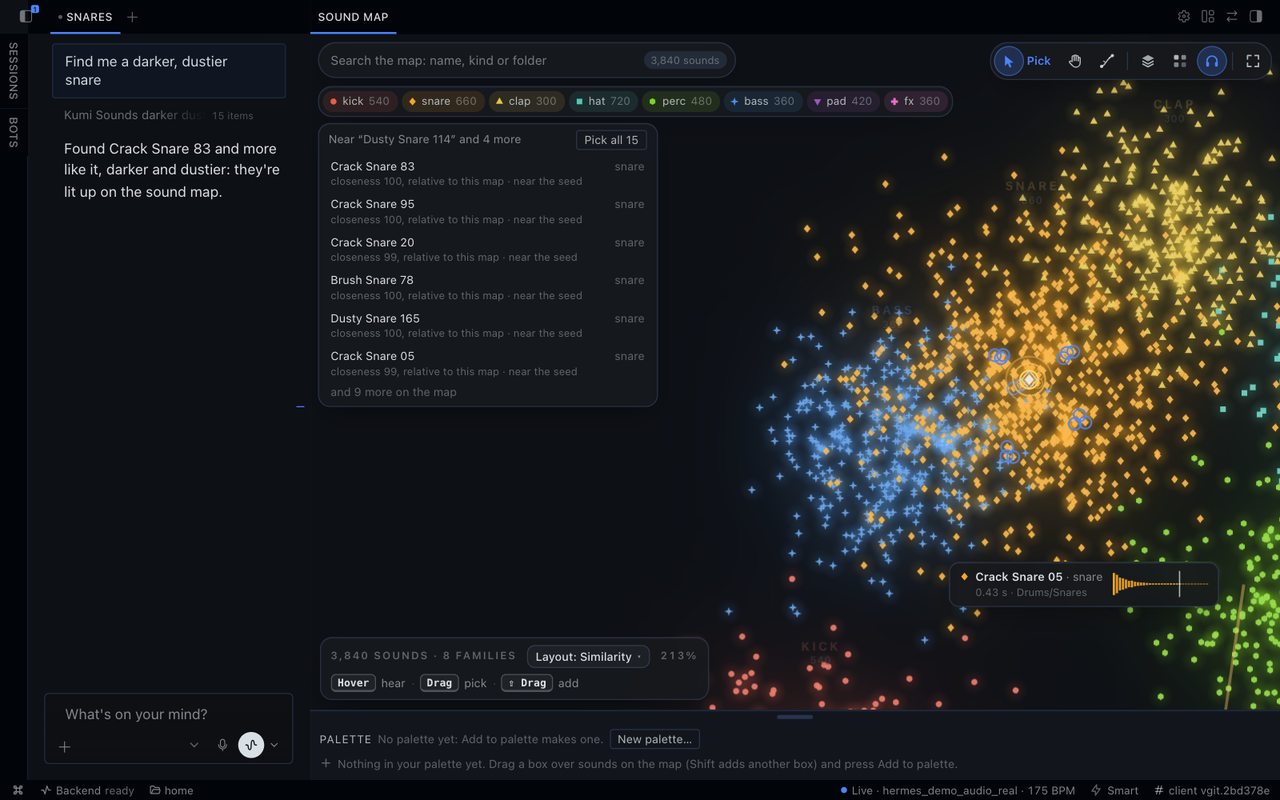
The palette: a box of 18 snares picked in white, with their actions beside them (Add to palette, Make…, More like these), the palette's 15 hats ringed in the accent, and the palette drawer below, each sound with its waveform in its family's colour.
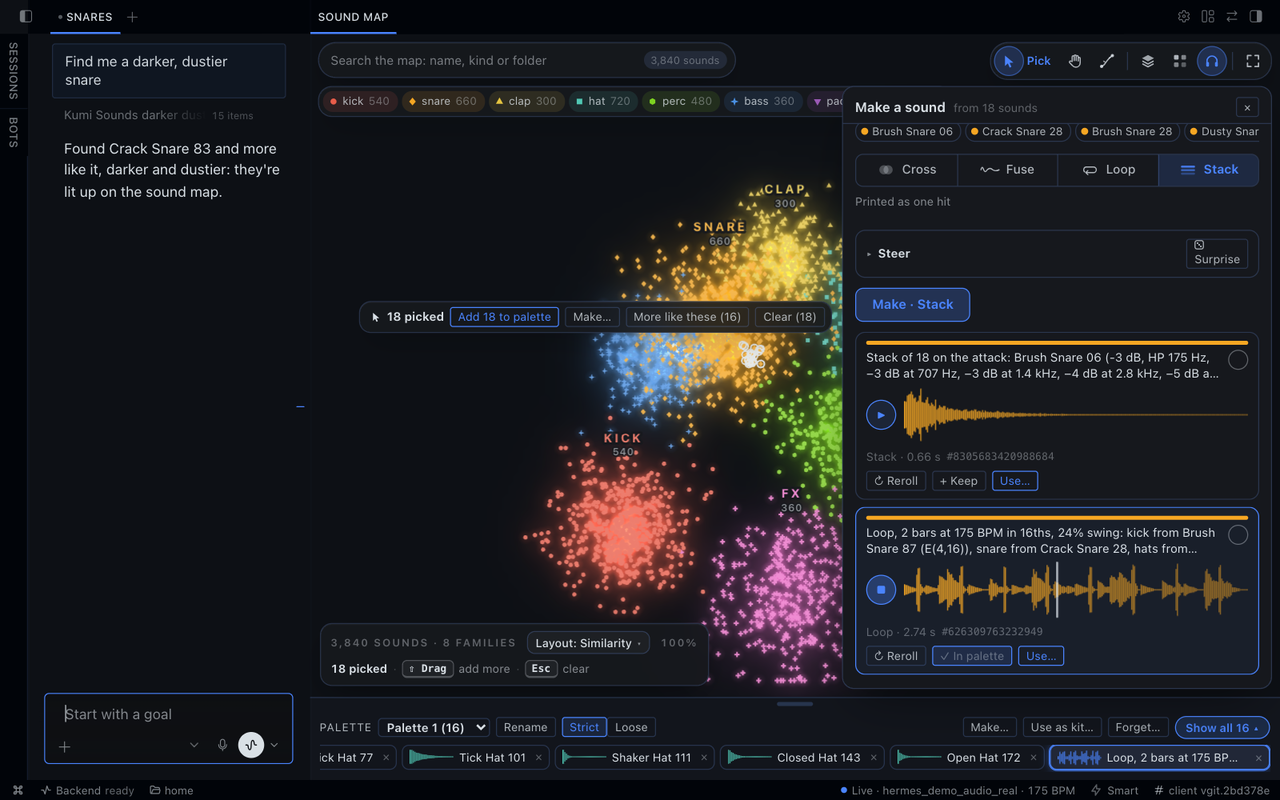
Make, open beside the map: a Stack and a Loop at the project's 175 BPM (playing, kept in the palette), each drawn in the colours of the snares it came from, with Reroll, Keep and Use.
Screenshots:
- The pane is a real session, not scripted: Hermes Desktop v0.23.1 on Windows with a real model, Kumi for Hermes on the
1.24.79 runtime, and real Renoise, in a project that started empty. - The Live set is a real session, not scripted: Hermes Desktop v0.23.1 on Windows with a real model, Kumi for Hermes,
and Ableton Live 12 Beta, in a set that started empty. Asked "watch this tutorial (a YouTube link) and recreate it in
the empty live project", Hermes read the tutorial's transcript (its video player wouldn't load) and built the tracks,
routing, devices and clips. The sound map holds 29,176 of the producer's own samples. - The map, palette and Make shots are Kumi 1.24.79 in Hermes v0.23.0's Desktop interface: the 3,840-sound map and its
samples are generated test data, and the made sounds come from Kumi's sound-design engine. - In the other shots, Hermes's side of the chat came from a scripted stand-in model, so the words are illustrative;
Kumi's side is real.
Tools
| Tool | What it does | Asks first |
|---|---|---|
| kumi_status | Setup, runtime and DAW connection state | no |
| kumi_setup | Plans and installs Kumi's runtime and its part in your DAW | yes, each step |
| kumi_connect | Starts Kumi and connects to the DAW chosen in settings | no (changes nothing in your project) |
| kumi_observe | A short, current look at the project: FOCUS, what changed, the project overview | no |
| kumi_read | Bounded reads of tracks, devices, clips and their settings | no |
| kumi_plugin_knowledge | Kumi's guide to a Live plug-in on a track and the parameters configured for it, or (in any DAW, even with none connected) its catalog of plug-in formats and the controls it has verified | no |
| kumi_change | One typed change of one or more steps, recorded in HISTORY | only with Ask before each change on |
| kumi_undo | Undoes a HISTORY entry while it can still be undone, or your newest change whole ("undo that") | only with Ask before each change on |
| kumi_history | Lists recent changes and whether each can be undone | no |
| kumi_listen | Measures an audio file, a library sound, a result Kumi made, or a window of a track or the mix (in Live, through Kumi Ears, before the fader), optionally beside a reference: part of one (up to 60 s), or up to five measured as one target | a track or the mix: only with Ask before each change on |
| kumi_transport | Starts playback, or stops it; changes nothing in the project but where play starts | play: only with Ask before each change on; stop: no |
| kumi_variations | Numbered takes of a clip, item or pattern, each written as a new one, never over it | only with Ask before each change on |
| kumi_script | Runs a script in the DAW for what no typed change does: Python in Live, Lua in REAPER and Renoise | always; Hermes Desktop shows its code |
| kumi_device | Builds a Max for Live audio effect from GenExpr code, as a new file in your User Library | always; Hermes Desktop shows its code |
| kumi_preset_build | Builds a preset for Serum 2, Pro-Q 4 or Ozone 12, for the version installed, as Kumi's private copy, with Kumi's own preset writer and its limits (up to 512 verified controls); changes nothing in Live (Live only) | no |
| kumi_preset | Puts a preset Kumi built into Live's User Library (Kumi folder) as a new .vstpreset file; loading it is a change of its own | only with Ask before each change on, with every setting |
| kumi_judge | Works toward a loudness, true peak or reference's balance in rounds: Live plays a stretch through Kumi Ears, and Kumi keeps each change only if it helped, else takes it back (Live only) | only with Ask before each change on |
| kumi_tune | Lets Kumi pick a device's numbers in a judged round (fit, home, search or probe), kept or taken back (Live only) | only with Ask before each change on |
| kumi_wavetable | Writes a new wavetable .wav for Serum 2 or Vital into the plug-in's wavetable folder or User Library/Kumi/Wavetables; it stays after an undo (Live only) | only with Ask before each change on |
| kumi_sound | Measures 1–8 tracks heard side by side in one pass through Kumi Ears: each sound's envelope, tone, effects (reverb time, echoes, pumping), problems, a kit verdict and ducking; nothing in the Set changes (Live only) | only with Ask before each change on |
| kumi_audition | Plays a part once and scores up to 8 candidate tracks (or the mix) 0–100 against a reference, with their gaps; Session-clip candidates play from temporary Arrangement copies removed after (Live only) | only with Ask before each change on |
| kumi_groove | Shapes a MIDI part's feel toward a reference MIDI clip's, judged on the notes with no listening; apply moves the notes as a change you can undo, and a round that didn't help is taken back (Live only) | change and apply: only with Ask before each change on |
| kumi_form | Reads a song's form: plays the whole Arrangement once through Kumi Ears while you wait (up to about 6½ minutes with Hermes's default tool deadline, up to 15 if you raise timeouts.tools.sequential_call; a longer song is read in parts; Stop ends it), then answers energy over the song, sections, turns, the first hook and which tracks play where, beside a reference's form if you give one (Live only) | only with Ask before each change on |
| kumi_render | Renders up to 60 s of an audio track's own clips offline (no playback) and keeps the file in Kumi's own data as an artifact_id for kumi_listen (Live only) | only with Ask before each change on |
| kumi_sounds | Searches your sound library by how sounds measure, by name, and by tempo, key, length and kind, saying why each result matches and on what | no |
| kumi_palette | Your palette, shared with the sound map in Desktop: lists and searches it, finds what a loose palette brings in, adds, removes and excludes sounds, manages palettes, and says how to load it as a kit in your DAW; changes no project | no (its edits never run from a webhook, a one-shot query or Hermes's background work) |
| kumi_design | Makes a new sound from 2 or more of yours or of Kumi's results: crosses them (blend, attack, resonate, modulate), fuses them (texture, a beat or melody loop, smear), stacks them into one hit, or grows one toward another; a steer pushes any of them darker, punchier, longer, wider and more; each seed is a variation, so a reroll is another seed. Kept as Kumi's private copy; changes no project | no (it never runs from a webhook, a one-shot query or Hermes's background work) |
| kumi_library | Adds a sample folder and scans it | yes |
| kumi_job | Reports a long job (a library scan, a Mirelo generation) | no |
| kumi_generate | Optional Mirelo integration: sound effects from a prompt and MIDI notes from an audio file (see Integrations) | yes: each paid generation, and each file sent |
Skills teach Hermes the workflows: kumi:daw, kumi:sounds and kumi:listening, plus kumi:generate for Mirelo. In
any message, write @kumi:focus, @kumi:history or @kumi:status to attach what Kumi last saw: what you're on in the
DAW, its recent changes, or its connection. They only read what Kumi has already published, so nothing asks first.
Install
hermes plugins install kumi
hermes plugins enable kumi
kumi is Kumi's name in Hermes's plugin catalog. Until Kumi is listed there, install it from Kumi's repository with
hermes plugins install user1303836/kumi#hermes-plugin, then enable it the same way.
In Hermes Desktop, also turn on Kumi's Desktop switch under Capabilities → Plugins: a plugin's Desktop switch
starts off.
Set up
Kumi needs two things on the machine that runs Hermes, can use a third, and asks before each:
- Its runtime: Kumi's official release for your platform, 27–35 MB, from
github.com/user1303836/kumi/releases/download/v<version>/. Kumi checks it against the SHA-256 this plugin pins,
unpacks it (86–128 MB) into this profile's plugin data, and refuses anything that doesn't match. - Its part in your DAW: Live's Remote Script (with the Kumi Ears device), REAPER's extension or Renoise's tool,
installed only at the location shown to you. Quit Live first; REAPER and Renoise can stay open and restart after.
If another Kumi on this computer (a standalone Kumi, or Kumi for Hermes in another Hermes profile) already put its
part in your DAW, setup offers to use that installation instead of replacing it, so you can go on using both, even at
the same time. The first DAW you set up becomes Kumi'sdawin the same approval; setting up
another one keeps the current DAW and ends with the step that switches:hermes kumi setup --daw <daw> --use,
approved like the rest. - Optional, ffmpeg: if an ffmpeg is already on this computer, setup offers to let Kumi's runtime run it to read
MP3, FLAC and other compressed audio. Setup is done either way; without it, Kumi reads WAV and AIFF only.
Ask Hermes to "set up Kumi for Live" from any surface, or run hermes kumi setup --daw reaper in a terminal (--daw
takes ableton, reaper or renoise; without it, setup is for the daw setting, Live unless you've changed it).
Then, in the DAW:
- Live: choose AbletonMcpBridge as a Control Surface in Settings → Link, Tempo & MIDI.
- REAPER: restart REAPER.
- Renoise: enable the Kumi tool.
Setup never starts or quits your DAW, picks a Control Surface for you, or saves a project.
Commands
| Command | What it does |
|---|---|
| /kumi in a chat, hermes kumi status in a terminal | Where Kumi stands in this profile: what setup still needs, the DAW connection, whether Kumi can read compressed audio, whether Hermes asks before each Kumi change, and whether Hermes's approvals are off |
| /kumi doctor, hermes kumi doctor | Checks what Kumi needs in this profile and says what to do about each problem. It changes nothing |
| hermes kumi setup --daw <daw> | Sets Kumi up for ableton, reaper or renoise, asking before each step; --use also makes that DAW Kumi's |
| /kumi samples, hermes kumi samples | The sample folders Kumi may read. … samples add <folder> adds one by its full path (C:\Users\you\Samples, ~/Samples): the terminal shows what Kumi will read and asks first; /kumi samples add works in Hermes's own apps, never from a chat app |
Settings
Set them in plugins.entries.kumi.settings in this profile's config.yaml, or where Hermes Desktop shows the plugin's
settings:
| Setting | Default | What it does |
|---|---|---|
| daw | Live (ableton) | Which DAW Kumi connects to: ableton, reaper or renoise. The first DAW you set up becomes it; hermes kumi setup --daw <daw> --use switches |
| library_folders | none | The folders Kumi may read to build your sound map: a scan reads only the audio files in them, and nothing else is scanned. Add one from the sound map's Sample folders, with hermes kumi samples add <folder> or /kumi samples add <folder>, by asking Hermes, or here |
| inject_focus | on | When what you're looking at changes, adds a short note to the chat connected to Kumi: what you're on (FOCUS), and what changed in the project while Kumi was away |
| ask_before_changes | off | Ask before each change: Hermes asks before each Kumi change, undo, track or mix listen, play, take and preset, per kind of change and per chat. Off, Kumi makes them without asking and records each in HISTORY; scripts, devices, setup steps, sample folders and Mirelo jobs ask either way |
| scripts_in_messaging | off | Lets a messaging chat (Discord, Slack, Telegram…) ask to run a script in your DAW, or to build a Max for Live device. Each one is asked (a messaging app shows its purpose and SHA-256; Hermes Desktop shows the code), whatever Ask before each change says, and none runs while Hermes's approvals are off |
| listen_interpretation | off | Also asks the model set for Kumi's listening task in Hermes (Vision's, unless you change it; it must accept images) to interpret measurements (see below) |
Hermes Desktop and the dashboard
- Desktop: a status chip (DAW, project, tempo), a side pane with FOCUS and HISTORY, the sound map in its own tab,
cards for measured audio, and commands in Hermes's command palette. On the map, a sound plays as soon as the pointer
reaches it; a box picks sounds (Shift adds another) for your palette, which sits under the map (play, remove,
reorder, rename, strict or loose, Use as kit…) and is the onekumi_palettereads and edits. A sound that can't play
there leaves the map quietly, counted in one line. While a script or device waits for your approval, the pane shows
its whole code (and a device's controls); a script's HISTORY row has Show code. Buttons never change your
project directly: a project change goes into the chat as a request, through the same path as a typed one, while
Make, the palette and hiding sounds that can't play write only Kumi's own data. - Web dashboard: a Kumi tab with the same HISTORY, status, map and palette.
Files
Kumi keeps what it writes for Hermes in this profile's plugin-data/kumi/ folder: the runtime, the library index and
map, HISTORY, measurements, copies of the audio it measured or made (state/artifacts; your originals are never
changed), the code of each script it ran (state/scripts), your palettes (state/palettes.json), the sounds made on
the map (state/designs, listed in state/designs.json: the 200 newest, and any older one a palette keeps), the sounds hidden
from the map (state/map-hidden.json) and job records. Outside it, setup writes only Kumi's
part in your DAW, at the location you approved (with another Kumi's installation in use, what it writes in that
installation's folder is listed under Disclosure); each Max for Live device Kumi builds is a new file in Live's User
Library (User Library/Kumi/Audio Effects), and each preset you place a new .vstpreset file there
(User Library/Kumi/Instruments or Audio Effects), and each wavetable a new .wav file in Vital's wavetable folder
or User Library/Kumi/Wavetables. A script runs with your DAW's access, so what it writes
follows its code. Kumi reads WAV and AIFF itself; for MP3, FLAC and other compressed audio it uses an ffmpeg already
on your computer, if you allow it at setup (it never downloads one). Removing the plugin keeps plugin-data/kumi/;
deleting it removes everything Kumi wrote for Hermes there, including sounds from integrations that your projects may
play (see Integrations).
Integrations (optional)
Core Kumi needs neither of these.
Sounds from other Hermes plugins (ElevenLabs). Kumi can measure a finished sound another Hermes plugin saved in
<HERMES_HOME>/cache/generated/audio, or put it in your project as a change of its own; it copies the file into
its own data first.
Mirelo (paid). kumi_generate asks Mirelo for sound effects from a prompt and for MIDI notes from an audio file.
It's off until you set all four:
| Setting | Default | What it does |
|---|---|---|
| mirelo_api_key | none | Your Mirelo API key, a Hermes secret (MIRELO_API_KEY). Kumi sends it only to Mirelo, with a generation you approved |
| mirelo_acknowledged | off | Lets Hermes ask for paid Mirelo generations, each approved with its estimate in Mirelo API credits |
| mirelo_sfx_enabled, mirelo_midi_enabled | off | Allow each kind: sound effects from a prompt, MIDI notes from an audio file |
| mirelo_credit_cap | 0 | The most Mirelo API credits Kumi may reserve, over its whole life. 0 refuses every paid generation |
In a terminal, hermes kumi credits shows what's spent, reserved and left. hermes kumi credits unfreeze lets paid
generations start again after a charge came in above its estimate, and hermes kumi credits release <id> releases a
reservation whose charge stayed unknown, once you've checked it on Mirelo's dashboard. Both ask for your yes in a
terminal, and no tool can run them. What leaves your computer, and how credits are reserved: see Disclosure.
Their sounds in your projects stay in plugin-data/kumi/, and the project plays them from there. Before deleting
that folder, save such projects with their files copied in (Live: File → Collect All and Save; REAPER: Save
project as… with Copy all media into project directory), or they'll miss those samples.
Disclosure
- Download: after you approve setup, Kumi downloads the exact platform release named in this plugin's
kumi_release.json, only fromgithub.com/user1303836/kumi/releases/download/. It checks the SHA-256 this plugin
pins and installs the release under this profile's plugin-data folder; setup shows the download and unpacked sizes. - Writes outside its data: setup may install Live's Remote Script with its Kumi Ears device, a REAPER extension or
a Renoise tool, only at the locations you approve. Each Max for Live device Kumi builds is written as a new file in
Live's User Library (User Library/Kumi/Audio Effects); it stays there after an undo, and in any Set that uses it.
Each preset you place is a new.vstpresetfile there too (User Library/Kumi/InstrumentsorAudio Effects),
and it stays after an undo.
Each wavetable Kumi makes is a new.wavfile (never over a file) in Vital's wavetable folder
(~/Music/Vital/User/Wavetables;~/Documents/Vital/User/Wavetableson Windows) or Live's User Library
(User Library/Kumi/Wavetables, for Serum 2 and others); it stays after an undo. While judging or tuning, Live plays
the stretch through the Kumi Ears device setup installed, placed on the track or before Main, with Live stopped and
not recording, and removes it after (Live's own Undo history keeps those temporary device steps). A pass lasts at
most 60 s, counting the bar Live plays before the stretch and the half bar after it; a judge or tune pass may play
once more when Live started late, under the same limit. What Kumi hears stays in its own data until the call ends. A
tune's search or probe makes scratch copies of the run's track in the Set and removes them after, and if Kumi stops
partway its next look (kumi_observe) removes leftovers. No record pass, and no model is downloaded: a run goes by
its meters. Measuring sounds (kumi_sound) and auditioning (kumi_audition) play the same way, with the same
limits; an audition of Session clips plays them from temporary copies in the Arrangement, removed after. A groove
round (kumi_groove) never plays: itsapply, and a round it takes back, change a MIDI clip's notes as changes in
HISTORY. A render (kumi_render) is offline: Kumi keeps the file (at most 60 s of the track's own clips) in its own
data and deletes Live's temporary render file. Reading a song's form (kumi_form) plays the whole Arrangement
once the same way while you wait, for as long as Hermes's tool deadline allows (about 6½ minutes by default, up to
15 if you raisetimeouts.tools.sequential_call; a longer song is read in parts), and Stop ends it at once.
Before some changes, Kumi copies the project as last saved beside it, once for each saved version (an unsaved project
gets none): in Live when a change reaches its third step (<Set>.backup-<date>.als, which stays until you delete it),
and in Renoise before a change that loads a sample (<Song> (Kumi copy <date>).xrns; Kumi keeps a song's five newest
copies and deletes older ones). The change that kept a copy says so, with the copy's name. - Processes: Kumi's runtime, its DAW bridge and its library workers run on the machine that runs Hermes, on
loopback only. They stop when the chat ends, when the plugin unloads or Hermes exits, or after 15 minutes idle (2
hours while connected to your DAW for a chat); a job still running, such as a scan or a Mirelo generation, keeps
them up for at most 6 hours. Your DAW keeps running. - Reads: the open project; the audio files in the sample folders you list (never a whole drive or volume, your
home folder or above, or inside or above HERMES_HOME; links never lead it outside them); its renders of the windows
you ask for (REAPER and Renoise); and finished audio other Hermes plugins saved in
<HERMES_HOME>/cache/generated/audio(which Kumi never creates), to place or measure it. To tell which version of
Serum 2, Pro-Q 4 or Ozone 12 you have, the VST3 metadata in your standard plug-in folders (it never loads a plug-in). - Who can add a sample folder: you, by its full path, and every way goes through the same guard. In the sound
map's Sample folders, Desktop sends the request to Kumi's chat (the dashboard copies it), and Hermes asks once
for the folder and its first scan.hermes kumi samples add <folder>shows the folder and asks y/N in the terminal.
/kumi samples add <folder>adds it on your typed command, in Hermes's own apps only: a chat app is refused. Or
ask Hermes, which asks you. A folder you type is kept by where it really is (a link is followed first, and shown).
Nothing in a folder is read until a scan, whose approval names every folder it reads. Allowing scans for the session
or for always covers those folders only: add one, and the next scan asks again. A folder that's gone (an unplugged
drive) is left out of a scan, and Kumi says which. - Approvals: by default (
ask_before_changesoff) Kumi makes changes, undos, track and mix listens, play, takes
and presets without asking; each change still goes into HISTORY, and most can be undone. Scripts, devices, setup
steps, sample-folder adds and scans, Mirelo uploads and paid generations always go through Hermes's approval.
Withask_before_changeson, Hermes asks before each change, undo, listen, play, take and preset too. Stop never
asks. Kumi approves nothing in Hermes itself.- Allowing for the session or always covers that kind of call (changes, undos, listens, play, sample-folder adds
and scans) in this chat only, including a one-shot run that resumes it (hermes chat -q --resume). Another chat,
a new one-shot run or a scheduled job asks again or is refused. Scheduled jobs and webhooks never change anything,
whatever the setting. A new one-shothermes chat -qrun can: Kumi can't tell it from a chat, since Hermes runs
its tools in its gateway, so by default it makes the changes it asks for. Withask_before_changeson, Hermes
refuses them there, and it refuses scripts, devices, setup steps, sample folders and Mirelo jobs there either way. - Only your own turns: when Hermes works on a chat in the background (its review after a turn) or answers a
side question (/btw), Kumi only reads, whatever you allowed for the session. - Narrower approvals: a setup step's approval covers its own plan. A change only your DAW's own Undo takes back
asks under its own kind. With Mirelo, an upload's covers its one file in this chat, and a paid generation's only
its own estimate, once. A preset's covers its one file: each new preset is asked (withask_before_changeson). - Scripts and devices: each is asked in every chat, and by its
code: allowing it for the session covers only that same code in this chat, and "Always" lets only that same code
run again without asking, in any chat. Any other script or device is asked. In a chat that has read outside content
(web pages, transcripts, files Hermes fetched from the internet or read with its own file tools, another plugin's
results, or any terminal command or code run), the approval says so; installed skills and the names in your
library and projects don't count. A messaging chat runs none unlessscripts_in_messagingis on; scheduled jobs,
webhooks and Hermes's API server never run one. - "Always" leaves an entry in Hermes's
command_allowlist(the profile's config.yaml) that Kumi never edits; to
remove it, delete theplugin_rule:kumi:entries there. - When Hermes's approvals are off (
--yolo, a chat's/yoloorapprovals.mode: off), Hermes runs all of these
without asking (Mirelo's up to your credit cap), and/kumisays so; scripts and devices run unasked only then, in
a chat that hasn't read outside content, and are refused in one that has. A one-shothermes -zturn is yolo too,
and Kumi can't tell it apart.
- Allowing for the session or always covers that kind of call (changes, undos, listens, play, sample-folder adds
- HISTORY and undo: HISTORY records what actually happened, including when an outcome is uncertain. Kumi can undo
a change only while the runtime that made it is still running; after that, use your DAW's own Undo. In Live, an undo
refuses to touch a value you've changed by hand since; in REAPER and Renoise, it puts the value back anyway. A few
changes only the DAW's own Undo takes back: in Live, adding a chain to a rack, moving a device and loading a sample
onto a pad, each a change of its own, with how Cmd+Z (Ctrl+Z) takes it back said first; and a script,
in any DAW. - Listening: Kumi measures audio files on this computer, and can listen to a track or the mix (asked first with
ask_before_changeson):
only that window (60 seconds at most, with the DAW stopped) is heard. The one exception is reading a song's form
(kumi_form): it plays the whole Arrangement once while you wait, up to about 6½ minutes with Hermes's default
tool deadline (up to 15 if you raisetimeouts.tools.sequential_call; a longer song is read in parts), and Stop
ends it. REAPER and Renoise render it into the
listening folder of Kumi's part in that DAW, and Kumi copies that one file into its data. The render's temporary
transport, routing and device settings are put back after; REAPER may show the project as modified, and Renoise's
BPM and lines per beat are put back only if they're still what the render left. In Live (256 beats at most, in the
Arrangement), Kumi captures it through Kumi Ears, after each track's devices and before its fader, then removes the
device; Live may show the Set as modified, and its own Undo history holds the listen's temporary device steps
(pressing Undo in Live can bring Kumi Ears back). - Playback: play asks first only with
ask_before_changeson, and never starts a play that would record; stop
never asks. Neither changes anything in the project but where play starts. - Scripts: a script runs inside your DAW with the DAW's access to this computer (its files and
network). Kumi refuses one over 400 lines or 32 KB, with hidden or direction-changing characters, or using process
or network calls it recognises; that check is a safeguard, not a sandbox. Kumi stops a script after 10 seconds (0.8
in Renoise). - Project ids: Kumi's REAPER extension keeps an id in a saved project, and its Renoise tool keeps one in a song,
only when a standalone Kumi connected to that DAW asks it to; Kumi for Hermes never asks. Once kept, the id is saved
with the project. - ffmpeg: with your approval at setup, Kumi's runtime runs an ffmpeg already on this computer to decode compressed
audio. Kumi never downloads one, and checks the ffmpeg file you allowed before each start (not the libraries it
loads, which an upgrade can change). It hands ffmpeg only the one file it's reading, never a URL or a playlist, and
ffmpeg reads nothing from the network. - What reaches a model: audio is measured on this computer and never sent to a model; in a messaging chat
(Telegram, Discord…), a sound or measured audio you ask Hermes to send you goes to that chat as an attachment,
through that app. The project details Kumi notes for FOCUS, and the measurements it returns, go to the model you use
in Hermes as part of the conversation; Kumi's status names no folder on this computer to it. With
listen_interpretationon, Kumi also sends the measurements and a small image of the measured band energy (never
the audio or file paths) through Hermes's own model access: to the model set for Kumi's listening task in Hermes (it
must accept images), or to the fallback providers Hermes is configured to try for that task. Hermes retries a failed
attempt and may fall back, which can add time and token cost. - Another Kumi's installation: if you let Kumi for Hermes use another Kumi's installation (in Live, REAPER or
Renoise), its runtime reads that installation's bridge files (the secret, discovery files and install receipt) and
writes only what a connection needs there, never what it learns of your projects, which stays in its own data:- its connection state (Live), and the DAW's write-lease lock (
serve/<daw>.lease); - in REAPER and Renoise, it removes discovery files a closed DAW left, and uses the bridge's listening folder
(created if it's missing, owner-only on Windows): the renders it asks for land there, and Kumi moves or removes its
own, and cuts there the part of a project clip it hears as a reference; - in Renoise, while Kumi changes an instrument's macro mappings, the tool saves that instrument to the bridge's work
folder, and the file is removed once read.
A standalone Kumi's sign-in, model providers, account files and updater are never used.
- its connection state (Live), and the DAW's write-lease lock (
- Scheduled jobs (Hermes cron) read only Kumi's status and HISTORY as last published; a job's answer (change
titles, track names) leaves this computer only through where that job delivers, and Kumi's job blueprints deliver
locally by default. - Mirelo (off until you add a key, acknowledge it, turn a kind on and set a cap above 0): your prompt, and for MIDI
the audio file you approve, go with your key toapi.mirelo.aiand to the upload and download links Mirelo's API
gives for each job, on hosts Mirelo chooses (its storage or delivery network), so they aren't a fixed list. Whether
Mirelo trains on what you send follows your Mirelo account's settings; Kumi has no setting of its own for it.- Credits, never money: each generation is approved with Mirelo's estimate in API credits and reserves up to it
against a lifetime cap (0 by default, which refuses every paid generation); sending a file is approved on its own.
A charge may stay unknown until Mirelo reports it, and its reservation keeps counting against the cap meanwhile. A
charge above its estimate pauses new paid generations. - Yours alone, in a terminal: letting paid generations start again (
hermes kumi credits unfreeze) and
releasing a reservation whose charge stayed unknown (hermes kumi credits release <id>). - Never unattended: nothing is paid for or uploaded in scheduled jobs,
hermes chat -q, webhooks or Hermes's
API server. - What Mirelo makes is saved in this profile's plugin data, and placing it in your project is a separate
change. Switching a kind off stops new jobs (one already running is still fetched while the key is set); removing
the key stops Kumi contacting Mirelo.
- Credits, never money: each generation is approved with Mirelo's estimate in API credits and reserves up to it
- No telemetry.
Compatibility
- Hermes 0.22.7 or later.
- Ableton Live 12 on macOS and Windows. Kumi is tested on Live 12.4 (beta). Live 12.0 to 12.3 are untested and have no
Extension Host for Kumi's Live extension, so there Kumi can't render offline, write MIDI clips into the Arrangement or
clear a range in it. - REAPER 7 or later and Renoise 3.5 or later on macOS, Windows and Linux.
- The DAW must run on the machine that runs Hermes: a Desktop app connected to a remote Hermes controls that
machine's DAW, not its own.
Development
The plugin lives in Kumi's repository at hermes-plugin/. Its tests need no DAW, network or sign-in:
python3 -m unittest discover -s hermes-plugin/tests
hermes plugins validate hermes-plugin
hermes plugins doctor hermes-plugin --ci
A Kumi release is pinned with python3 scripts/hermes_pin.py <version>, which records each platform's bundle,
SHA-256 and sizes after checking them against the release's own records.
License
MIT, as the rest of Kumi.
README from the reviewed commit 7f8b0de; it updates when the author re-pins.