 aron98
load-lock for Hermes Agent
A machine-wide heavy-work budget for every coding agent sharing your machine.
When several AI coding agents (Hermes sessions, Claude Code, OpenCode, …)
run on one host, their builds and test suites pile onto the same cores,
memory and disk at the same time. load-lock is a cooperative counting
semaphore: agents acquire a permit before heavy work (full builds, test
suites, big compiles), queue politely when capacity is full, and release
when done. Capacity is a shared budget you configure — not an enforced
limit — so honest agents take turns instead of thrashing the machine.
This plugin brings that budget into Hermes:
- 19
load_lock_*tools with the full permit lifecycle
(acquire → queue → claim → run → auto-release), queue/offer/holder
introspection, bounded honest waits, and machine inspection. - Policy at session start — the 7-rule budget brief is injected into
the first turn (and re-injected after compaction) so the agent knows the
rules before it touches a compiler. - Permit heartbeats — permits held by a long-lived Hermes session are
kept alive automatically; a dead session's permits are reclaimed by the
daemon instead of leaking. - Session-end cleanup — queued requests left behind by a finished
session are cancelled best-effort. /load-lockslash command — quick status / pending / machine /
config / guide views for the human at the wheel.- Bundled skill —
load-lock:agent-guide, the full operating playbook
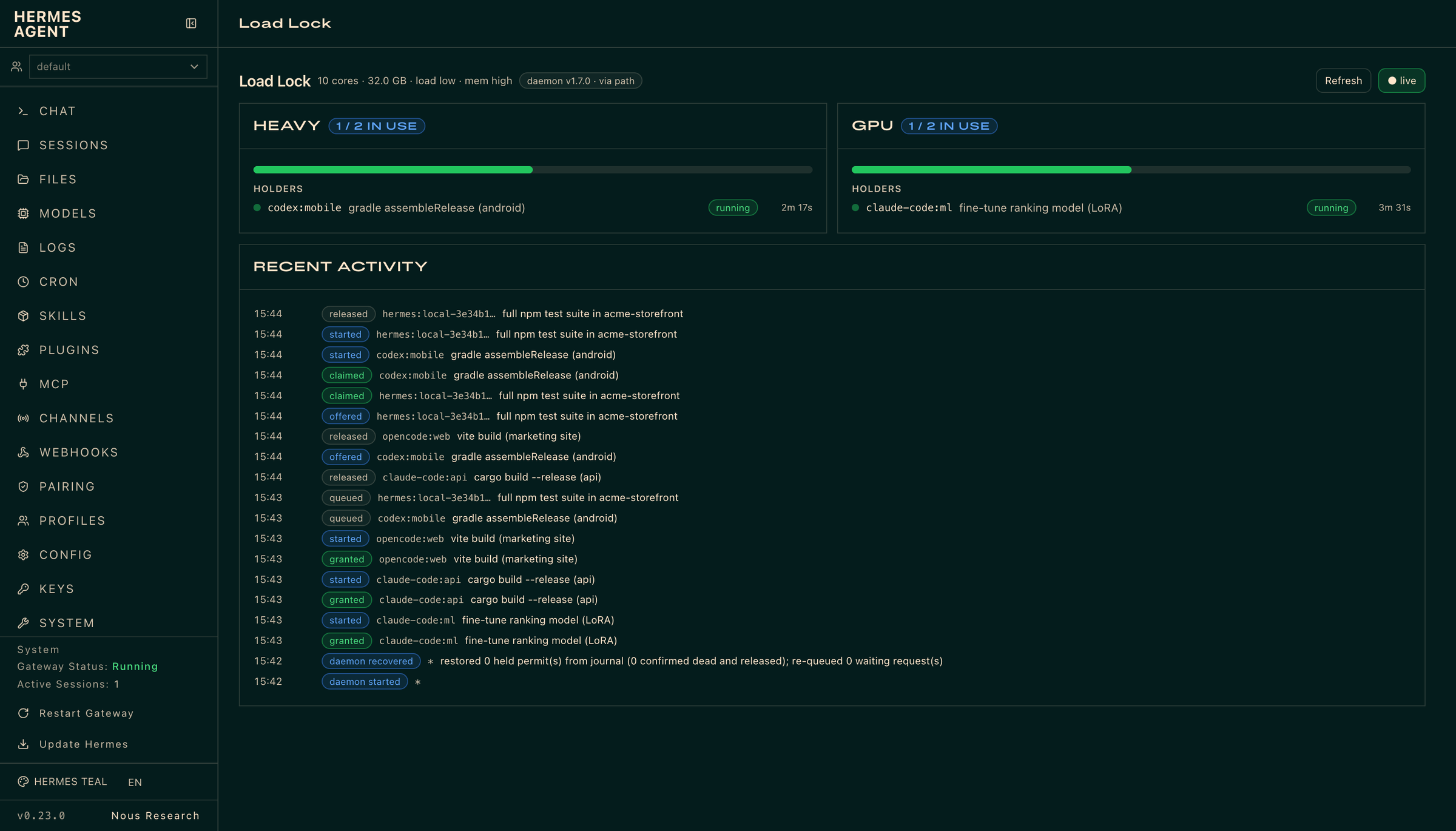
(opt-in viaskill_view). - Dashboard tab — a live "Load Lock" tab in
hermes dashboard:
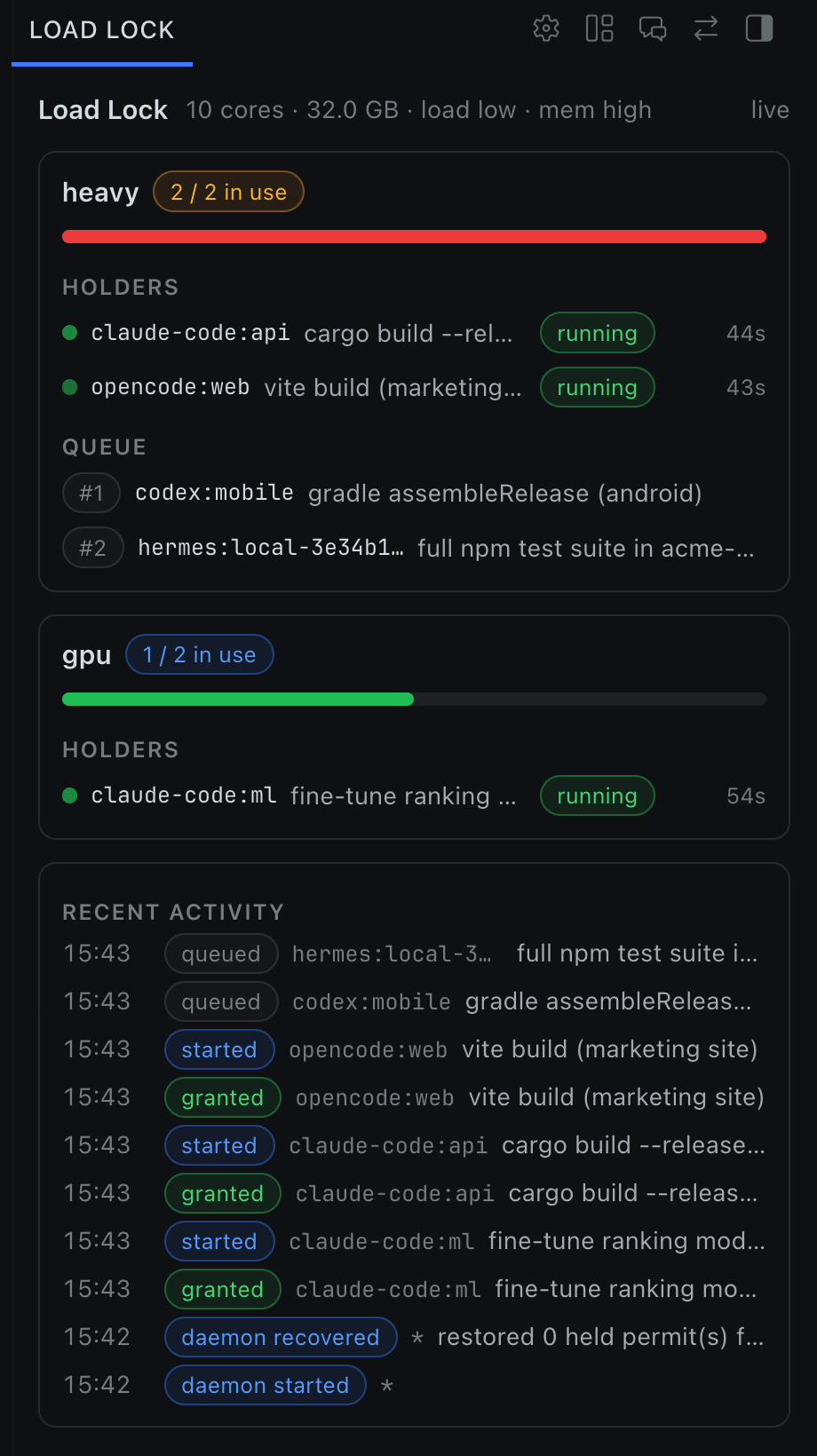
per-pool capacity bars, holders with reason + age, offer countdowns,
queue and paused lists, and an incremental activity feed. - Desktop pane + status chip — on Hermes Desktop (0.23+), the same live
view docks as a tiling pane on the workspace's right edge, aLL 2/3
chip in the status bar (colored by pressure, click to open the pane),
and an "Open Load Lock" command-palette row. - Approval parity —
load_lock_run_with_permitgoes through the same
dangerous-command approval gate as Hermes'sterminaltool.
Screenshots
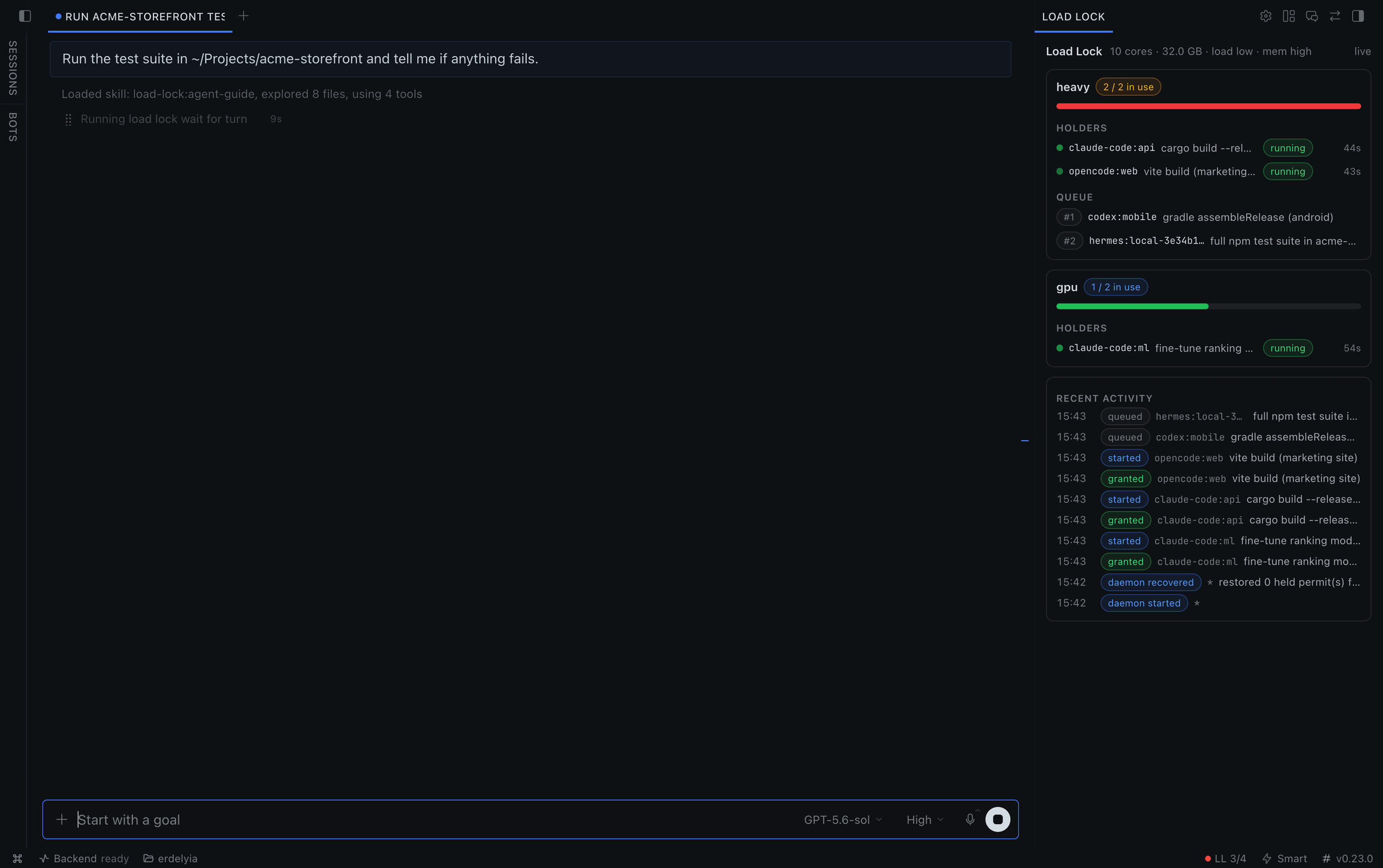
Hermes waits its turn: both heavy permits are held by other agents, so
its test run queues (wait_for_turn) instead of piling on.
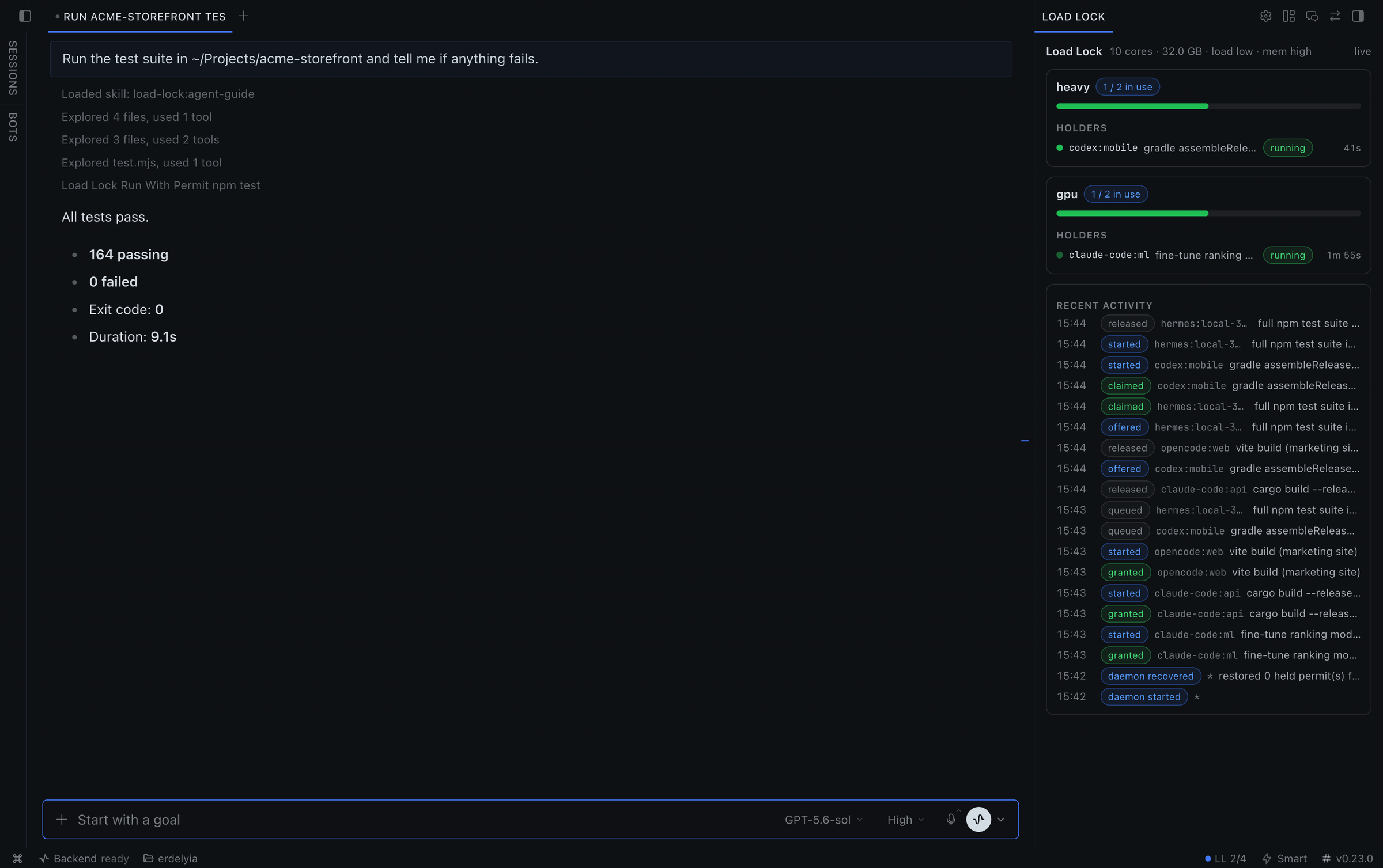
Its turn came, the suite ran under the permit, and the permit was released
automatically when the job exited.
| Desktop pane | Dashboard tab |
| --- | --- |
|  |
 |
Install
-
Install the load-lock CLI (Node >= 20):
npm install -g @aron98/load-lock@1.7.1 -
Install/enable the plugin (from this repo:
plugins/hermes/):hermes plugins enable load-lock
That's it. The CLI auto-spawns a small local daemon on first use — no
service to manage (see load-lock doctor if you want to check the wiring).
Settings
Optional, under plugins.entries.load-lock.settings in your Hermes
config (renders as a settings form on newer Hermes versions):
| Setting | Default | Meaning |
| --- | --- | --- |
| load_lock_command | (empty) | Explicit argv prefix for the load-lock CLI, e.g. node /path/to/dist/cli/main.js. Overrides PATH lookup. |
| auto_install | false | Last-resort fallback: run npx --yes --package=@aron98/load-lock@<pinned> when no local runtime is found. Makes a network call to npm; off by default. |
| pool | heavy | Default pool for permits (e.g. heavy, gpu-heavy). |
| heartbeat | true | Keep untracked permits of live sessions alive automatically. |
| inject_policy | true | Inject the budget brief into the session's first turn / after compaction. |
| env_passthrough | (empty) | Extra variable names (space/comma separated) passed to load_lock_run_with_permit jobs on top of the built-in allowlist. Provider API keys are never passed unless listed here. |
Tools
load_lock_acquire, load_lock_claim, load_lock_release,
load_lock_cancel, load_lock_decline, load_lock_rejoin,
load_lock_wait_for_turn, load_lock_pending, load_lock_status,
load_lock_inspect_machine, load_lock_get_config, load_lock_configure,
load_lock_attach_pid, load_lock_mark_started, load_lock_run_with_permit,
load_lock_job_status, load_lock_job_stop, load_lock_wait_for_completion,
plus load_lock_agent_guide (the full playbook as text).
The core flow agents actually use:
acquire(reason, op_key)      → granted | queued(position) | paused
  ↳ queued: keep doing light work; claim promptly when offered
run_with_permit(permit, cmd) → runs the heavy job, auto-releases on exit
release(permit)              → done (or never — the job exit releases)
Every tool returns structured JSON — never raises — including the queued
and wait states (exit-code semantics are mapped into the payload), so the
model can react instead of guessing.
Dashboard
With the plugin enabled, hermes dashboard gains a Load Lock tab:
capacity bars per pool, who holds what (and why, and for how long), offer
countdowns, the queue, and a live activity feed. It is read-only — the
dashboard never mutates pool state; it polls this plugin's own API routes,
which shell out to the same CLI the agents use, so it can never disagree
with what the agents see.
Desktop
On Hermes Desktop (unified-package desktop half, verified on 0.23.0), the
plugin also contributes:
- a Load Lock pane on the workspace's right edge — live pools, holders,
offers and recent activity. Drag it anywhere; it's a first-class tiling
pane. - a status-bar chip —
LL 2/3, a colored pressure dot, and queue counts in
the tooltip. Click it to reveal the pane. - an Open Load Lock row in the command palette.
Desktop halves load disabled by default: flip the switch once under
Capabilities ▸ Plugins. Data flows through the same read-only routes as the
dashboard tab (2s polling, plus instant invalidation via the plugin event
the backend broadcasts on every daemon state change). Like everything else
in this plugin, the surface degrades to a clean error message when the
CLI is missing.
Compatibility
Verified against Hermes Agent 0.23.0 (hermes plugins validate +
doctor + live session) and against 0.19.0 (PyPI release) for the agent
tool surface. requires_hermes: ">=0.23.0": the floor matches what is
fully tested (desktop half + post_compaction). On older builds the newer
hooks (e.g. post_compaction) and the desktop half simply don't activate,
and the documented fallbacks (history-shrink compaction detection, the
dashboard tab) cover the same jobs.
Security & disclosures (catalog rule 13)
- Shell commands: tools and dashboard routes shell out to the local
load-lockCLI (--jsonmode). The CLI auto-spawns a small local
daemon (Unix socket under~/.local/state/load-lock) that tracks
permits and heartbeats.load_lock_run_with_permitspawns exactly the
command the agent supplies, as a detached process in its own process
group, and releases the permit when it exits. - Network: none, except the optional pinned
npxfallback
(auto_install, off by default) which downloads
@aron98/load-lockfrom npm. No telemetry, no phone-home, no remote
APIs. - Reads outside own data: the CLI reads its own state dir
(~/.local/state/load-lock) and, forload_lock_inspect_machine,
system facts (core count, memory, load average, cgroup limits) to
summarize machine pressure. - Background processes: the local
load-lockdaemon (auto-managed,
load-lock service stopto stop); a heartbeat thread and a job
registry inside the Hermes plugin process; on builds with plugin
events (0.23+), the dashboard-serving process also runs one idle
load-lock events --followtail to push state changes to an attached
Desktop (started lazily on first dashboard request, fire-and-forget,
restarted with backoff if it dies). - Approvals:
load_lock_run_with_permitspawns the command the agent
passes, so apre_tool_callhook runs it past Hermes's own
dangerous-command detector and escalates anything flagged to the same
human-approval gate theterminaltool uses (allowlist, prompts, cron
mode, fail-closed). Ordinary heavy work such asnpm testis not
flagged and never prompts. The detector is imported from
tools.approval_detection; if it cannot be loaded, every command is
escalated. The plugin never bypasses approvals or unattended-mode
switches. - Child environment: every process the plugin starts (the CLI, the
daemon it auto-starts, and the jobload_lock_run_with_permitruns) gets
an environment built from an allowlist:PATH,HOME, locale, temp and
XDG dirs,LOAD_LOCK_*, node/npm and proxy settings, and for jobs the
usual toolchain locations (JAVA_HOME,CARGO_HOME,GOPATH,
VIRTUAL_ENV, …). Provider API keys and anything named like a token,
secret or password are never passed; add names explicitly with the
env_passthroughsetting if a build needs one. - Terminal backend:
load_lock_run_with_permitruns commands on this
host, so it refuses when Hermes's terminal backend is notlocal
(docker, ssh, modal, …) and tells the agent to run the command with the
terminaltool betweenload_lock_mark_startedand
load_lock_releaseinstead. The backend is resolved like Hermes does
(per-turn terminal scope viatools.terminal_scope, then
terminal.backendin config, thenTERMINAL_ENV); if it cannot be
determined, the tool refuses. - Credentials: none required, none stored.
- No Python dependencies — the plugin uses only the Hermes-provided
environment (FastAPI for the dashboard routes).
Links
- Upstream project: https://github.com/aron98/load-lock
- Full agent playbook: the
load-lock:agent-guideskill bundled here, or
load-lock agent-guideon any machine with the CLI. - Adapter notes for other harnesses (Claude Code, OpenCode, MCP):
docs/ADAPTERS.mdin the upstream repo.
MIT license.
README from the reviewed commit d473315; it updates when the author re-pins.