 yugasurfer
Loaded Skills Indicator
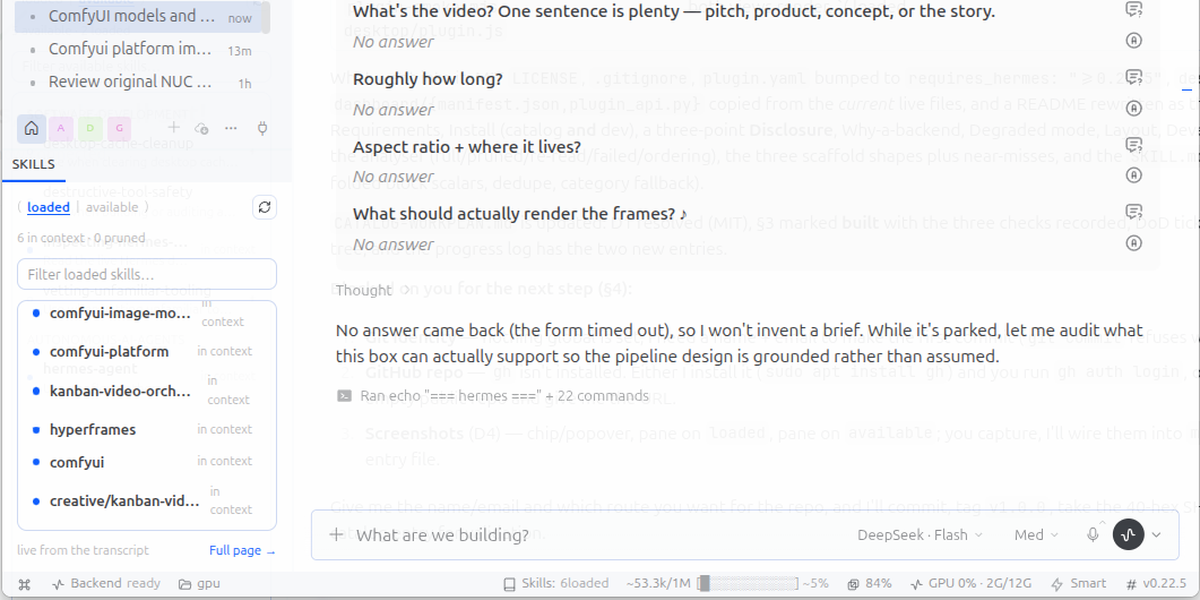
A Hermes Desktop status-bar chip that answers one question:
Which skills are read into this conversation's context right now?
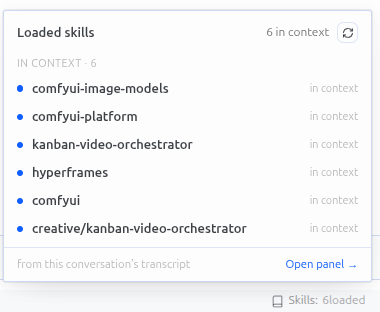
Skills: 6 loaded in the bottom-right cluster. Click it for the list:
| Row | Meaning |
|---|---|
bold name, accent dot, in context | the skill body is still in the transcript — the agent can use it without re-reading |
ghosted name, hollow dot, pruned | the body was reduced to a [SKILL_PRUNED: …] marker by context compression; skill_view is needed again |
| (not listed) | never loaded in this conversation — the plugin never pads the list with inventory |
⌘K → Skills: open pane docks the same list beside the conversation
(resizable, closable — re-running the command re-fronts it). The chip's popover
has an Open pane → link too, and the pane's footer links to the full-page
view at /loaded-skills.
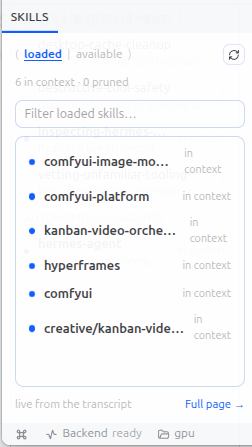
The pane has two views behind a small toggle, ( loaded | available ):
| View | What it shows |
|---|---|
| loaded | the transcript view above — what is in context right now |
| available | every skill on disk, grouped by category, with its description and a dot when it is already loaded; click a row and /<skill> lands in the composer, ready to send |
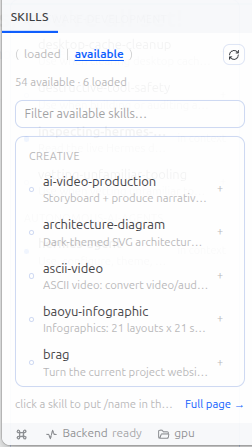
⌘K → Skills: open all skills opens the pane straight on the inventory.
Clicking never submits: a click gives you /name in the input, and you decide
whether to send it. If the composer is unavailable the command is copied to the
clipboard instead.
Requirements
- Hermes Agent 0.22.5 or newer (the desktop SDK surface used —
host.openWorkspace,host.composer,focusedSessionId— is newer than
0.21), with the desktop app running. - No Python dependencies, no API keys, no configuration.
- Built and tested on Linux (GNOME/Wayland, Hermes v0.22.5). Everything it
touches is cross-platform — the desktop SDK,state.dbandSKILL.mdfiles —
but macOS and Windows are untested by the author.
Install
From the catalog, once listed:
hermes plugins install loaded-skills-indicator --enable
The desktop half is copied into the app root opt-in, like every unified
package: open Settings → Plugins and switch Loaded Skills Indicator on.
Restart Hermes Desktop if the chip does not appear — the loader caches folders
it has already scanned and only re-reads a folder it has not seen.
From a checkout (development):
git clone https://github.com/<owner>/loaded-skills-indicator
cd loaded-skills-indicator
ln -s "$PWD" ~/.hermes/plugins/loaded-skills-indicator
hermes plugins enable loaded-skills-indicator --no-allow-tool-override
mkdir -p ~/.hermes/desktop-plugins/loaded-skills-indicator
cp desktop/plugin.js ~/.hermes/desktop-plugins/loaded-skills-indicator/plugin.js
desktop/plugin.js is a plain file with no build step — re-copy it after
editing (or symlink it) and the app hot-reloads it in place.
Other profiles
The backend package is per-profile ($HERMES_HOME/plugins/): copy the folder
into ~/.hermes/profiles/<name>/plugins/ and enable it there. The desktop half
is app-level and is shared by every profile; without the backend it still works,
in degraded mode (see below).
Disclosure
What this plugin touches, for anyone deciding whether to install it:
- Reads the local transcript.
dashboard/plugin_api.pyopens the profile's
state.dbread-only (mode=ro) and reads the ACTIVE message rows of one
session to decide which skills are still in context. No writes, no other
tables. - Reads skill files. The "available" view asks
GET /available, which reads
SKILL.mdfrontmatter (name, description, category) under the profile and
bundled skills directories — nothing else on disk. - Types into your composer. Clicking an available skill calls
host.composer.insertTextwith/<skill>; it never submits. If that surface
is missing the command is copied to the clipboard (ctx.os.writeClipboard).
No network calls, no telemetry, no credentials, no subprocesses, no self-update
machinery. The plugin never mutates a session, a skill or a config file.
Why a backend
session.history — the only transcript RPC a renderer can call — strips
tool-result bodies except for write_file / patch / skill_manage. So from
the UI alone you can see that skill_view ran, never whether the body is
still there. state.db has the bodies, so plugin_api.py reads the ACTIVE
rows (active = 1, not compacted) and reduces them to a small list:
- assistant
tool_calls→tool_call_id→ theskill_viewargument name; skill_viewtool row with a body → full; with a prune marker → pruned;success: false/[skill_view] … FAILED→ ignored (nothing was read);/skill, bundle and auto-load scaffold turns → every skill they name (the
three scaffold shapes are parsed locally — no import of Hermes internals);- prune markers in any row's text (compaction summaries) → pruned.
The last event for a name wins, so a re-read after a prune goes back to full.
The route is read-only, cached for 1.5 s, and tries this request's home, the
default root and every profile's state.db — the router can run in a plugin host
whose process home is the launch profile.
The "available" view does not reimplement the agent's view of the library: the
list comes from the gateway's own skills.manage RPC (so disabled and
platform-filtered skills stay hidden), and GET /available only enriches it with
descriptions. Backend unreachable → names still list, descriptions go missing.
Degraded mode
If the backend is not reachable (package not enabled for the active profile, or
a gateway that does not serve /api/plugins/), the chip falls back to the
display transcript: skill_view invocations are still listed and prune markers
are still read, but a pruned body whose marker the summarizer dropped cannot be
told apart from a live one. The footer says so: "Backend off — display
transcript only".
Behaviour
- Refetches every 5 s, on any gateway event that could touch skills/tools, when
the focused session changes, and when the window regains focus. - Follows the focused chat (
host.state.focusedSessionId/
focusedStoredSessionId), including session tiles. - Zero skills →
Skills: 0 loaded, and the popover says nothing is loaded. - Right-click the status bar to hide the chip (it is listed as Loaded
skills); the ⌘K pane keeps working either way. - A gateway caches a mounted plugin router, so after a plugin update a new
backend route needs a gateway/app restart before it answers. The UI degrades
instead of breaking while that is true.
Layout
plugin.yaml, __init__.py       # agent half (inert register stub)
desktop/plugin.js              # the UI: chip, popover, docked pane, page
dashboard/plugin_api.py        # /skills, /available, /health  (FastAPI router)
dashboard/manifest.json        # {"api": "plugin_api.py", "tab": {"hidden": true}}
tests/                         # unittest, no dependencies
Development
python3 -m unittest discover -s tests -t tests -v   # 18 tests, stdlib only
hermes plugins validate . --install-deps            # the catalog CI gate
The tests stub FastAPI's two import-time names, so the router's pure functions
(transcript analysis, SKILL.md scanning, scaffold parsing) run anywhere.
README from the reviewed commit 1c50147; it updates when the author re-pins.