
 pratikpoddar
Margin
Comment @hermes on any highlighted text in Google Docs, Slides or Sheets, and Hermes answers right in the comment thread.
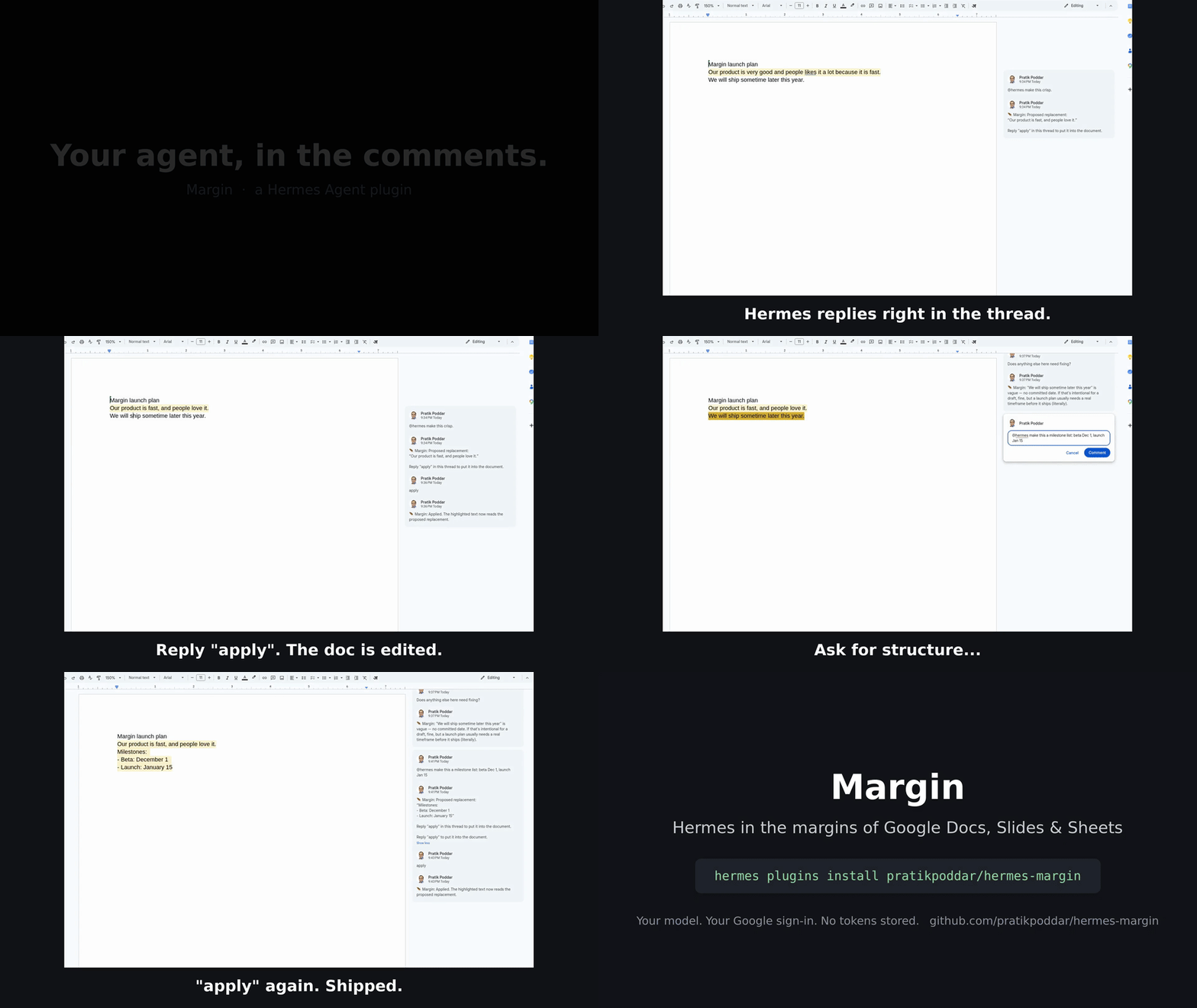
Margin is a Hermes Agent gateway platform plugin. Every Google Drive comment thread becomes its own Hermes chat session: Hermes sees the whole document plus the text you highlighted, replies in the thread, remembers the thread when you follow up, and can put its suggested wording straight into the Doc when you reply apply.
Setup (5 steps)
- Create a Google Cloud OAuth client. In the Google Cloud console, create a project, configure the OAuth consent screen (External, testing mode, add your own Google account as a test user), then create an OAuth client ID of type Desktop app.
- Enable the APIs. In the same project enable the Google Drive API, Google Docs API and Google Slides API.
- Install the plugin.
Hermes asks forhermes plugins install pratikpoddar/hermes-margin --enableMARGIN_GOOGLE_CLIENT_IDandMARGIN_GOOGLE_CLIENT_SECRET(the Desktop client from step 1). - Sign in to Google, once, from a terminal.
Hermes runs the browser sign-in, stores the token in your profile and refreshes it. Margin never sees it.hermes auth add margin:google # `hermes margin auth` prints these steps and checks the sign-in - Watch a document and start the gateway.
Highlight text in the doc and commenthermes margin watch https://docs.google.com/document/d/<id>/edit # or /margin watch <url> in any Hermes chat hermes gateway@hermes make this clearer.
If a gateway was already running before you installed Margin, runhermes gateway restartso it loads the plugin. Comments that existed before the first poll are skipped, so post a new one.
How it works
Google Doc comment "@hermes …"  ──poll──▶  Margin adapter  ──MessageEvent──▶  Hermes gateway ▶ agent
            ▲                                                                       │
            └──────────── reply in the same thread (status reply edited in place) ◀─┘
- Polling. Every 10 s (
MARGIN_POLL_INTERVAL) Margin calls Drivecomments.listfor each watched file, withstartModifiedTimeset to the newest change it has seen, and fields includingquotedFileContent,repliesandmodifiedTime. On errors it backs off exponentially (429 and 5xx are retried with backoff andRetry-After; the poll loop doubles its interval up to 5 minutes). - Triggers. A new, unresolved comment that mentions
@hermes(MARGIN_TRIGGER) opens a thread. Any later reply in a thread Margin has joined continues it; no mention needed. - Sessions.
chat_idis the Drive file id andthread_idis the comment id, so each comment thread is one Hermes session (…:margin:group:<file>:<comment>), and follow-ups have the thread's memory. - Context. The first turn of a thread carries your request, the highlighted text and the document text (exported as plain text; CSV for Sheets; capped at
MARGIN_MAX_DOC_CHARS, default 60,000 characters). The document is marked as untrusted data, and Margin turns can never run gateway slash commands. - Status. Margin posts "🪶 Margin is reading the doc…", edits it to "is thinking…", then edits the same reply into the final answer.
- Apply. When Hermes proposes new wording it uses a fenced
replaceblock. Margin shows it as "Proposed replacement" and, when you replyapply, calls Docsdocuments.batchUpdate(or Slidespresentations.batchUpdate)replaceAllTextwithmatchCase, only if the highlighted text occurs exactly once in the file. A highlight spanning several paragraphs in a Doc is replaced by its exact index range (deleteContentRange+insertTextin one batchUpdate). Otherwise it replies explaining why nothing changed. - Dedupe and loops. Every comment and reply id Margin has handled is stored, so restarts never replay a turn. Existing comments are recorded, not answered, when a file is first watched. Margin ignores replies it posted (by id, and by its
🪶 Marginmarker). - Who can trigger it. By default only the signed-in Google account. Add other commenters with
MARGIN_ALLOWED_USERS(Drive permission ids or emails, when Google exposes them), orMARGIN_ALLOW_ALL_USERS=trueto let anyone who can comment on a watched file drive your agent (not recommended).
Commands
| Command | What it does |
|---|---|
| /margin watch <url or id> · hermes margin watch <url> | Start watching a Doc, Slides deck or Sheet |
| /margin unwatch <url or id> · hermes margin unwatch <url> | Stop watching it |
| /margin list · hermes margin list | List watched files (including MARGIN_WATCH_FILES) |
| /margin status · hermes margin status | Last poll time or error per file, threads joined |
| hermes margin auth | Setup steps and the current Google sign-in |
Configuration
| Variable | Default | |
|---|---|---|
| MARGIN_GOOGLE_CLIENT_ID / MARGIN_GOOGLE_CLIENT_SECRET | required | Your own Desktop OAuth client |
| MARGIN_WATCH_FILES | empty | Comma-separated URLs or ids, added to the watch list |
| MARGIN_TRIGGER | @hermes | Mention that opens a thread |
| MARGIN_POLL_INTERVAL | 10 | Seconds between polls (minimum 2) |
| MARGIN_MAX_DOC_CHARS | 60000 | Document characters sent with the first turn |
| MARGIN_ALLOWED_USERS / MARGIN_ALLOW_ALL_USERS | owner only | Who else may trigger Hermes |
Privacy and disclosure
- Your document goes to your model. The full text of a watched file (up to
MARGIN_MAX_DOC_CHARS), the highlighted text and the comment thread are sent to whichever model provider your Hermes profile uses, at the start of each thread. Don't watch files you aren't allowed to send there. - Network calls: only Google APIs:
www.googleapis.com(Drive),docs.googleapis.com,slides.googleapis.com, every 10 s per watched file while the gateway runs. Requests are made through Hermes'scredentialed_provider_request, which attaches the token only for those declared hosts. - Credentials: Margin declares an
oauth:client inplugin.yaml. Hermes runs the sign-in (hermes auth add margin:google), stores the grant in your profile's auth store and refreshes it. Margin never reads, stores or refreshes a token. Scopes:drive(read files and comments, post and edit replies),documentsandpresentations(apply). Revoke withhermes auth logout margin:google. - Writes to your files: Margin posts and edits its own comment replies, and changes document text only when someone allowed replies
applyin a thread. - Stored data: the watch list, poll cursors, handled comment/reply ids, and per-thread highlighted text and last proposal, in Hermes's per-plugin state under
<HERMES_HOME>/plugin-data/. No document text, no credentials. - Background work: a polling loop inside the Hermes gateway process. No shell commands, no subprocesses, no telemetry, no self-update.
Limitations
- Polling, not push: replies appear within one poll interval (about 10 s) plus model time.
- Comment replies are plain text; Markdown is flattened.
applyworks in Docs and Slides only, for a single-paragraph highlight that appears exactly once. Sheets threads get answers but noapply.- When Margin signs in as your own Google account, its replies appear under your name, marked
🪶 Margin. Use a separate Google account shared on the doc if you want a distinct author (then add your own account toMARGIN_ALLOWED_USERS). - Google may show an "unverified app" screen for a personal OAuth client in testing mode, and testing-mode refresh tokens expire after 7 days (sign in again with
hermes auth add margin:google). - Very large documents are truncated to
MARGIN_MAX_DOC_CHARSin the first turn. Edits made to the document after a thread starts are not re-sent automatically. - Comments anchored to images, drawings or Sheets ranges may arrive without highlighted text.
Development
pip install pytest pytest-asyncio     # inside a Hermes venv (Python 3.14)
pytest                                 # fake Google transport; no credentials needed
hermes plugins validate .
License
MIT © Tinkerer (Pratik Poddar)
README from the reviewed commit 29a8467; it updates when the author re-pins.


