 arspesk
mock-review
mock-review is a Hermes plugin for reviewing UI and design options. Your agent builds a decision round, the plugin
serves it as a review board, and you open the link, mark each decision Approve, Change or Skip, add notes, drop pins on
the mocks and press Send. Send wakes the agent in the chat the review came from, with your marks attached. Boards render
inline mocks at desktop, tablet and phone widths, in light and dark, and wear a per-project design profile.
With viewer access you can also export a round as PNG, PDF, HTML or Markdown, with or without its comments.
Plan boards and Build
A plan preset round uses the same fixed skeleton as a design board: a status line, "Already decided", a defaults card,
the plan grouped by section, then a final approval. Questions carry a recommendation (go with it, or type a different
answer); pieces, defaults and decisions are approved, changed or skipped, and "Approve the rest" fills a section in one
press. The footer has one button. By default it is "Build": locked, with what is still open in its
tooltip, until every question is answered, everything else is approved or skipped and nothing is on Change; a block on
Change turns it into "Send" for those notes. Set footer_button to send for a board that only ever sends notes.
Mocks carry working controls by default (interactive_elements): the board opens usable, so dropdowns and switches
respond, and Comment (or C) switches to pinning a note. The section bar stays pinned under the header, so a long plan is
one tap from any section.
Build wakes Hermes on the chat the board came from, with the approved plan. The agent builds, and the result arrives as
the next round on the same link, with "Your notes, answered" and Revised badges on the blocks that changed.
A design profile is bound to a project once, with hermes mockreview design bind <name> <abs project path>. It then
auto-applies to every create and add-round in that project (or its git repository and worktrees). A round whose mocks use
off-profile colours or fonts is refused before anything is written, and the message names the exact location and value.
--off-brand "<reason>" is the only bypass; the reason is recorded on the round and the review.
To see a plan board without an agent, create the demo from a checkout with a board running (see Quickstart):
hermes mockreview create --title "Offline sync plan" --platform local --chat-id demo --project "$PWD" --decisions "$PWD/examples/plan-demo/decisions.json" --no-design --no-wake
examples/plan-demo/decisions.json uses every 1.2 block; the printed link opens round 1.
Install
Requires Hermes 0.22.0 or newer and Python 3.11-3.14. Hermes installs the plugin's one Python dependency, itsdangerous, from pyproject.toml. PyJWT is an optional crypto extra, needed only for Cloudflare Access sign-in.
Once the plugin is in the Hermes catalog:
hermes plugins install mock-review
Until then, install it from GitHub:
hermes plugins install apelabs-dev/hermes-mock-review
Enable it if the installer did not: hermes plugins enable mock-review.
Quickstart
hermes mockreview setup
The wizard checks your Hermes version, works out which chats to wake you in, enables the webhook platform if you agree,
creates the signing secret, adds a wake route and a notice route for each messaging platform, asks to let Hermes Desktop
chats be woken, picks the hosting mode, turns on autostart, validates the plugin and creates a test review. Add
--dry-run to see the plan without changing anything, or --yes to accept the defaults without questions.
Which chats: setup reads the platforms in the Hermes config and sets up every messaging platform it finds, plus Hermes
Desktop chats. The webhook ingress, the Microsoft Graph ingress, the API server and the agent-protocol adapters are not
chats, so they never count. With several messaging platforms it asks on a terminal (Enter means all of them); under
--yes or --dry-run it takes them all and says so. With none, it sets up Desktop chats only. --origin-platform NAME
(repeatable; local is Desktop) narrows it to exactly what you name. A Desktop chat is woken inside its own session,
which needs Hermes's allow_gateway_injection consent: setup asks for it and needs an explicit yes (--yes only
prints the command). See which chats can be woken.
The first run usually ends with the test review marked pending (board not running): the review is saved and loads by
itself once the board runs, and setup prints no link until a board answers. The last lines of the output start with
next: and say what to do for your setup. In short:
- Start the board. Inside the gateway: if it is running, restart it (
hermes gateway restart, or stop and run again a
gateway you started withhermes gateway run); if it is stopped, start it (hermes gateway run, or
hermes gateway startfor the installed service). Wake-ups need the gateway either way. To run nothing inside the
gateway, runhermes mockreview servein a terminal instead. - Optional: run
hermes mockreview setupagain. It is safe to repeat: it reuses the secret and routes, notices the
board that is already running, closes the earlier test review, and creates a new one whoseboard url:you can open. - Ask your agent for a design review. It calls
mock_review_createand posts the link. This is the real test of the
wake-up: press Send on the board and the agent answers in the chat.
Let the woken session build (opt-in)
Hermes runs the session Send wakes with its safe webhook tools only, so by default that session replies "Round N
feedback is saved; the build continues in this thread's chat session." and the chat's own session builds the round. To
let the woken session build right away, set the toolsets, re-run setup and add the line it prints by hand. Include mock-review so it can call the
mock_review tools; the list replaces Hermes's webhook default rather than adding to it:
hermes config set plugins.entries.mock-review.settings.wake_toolsets "mock-review,terminal,file"
hermes mockreview setup
Setup never edits Hermes's route file: it prints the "toolsets" line to add to the wake route in
webhook_subscriptions.json (Hermes keeps this a manual step so an agent cannot grant itself tools). Each setup run
re-subscribes the route and drops the key, so add it again afterwards. It refuses while the server listens beyond
loopback, because feedback typed there would reach those tools. Read security first.
Try a board without an agent
With a board running (step 1), create a review from a terminal. examples/demo-variants holds three full-page variants of
one pricing page; this one opens as a live prototype:
EXAMPLES="${HERMES_HOME:-$HOME/.hermes}/plugins/mock-review/examples/demo-variants"   # from a checkout: "$PWD/examples/demo-variants"
hermes mockreview create --title "Pricing page" --platform local --chat-id demo --no-wake --allow-live-demo \
  --prototype "$EXAMPLES/a-calm-editorial/index.html"
It prints the review's url. --no-wake makes it a board nobody is woken by, so no signing secret or route is needed.
A live prototype opens in Use it mode, so clicks work the page. To leave a comment, switch the header to Pin and
tap the spot; after each pin the board goes back to Use it.
Agents write decision rounds instead; see docs/decisions-format.md.
Sharing
A review is hosted in one of three ways. Set the default with default_host, or let the agent ask you.
local(the default): the board is served from this computer. With the default bind address the link opens on this
computer only. Settinghostto0.0.0.0makes local links reachable from other devices on your network; people
there get the sign-in page and join with an invite or a share link.tailnet: the board stays on loopback and you expose it withtailscale serve. The link is your Tailscale address,
so only your tailnet can open it.setupoffers this when Tailscale is running, andsetup --hosting tailnet
selects it.public: a public URL behind Tailscale Funnel or any TLS proxy.hermes mockreview public onmaps one Funnel port
and prints the URL; any other proxy works withpublic_urlandtrusted_proxies. Reviewers sign in with an invite
or a share link. See docs/public-hosting.md.
docs/hosting.md covers each mode step by step.
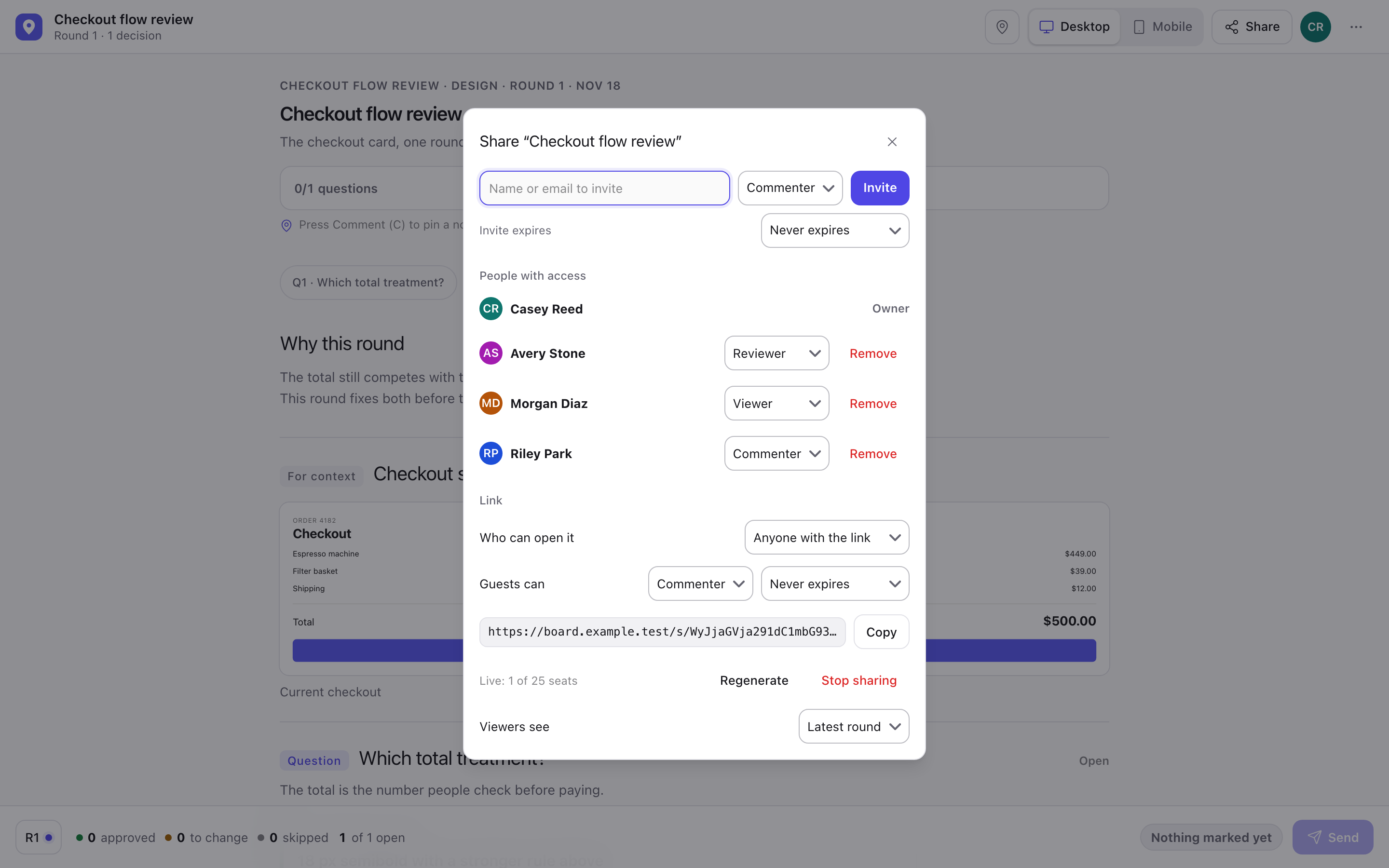
Sharing a review with other people is separate from hosting it. An invite (hermes mockreview invite) creates an
account and works once; a share link gives access to one review without an account, and the link itself is the
guest's credential. A review has at most one share link, managed by its owner in the Share dialog or with
hermes mockreview share <review id>. The link carries its own guest role — reviewer, commenter (the default) or
viewer — and can be limited to signed-in members, given an expiry, and pinned to one round for viewer guests.
A guest opens the link with its role and gets a server-assigned name such as "Calm Otter"; the name is unique among
that review's live guests and can be changed. A viewer sees only the round the link names, with no feedback pins,
notes or submit token. A commenter can comment on any round; a reviewer can also send feedback and ask for a pin fix,
but a guest never wakes Hermes: Send is stored for the owner. Regenerating or stopping the link ends every guest
session of the old link.
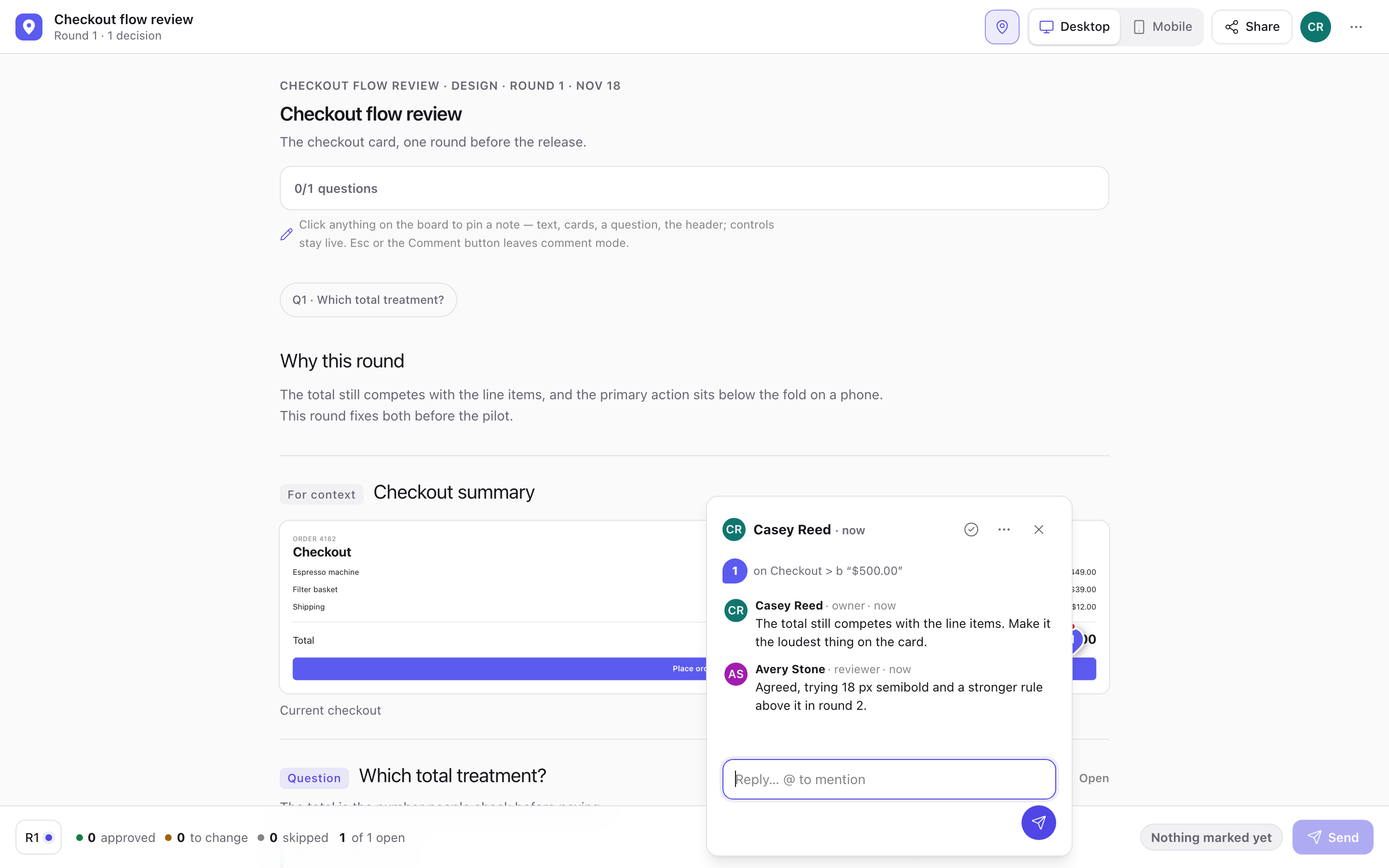
Pins are conversations now: each pin opens a thread with replies, resolve/reopen, optional @Hermes mentions, and live
updates on every open board. An owner's or reviewer's @Hermes comment wakes Hermes once per comment; the board answers
at once and the worker tick delivers it, coalescing a burst into one wake, and the anchored block carries a working
chip until the session replies. It replies in the thread and patches the block in place when the comment asks for it; a
guest, an agent token and a wake-off board never wake anyone. The wake goes to the chat the review was created
from; docs/comments.md says what the session does there. Comments and their history live in the review's own
database under the data root. See docs/comments.md and docs/security.md.
The board opens in the inline layout by default: a flowing document with thin rules and no card backgrounds. Set
layout to cards for the bordered, rounded sections of 2.0.0. The choice is stored in each review when it is
created, so changing the setting leaves open reviews as they are.
People and access
There are no passwords. The board server has accounts, and every request is checked against who is asking.
- The owner is this computer: a request from the board's own machine is the install's admin. Turn
loopback_owner
off and the owner signs in with a one-time link instead,hermes mockreview login. - People join with a single-use invite link (
hermes mockreview invite, 7 days by default,--expiresto change it).
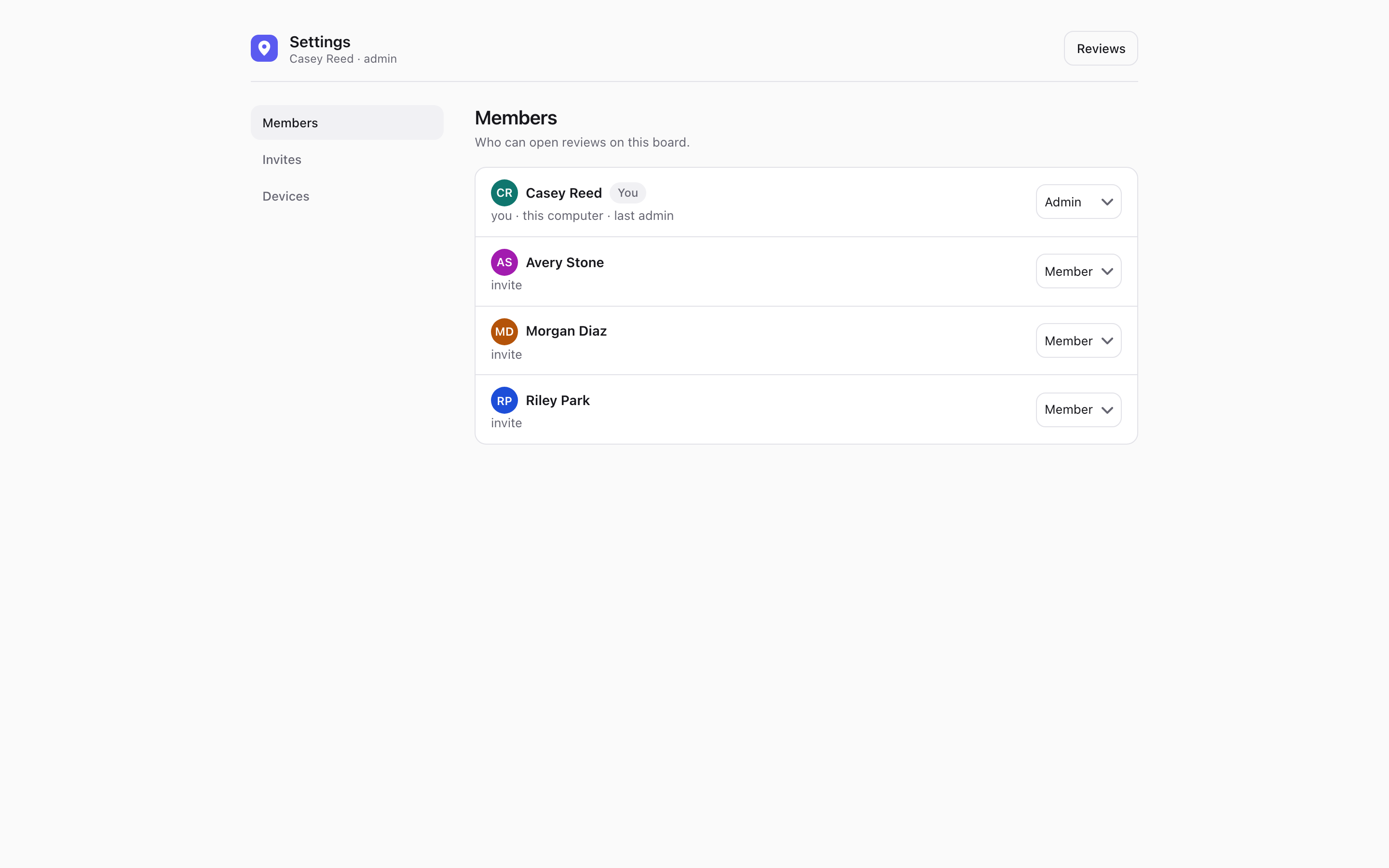
An invite creates an account; a share link does not. - Accounts live in one flat user directory per install. Each account is a member or an admin; admins manage every
review and see Members and Invites in Settings. The last admin cannot be demoted or the only admin deleted. - Access is granted per review:
viewer(look),commenter(look and comment) orreviewer(look, comment and send
feedback), optionally with an expiry. A grant for all reviews is a convenience flag, not a workspace or a team.
hermes mockreview users grant <name|id> --review <review id> --role reviewer --expires 30dis the CLI form. - Personal access tokens (
hermes mockreview tokens create --user <id> <name>) let a coding agent comment as that
account; the token is shown once and stored hashed.
A device stays signed in: a session lasts 30 days from its last use, so a phone or laptop signs in once with a link
and is not asked again while it is in use. Settings > Devices lists your signed-in devices and can sign the others out.
On a tailnet or public board, setup ends by printing a first sign-in link, and until you have used one, the agent's
create and add-round results carry a fresh link for it to hand over. A link works once and expires after 15 minutes.
Roles and grants are read again on every request, so a change applies immediately. The full model — sessions, proxy
identities, share-link seats, throttling and audit — is in docs/security.md; the migration from
the old password/hosting model is in docs/migrating-to-2.md.
Platforms
macOS and Linux run everything, including the board inside the gateway process (autostart). On Windows, run the board in
the foreground with hermes mockreview serve. The plugin installs no service files on any platform.
Other agents (MCP)
Claude Code, Codex and OpenCode can use the same boards without Hermes in the loop: mockreview/mcp.py serves the six
mock_review_* tools over stdio, so a coding agent can create a board, add a round and read the reviewer's marks
itself. With a personal access token (mockreview tokens create --user <id> <name>, passed as --token or
MOCKREVIEW_TOKEN) it also gets three comment tools — list_comments, reply and resolve — so it can work through
the board's threads as the person whose token it holds; an @Hermes mention there never wakes Hermes. The canonical
command is <abs>/bin/mockreview mcp (the checkout or installed plugin directory);
python -m mockreview.mcp runs the same server when the package is on the import path. Details:
docs/mcp.md.
Wake is off for MCP boards by default, because an external CLI has no Hermes session to wake: the agent reads the marks
with mock_review_feedback. Add --wake plus --platform and --chat-id (or origin_platform and origin_chat_id
on one call) only when the session context names a real chat. A receiver of your own can be supplied through
MOCKREVIEW_WEBHOOK_URL; see the receiver contract in docs/mcp.md. A local link
opens on the computer running the board; use tailnet to open it on a phone.
Claude Code, project scope (use --mcp-config with a JSON file for a one-off):
claude mcp add --transport stdio --scope project mock-review -- <abs>/bin/mockreview mcp
Codex, in ~/.codex/config.toml:
[mcp_servers.mock-review]
command = "python3"
args = ["<abs>/bin/mockreview", "mcp"]
OpenCode, in opencode.json:
{
  "mcp": {
    "servers": {
      "mock-review": {
        "type": "local",
        "command": ["<abs>/bin/mockreview", "mcp"],
        "disabled": false
      }
    }
  }
}
Commands and reference
hermes mockreview <command> and the /mockreview slash command (list, open, close, settings). The agent uses nine
tools. Six work on boards: mock_review_create, mock_review_add_round, mock_review_feedback, mock_review_ack,
mock_review_list and mock_review_patch_block. Three work on comment threads: mock_review_list_comments,
mock_review_reply and mock_review_resolve.
- docs/cli.md: every command with its flags
- docs/settings.md: every setting, its default and its environment variable
- docs/design.md: the 2.0 design system, tokens and the rules the tests hold
- docs/decisions-format.md: the
decisions.jsonblocks an agent writes - docs/desktop.md: the Mocks tab in Hermes Desktop (list, read-only viewer, delete)
- docs/hosting.md, docs/security.md and
docs/troubleshooting.md
Disclosures
What the plugin does that you may want to know before installing it.
Background server. When autostart is on, the plugin starts a board web server on a background thread inside the Hermes
gateway process, plus one worker thread that retries undelivered wake-ups and runs the optional auto-close and cleanup of
old reviews. autostart is off until hermes mockreview setup turns it on. The CLI, hermes plugins validate and
Kanban workers never start a server. hermes mockreview serve runs the same server in the foreground instead.
Bind address and port. The server listens on 127.0.0.1:8790 by default (settings host and port). If you set host
to 0.0.0.0, every device that can reach your computer on that port gets the sign-in page: people join with an invite
(hermes mockreview invite) or the review's share link. Do this only on a network you trust. Setup prints this warning before it makes the change.
Outbound network calls:
- The Hermes webhook on
http://localhost:8644(settingwebhook_url): a signed POST when you press Send, to wake your
agent. It stays on your computer. - The same local webhook again, on a second route (
<webhook_route>-<platform>-notice): up to two more signed POSTs,
still loopback only. One right after the wake-up is accepted (an instant "got it, working on round N" in the origin
chat, also mirrored into that chat's session), and one later, only when a sent round gets no new round within
stale_after_minutes(orstale_after_read_minutesafter the agent read it; both timesbuild_stale_factorafter
Build), to say the agent may have stalled. No
ping for a round with nothing left to build, one the agent acknowledged, or a closed review. Both carry the review title and counts, never your notes, and
use the same signing secret as the wake-up. - Cloudflare Access only: when
cloudflare_teamandcloudflare_audienceare both set, a GET to
https://<team>.cloudflareaccess.com/cdn-cgi/access/certsfetches the team's public signing keys, so the board can
check theCf-Access-Jwt-Assertiontoken on a request. The keys are cached for an hour. Nothing is sent but the request itself. - Nothing else. There is no telemetry, analytics or update check.
Credentials. The plugin reads one secret through Hermes's secret scope, or from the process environment when it runs
without Hermes (the stdio MCP server), and keeps none of its own: MOCKREVIEW_WEBHOOK_SECRET (signs the wake-up
request; setup generates it and stores it with hermes config set). It is declared as an optional secret in
plugin.yaml.
Shell commands. tailscale status --json and tailscale serve status --json find your tailnet address and existing
routes when you use tailnet hosting (on macOS, the app's own binary when the tailscale symlink crashes); they only
read, and setup prints any tailscale serve command for you to run. tailscale funnel status --json also only reads:
it finds the Funnel URL of this board for a public review. hermes mockreview public on runs
tailscale funnel --bg --yes --https=<port> http://127.0.0.1:<port> to map one Funnel port to the loopback board, and
public off runs tailscale funnel --https=<port> off to remove it. Both run only when you ask, and neither touches a
port that serves something other than this board. To match a saved design profile to a project, it
runs git -C <project> rev-parse --show-toplevel --git-common-dir, which only reads the project's git toplevel and,
inside a linked worktree, the main checkout. setup also
runs hermes subcommands: --version, gateway status and config get to read the current state, and config set,
config unset for obsolete settings, webhook subscribe, webhook remove (only for a self-delivering route left by an
older setup, and only after you confirm) and plugins validate to make its changes.
Files. Reviews are stored under $HERMES_HOME/workspace/mock-reviews (setting data_dir). The plugin reads the Hermes
config.yaml through Hermes, or directly for its own settings when it runs outside the gateway.
Development
uv run --with-requirements requirements-dev.txt python scripts/check.py fast
uv run --with-requirements requirements-dev.txt python scripts/check.py changed --base main
uv run --with-requirements requirements-dev.txt python scripts/check.py full
fast runs every non-browser test in parallel (fail-fast, under a minute on a quiet machine). changed maps the
branch's changed files to the tests they can affect, plus a small always-on smoke set; an unmapped path falls back to
the non-browser tier, and full is the acceptance run. full runs the non-browser tier first and then the browser
modules in a pool, each in its own pytest process, so a module's Chrome is reused and the suite fits in bounded
foreground parts (--part nonbrowser or --part browser runs one half). A failed non-browser phase stops the run
before any browser starts; --all runs both phases and shows every failure, so it is the form to use when one run
must catch a broken non-browser and a broken browser assertion (the mutation demonstration uses full --all).
The browser modules are discovered, not just listed: the runner takes every module that actually carries
pytest.mark.browser and unions it with its schedule. A new browser module needs the mark; leaving its name out of
the schedule still runs it (with a warning and one worker), while a listed module that lost the mark fails the run.
A lower CHECK_CHROMES budget only changes how many workers a browser module gets, never which modules run; work
that cannot be scheduled is reported as a failure, never dropped. A browser job runs only its marked tests, and a
module that also holds unmarked ones keeps those in the non-browser pass, so every test runs exactly once in both
full and changed.
A browser module that fails runs once more: only its failed tests after --all, the whole module after a fail-fast
run. When the retry passes, the run stays green and each test that failed first is listed as flaky, before the summary
and in its count (and as a warning and a job-summary line on GitHub Actions); a test that fails twice fails the run.
CHECK_RETRIES=0 turns the retry off. The non-browser tier is never retried.
In CI the four tests (...) checks are required. The Linux ones run both tiers. On macOS and Windows the browser tier
runs as a separate browser tier (...) check that does not block a pull request: when it fails there, the check stays
green and shows a warning. On main it fails like any other check, and a nightly run of the full matrix opens or
updates a nightly-ci issue when anything fails. A pull request that only touches the root Markdown files or docs/
skips the browser tier; the non-browser tier, which holds the docs checks, still runs.
The browser harness caps Chromes machine-wide for this OS user: MOCKREVIEW_CHROMES (default 3, never more than 4) is
one run's budget, and slot files in /tmp/mockreview-chrome-slots-<uid> (POSIX; %LOCALAPPDATA%\mockreview\chrome-slots
on Windows) make every process of this user respect the same ceiling, whatever its TMPDIR or HOME says. It does not
cover other OS users, other machines, or a sandbox that maps /tmp away per process; MOCKREVIEW_CHROME_SLOTS points
the registry at an explicit directory. Browser tests skip when no Chrome, Chromium or Edge is installed;
MOCKREVIEW_BROWSER points at an explicit executable.
requirements-dev.txt is development-only. The plugin runtime keeps its one dependency (itsdangerous, in
pyproject.toml and installed by Hermes), and pytest, pyyaml and pytest-xdist are never part of it.
AGENTS.md describes the layout and the rules a change has to keep. CHANGELOG.md lists
releases.
Releasing
Commits on main drive the version, through .github/workflows/release-please.yml (Release Please, pinned to a commit).
Every push opens or updates one release pull request; merging it bumps the version, prepends the changelog entry, tags
vX.Y.Z and publishes the GitHub release.
fix:andperf:commits cut a patch release,feat:a minor,feat!:or aBREAKING CHANGE:footer a major.docs:,test:,ci:andchore:commits cut no release on their own.- Do not edit the version by hand.
release-please-config.jsonnames the files that carry it:plugin.yamland
mockreview/__init__.py, each markedx-release-please-version, plus.release-please-manifest.json. A test fails
when they disagree. - After a release the catalog pin stays manual: a pull request against
NousResearch/hermes-agentthat points its
catalog at the new tag. - The action needs one repository setting, once: Settings > Actions > General > Workflow permissions, "Allow GitHub
Actions to create and approve pull requests".
License
MIT. See LICENSE.
Safe absolute HTTP(S) links in mock/option HTML open in a new tab with noopener noreferrer. Table cells remain
text, with bare absolute HTTP(S) URLs linked even inside prose or alongside other URLs. Surrounding punctuation
and literal HTML stay text. Relative URLs and other link protocols are not linked.
See hosting and security.
README from the reviewed commit 9ebf9d4; it updates when the author re-pins.