
 thibaud.art
Progression — Hermes plugin
A right-side panel for the Hermes Agent desktop app that shows,
live, what the agent and its subagents are doing:
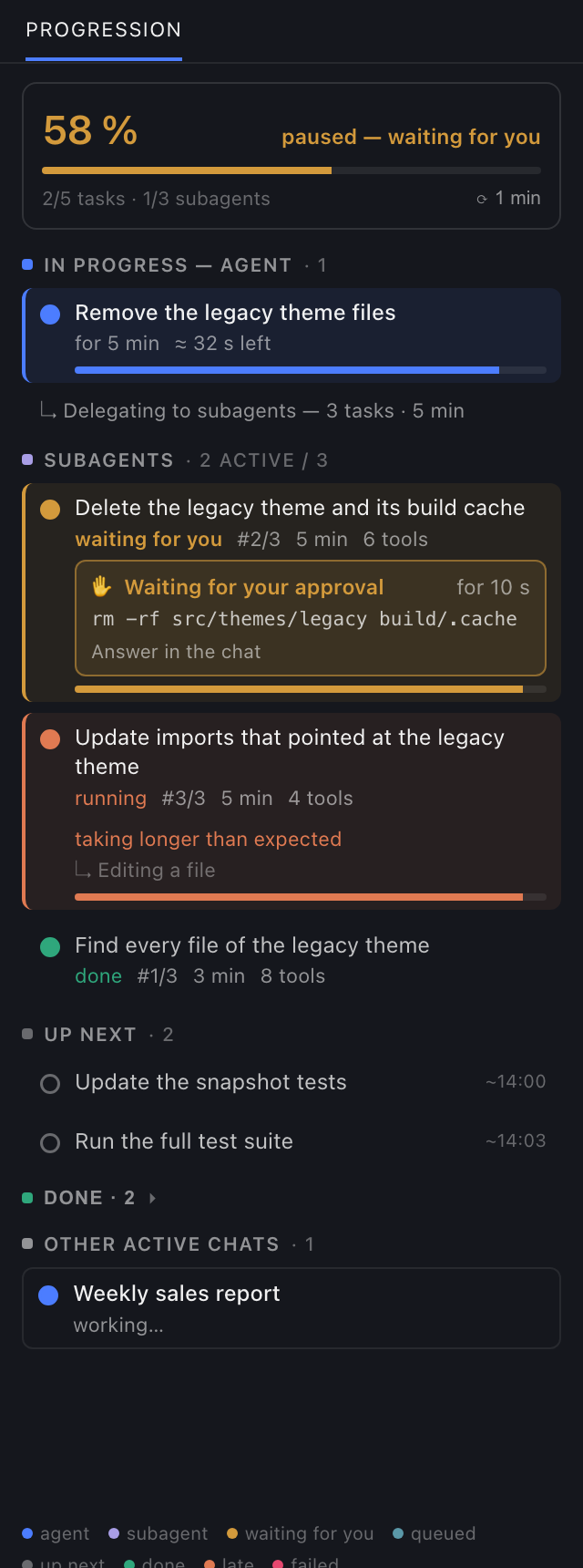
The panel as rendered by desktop/plugin.js with sample data (dark theme).
- In progress — agent: the active task and the tool the agent is using right now;
- Subagents: goal, status, elapsed time, tool count, estimated time left;
- Waiting for you ✋: when the agent or a subagent is parked on an approval, a password, a secret or a
question, the panel says who is waiting and on what (the command to approve), pauses the ETA, and sends a native
notification while Hermes is in the background. Subagents ask through their parent chat, so the request is matched
to the subagent whose last command it is; when that can't be told apart, the panel says so; - Up next: the following tasks, each with an estimated finish time;
- Done (collapsed) and other active chats (click to open one);
- a header with the completion % and the ETA (finish clock time), recomputed every 30 s / 1 / 2 / 5 / 10 min.
New tasks and status changes show at once; the timer only refreshes elapsed times and estimates.
Colours: blue = agent · purple = subagent · yellow = waiting for you · cyan = queued · grey = up next · green = done ·
orange = taking longer than expected · red = failed. A legend sits at the bottom of the panel.
Commands
/progression: show / hide the panel ·/progression on|off/progression 2: recompute every 2 min (or click ⟳ in the panel)/progression fr|en|auto: panel language (auto = the app's language; English and French ship)- ⌘K → "Progression: show / hide the panel"
Install
- One click: open
hermes://plugin/install?repo=supa-thibaud/hermes-progression&enable=1
(the app asks for confirmation), or runhermes plugins install supa-thibaud/hermes-progression.
Hermes installs a package's desktop half disabled: turn on "Progression" in Capabilities → Plugins. - From a local checkout:
./install.sh(copies the desktop half to~/.hermes/desktop-plugins/progression/,
where it is enabled by default, and the command to~/.hermes/plugins/progression/).
How it works
- The agent's plan comes from
todo.updatedevents (the agent's built-intodotool). An agent that publishes no
task list still shows its current tool and its subagents. Tip: tell your agent (memory orAGENTS.md) to publish
a todo list for any work of 3+ steps. - Subagents come from
subagent.*events, plussubagent.listwhen you switch chats. - Current tool:
tool.start/tool.complete. Other chats' titles:session.active_list. - Waiting for you: while a chat is mid-turn, every 5 s
session.active_list(statuswaiting) and, for a waiting
chat,session.events.sincewith a far-futurelast_seen(no events replayed) to read itsopen_requests;
request.canceltriggers an immediate re-check. - % = (done tasks + estimated progress of the running task) / non-cancelled tasks.
- ETA = mean measured duration of finished tasks (20 s floor) × tasks left, minus the time already spent on the
running task. Subagents: mean duration of finished subagents of the same delegation batch. No ETA before the
first task (or subagent) finishes. - The panel has no ✕ on purpose: closing a plugin's only pane disables the whole plugin,
/progressionincluded.
Privacy and disclosures
- No network calls, no telemetry, no shell commands, no files read or written.
- Uses only the desktop plugin SDK and read-only gateway calls (
subagent.list,session.active_list,
session.events.since), polled every 5 s only while a chat is working or waiting. - Native notifications (
ctx.os.notify, shown only while Hermes is in the background, user-controllable in
Settings → Notifications) when a chat starts waiting for you; they name the kind of request and the chat, never the command. - Stores the panel state (visibility, refresh period, language, the last task lists of up to 40 chats) in the
plugin's own desktop storage.
Files
desktop/plugin.js: the panel (Hermes desktop plugin SDK, uncompiled ESM)plugin.yaml,__init__.py: the/progressioncommand on the agent side (slash menu, CLI, messaging)
En français
Panneau à droite du chat : tâches de l'agent et de ses sous-agents (en cours, à suivre, terminées), code couleur,
% de complétion et ETA, et un drapeau ✋ quand l'agent ou un sous-agent attend ta réponse (approbation, mot de
passe, question), avec la commande concernée. /progression affiche/masque, /progression 2 règle la fréquence du recalcul,
/progression fr force le français (sinon la langue de l'app). Installation : voir « Install » ci-dessus, puis
activer « Progression » dans Capacités → Plugins.
License
MIT — © 2026 thibaud.art
README from the reviewed commit eb57d3c; it updates when the author re-pins.


