
 Nj07r
Reading for Hermes
Your newsletters, out of the inbox and into a reader built for them.
Newsletters are the good part of email, and the inbox is the worst place to read them. Reading
moves the senders you pick into one Gmail label and gives that label a calm, fast reader: a page in
Hermes Desktop, and a web app on your phone. Hermes reads along with you.
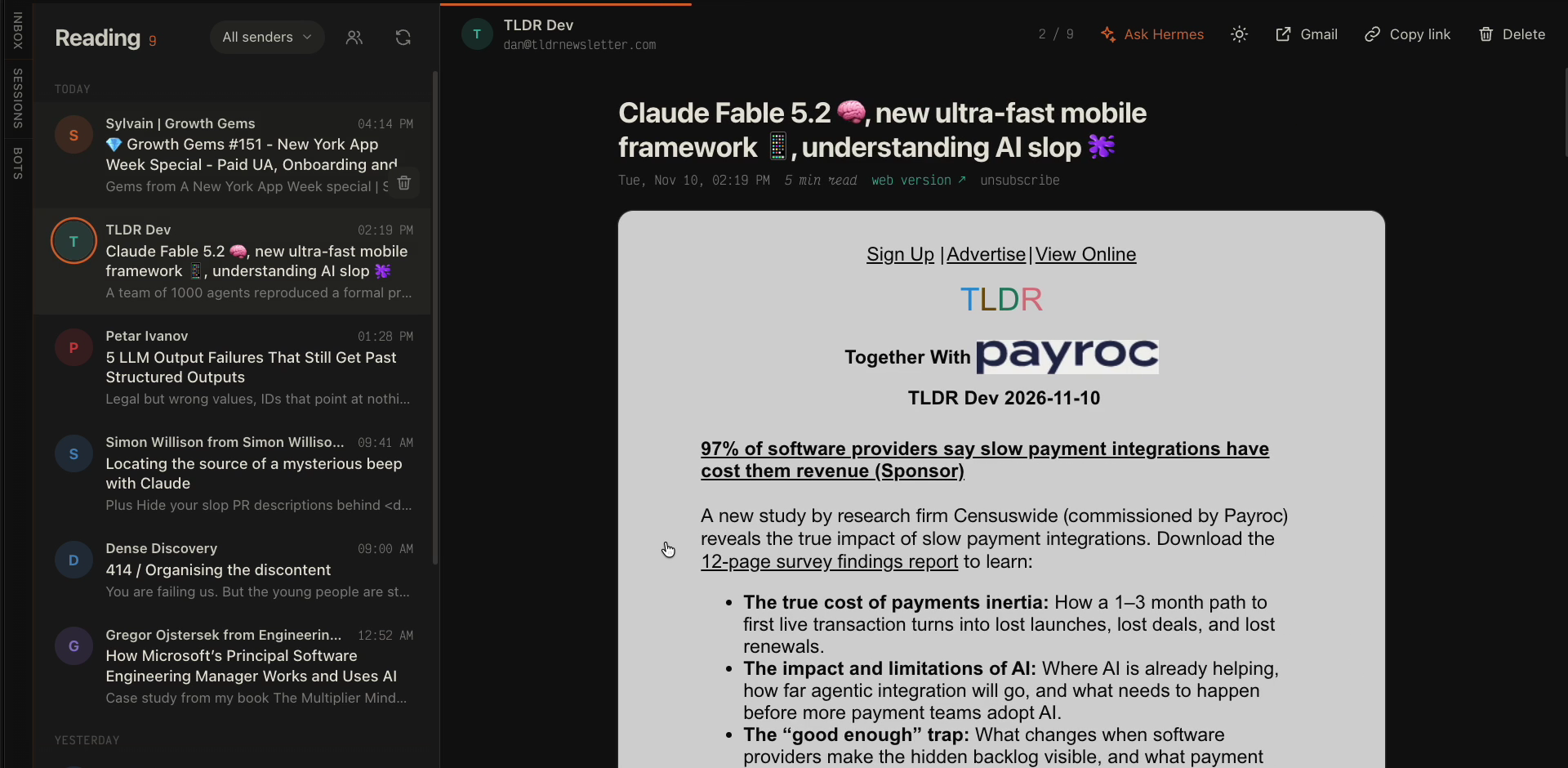
Why it is different
- Setup finds your newsletters for you. Connect Gmail, and Reading scans your inbox for
mailing-list mail and ticks the ones that look like newsletters. Untick the receipts, press
one button, done. Add or remove a sender by hand at any time. - Gmail does the moving, not a server. Reading writes native Gmail filters. New issues skip
the inbox even when Hermes is off, and your mail never passes through a third party. To undo
everything, remove the filters. - Ask Hermes about any issue. One button opens a chat with the newsletter attached. Ask
for the gist, argue with it, turn it into a task, save it to your notes. In any chat, type
@newsletter:to attach one by subject. - Unsubscribe in one tap. Reading uses the sender's one-click unsubscribe (RFC 8058), or
sends the unsubscribe email for you, and stops routing the sender. - A reader, not a mail client. Swipe or press
j/kthrough issues,dto delete with
Undo,tfor dark or original colors (remembered per sender). Emails that ship their own dark
design keep it. - Digests with your own agent.
hermes reading export --since 24hgives a cron job the day's
newsletters as Markdown. The bundled skill shows Hermes how to turn them into a text digest or
an audio brief. - Your Google client, Hermes holds the token. Reading talks to the Gmail API with an OAuth
client that you own. Hermes runs the sign-in and keeps and refreshes the token; Reading never
sees it. No telemetry. Public Hermes APIs only.
Install
hermes plugins install Nj07r/hermes-reading
hermes plugins enable reading
The install asks for READING_GOOGLE_CLIENT_ID and READING_GOOGLE_CLIENT_SECRET. Press Enter
to skip them for now: setup sets them. Restart the gateway. In Hermes Desktop, open
Settings > Plugins and switch on Reading. Reading appears in the sidebar, under Archive.
Set up
Once, about 3 minutes:
-
Create a Google OAuth client. It is free. Enable the
Gmail API, set up the
consent screen (External, with yourself as a
test user), and create a client of type
Desktop app. Download its JSON. -
Connect Gmail from a terminal:
hermes reading setup --client ~/Downloads/client_secret_....jsonThis saves the client id and secret in your profile's
.env(withhermes config set), then
runshermes auth add reading:google, which opens the Google sign-in. Hermes stores the grant.
No browser on this machine? Add--no-browser. -
Pick newsletters. The command lists the newsletters it found. Or open Reading in the
Desktop sidebar: it moves on by itself after the sign-in, and you tick the newsletters and press
Move.
Or ask Hermes: "set up Reading for me". The bundled skill knows the steps. Hermes cannot run the
sign-in for you: hermes auth add runs only in your own terminal.
To sign out: hermes auth logout reading:google.
Use it
| Where | How |
|---|---|
| Hermes Desktop | Reading in the sidebar: the list and the email side by side in the main area. |
| Browser and phone | http://<your dashboard>/dashboard-plugins/reading/open.html. On a phone, add it to the home screen. |
| Any chat | @newsletter: and a few letters of the subject. |
| Terminal and cron | hermes reading list, export, senders, add, remove, unsubscribe. |
Keys in the reader: j k move, d delete, z undo, a ask Hermes, s senders, c copy
link, o open in Gmail, t colors, r refresh, ? all keys.
Coming from Meco
hermes reading import-label <Meco's label> moves its mail into Reading and adds its senders.
Then disconnect Meco and run hermes reading sync once, in case Meco moved mail back to the
inbox.
Documentation
- Reference: commands, settings, files, Gmail scopes, page API.
- About Reading: how the parts work together, and why.
Privacy
What Reading does, before you install it:
- Network: the Gmail API (
gmail.googleapis.com), through Hermes's
credentialed_provider_request. When you press Unsubscribe: a one-click POST to the
sender's unsubscribe address (https only, never to a private, loopback or link-local address,
checked again on every redirect), or an unsubscribe email sent from your Gmail account.
Nothing else, and no telemetry. - Emails on screen: each email shows in a sandboxed frame with an opaque origin. Its own
scripts, event handlers and nested frames are removed, and its CSP runs only Reading's small
helper script (size, keys, swipes). In Desktop the reader page itself runs in the SDK's
SandboxedFrameand reaches the app only through a short list of messages. - Dashboard calls: the page's backend refuses cross-site requests, and calls that change
mail or settings are POST only. - Gmail changes: it creates the label, writes and deletes its own Gmail filters, moves the
routed senders' mail out of the inbox, marks emails as read when you open them, and moves
emails to the Trash when you delete them. - Credentials: none stored by Reading. The Google client id and secret are
.envvariables
that Hermes reads. Hermes stores and refreshes the sign-in in its ownauth.json. - Files: only its own
HERMES_HOME/reading/(the sender list and the ids of its filters). - Shell:
hermes reading setuprunshermes config setandhermes auth add, in your
terminal only, without the parent's auto-approve or YOLO variables. - Model provider: the
@newsletter:reference and Ask Hermes send the newsletter text to
your model provider, like any text you paste into a chat.
Development
git clone https://github.com/Nj07r/hermes-reading && cd hermes-reading
ln -s "$PWD" ~/.hermes/plugins/reading
~/.hermes/hermes-agent/venv/bin/python -m unittest discover -s tests
hermes plugins validate . && hermes plugins doctor . --ci
page.html and reading_core.py reload on each request: no gateway restart needed. Changes to
dashboard/plugin_api.py or __init__.py need one. After a change to desktop/plugin.js, reload
Desktop with cmd+shift+r.
MIT license.
README from the reviewed commit c739110; it updates when the author re-pins.


