silentpr0
redline
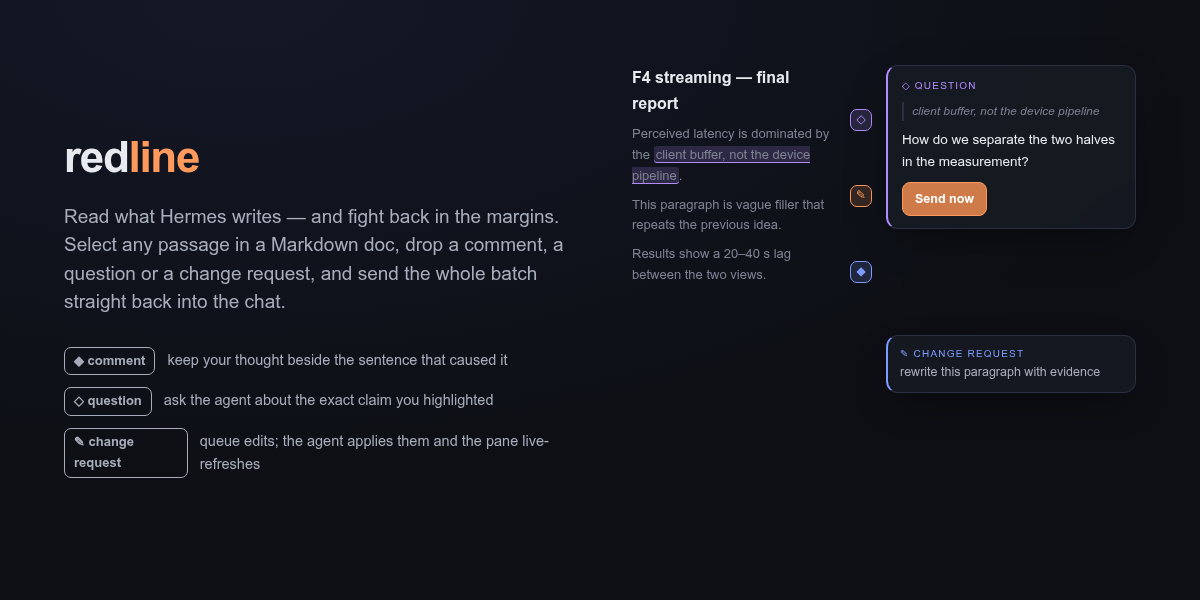
Read what Hermes writes — and fight back in the margins.
Hermes writes a lot of Markdown and source code for you: reports, plans, docs, analyses, scripts. Reading it in chat is fine. Reviewing it in chat is painful — you copy a paragraph or line, paste it, explain which part, hope the agent gets it.
Redline turns Markdown documents and supported source files into a review surface inside Hermes Desktop. Select a sentence or line span. Drop a comment, a question, or a change request right on top of it. Queue as many as you like — or fire one immediately. The whole batch lands back in the chat as a structured message the agent acts on, and the pane live-refreshes as it edits the file.
What it looks like
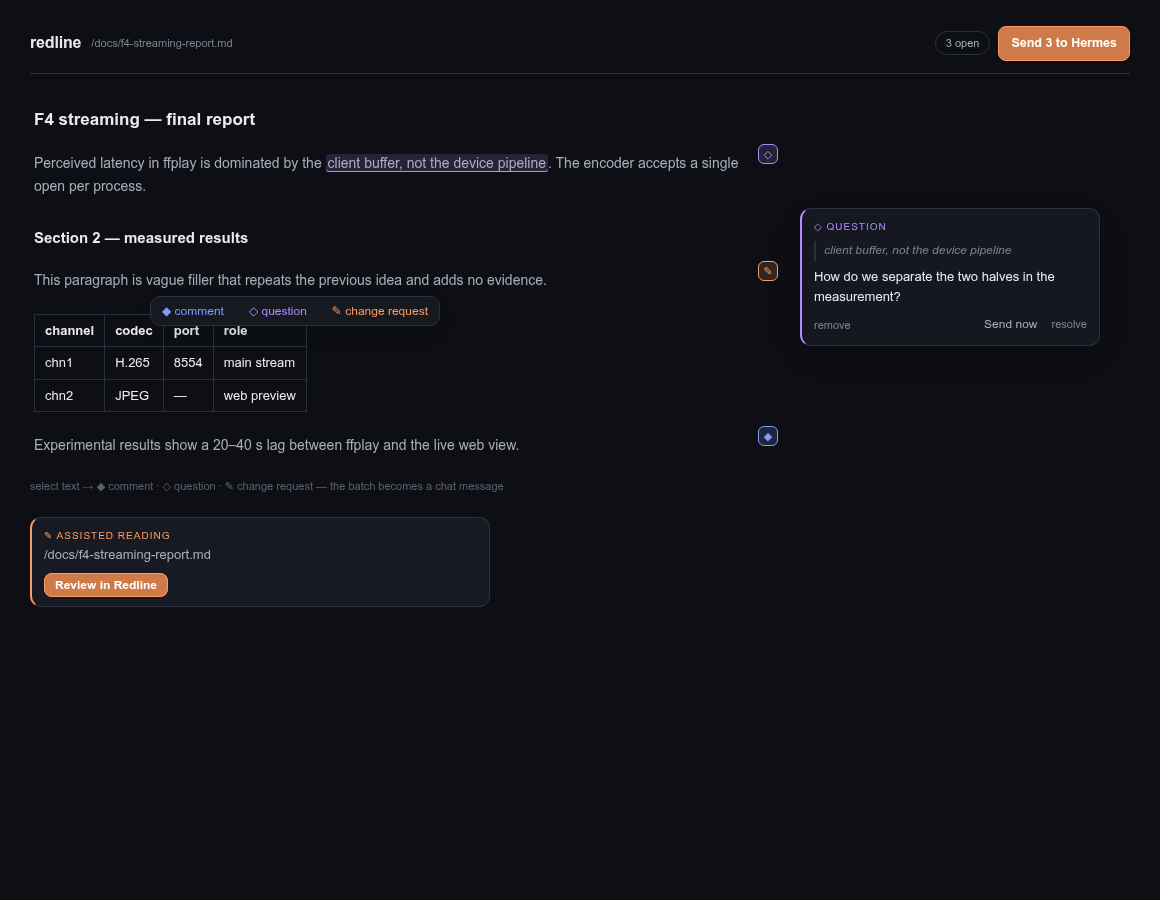
- When the agent writes a reviewable Markdown document or supported source file with Hermes file tools, Redline automatically adds its card to the final response; agents can still emit a card manually when needed.
- One click opens the file in a pane docked beside the chat — Markdown uses the app's own renderer; source files use numbered lines with optional syntax highlighting and your theme's colors.
- Select any passage → a pill offers ◆ comment · ◇ question · ✎ change request.
- Each annotation becomes a floating card over the text. The passage it was made on carries a coloured wash and its marker sits beside those words in the margin, so a thread always shows which passage it belongs to. Threads that land on the same line stack.
- Annotations persist in a sidecar next to your file (
<file><ext>.redline.json, such asdoc.md.redline.jsonorapp.tsx.redline.json) — close the pane, come back tomorrow, your review is still there.
The loop
agent writes doc.md
   → ::redline{file="doc.md"} card in the chat
      → you read, select, annotate
         → batch (or single) back into the composer
            → agent edits the file
               → the pane refreshes under you
Two ways to send, your call per annotation:
- Add to list — accumulate a review, send it as one batch (
Send 4 to Hermes). The agent answers point by point, numbered to match your boxes. - Send now — one hot take, fired immediately, without touching the rest of the list.
Why it helps day to day
- Reviews stop being copy-paste archaeology. The quote travels with the note; the agent always knows exactly which passage you mean.
- You review at reading speed. Comment while you read, decide later whether to send.
- Long documents become tractable. A 10-page report reviewed in place beats a 10-message chat thread about it.
- Nothing is lost. The sidecar keeps open threads, resolved threads, and what was already sent — across restarts.
Install
Copy this directory to ~/.hermes/plugins/redline (or the equivalent plugins directory for your Hermes profile), enable it in Capabilities → Plugins, and restart the gateway so the backend routes mount. From the plugin catalog:
hermes plugins install redline
How it works
Three pieces, no core patches — everything through the Desktop plugin SDK:
| piece | role |
|---|---|
desktop/plugin.js | transcript directive, review pane, selection pill, floating cards, margin markers, batch composer |
dashboard/plugin_api.py | tiny FastAPI backend: reads Markdown/source files and persists annotations |
<file><ext>.redline.json | sidecar beside your file — the annotation list, yours to keep |
Agent-side hooks remember eligible Markdown/source files written via write_file or patch and append the card directive automatically at the end of the response. The agent side is otherwise just a message format: a batch arrives as ⁂ redline — review of <path> (N notes): with numbered selection: entries; code selections include L<n>: line anchors, which any Hermes agent can act on.
Disclosure
- Reads any local
.md/.markdownor supported source-file path you name (max 1 MB) and writes only the sidecar beside it. Reviewed paths and sidecars live on the gateway host, not the Desktop client machine (relevant when using a remote gateway). It is a local review tool, not a sandboxed document service. - No network calls beyond the local Hermes gateway. No credentials touched. No telemetry.
- The pane polls the backend every 3 s while open so agent edits show up live.
- The
transform_llm_outputhook modifies the final agent response by appending a::redline{file="..."}directive after an eligible Markdown or source file is delivered. Hermes renders that trailing directive as the review card, using the same directive mechanism as core previews.
Supported files
Markdown: .md, .markdown. Source/config: .py, .sh, .js, .ts, .tsx, .c, .h, .cpp, .go, .rs, .rb, .yaml, .yml, .json, .toml, .sql. Source files render as numbered lines; batch selections carry L<n>: anchors.
Known limits
- One annotation card open at a time (click a margin marker to switch).
- A thread that has been sent but not closed keeps a faded wash, so what is still in flight stays visible while you read.
- Anchors are matched against the rendered text, so a passage edited beyond recognition loses its wash and its marker falls back to the block margin. Selections are stored with their offsets, so a repeated phrase anchors to the occurrence you selected; where only the quote is available (older sidecars, or offsets that no longer fit the text) matching takes the first occurrence.
- Markdown renders through the chat's own renderer — tables, lists, code blocks yes; syntax highlighting depends on the chat provider.
- Block anchors are paragraph indices captured at annotation time, so the pane looks for the passage in that block first and then outward from it. If the words themselves are gone, the thread keeps its quote and falls back to a margin slot.
MIT licensed. Feedback and forks welcome.
README from the reviewed commit ba52c4e; it updates when the author re-pins.