 devSebb
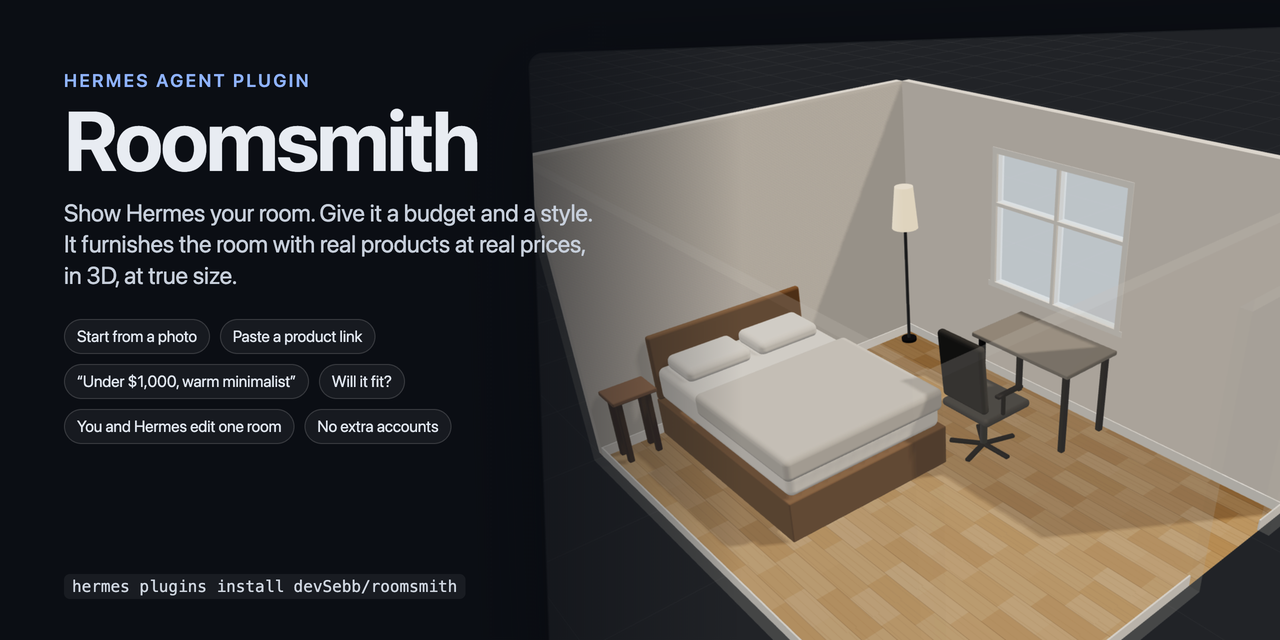
Roomsmith — a Hermes Agent plugin
 — on every push: engine tests on Python 3.11/3.14, editor typecheck and tests, bundles rebuilt and compared with the committed ones, and Hermes's own
plugins doctor --ci and plugins validate. Run the same checks locally with scripts/ci-local.sh.
One 3D room that you and Hermes both edit. It tells you whether things fit and
what they cost. Drag the furniture by hand in an editor inside Hermes Desktop,
or tell Hermes what to change: both work on the same saved room, with undo, and
each sees what the other did. Start the room from a photo or from its
measurements. Give Hermes a budget and it furnishes the room with real products:
the plugin reads each product page, checks the size against your room and the
price against your budget, and shows the piece at true size.
Status: 0.1.0 — built for the Hermes Agent Plugin Hackathon (Nous Research, 4–11 November 2026); see Hackathon below.
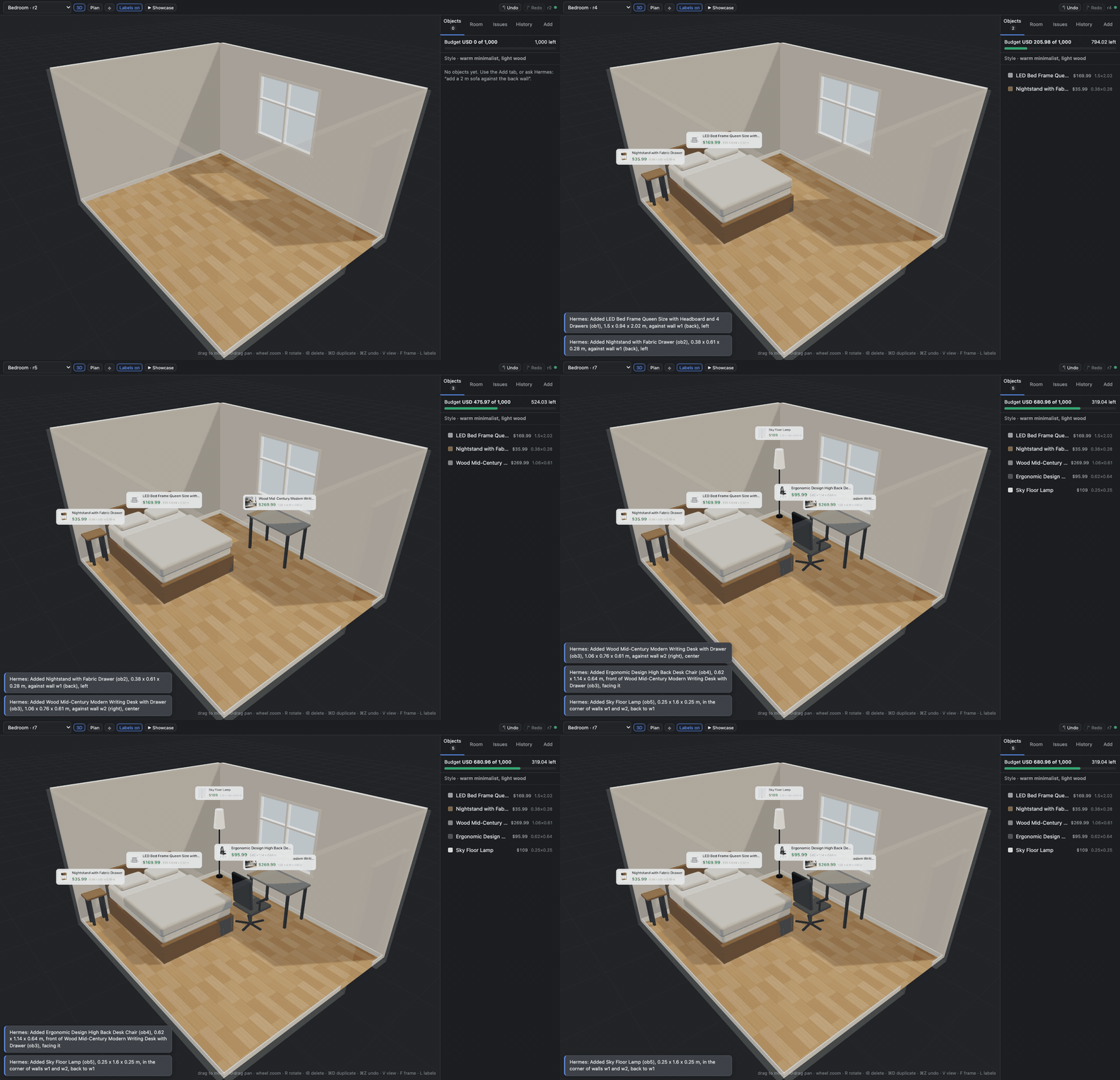
Real products arrive one at a time; the editor follows and the budget bar fills. (The editor, recorded in the development harness; the products were added through the plugin's tools by a script.)
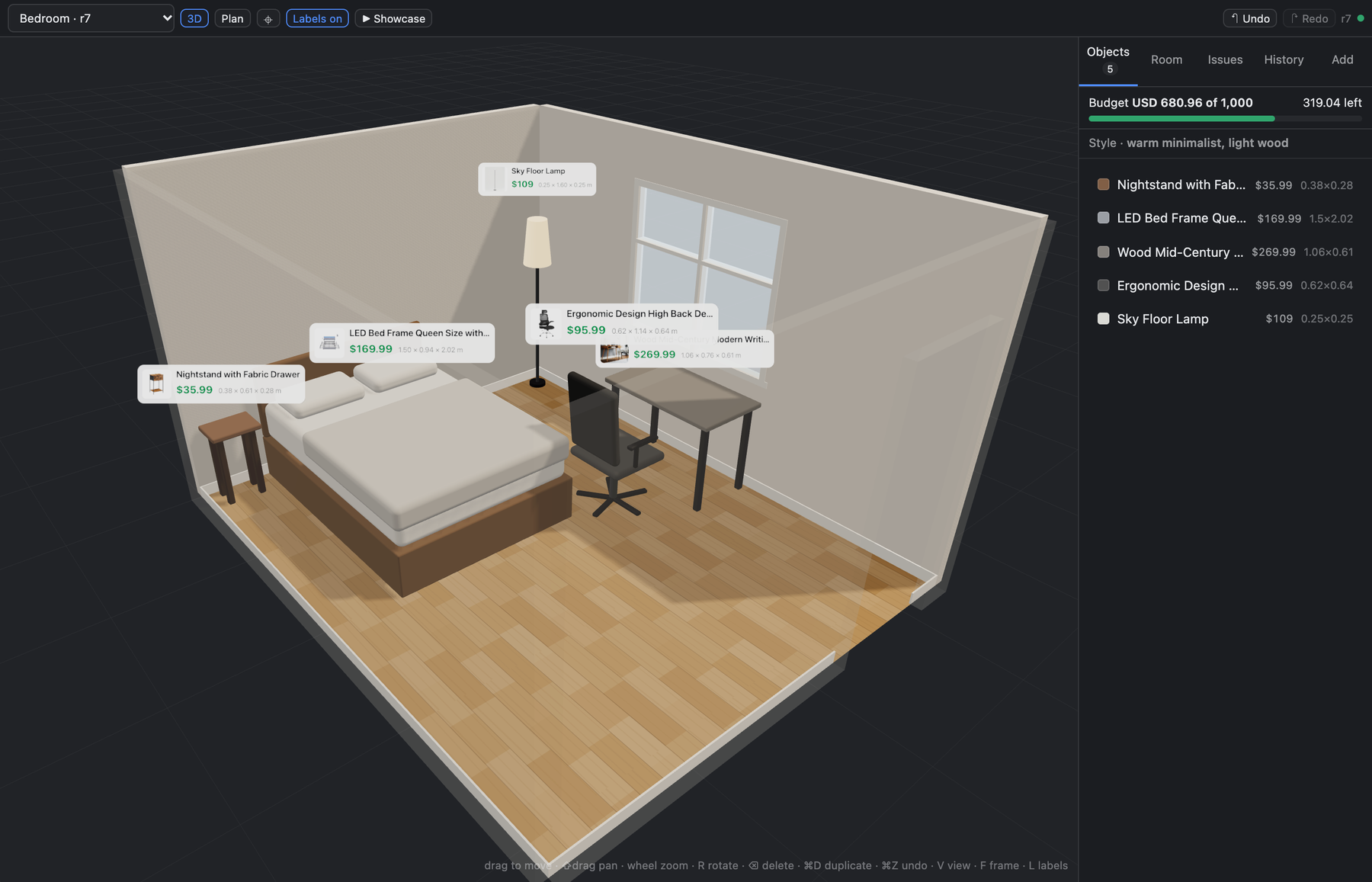
Five real products, read from their shop pages, placed at true size. The budget bar is exact; the room above came to USD 680.96 of 1,000.
| | |
|---|---|
|  |
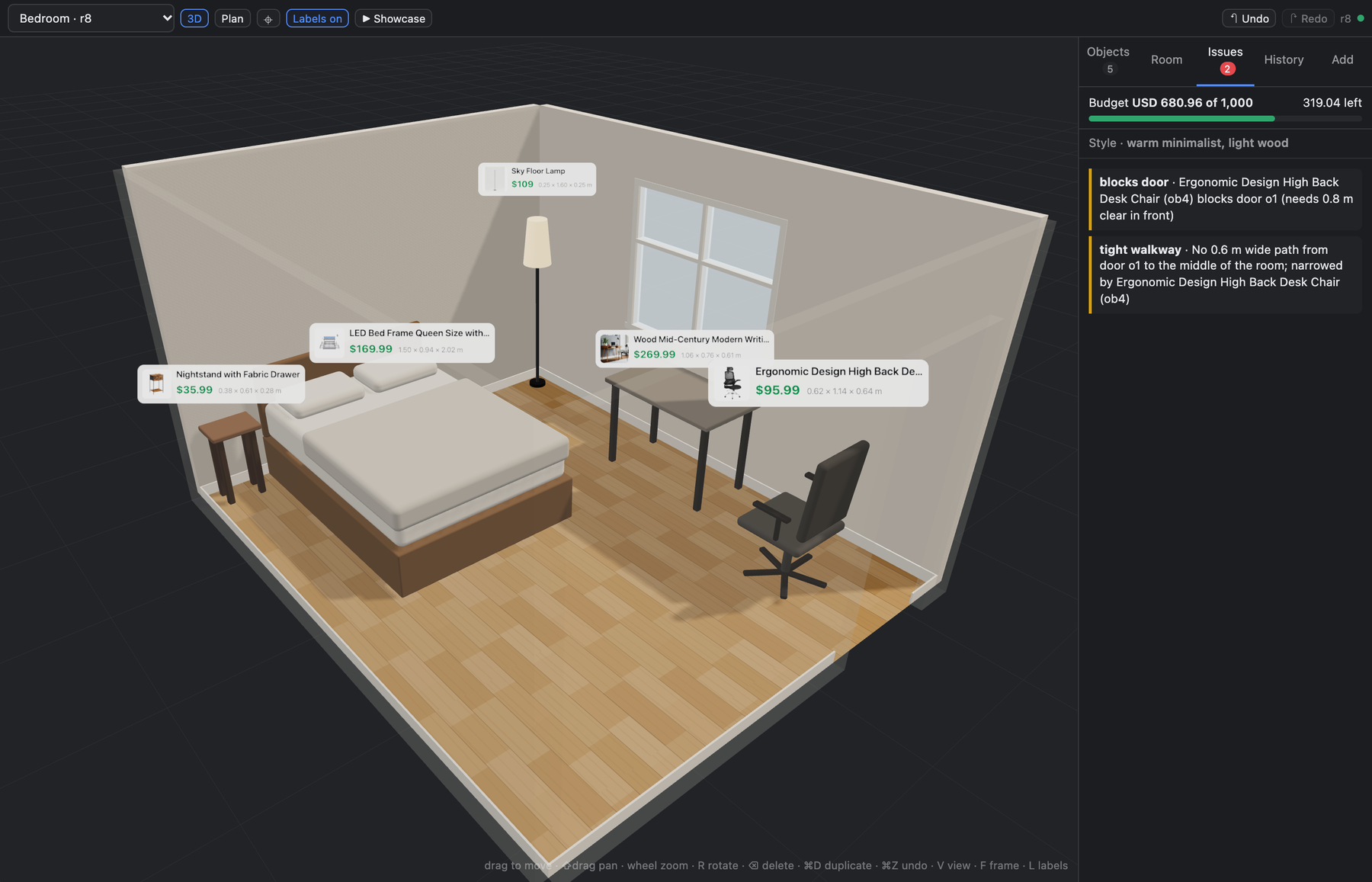 |
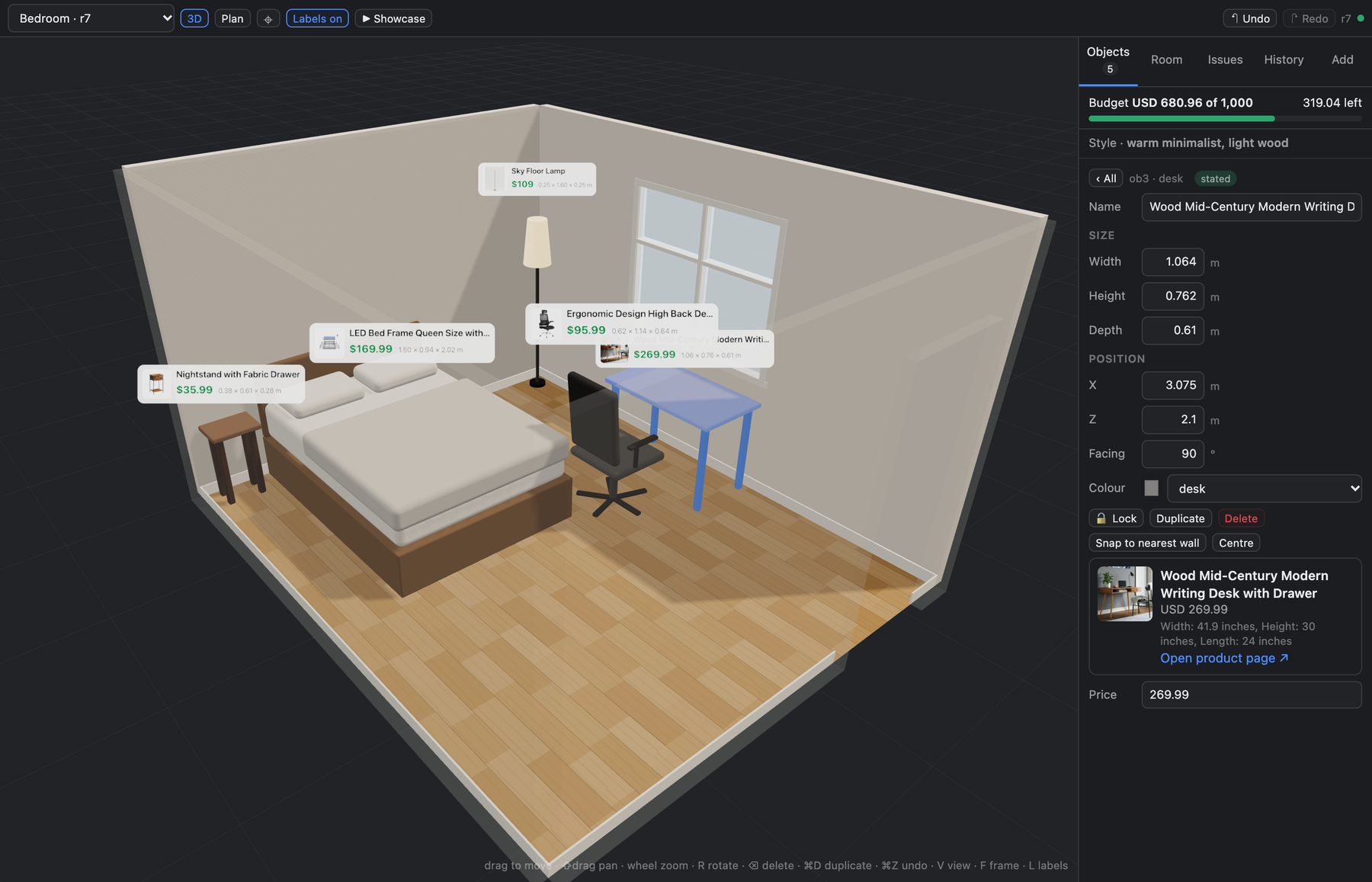
| A real product: photo, title, price, printed size and link, read from the page | Drag a chair into the doorway and it says so, with the numbers |
|  |
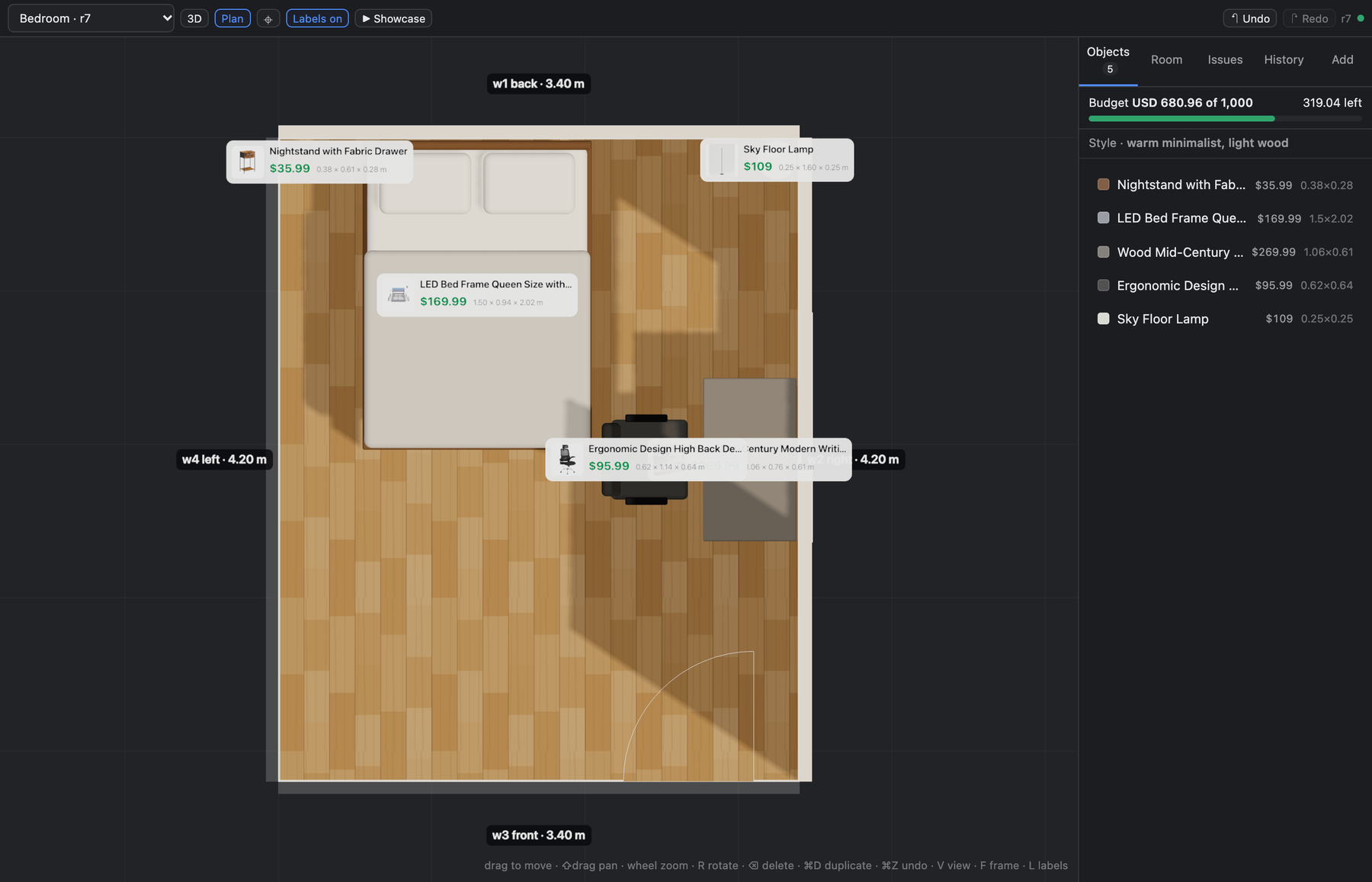 |
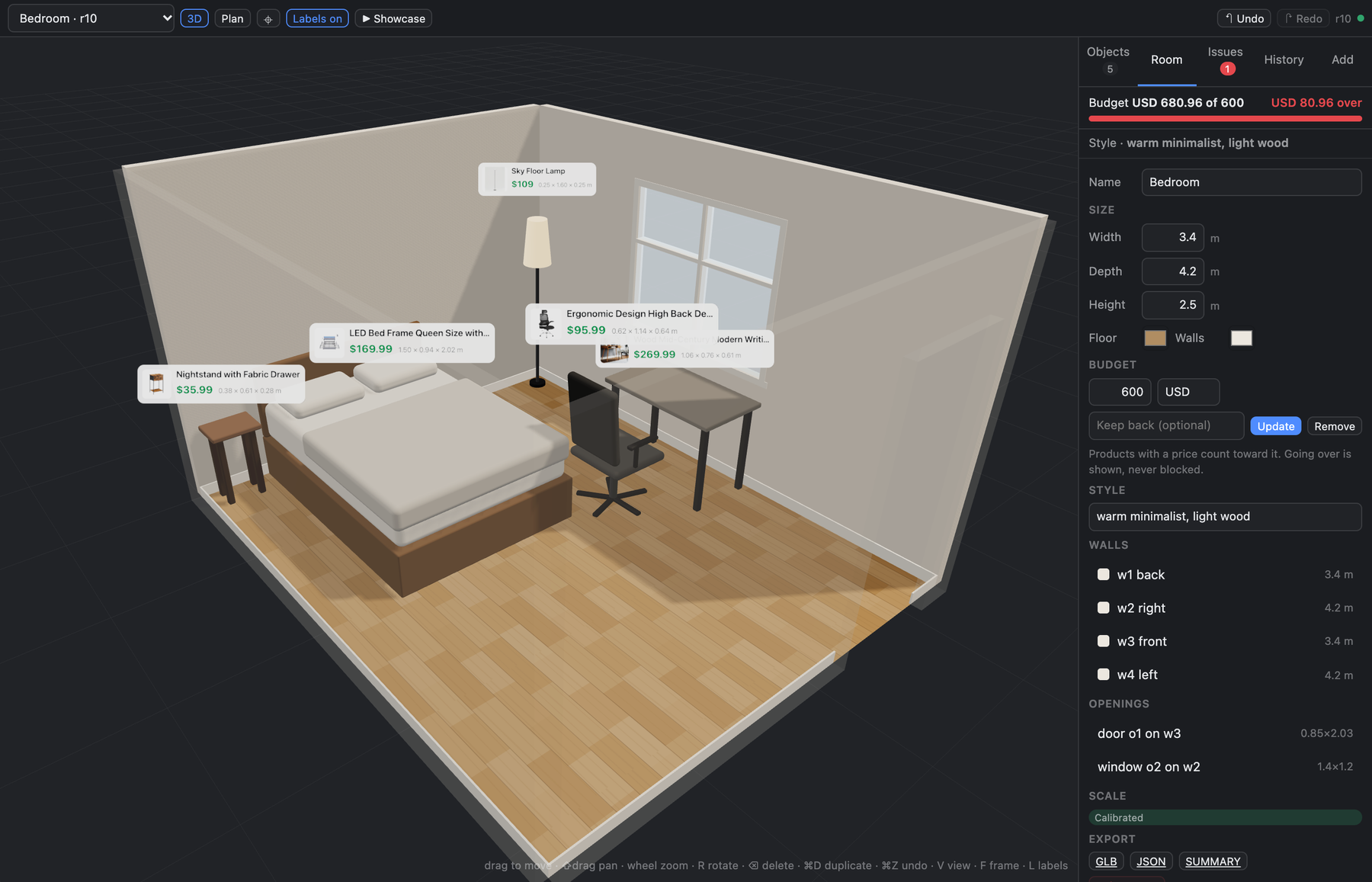
| Over budget is shown, never blocked: the decision is yours | Plan view with wall lengths |
The editor is the same in the Hermes Desktop pane, the Desktop full page and the
hermes dashboard tab, in dark and light themes.
What it does
- One room, two editors. A live 3D editor (Hermes Desktop pane, or a tab in
hermes dashboard) and eleven agent tools write the same saved room. Every edit
is a numbered revision with undo; Hermes sees what you changed by hand, and
you see what Hermes changed (it glides into place with a note), and when
Hermes creates or opens another room the editor follows. Click a piece and say
"would this fit by the window?": Hermes knows what you have selected. - Furnish to your budget. Tell Hermes the amount. It finds real products
with its own web search;roomsmith_shortlistreads each page, tests the size
in the room and the price against what is left, and ranks them. Each piece
arrives at true size and the editor's budget bar fills. Totals are exact. The
budget is yours: the plugin reports when the room goes over and Hermes asks
you; nothing is blocked and nothing is bought. A buffer is kept back only if
you ask for one. Name a look ("warm minimalist, light wood") and Hermes shops
with it; the room remembers it. Choosing what suits the look is Hermes's
judgement. The plugin checks size and price, not taste. - Photo → draft room. Hermes reads a photo and builds walls, door and window
guesses, and the furniture it sees as sized boxes. Sizes are estimates until
you give one real measurement (a wall, the door); then the whole room rescales. - Real products at true size. Paste a link; the plugin reads the page's
product data (title, price, photo, printed dimensions in cm/mm/m/in/ft) and
puts a true-size stand-in in the room wearing the product's photo, with the
name, price and link. No size on the page? It asks you, never guesses. - Fit checks by geometry, not guesswork. Overlaps, things outside the room,
blocked doors and windows, tight walkways, too-tall objects; "will this fit
against that wall, with how much to spare", "where could it fit", "will it
pass through the door". - Export to GLB (opens in Blender, macOS Quick Look, most 3D tools), JSON
(re-importable), or a text summary with sizes, prices, a total and product links. The editor's
GLB is the room as drawn (shapes, floor, product tags); the agent's
roomsmith_exportwrites a lighter box-per-object GLB.
Install
hermes plugins install devSebb/roomsmith --enable   # or the catalog name: roomsmith
hermes plugins doctor roomsmith --ci                # optional: 11 tools, 1 hook, OK
Without --enable the installer asks Enable 'roomsmith' now? [y/N] and the
default is no; answer y, or run hermes plugins enable roomsmith afterwards.
The tools appear in the next new chat, not in one that was already open.
From Hermes Desktop you can also use
hermes://plugin/install?repo=devSebb/roomsmith&enable=1.
Then, depending on where you talk to Hermes:
- Hermes Desktop: switch Roomsmith's editor on under Settings → Plugins. A
Roomsmith entry appears in the sidebar, the room pane opens beside the chat,
and a 🛋 chip in the status bar shows the active room. If the full-page editor
(sidebar entry /⌘K→ Open Roomsmith) does not appear at once, restart the
app: on Desktop 0.21 pages were registered at start-up. When Desktop talks to a
remote gateway, the plugin must also be installed on the machine running
Desktop, because the editor loads from there. - CLI /
hermes dashboard: the tools work in any chat (-t roomsmithif you
pin toolsets); the dashboard shows a Roomsmith tab with the same editor.
Requires Hermes Agent ≥ 0.21.0 (verified on 0.21.0 and 0.23.0). No API keys, no
accounts, no network access of its own (see Privacy below). Photo reading uses
whichever model your Hermes already runs; if that model cannot see images, the
plugin says so and builds the room from the sizes you give it instead.
Try it
> make a 4.2 by 5 metre living room with a door on the left wall
> add a 2.1 m sofa against the back wall and a coffee table in front of it
> would a 1.6 m wide bookshelf fit on the right wall?
> would this fit where the sofa is? https://www.castlery.com/us/products/hamilton-sofa
> furnish this as a bedroom with a desk for under 1,000 dollars, warm minimalist, light wood
> swap the desk for a cheaper one
> /room
Then open the editor and drag things around; Hermes is told what you changed
and what you have selected the next time you speak to it.
With a photo: attach it in chat (if your model can see images, Hermes estimates
the room itself) or say make a room from ~/Pictures/living.jpg. Then:
the back wall is 4.2 m — and everything rescales.
How it is built
plugin.yaml, __init__.py   agent half: 11 tools, /room, skill, awareness hook
rs_core/                   the engine: scene model, operations, validation,
                           fit checks, product-page reading, prices and budget,
                           images, SQLite store.
                           Standard library; Pillow (if present) for thumbnails.
rs_agent/                  Hermes-facing layer (tool schemas, handlers, photo)
dashboard/plugin_api.py    FastAPI routes under /api/plugins/roomsmith/
dashboard/dist/index.js    the editor as a dashboard tab (built)
desktop/plugin.js          the editor as a Hermes Desktop plugin (built)
web/                       editor source (TypeScript, three.js, React) + build
skills/room-design/        how the agent should work with a room
tests/                     pytest (engine, tools, backend, product pages, budget,
                           shortlist, hardening, review findings) — 255 tests
docs/                      architecture, compatibility record, screenshots
The tools and the editor's backend may run in different processes; the SQLite
file in <hermes home>/plugin-data/roomsmith/ is the only shared state.
Writes are serialised with the database write lock and checked against the
revision they were derived from, so nobody's edit is ever silently lost.
docs/ARCHITECTURE.md has the layers, the command
contract and the boundaries on one page.
Build from source
The two built files are committed so an install needs no build step. To rebuild:
cd web && npm install && npm run build      # -> desktop/plugin.js, dashboard/dist/index.js
npm test                                    # editor math
cd .. && python3 -m venv .venv && .venv/bin/pip install pytest fastapi httpx pillow pyyaml
.venv/bin/python -m pytest                  # engine, tools, backend
The build runs the Hermes catalog's Desktop-surface lint and the 1 MB file
limit; it fails on any hit. web/dev/ has a local harness (server.py +
headless-Chrome smoke scripts) that exercises the editor against the real
backend without Hermes.
Conventions
Metres and degrees. [width, height, depth]: width across the front, depth
front-to-back. Walls w1 back, w2 right, w3 front, w4 left (as seen from
the camera that took the photo). "Left/right on a wall" are as seen from inside
the room facing that wall.
Privacy and safety
- Network: the plugin makes exactly two kinds of request, both only for a
product link you pasted or that Hermes passed in while furnishing: one GET to that URL (plus, for Shopify stores, the store's
public product JSON next to it) and one GET for the product's main image, which
is shrunk to a small thumbnail and kept in the room's data. PlainUser-Agent: Roomsmith/0.1, no cookies, no retries against sites that refuse. Only public
addresses are contacted: the host, and the host of every redirect, must resolve
to public IPs (no localhost, private ranges or link-local), and responses are
capped at 8 MB. Requests are bounded: at most 80 per 10 minutes and 12 per
shop per minute (counted separately by the agent and by the editor's backend);
a page that read is reused for a day, and a shop that refused is left alone for
10 to 30 minutes. The plugin does not search the web (Hermes
does, with your own search tool) and follows no links inside pages. Only the
title, size line and price from a page reach the model, cleaned and
length-capped; never page text. Photos you
choose go to your configured Hermes model through Hermes's own model access;
nothing else leaves your machine. - Files: reads only the image files you name or upload; writes only inside
<hermes home>/plugin-data/roomsmith/(exports go to itsexports/folder and
the tool returns the path; the editor's Export button downloads instead). - Money: the plugin has no payment or account code and never buys or
reserves anything. A price is only what a page printed or you typed. It does
not convert currencies: a product priced in another currency, or with no
readable price, is listed and left out of the total, and it says so. - No shell commands, background processes, telemetry, credentials, or
self-update.
Known limitations (0.1)
-
Photos give a draft: one photo shows two or three walls; the fourth wall and
anything behind the camera are guesses. Calibrate (one real measurement) before
trusting sizes — the editor shows a Draft badge until you do. -
Photo reading needs a model that accepts images. Otherwise the tool reports
which fallback it took and asks for the room's measurements. -
HEIC photos are not read yet; export as JPEG/PNG first.
-
Rooms are polygons in the data model but the editor resizes rectangles only.
-
Which shops work. Any product link can be tried; what the plugin gets
depends on what the page prints and whether the shop answers. It reads
structured data (schema.org Product, Shopify product JSON, OpenGraph), the
visible text and the spec text modern stores keep in inline scripts. As of 10
November 2026:- Size, price and photo read: VASAGLE/SONGMICS, Nathan James, Brightech,
Simpli Home, Walker Edison, Branch, Castlery, Poly & Bark, Sixpenny, Albany
Park, English Elm, Amber Harlow, Zinus. - IKEA: name and price always; the size when it is printed in the product
name or the measurements (nightstands, dressers, many beds). Where a bed
page gives only a mattress size ("Queen"), the standard size is offered as a
marked estimate. - Amazon: often no readable price. Target: no readable size.
- Refuse automated reads: Lowe's, Home Depot, Article, Wayfair.
- A shop can also refuse one machine and answer another: in testing, one
network was refused by every Shopify store (HTTP 429) while another read the
same pages. The plugin reportsblocked, leaves that shop alone for 10 to
30 minutes, and Hermes asks you for the size and price or tries another shop.
A few pages read a wrong size or the default variant's price. Check the
stand-in's size and price against the page before you buy;
scripts/survey-stores.pyprints what the plugin reads from any list of
links. The plugin never invents a size: a size that cannot belong to that kind
of furniture is rejected, and when a page prints only a footprint (desk tops)
the category's usual height is used and said. - Size, price and photo read: VASAGLE/SONGMICS, Nathan James, Brightech,
-
Furnishing to a budget needs a web search tool in your Hermes for finding
products; without one, paste a few links per piece. Prices are as read at that
moment. There is no currency conversion. -
The furniture is drawn as stand-in shapes at true size, not as models of the
actual products. The shapes follow what the product's name says (its colour or
wood, "round", "6-drawer", "5-tier ladder", "glass top", "metal legs",
"tripod"), so a round walnut coffee table is round and walnut; details the
name does not mention are generic. The product's photo is on its card. -
Hermes Desktop: the Desktop's own right-click menu owns right-click on the
canvas (pan with ⇧-drag or the middle button).
Hackathon
Entry for the Hermes Agent Plugin Hackathon run by Nous Research:
- Announcement: https://x.com/NousResearch/status/2118094256438936062 (4 Nov 2026) — 7 days, deadline Wed 11 Nov 2026, 5 PM EST; judged on usefulness, reliability, polish and creativity, favouring plugins that do more than a prompt or a skill could.
- Entry = a pull request adding
plugin-catalog/roomsmith.yamlto NousResearch/hermes-agent (submission guide) + a demo video under 90 s posted on X tagging @NousResearch + both links through the entry form. - Catalog entry:
catalog/roomsmith.yaml; how it is built:docs/ARCHITECTURE.md; what was verified where:docs/compat.md.
Licence
MIT. The built editor bundles three.js (MIT); see THIRD_PARTY_NOTICES.md.
README from the reviewed commit 421e6f3; it updates when the author re-pins.


