
 miguelangeloazevedo
Rung
Stops an agent from marking its own work done until the tests you approved pass.
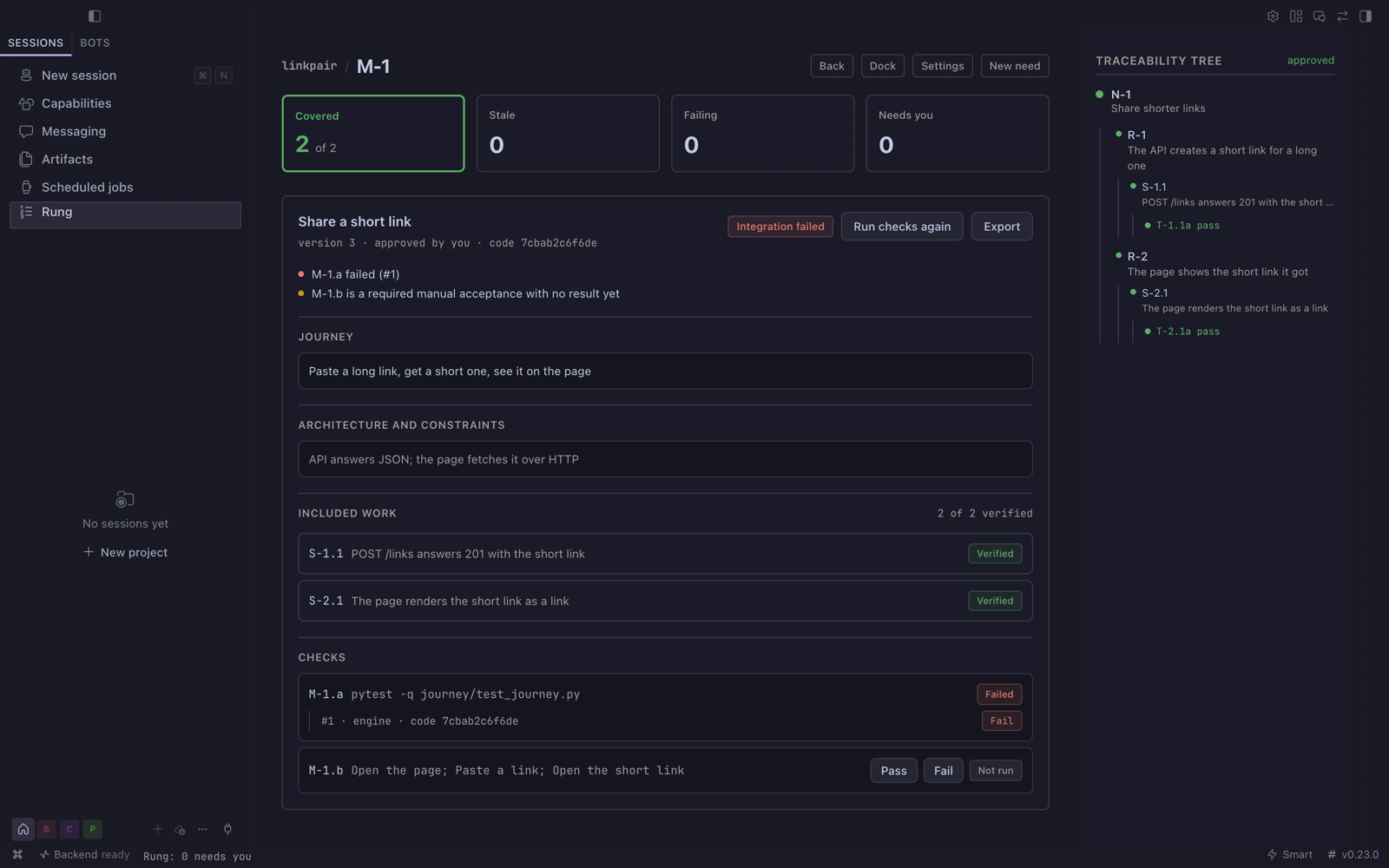
Rung is a Hermes Agent plugin. You write a need, break it into requirements and specifications, and give
each specification tests. Agents do the work; a specification counts as done only when its tests pass
on the code as it is now, and a deterministic check, not a model, says so. The ladder lives in a Desktop pane and a dock beside the
chat, and every agent sees the same ladder through Rung's tools.
Install
hermes plugins install https://github.com/miguelangeloazevedo/rung --enable
hermes rung doctor
Restart the Desktop, then pick Rung in the sidebar and Try the sample project. The doctor ends with
rung doctor: PASS. Step-by-step checks, update and removal: INSTALL.md.
What you get
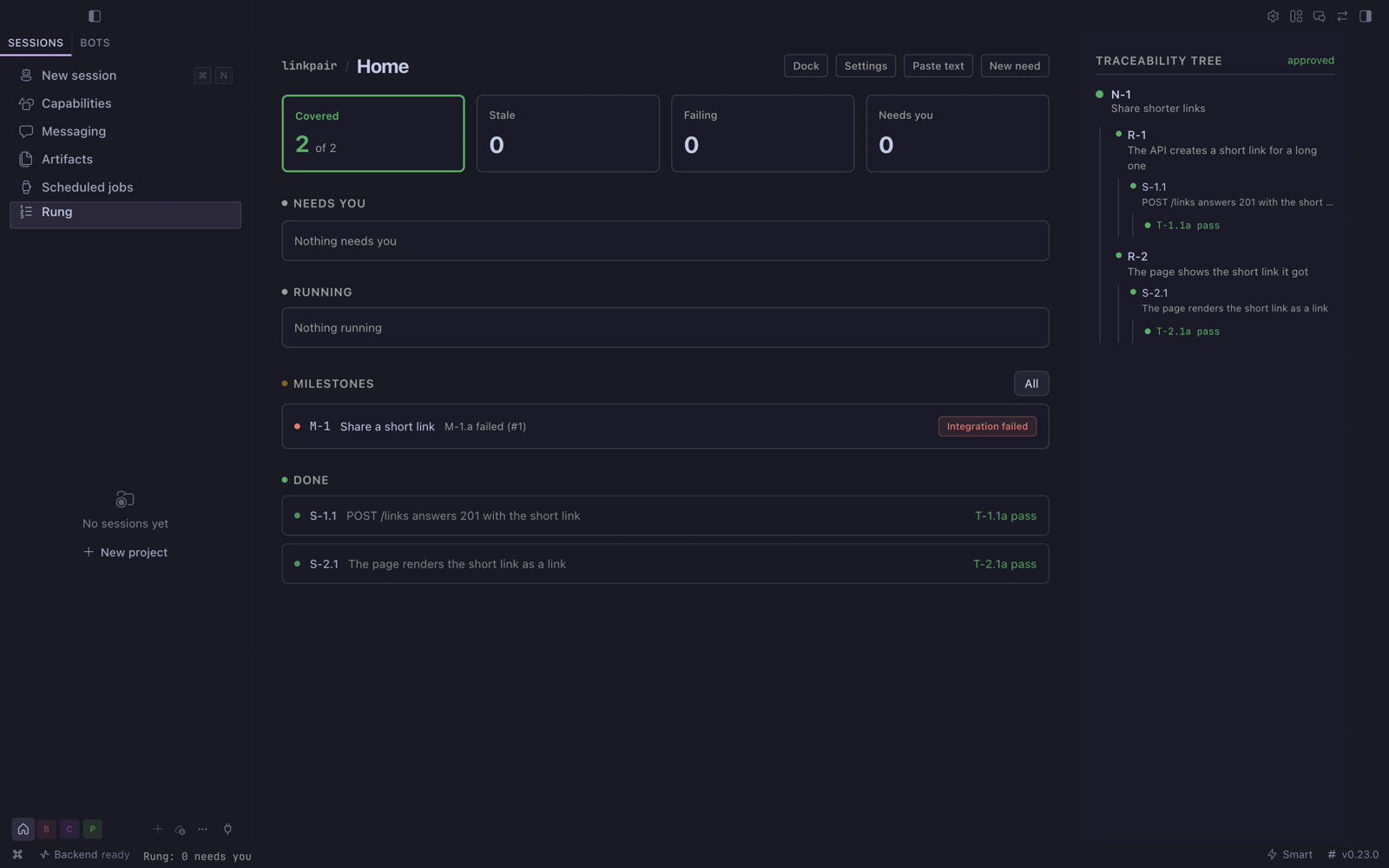
- The ladder. Need, requirement, specification, test, test execution. Text changes after approval
make everything below it stale, so an old pass never counts for new words. - Current evidence. A pass applies to the project's files it ran on. Change the code and the pass is
Out of date until the test runs again; a develop run checks the passes it made out of date. A worker
that edits the test files a person approved gets no pass until that person accepts the change. A
required manual check waits for a person. The full rule: docs/verification.md. - The done gate. When a chat claims a specification (
rung_claim) and tries to mark it done
(rung_report,kanban_complete, or a todo item naming it), apre_tool_callhook blocks the call
and names the failing test. No model is asked. - Needs you. Approvals, stale items, failed runs and blocked claims in one list, with a count in the
status bar. - The dock. Needs you, Running and the current need's ladder in a pane beside the chat.
- Allocation. Rung suggests which profile should carry a specification and lists every excluded
profile with its reason: a missing required tool, too many runs at once, authorship of the work when
the specification needs a different profile from the author, or human only. - Develop runs. Send a specification to a profile; Rung runs it in the project folder, attempt by
attempt, until its tests pass or the attempts run out. - Goal gate.
hermes rung check S-2.1exits 0 only when that specification is verified now, so
/goal gate add hermes rung check S-2.1stops a goal loop on tests.hermes rung verify S-2.1says
what holds it and the next step. - Integration milestones. Specifications can each be verified while the system is not. A milestone
names a user journey, the specifications it spans and its own checks; it is Verified only when every
included specification is verified now and its checks pass on the same code
(hermes rung milestone M-1 --run, exit 0 only when verified). - Quick task. A small change in one step: the outcome and its checks become ordinary ladder rows you
approve once, built and verified by the same runner. - System work. Components and contracts a person approves; specification dependencies; a plan that
starts only ready work within an attempt and minute budget; isolated runs integrated only without
conflicts; contract checks; journeys, regression baselines, quality obligations and environment probes on
a milestone; a system report that reads Accepted only when every milestone is verified now.
How it works
 Need ── Requirement ── Specification ── Test ── Test execution
                             │             │
                   claim, develop run    command or manual,
                   by a Hermes profile   pass rule, approval
                             │             │
                             └── Rung check: verified only when
                                 every required test's newest
                                 result passed on the current
                                 text and the current code
                                         │
          pre_tool_call done gate ◄──────┤
          hermes rung check (goal gate) ◄┤
          Desktop pane and dock ◄────────┘
One local SQLite store holds the ladder. The engine is plain Python: structure, links, staleness,
coverage, execution history and allocation are computed, not inferred. Models only draft text when you
ask them to and do the development work.
| Surface | What it is |
| --- | --- |
| Desktop pane | Sidebar entry Rung: projects, ladder, editors, runs, results and evidence |
| Dock | Pane beside the chat (command palette: Rung dock) |
| Agent tools | rung_status, rung_propose, rung_check, rung_run_tests, rung_claim, rung_report |
| Hook | pre_tool_call: the done gate |
| CLI | hermes rung check, verify, recheck, milestone, enforcement, status, tree, run, send, claims, readout, doctor, demo |
| Slash command | /rung, /rung check <SPEC> |
Agents can propose and report; only a person approves text, tests and manual results.
Safety and data
- Store. Everything Rung records is in
$HERMES_HOME/plugin-data/rung/. A profile without a store
of its own uses its root home's ladder. Removing the plugin leaves the store; delete that folder to
remove the data. - Project folders. Rung reads the folders you name for your projects, and test commands and develop
runs work inside them. Nothing else on disk is read or changed. - Shell commands. A command test, contract check, milestone check, environment probe or migration
runs the command a person approved, in the project folder, with a timeout and an output limit. An
isolated run copies the project files to a workspace in the store and works there. - Command environment. Those commands run code from the project being edited, so they never inherit
the environment Hermes and Rung run in (and with it every provider key). Each getsPATH,HOME,
LANG,LC_*,TMPDIR, the project's own virtual environment (.venvorvenvin the project
folder) and only the variables you name under Environment variables in Project settings. - Hermes child runs. A develop run, and drafting by a profile when you choose it, start
hermes -p <profile> chat -Q -qin the project folder. That chat uses the profile's own model, tools
and credentials, under Hermes's approval rules for single-query sessions (approvals.single_query_mode,
deny by default). Rung never turns approvals off for it. - Background processes. Each develop run is a supervised runner process that ends when the run
finishes or you cancel it. - The hook. Read only, no model call, no process started; if it cannot read the store it lets the
call through and the doctor reports the store. It watchesrung_report,kanban_completeand
todo_listin a chat that holds a claim; another way of declaring work finished is not seen.
hermes rung enforcement SESSIONsays whether a chat is enforced, unbound or degraded; that is a
separate fact from whether its work is verified. - Network and credentials. Rung itself makes no network calls, stores no credentials and sends no
telemetry.
Limits
- One machine: the store is local, not shared between computers.
- A specification is only as good as its tests. Rung makes the tests the stop condition; it does not
judge whether they test the right thing. Manual tests and their approval stay with a person. - Develop runs need a Hermes profile with a working model. The sample project runs without one.
- Protected test files and the code basis are integrity checks for cooperative local work, not a
security boundary: a process running as your user can change any file, the store included. The basis
covers the project folder, not installed packages or services the tests reach. - Cancelling a run stops its processes; it does not undo the files it changed.
- Hermes
0.22.5or newer (requires_hermesinplugin.yaml). Tested on 0.22.5 and 0.23.0, on macOS.
Changelog
- 1.2.1. Project commands (tests, contract and milestone checks, the regression baseline, environment
probes, migrations) no longer inherit the environment Hermes runs in: they getPATH,HOME,LANG,
LC_*,TMPDIR, the project's own virtual environment and the variables named in Project settings. - 1.2.0. Quick task, need completeness, the dock bound to the focused chat, a sample that shows
verification move, Needs you as decisions, a result-first read-out, allocation labels that say what
they count. Architecture and contracts, dependencies, isolated runs, the plan with budgets and
recovery, contract checks, milestone journeys, regression, quality obligations and environment, change
impact by component, and the system report. - 1.1.0. Current evidence: one verification result for every surface (gate, hook, pane, dock,
read-out, CLI), passes bound to the code they ran on, protected test files, required and optional
manual checks, Out of date with recheck, a Verification section and next action per specification,
and a Next list on Home. Integration milestones over several specifications. Enforcement health per
chat. A project whose files cannot be read verifies nothing. Stores upgrade in place; old results keep
their meaning. - 1.0.0. The ladder, Needs you, staleness, test executions and defects, develop runs, allocation with
required tools, runs at once, independence and human-only filters, claims and the done gate, the
dock, the goal gate, the read-out, the doctor and the sample project.
License
MIT, see LICENSE.
README from the reviewed commit 558b5dc; it updates when the author re-pins.


